Windows 7 Boot manager option only at startup

sportsfan7700

New member
Local time
1:55 PM
Messages
20
I have a Toshiba L875 and previously dual booted it with Ubuntu 14.04. When I returned to Windows 7 only, almost every single time I do not see the Toshiba "splash screen" even though I have gone into msconfig and checked to see if it was still there as a boot option, and set the time out to 0 on both options under advanced system settings..Can anyone help dignose why this is still happening?

Thank you all,
Matt
 

My Computer My Computer

Computer type
Laptop
Computer Manufacturer/Model Number
Toshiba L875
OS
Windows 7 Home Premium x64
CPU
4 GB
Memory
640 GB
Screen Resolution
1600X900
Internet Speed
I pay for 50/50, It reaches 58/65
Antivirus
Bitdefender Internet Security 2015
Browser
Google Chrome
Other Info
MalwareBytes on Denand
Hi Greg,

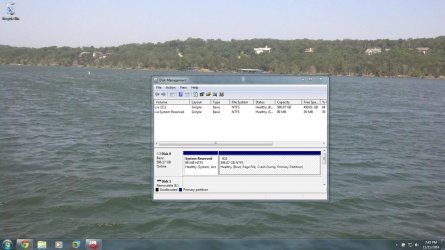
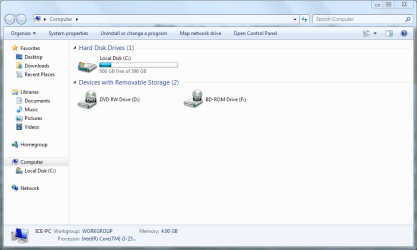
I think I did because I had a panic of the kernel before restoring the MBR. Also I have an F: drive that I can't remember how it got there (maybe for VMware)?

Thanks,
Matt
 

Attachments

  • Capture.jpg
    Capture.jpg
    148.2 KB · Views: 1
  • Capture1.PNG
    Capture1.PNG
    36 KB · Views: 2

My Computer My Computer

Computer type
Laptop
Computer Manufacturer/Model Number
Toshiba L875
OS
Windows 7 Home Premium x64
CPU
4 GB
Memory
640 GB
Screen Resolution
1600X900
Internet Speed
I pay for 50/50, It reaches 58/65
Antivirus
Bitdefender Internet Security 2015
Browser
Google Chrome
Other Info
MalwareBytes on Denand
It looks correct.

You're not still seeing a Dual Boot menu, are you?

So the problem is you don't see the BIOS splash screen? This would be more likely a setting in BIOS setup having to do with Fast Boot, or Quick Boot.
 
Greg,
I just rebooted and DID see the Windows 7 splash screen with "starting windows". I did not see a Toshiba splash screen allowing me to get into the BIOS. So my question is these seem to be two different things. Can I still use F2 to access the BIOS I wonder?
 

My Computer My Computer

Computer type
Laptop
Computer Manufacturer/Model Number
Toshiba L875
OS
Windows 7 Home Premium x64
CPU
4 GB
Memory
640 GB
Screen Resolution
1600X900
Internet Speed
I pay for 50/50, It reaches 58/65
Antivirus
Bitdefender Internet Security 2015
Browser
Google Chrome
Other Info
MalwareBytes on Denand
Yes, there is a BIOS splash screen and then it hands it over to Windows.

If you're not seeing the BIOS splash screen, then reboot and tap the F2 key to see if you can enter BIOS setup. If not try again and this time hold the key down while rebooting.
 
I tried twice after letting the PC rest for a few minutes. Both results were back to the Windows Boot Menu, with no sign of the Toshiba splash screen. If everything looks correct, why is the access still being blocked to the Toshiba splash at boot?
 

My Computer My Computer

Computer type
Laptop
Computer Manufacturer/Model Number
Toshiba L875
OS
Windows 7 Home Premium x64
CPU
4 GB
Memory
640 GB
Screen Resolution
1600X900
Internet Speed
I pay for 50/50, It reaches 58/65
Antivirus
Bitdefender Internet Security 2015
Browser
Google Chrome
Other Info
MalwareBytes on Denand
The Dual Boot you had has nothing to do with the BIOS showing its splash screen. That is only controlled by settings in the BIOS itself, normally for Fast Boot.

Try powering down, then holding the F2 key while powering up.

If it enters BIOS setup that would mean that Fast Boot is enabled in BIOS as suspected. You can change it in BIOS setup.
 
I will see what occurs in the morning and report back :)
 

My Computer My Computer

Computer type
Laptop
Computer Manufacturer/Model Number
Toshiba L875
OS
Windows 7 Home Premium x64
CPU
4 GB
Memory
640 GB
Screen Resolution
1600X900
Internet Speed
I pay for 50/50, It reaches 58/65
Antivirus
Bitdefender Internet Security 2015
Browser
Google Chrome
Other Info
MalwareBytes on Denand
Back
Top