How to recover data if computer ia showing "no operating system found"

akks

New member
Local time
11:57 AM
Messages
2
How to recover data if computer ia showing "no operating system found"

Hey I had Windows 7 home basic installed on my dell inspiron laptop, and there was only 1 partition (c drive), I think that I deleted something from windows, and now when m switching on the laptop its saying "operating system not found".
Somebody please help me, how can I recover the data on hard drive. Is it possible that data is still present on hdd.
Sorry for my grammer, m not good in english.
 

My Computer My Computer

At a glance

windows 7 home basic 64 bit
Computer type
Laptop
Computer Manufacturer/Model Number
Dell
OS
windows 7 home basic 64 bit
Simply plug the hard drive into another PC, then just copy and paste the data to whatever storage device you have available :)
 

My Computer My Computer

At a glance

Windows 10 Pro x64Intel Core i7 6700KGSkill TridentZ RGB 16GB 3600 16-16-16-36EVGA GTX 980 Ti SC x2
Computer type
PC/Desktop
Computer Manufacturer/Model Number
Skylake Special #666
OS
Windows 10 Pro x64
CPU
Intel Core i7 6700K
Motherboard
Asus Sabertooth Z170 Mark 1
Memory
GSkill TridentZ RGB 16GB 3600 16-16-16-36
Graphics Card(s)
EVGA GTX 980 Ti SC x2
Sound Card
Realtek High Definition
Monitor(s) Displays
AOC G2460PG
Screen Resolution
1920 x 1080 144Hz
Hard Drives
Samsung 860 Pro 256GB, Seagate Barracuda 4TB x2
PSU
EVGA 1000 P2, EVGA White Custom Braided Cables
Case
Corsair Vengeance C70 Gunmetal Black
Cooling
Corsair H100i v2, Corsair ML120 x2, Thermal Grizzly Kryonaut
Keyboard
Logitech G910 Orion Spectrum
Mouse
Logitech G700s
Internet Speed
Verizon Fios Quantum Gateway 75/75
Antivirus
Windows Defender, Malwarebytes Free 3.8.3
Browser
Chrome
Other Info
Corsair SP120 x4, LG Blu-ray Drive, Durabrand HT-395 100 Watt Dolby Digital Amp, Corsair H2100 Wireless 7.1 Headset
All right, I'll surely do that, but I am afraid that everything was on a single drive and if OS is not there then there is a possibility that whole data might also have gone with it. What do you say AddRAM?
 

My Computer My Computer

At a glance

windows 7 home basic 64 bit
Computer type
Laptop
Computer Manufacturer/Model Number
Dell
OS
windows 7 home basic 64 bit
As long as the drive works the data is still there, windows just won`t start, that`s a whole nother issue.

Get your data off, put the drive back in the PC, then we can help you get it booting again.

Number 1 priority is to get the data off if it`s important to you.
 

My Computer My Computer

At a glance

Windows 10 Pro x64Intel Core i7 6700KGSkill TridentZ RGB 16GB 3600 16-16-16-36EVGA GTX 980 Ti SC x2
Computer type
PC/Desktop
Computer Manufacturer/Model Number
Skylake Special #666
OS
Windows 10 Pro x64
CPU
Intel Core i7 6700K
Motherboard
Asus Sabertooth Z170 Mark 1
Memory
GSkill TridentZ RGB 16GB 3600 16-16-16-36
Graphics Card(s)
EVGA GTX 980 Ti SC x2
Sound Card
Realtek High Definition
Monitor(s) Displays
AOC G2460PG
Screen Resolution
1920 x 1080 144Hz
Hard Drives
Samsung 860 Pro 256GB, Seagate Barracuda 4TB x2
PSU
EVGA 1000 P2, EVGA White Custom Braided Cables
Case
Corsair Vengeance C70 Gunmetal Black
Cooling
Corsair H100i v2, Corsair ML120 x2, Thermal Grizzly Kryonaut
Keyboard
Logitech G910 Orion Spectrum
Mouse
Logitech G700s
Internet Speed
Verizon Fios Quantum Gateway 75/75
Antivirus
Windows Defender, Malwarebytes Free 3.8.3
Browser
Chrome
Other Info
Corsair SP120 x4, LG Blu-ray Drive, Durabrand HT-395 100 Watt Dolby Digital Amp, Corsair H2100 Wireless 7.1 Headset
Don't be in a hurry to dismantle your laptop and take out the HDD.

Try to access your drive with a live Linux.

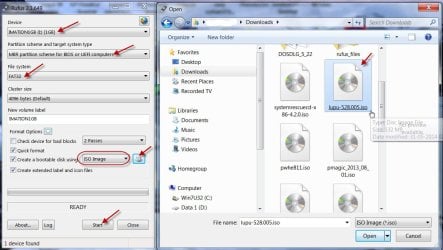
Create your Lucid Puppy pen drive as detailed here http://www.sevenforums.com/hardware...ly-unrecognisable-hard-drive.html#post2936753

You can download the latest version of Rufus here https://rufus.akeo.ie/

24-03-2015 14-57-47.jpg

Boot Lucid Puppy from the bootable pendrive using the onetime bootmenu in your laptop and check whether you can recover the data from the internal drive.

Of course you have to connect another external drive to which you will copy.

Go to the topic Recovering files from the non-bootable Internal Drive: in this thread Lucid Puppy way to recover files from a non-bootable computer on how-to.

Note: Back up all data on the pen drive before creating the bootable pen drive with rufus since all that will be lost when rufus formats it.
 

My Computer My Computer

At a glance

Windows 7 Home Premium 32 bit
OS
Windows 7 Home Premium 32 bit
Back
Top