Solved computer won't boot, no operating system found

Just my two cents and forgive me if this was said as I haven't read the whole thread but...

Operating system not found is generally code word for your HD is going bad or some type of hardware problem that is not allowing your computer to recognize your hard drive. At this point in the boot process, windows has just begun to point to the operating system but wasn't able to since it couldn't find the hard drive or the sector containing the MBR.

I would definitely troubleshoot to see if hardware failure is the cause.
 

My Computer

Computer type
PC/Desktop
Computer Manufacturer/Model Number
Custom
OS
Dual Boot: Windows 8.1 & Server 2012r2 VMs: Kali Linux, Backbox, Matriux, Windows 8.1
CPU
A10 7700 Kavari SteamRoller
Motherboard
ASUS A88XM-PLUS (FM2+ )
Memory
8GB DDR3 SDRAM PC3-8500
Graphics Card(s)
1024MB ATI AMD Radeon R7 Graphics
Sound Card
Realtek High Definition Audio
Monitor(s) Displays
Samsung
Hard Drives
SSD Crucial 120gb
WD VelociRaptor 1tb
PSU
Rosewill Gaming 650w
Case
Rosewill Galaxy 2
Internet Speed
55/12
Antivirus
Malwarebytes, MSE, SAS
Browser
FireFox, Chrome
I don't understand what that could mean... unless the hard drive contains Windows Server?

That`s exactly what it means :)
His specs show Windows 7 Home Premium. What is the hard drive doing containing Windows Server, making its partitions apparently unreadable by PW and the BIOS of the laptop?

This was presumably a regular working Win7 Home Premium laptop, until all of a sudden it's not??
 

My Computer

Computer type
PC/Desktop
Computer Manufacturer/Model Number
Home-built, two systems (1) and (2)
OS
Windows 7 Pro x64 (1), Win7 Pro X64 (2)
CPU
i5-3350p 3.1Ghz/6MB-cache (1); E8400 3.0Ghz/6MB-cache (2)
Motherboard
ASUS P8Z77-V Pro (1); ASUS P5Q3 (2)
Memory
8GB PC3-12800 DDR3 (1); 4GB PC3-10600 DDR3 (2)
Graphics Card(s)
ATI HD7750 (1), (see TV cards); ATI R7 250 (2)
Sound Card
Realtek ALC892 HD Audio (1); Realtek ALC1200 HD Audio (2)
Monitor(s) Displays
Eizo HD2441W LCD, Eizo S2433W (1); Eizo 24" S2433W (2)
Screen Resolution
1920x1200, 1920x1200 (1); 1920x1200 (2)
Hard Drives
(1) 1TB SATA-II (7200RPM), 2x2TB SATA-III (7200RPM), 250GB SATA-III (10000RPM) for OS; 2x2TB external USB 3.0

(2) 320GB SATA-II (7200RPM), 750GB SATA-II (7200RPM), 150GB SATA-II (10000RPM) for OS; 2TB external USB 3.0
PSU
Nesteq ECS-6001 600W (1); Nesteq ECS-5001 500W (2)
Case
Acousti-Case 360 (1) and (2)
Cooling
Noctua NH-U12P SE2 for CPU, 2x120mm case fans (1) and (2)
Keyboard
IBM PS/2 (1) and (2)
Mouse
Logitech MX Revolution wireless (1); Microsoft wired (2)
Internet Speed
100mbps down / 10mbps up
Antivirus
Microsoft Security Essentials; Malwarebyte Anti-Malware Pro
Browser
Firefox
Other Info
Ceton InfiniTV 4-tuner cablecard-enabled TV card as well as Hauppauge HVR-2250 OTA/ATSC 2-tuner TV card in (1), running under Win7 WMC

My Computer

Computer type
PC/Desktop
Computer Manufacturer/Model Number
Skylake Special #666
OS
Windows 10 Pro x64
CPU
Intel Core i7 6700K
Motherboard
Asus Sabertooth Z170 Mark 1
Memory
GSkill TridentZ RGB 16GB 3600 16-16-16-36
Graphics Card(s)
EVGA GTX 980 Ti SC x2
Sound Card
Realtek High Definition
Monitor(s) Displays
AOC G2460PG
Screen Resolution
1920 x 1080 144Hz
Hard Drives
Samsung 860 Pro 256GB, Seagate Barracuda 4TB x2
PSU
EVGA 1000 P2, EVGA White Custom Braided Cables
Case
Corsair Vengeance C70 Gunmetal Black
Cooling
Corsair H100i v2, Corsair ML120 x2, Thermal Grizzly Kryonaut
Keyboard
Logitech G910 Orion Spectrum
Mouse
Logitech G700s
Internet Speed
Verizon Fios Quantum Gateway 75/75
Antivirus
Windows Defender, Malwarebytes Free 3.8.3
Browser
Chrome
Other Info
Corsair SP120 x4, LG Blu-ray Drive, Durabrand HT-395 100 Watt Dolby Digital Amp, Corsair H2100 Wireless 7.1 Headset
Who knows, but I tried to use PW (A few years ago when I first learned to use the boot cd) on a machine with windows Server and got the same message.

Even though PW boot cd clearly says it supports windows server.

Bootable Partition Manger | MiniTool Partition Wizard Bootable Edition
Actually, I don't think the Home and Professsional versions of PW support Windows Server. Here's the product comparison, and it's clearly NOT supported except by the Server and higher versions of PW.

Being free, I believe the free standalone boot CD is a "lower flavor", i.e. equivalent to the Home version (which is also free). I believe the standalone boot CD comes in the same "flavors" as the product itself, else everybody could just use the standalone boot CD to do everything from the standalone boot CD, and never have to purchase one of the "upper flavors" for Windows which are not free.

So, I'm suspecting that if the OP's hard drive somehow is actually a Windows Server drive (which admittedly, is a shocking magical transition from a previous Win7 Home Premium drive) that it's not a surprise the free standalone PW boot CD wouldn't support it.

Anyway, this is certainly an interesting story with some very odd clues. Either a catastrophic drive failure rendering it useless, or there might be more to the story than we know yet. Trying one of the suggested additional alternatives to try and read it (or fail) would be very interesting. Either connecting it to another PC with a spare SATA data and power cable, or connecting it through something like that Kingwin SATA-to-USB adapter... either or both of those experiments would be informative.
 

My Computer

Computer type
PC/Desktop
Computer Manufacturer/Model Number
Home-built, two systems (1) and (2)
OS
Windows 7 Pro x64 (1), Win7 Pro X64 (2)
CPU
i5-3350p 3.1Ghz/6MB-cache (1); E8400 3.0Ghz/6MB-cache (2)
Motherboard
ASUS P8Z77-V Pro (1); ASUS P5Q3 (2)
Memory
8GB PC3-12800 DDR3 (1); 4GB PC3-10600 DDR3 (2)
Graphics Card(s)
ATI HD7750 (1), (see TV cards); ATI R7 250 (2)
Sound Card
Realtek ALC892 HD Audio (1); Realtek ALC1200 HD Audio (2)
Monitor(s) Displays
Eizo HD2441W LCD, Eizo S2433W (1); Eizo 24" S2433W (2)
Screen Resolution
1920x1200, 1920x1200 (1); 1920x1200 (2)
Hard Drives
(1) 1TB SATA-II (7200RPM), 2x2TB SATA-III (7200RPM), 250GB SATA-III (10000RPM) for OS; 2x2TB external USB 3.0

(2) 320GB SATA-II (7200RPM), 750GB SATA-II (7200RPM), 150GB SATA-II (10000RPM) for OS; 2TB external USB 3.0
PSU
Nesteq ECS-6001 600W (1); Nesteq ECS-5001 500W (2)
Case
Acousti-Case 360 (1) and (2)
Cooling
Noctua NH-U12P SE2 for CPU, 2x120mm case fans (1) and (2)
Keyboard
IBM PS/2 (1) and (2)
Mouse
Logitech MX Revolution wireless (1); Microsoft wired (2)
Internet Speed
100mbps down / 10mbps up
Antivirus
Microsoft Security Essentials; Malwarebyte Anti-Malware Pro
Browser
Firefox
Other Info
Ceton InfiniTV 4-tuner cablecard-enabled TV card as well as Hauppauge HVR-2250 OTA/ATSC 2-tuner TV card in (1), running under Win7 WMC
Without trying to break our heads on the issue why PW is not running into OP's system, it would be in the interests of the OP to try and read the drive with a live Linux CD/pendrive and in case it fails, run Seatools for DOS to check the status of his Seagate drive and if possible to allow it to repair as indicated in my post #18.
 

My Computer

OS
Windows 7 Home Premium 32 bit
downloaded the second one, i get the same error. I will order the SATA to USB you suggested and give that a try.... i will post my findings once i get it
Well, given the results from PW standalone which apparently can't read the drive via the machine's BIOS, and as was already mentioned the fact that the BIOS sees it as having 0GB capacity (shown in your screenshot), it ......... Looking grim right now, I'm afraid.

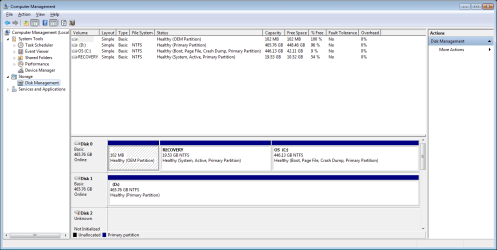
I plugged it in to another laptop and it didn't show up..... this it was shows in disk management:
 

Attachments

  • Disk 2.png
    Disk 2.png
    25.4 KB · Views: 3

My Computer

Computer type
PC/Desktop
Computer Manufacturer/Model Number
Dell XPS L502X
OS
Windows 7 Home Premium 64 bit
CPU
Intel Core i7-2640, 2.80GHz
Memory
8 GB
Hard Drives
Seagate Momentus 7200.4 ST9500423AS 500GB 7200 RPM 16MB Cache SATA 3.0Gb/s 2.5"
Hi MonkeeMadness,

Before you take out the HDD from the laptop, please try to access the drive from a live Linux pendrive to check whether it can access the drive. Follow the post here http://www.sevenforums.com/hardware...ly-unrecognisable-hard-drive.html#post2936753

If it still fails to find your drive:

You seem to have a Seagate drive. Run Seagate Seatools for DOS and check your drive. It can also repair the drive if possible. http://www.sevenforums.com/tutorials/313457-seatools-dos-windows-how-use.html

Rufus: Rufus - Create bootable USB drives the easy way

Lucid Puppy (Ubuntu Compatible Build) 5.2.8 ISO from Long-Term-Supported WaryPuppy (LTS)

I will have to give this a try, the SATA to USB didn't work. It will probably take me a couple of days to post my finding, i will be away from the bad laptop, possibly until the weekend. I will let you know if it works, thanks.
 

My Computer

Computer type
PC/Desktop
Computer Manufacturer/Model Number
Dell XPS L502X
OS
Windows 7 Home Premium 64 bit
CPU
Intel Core i7-2640, 2.80GHz
Memory
8 GB
Hard Drives
Seagate Momentus 7200.4 ST9500423AS 500GB 7200 RPM 16MB Cache SATA 3.0Gb/s 2.5"

My Computer

Computer type
PC/Desktop
Computer Manufacturer/Model Number
Dell XPS L502X
OS
Windows 7 Home Premium 64 bit
CPU
Intel Core i7-2640, 2.80GHz
Memory
8 GB
Hard Drives
Seagate Momentus 7200.4 ST9500423AS 500GB 7200 RPM 16MB Cache SATA 3.0Gb/s 2.5"
Hi MonkeeMadness,

Before you take out the HDD from the laptop, please try to access the drive from a live Linux pendrive to check whether it can access the drive. Follow the post here http://www.sevenforums.com/hardware...ly-unrecognisable-hard-drive.html#post2936753

If it still fails to find your drive:

You seem to have a Seagate drive. Run Seagate Seatools for DOS and check your drive. It can also repair the drive if possible. http://www.sevenforums.com/tutorials/313457-seatools-dos-windows-how-use.html

Rufus: Rufus - Create bootable USB drives the easy way

Lucid Puppy (Ubuntu Compatible Build) 5.2.8 ISO from Long-Term-Supported WaryPuppy (LTS)


I was able to try both of them today:

LUCID PUPPY: Only my optical DVD/BD shows up, no C drive or any other drive

SEATOOLS: Model id shows up, serial #, test progress=idle, test results = failed.... also tried the long test and right away Sector Repair Failure is what shows up... have i tried everything possible?


Do you why when i connected the HD via USB to my other laptop it shows the following:
On the picture I posted of the disk management it shows disk 2 with 102MB, it's a 500GB HD......
 

My Computer

Computer type
PC/Desktop
Computer Manufacturer/Model Number
Dell XPS L502X
OS
Windows 7 Home Premium 64 bit
CPU
Intel Core i7-2640, 2.80GHz
Memory
8 GB
Hard Drives
Seagate Momentus 7200.4 ST9500423AS 500GB 7200 RPM 16MB Cache SATA 3.0Gb/s 2.5"
If in-situ ( that is in its original position on your laptop) the drive cannot be accessed with Lucid Puppy and Seatools for DOS gave a fail report, I would say that your drive is dead and will go back to TVeblen's learned post #18. ( I do not want to repeat it. :))

Yes, no other interface in-between. Direct SATA connection on a desktop as an internal drive. Try PW(Windows) and SeaTools for Windows to repair if possible.

( Please post a screenshot how the drive appears in Windows Disk Management and Partition Wizard with the direct connection on a desktop. That will help other experts here to read and suggest further course of action.)
 

My Computer

OS
Windows 7 Home Premium 32 bit
Hello everyone thank you for all your advice, i tried everything suggested and nothing worked... sorry took so long to update, i didn't have access to my laptop... i got a second opinion from a IT Tech and said the HD was dead. Thanks again for all the suggestions to try and salvage the info. I will mark this as solved, will be ordering a new hard drive.
 

My Computer

Computer type
PC/Desktop
Computer Manufacturer/Model Number
Dell XPS L502X
OS
Windows 7 Home Premium 64 bit
CPU
Intel Core i7-2640, 2.80GHz
Memory
8 GB
Hard Drives
Seagate Momentus 7200.4 ST9500423AS 500GB 7200 RPM 16MB Cache SATA 3.0Gb/s 2.5"
Back
Top