
Hello everyone,
I’m new to the forum. I actually came here because of a booting problem that occurred a few days ago. Needless to say I know little about the subject. I’m using an ASUS X54H Laptop, running on Windows 7 Home Premium x64 bought in February 2013.
First thing that happened was the Windows taskbar simply disappearing after a few minutes of lagging while using my computer in a common way : running some word and .pdf documents, surfing the internet, listening to some music… No new softwares or drivers recently installed whatsoever.
I just couldn’t get my taskbar back, and of course that wasn’t as if I had unintentionally moved it : it was just invisible. If I tried to minimize windows they would just appear as little bars just above the place where the taskbar should have been. So I thought restarting my computer would get me ridden of this.
As I had no access to the Start menu, I restarted with the help of the task manager.
When my computer restarted, it directly booted on Windows RE. Startup Repair identified the root cause as:
I tried to run Startup Repair several times, as it is sometimes advised on the Internet, without success. Next step has been trying to restore my computer to a previous point. The only thing it changed was that now Startup Repair just read “Startup Repair has tried several times but still cannot determine the cause of the problem” without mentioning fvevol.sys. All actions performed by Startup Repair were said to be completed successfully, with the Error code = 0x0.
Then I tried a few things found on this tutorial : Troubleshooting Windows 7 Failure to boot.
The “last known good configuration” operation didn’t work. I tried with the command prompt to perform a disk check. Then I tried the SFC –SCANNOW procedure.
You can see the results of both in Image 1.
I then followed the procedure described in http://www.sevenforums.com/tutorials/139576-startup-repair-infinite-loop-recovery.html which didn’t help.
Then I tried the Bootrec.exe Tool as explained here : http://www.sevenforums.com/tutorial...ool-how-use-windows-recovery-environment.html
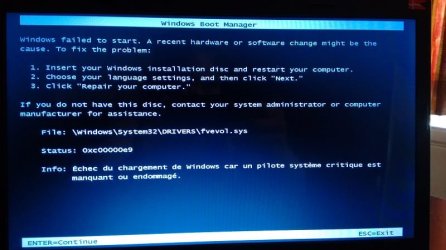
On restarting the computer I’m having this screen I never saw before… (Image 2)
…which mentions fvevol.sys again.
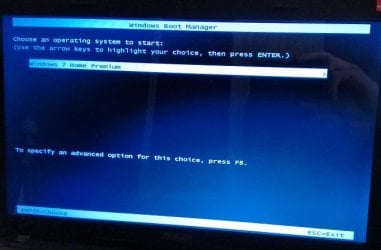
But it seems I’m not able to access Windows RE anymore. If I go on, I’m getting to the screen displayed on Image 3.
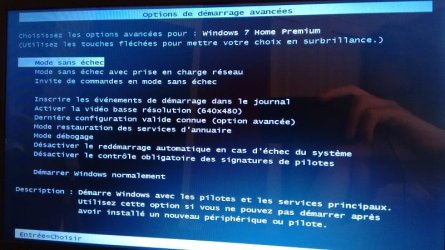
And by pressing F8, I get to the one on Image 4, which is of course familiar as I had tried at some point to boot in safe mode without succeeding. But the “repair computer” option that was available before, above all the others, isn’t available anymore. So it seems I can’t even access Windows recovery options anymore.
At this point, I just thought it would be quite silly to venture further on without actually understanding what I was trying to fix.
I don't have any Windows installation disc, as it wasn't provided with my computer. I am currently using a laptop borrowed from a friend running on the same OS, if that can be of any help in case I have to install Windows again...?
I hope anyone here has an idea of what to do. Please forgive my mistakes as English is not my mother language!
I’m new to the forum. I actually came here because of a booting problem that occurred a few days ago. Needless to say I know little about the subject. I’m using an ASUS X54H Laptop, running on Windows 7 Home Premium x64 bought in February 2013.
First thing that happened was the Windows taskbar simply disappearing after a few minutes of lagging while using my computer in a common way : running some word and .pdf documents, surfing the internet, listening to some music… No new softwares or drivers recently installed whatsoever.
I just couldn’t get my taskbar back, and of course that wasn’t as if I had unintentionally moved it : it was just invisible. If I tried to minimize windows they would just appear as little bars just above the place where the taskbar should have been. So I thought restarting my computer would get me ridden of this.
As I had no access to the Start menu, I restarted with the help of the task manager.
When my computer restarted, it directly booted on Windows RE. Startup Repair identified the root cause as:
Boot critical file c:\windows\system32\drivers\fvevol.sys is corrupt.
Repair action: File repair
Result: Failed. Error code = 0x45d
Time taken = 639246 ms
I tried to run Startup Repair several times, as it is sometimes advised on the Internet, without success. Next step has been trying to restore my computer to a previous point. The only thing it changed was that now Startup Repair just read “Startup Repair has tried several times but still cannot determine the cause of the problem” without mentioning fvevol.sys. All actions performed by Startup Repair were said to be completed successfully, with the Error code = 0x0.
Then I tried a few things found on this tutorial : Troubleshooting Windows 7 Failure to boot.
The “last known good configuration” operation didn’t work. I tried with the command prompt to perform a disk check. Then I tried the SFC –SCANNOW procedure.
You can see the results of both in Image 1.
I then followed the procedure described in http://www.sevenforums.com/tutorials/139576-startup-repair-infinite-loop-recovery.html which didn’t help.
Then I tried the Bootrec.exe Tool as explained here : http://www.sevenforums.com/tutorial...ool-how-use-windows-recovery-environment.html
On restarting the computer I’m having this screen I never saw before… (Image 2)
…which mentions fvevol.sys again.
But it seems I’m not able to access Windows RE anymore. If I go on, I’m getting to the screen displayed on Image 3.
And by pressing F8, I get to the one on Image 4, which is of course familiar as I had tried at some point to boot in safe mode without succeeding. But the “repair computer” option that was available before, above all the others, isn’t available anymore. So it seems I can’t even access Windows recovery options anymore.
At this point, I just thought it would be quite silly to venture further on without actually understanding what I was trying to fix.
I don't have any Windows installation disc, as it wasn't provided with my computer. I am currently using a laptop borrowed from a friend running on the same OS, if that can be of any help in case I have to install Windows again...?
I hope anyone here has an idea of what to do. Please forgive my mistakes as English is not my mother language!
Attachments

My Computer
- Computer type
- PC/Desktop
- OS
- Windows 7 Home Premium x64


