Solved Delete Stubborn File

Status
Not open for further replies.

chuckhig

New member
Power User
VIP
Local time
2:00 AM
Messages
186
Location
Adirondack Mountains..upstate New York
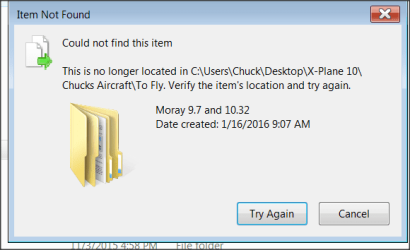
I have tried every un -locker that I could find. Cannot delete this file. It is empty. I cannot move it to my desktop to delete either. Any help appreciated. Thanks.
 

Attachments

  • Snap 2016-01-18 at 12.00.37.png
    Snap 2016-01-18 at 12.00.37.png
    11 KB · Views: 85

My Computer

OS
Windows 7 Home Premium 64 bit
I use a small linux distro, Porteus. I have it burned to a CD and also "written" to a USB stick.
I boot into that, send the file in Windows that I'm unable to delete/move/erase/rename and delete it.

Several times I've had 0 byte files that I could see but no program would remove them. Porteus has saved me from having to restore an image just to get rid of something.

If you want the ISO, send me a PM with an email address. I have the file on gdrive and I will email you the link to download it.
 

My Computer

Computer type
PC/Desktop
Computer Manufacturer/Model Number
Dell, Acer, eMachine
OS
Home Premium and Pro 32 bit and 64 bit (4 computers)
Browser
Palemoon
plodr could you just post a website to download Porteus?
 

My Computer

Computer type
PC/Desktop
Computer Manufacturer/Model Number
Home made Desktop
OS
Windows 10 Pro. 64/ version 1709 Windows 7 Pro/64
CPU
Intel i7-6800K @ 4.3
Motherboard
ASUS X-99 Deluxe II
Memory
Corsair Platinum 16 gig @2400
Graphics Card(s)
EVGA GTX 1070 OC
Monitor(s) Displays
Asus 27" LED LCD/VE278Q
Screen Resolution
1920-1080 or 1280-720 HDMI
Hard Drives
INTEL SSD 730-240 Gb Sata 3.0/
PSU
EVGA Platium 1200W
Case
Phanteks Luxe Tempered Glass 8 fans/ one radiator
Cooling
XSPC/ Water Cooled CPU
Keyboard
Das 4 Professional
Mouse
Logitech M705/MX Anywhere 2-S
Internet Speed
100 mbits
Antivirus
Microsoft Security Essentials/ Malwarebytes Premium 3.0/ SAS
Browser
I.E. 11 default/Firefox/ ISP Time Warner Cable/Spectrum
Other Info
LG BluRay Burner/
Sound system-KLipsch-THX/
Icy Dock ssd Hot Swap bays.
The first thing to try is to simply press F5 to Refresh, if you are unable to remove the file using Explorer, you might have better luck using the command prompt.
press windows key + r
type cmd.exe, press enter
cd \to\the\folder\containing\the\problem\file
dir /x
Note the short filename of the problem file. It will look for example like BLAH~1.
del BLAH~1
 

My Computer

Computer type
PC/Desktop
OS
windows 7 Home 64 bit
chuckhig,
Perhaps you have already done this - but before you delete the problematic folder, I would spend some time attempting to make sure that there is no problem with the file system (e.g. run a check of the file system with chkdsk).

Was one of the un-locker apps that you tried named Unlocker? If not, you can read a bit more about it in this old post. It would be interesting to know if any apps are locking the folder.
 

My Computer

Computer type
Laptop
Computer Manufacturer/Model Number
Employer provided Dell Latitude
OS
W7 Pro SP1 64bit
CPU
i7
Memory
8GB
Graphics Card(s)
Intel HD Graphics
Hard Drives
crappy SSD
Antivirus
Employer mandated Symantec Endpoint Protection
Browser
Pale Moon 64bit, IE11 64bit & Chrome 64bit

My Computer

Computer type
Laptop
Computer Manufacturer/Model Number
Employer provided Dell Latitude
OS
W7 Pro SP1 64bit
CPU
i7
Memory
8GB
Graphics Card(s)
Intel HD Graphics
Hard Drives
crappy SSD
Antivirus
Employer mandated Symantec Endpoint Protection
Browser
Pale Moon 64bit, IE11 64bit & Chrome 64bit

My Computer

Computer type
PC/Desktop
Computer Manufacturer/Model Number
home built
OS
Multi-Boot W7_Pro_x64 W8.1_Pro_x64 W10_Pro_x64 +Linux_VMs +Chromium_VM
CPU
AMD Athlon II x4 620
Motherboard
Gigabyte GA-MA785G-UD3H
Memory
6GB GSkill DDR2 800
Graphics Card(s)
AMD 4670 GPU + AMD 4200 IGP
Sound Card
on board Realtek ALC889A
Monitor(s) Displays
RCA 40" LCD TV, Insignia 32" LCD TV, HP 15" LCD monitor
Screen Resolution
1680 x 1050
Hard Drives
OCZ Vertex 3 120GB,
Samsung F3 1TB (3),
Several others - WD, Seagate, Hitachi, ...
PSU
Corsair 500 W
Case
Rosewill mid tower
Cooling
CM 90mm rifle
Keyboard
Gyration wireless, Logitech wireless, Dell USB wired
Mouse
Gyration wireless, Logitech wireless, V7 USB wired
Internet Speed
Spectrum - 100Mbps D / 10Mbps U
Antivirus
Avast, MBAM3, EMET, WinPatrol
Browser
Pale Moon, Firefox, IE
Other Info
2 multi-boot PC's
Mainly HTPC/Office/Gen purpose (no gaming).
Trendnet USB KVM.
LG DVD burner/Blue Ray Player.
Tray system for removable SATA backup drives.

Not currently OCd, under-volted.
I use Hybrid sleep, rarely re-boot or shutdown.

Hauppauge HD-PVR, Avermedia PCIe TV Tuner, Hauppauge PCI TV Tuner.
Where "unlocker" applications couldn't detect a handle, deleting stubborn files using either the 8.3 short path naming convention or the long path naming convention have proven quite successful strategies in the past...

Chuckhig, create the below batch file and drag your problem file onto this script.
Code:
if "%~1"=="" exit /b
del /a /f \\?\%1
tskill explorer
goto 2>NUL & del %0
Or if your problem item is actually a folder (as per what your attached image suggests), then create the below instead.
Code:
if "%~1"=="" exit /b
rd /s /q \\?\%1
tskill explorer
goto 2>NUL & del %0
 

My Computer

Computer type
PC/Desktop
OS
Windows 10, Windows 8.1 Pro, Windows 7 Professional, OS X El Capitan
Sure. But be aware that Porteus is a build-it-yourself distro.
You have to pick and choose items to get the distro.

Have fun building: Porteus Wizard
 

My Computer

Computer type
PC/Desktop
Computer Manufacturer/Model Number
Dell, Acer, eMachine
OS
Home Premium and Pro 32 bit and 64 bit (4 computers)
Browser
Palemoon

My Computer

Computer Manufacturer/Model Number
HP, Dell, Gateway, Toshiba - 4 laptops and 2 desktops
OS
Vista, Windows7, Mint Mate, Zorin, Windows 8
CPU
from 1.6GHz Duo to i7
Monitor(s) Displays
2x HP w2207
Hard Drives
5x HDD, 7x SSD, 12x Externals
Keyboard
with trackball - no mices
Mouse
Trackball mice
Internet Speed
DSL 6000
Where "unlocker" applications couldn't detect a handle, deleting stubborn files using either the 8.3 short path naming convention or the long path naming convention have proven quite successful strategies in the past...

Chuckhig, create the below batch file and drag your problem file onto this script.
Code:
if "%~1"=="" exit /b
del /a /f \\?\%1
tskill explorer
goto 2>NUL & del %0
Or if your problem item is actually a folder (as per what your attached image suggests), then create the below instead.
Code:
if "%~1"=="" exit /b
rd /s /q \\?\%1
tskill explorer
goto 2>NUL & del %0
Sorry..way over my head.
 

My Computer

OS
Windows 7 Home Premium 64 bit

My Computer

Computer Manufacturer/Model Number
HP, Dell, Gateway, Toshiba - 4 laptops and 2 desktops
OS
Vista, Windows7, Mint Mate, Zorin, Windows 8
CPU
from 1.6GHz Duo to i7
Monitor(s) Displays
2x HP w2207
Hard Drives
5x HDD, 7x SSD, 12x Externals
Keyboard
with trackball - no mices
Mouse
Trackball mice
Internet Speed
DSL 6000
Hmm, so it is a ghost file.
 

My Computer

Computer Manufacturer/Model Number
HP, Dell, Gateway, Toshiba - 4 laptops and 2 desktops
OS
Vista, Windows7, Mint Mate, Zorin, Windows 8
CPU
from 1.6GHz Duo to i7
Monitor(s) Displays
2x HP w2207
Hard Drives
5x HDD, 7x SSD, 12x Externals
Keyboard
with trackball - no mices
Mouse
Trackball mice
Internet Speed
DSL 6000
I even attempted the CMD suggestion. I must be trying it bad or something. No luck. I had this problem once a long time ago before this new computer. I was given given a code or something..not sure,but it worked. I know you have to type the correct path with that code,but lost it. I tried to move the folder to my desktop and cannot either. Oh well. The folder is empty...just annoying. Thanks for your help. I will keep looking for an answer.
 

My Computer

OS
Windows 7 Home Premium 64 bit
Did you get a chance to run the check mentioned in post #7?
 

My Computer

Computer type
Laptop
Computer Manufacturer/Model Number
Employer provided Dell Latitude
OS
W7 Pro SP1 64bit
CPU
i7
Memory
8GB
Graphics Card(s)
Intel HD Graphics
Hard Drives
crappy SSD
Antivirus
Employer mandated Symantec Endpoint Protection
Browser
Pale Moon 64bit, IE11 64bit & Chrome 64bit
RE: X-Plane

Is that run from DVD? Or installed on your hard drive?

In any case it seems that the folder is created by the program. I've seen other programs that create folders that cannot be deleted if:

A: The program is not in use.

B: You change the default "Save Location" of a folder that is used by the program.

I know of ways to delete zero byte files/ directories but you need a backp before going ahead.

EDIT:

On the basis that you might want to go ahead:

Create a system image backup that you can restore if needed.

Then read this post:

http://www.sevenforums.com/general-...ile-doesnt-exist-post2824798.html#post2824798

Use PowerTool PowerTool x64 V1.6 for your 64bit machine. Just delete the folder and don't mess about with the other features.
 
Last edited:

My Computer

Computer type
Laptop
Computer Manufacturer/Model Number
ASUS
OS
Microsoft Windows 7 Home Premium 64-bit 7601 Multiprocessor Free Service Pack 1
CPU
AMD C-60 APU with Radeon(tm) HD Graphics
Motherboard
ASUSTeK COMPUTER INC. X501U
Memory
4.00 GB
Graphics Card(s)
AMD Radeon HD 6290 Graphics
Sound Card
(1) AMD High Definition Audio Device (2) Realtek High Defi
Screen Resolution
1366 x 768 x 32 bits (4294967296 colors) @ 60 Hz
Hard Drives
Hitachi HTS545050A7E380 SATA Disk Device
Antivirus
Comodo CIS & FW, SecureAplus App Whitelisting, Threatfire
Browser
Cyberfox 64bit, Opera 64bit, Airfox
Other Info
Spy-The-Spy, HitmanPro.Alert, Norton Connect Safe, MJRegWatcher, BitDefender TrafficLight, Voodoo Shield, Zemana AntiMalware
Have you tried a Linux LiveCD? I've had really stubborn files that were easily dispatched from Linux...
 

My Computer

Computer Manufacturer/Model Number
Compaq Presario SR5518F (desktop)
OS
Windows 7 Home Premium 64bit
CPU
Intel Pentium Dual Core E2180 @2GHz
Motherboard
MSI "Boston"
Memory
4 GB
Graphics Card(s)
NVIDIA GeForce 8500 GT
Sound Card
Integrated - Realtek High Definition Audio
Monitor(s) Displays
Acer
Hard Drives
Hitachi HDP725025GLA380 ATA Device
Optiarc DVD RW AD-7201S5 ATA Device
Internet Speed
5 Mbps
Sorry..way over my head.
It's not "way over your head". I'm sure you've created a file before. And I'm sure you've dragged and dropped a file somewhere before.

I had this problem once a long time ago before this new computer. I was given given a code or something..not sure,but it worked.
That "code" is probably the same one used in the batch file I'm offering you to try.

Well I've gone ahead and created the batch files for you and have attached them here. The instructions are simple: if you want to delete a file, drag and drop it on FileDeleter.bat's icon. If you want to delete a folder, drag and drop the folder on to FolderDeleter.bat.


Edit: Removed attachments. Please see post 9 for the mentioned batch files.
 
Last edited:

My Computer

Computer type
PC/Desktop
OS
Windows 10, Windows 8.1 Pro, Windows 7 Professional, OS X El Capitan
Status
Not open for further replies.
Back
Top
