- Local time
- 6:53 PM
- Messages
- 47
Hello,
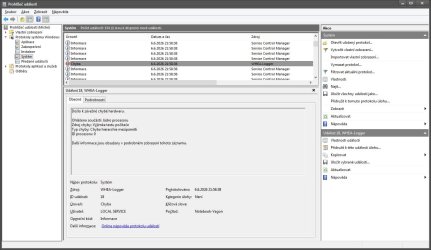
I have strange "issue" with WHEA-Logger - code 18 ID Processor Core: 0 , which generating in Event viewer every after system start.
But my laptop (Lenovo Y50-70) works perfectly (zero freeze, zero BSOD) . I installed Windows 10 next to the Windows 7 as dual boot, and in W10 this WHEA-Logger not generating after start system.
Can I somehow fix this issue and stop generating this "maybe" false positive error?
I tried reset bios settings, SFC /SCANNOW, re install Intel chipset driver, reinstall GPU drivers (Intel/Nvidia) via DDU , nothing helped.
Thank you in advance for any advice.
I have strange "issue" with WHEA-Logger - code 18 ID Processor Core: 0 , which generating in Event viewer every after system start.
But my laptop (Lenovo Y50-70) works perfectly (zero freeze, zero BSOD) . I installed Windows 10 next to the Windows 7 as dual boot, and in W10 this WHEA-Logger not generating after start system.
Can I somehow fix this issue and stop generating this "maybe" false positive error?
I tried reset bios settings, SFC /SCANNOW, re install Intel chipset driver, reinstall GPU drivers (Intel/Nvidia) via DDU , nothing helped.
Thank you in advance for any advice.
My Computer
- Computer type
- Laptop
- Computer Manufacturer/Model Number
- Lenovo Y50-70 (20378)
- OS
- Windows 7 Professional x64
- CPU
- Intel Core i5-4210H
- Memory
- 2x Kingston 8GB DDR3 1600 CL11
- Graphics Card(s)
- Nvidia GeForce GTX960M 4GB
- Sound Card
- Sound Blaster PLAY! 3
- Monitor(s) Displays
- 2
- Screen Resolution
- 2x 1920x1080
- Hard Drives
- Crucial MX500 500GB SSD
- Cooling
- Deepcool Multi Core X6
- Keyboard
- Yenkee YKB 1002 CS USB
- Mouse
- Crono CM645 Wired optical mouse
- Internet Speed
- 95 Mb/s Down 95 Mb/s Up
- Antivirus
- MSE
- Browser
- Firefox 91.13.0esr x64bit