MY MYSTERY SOLVED!!!! see below the ========= for how I used this
Capt Jacks 'source' above led me (eventually) to:
Right-click is slow or weird behavior caused by context menu handlers
which included this:
Method 2 - Using ShellExView to determine the Context-menu causing the problem
 ShellExView
 (by
Nir Sofer) is an excellent tool to view and manage all installed shell extensions. If available, it displays the description, as well as version details, company information, location, file name and more. You can optionally disable/enable any item, which can be very useful to disable an extension, that you don t need or that has been left behind in your right click menu from a previous software install.
Effective usage of ShellExView to resolve right-click problems
Download
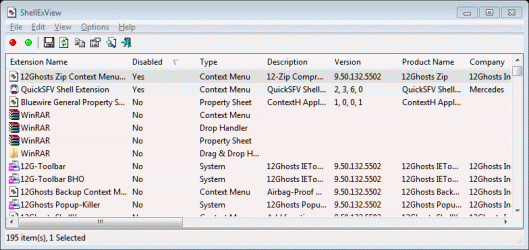
ShellExView (from nirsoft.net) and run it. It will scan the registry for all the shell extensions. Once the scan is over and the list is displayed, you need to spot the context menu handlers. Sort the results using "Type", so that the context menu handlers are displayed together.
The rule is to disable non-Microsoft context menu handlers *one-by-one* and verify if the problem is solved. If disabling one does not solve the problem, undo the disabled item and disable the next non-Microsoft handler. Do the same until the problem is solved and finally identify the culprit. Scroll right to see the
Company Name column in ShellExView.
Even more quicker method is to bisect the list of context menu handlers into two groups, disabling half of the entries at a stretch, rebooting and testing the behavior again.
JClarke commented on this article:
You can disable them ...they say "one at a time" and see what effect it has on the problem. I did it a lot quicker by bisecting the list, disabling half of the entries in one fell swoop, rebooting and trying the right click.
It worked, so I knew I just had to narrow it down, just as we used to do with msconfig. Then I kept bisecting the list until it was just a few and did those one at a time. The problem is that you have to reboot between tries to get accurate testing of the results of your disabling. I didn't find logging off to be consistent.
==========
Not sure why 'tip' above says to reboot, not needed, I checked right click after each enable/disable change.
I sorted by Company to group all nonMS together
Halving did not work for me only because I happened to have 2 culprits.
included snap of shellexview sorted on enable column showing my 2 guilty parties at top (note disable status of yes)
going to uninstall 12 ghosts and quick SFV and anticipate my problem will be gone.