right click COMPUTER icon, MANAGE has SHIELD by it

drumtrucker

New member
Member
Local time
4:28 PM
Messages
54
and will not launch

UAC (security) at lowest level.

CAN access through:
start>administrative tools>computer management

but still wondering why the shield and non launching the VISTA way
(right click 'computer' icon and select 'manage')
 

Attachments

  • manage clip.png
    manage clip.png
    6.7 KB · Views: 2,010

My Computer My Computer

At a glance

Win 7 HPIntel Core 2 Quad CPU Q9300 @ 2.50GHz 4 cores...6GB
Computer Manufacturer/Model Number
Shuttle SP35P2 pro
OS
Win 7 HP
CPU
Intel Core 2 Quad CPU Q9300 @ 2.50GHz 4 cores 4 Logical proc
Motherboard
Phoenix Technologies LTD 6.00 PG, 11/2/2007
Memory
6GB
Sound Card
onboard Realtek HD Audio
Screen Resolution
1920x1080 and 1360 x 768
Hard Drives
in box 2 500Gb
in external box 1.5Tb
in external SATA box 2 x 1Tb
Mouse
Logitech Optical Trackman (as seen on NCIS)
Other Info
All this is in my 18 wheeler!
MIne has the shield and it launches just fine.
 

My Computer My Computer

At a glance

Win7
OS
Win7
Are you an administrator or user?

~Lordbob
 

My Computer My Computer

At a glance

Windows 7 Ultimate x64, Mint 9Intel i5-2500k2x 4Gb Corsair VENGEANCE DDR3-1600NVidia GeForce N260GTX Twin Frozr
Computer Manufacturer/Model Number
Hera
OS
Windows 7 Ultimate x64, Mint 9
CPU
Intel i5-2500k
Motherboard
ASUS P8P67 Pro
Memory
2x 4Gb Corsair VENGEANCE DDR3-1600
Graphics Card(s)
NVidia GeForce N260GTX Twin Frozr
Sound Card
Realtek HD OnBoard Audio
Monitor(s) Displays
ASUS 24" Monitor
Screen Resolution
1920x1080
Hard Drives
G.SKILL Phoenix Series 60GB SATA II MLC Internal Solid State Drive (SSD)
SAMSUNG Spinpoint F3R 1TB 7200 RPM 32MB Cache SATA II
PSU
Cooler Master Real Power Pro 750W
Case
Cooler Master Haf 932
Cooling
Fans
Keyboard
Razer Tarantula
Mouse
Razer Lachesis
Internet Speed
not fast enough
Hello Drumtucker,

The shield icon indicates that you will need to provide permission in UAC before that item will run or open. Since you have UAC turned off, you will not be able to access it in a standard account. Only from within a administrator account instead. Since you are in a administrator account, see if turning UAC back on may allow you to open it.

Hope this helps,
Shawn
 

My Computer My Computer

At a glance

64-bit Windows 11 Pro for WorkstationsIntel i7-8700K OC'd to 5 GHz64 GB (4x16GB) G.SKILL TridentZ RGB DDR4 3600...ASUS ROG-STRIX-GTX1080TI-O11G-GAMING
Computer type
PC/Desktop
Computer Manufacturer/Model Number
Self built custom
OS
64-bit Windows 11 Pro for Workstations
CPU
Intel i7-8700K OC'd to 5 GHz
Motherboard
ASUS ROG Maximus XI Formula Z390
Memory
64 GB (4x16GB) G.SKILL TridentZ RGB DDR4 3600 MHz
Graphics Card(s)
ASUS ROG-STRIX-GTX1080TI-O11G-GAMING
Sound Card
Integrated
Monitor(s) Displays
2 x Samsung Odyssey G7 27"
Screen Resolution
2560x1440
Hard Drives
1TB Samsung 990 PRO M.2,
4TB Samsung 990 PRO PRO M.2,
TerraMaster F8 SSD Plus NAS
PSU
Seasonic Prime Titanium 850W
Case
Thermaltake Core P3
Cooling
Corsair Hydro H115i
Keyboard
Logitech wireless K800
Mouse
Logitech MX Master 4
Internet Speed
2 Gb/s Download and 100 Mb/s Upload
Antivirus
Malwarebyte Anti-Malware Premium
Browser
Google Chrome
Other Info
Logitech Z625 speaker system,
Logitech BRIO 4K Pro webcam,
HP Color LaserJet Pro MFP M477fdn,
APC SMART-UPS RT 1000 XL - SURT1000XLI,
Galaxy S23 Plus phone
Not sure why Dave 1812 answered...
but yes I am the ONE AND ONLY user.

I just raised UAC one click up, but need to reboot to invoke, so it may be awhile before I can see if that worked.

Thanks, will report back when I've checked it out.
 

My Computer My Computer

At a glance

Win 7 HPIntel Core 2 Quad CPU Q9300 @ 2.50GHz 4 cores...6GB
Computer Manufacturer/Model Number
Shuttle SP35P2 pro
OS
Win 7 HP
CPU
Intel Core 2 Quad CPU Q9300 @ 2.50GHz 4 cores 4 Logical proc
Motherboard
Phoenix Technologies LTD 6.00 PG, 11/2/2007
Memory
6GB
Sound Card
onboard Realtek HD Audio
Screen Resolution
1920x1080 and 1360 x 768
Hard Drives
in box 2 500Gb
in external box 1.5Tb
in external SATA box 2 x 1Tb
Mouse
Logitech Optical Trackman (as seen on NCIS)
Other Info
All this is in my 18 wheeler!
raised UAC up one level, rebooted...
still no launch as described above.
wierd
 

My Computer My Computer

At a glance

Win 7 HPIntel Core 2 Quad CPU Q9300 @ 2.50GHz 4 cores...6GB
Computer Manufacturer/Model Number
Shuttle SP35P2 pro
OS
Win 7 HP
CPU
Intel Core 2 Quad CPU Q9300 @ 2.50GHz 4 cores 4 Logical proc
Motherboard
Phoenix Technologies LTD 6.00 PG, 11/2/2007
Memory
6GB
Sound Card
onboard Realtek HD Audio
Screen Resolution
1920x1080 and 1360 x 768
Hard Drives
in box 2 500Gb
in external box 1.5Tb
in external SATA box 2 x 1Tb
Mouse
Logitech Optical Trackman (as seen on NCIS)
Other Info
All this is in my 18 wheeler!
Drumtrucker,

Check in the registry under HKEY_CURRENT_USER\SOFTWARE\Microsoft\Windows\CurrentVersion\Policies\Explorer if there is a NoManageMyComputerVerb entry. If so, then:

1. Double-click on NoManageMyComputerVerb if it exists.

2. Set this value to 1 to disable the Manage option.
Set this value to 0 to enable the Manage option.

3. Restart the computer.
 

My Computer My Computer

At a glance

64-bit Windows 11 Pro for WorkstationsIntel i7-8700K OC'd to 5 GHz64 GB (4x16GB) G.SKILL TridentZ RGB DDR4 3600...ASUS ROG-STRIX-GTX1080TI-O11G-GAMING
Computer type
PC/Desktop
Computer Manufacturer/Model Number
Self built custom
OS
64-bit Windows 11 Pro for Workstations
CPU
Intel i7-8700K OC'd to 5 GHz
Motherboard
ASUS ROG Maximus XI Formula Z390
Memory
64 GB (4x16GB) G.SKILL TridentZ RGB DDR4 3600 MHz
Graphics Card(s)
ASUS ROG-STRIX-GTX1080TI-O11G-GAMING
Sound Card
Integrated
Monitor(s) Displays
2 x Samsung Odyssey G7 27"
Screen Resolution
2560x1440
Hard Drives
1TB Samsung 990 PRO M.2,
4TB Samsung 990 PRO PRO M.2,
TerraMaster F8 SSD Plus NAS
PSU
Seasonic Prime Titanium 850W
Case
Thermaltake Core P3
Cooling
Corsair Hydro H115i
Keyboard
Logitech wireless K800
Mouse
Logitech MX Master 4
Internet Speed
2 Gb/s Download and 100 Mb/s Upload
Antivirus
Malwarebyte Anti-Malware Premium
Browser
Google Chrome
Other Info
Logitech Z625 speaker system,
Logitech BRIO 4K Pro webcam,
HP Color LaserJet Pro MFP M477fdn,
APC SMART-UPS RT 1000 XL - SURT1000XLI,
Galaxy S23 Plus phone
that sounded promising, but no such luck. No reg entry anywhere for 'nomanagemycomputer'.

And like I said, CAN get there through start>admin tools>comp management

just a mystery to solve, eh?
 

My Computer My Computer

At a glance

Win 7 HPIntel Core 2 Quad CPU Q9300 @ 2.50GHz 4 cores...6GB
Computer Manufacturer/Model Number
Shuttle SP35P2 pro
OS
Win 7 HP
CPU
Intel Core 2 Quad CPU Q9300 @ 2.50GHz 4 cores 4 Logical proc
Motherboard
Phoenix Technologies LTD 6.00 PG, 11/2/2007
Memory
6GB
Sound Card
onboard Realtek HD Audio
Screen Resolution
1920x1080 and 1360 x 768
Hard Drives
in box 2 500Gb
in external box 1.5Tb
in external SATA box 2 x 1Tb
Mouse
Logitech Optical Trackman (as seen on NCIS)
Other Info
All this is in my 18 wheeler!
Hi Drumtruck,
You can try System File checker
1, Start type cmd
2, Right click and Run as admin
3, Then type sfc /scannow
 

My Computer My Computer

At a glance

Windows 7 Ultimate - 64-bit | Windows 8 Pro -...Intel® Core™ i7 Processor 3,610QM (2.30Hz, 6M...8 GBNVIDIA® GeForce® GT 650M 2GB Graphics, Optimu...
Computer Manufacturer/Model Number
Samsung NP550P5C-S02IN
OS
Windows 7 Ultimate - 64-bit | Windows 8 Pro - 64-bit
CPU
Intel® Core™ i7 Processor 3,610QM (2.30Hz, 6MB L3 Cach
Memory
8 GB
Graphics Card(s)
NVIDIA® GeForce® GT 650M 2GB Graphics, Optimus™ techno
Sound Card
SoundAlive™ JBL 3 Speakers (With sub-Woofer)
Monitor(s) Displays
39.62cm (15.6) SuperBright 300nit HD+ LED Display
Screen Resolution
1,600 x 900, Anti-Reflective
Hard Drives
1TB S-ATA II Hard Drive (5,400RPM)
Hey ,
I also found a workaround for this in Social Technet thought of posting it

Create a Batch File under C:\Windows\System32\ called CompMgmtLauncher.bat ( To create Open a notepad then File > Save as > CompMgmtLauncher.bat )

Edit CompMgmtLauncher.bat and put in these two lines

Start C:\Windows\System32\compmgmt.msc
Exit


Save batch file and exit
Type Regedit and do a search for CompMgmtLauncher.exe

Mine was located here.
[HKEY_CLASSES_ROOT\CLSID\{20D04FE0-3AEA-1069-A2D8-08002B30309D}\shell\Manage\command]

Under this key you will find a line that ends in CompMgmtLauncher.exe
Change the exe to bat and Manage should now work.

Source: Right Click Manage stops working.
 

My Computer My Computer

At a glance

Windows 7 Ultimate - 64-bit | Windows 8 Pro -...Intel® Core™ i7 Processor 3,610QM (2.30Hz, 6M...8 GBNVIDIA® GeForce® GT 650M 2GB Graphics, Optimu...
Computer Manufacturer/Model Number
Samsung NP550P5C-S02IN
OS
Windows 7 Ultimate - 64-bit | Windows 8 Pro - 64-bit
CPU
Intel® Core™ i7 Processor 3,610QM (2.30Hz, 6MB L3 Cach
Memory
8 GB
Graphics Card(s)
NVIDIA® GeForce® GT 650M 2GB Graphics, Optimus™ techno
Sound Card
SoundAlive™ JBL 3 Speakers (With sub-Woofer)
Monitor(s) Displays
39.62cm (15.6) SuperBright 300nit HD+ LED Display
Screen Resolution
1,600 x 900, Anti-Reflective
Hard Drives
1TB S-ATA II Hard Drive (5,400RPM)
NO integrity violations
 

My Computer My Computer

At a glance

Win 7 HPIntel Core 2 Quad CPU Q9300 @ 2.50GHz 4 cores...6GB
Computer Manufacturer/Model Number
Shuttle SP35P2 pro
OS
Win 7 HP
CPU
Intel Core 2 Quad CPU Q9300 @ 2.50GHz 4 cores 4 Logical proc
Motherboard
Phoenix Technologies LTD 6.00 PG, 11/2/2007
Memory
6GB
Sound Card
onboard Realtek HD Audio
Screen Resolution
1920x1080 and 1360 x 768
Hard Drives
in box 2 500Gb
in external box 1.5Tb
in external SATA box 2 x 1Tb
Mouse
Logitech Optical Trackman (as seen on NCIS)
Other Info
All this is in my 18 wheeler!
Have you installed any new drivers or software? What antivirus are you using?
 

My Computer My Computer

At a glance

Windows 7 Ultimate x86-64[email protected] 1066MHz FSB6GB DDR3 1066MHz9300M GS 256MB Dedicated (Speed) + Intel4500M...
Computer Manufacturer/Model Number
Sony Vaio Z46GDU
OS
Windows 7 Ultimate x86-64
CPU
[email protected] 1066MHz FSB
Motherboard
Sony branded
Memory
6GB DDR3 1066MHz
Graphics Card(s)
9300M GS 256MB Dedicated (Speed) + Intel4500MHD (Stamina)
Sound Card
Realtek HD Audio
Monitor(s) Displays
13.1' WXGA
Screen Resolution
1600x900
Hard Drives
320GB 7200RPM w/ 16MB cache
Internet Speed
1MB/s
MY MYSTERY SOLVED!!!! see below the ========= for how I used this

Capt Jacks 'source' above led me (eventually) to:
Right-click is slow or weird behavior caused by context menu handlers

which included this:
Method 2 - Using ShellExView to determine the Context-menu causing the problem

ShellExView (by Nir Sofer) is an excellent tool to view and manage all installed shell extensions. If available, it displays the description, as well as version details, company information, location, file name and more. You can optionally disable/enable any item, which can be very useful to disable an extension, that you don t need or that has been left behind in your right click menu from a previous software install.

Effective usage of ShellExView to resolve right-click problems
Download ShellExView (from nirsoft.net) and run it. It will scan the registry for all the shell extensions. Once the scan is over and the list is displayed, you need to spot the context menu handlers. Sort the results using "Type", so that the context menu handlers are displayed together.
The rule is to disable non-Microsoft context menu handlers *one-by-one* and verify if the problem is solved. If disabling one does not solve the problem, undo the disabled item and disable the next non-Microsoft handler. Do the same until the problem is solved and finally identify the culprit. Scroll right to see the Company Name column in ShellExView.
tipspot.gif
Even more quicker method is to bisect the list of context menu handlers into two groups, disabling half of the entries at a stretch, rebooting and testing the behavior again. JClarke commented on this article:
You can disable them ...they say "one at a time" and see what effect it has on the problem. I did it a lot quicker by bisecting the list, disabling half of the entries in one fell swoop, rebooting and trying the right click.
It worked, so I knew I just had to narrow it down, just as we used to do with msconfig. Then I kept bisecting the list until it was just a few and did those one at a time. The problem is that you have to reboot between tries to get accurate testing of the results of your disabling. I didn't find logging off to be consistent.


==========

Not sure why 'tip' above says to reboot, not needed, I checked right click after each enable/disable change.

I sorted by Company to group all nonMS together

Halving did not work for me only because I happened to have 2 culprits.

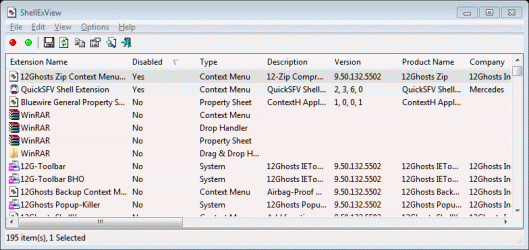
included snap of shellexview sorted on enable column showing my 2 guilty parties at top (note disable status of yes)

going to uninstall 12 ghosts and quick SFV and anticipate my problem will be gone.

 

Attachments

  • right click bad boys.GIF
    right click bad boys.GIF
    28.2 KB · Views: 262
Last edited:

My Computer My Computer

At a glance

Win 7 HPIntel Core 2 Quad CPU Q9300 @ 2.50GHz 4 cores...6GB
Computer Manufacturer/Model Number
Shuttle SP35P2 pro
OS
Win 7 HP
CPU
Intel Core 2 Quad CPU Q9300 @ 2.50GHz 4 cores 4 Logical proc
Motherboard
Phoenix Technologies LTD 6.00 PG, 11/2/2007
Memory
6GB
Sound Card
onboard Realtek HD Audio
Screen Resolution
1920x1080 and 1360 x 768
Hard Drives
in box 2 500Gb
in external box 1.5Tb
in external SATA box 2 x 1Tb
Mouse
Logitech Optical Trackman (as seen on NCIS)
Other Info
All this is in my 18 wheeler!
Glad your problem is fixed .. :D
Thank you very much for posting back
 

My Computer My Computer

At a glance

Windows 7 Ultimate - 64-bit | Windows 8 Pro -...Intel® Core™ i7 Processor 3,610QM (2.30Hz, 6M...8 GBNVIDIA® GeForce® GT 650M 2GB Graphics, Optimu...
Computer Manufacturer/Model Number
Samsung NP550P5C-S02IN
OS
Windows 7 Ultimate - 64-bit | Windows 8 Pro - 64-bit
CPU
Intel® Core™ i7 Processor 3,610QM (2.30Hz, 6MB L3 Cach
Memory
8 GB
Graphics Card(s)
NVIDIA® GeForce® GT 650M 2GB Graphics, Optimus™ techno
Sound Card
SoundAlive™ JBL 3 Speakers (With sub-Woofer)
Monitor(s) Displays
39.62cm (15.6) SuperBright 300nit HD+ LED Display
Screen Resolution
1,600 x 900, Anti-Reflective
Hard Drives
1TB S-ATA II Hard Drive (5,400RPM)
Drumtucker,

I'm happy to hear that you got it sorted. Thank you for posting back with your solution. :)
 

My Computer My Computer

At a glance

64-bit Windows 11 Pro for WorkstationsIntel i7-8700K OC'd to 5 GHz64 GB (4x16GB) G.SKILL TridentZ RGB DDR4 3600...ASUS ROG-STRIX-GTX1080TI-O11G-GAMING
Computer type
PC/Desktop
Computer Manufacturer/Model Number
Self built custom
OS
64-bit Windows 11 Pro for Workstations
CPU
Intel i7-8700K OC'd to 5 GHz
Motherboard
ASUS ROG Maximus XI Formula Z390
Memory
64 GB (4x16GB) G.SKILL TridentZ RGB DDR4 3600 MHz
Graphics Card(s)
ASUS ROG-STRIX-GTX1080TI-O11G-GAMING
Sound Card
Integrated
Monitor(s) Displays
2 x Samsung Odyssey G7 27"
Screen Resolution
2560x1440
Hard Drives
1TB Samsung 990 PRO M.2,
4TB Samsung 990 PRO PRO M.2,
TerraMaster F8 SSD Plus NAS
PSU
Seasonic Prime Titanium 850W
Case
Thermaltake Core P3
Cooling
Corsair Hydro H115i
Keyboard
Logitech wireless K800
Mouse
Logitech MX Master 4
Internet Speed
2 Gb/s Download and 100 Mb/s Upload
Antivirus
Malwarebyte Anti-Malware Premium
Browser
Google Chrome
Other Info
Logitech Z625 speaker system,
Logitech BRIO 4K Pro webcam,
HP Color LaserJet Pro MFP M477fdn,
APC SMART-UPS RT 1000 XL - SURT1000XLI,
Galaxy S23 Plus phone
an update to my solution above:

I have rebooted and NOT uninstalled either of the problem programs and right click manage still working. Now I have NOT RUN either of those programs either, so that could restart the problem...
 

My Computer My Computer

At a glance

Win 7 HPIntel Core 2 Quad CPU Q9300 @ 2.50GHz 4 cores...6GB
Computer Manufacturer/Model Number
Shuttle SP35P2 pro
OS
Win 7 HP
CPU
Intel Core 2 Quad CPU Q9300 @ 2.50GHz 4 cores 4 Logical proc
Motherboard
Phoenix Technologies LTD 6.00 PG, 11/2/2007
Memory
6GB
Sound Card
onboard Realtek HD Audio
Screen Resolution
1920x1080 and 1360 x 768
Hard Drives
in box 2 500Gb
in external box 1.5Tb
in external SATA box 2 x 1Tb
Mouse
Logitech Optical Trackman (as seen on NCIS)
Other Info
All this is in my 18 wheeler!
Drumtrucker,

Usually if you disable or remove the bad context menu item for it, it should be fine to run. Just be sure not to enable any option in the program that may add the context menu item back.
 

My Computer My Computer

At a glance

64-bit Windows 11 Pro for WorkstationsIntel i7-8700K OC'd to 5 GHz64 GB (4x16GB) G.SKILL TridentZ RGB DDR4 3600...ASUS ROG-STRIX-GTX1080TI-O11G-GAMING
Computer type
PC/Desktop
Computer Manufacturer/Model Number
Self built custom
OS
64-bit Windows 11 Pro for Workstations
CPU
Intel i7-8700K OC'd to 5 GHz
Motherboard
ASUS ROG Maximus XI Formula Z390
Memory
64 GB (4x16GB) G.SKILL TridentZ RGB DDR4 3600 MHz
Graphics Card(s)
ASUS ROG-STRIX-GTX1080TI-O11G-GAMING
Sound Card
Integrated
Monitor(s) Displays
2 x Samsung Odyssey G7 27"
Screen Resolution
2560x1440
Hard Drives
1TB Samsung 990 PRO M.2,
4TB Samsung 990 PRO PRO M.2,
TerraMaster F8 SSD Plus NAS
PSU
Seasonic Prime Titanium 850W
Case
Thermaltake Core P3
Cooling
Corsair Hydro H115i
Keyboard
Logitech wireless K800
Mouse
Logitech MX Master 4
Internet Speed
2 Gb/s Download and 100 Mb/s Upload
Antivirus
Malwarebyte Anti-Malware Premium
Browser
Google Chrome
Other Info
Logitech Z625 speaker system,
Logitech BRIO 4K Pro webcam,
HP Color LaserJet Pro MFP M477fdn,
APC SMART-UPS RT 1000 XL - SURT1000XLI,
Galaxy S23 Plus phone
Back
Top