Partition not showing up in "Computer" on left side

wickedfpoop

New member
Local time
6:27 PM
Messages
3
*Insert token disclaimer about not knowing if this is the correct forum for this* :D It looks like it so I'll go with it.

I've got a problem that popped up the other night when I decided I wanted to restore my system to a previous time due to a BSOD I received and had a feeling it was due to CCleaner.

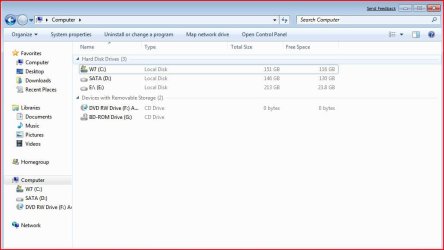
Regardless, I'm now unable to see my E: drive, as shown in the screenshot, on the left side of Explorer under Computer. It shows up fine in the main window there but not on the side. I can't even rename it, I had it named previously.

Any ideas?
 

Attachments
  • mycomputer.jpg
    mycomputer.jpg
    54.8 KB · Views: 537

My Computer My Computer

OS
Windows 7
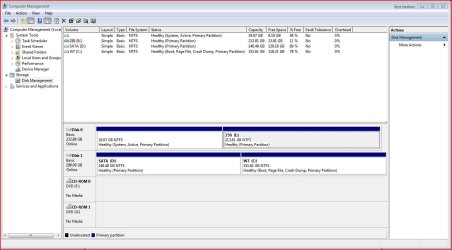
Could you post a screenshot of Disk Management ?

Click Start Orb>Rt click Computer>Manage>click Disk Management in the left pane of the new window.
 

My Computers My Computers

System One System Two

  • Computer type
    PC/Desktop
    OS
    7 X64
    CPU
    i5 8400
    Motherboard
    gigabyte b365m ds3h
    Memory
    2x8gb 3200mhz
    Hard Drives
    various
    PSU
    pure power 11 400w cm
    Case
    Coolermaster
    Cooling
    cryorig m9i
  • Computer type
    PC/Desktop
    OS
    7x64
    CPU
    g5400
    Motherboard
    ga b365m ds3h
    Memory
    8gb ddr4 2400
    PSU
    xfx pro 450w
Try renaming the E: drive in Disk Mgmt utility without the backslash and then refreshing the Computer view.
 

My Computer My Computer

Computer Manufacturer/Model Number
Personal Build
OS
Vista Ult 64bit - Windows 7 Ult 7264 64bit
CPU
Intel Core 2 Duo E6750
Motherboard
Asus Commando
Memory
4 G's Crucial Ballistix Tracer
Graphics Card(s)
BFG Nvidia 8800 GTS 340
Sound Card
Creative Sound Blaster X-FI Platinum FATAL1TY
Monitor(s) Displays
2-22" HP W2207 LCD
Screen Resolution
1920 x 1080
Hard Drives
3 x 500G WD Caviar SATA II
PSU
Enermax Noise Taker II 600W
Case
NZXT Lexa Classic (dual doored & windowed)
Cooling
Zalman 9700 CPU cooler - 4 x 120mm, 1 x 90mm fans
Keyboard
Logitech MX 5500
Mouse
Logitech MX Revolution
Internet Speed
Blazing...
Could you post a screenshot of Disk Management ?

Click Start Orb>Rt click Computer>Manage>click Disk Management in the left pane of the new window.

Should be attached.

Try renaming the E: drive in Disk Mgmt utility without the backslash and then refreshing the Computer view.

Tried that but it seems it's still showing up as E:\ in the main explorer window and isn't showing under the Computer section still.
 

Attachments

  • diskmanage.jpg
    diskmanage.jpg
    112.3 KB · Views: 370

My Computer My Computer

OS
Windows 7
Hi,

Try rt click E: and shrink it a little. Then Reboot.

See if that helps.
 

My Computers My Computers

System One System Two

  • Computer type
    PC/Desktop
    OS
    7 X64
    CPU
    i5 8400
    Motherboard
    gigabyte b365m ds3h
    Memory
    2x8gb 3200mhz
    Hard Drives
    various
    PSU
    pure power 11 400w cm
    Case
    Coolermaster
    Cooling
    cryorig m9i
  • Computer type
    PC/Desktop
    OS
    7x64
    CPU
    g5400
    Motherboard
    ga b365m ds3h
    Memory
    8gb ddr4 2400
    PSU
    xfx pro 450w
I'm now unable to see my E: drive, as shown in the screenshot, on the left side of Explorer under Computer.
Perhaps this helps:
In Windows Explorer: "Organize" -> "Folder and search options".
Then under "Navigation pane" mark
"Show all folders" and
"Automatically expand to current folder".
 

My Computer My Computer

OS
Windows XP and 7
wan3350, it looks like the issue I was having was a bit different from yours. From your SS it looks like you may need to format that drive unless you're dual booting and that's your other OS's partition. The 19.07 gig unlabeled partition on mine is my XP partition.

unawave, it's very odd that it worked but it looks like that did it. :D Thanks!

It's not exactly how I wanted it to look so I turned those options off and now it's showing that it did previously.
 

My Computer My Computer

OS
Windows 7
Back
Top