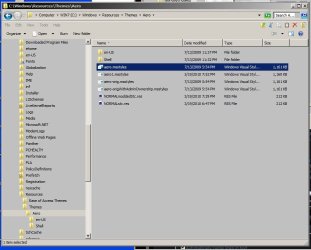
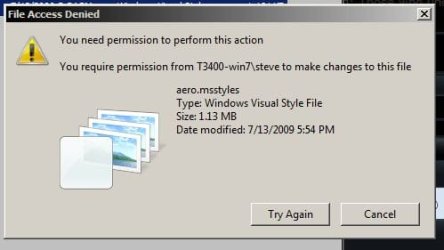
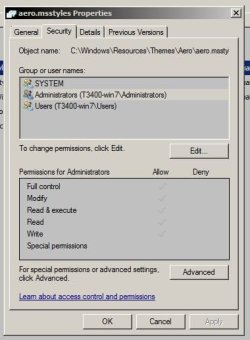
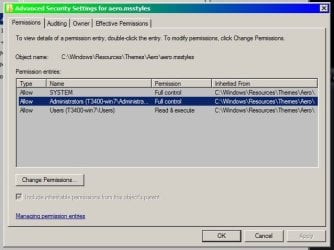
Brink has written an excellent tutorial on this, however, for those of you who prefer to "roll your own":
Take Ownership of file - Vista Forums
Taking Ownership of Files and Folders
As an administrator you can take ownership of a file or folder as follows:
1. In Windows Explorer, rt-click on "properties" for the file or folder.
2. Security tab | Advanced
3. Owner tab| click Edit
4. In the Change Owner To list, select the new owner. To take ownership of all subfolders and files within the folder, select Replace Owner On Subcontainers And Objects option.
5. OK | OK
Assigning Ownership
As administrator or the current owner, you can assign ownership to another user or group as follows:
1. In Windows Explorer, rt-click on "Properties" for the file or folder.
2. Security tab | Advanced
3. Owner tab | Edit
4. Click Other Users Or Groups
5. Type the name of a user or a group | click Check Names | Choose the name you want if its not already filled in | OK
6. From the Change Owner list, select the new owner. For a folder, select Replace Owner On Subcontainers and Objects to assign ownership of all subfolders and files within the folder.
7. Ok | OK
karl
Take Ownership of file - Vista Forums
Taking Ownership of Files and Folders
As an administrator you can take ownership of a file or folder as follows:
1. In Windows Explorer, rt-click on "properties" for the file or folder.
2. Security tab | Advanced
3. Owner tab| click Edit
4. In the Change Owner To list, select the new owner. To take ownership of all subfolders and files within the folder, select Replace Owner On Subcontainers And Objects option.
5. OK | OK
Assigning Ownership
As administrator or the current owner, you can assign ownership to another user or group as follows:
1. In Windows Explorer, rt-click on "Properties" for the file or folder.
2. Security tab | Advanced
3. Owner tab | Edit
4. Click Other Users Or Groups
5. Type the name of a user or a group | click Check Names | Choose the name you want if its not already filled in | OK
6. From the Change Owner list, select the new owner. For a folder, select Replace Owner On Subcontainers and Objects to assign ownership of all subfolders and files within the folder.
7. Ok | OK
karl
Last edited by a moderator:
My Computer
At a glance
MS Windows 7 Ultimate SP1 64-bitAMD A10-4600M6.00 GB Dual-Channel DDR3 @ 798MHz (11-11-12-28)AMD Radeon HD 7660G
- Computer Manufacturer/Model Number
- Toshiba Satellite S875D-S7239 laptop
- OS
- MS Windows 7 Ultimate SP1 64-bit
- CPU
- AMD A10-4600M
- Motherboard
- AMD Pumori (Socket FT1)
- Memory
- 6.00 GB Dual-Channel DDR3 @ 798MHz (11-11-12-28)
- Graphics Card(s)
- AMD Radeon HD 7660G
- Sound Card
- High Definition Audio Device
- Monitor(s) Displays
- Generic PnP Monitor (1600x900@60Hz)
- Screen Resolution
- 1600x900@60Hz
- Hard Drives
- SSD 119GB Corsair CSSD-V128GB2 ATA Device
- Keyboard
- Standard PS/2 Keyboard
- Mouse
- HP Wireless Optical Mobile Mouse Model FHA-3410
- Internet Speed
- What the local pub, local coffee shop offers.
- Other Info
- Optical Drive:MATSHITA BD-CMB UJ160B ATA Device
Also have an Asus ha1002xp netbook with Win 7 Ultimate installed.