What's the point of a partition?

Valor D

New member
Power User
Local time
11:19 PM
Messages
80
I bought a new DELL laptop with Win 7, I-3 Processor, 4 GB RAM and 288 GB of memory. I soon discovered that there was some stupid "partition" separating my harddrive into 2 parts. The part where the O.S. and all the programs and everything I saved to had only about 50 GB of memory on it. The other part, which just sat there doing nothing at all, had the majority of the memory, 238 GB. My question is, what the hell were they thinking when they did this? Why would there be a partition to begin with? Ok, I know the operative answer. It's to protect and backup your data in case a virus gets in. But, isn't that what data/backup disks are for? Dell pcs come with a backup Win 7 disk in case u need to reinstall, therefore it's pointless. Also, why the hell would the O.S. and all the memory be saving to the smaller half of the harddrive, while the majority of your data space is isolated and unusable? Seems like they did that totally backwards! Within the first week after I'd bought my new laptop, the speed and performance had slowed down in the extreme, because most of the 50 GB of available memory was already full. Therefore, I took it to the Geeksquad, and had them remove that stupid partition. Thus, problem solved. My harddrive space is now 288 GB, and moving with the speed that a new computer should. :)
 

My Computer My Computer

Computer Manufacturer/Model Number
DELL Inspiron 1564
OS
Windows 7 64 bit
CPU
Intel Core Processor i3-330M
Motherboard
4 GB
Memory
320 GB Harddrive
Graphics Card(s)
Integrated Intel Graphics Media Accelerator HD
Sound Card
Realtek HD Audio
Keyboard
Standard PS/2
Mouse
DELL Touchpad
if i were you i would have taken two different approaches, 1 - asked here how two remove a partition, it is pretty simple. 2 - which is really the first option, got in touch with dell, and asked them what happened, their service is great, and right on the ball, they have a great chat service.
hard to believe they would mess up so badly. maybe there is a installed program that it's necessary to have the above partition setup.
 

My Computer My Computer

Computer type
PC/Desktop
Computer Manufacturer/Model Number
surface pro 1
OS
windows 8.1 pro
CPU
Intel Core i5
Memory
4096 MB
Screen Resolution
1920 x 1080 x 59 hertz
Partitioning strategy is largely a matter of personal preference but some caveats apply.

1) A hard drive ith multiple partitions lowers your drive's access time, providing you with a more responsive system. If you create a partition at the outer edge of your drive (the first one, say C: ), and install your OS and apps there, while using the inner for storing data files that don't require that frequent access, you'll restrict your drive's seeks to the fastest part of the drive. OTOH, If you install your OS on a single, large partition, over a period of time, system & program files may end up at the far end of the drive. When this happens, system and program files will take longer to access, and result in a less responsive system.

2) Multiple partitions allow you to save your data files if you need to reformat your system. Right now, you have a single large partition and you say you'll use the disks you got to reinstall. Now, when you reinstall, all your data which you may have spent hours and hours working over will be lost. UNLESS you back it all up to external media first.

3) Multiple partitions allows you to defrag only those partitions that need defragging. This saves wear and tear on your drive. Defragging a 50 gb partition would also take much less time than a 320 gb one esp. if you move around your data or delete and reinstall frequently.

By the way, memory and hard drive space are 2 different things, you need to be careful what exactly you are referring to.
 

My Computer My Computer

Computer Manufacturer/Model Number
Too many to describe...
OS
Windows 7 x64 pro/ Windows 7 x86 Pro/ XP SP3 x86
Bill2,

Very well put and written. Hopefully the OP will read and learn the importance of how to work with a HDD.
 

My Computer My Computer

Computer Manufacturer/Model Number
HP Pavilion a4302f
OS
Win 7 Pro x64, VM Win XP, Win7 Pro Sandbox, Kubuntu 11
CPU
AMD Athlon(tm) II X4 640 @ 3.0 Gbz
Memory
12GB 1066MHz DDR3 SDRAM - 2x4GB, 2x2GB
Graphics Card(s)
ATI Radeon HD 4350 HD Graphics/Audio with 512MB
Sound Card
Realtek High Definition Audio
Monitor(s) Displays
1. Dell 23" SP2307, 2. Mitsublishi 40" HDTV, Hannspree 25"
Screen Resolution
1. 2048x1152, 2. 1920-1080, 3. 1920x1200
Hard Drives
Int: 1 120 Gig SSD i
1 - 2.5" 500 USB External HDD
1 -1 Tb USB External HDD
Case
Mid Tower
Cooling
Standard Fans - 5 fans (very quiet)
Keyboard
Microsoft Wireless 2000
Mouse
Microsoft Wireless Mouse 5000
Internet Speed
10 Mbit (realistically 500 Kbit - 1.2 Mbit)
Other Info
Speakers - Bose Desktop (Excellent Sound)
1 external CD|DVD\Blue-ray Recorders/Players (Sony)
Hello Valor D, welcome to Seven Forums!


Hopefully the partition that you had the "Geeksquad" remove was not the only option you had to use the "Factory Recovery" program to recover your PC in case of failure as some manufactures only send you a disk to access the recovery partition and now you won't have that available to you.
 

My Computer My Computer

Computer Manufacturer/Model Number
* BFK Customs *
OS
W 7 64-bit Ultimate
CPU
Intel Q9550 Yorkfield
Motherboard
ASUS P5Q Pro
Memory
8GB Dominator 8500C5D
Graphics Card(s)
ATI : XFX 5870
Sound Card
Realtek HD Audio 7-1
Monitor(s) Displays
1x 47" LCD HDMI & 3x 26" LCD HDMI
Screen Resolution
1920x1080P & 1920x1200
Hard Drives
1x 80GB Intel X25-M G2 SSD : 1x 500GB & 1x 640GB WD Caviar Black(s)
PSU
Corsair 620HX
Case
Cooler Master RC-690
Cooling
Tuniq Tower 120, 2x 140mm and 3x 120mm case fans
Keyboard
Microsoft 500
Mouse
Razer Diamondback 3G
Internet Speed
14 Mb/s
Other Info
1x Koutech 3Gb/s SATA HDD Hot Swap Rack
I have just checked my new Dell desktop which I assume is set up similar to a laptop regarding the partitions. One partition is the OEM, one is the Recovery and one is the remainder of the DD space for everything else. Seems perfectly logical to me. I have the Win 7 disc for re-installing if required but the recovery section would be tried before a new install surely. If any one of those partitions is removed then I think Valor D could be in trouble in the future. I would have checked with Dell first, especially as it is a new machine and presumably still under a service agreement.
 

My Computer My Computer

Computer type
PC/Desktop
OS
Microsoft Windows 7 Home Premium 64-bit 7601 Multiprocessor Free Service Pack 1
CPU
Intel(R) Core(TM) i7-3770 CPU @ 3.40GHz
Motherboard
ASUSTeK COMPUTER INC. P8H77-M
Memory
8.00 GB
Graphics Card(s)
Intel(R) HD Graphics 4000
Sound Card
On Board
Monitor(s) Displays
Dell 24"
Screen Resolution
1920 x 1080
Hard Drives
(1) INTEL SSDSC2CT180A3 ATA Device (2) ST500DM002-1BD142 ATA Device (3) WDC WD3200AAKS-75L9A0 ATA Device (4) Generic- Compact Flash USB Device (5) Generic- MS/MS-Pro USB Device (6) Generic- SD/MMC USB Device (7) Generic- SM/xD-Picture USB
PSU
500w Corsair
Case
Cooler Master
Cooling
3 Fans
Keyboard
Logitech MK300
Mouse
Logitech WOM
Internet Speed
75Mb
Antivirus
Norton 360
Browser
Firefox, Opera, IE
Re:

I have just checked my new Dell desktop which I assume is set up similar to a laptop regarding the partitions. One partition is the OEM, one is the Recovery and one is the remainder of the DD space for everything else. Seems perfectly logical to me. I have the Win 7 disc for re-installing if required but the recovery section would be tried before a new install surely. If any one of those partitions is removed then I think Valor D could be in trouble in the future. I would have checked with Dell first, especially as it is a new machine and presumably still under a service agreement.

Yeah, the new concept of having 3/4 of your harddrive reserved for "recovery" is seriously stupid, in my opinion. As I said, I have the Windows 7 reinstall disk, and any other data I have saved on backup disks. I did discuss this problem with the Geeksquad prior to the final decision of removing the partition, yes, of course. They agreed that this setup was a seriously stupid one on DELL's part, and we discussed a few different options; most of them were overly complicated and not very good solutions. This seemed to be the best one.
 

My Computer My Computer

Computer Manufacturer/Model Number
DELL Inspiron 1564
OS
Windows 7 64 bit
CPU
Intel Core Processor i3-330M
Motherboard
4 GB
Memory
320 GB Harddrive
Graphics Card(s)
Integrated Intel Graphics Media Accelerator HD
Sound Card
Realtek HD Audio
Keyboard
Standard PS/2
Mouse
DELL Touchpad
The only Geeksquad I know of in the UK is supported by the Carphone Warehouse who own that brilliant ISP "Talk Talk". I need say no more :(
 

My Computer My Computer

Computer type
PC/Desktop
OS
Microsoft Windows 7 Home Premium 64-bit 7601 Multiprocessor Free Service Pack 1
CPU
Intel(R) Core(TM) i7-3770 CPU @ 3.40GHz
Motherboard
ASUSTeK COMPUTER INC. P8H77-M
Memory
8.00 GB
Graphics Card(s)
Intel(R) HD Graphics 4000
Sound Card
On Board
Monitor(s) Displays
Dell 24"
Screen Resolution
1920 x 1080
Hard Drives
(1) INTEL SSDSC2CT180A3 ATA Device (2) ST500DM002-1BD142 ATA Device (3) WDC WD3200AAKS-75L9A0 ATA Device (4) Generic- Compact Flash USB Device (5) Generic- MS/MS-Pro USB Device (6) Generic- SD/MMC USB Device (7) Generic- SM/xD-Picture USB
PSU
500w Corsair
Case
Cooler Master
Cooling
3 Fans
Keyboard
Logitech MK300
Mouse
Logitech WOM
Internet Speed
75Mb
Antivirus
Norton 360
Browser
Firefox, Opera, IE
Hello Mitchell.


Here in the US it is a part of a big brick and mortar store chain, but I wouldn't put much stock in their advise as most of them are, shall we say, not very knowledgeable.
 

My Computer My Computer

Computer Manufacturer/Model Number
* BFK Customs *
OS
W 7 64-bit Ultimate
CPU
Intel Q9550 Yorkfield
Motherboard
ASUS P5Q Pro
Memory
8GB Dominator 8500C5D
Graphics Card(s)
ATI : XFX 5870
Sound Card
Realtek HD Audio 7-1
Monitor(s) Displays
1x 47" LCD HDMI & 3x 26" LCD HDMI
Screen Resolution
1920x1080P & 1920x1200
Hard Drives
1x 80GB Intel X25-M G2 SSD : 1x 500GB & 1x 640GB WD Caviar Black(s)
PSU
Corsair 620HX
Case
Cooler Master RC-690
Cooling
Tuniq Tower 120, 2x 140mm and 3x 120mm case fans
Keyboard
Microsoft 500
Mouse
Razer Diamondback 3G
Internet Speed
14 Mb/s
Other Info
1x Koutech 3Gb/s SATA HDD Hot Swap Rack
Yeah, the new concept of having 3/4 of your harddrive reserved for "recovery" is seriously stupid, in my opinion. As I said, I have the Windows 7 reinstall disk, and any other data I have saved on backup disks. I did discuss this problem with the Geeksquad prior to the final decision of removing the partition, yes, of course. They agreed that this setup was a seriously stupid one on DELL's part, and we discussed a few different options; most of them were overly complicated and not very good solutions. This seemed to be the best one.

By way of agreeing with Bill2...

I always partition my drives... My main workstation looks like this...

Capture.JPG


The reason for this is that should anything happen in the system drive, the chances of my Data and Archive drives being affected is quite low. But you need a way to conveniently access these drives...

The Archive drive is simple... I just made a desktop link for it and manage the files there manually.

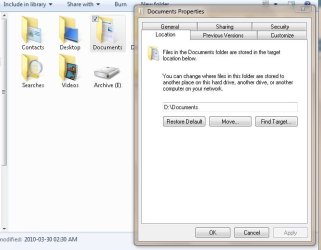
The Data drive is a wee bit more complicated. What I did there was to make the folders I needed (Music, Video, Pictures, Electronics, Programming, etc.) and then I relocated the "My Whatever" folders from my user account to the data drive...

Capture2.JPG

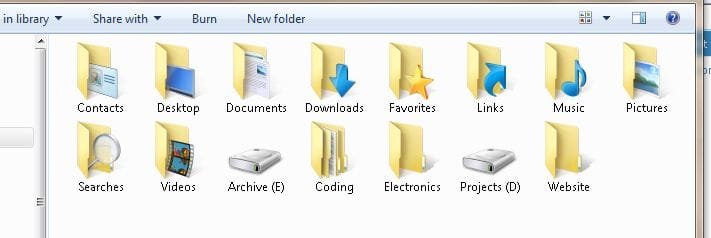
Next I Dragged my username out of the start menu and onto the desktop, which creates a shortcut to my home folder. In that folder I also created extra shortcuts to the various folders that were not "My Whatever" and I use my home folder as a launch point for the entire system....

Capture3.JPG

The joy of this is, as Bill2 points out, that you have a very easily managed system, with tons of space available and far easier maintenance. I use an external HDD to backup my files with Robocopy, which only copies changed files. My Projects disk is changing all the time as I work on this and that... The archive disk almost never changes except to add new stuff to it. Backup and defrag are something of a non-event on a system like this.

It is entirely likely that Dell (etc) provided you with a system that supports this kind of file strategy but could not fully implement it at the factory because they didn't know what username you would add to the system...

In any event it is a darned good idea to keep your OS, changing data and static data separate...
 

My Computer My Computer

Computer Manufacturer/Model Number
Homebrew
OS
XP Pro SP3 X86 / Win7 Pro X86
CPU
Amd 64 x2 4200 (2.4ghz)
Motherboard
Asus M2N-MX SE Plus
Memory
Kingston DDR2 800 2gb
Graphics Card(s)
Nvidia GF-8400
Sound Card
Realtek on Motherboard
Monitor(s) Displays
Acer x-193bw
Screen Resolution
1440 x 900
Hard Drives
Western Digital 500g
PSU
350watt In-Win
Case
In-Win
Cooling
Air
Keyboard
yes
Mouse
yes
Internet Speed
5mpbs
Other Info
Also ASRock ION 330 as HTPC (on XP).
Acer Aspire as GP netbook (on XP).
Hello Mitchell.


Here in the US it is a part of a big brick and mortar store chain, but I wouldn't put much stock in their advise as most of them are, shall we say, not very knowledgeable.
Similar situation here in the UK. I like your "delicate" choice of words "shall we say, not very knowledgeable"
 

My Computer My Computer

Computer type
PC/Desktop
OS
Microsoft Windows 7 Home Premium 64-bit 7601 Multiprocessor Free Service Pack 1
CPU
Intel(R) Core(TM) i7-3770 CPU @ 3.40GHz
Motherboard
ASUSTeK COMPUTER INC. P8H77-M
Memory
8.00 GB
Graphics Card(s)
Intel(R) HD Graphics 4000
Sound Card
On Board
Monitor(s) Displays
Dell 24"
Screen Resolution
1920 x 1080
Hard Drives
(1) INTEL SSDSC2CT180A3 ATA Device (2) ST500DM002-1BD142 ATA Device (3) WDC WD3200AAKS-75L9A0 ATA Device (4) Generic- Compact Flash USB Device (5) Generic- MS/MS-Pro USB Device (6) Generic- SD/MMC USB Device (7) Generic- SM/xD-Picture USB
PSU
500w Corsair
Case
Cooler Master
Cooling
3 Fans
Keyboard
Logitech MK300
Mouse
Logitech WOM
Internet Speed
75Mb
Antivirus
Norton 360
Browser
Firefox, Opera, IE
By way of agreeing with Bill2...

I always partition my drives... My main workstation looks like this...

View attachment 65510


The reason for this is that should anything happen in the system drive, the chances of my Data and Archive drives being affected is quite low. But you need a way to conveniently access these drives...

The Archive drive is simple... I just made a desktop link for it and manage the files there manually.

The Data drive is a wee bit more complicated. What I did there was to make the folders I needed (Music, Video, Pictures, Electronics, Programming, etc.) and then I relocated the "My Whatever" folders from my user account to the data drive...

View attachment 65511

Next I Dragged my username out of the start menu and onto the desktop, which creates a shortcut to my home folder. In that folder I also created extra shortcuts to the various folders that were not "My Whatever" and I use my home folder as a launch point for the entire system....

View attachment 65513

That sounds like a plan to me. :) 15GB for the System Disk? I guess your PageFile is elsewhere too.
 

My Computer My Computer

Computer type
PC/Desktop
Computer Manufacturer/Model Number
Scan 3XS P55 liteDAW
OS
Windows Home Premium (64)
CPU
Intel Core i7 860
Motherboard
Gigabyte GA-P55A-UD4
Memory
8GB (4x2GB) Corsair TwinX XMS3
Graphics Card(s)
1GB Gainward 9500 GT
Sound Card
M-Audio Delta 66
Monitor(s) Displays
Acer v223wBBd
Screen Resolution
1680 x 1050
Hard Drives
1 x 500 GB WD Barracuda (OS+Docs)
2 x 1TB Samsung Spinpoint F3 (Data)
PSU
Enermax EMD625AWT II - 625W Enermax Modu82+ II
Case
Fractal Design Define R2 Black
Cooling
Prolima Megahalems Super 6 Heatpipe Tower Cooler
Keyboard
Microsoft Digital Media Pro
Mouse
Belkin Optical Ergo
Internet Speed
8 Mbps nominal (14.9 achieved !)
Other Info
Digital Audio Workstation
By way of agreeing with Bill2...

I always partition my drives... My main workstation looks like this...

View attachment 65510


The reason for this is that should anything happen in the system drive, the chances of my Data and Archive drives being affected is quite low. But you need a way to conveniently access these drives...

The Archive drive is simple... I just made a desktop link for it and manage the files there manually.

The Data drive is a wee bit more complicated. What I did there was to make the folders I needed (Music, Video, Pictures, Electronics, Programming, etc.) and then I relocated the "My Whatever" folders from my user account to the data drive...

View attachment 65511

Next I Dragged my username out of the start menu and onto the desktop, which creates a shortcut to my home folder. In that folder I also created extra shortcuts to the various folders that were not "My Whatever" and I use my home folder as a launch point for the entire system....

View attachment 65513

That sounds like a plan to me. :) 15GB for the System Disk? I guess your PageFile is elsewhere too.

Ok, good point... a small note about my system, just to clarify... I don't use pagefiles (as in turned off), I don't use automatic updates (Service Packs will do), I don't use System Restore, and I removed a whole lot of crap (Voice recognition, natural language search, media center, windows media player, language support, etc) from the system before it even hit the drive.

For you're average W7 Pro or Ultimate install I would recommend 50gb in the System Partition....
 

My Computer My Computer

Computer Manufacturer/Model Number
Homebrew
OS
XP Pro SP3 X86 / Win7 Pro X86
CPU
Amd 64 x2 4200 (2.4ghz)
Motherboard
Asus M2N-MX SE Plus
Memory
Kingston DDR2 800 2gb
Graphics Card(s)
Nvidia GF-8400
Sound Card
Realtek on Motherboard
Monitor(s) Displays
Acer x-193bw
Screen Resolution
1440 x 900
Hard Drives
Western Digital 500g
PSU
350watt In-Win
Case
In-Win
Cooling
Air
Keyboard
yes
Mouse
yes
Internet Speed
5mpbs
Other Info
Also ASRock ION 330 as HTPC (on XP).
Acer Aspire as GP netbook (on XP).
For you're average W7 Pro or Ultimate install I would recommend 50gb in the System Partition....
Mine is 71gb but then I don't use this drive for any data storage so space is not a problem. I don't have that many space hungry programs and no Games at all. Mainly Video and still image editing software.
 

My Computer My Computer

Computer type
PC/Desktop
OS
Microsoft Windows 7 Home Premium 64-bit 7601 Multiprocessor Free Service Pack 1
CPU
Intel(R) Core(TM) i7-3770 CPU @ 3.40GHz
Motherboard
ASUSTeK COMPUTER INC. P8H77-M
Memory
8.00 GB
Graphics Card(s)
Intel(R) HD Graphics 4000
Sound Card
On Board
Monitor(s) Displays
Dell 24"
Screen Resolution
1920 x 1080
Hard Drives
(1) INTEL SSDSC2CT180A3 ATA Device (2) ST500DM002-1BD142 ATA Device (3) WDC WD3200AAKS-75L9A0 ATA Device (4) Generic- Compact Flash USB Device (5) Generic- MS/MS-Pro USB Device (6) Generic- SD/MMC USB Device (7) Generic- SM/xD-Picture USB
PSU
500w Corsair
Case
Cooler Master
Cooling
3 Fans
Keyboard
Logitech MK300
Mouse
Logitech WOM
Internet Speed
75Mb
Antivirus
Norton 360
Browser
Firefox, Opera, IE
Hello Valor D, welcome to Seven Forums!


Hopefully the partition that you had the "Geeksquad" remove was not the only option you had to use the "Factory Recovery" program to recover your PC in case of failure as some manufactures only send you a disk to access the recovery partition and now you won't have that available to you.

he can always make his own recovery disc.
 

My Computer My Computer

Computer Manufacturer/Model Number
Seanix Desktop PC
OS
Windows 7 Ultimate 32 bit
CPU
Intel Core 2 Duo CPU E4500 2.20 GHz
Memory
1.99 GB
Graphics Card(s)
Intel G33/G31 Express Chipset Family (256 MB)
Sound Card
Realtek ALC888/1200
Monitor(s) Displays
DELL
Screen Resolution
1280 X 1024
Hard Drives
320GB Internal
200GB External
Case
Seanix
Keyboard
Seanix USB Keyboard
Mouse
Seanix USB Keyboard
Internet Speed
Broadband
Other Info
Getting close to 3 years old.
Hello Valor D, welcome to Seven Forums!


Hopefully the partition that you had the "Geeksquad" remove was not the only option you had to use the "Factory Recovery" program to recover your PC in case of failure as some manufactures only send you a disk to access the recovery partition and now you won't have that available to you.

he can always make his own recovery disc.
http://www.sevenforums.com/tutorials/2083-system-repair-disc-create.html?ltr=S
 

My Computer My Computer

Computer type
PC/Desktop
Computer Manufacturer/Model Number
Dell XPS 420
OS
Windows 10, Home Clean Install
CPU
Intel Core2 processsor Q8200(2.33Ghz 1333FSB) Quad Core Tech
Motherboard
Dell
Memory
6 gb
Graphics Card(s)
ATI Radeon 256MB HD3650
Sound Card
Intergrated 7.1 Channel Audio
Monitor(s) Displays
Dell SP2009W 20"
Hard Drives
640 GB Serial ATA Hard drive
Cooling
Fan
Keyboard
Dell USB Keyboard
Mouse
Dell Premium Optical USB
Internet Speed
DSL 2.85
Hello Valor D, welcome to Seven Forums!


Hopefully the partition that you had the "Geeksquad" remove was not the only option you had to use the "Factory Recovery" program to recover your PC in case of failure as some manufactures only send you a disk to access the recovery partition and now you won't have that available to you.

he can always make his own recovery disc.


Not if he's deleted the partition that is needed to create the "Factory Recovery" disks; unless you mean this but that's not even the same thing at all, it'll only repair an installed OS not install an OS.

http://www.sevenforums.com/tutorials/2083-system-repair-disc-create.html?ltr=S
 

My Computer My Computer

Computer Manufacturer/Model Number
* BFK Customs *
OS
W 7 64-bit Ultimate
CPU
Intel Q9550 Yorkfield
Motherboard
ASUS P5Q Pro
Memory
8GB Dominator 8500C5D
Graphics Card(s)
ATI : XFX 5870
Sound Card
Realtek HD Audio 7-1
Monitor(s) Displays
1x 47" LCD HDMI & 3x 26" LCD HDMI
Screen Resolution
1920x1080P & 1920x1200
Hard Drives
1x 80GB Intel X25-M G2 SSD : 1x 500GB & 1x 640GB WD Caviar Black(s)
PSU
Corsair 620HX
Case
Cooler Master RC-690
Cooling
Tuniq Tower 120, 2x 140mm and 3x 120mm case fans
Keyboard
Microsoft 500
Mouse
Razer Diamondback 3G
Internet Speed
14 Mb/s
Other Info
1x Koutech 3Gb/s SATA HDD Hot Swap Rack
I haven't seen the drive, obviously, I assume if you have a recovery partition it is an additional one of 10gb or less.

It seems very sensible it was pre partitioned for you in that way.

As many have pointed out - there are lots of advantages in having the operating system ( and installed apps.) on one partition - and your data on a separate partition(s).

Much easier, quicker, and less work for the drive when doing maintenance tasks- defrag, checkdisk, etc.

Also much easier and quicker to make backup images.

Also massively better if you need to reinstall/restore an image. Your data partitions should remain untouched.


You might want to recreate that partition , no need to pay someone to do it , it's pretty easy.

Anyone here will explain how.
 

My Computers My Computers

System One System Two

  • Computer type
    PC/Desktop
    OS
    7 X64
    CPU
    i5 8400
    Motherboard
    gigabyte b365m ds3h
    Memory
    2x8gb 3200mhz
    Hard Drives
    various
    PSU
    pure power 11 400w cm
    Case
    Coolermaster
    Cooling
    cryorig m9i
  • Computer type
    PC/Desktop
    OS
    7x64
    CPU
    g5400
    Motherboard
    ga b365m ds3h
    Memory
    8gb ddr4 2400
    PSU
    xfx pro 450w
Hello Valor D, welcome to Seven Forums!


Hopefully the partition that you had the "Geeksquad" remove was not the only option you had to use the "Factory Recovery" program to recover your PC in case of failure as some manufactures only send you a disk to access the recovery partition and now you won't have that available to you.

he can always make his own recovery disc.

Not if the recovery partition is gone.
 

My Computer My Computer

Computer Manufacturer/Model Number
Homebrew
OS
XP Pro SP3 X86 / Win7 Pro X86
CPU
Amd 64 x2 4200 (2.4ghz)
Motherboard
Asus M2N-MX SE Plus
Memory
Kingston DDR2 800 2gb
Graphics Card(s)
Nvidia GF-8400
Sound Card
Realtek on Motherboard
Monitor(s) Displays
Acer x-193bw
Screen Resolution
1440 x 900
Hard Drives
Western Digital 500g
PSU
350watt In-Win
Case
In-Win
Cooling
Air
Keyboard
yes
Mouse
yes
Internet Speed
5mpbs
Other Info
Also ASRock ION 330 as HTPC (on XP).
Acer Aspire as GP netbook (on XP).
I believe Dell still supply a reinstallation dvd. I have one from a while back.
 

My Computers My Computers

System One System Two

  • Computer type
    PC/Desktop
    OS
    7 X64
    CPU
    i5 8400
    Motherboard
    gigabyte b365m ds3h
    Memory
    2x8gb 3200mhz
    Hard Drives
    various
    PSU
    pure power 11 400w cm
    Case
    Coolermaster
    Cooling
    cryorig m9i
  • Computer type
    PC/Desktop
    OS
    7x64
    CPU
    g5400
    Motherboard
    ga b365m ds3h
    Memory
    8gb ddr4 2400
    PSU
    xfx pro 450w
Back
Top