Internal SATA drives are treated as removable drives

toolbox1234

New member
Member
Local time
11:56 AM
Messages
16
On my Windoiws 7 Ultimate desktop PC, all my SATA hard drives are show up as removable from day 1. This is not a big problem but an anonyance. When I click "Safely Remove Hardware and Eject Media", all my fixed drives are listed along with the USB drive. Anyway to change the drive type of my internal drives to the proper type?
Thanks.
 

My Computer My Computer

At a glance

Win 7 Ultimate 32bit
OS
Win 7 Ultimate 32bit
mine does the same thing. each of my partitions show up.
 

My Computer My Computer

At a glance

Windows 7 64-bit HomeIntel Core i7-870 Lynnfield 2.93 Ghz8GB 4x2 A-Data 1333 MhzHIS Radeon HD 5850 1GB
Computer type
PC/Desktop
Computer Manufacturer/Model Number
My First Build
OS
Windows 7 64-bit Home
CPU
Intel Core i7-870 Lynnfield 2.93 Ghz
Motherboard
Asus P7P55D-E Pro
Memory
8GB 4x2 A-Data 1333 Mhz
Graphics Card(s)
HIS Radeon HD 5850 1GB
Sound Card
Onboard
Monitor(s) Displays
Dell S2440L 24"
Screen Resolution
1080p
Hard Drives
120 GB Intel X25-M SATA Solid State Drive ///
1 TB Western Digital Caviar Black SATA 6gb/s 7200rpm Drive
PSU
Corsair 650TX 650 Watt
Case
Antec Three Hundred
Cooling
Stock Intel /// 4 Antec Case Fans /// NZXT Sentry-2
Keyboard
Logitech LX 710
Mouse
Logitech LX 710
Other Info
LG Blu-Ray Drive
I think that is a function of the drivers. Did you install the manufacturers supplied drivers of go with the default windows drivers? To be honest I just guessing, my SATA drive doesn't show up as removable. My motherboard also doesn't have any esata ports, it that matters.
 

My Computer My Computer

At a glance

Windows 10 Education 64 bitAMD Phenom II X4 980 Black Edition Deneb 3.7GHz8GB 4GBx2 Kingston PC10600 DDR3 1333 MemoryZotac NVIDIA Geforce GT640 2 Gig DDR3 PCIe
Computer type
PC/Desktop
Computer Manufacturer/Model Number
Home Built
OS
Windows 10 Education 64 bit
CPU
AMD Phenom II X4 980 Black Edition Deneb 3.7GHz
Motherboard
Asus M4N68T-M V2 µATX Motherboard
Memory
8GB 4GBx2 Kingston PC10600 DDR3 1333 Memory
Graphics Card(s)
Zotac NVIDIA Geforce GT640 2 Gig DDR3 PCIe
Sound Card
VIA VT1708s High Definition Audio 8-channel Onboard
Monitor(s) Displays
22" LG E2242 1080p and 2 19" I-INC AG191D
Screen Resolution
1280x1024 - 1920x1080 - 1280x1024
Hard Drives
Crucial M100 256 GB SSD and 500 GB WD Blue SATA
PSU
Thermaltake TR 620
Case
Power Up Black ATX Mid-Tower Case
Cooling
Stock heatsink and fan
Keyboard
Logitech Wireless K350 Wave
Mouse
Logitech Wireless M570 Trackman Wheel
Internet Speed
80 Mbps Down 30 Mbps Up
Antivirus
Windows Defender
Browser
Internet Explorer 11
Other Info
HP DVD1040e Lightscribe - External USB2
External

Made me curious, I checked mine. Only one drive show up out of three. It has the MS driver. I have external ports and the one drive hooked to them does't show.
 

My Computer My Computer

At a glance

win 7 X64 Ultimate SP1I3770KG Skill F3-14900CL9-4GBXL x 4NVIDIA GeForce GTX670 + Intel 4000
Computer Manufacturer/Model Number
BGC (Bob's Garage Crew)
OS
win 7 X64 Ultimate SP1
CPU
I3770K
Motherboard
Asus P8Z77-V Deluxe
Memory
G Skill F3-14900CL9-4GBXL x 4
Graphics Card(s)
NVIDIA GeForce GTX670 + Intel 4000
Sound Card
Realtek HD 5.1 (MOB)
Monitor(s) Displays
Asus VW224T (1)
Screen Resolution
1920 x 1080
Hard Drives
SATA Corsair Force GT 2.5" 180GB (System) Sata 3
OCZ Vertex3 120GB
OCZ Vertex 2 120GB 2.5" SATA II
ST31000524AS 1000.2GB
WD15EARS (External)
PSU
CoolerMaster 1000 Watt
Case
CoolerMaster HAF X
Cooling
CPU -- CoolerMaster 520N
Keyboard
MS Wireless 3000 V2
Mouse
MS Wireless 3000 V2
Internet Speed
Cable
Antivirus
Norton Internet Security
Browser
IE9
Other Info
AMI Bios 1805
OC'd 3%
id rather just deal with it than start messing with the registry, but thats just me...
 

My Computer My Computer

At a glance

Windows 7 64-bit HomeIntel Core i7-870 Lynnfield 2.93 Ghz8GB 4x2 A-Data 1333 MhzHIS Radeon HD 5850 1GB
Computer type
PC/Desktop
Computer Manufacturer/Model Number
My First Build
OS
Windows 7 64-bit Home
CPU
Intel Core i7-870 Lynnfield 2.93 Ghz
Motherboard
Asus P7P55D-E Pro
Memory
8GB 4x2 A-Data 1333 Mhz
Graphics Card(s)
HIS Radeon HD 5850 1GB
Sound Card
Onboard
Monitor(s) Displays
Dell S2440L 24"
Screen Resolution
1080p
Hard Drives
120 GB Intel X25-M SATA Solid State Drive ///
1 TB Western Digital Caviar Black SATA 6gb/s 7200rpm Drive
PSU
Corsair 650TX 650 Watt
Case
Antec Three Hundred
Cooling
Stock Intel /// 4 Antec Case Fans /// NZXT Sentry-2
Keyboard
Logitech LX 710
Mouse
Logitech LX 710
Other Info
LG Blu-Ray Drive
I'd say that windows wouldn't let you eject the drive that windows is installed too, and if you did eject one of your other drives a reboot would get it back. Still, I think it would bother me enough that I would try editing the registry. I'd back up that key first though, just in case I made a typo. ;)
 

My Computer My Computer

At a glance

Windows 10 Education 64 bitAMD Phenom II X4 980 Black Edition Deneb 3.7GHz8GB 4GBx2 Kingston PC10600 DDR3 1333 MemoryZotac NVIDIA Geforce GT640 2 Gig DDR3 PCIe
Computer type
PC/Desktop
Computer Manufacturer/Model Number
Home Built
OS
Windows 10 Education 64 bit
CPU
AMD Phenom II X4 980 Black Edition Deneb 3.7GHz
Motherboard
Asus M4N68T-M V2 µATX Motherboard
Memory
8GB 4GBx2 Kingston PC10600 DDR3 1333 Memory
Graphics Card(s)
Zotac NVIDIA Geforce GT640 2 Gig DDR3 PCIe
Sound Card
VIA VT1708s High Definition Audio 8-channel Onboard
Monitor(s) Displays
22" LG E2242 1080p and 2 19" I-INC AG191D
Screen Resolution
1280x1024 - 1920x1080 - 1280x1024
Hard Drives
Crucial M100 256 GB SSD and 500 GB WD Blue SATA
PSU
Thermaltake TR 620
Case
Power Up Black ATX Mid-Tower Case
Cooling
Stock heatsink and fan
Keyboard
Logitech Wireless K350 Wave
Mouse
Logitech Wireless M570 Trackman Wheel
Internet Speed
80 Mbps Down 30 Mbps Up
Antivirus
Windows Defender
Browser
Internet Explorer 11
Other Info
HP DVD1040e Lightscribe - External USB2
If a PC only has one or two partitions/drives, there is no need to do this registry edit. Because I have several fixed drives, I have to "hunt" for the USB drive among all my internal drives when I want to remove it.
 

My Computer My Computer

At a glance

Win 7 Ultimate 32bit
OS
Win 7 Ultimate 32bit
I believe the hotplugging is a feature of the AHCI driver.

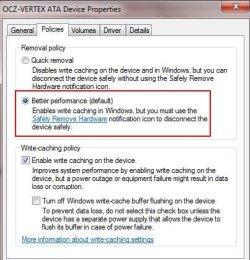
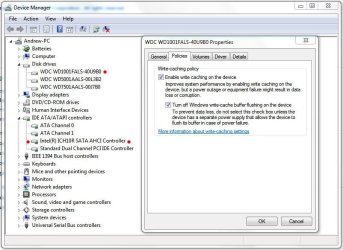
Check in the Device Manager under Disk Drives -> Right Click Drive and choose Properties and look under the Policies tab.

"You should also see each drive with these options in the Devices & Printers section as well.
 

Attachments

  • Capture.JPG
    Capture.JPG
    37.6 KB · Views: 1,052

My Computer My Computer

At a glance

Windows 7 Home Premium 64bitIntel Core i7 2700k8GB Mushkin Redline Ridgebacks @1866EVGA GTX570 SC
Computer Manufacturer/Model Number
Custom (Self Build)
OS
Windows 7 Home Premium 64bit
CPU
Intel Core i7 2700k
Motherboard
eVGA P67 SLI
Memory
8GB Mushkin Redline Ridgebacks @1866
Graphics Card(s)
EVGA GTX570 SC
Sound Card
XiFi Titanium HD
Monitor(s) Displays
LG W2453V
Screen Resolution
1920x1080
Hard Drives
Intel 320 80GB -- Intel X25-V 40GB --WD Black 1TB x2 -- WD Blue 640GB
PSU
Seasonic x750
Case
Corsair 600T SE White
Cooling
eVGA Superclocked CPU Cooler
Keyboard
Saitek Cyborg
Antivirus
Kaspersky
Browser
IE
Other Info
LG BD/DVD

My Computer My Computer

At a glance

Windows 7 x64 pro/ Windows 7 x86 Pro/ XP SP3 x86
Computer Manufacturer/Model Number
Too many to describe...
OS
Windows 7 x64 pro/ Windows 7 x86 Pro/ XP SP3 x86
I believe the hotplugging is a feature of the AHCI driver.

Check in the Device Manager under Disk Drives -> Right Click Drive and choose Properties and look under the Policies tab.

"You should also see each drive with these options in the Devices & Printers section as well.

I think hot plugging is a feature of ESATA. The dialog box you attached will only show up if the system considers the drive an ESATA drive and not an internal SATA drive. I used to get the dialog box before the registry changes.
 

My Computer My Computer

At a glance

Win 7 Ultimate 32bit
OS
Win 7 Ultimate 32bit
Even with the Safely remove icon, windows wouldnt let you eject the system drive. If it bothers you guys, try the Icon Remover, that'll hide the icon in the tray.

IconRemover - freeware tool for complete removal of 'Safely Remove Hardware' Icon
The point is I don't want to hide the "safely remove hardware" icon. I plug/unplug usb drive (and my digital camera) pretty often and need the "safely remove hardware" icon and the function all the time.
I am not saying everyone go ahead and edit their registry. Just point out a solution to my problem. If the problem doesn't bother you, don't do anything. After all, the P in PC stands for personal. Do whatever you want with your pc (after you back it up).
 

My Computer My Computer

At a glance

Win 7 Ultimate 32bit
OS
Win 7 Ultimate 32bit
I believe the hotplugging is a feature of the AHCI driver.

Check in the Device Manager under Disk Drives -> Right Click Drive and choose Properties and look under the Policies tab.

"You should also see each drive with these options in the Devices & Printers section as well.

My SATA hard drive has the "Write-cauhing policy" window but not the other one.
My USB thumbdrive only has the Removal policy window. Even setting for quick removal won't get ride of the safely remove icon though. How do I know if my SATA driver is AHCI or not?
 

My Computer My Computer

At a glance

Windows 10 Education 64 bitAMD Phenom II X4 980 Black Edition Deneb 3.7GHz8GB 4GBx2 Kingston PC10600 DDR3 1333 MemoryZotac NVIDIA Geforce GT640 2 Gig DDR3 PCIe
Computer type
PC/Desktop
Computer Manufacturer/Model Number
Home Built
OS
Windows 10 Education 64 bit
CPU
AMD Phenom II X4 980 Black Edition Deneb 3.7GHz
Motherboard
Asus M4N68T-M V2 µATX Motherboard
Memory
8GB 4GBx2 Kingston PC10600 DDR3 1333 Memory
Graphics Card(s)
Zotac NVIDIA Geforce GT640 2 Gig DDR3 PCIe
Sound Card
VIA VT1708s High Definition Audio 8-channel Onboard
Monitor(s) Displays
22" LG E2242 1080p and 2 19" I-INC AG191D
Screen Resolution
1280x1024 - 1920x1080 - 1280x1024
Hard Drives
Crucial M100 256 GB SSD and 500 GB WD Blue SATA
PSU
Thermaltake TR 620
Case
Power Up Black ATX Mid-Tower Case
Cooling
Stock heatsink and fan
Keyboard
Logitech Wireless K350 Wave
Mouse
Logitech Wireless M570 Trackman Wheel
Internet Speed
80 Mbps Down 30 Mbps Up
Antivirus
Windows Defender
Browser
Internet Explorer 11
Other Info
HP DVD1040e Lightscribe - External USB2
On my Windoiws 7 Ultimate desktop PC, all my SATA hard drives are show up as removable from day 1. This is not a big problem but an anonyance. When I click "Safely Remove Hardware and Eject Media", all my fixed drives are listed along with the USB drive. Anyway to change the drive type of my internal drives to the proper type?
Thanks.

Perhaps I'm missing the point here, but none of my "internal" SATA hard drives show up as removable drives, nor should they.

What am I missing?

Can you post a screen shot showing this?

Here's mine....

Capture.JPG
This is with AHCI enable in the BIOS

"You should also see each drive with these options in the Devices & Printers section as well.

Hmmm....don't have that option, never did.
 

My Computer My Computer

At a glance

Windows 10 ProIntel Core i7-4770K (3.5Ghz)32 gig Corsair Dominator Platinum (4x8Gig)Sapphire Tri-X R9 Fury
Computer type
PC/Desktop
Computer Manufacturer/Model Number
Custom built by me.
OS
Windows 10 Pro
CPU
Intel Core i7-4770K (3.5Ghz)
Motherboard
Gigabyte G1 Sniper 5 (F10 Bios)
Memory
32 gig Corsair Dominator Platinum (4x8Gig)
Graphics Card(s)
Sapphire Tri-X R9 Fury
Sound Card
Soundblaster ZXR
Monitor(s) Displays
NEC PA242W 24" LCD Monitor
Screen Resolution
1920 x 1200
Hard Drives
Primary - Samsung 850 Pro (512gig), Samsung 840 Pro (256gig), 2TB WD Caviar Black.
PSU
EVGA Supernova 1000 G2
Case
Cooler Master HAF X
Cooling
Corsair H100i with Corsair Air Series SP120 Quiet Fans
Keyboard
Logitech Wireless Wave
Mouse
Logitech Performance MX
Internet Speed
High Speed Cable
Antivirus
Norton Security
Browser
IE11
Other Info
Memory Timings - 1866MHz @ 9-9-9-27-1T @ 1.5 volts
Even with the Safely remove icon, windows wouldnt let you eject the system drive. If it bothers you guys, try the Icon Remover, that'll hide the icon in the tray.

IconRemover - freeware tool for complete removal of 'Safely Remove Hardware' Icon
The point is I don't want to hide the "safely remove hardware" icon. I plug/unplug usb drive (and my digital camera) pretty often and need the "safely remove hardware" icon and the function all the time.
I am not saying everyone go ahead and edit their registry. Just point out a solution to my problem. If the problem doesn't bother you, don't do anything. After all, the P in PC stands for personal. Do whatever you want with your pc (after you back it up).

Disable AHCI (set it to IDE) in your BIOS if you enabled it
 

My Computer My Computer

At a glance

Windows 10 Pro x64, Arch LinuxIntel Core 2 Quad Q8200 OC'd 3.08GHz8GB DDR2 900MhzMSI GT730 2GB GDDR5 (Kepler)
Computer type
PC/Desktop
Computer Manufacturer/Model Number
Custom Build
OS
Windows 10 Pro x64, Arch Linux
CPU
Intel Core 2 Quad Q8200 OC'd 3.08GHz
Motherboard
Asus Rampage formula LGA775
Memory
8GB DDR2 900Mhz
Graphics Card(s)
MSI GT730 2GB GDDR5 (Kepler)
Sound Card
Supreme FX2
Monitor(s) Displays
Samsung LS22F350 LED
Screen Resolution
1080P
Hard Drives
Kingston SSDNow UV400 120GB, 500GB Hitachi, 2TB Samsung, 500GB Seagate FreeAgent, 640GB Samsung, 160GB Toshiba (Arch)
PSU
AeroCool 500W Bronze
Cooling
Cooler Master V6 + 3X fans
Keyboard
Prolink keyboard
Mouse
Logitech M705
Internet Speed
1MiB/s
Browser
Chrome Beta
On my Windoiws 7 Ultimate desktop PC, all my SATA hard drives are show up as removable from day 1. This is not a big problem but an anonyance. When I click "Safely Remove Hardware and Eject Media", all my fixed drives are listed along with the USB drive. Anyway to change the drive type of my internal drives to the proper type?
Thanks.

Perhaps I'm missing the point here, but none of my "internal" SATA hard drives show up as removable drives, nor should they.

What am I missing?

Can you post a screen shot showing this?

Here's mine....

View attachment 104052
This is with AHCI enable in the BIOS

If you internal SATA drives don't show up as removable drives, you don't have this issues. The only way to tell is to click the "safely remove hardware and eject media" icon at the system tray. Before my registry edit, all my internal drives are listed there. After the registry edit, I do not have "safely remove..." icon at the system tray unless I plug in my digital camera or a USB flash drive.
 

My Computer My Computer

At a glance

Win 7 Ultimate 32bit
OS
Win 7 Ultimate 32bit
Even with the Safely remove icon, windows wouldnt let you eject the system drive. If it bothers you guys, try the Icon Remover, that'll hide the icon in the tray.

IconRemover - freeware tool for complete removal of 'Safely Remove Hardware' Icon
The point is I don't want to hide the "safely remove hardware" icon. I plug/unplug usb drive (and my digital camera) pretty often and need the "safely remove hardware" icon and the function all the time.
I am not saying everyone go ahead and edit their registry. Just point out a solution to my problem. If the problem doesn't bother you, don't do anything. After all, the P in PC stands for personal. Do whatever you want with your pc (after you back it up).

Disable AHCI (set it to IDE) in your BIOS if you enabled it

Can not disable AHCI. My "hackintosh" require all hard drives to be in AHCI mode.
 

My Computer My Computer

At a glance

Win 7 Ultimate 32bit
OS
Win 7 Ultimate 32bit
Perhaps I'm missing the point here, but none of my "internal" SATA hard drives show up as removable drives, nor should they.

What am I missing?

If you internal SATA drives don't show up as removable drives, you don't have this issues. The only way to tell is to click the "safely remove hardware and eject media" icon at the system tray.

My point is is that this thread is\was going in the direction that this is normal. I don't think it is, which I suppose is why you posted this in the first place. Sorry.

And whenever I connect my "external HD(s)" and click "safely remove" the only drive I get is the external drive(s).

Do you have your "internal" drives hooked up the the "e-sata" ports on the motherboard? That "might" be the problem.
 
Last edited:

My Computer My Computer

At a glance

Windows 10 ProIntel Core i7-4770K (3.5Ghz)32 gig Corsair Dominator Platinum (4x8Gig)Sapphire Tri-X R9 Fury
Computer type
PC/Desktop
Computer Manufacturer/Model Number
Custom built by me.
OS
Windows 10 Pro
CPU
Intel Core i7-4770K (3.5Ghz)
Motherboard
Gigabyte G1 Sniper 5 (F10 Bios)
Memory
32 gig Corsair Dominator Platinum (4x8Gig)
Graphics Card(s)
Sapphire Tri-X R9 Fury
Sound Card
Soundblaster ZXR
Monitor(s) Displays
NEC PA242W 24" LCD Monitor
Screen Resolution
1920 x 1200
Hard Drives
Primary - Samsung 850 Pro (512gig), Samsung 840 Pro (256gig), 2TB WD Caviar Black.
PSU
EVGA Supernova 1000 G2
Case
Cooler Master HAF X
Cooling
Corsair H100i with Corsair Air Series SP120 Quiet Fans
Keyboard
Logitech Wireless Wave
Mouse
Logitech Performance MX
Internet Speed
High Speed Cable
Antivirus
Norton Security
Browser
IE11
Other Info
Memory Timings - 1866MHz @ 9-9-9-27-1T @ 1.5 volts
My point is is that this thread is\was going in the direction that this is normal. I don't think it is, which I suppose is why you posted this in the first place. Sorry.

And whenever I connect my "external HD(s)" and click "safely remove" the only drive I get is the external drive(s).

Do you have your "internal" drives hooked up the the "e-sata" ports on the motherboard? That "might" be the problem.

I think my "problem" is I have a DIY PC with an older motherboard (Gigabyte P965-DS3 rev 1.1). Since the motherboard was for hobbyists, the BIOS for it does not make any distinction between internal drive and ESATA drive. Any of the SATA socket can be connected to "internal" SATA drive or uses an ESTA cable for external SATA drive. When Win 7 comes along, it decides all my drives are external because there is no way it can tell.
 

My Computer My Computer

At a glance

Win 7 Ultimate 32bit
OS
Win 7 Ultimate 32bit
mine does the same thing and its a newer p7p55d-e pro motherboard...
 

My Computer My Computer

At a glance

Windows 7 64-bit HomeIntel Core i7-870 Lynnfield 2.93 Ghz8GB 4x2 A-Data 1333 MhzHIS Radeon HD 5850 1GB
Computer type
PC/Desktop
Computer Manufacturer/Model Number
My First Build
OS
Windows 7 64-bit Home
CPU
Intel Core i7-870 Lynnfield 2.93 Ghz
Motherboard
Asus P7P55D-E Pro
Memory
8GB 4x2 A-Data 1333 Mhz
Graphics Card(s)
HIS Radeon HD 5850 1GB
Sound Card
Onboard
Monitor(s) Displays
Dell S2440L 24"
Screen Resolution
1080p
Hard Drives
120 GB Intel X25-M SATA Solid State Drive ///
1 TB Western Digital Caviar Black SATA 6gb/s 7200rpm Drive
PSU
Corsair 650TX 650 Watt
Case
Antec Three Hundred
Cooling
Stock Intel /// 4 Antec Case Fans /// NZXT Sentry-2
Keyboard
Logitech LX 710
Mouse
Logitech LX 710
Other Info
LG Blu-Ray Drive
Back
Top