Restoring partition drive permissions

falmp

New member
Local time
9:07 AM
Messages
3
Hello,

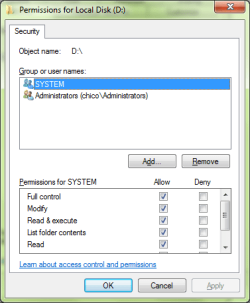
I was tweaking some security permissions on my partition D and removed the options "Authenticated Users" and "Users", now I can't access it, even though I'm an administrator. After some time playing with it it seems I can't find how to add those two permissions back like it was. Can anyone help me or guide me?

Many thanks!

P.S. Attached is my partition C and D security settings. Partition C is how I want partition D to look like.
 

Attachments
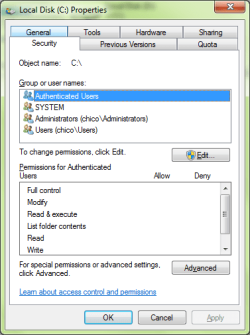
  • partition_c.png
    partition_c.png
    15 KB · Views: 12
  • partition_d.png
    partition_d.png
    12.5 KB · Views: 11

My Computer My Computer

OS
Windows 7 Professional 64bit
I don't know if doing a system restore would bring it back, but it's worth a try.
 

My Computer My Computer

Computer Manufacturer/Model Number
Dell and Custom
OS
Systems 1 and 2: Windows 7 Enterprise x64, Win 8 Developer
CPU
System 1: i7 [email protected], System 2: AMD FX-4100 Zambezi 3.6G
Motherboard
System 1:Dell 06NWYK System 2: ASUS M5A97 AM3+
Memory
System 1: 8GB System 2: 8GB
Graphics Card(s)
System 1: ATI FirePro V4800 System 2: Radeon HD 6850
Sound Card
System 1: onboard System 2: onboard
Monitor(s) Displays
System1: Viewsonic HDMI 24"
Screen Resolution
System 1: 1920x1080 System 2: 1920x1080
Hard Drives
System 1: Mirrored .5B drives System 2: Seagate Barracuda ST1000DM003 1TB 7200 RPM 64MB Cache SATA 6.0Gb/s
Case
System 1: Dell System 2: Cooler Master
Internet Speed
10 MBPS
It would just be easier to back everything up, delete the partition then recreate it...

As for why you cannot access it, for the sake of security by default Explorer and all the applications you run have "User" privileges only. You do not get administrator rights until you elevate by using "Run as Admin" or accepting a UAC prompt from a application.
 

My Computer My Computer

Computer type
PC/Desktop
Computer Manufacturer/Model Number
Alienware Aurora ALX R4
OS
Windows 10 Pro (x64)
CPU
Intel Core i7-3930K (3.2GHz - 4.5GHz)
Motherboard
Alienware Aurora-R4 x79
Memory
4x Samsung 4GB PC3-12800 DDR3 (16GB 1600MHz)
Graphics Card(s)
Nvidia Geforce GTX 690
Sound Card
SteelSeries Siberia Elite
Monitor(s) Displays
Dell UltraSharp U3011
Screen Resolution
2560x1600
Hard Drives
Samsung 850 Pro 256 GB, Seagate 1TB Desktop Hybrid HDD, 2x Western Digital 4TB Green HDD
PSU
875W Some Dell PSU <.<
Case
Alienware Aurora ALX
Cooling
Custom Liquid Cooling (EK CPU & GPU blocks) dual EK 480RAD
Keyboard
Logitech G710+ Mechanical
Mouse
Logitech G700s
Internet Speed
Verizon Fios (50 mbps average)
Other Info
Server: Intel NUC D54250WYK: i5-4250U, 16GB, 256 GB mSATA, Windows Server 2012 R2
I don't know if doing a system restore would bring it back, but it's worth a try.

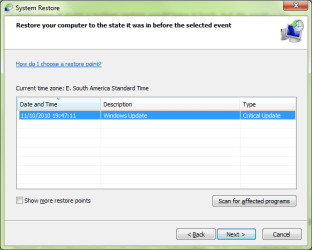
It seems that I might have disabled System Restore in the past, because it looks like I have only one restore point from yesterday (see attachment). It doesn't help because I messed the partition permissions some days ago. :(

It would just be easier to back everything up, delete the partition then recreate it...

As for why you cannot access it, for the sake of security by default Explorer and all the applications you run have "User" privileges only. You do not get administrator rights until you elevate by using "Run as Admin" or accepting a UAC prompt from a application.

I can't backup it, I don't have enough space. My harddisk is partitioned with partition C for operational system (50GB) and partition D (250GB), which is messed up, for the rest. It looked like a smart scheme at the time, hehe. :geek:
 

Attachments

  • restore_point.png
    restore_point.png
    14.7 KB · Views: 13

My Computer My Computer

OS
Windows 7 Professional 64bit
Below Authenticated Users has three permissions unchecked (not including "Full Control"). While Users only has the below values checked. (See screen shots)
 

Attachments

  • perm_auth.png
    perm_auth.png
    12.5 KB · Views: 29
  • perm_user.png
    perm_user.png
    13 KB · Views: 21

My Computer My Computer

Computer type
PC/Desktop
Computer Manufacturer/Model Number
Alienware Aurora ALX R4
OS
Windows 10 Pro (x64)
CPU
Intel Core i7-3930K (3.2GHz - 4.5GHz)
Motherboard
Alienware Aurora-R4 x79
Memory
4x Samsung 4GB PC3-12800 DDR3 (16GB 1600MHz)
Graphics Card(s)
Nvidia Geforce GTX 690
Sound Card
SteelSeries Siberia Elite
Monitor(s) Displays
Dell UltraSharp U3011
Screen Resolution
2560x1600
Hard Drives
Samsung 850 Pro 256 GB, Seagate 1TB Desktop Hybrid HDD, 2x Western Digital 4TB Green HDD
PSU
875W Some Dell PSU <.<
Case
Alienware Aurora ALX
Cooling
Custom Liquid Cooling (EK CPU & GPU blocks) dual EK 480RAD
Keyboard
Logitech G710+ Mechanical
Mouse
Logitech G700s
Internet Speed
Verizon Fios (50 mbps average)
Other Info
Server: Intel NUC D54250WYK: i5-4250U, 16GB, 256 GB mSATA, Windows Server 2012 R2
Below Authenticated Users has three permissions unchecked (not including "Full Control"). While Users only has the below values checked. (See screen shots)

I had not seen this dialog before, so that alone made me look some more until I find it. After that, I just cloned all the groups and permissions from the partition C.

Many thanks, now I have the partition restored! :cool:
 

My Computer My Computer

OS
Windows 7 Professional 64bit
You get there by pressing the "Advance" button.
 

My Computer My Computer

Computer type
PC/Desktop
Computer Manufacturer/Model Number
Alienware Aurora ALX R4
OS
Windows 10 Pro (x64)
CPU
Intel Core i7-3930K (3.2GHz - 4.5GHz)
Motherboard
Alienware Aurora-R4 x79
Memory
4x Samsung 4GB PC3-12800 DDR3 (16GB 1600MHz)
Graphics Card(s)
Nvidia Geforce GTX 690
Sound Card
SteelSeries Siberia Elite
Monitor(s) Displays
Dell UltraSharp U3011
Screen Resolution
2560x1600
Hard Drives
Samsung 850 Pro 256 GB, Seagate 1TB Desktop Hybrid HDD, 2x Western Digital 4TB Green HDD
PSU
875W Some Dell PSU <.<
Case
Alienware Aurora ALX
Cooling
Custom Liquid Cooling (EK CPU & GPU blocks) dual EK 480RAD
Keyboard
Logitech G710+ Mechanical
Mouse
Logitech G700s
Internet Speed
Verizon Fios (50 mbps average)
Other Info
Server: Intel NUC D54250WYK: i5-4250U, 16GB, 256 GB mSATA, Windows Server 2012 R2
Hello,

I was tweaking some security permissions on my partition D and removed the options "Authenticated Users" and "Users", now I can't access it, even though I'm an administrator.
Click the Add button. Type Authenticated Users, Check Names, when it pops in the box left click it to highlight, OK and then set the permissions

Edit: Oops, sorry, had this page up in a tab too long
 

My Computer My Computer

Computer Manufacturer/Model Number
Averatec 6130HS-20
OS
Windows 7 Professional 32-bit (6.1, Build 7600)
CPU
Intel(R) Pentium(R) 4 3.00 GHz HT
Memory
2.0 GB
Graphics Card(s)
ATI Mobility Radeon 9600 64MB
Sound Card
Realtek AC'97 Audio
Screen Resolution
1280 x 800
Hard Drives
Seagate 96023A 60GB 7200RPM -
Seagate FreeAgentDesktop 250GB
Cooling
20 Inch Box Fan
Mouse
Targus PAWM10 Wireless Optical Laptop Mouse

My Computer My Computer

Computer Manufacturer/Model Number
Toshiba Satellite S875D-S7239 laptop
OS
MS Windows 7 Ultimate SP1 64-bit
CPU
AMD A10-4600M
Motherboard
AMD Pumori (Socket FT1)
Memory
6.00 GB Dual-Channel DDR3 @ 798MHz (11-11-12-28)
Graphics Card(s)
AMD Radeon HD 7660G
Sound Card
High Definition Audio Device
Monitor(s) Displays
Generic PnP Monitor (1600x900@60Hz)
Screen Resolution
1600x900@60Hz
Hard Drives
SSD 119GB Corsair CSSD-V128GB2 ATA Device
Keyboard
Standard PS/2 Keyboard
Mouse
HP Wireless Optical Mobile Mouse Model FHA-3410
Internet Speed
What the local pub, local coffee shop offers.
Other Info
Optical Drive:MATSHITA BD-CMB UJ160B ATA Device


Also have an Asus ha1002xp netbook with Win 7 Ultimate installed.
Back
Top