My win 7 runs slower than XP when opening folders

eaglepi

New member
Member
VIP
Local time
10:00 AM
Messages
193
I reccently did a fresh install of Win 7 and all seemed good, I had 2 Gb of RAM when I did the install. I read that it seems to work better to install with 2 then add the other 2GB.

When I first noticed Win 7 running slow I turned off all the bells and whistles and it seem to run much faster so I added the other 2 GB of RAM, I added the same exact RAN that was in my computer, same company same size, same speed etc and then my system wouldn't boot some times and others boot and act strange.

I took out the extra 2 GB of RAM and everything ran fine again so I have left it out and when I upgrade my hardware I'll buy all new RAM.

The thing that bugs me is I can open the same folder which had a lot of files in it and each time I ahve to wait while that little blue circle spins.. heck with XP it opened instantly what's up I thought Win 7 was faster?
 

My Computer My Computer

At a glance

Windows 7 ultimate SP1Intel Core i7-870 Lynnfield 4.00GHzCorsair Vengeance 16GB (2x8GB) DDR3 1600 MHz ...MSI NX8600GTS T2D256EZ
Computer type
PC/Desktop
Computer Manufacturer/Model Number
Home made :)
OS
Windows 7 ultimate SP1
CPU
Intel Core i7-870 Lynnfield 4.00GHz
Motherboard
ASUS Z97-A ATX DDR3 2600 LGA 1150 Motherboards Z97-A
Memory
Corsair Vengeance 16GB (2x8GB) DDR3 1600 MHz (PC3 12800) Des
Graphics Card(s)
MSI NX8600GTS T2D256EZ
Sound Card
intergraded on MB
Monitor(s) Displays
Two 24" Samsung
Screen Resolution
1920 X1200
Hard Drives
3 of: Seagate 2TB Desktop HDD SATA 6Gb/s 64MB Cache 3.5-Inch Internal Bare Drive
1 of: Seagate 1TB Desktop HDD SATA 6Gb/s 64MB Cache 3.5-Inch Internal Bare Drive
PSU
OCZ GameXStream OCZ700GXSSLI 700W ATX12V
Case
Antec Performance TX640B ATX Mini Tower Case
Cooling
Thermalright Ultima 90
Keyboard
Logitech
Mouse
Logitec
Internet Speed
10 Mbps cable
1...I have never found any trouble with installing using 4gb ram,
2...My folders open instantly, like they used to do in XP.
3...Try a good clean out of your system, Defrag, Disc clean even a Reg clean.

Check my spec.
 

My Computer My Computer

At a glance

Vista Ultimate 32 bit, Win 7 Pro 32 bit, Win ...Intel i5 CPU 750 @ 2.67 GHZ, OC 3.7 GHZ4 GigNvidia GeForce GTS450
Computer Manufacturer/Model Number
Home build.
OS
Vista Ultimate 32 bit, Win 7 Pro 32 bit, Win 7 Pro 64 bit
CPU
Intel i5 CPU 750 @ 2.67 GHZ, OC 3.7 GHZ
Motherboard
Asus P7P55D
Memory
4 Gig
Graphics Card(s)
Nvidia GeForce GTS450
Monitor(s) Displays
Acer 24"
Screen Resolution
1440 x 900
Hard Drives
1000 GIG
1000 GIG
PSU
650
Case
Antec Nine Hundred Two
Internet Speed
14 MB (APPROX)
Telling me you have not had these issues isn't helping me who IS....
 

My Computer My Computer

At a glance

Windows 7 ultimate SP1Intel Core i7-870 Lynnfield 4.00GHzCorsair Vengeance 16GB (2x8GB) DDR3 1600 MHz ...MSI NX8600GTS T2D256EZ
Computer type
PC/Desktop
Computer Manufacturer/Model Number
Home made :)
OS
Windows 7 ultimate SP1
CPU
Intel Core i7-870 Lynnfield 4.00GHz
Motherboard
ASUS Z97-A ATX DDR3 2600 LGA 1150 Motherboards Z97-A
Memory
Corsair Vengeance 16GB (2x8GB) DDR3 1600 MHz (PC3 12800) Des
Graphics Card(s)
MSI NX8600GTS T2D256EZ
Sound Card
intergraded on MB
Monitor(s) Displays
Two 24" Samsung
Screen Resolution
1920 X1200
Hard Drives
3 of: Seagate 2TB Desktop HDD SATA 6Gb/s 64MB Cache 3.5-Inch Internal Bare Drive
1 of: Seagate 1TB Desktop HDD SATA 6Gb/s 64MB Cache 3.5-Inch Internal Bare Drive
PSU
OCZ GameXStream OCZ700GXSSLI 700W ATX12V
Case
Antec Performance TX640B ATX Mini Tower Case
Cooling
Thermalright Ultima 90
Keyboard
Logitech
Mouse
Logitec
Internet Speed
10 Mbps cable
this can actually be caused by viruses because they take up much of your ram
 

My Computer My Computer

At a glance

Windows 7 64-Bit
OS
Windows 7 64-Bit
I reccently did a fresh install of Win 7 and all seemed good, I had 2 Gb of RAM when I did the install. I read that it seems to work better to install with 2 then add the other 2GB.

When I first noticed Win 7 running slow I turned off all the bells and whistles and it seem to run much faster so I added the other 2 GB of RAM, I added the same exact RAN that was in my computer, same company same size, same speed etc and then my system wouldn't boot some times and others boot and act strange.

I took out the extra 2 GB of RAM and everything ran fine again so I have left it out and when I upgrade my hardware I'll buy all new RAM.

The thing that bugs me is I can open the same folder which had a lot of files in it and each time I ahve to wait while that little blue circle spins.. heck with XP it opened instantly what's up I thought Win 7 was faster?


try using different ram slots on the board , if it does not make a difference send it back to the company , i sent back my ram they gave me a new one :D usually they will refund you
 

My Computer My Computer

At a glance

Windows 7 Home Premium 64BitAMD Phenom II x4 920 ProcessorCorsair 4.0GB Dual-Channel DDR2 @ 401MHz (5-5...GeForce 8600 GT (EVGA)
OS
Windows 7 Home Premium 64Bit
CPU
AMD Phenom II x4 920 Processor
Motherboard
Gigabyte Technology Co., Ltd. GA-MA785GM-US2H (Socket AM2)
Memory
Corsair 4.0GB Dual-Channel DDR2 @ 401MHz (5-5-5-18)
Graphics Card(s)
GeForce 8600 GT (EVGA)
Sound Card
Realtek High Definition Audio
Monitor(s) Displays
Acer X193W
Screen Resolution
1440 X 900
Hard Drives
244GB Seagate ST3250410AS ATA Device (SATA)
I reccently did a fresh install of Win 7 and all seemed good, I had 2 Gb of RAM when I did the install. I read that it seems to work better to install with 2 then add the other 2GB.

When I first noticed Win 7 running slow I turned off all the bells and whistles and it seem to run much faster so I added the other 2 GB of RAM, I added the same exact RAN that was in my computer, same company same size, same speed etc and then my system wouldn't boot some times and others boot and act strange.

I took out the extra 2 GB of RAM and everything ran fine again so I have left it out and when I upgrade my hardware I'll buy all new RAM.

The thing that bugs me is I can open the same folder which had a lot of files in it and each time I ahve to wait while that little blue circle spins.. heck with XP it opened instantly what's up I thought Win 7 was faster?
One thing you can try that should help is open up any instance of Windows Explorer; "Computer" will do. Click on "Organize" on the top left and then click on "Folder and Search Options". Go to the "View" tab and then ensure that the checkbox for "Always show icons, never thumbnails" is checked. This will ensure that any time you load a folder, it will not take the time to load up thumbnails for each folder based on its contents.

This should speed up viewing folders and their contents.
 

My Computer My Computer

At a glance

Windows 7 Ultimate x64 SP1Intel Core i3 530 2.93 Ghz Clarkdale4 GB OCZ DDR3 1600 (PC12800) Low Voltage Desk...Nvidia GeForce GTX 550 Ti with 1 GB of RAM
OS
Windows 7 Ultimate x64 SP1
CPU
Intel Core i3 530 2.93 Ghz Clarkdale
Motherboard
ASRock P55 PRO/USB3 LGA 1156
Memory
4 GB OCZ DDR3 1600 (PC12800) Low Voltage Desktop Memory
Graphics Card(s)
Nvidia GeForce GTX 550 Ti with 1 GB of RAM
Sound Card
Realtek HD ALC892
Monitor(s) Displays
20'' eMachines E202HDbmd Glare Panel Widescreen
Screen Resolution
1600 x 900
Hard Drives
Western Digital 1 TB Caviar Black Edition (7200 RPM) SATA
Hitachi Deskstar 500 GB (7200 RPM) SATA
Samsung SpinPoint 400 GB (7200 RPM) SATA
PSU
Rosewill Xtreme Series RX750-D-B ATX12V v2.2 & EPS12V (750W)
Case
Cooler Master Centurion 534 RC-534-KKN2-GP Mid-Tower
Cooling
Standard Case Fans and Stock CPU Heatsink
Keyboard
Microsoft Wireless Optical Desktop Elite
Mouse
Microsoft Wireless Optical Desktop Elite
Internet Speed
7.1 Mbps Verizon DSL
if the folders you are opening contain lots of thumbnail images, i have read win7 can be slow(er than XP) the first few times while it builds a cache.
 

My Computer My Computer

At a glance

Windows 7 Ultimate x641.80 GHz Intel Core 2 Duo processor T71003 gig ddr2NVIDIA GeForce 8400M GS
Computer Manufacturer/Model Number
HP dv6519tx
OS
Windows 7 Ultimate x64
CPU
1.80 GHz Intel Core 2 Duo processor T7100
Memory
3 gig ddr2
Graphics Card(s)
NVIDIA GeForce 8400M GS
Sound Card
Realtek High Definition Audio
Monitor(s) Displays
15.4” WXGA High Definition BrightView Widescreen
Screen Resolution
1280 x 800
Hard Drives
Hitachi 320 GB (5400 rpm)
PSU
90 W AC Power Adapter
Cooling
Kitchen plate under the lappy
Keyboard
101 key compatible
Mouse
Touch Pad with On/Off button and dedicated vertical Scroll
Internet Speed
Three Wireless internet prepaid using E160G USB dongle
Did you do a clean install ? I upgraded the first time I installed and it seemed very sluggish and inconsistent but after reformatting and reinstalling and doing away with all the old, the windows experience was just fine... So apparently if you keep the windows old file, there may be conflicts... Though that's just my experience when I first got my retail copy and moved over to W7
 

My Computer My Computer

At a glance

Windows 7 Ultimate 64BitAMD 450 Rana 3.2 Ghz (Unlocked into a Phenom ...PNY 6GB @ 667 Mhz (2X2GB In Dimm 1-2, 2X1GB I...XFX Radeon HD5830
Computer Manufacturer/Model Number
Personal Build
OS
Windows 7 Ultimate 64Bit
CPU
AMD 450 Rana 3.2 Ghz (Unlocked into a Phenom II X4 B50 3.2)
Motherboard
Biostar A770E3
Memory
PNY 6GB @ 667 Mhz (2X2GB In Dimm 1-2, 2X1GB In Dimm 3-4)
Graphics Card(s)
XFX Radeon HD5830
Sound Card
RocketFish 5.1 PCI Sound Card
Monitor(s) Displays
22 inch Lenovo L215 LCD/ SCEPTRE 37 inch LCD-HD (Movies)
Screen Resolution
1920X1080
Hard Drives
2X Seagate Barracuda 320GB 7200RPM
PSU
Cooler Master GX 650
Case
NZXT Lexa S, Crafted Gaming Armour Series
Cooling
2X140 exhaust on top, 1X120 exhaust the back, 2X120 intake
Keyboard
Logitech G15
Mouse
Logitech G500
Internet Speed
DSL 3 Mbps
I think just run a chkdsk,,to be sure...Sounds like you got some bad sectors i'd run ccleaner a few times on registry aswell..SmartDefrag has a optimal performance defrag that might help..I think its deep optimize..Try it:huh:
 

My Computer My Computer

At a glance

Windows 7 Ultimate 32bitINTEL Pentium4 3.2ghz(QuadCore MonthEnd!!!)2gb kingston DDR2 800hd powercolour 5570 512MB
Computer Manufacturer/Model Number
Custom
OS
Windows 7 Ultimate 32bit
CPU
INTEL Pentium4 3.2ghz(QuadCore MonthEnd!!!)
Motherboard
Asus P5QL-EM
Memory
2gb kingston DDR2 800
Graphics Card(s)
hd powercolour 5570 512MB
Sound Card
8ch onboard
Monitor(s) Displays
21" Samsung
Screen Resolution
Change alot
Hard Drives
samsung 500GB 7200rpm
PSU
Sparta 500w
Case
Alienware
Cooling
Aero cooling
Keyboard
Microsoft Multi-Media
Mouse
Scorpion 3000dpi
Internet Speed
none
Other Info
Xforce-5 5.1 Surround
Windows 7 defrag works just fine. I would NOT run cccleaner a few times, as 7 registry DOES take care of itself.

I would indeed do a CHKDSK, that would be useful
 

My Computer My Computer

At a glance

W7 Professional x64AMD Athlon II X3 445 Rana 3.10 GHzPNY XLR DDR3 1600 4x2GBNVIDIA GeForce GTS 450 (fermi) 1GB GDDR5
Computer Manufacturer/Model Number
Pugh Technologies
OS
W7 Professional x64
CPU
AMD Athlon II X3 445 Rana 3.10 GHz
Motherboard
MSI 870A-G54
Memory
PNY XLR DDR3 1600 4x2GB
Graphics Card(s)
NVIDIA GeForce GTS 450 (fermi) 1GB GDDR5
Sound Card
Realtek ALC892 onboard
Monitor(s) Displays
ASUS VE205t, Viewsonic VX2035WM
Screen Resolution
1600x900, 1600x1050
Hard Drives
977GB Hitachi Hitachi HDS721010CLA332
244GB Western Digital WDC WD2500AAJS-65B4A0
488GB Western Digital WDC WD5000AAJS-00A8B0
488GB Western Digital WDC WD5000AAKS-00UU3A0
PSU
Antec EarthWatts EA650 650W
Case
ThermalTake Armor A90 Mid Tower
Cooling
3x 120mm in, 1x 120mm & 200mm out, self built hydro-cooler
Keyboard
Logitec 55
Mouse
Razer Deathadder
Internet Speed
20 Mbps D/L, 9 Mbps U/L
I would also take the time to note when you started noticing things slowing down and some of the processes you did.

Windows 7 is currently using a feature called Windows Search. XP does not use Windows Search, it is actually something you add on and is used heavily by Outlook 2007. This requires doing some indexing of your system, which will try and not slow things down, but invariably it does to some degree as indexing is making a database of where files are and the 'content' to help make finding easier. It could be that Windows 7 took the 2 extra gigs of memory to change the performance model to make use of the extra resources to try and do just that, but not realizing it is creating a bit more overhead than usual.
 

My Computer My Computer

At a glance

Windows 7 Ultimate x64 and Home Premium x64Intel i7 960 (3.2 GHz Quad Core)12 Gigs (Triple Channel)Alienware OEM nVidia GTX 560 Ti (1.25 Gig)
Computer Manufacturer/Model Number
Alienware Area 51 Desktop and Dell Inspirion 17R (N7010)
OS
Windows 7 Ultimate x64 and Home Premium x64
CPU
Intel i7 960 (3.2 GHz Quad Core)
Motherboard
Alienware Intel based X58
Memory
12 Gigs (Triple Channel)
Graphics Card(s)
Alienware OEM nVidia GTX 560 Ti (1.25 Gig)
Sound Card
Creative Labs X-Fi Titanium
Monitor(s) Displays
Samsung PX2370 LED 23" Monitor
Screen Resolution
1920x1080
Hard Drives
2 320 Gig SATA in Raid 1 Configuration (System/App)
1 1 Tera SATA (Games)
1 1 Tera SATA (Data/Music/Videos)
PSU
750 Watt Power Supply
Case
Alienware Area 51 Desktop
Cooling
Liquid Cooled
Keyboard
Logitech G510
Mouse
Microsoft Trackball Explorer
Internet Speed
Cable
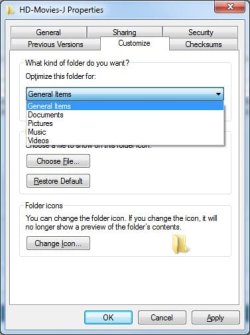
I have found that some of my folders with movies/media files would open and update really slow and changing the folder setting from Videos to General Items significantly sped up the folders opening and refreshing,
 

Attachments

  • folder-setting.jpg
    folder-setting.jpg
    48.6 KB · Views: 1

My Computer My Computer

At a glance

Windows 7 Ultimate 64bitIntel i7 3770K16GB DDR3 1333 Corsair XMS3XFX HD6950 2GB EyeFinity
Computer Manufacturer/Model Number
HAL-9000
OS
Windows 7 Ultimate 64bit
CPU
Intel i7 3770K
Motherboard
Asus Sabertooth Z77
Memory
16GB DDR3 1333 Corsair XMS3
Graphics Card(s)
XFX HD6950 2GB EyeFinity
Sound Card
Logitech G35 & Sennheiser PC135 & VIA HD
Monitor(s) Displays
23" HP 2310e, 23" Samsung B2230, 21.5" Viewsonic
Screen Resolution
5760x1080
Hard Drives
16TB of Storage
128GB & 256GB Crucial M4 SSD's, 2X 1TB WD Black, 3x 2TB WD, 3x 2TB Samsung F4, 1.5TB Seagate, WD 500GB,
PSU
Antec True Power New 650watt
Case
Cooler Master HAF-932
Cooling
Corsair H60 Hydro Cooler, 3x 230mm Fans, 2x120mm Fan
Keyboard
Logitech G15 and G13
Mouse
Logitech G700 Gaming Mouse
Internet Speed
50/10 Mbit
Other Info
Speakers : Alesis M1 Active Mk2 Studio Monitors , APC RS 1200 UPS, HP 4500DN Color Laser, HP P1006 mono Laser, Kodak 8500 Dye-Sub, Epson 1280 inkjet, Epson Worforce 610 MFC
  • Like
Reactions: whs
Back
Top