
DeFraggler vs Win7 defrag?


When I first got Vista I found out that the defrag had no GUI to show placement of files and was not programmable in that it would automatically defrag every drive on the computer. Since I have several drives on my computer with over 5 TB of storage this built in defrag would spend endless hours defragging. Is the defrag in Win 7 any different?

I really like Defraggler because it lets the user choose among which files on which drive to defrag. Defrag algorithms may differ somewhat from one program to anther, but for someone who has several TB of storage the ability to choose precisely which files and when to defrag them is extremely important.

~Maxx~
.
da59fa57.png
 

My Computer My Computer

Computer Manufacturer/Model Number
HP HPE 270f
OS
Windows 7 x64 Home Premium
CPU
Intel Core i7 930 @ 2.8 Ghz Socket 1366 LGA
Motherboard
Pegatron Truckee v1.04E41
Memory
8 GB 1366 Mhz DDR3 (PC3-10700) RAM
Graphics Card(s)
ATI Radeon 5770 1 GB DDR5 RAM
Sound Card
Realtech High Definition
Monitor(s) Displays
32" Sony Bravia
Screen Resolution
1366 X 768
Hard Drives
Intel 25nm 120 GB Series 320 SSD HD Tune- 265 MBps Read/ 130 MBps Write

LaCie 1TB + 1TB RAID 0 eSATA Drive HD Tune- 160 MBps Read/ 90 MBps Write
Keyboard
Logitech Illuminated
Mouse
Logitech MX Revolution
Internet Speed
36.4 Mbps Maximum on a 37 Mbps Motorola SB501 Modem
When I first got Vista I found out that the defrag had no GUI to show placement of files and was not programmable in that it would automatically defrag every drive on the computer. Since I have several drives on my computer with over 5 TB of storage this built in defrag would spend endless hours defragging. Is the defrag in Win 7 any different?
Yes, Windows 7 built-in defrag is very different. One can select which drives to defrag during automatic defrag and see the progress of defrag operation. Win 7 defrag is significantly faster than Vista's defrag as well - I ran Win 7 defrag on many different drives and it never took more than 40 minutes to finish.

But I certainly agree with you that, with large storage, having an ability to analyse fragmentation of individual files and to defrag them selectively is very important.
 

My Computer My Computer

Computer Manufacturer/Model Number
Toshiba Satellite U500
OS
Windows 7 Home Premium x64 SP1
CPU
Intel Core i3 M330 @ 2.13GHz
Memory
4 GB
Graphics Card(s)
NVidia GeForce 310M
Screen Resolution
1280x800
Garlic- Welcome to the Windows 7 Forums and thanks for the detailed information about Win 7's built in defragger. Like I said Vista's defragger really scared me off and by the time I got my Win 7 computer I had already tried most of the leading 3rd party defraggers and had been using MyDefrag x64 (Formerly JK Defrag) which is completely customizable for quite some time. The software defrags the 23 GB of information on my C Drive in about 45 seconds where it has placed all of my most frequently used programs at the outside of the disc where the drive reads and writes the very fastest and the least amount of movement is required from the disk reader.

~Maxx~

52fe3daf.jpg
 

My Computer My Computer

Computer Manufacturer/Model Number
HP HPE 270f
OS
Windows 7 x64 Home Premium
CPU
Intel Core i7 930 @ 2.8 Ghz Socket 1366 LGA
Motherboard
Pegatron Truckee v1.04E41
Memory
8 GB 1366 Mhz DDR3 (PC3-10700) RAM
Graphics Card(s)
ATI Radeon 5770 1 GB DDR5 RAM
Sound Card
Realtech High Definition
Monitor(s) Displays
32" Sony Bravia
Screen Resolution
1366 X 768
Hard Drives
Intel 25nm 120 GB Series 320 SSD HD Tune- 265 MBps Read/ 130 MBps Write

LaCie 1TB + 1TB RAID 0 eSATA Drive HD Tune- 160 MBps Read/ 90 MBps Write
Keyboard
Logitech Illuminated
Mouse
Logitech MX Revolution
Internet Speed
36.4 Mbps Maximum on a 37 Mbps Motorola SB501 Modem

For what it's worth, I got hooked on Defraggler on my XP. For whatever reason on my Windows 7 machine, Defraggler is slower than the Windows defragger, so I only use Windows for the defrag. I still run Defraggler to analyze and get the pretty screen with all the colors on it, and to check the files after Windows defrag.
 

My Computer My Computer

OS
Windows 7 Home Premium 64 bit
Memory
4GB DDR3
Thank you Maxx.
 
Last edited:

My Computer My Computer

Computer Manufacturer/Model Number
Toshiba Satellite U500
OS
Windows 7 Home Premium x64 SP1
CPU
Intel Core i3 M330 @ 2.13GHz
Memory
4 GB
Graphics Card(s)
NVidia GeForce 310M
Screen Resolution
1280x800
I still run Defraggler to analyze and get the pretty screen with all the colors on it, and to check the files after Windows defrag.

I agree Defraggler has an excellent multi-color GUI that depicts exactly what the status of the files on the HDD are and their precise placement on the disk as do many other freeware defraggers which makes one wonder what is preventing the Windows 7 defragger from also having such useful amenities.

~Maxx~
.
da59fa57.png
 

My Computer My Computer

Computer Manufacturer/Model Number
HP HPE 270f
OS
Windows 7 x64 Home Premium
CPU
Intel Core i7 930 @ 2.8 Ghz Socket 1366 LGA
Motherboard
Pegatron Truckee v1.04E41
Memory
8 GB 1366 Mhz DDR3 (PC3-10700) RAM
Graphics Card(s)
ATI Radeon 5770 1 GB DDR5 RAM
Sound Card
Realtech High Definition
Monitor(s) Displays
32" Sony Bravia
Screen Resolution
1366 X 768
Hard Drives
Intel 25nm 120 GB Series 320 SSD HD Tune- 265 MBps Read/ 130 MBps Write

LaCie 1TB + 1TB RAID 0 eSATA Drive HD Tune- 160 MBps Read/ 90 MBps Write
Keyboard
Logitech Illuminated
Mouse
Logitech MX Revolution
Internet Speed
36.4 Mbps Maximum on a 37 Mbps Motorola SB501 Modem
I do have a question about the Windows defragger. Lately when I run it it is making a lot of passes, as high as 13. Does this have any bearing on anything? The HD was only 4% fragmented.
 

My Computer My Computer

OS
Windows 7 Home Premium 64 bit
Memory
4GB DDR3
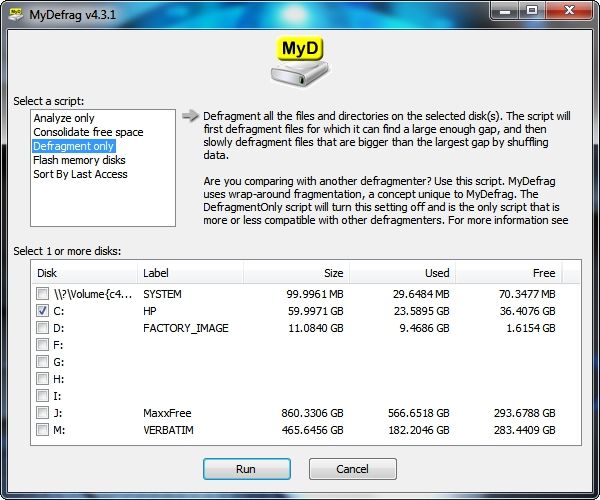
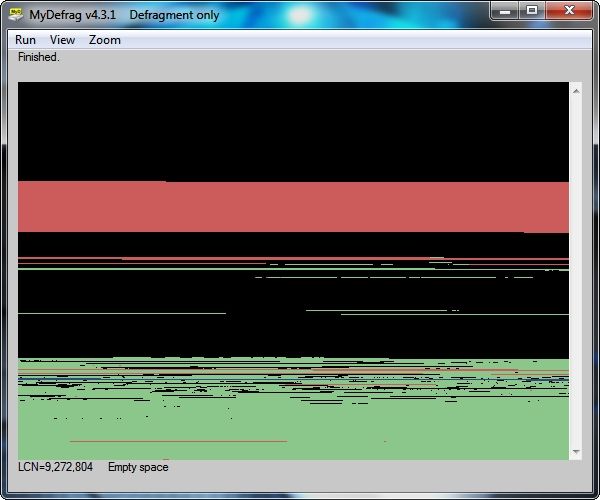
nailgunner- As I said earlier I've only used the Windows built in Defrag once in Vista and then I moved on because it seemed to take forever to do its job. Below are screenshots of MyD Defragging the 23.5 GB on my Win 7 C Drive with 6% fragmentation...

80e5ca63.jpg


abd266d8.jpg


The Defragmentation took a total of 34.16 seconds. Also note that the programs on the C Drive have previously been put in order according to when they were last accessed and are graphically represented in the green section on the fastest outside part of the disk with black representing the free space and the smaller red section being the 1 GB of System Volume Information and the larger red section representing the 8.4 GB Page File on the innermost part of the disk.

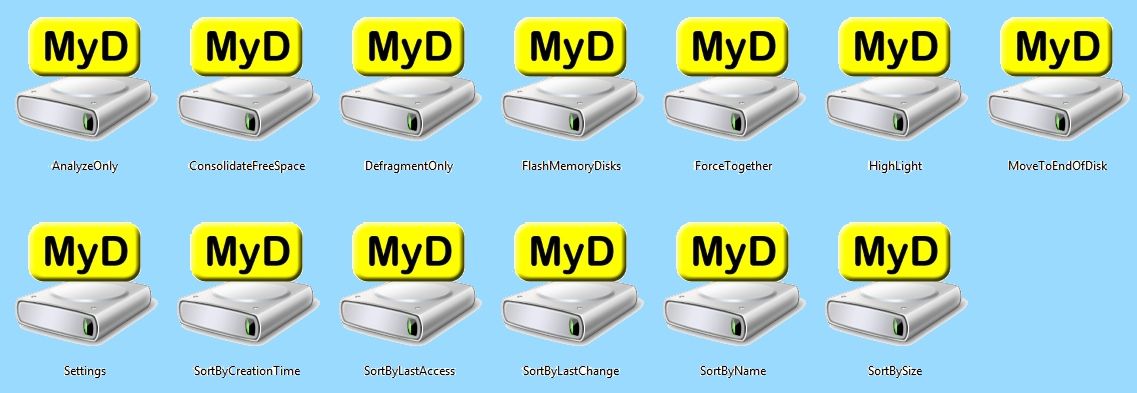
I can't make any comparison to the Windows 7 Defrag because I have never used it. The above documentation represents where several years of trying most every leading Defrag and Optimization software including O&O, Perfect Disk and a host of other shareware and freeware alike and finally going with the granularly programmable MyD, yes it will even allow you to run your own optimization scripts!

2b5eab2d.jpg


I know that some of the Members here say that the customization of file placement in Win 7 is something to be avoided, but I have never had a single problem result from organizing the software on my Win 7 OS partition the way I choose and as a result having my most frequently used programs start in about 1/2 the time that they used to is well worth the 1/2 hour or so that it took to safely reorganize them on the Disk using the MyD Script of my own choosing which now runs much more efficiently than the unorganized placement than they were in. As an example my 1 GB 64 bit Image Management Program which used to start in 6 seconds before MyD Optimization now starts in 3.47 seconds for a 42% faster start without any negative complications.

As is the standard recommendation with installing any new software have a good Restore Point, updated System Image and if possible a 3rd party Backup Image on hand and any problems that might possibly occur can easily and quickly be reversed leaving much to gain and absolutely nothing to loose by taking control of the placement of programs on your Win 7 OS partition should you want to.

~Maxx~
.
da59fa57.png
 

My Computer My Computer

Computer Manufacturer/Model Number
HP HPE 270f
OS
Windows 7 x64 Home Premium
CPU
Intel Core i7 930 @ 2.8 Ghz Socket 1366 LGA
Motherboard
Pegatron Truckee v1.04E41
Memory
8 GB 1366 Mhz DDR3 (PC3-10700) RAM
Graphics Card(s)
ATI Radeon 5770 1 GB DDR5 RAM
Sound Card
Realtech High Definition
Monitor(s) Displays
32" Sony Bravia
Screen Resolution
1366 X 768
Hard Drives
Intel 25nm 120 GB Series 320 SSD HD Tune- 265 MBps Read/ 130 MBps Write

LaCie 1TB + 1TB RAID 0 eSATA Drive HD Tune- 160 MBps Read/ 90 MBps Write
Keyboard
Logitech Illuminated
Mouse
Logitech MX Revolution
Internet Speed
36.4 Mbps Maximum on a 37 Mbps Motorola SB501 Modem
Maxxwire...Thanks. Sounds interesting. Gives me an excuse to put the family photo-editing project aside, think I will try it and play around with it.
 

My Computer My Computer

OS
Windows 7 Home Premium 64 bit
Memory
4GB DDR3
Run defrag from the command line
Open a command window and type defrag /? to show a list of commands.
Exampel:
defrag c: /analyze will show how much your disk is fragmented.
 

My Computer My Computer

Computer Manufacturer/Model Number
Custom Build
OS
Window's 7 Ultimate 64bit
CPU
E8400 Lapped
Motherboard
P5Q Pro Turbo Asus
Memory
Kingston 4 gig
Graphics Card(s)
2=ATI 5670Video Crossfire / HVR2250 TV Tuner Card
Sound Card
HDMI sound
Monitor(s) Displays
Sony 46"
Screen Resolution
1280x720
Hard Drives
1 WD 160gig YS, 1 Black Edition 320gig and one 250gig WD YS Model plus external Caviar Black 640gig Drives
PSU
Antec 550 Modular
Case
Antec Custom 180B
Cooling
X-1283 Lapped Artic Silver 5
Keyboard
Wave Combo Logitech
Mouse
Logitech LX-8
Internet Speed
5mb down 768 up
Other Info
Custom side fan in case, plus moved middle lower fan to the front of hard drives , also installed a second intake fan in lower two optical drive slots. Rear fans are controlled by Fan mate controllers. temps inside case are monitored by probe and temps coming out the top exhaust are also monitored, temps as of right now 20c inside and 22.7 out the exhaust. Front intake fans are controlled by Asu
I need to find another hobby before I do something serious to my computer. I installed Auslogics and MyDefrag to see how I liked them. I already had Windows defrag and Defraggler.

I only analyzed with Auslogics, but I liked the way it was set up.

I then used MyDefrag. I ran one of their scripts to "sort by size", then a defragger script.

I then analyzed with the other defraggers. Microsoft showed it still 2% fragmented, Auslogics showed it 3%, and Defraggler shows it a friggin 46% fragmented.

Plus it increased my used HD space from about 26GB to 50.3GB.

Gonna get this reversed before MyDefrag doubles it up on me again, and probably stick with Auslogics and Windows. I need to start collecting stamps or something.

And yes, my computer was and is working great, so NO, I have no logical reason for trying to make something work better that is already working fine. So please don't ask. :D
 

My Computer My Computer

OS
Windows 7 Home Premium 64 bit
Memory
4GB DDR3
I need to find another hobby before I do something serious to my computer. I installed Auslogics and MyDefrag to see how I liked them. I already had Windows defrag and Defraggler.

I only analyzed with Auslogics, but I liked the way it was set up.

I then used MyDefrag. I ran one of their scripts to "sort by size", then a defragger script.

I then analyzed with the other defraggers. Microsoft showed it still 2% fragmented, Auslogics showed it 3%, and Defraggler shows it a friggin 46% fragmented.

Plus it increased my used HD space from about 26GB to 50.3GB.

Gonna get this reversed before MyDefrag doubles it up on me again, and probably stick with Auslogics and Windows. I need to start collecting stamps or something.

And yes, my computer was and is working great, so NO, I have no logical reason for trying to make something work better that is already working fine. So please don't ask. :D

defraggler increased your hardrive space because it is not shadow copy aware. The shadow copy (VSS service) mistakes your moving a files blocks around as modifying the file so copies what it thinks is the old file data to the shadow copy - thus duplicating data it doesn't need to be copied, an thus using up hard drive space - and shadow copy space. Note this shadow copy space is your restore points. Eventually you will exceed the storage limit you set for your restore points and you will start losing them.

You are crazy if you use defraggler on windows 7.

- Gene
 

My Computer My Computer

Computer type
PC/Desktop
Computer Manufacturer/Model Number
Home built (GeneO industries)/Model 4
OS
Windows 10 Pro. EFI boot partition, full EFI boot
CPU
i7 4770k 4.4GHz (44-44-43-43 turbo) @ 1.248V
Motherboard
ASUS Maximus VI Hero
Memory
16GB (8GBx2) @2200 MHz G.skill Sniper 10-11-10-30-1, 1.6V
Graphics Card(s)
MSI GTX 970 Gaming 4G
Sound Card
Onboard SupremeFX Audio
Monitor(s) Displays
NEC Spectraview 2490WUXi-SV
Screen Resolution
1920 x 1200
Hard Drives
Samsung 850 Pro 256GB (OS), Samsung 2x 128GB 840 Pro SSD in RAID0, 3x WD Blue 6Gb/s 1TB RAID0, WD 2TB Black external USB 3.0, 2TB WD20EARS Green external USB 3.0, 2x 500GB Seagate and 1 750 GB external USB, 1x 350GB external USB3
PSU
Seasonic X-850 (2012 KM3 model)
Case
Fractal Design Define R4
Cooling
NH-D14, NF-F12, NF-A15; NF-P14, NF-P12,NF-A14, S12A PWM
Keyboard
Cooler Master Storm Quickfire Rapid - Brown
Mouse
Logitech G602
Internet Speed
126.4 Mb/s down, 24.3 Mb/s up
Other Info
USB 3.0 x8 , SATA III x8, eSATA, USB 2.0 x6. Samsung DVD R/W drive.

WEI: CPU 7.8, Memory 7.9, Graphics 7.9, Disk 7.9
Well to be clear, it wasn't defraggler that increased it, it was Mydefrag.
 

My Computer My Computer

OS
Windows 7 Home Premium 64 bit
Memory
4GB DDR3
Plus it increased my used HD space from about 26GB to 50.3GB.

Well to be clear, it wasn't defraggler that increased it, it was Mydefrag.

It wasn't actually My Defrag that increased the amount of data on your HDD it was System Restore making restore points while the files are being moved according to your choice of scripts by MyDefrag, but not to worry Disc Cleanup can almost instantly remove all but the most recent restore point. What prompted you to choose the 'sort by size' script? As I said it was the 'sort by last access' that helped my programs start up so much faster.

~Maxx~
.
da59fa57.png
 

My Computer My Computer

Computer Manufacturer/Model Number
HP HPE 270f
OS
Windows 7 x64 Home Premium
CPU
Intel Core i7 930 @ 2.8 Ghz Socket 1366 LGA
Motherboard
Pegatron Truckee v1.04E41
Memory
8 GB 1366 Mhz DDR3 (PC3-10700) RAM
Graphics Card(s)
ATI Radeon 5770 1 GB DDR5 RAM
Sound Card
Realtech High Definition
Monitor(s) Displays
32" Sony Bravia
Screen Resolution
1366 X 768
Hard Drives
Intel 25nm 120 GB Series 320 SSD HD Tune- 265 MBps Read/ 130 MBps Write

LaCie 1TB + 1TB RAID 0 eSATA Drive HD Tune- 160 MBps Read/ 90 MBps Write
Keyboard
Logitech Illuminated
Mouse
Logitech MX Revolution
Internet Speed
36.4 Mbps Maximum on a 37 Mbps Motorola SB501 Modem
OK...it happened when I ran MyDefrag. I have since returned my HD to it's 25GB size. Would prefer not to say exactly how I did it, :rolleyes: , so I don't get scolded for that, but it's all good now.


edit
I actually tried a couple of the scripts just to test it, and size what the last one I tried.
 

My Computer My Computer

OS
Windows 7 Home Premium 64 bit
Memory
4GB DDR3
OK...it happened when I ran MyDefrag. I have since returned my HD to it's 25GB size. Would prefer not to say exactly how I did it, :rolleyes: , so I don't get scolded for that, but it's all good now.

I'm glad to hear that things are back as they were now. I set my System Restore space back so far on my Win 7 computer that MyDefrag does not prompt System Restore to increase the amount of Restore Points as it did on your computer. In Vista I used to simply just turn System Restore off while My Defrag placed the files in the order that I had instructed it to so this wouldn't happen.

~Maxx~
.
da59fa57.png
 

My Computer My Computer

Computer Manufacturer/Model Number
HP HPE 270f
OS
Windows 7 x64 Home Premium
CPU
Intel Core i7 930 @ 2.8 Ghz Socket 1366 LGA
Motherboard
Pegatron Truckee v1.04E41
Memory
8 GB 1366 Mhz DDR3 (PC3-10700) RAM
Graphics Card(s)
ATI Radeon 5770 1 GB DDR5 RAM
Sound Card
Realtech High Definition
Monitor(s) Displays
32" Sony Bravia
Screen Resolution
1366 X 768
Hard Drives
Intel 25nm 120 GB Series 320 SSD HD Tune- 265 MBps Read/ 130 MBps Write

LaCie 1TB + 1TB RAID 0 eSATA Drive HD Tune- 160 MBps Read/ 90 MBps Write
Keyboard
Logitech Illuminated
Mouse
Logitech MX Revolution
Internet Speed
36.4 Mbps Maximum on a 37 Mbps Motorola SB501 Modem
And in Defraggler it was that whole extra system restore file activity that was making it show 46% fragmentation.

I had been adding and deleting a lot of trialware photo editing programs and moving a lot of pictures around, so I was defragging on a fairly regular basis. I'm done now, so I think I will leave well enough alone.
 

My Computer My Computer

OS
Windows 7 Home Premium 64 bit
Memory
4GB DDR3
Well again, to be clear, I was running Defraggler first, and it was slow as crap, which was why I started using Windows defrag and wondered if the 13 passes was unusual.
Both Auslogics and MyDefrag were quick on the defragging. I like Auslogics layout better so will probably stick with that.
 

My Computer My Computer

OS
Windows 7 Home Premium 64 bit
Memory
4GB DDR3
I'm done now, so I think I will leave well enough alone.

That sounds like a good plan. In the future if you ever feel the need to improve the speed which programs open on your Win 7 computer the My Defrag 'sort by last access' script can make it happen.

The reason that I know this is that I did benchmarks both before and after the most frequently used programs were moved to the fastest part of the disk and as I said the largest 1 GB program now opens in 3.42 seconds which is 42% faster than it did before My Defrag moved it and the other files I use most frequently to the outside of the disk for quick access and improved read times.

~Maxx~
.
da59fa57.png
 

My Computer My Computer

Computer Manufacturer/Model Number
HP HPE 270f
OS
Windows 7 x64 Home Premium
CPU
Intel Core i7 930 @ 2.8 Ghz Socket 1366 LGA
Motherboard
Pegatron Truckee v1.04E41
Memory
8 GB 1366 Mhz DDR3 (PC3-10700) RAM
Graphics Card(s)
ATI Radeon 5770 1 GB DDR5 RAM
Sound Card
Realtech High Definition
Monitor(s) Displays
32" Sony Bravia
Screen Resolution
1366 X 768
Hard Drives
Intel 25nm 120 GB Series 320 SSD HD Tune- 265 MBps Read/ 130 MBps Write

LaCie 1TB + 1TB RAID 0 eSATA Drive HD Tune- 160 MBps Read/ 90 MBps Write
Keyboard
Logitech Illuminated
Mouse
Logitech MX Revolution
Internet Speed
36.4 Mbps Maximum on a 37 Mbps Motorola SB501 Modem
Well again, to be clear, I was running Defraggler first, and it was slow as crap, which was why I started using Windows defrag and wondered if the 13 passes was unusual. Both Auslogics and MyDefrag were quick on the defragging. I like Auslogics layout better so will probably stick with that.

Gregrocker is also a huge fan of Auslogics software and for good reason...

~Maxx~
.
da59fa57.png
 

My Computer My Computer

Computer Manufacturer/Model Number
HP HPE 270f
OS
Windows 7 x64 Home Premium
CPU
Intel Core i7 930 @ 2.8 Ghz Socket 1366 LGA
Motherboard
Pegatron Truckee v1.04E41
Memory
8 GB 1366 Mhz DDR3 (PC3-10700) RAM
Graphics Card(s)
ATI Radeon 5770 1 GB DDR5 RAM
Sound Card
Realtech High Definition
Monitor(s) Displays
32" Sony Bravia
Screen Resolution
1366 X 768
Hard Drives
Intel 25nm 120 GB Series 320 SSD HD Tune- 265 MBps Read/ 130 MBps Write

LaCie 1TB + 1TB RAID 0 eSATA Drive HD Tune- 160 MBps Read/ 90 MBps Write
Keyboard
Logitech Illuminated
Mouse
Logitech MX Revolution
Internet Speed
36.4 Mbps Maximum on a 37 Mbps Motorola SB501 Modem
Back
Top