Hi-
Please read this carefully, and please do not jump to conclusions.
I'm running a Samsung SSD 850 PRO 256GB drive for my OS (C:\; Win 7 Pro SP1 x64)) and a Seagate
Barracuda 1 TB HDD (D:\) for storage. I have moved Downloads, My Pictures, and Page File over to this
drive.
I stumbled across an article by Scott Hanselman, an MS Developer, who has explained the Win 8 and
Win 10 feature that automatically Defrags SSD's, once a month. Here's a link:
The real and complete story - Does Windows defragment your SSD? - Scott Hanselman
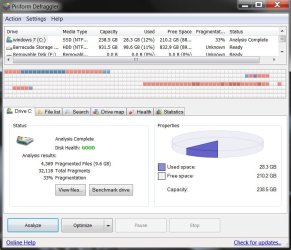
So, I ran an analysis of my Samsung SSD and this indicates 33% fragmentation. Furthermore, we have
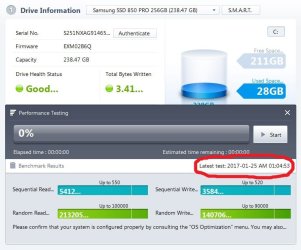
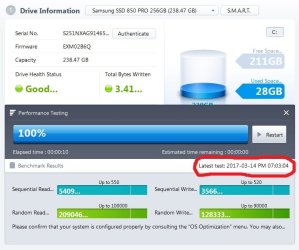
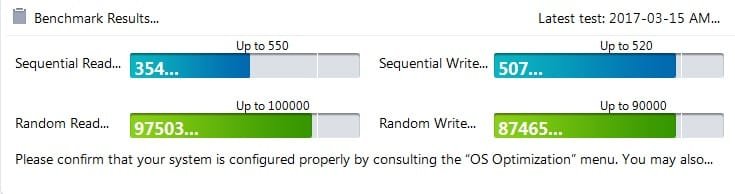
run a Performance Test from within Samsung Magician.
We have perceived, perhaps, a slight slow down and a bit longer boot time recently. Of course, this may
be a figment of my imagination.
The purpose of this thread is to get some opinions on the matter BEFORE I run defrag and optimization
with Piriform Defraggler.
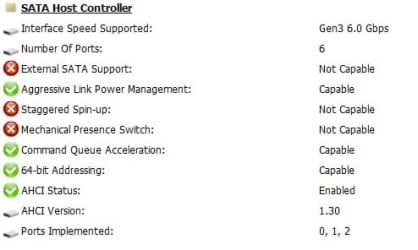
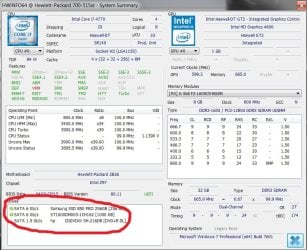
We've attached some screen shots that may help with opinions. The results from the Performance Test
are foreign to me- I truly do not know how to interpret the Read/Write values. Also, please note the
difference in Read/Write data between Jan 2017 and March 2017.
Thanks, in advance, for chiming in on this.
tim
Please read this carefully, and please do not jump to conclusions.
I'm running a Samsung SSD 850 PRO 256GB drive for my OS (C:\; Win 7 Pro SP1 x64)) and a Seagate
Barracuda 1 TB HDD (D:\) for storage. I have moved Downloads, My Pictures, and Page File over to this
drive.
I stumbled across an article by Scott Hanselman, an MS Developer, who has explained the Win 8 and
Win 10 feature that automatically Defrags SSD's, once a month. Here's a link:
The real and complete story - Does Windows defragment your SSD? - Scott Hanselman
So, I ran an analysis of my Samsung SSD and this indicates 33% fragmentation. Furthermore, we have
run a Performance Test from within Samsung Magician.
We have perceived, perhaps, a slight slow down and a bit longer boot time recently. Of course, this may
be a figment of my imagination.
The purpose of this thread is to get some opinions on the matter BEFORE I run defrag and optimization
with Piriform Defraggler.
We've attached some screen shots that may help with opinions. The results from the Performance Test
are foreign to me- I truly do not know how to interpret the Read/Write values. Also, please note the
difference in Read/Write data between Jan 2017 and March 2017.
Thanks, in advance, for chiming in on this.
tim
Attachments
My Computer
- Computer type
- PC/Desktop
- Computer Manufacturer/Model Number
- HP ENVY 700-515xt CTO, with more cam, headers, and 4.11 gears.
- OS
- Windows 7 Pro SP1 x64
- CPU
- Intel Haswell i7-4770 3.4GHz
- Motherboard
- OEM Kaili2 (MSI MS-7826 v2.0)
- Memory
- G. SKILLS 32GB Ripjaws X Series DDR3 1600 SDRAM
- Graphics Card(s)
- Integrated HD4600- upgrade coming!
- Sound Card
- Integrated...for now.
- Monitor(s) Displays
- Dell ST-2310 Digital
- Screen Resolution
- I like 1920x1080
- Hard Drives
- C\:-Samsung 850PRO SSD-256gb, D:\-SG Barracuda 7200 HDD 1 TB (Storage)
- PSU
- 350w OEM (About to become a display in the aquarium!)
- Case
- ENVY OEM
- Cooling
- FANS
- Keyboard
- Logitech and HP- USB.
- Mouse
- Logitech LS1 (Alltime favorite of mine!) and HP- both USB
- Internet Speed
- 65Mbps Down (min)/4.5Mbps UP- Charter Comm HS cable
- Antivirus
- avast! Internet Security 2015/MBAM
- Browser
- Opera, at present. Love that Chromium horsepower!



 After you upgrade the PSU.