windows 7/vista multiboot questions

titsataki

New member
Local time
8:30 AM
Messages
6
Location
CT
Hi everybody,

First I want to mention how impressed I am by the wealth of info and the knowledgeable people in these forums. I have been reading for several hours and I tried a few things but I thought I will create a thread with my specific details.

I have a desktop running Windows 7 (64bit)/Vista 32bit/Vista 64 bit. (all ultimate edition). Windows 7 and Vista 64 share one drive and the Vista 32 has part of another drive. I have purchased a SSD drive and I would like to move the windows 7 partition to the SSD drive and eventually get rid of the existing windows 7 partition. The vista install can stay there as i rarely used them I mostly use windows 7.

I read on the forums here and I know the ideal situation is to do a clean install on a separate drive with bios boot but I have my Win 7 all nicely set and I would rather not start over.

I have a piece of software called Active Disk image that can clone a drive/partition. so what I did a cloned the Win7 partition to the SSD drive. I read around and saw the method that it was higly suggested set the new SSD drive as active and reboot with the Win 7 cd and do a start up repair. Well I went ahead and used easyBCD and added the new disk to the start menu then I rebooted through my Win7 cd and did a startup repair. Well the start up repair is being going on for like an hour and it is still saying attempting repairs. Does it usually take a long time?

Any ideas or input will be greatly appreciated.

Thanks

Nick
 

My Computer My Computer

At a glance

Windows 7 Ultimate
OS
Windows 7 Ultimate

My Computer My Computer

At a glance

Windows 7 Ultimate x64 SP1AMD A10-5800K4.00GB Dual-Channel DDR3ATI AMD Radeon HD 7660D
Computer type
PC/Desktop
OS
Windows 7 Ultimate x64 SP1
CPU
AMD A10-5800K
Motherboard
ECS A55F2-M3
Memory
4.00GB Dual-Channel DDR3
Graphics Card(s)
ATI AMD Radeon HD 7660D
Sound Card
Steelseries Siberia
Monitor(s) Displays
1366x768
Hard Drives
WDC 3 TB
Seagate 500 GB
Internet Speed
2 Mbps

My Computer My Computer

At a glance

W 7 64-bit UltimateIntel Q9550 Yorkfield8GB Dominator 8500C5DATI : XFX 5870
Computer Manufacturer/Model Number
* BFK Customs *
OS
W 7 64-bit Ultimate
CPU
Intel Q9550 Yorkfield
Motherboard
ASUS P5Q Pro
Memory
8GB Dominator 8500C5D
Graphics Card(s)
ATI : XFX 5870
Sound Card
Realtek HD Audio 7-1
Monitor(s) Displays
1x 47" LCD HDMI & 3x 26" LCD HDMI
Screen Resolution
1920x1080P & 1920x1200
Hard Drives
1x 80GB Intel X25-M G2 SSD : 1x 500GB & 1x 640GB WD Caviar Black(s)
PSU
Corsair 620HX
Case
Cooler Master RC-690
Cooling
Tuniq Tower 120, 2x 140mm and 3x 120mm case fans
Keyboard
Microsoft 500
Mouse
Razer Diamondback 3G
Internet Speed
14 Mb/s
Other Info
1x Koutech 3Gb/s SATA HDD Hot Swap Rack
Sorry I got stuck at work. I was able to fix it. I forgot that I was using seperate SATA controler. The moment I moved the drive to the native MB Sata connectors I was able to boot through the DVD and then repair the start menu. So no issues there.
The not so impressive thing is that I noticed no applicable speeding of Windows boot.
I did perform an alignment but I did not see any head turning improvement.

One thing. I did not make the SSD drive Win7 an active. So I am guessing the boot menu still resides on my regular drive. Would that be a slowing factor?

Regards

Nick
 

My Computer My Computer

At a glance

Windows 7 Ultimate
OS
Windows 7 Ultimate

My Computer My Computer

At a glance

W 7 64-bit UltimateIntel Q9550 Yorkfield8GB Dominator 8500C5DATI : XFX 5870
Computer Manufacturer/Model Number
* BFK Customs *
OS
W 7 64-bit Ultimate
CPU
Intel Q9550 Yorkfield
Motherboard
ASUS P5Q Pro
Memory
8GB Dominator 8500C5D
Graphics Card(s)
ATI : XFX 5870
Sound Card
Realtek HD Audio 7-1
Monitor(s) Displays
1x 47" LCD HDMI & 3x 26" LCD HDMI
Screen Resolution
1920x1080P & 1920x1200
Hard Drives
1x 80GB Intel X25-M G2 SSD : 1x 500GB & 1x 640GB WD Caviar Black(s)
PSU
Corsair 620HX
Case
Cooler Master RC-690
Cooling
Tuniq Tower 120, 2x 140mm and 3x 120mm case fans
Keyboard
Microsoft 500
Mouse
Razer Diamondback 3G
Internet Speed
14 Mb/s
Other Info
1x Koutech 3Gb/s SATA HDD Hot Swap Rack
If you separated your OS's all out to individual HD's, why continue interlocking them with a Windows-managed Multi-Boot.

Much better to boot via BIOS boot order and one-time BIOS Boot Menu key so the HD's remain independent for hot plugging.
 
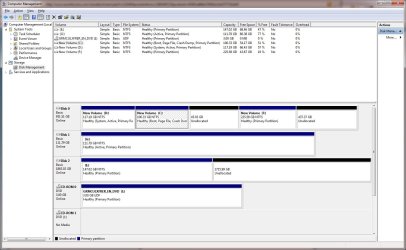
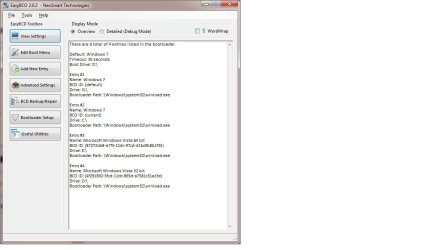
ok here are the screen shots:

In this screen shot I am booted into Windows 7 from the regular hard drive.
Drive G is the SSD. Weird observation I see two active partitions? Is that ok?

Any input I would appreciate it.

Easy BCD boot menu: Disk Management:
 

Attachments

  • disk management.jpg
    disk management.jpg
    130.3 KB · Views: 23
  • easy BCD.jpg
    easy BCD.jpg
    51.9 KB · Views: 9

My Computer My Computer

At a glance

Windows 7 Ultimate
OS
Windows 7 Ultimate
Had you correctly unplugged the other HD's during Win7 install you would have been given the C letter on the SSD and could boot it independently via BIOS which is the best way with separate HD's. You can either reinstall to realigned SSD, or unplug all other drives now, mark Win7 partition active, then run Startup Repair to write the System MBR to Win7 partition.

http://www.sevenforums.com/tutorials/71432-partition-mark-active.html
http://www.sevenforums.com/tutorials/105541-startup-repair-run-3-separate-times.html

Since you didn't tell us what is on the other partitions, we have to guess that your old Win7 is on C. If you want to get rid of it then you can simply delete it in Disk Management since D (Vista?) holds the System MBR for DISK0 Then if you want to continue using the Windows-managed Dual Boot to choose between Vistas, simply boot DISK0 using the one-time BIOS Boot menu key given on first boot screen. Delete the Win7 listings using EasyBCD to Edit OS.

However if you want to configure your three separate HD's with OS's to boot via the BIOS, remove all listings on the EasyBCD Edit OS tab. Now boot DISK0 when needed by tapping the one-time BIOS Boot Menu key given on first boot screen.

To boot DISK2 (if that's where your other Vista resides), you'll need to recover the System MBR into it the same way as you did DISK1, by unplugging all other HD's, marking it Active and running Startup Repair from the Vista DVD.
 
Yup I did not disconnect the other two drives. Reason being is that I am not sure of the benefit. I know it is the cleanest/safest way but I have had a windows multiboot for years and had not real issues. Would it offer a performance benefit? If it will most definitely try it.

The point of showing the screen shot of the easyBCD is that the partition letter names are showing along with the description of what it is there. F drive is just storage so it should not matter. Yes C drive is my regular partition Windows 7 install (shows as current and C drive) on easy BCD. The SSD drive Win7 install in the screen shot shows as the G drive). E drive is the partition with my Vista 64 bit and E drive is my Vista 32 bit. F has no OS just storage so it should not have any affect. Lots of unallocated space as well.

So D(Vista 32bit) and C(win7 64bi) have OS's G(win7 64 bit SSD drive) and E (vista 64bit).

My current question is performance of the SSd drive.

Thanks again for your help and sorry if my info was not clear.

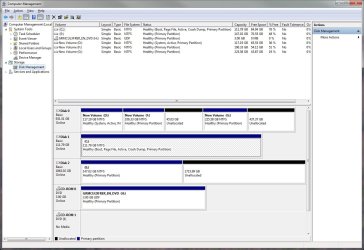
I booted into Win 7 in the SSD and here it is the screen shot: Boot drive shows as C:
 

Attachments

  • disk management Win7 SSD.jpg
    disk management Win7 SSD.jpg
    132.3 KB · Views: 7
Last edited:

My Computer My Computer

At a glance

Windows 7 Ultimate
OS
Windows 7 Ultimate
I'm asking out of curiosity sake: I can almost see dual-booting with XP for compatibility reasons, although virtualizing is a better way to go. But what would be the reason why anyone would consider multi-booting with three similar OSes...two of which are identical besides the platform? What would that accomplish, aside of wasting disk space?
 

My Computer My Computer

At a glance

Windows 7 Ultimate x64 SP1Intel Core i7-260012 GB Patriot Extreme DDR3-1333Nvidia GTX 470
OS
Windows 7 Ultimate x64 SP1
CPU
Intel Core i7-2600
Motherboard
Gigabyte GA-P67A-UD3P-B3
Memory
12 GB Patriot Extreme DDR3-1333
Graphics Card(s)
Nvidia GTX 470
Monitor(s) Displays
Dell UltraSharp 2209WA
Hard Drives
OCZ Agility3 240 GB, WD5001AALS, WD7501AALS
PSU
OCZ ModStream 700W
Case
CoolerMaster HAF 912 Advanced
Cooling
CoolerMaster Hyper 212 Plus
Absolutely valid question.

Here is the story. I first installed Vista 64. But then I found out that my company VPN was not supported on 64 bit OS. Also some on line banking did not like Vista 64. Thus I installed Windows Vista 32 bit.

When Windows 7 came out I installed a copy (on the regular disk not the SSD). I have grown very used to Win7 and rarely use the two Vista installs.

Next I got the SSD and I know I installed Win7 (by now VPN compatibilities are resolved).

Each step I kept the previous OS so I can always revert back if needed. But I still have different programs that I can use and are not installed on all OS's.

Space wasted is a valid point as well but with the $130 dollar 2Tb drives disk space is cheap. Yes indeed I will not keep the Win7 64bit twice, but I will wait for a few weeks until I blow it away and reclaim the disk space.

On the otehr hand I still have a on line bank access that for the life of me only likes windows XP. Thus my next OS to add to the mix is XP. (after I dump the extra Win7 install). I have been reading on it in these forums but I would not be surprised if I have to ask for help. :)

Sorry if rubbed anyone the wrong way.

Regards and again thanks for your input.


Nick
 

My Computer My Computer

At a glance

Windows 7 Ultimate
OS
Windows 7 Ultimate
I was just asking out of curiosity, that's all. You could simplify by just installing Windows 7, and then virtualizing XP for your banking needs...but I would honestly be more than blown away if the online banking didn't work with a specific OS. Hell, most work even under Linux. It is the browser that interacts with the site...not the OS...so if it was me, I'd get it to work under Windows 7, given that is more secure anyway. Are you using IE, or some other browser that might account for the issue? However, let's just say this is the one in a billion issue that is due to the OS....that would be my sign to switch banks to one that's competent.
 

My Computer My Computer

At a glance

Windows 7 Ultimate x64 SP1Intel Core i7-260012 GB Patriot Extreme DDR3-1333Nvidia GTX 470
OS
Windows 7 Ultimate x64 SP1
CPU
Intel Core i7-2600
Motherboard
Gigabyte GA-P67A-UD3P-B3
Memory
12 GB Patriot Extreme DDR3-1333
Graphics Card(s)
Nvidia GTX 470
Monitor(s) Displays
Dell UltraSharp 2209WA
Hard Drives
OCZ Agility3 240 GB, WD5001AALS, WD7501AALS
PSU
OCZ ModStream 700W
Case
CoolerMaster HAF 912 Advanced
Cooling
CoolerMaster Hyper 212 Plus
It seems like you are satsified with Windows-managed Dual Boot for your various OS's so no need to change for performance reasons.

The issue of your SSD performance is likely due to the cloning. Some have good luck with cloning to SSD but we have been expecting cases where it turned out less than optimal and yours may be one.

Since there is no reason to sacrifice performance for cloning an SSD, I think you should clean reinstall Win7 allowing it to correctly reconfigure your multi-boot as it should during install with all other HD's plugged in. If not, add any missing OS using EasyBCD from Win7.

Take time to study alignment beforehand so that it is set up correctly for a clean reinstall:
http://www.sevenforums.com/tutorials/113967-ssd-alignment.html
http://www.sevenforums.com/tutorials/70822-ssd-tweaks-optimizations-windows-7-a.html
 
Thanks for your help.

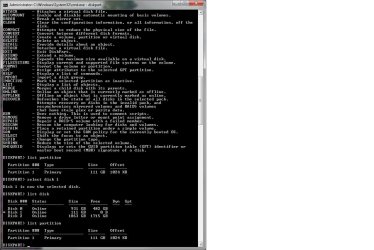
I did study the alignment subject after it was brought up further up. I did do a clean install of Windows 7 on the SSD. I run the diskpart utility and this is what I get: (the drive with the 111 Gb is the SSD I know the offset is supposed to by divisible by 4 which it is indeed).
 

Attachments

  • Diskpartition.jpg
    Diskpartition.jpg
    105.2 KB · Views: 5

My Computer My Computer

At a glance

Windows 7 Ultimate
OS
Windows 7 Ultimate
Back
Top