
Icons changed after installing MS Office 2010 language pack

Satangel

New member
Member
Local time
11:40 PM
Messages
31
Got a little other problem though, and don't want to start a new topic so I don't clutter your forums.
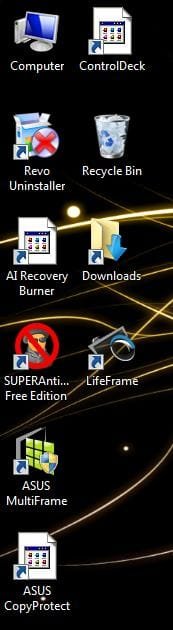
A few days ago I installed a MS Office 2010 language pack, and suddenly a lot of my programs icons just resetted :sarc: Even though they don't have anything to do with Office 2010. Is that possible?

Some programs that did change can be seen in the attachments.

All the Office programs changed their icon too.
 

Attachments
  • icons.JPG
    icons.JPG
    26.7 KB · Views: 18

My Computer My Computer

At a glance

Windows 7 Home Premium 64biti7-720QM4GB RAMATI Mobility Radeon HD 5730 1GB
Computer Manufacturer/Model Number
ASUS PRO64JQ
OS
Windows 7 Home Premium 64bit
CPU
i7-720QM
Memory
4GB RAM
Graphics Card(s)
ATI Mobility Radeon HD 5730 1GB
Hard Drives
500GB
Other Info
Bought September 2010
Okay, I did a quick Google and came up with this tutorial. I tried both methods but it didn't work. All the icons have changed though, this is how they look now.

Still not okay though, I really wonder how to fix this, next to a System Restore....
 

Attachments

  • achter tut.JPG
    achter tut.JPG
    22.1 KB · Views: 6

My Computer My Computer

At a glance

Windows 7 Home Premium 64biti7-720QM4GB RAMATI Mobility Radeon HD 5730 1GB
Computer Manufacturer/Model Number
ASUS PRO64JQ
OS
Windows 7 Home Premium 64bit
CPU
i7-720QM
Memory
4GB RAM
Graphics Card(s)
ATI Mobility Radeon HD 5730 1GB
Hard Drives
500GB
Other Info
Bought September 2010

My Computer My Computer

At a glance

Windows 7 Home Premium 64biti7-720QM4GB RAMATI Mobility Radeon HD 5730 1GB
Computer Manufacturer/Model Number
ASUS PRO64JQ
OS
Windows 7 Home Premium 64bit
CPU
i7-720QM
Memory
4GB RAM
Graphics Card(s)
ATI Mobility Radeon HD 5730 1GB
Hard Drives
500GB
Other Info
Bought September 2010
This is really sucking man, looks like shit atm :/
 

My Computer My Computer

At a glance

Windows 7 Home Premium 64biti7-720QM4GB RAMATI Mobility Radeon HD 5730 1GB
Computer Manufacturer/Model Number
ASUS PRO64JQ
OS
Windows 7 Home Premium 64bit
CPU
i7-720QM
Memory
4GB RAM
Graphics Card(s)
ATI Mobility Radeon HD 5730 1GB
Hard Drives
500GB
Other Info
Bought September 2010
Okay I uninstalled the language pack and redownloaded from another source, the 32bit version this time and it STILL WON'T WORK.
I'm getting rather desperate now, it looks like complete shit atm and I can't stand it.
 

My Computer My Computer

At a glance

Windows 7 Home Premium 64biti7-720QM4GB RAMATI Mobility Radeon HD 5730 1GB
Computer Manufacturer/Model Number
ASUS PRO64JQ
OS
Windows 7 Home Premium 64bit
CPU
i7-720QM
Memory
4GB RAM
Graphics Card(s)
ATI Mobility Radeon HD 5730 1GB
Hard Drives
500GB
Other Info
Bought September 2010
I wonder, if I just change the iconcache.db file to one from another computer running 7 64bit, one that shows the icons correctly, will it solve my problem? Is it recommended to do that because it seems kind of dangerous :p
 

My Computer My Computer

At a glance

Windows 7 Home Premium 64biti7-720QM4GB RAMATI Mobility Radeon HD 5730 1GB
Computer Manufacturer/Model Number
ASUS PRO64JQ
OS
Windows 7 Home Premium 64bit
CPU
i7-720QM
Memory
4GB RAM
Graphics Card(s)
ATI Mobility Radeon HD 5730 1GB
Hard Drives
500GB
Other Info
Bought September 2010
I tried some other things, including using IconPackager to change the icon style and then change it back to the default, and it still won't work. Getting really hopeless here and starting to think there's no other way then to just format this shit....
 

My Computer My Computer

At a glance

Windows 7 Home Premium 64biti7-720QM4GB RAMATI Mobility Radeon HD 5730 1GB
Computer Manufacturer/Model Number
ASUS PRO64JQ
OS
Windows 7 Home Premium 64bit
CPU
i7-720QM
Memory
4GB RAM
Graphics Card(s)
ATI Mobility Radeon HD 5730 1GB
Hard Drives
500GB
Other Info
Bought September 2010

My Computer My Computer

At a glance

Windows 7 Home Premium 64biti7-720QM4GB RAMATI Mobility Radeon HD 5730 1GB
Computer Manufacturer/Model Number
ASUS PRO64JQ
OS
Windows 7 Home Premium 64bit
CPU
i7-720QM
Memory
4GB RAM
Graphics Card(s)
ATI Mobility Radeon HD 5730 1GB
Hard Drives
500GB
Other Info
Bought September 2010

My Computer My Computer

At a glance

Windows 10, Home Clean InstallIntel Core2 processsor Q8200(2.33Ghz 1333FSB)...6 gbATI Radeon 256MB HD3650
Computer type
PC/Desktop
Computer Manufacturer/Model Number
Dell XPS 420
OS
Windows 10, Home Clean Install
CPU
Intel Core2 processsor Q8200(2.33Ghz 1333FSB) Quad Core Tech
Motherboard
Dell
Memory
6 gb
Graphics Card(s)
ATI Radeon 256MB HD3650
Sound Card
Intergrated 7.1 Channel Audio
Monitor(s) Displays
Dell SP2009W 20"
Hard Drives
640 GB Serial ATA Hard drive
Cooling
Fan
Keyboard
Dell USB Keyboard
Mouse
Dell Premium Optical USB
Internet Speed
DSL 2.85
Probably you are planning to install windows again, and that's why you are searching for a product key . If you can search the icons for C:\Windows \Installer with Resource hacker (I cannot say what is the appropriate folder , as I dont use those programs ), you can fix the icons manually .
 

My Computer My Computer

At a glance

Microsoft Windows 10 Pro Insider Preview 64-bitIntel(R) Core(TM) i3-4130 CPU @ 3.40GHzCorsair Vengence 4GB x2 (8.00GB Dual-Channel ...2047MB GeForce GTS 450 (ZOTAC International)
Computer type
PC/Desktop
Computer Manufacturer/Model Number
Self Assembled
OS
Microsoft Windows 10 Pro Insider Preview 64-bit
CPU
Intel(R) Core(TM) i3-4130 CPU @ 3.40GHz
Motherboard
Gigabyte Technology Co., Ltd. B85M-D3H
Memory
Corsair Vengence 4GB x2 (8.00GB Dual-Channel DDR3 @ 798MHz)
Graphics Card(s)
2047MB GeForce GTS 450 (ZOTAC International)
Sound Card
Onboard (Realtek High Definition Audio)
Monitor(s) Displays
LG Flatron E2040T
Screen Resolution
1600x900
Hard Drives
Western Digital 1 TB
Seagate 500 GB
PSU
Corsair VS550
Case
Cooler Master K380
Cooling
Cooler Master Seidon 120V Plus
Keyboard
Logitech MK260r
Mouse
Logitech MK260r
Internet Speed
PMPL Broadband
Antivirus
Windows Defender + MBAM
Browser
Firefox
Other Info
Dell Studio 15" Laptop
Satangel,

I don't know if this is related or not, but I had an issue very similar to yours a month or so ago. It was actually a Windows Update that had hosed office. I can't remember the number for it right now, but it happened on several PC's in a two day time span. I rolled back the update and rebooted and everything was back to normal. I then did an additional rebooted and tested the update again and Office kept it's proper icons.

Agan, I don't know if this is a similar issue to yours or not, but it was just very close to something I had seen.

Jay:D
 

My Computer My Computer

At a glance

Windows 7 x64 ProIntel Core i7 Q72012 GB
Computer Manufacturer/Model Number
Dell M6500
OS
Windows 7 x64 Pro
CPU
Intel Core i7 Q720
Memory
12 GB
Hard Drives
250GB
Internet Speed
8MB Cable
I found a code on the back of my laptop with Windows 7 Home Premium above it, so that's probably the code I need if I format my laptop :p It seems there's no other way then that... I'm gonna try uninstalling Office as a whole soon though and then installing another version, and if that doesn't help it's formatting time....
 

My Computer My Computer

At a glance

Windows 7 Home Premium 64biti7-720QM4GB RAMATI Mobility Radeon HD 5730 1GB
Computer Manufacturer/Model Number
ASUS PRO64JQ
OS
Windows 7 Home Premium 64bit
CPU
i7-720QM
Memory
4GB RAM
Graphics Card(s)
ATI Mobility Radeon HD 5730 1GB
Hard Drives
500GB
Other Info
Bought September 2010
Wait a bit ... Consult with a specialist before formatting , about license code and other things that may be necessary .
 

My Computer My Computer

At a glance

Microsoft Windows 10 Pro Insider Preview 64-bitIntel(R) Core(TM) i3-4130 CPU @ 3.40GHzCorsair Vengence 4GB x2 (8.00GB Dual-Channel ...2047MB GeForce GTS 450 (ZOTAC International)
Computer type
PC/Desktop
Computer Manufacturer/Model Number
Self Assembled
OS
Microsoft Windows 10 Pro Insider Preview 64-bit
CPU
Intel(R) Core(TM) i3-4130 CPU @ 3.40GHz
Motherboard
Gigabyte Technology Co., Ltd. B85M-D3H
Memory
Corsair Vengence 4GB x2 (8.00GB Dual-Channel DDR3 @ 798MHz)
Graphics Card(s)
2047MB GeForce GTS 450 (ZOTAC International)
Sound Card
Onboard (Realtek High Definition Audio)
Monitor(s) Displays
LG Flatron E2040T
Screen Resolution
1600x900
Hard Drives
Western Digital 1 TB
Seagate 500 GB
PSU
Corsair VS550
Case
Cooler Master K380
Cooling
Cooler Master Seidon 120V Plus
Keyboard
Logitech MK260r
Mouse
Logitech MK260r
Internet Speed
PMPL Broadband
Antivirus
Windows Defender + MBAM
Browser
Firefox
Other Info
Dell Studio 15" Laptop
Wait a bit ... Consult with a specialist before formatting , about license code and other things that may be necessary .

License code for what?
 

My Computer My Computer

At a glance

Windows 7 Home Premium 64biti7-720QM4GB RAMATI Mobility Radeon HD 5730 1GB
Computer Manufacturer/Model Number
ASUS PRO64JQ
OS
Windows 7 Home Premium 64bit
CPU
i7-720QM
Memory
4GB RAM
Graphics Card(s)
ATI Mobility Radeon HD 5730 1GB
Hard Drives
500GB
Other Info
Bought September 2010
For activating your computer after formatting . I have requested an expert to visit here .
 

My Computer My Computer

At a glance

Microsoft Windows 10 Pro Insider Preview 64-bitIntel(R) Core(TM) i3-4130 CPU @ 3.40GHzCorsair Vengence 4GB x2 (8.00GB Dual-Channel ...2047MB GeForce GTS 450 (ZOTAC International)
Computer type
PC/Desktop
Computer Manufacturer/Model Number
Self Assembled
OS
Microsoft Windows 10 Pro Insider Preview 64-bit
CPU
Intel(R) Core(TM) i3-4130 CPU @ 3.40GHz
Motherboard
Gigabyte Technology Co., Ltd. B85M-D3H
Memory
Corsair Vengence 4GB x2 (8.00GB Dual-Channel DDR3 @ 798MHz)
Graphics Card(s)
2047MB GeForce GTS 450 (ZOTAC International)
Sound Card
Onboard (Realtek High Definition Audio)
Monitor(s) Displays
LG Flatron E2040T
Screen Resolution
1600x900
Hard Drives
Western Digital 1 TB
Seagate 500 GB
PSU
Corsair VS550
Case
Cooler Master K380
Cooling
Cooler Master Seidon 120V Plus
Keyboard
Logitech MK260r
Mouse
Logitech MK260r
Internet Speed
PMPL Broadband
Antivirus
Windows Defender + MBAM
Browser
Firefox
Other Info
Dell Studio 15" Laptop
I found a code on the back of my laptop with Windows 7 Home Premium above it, so that's probably the code I need if I format my laptop :p It seems there's no other way then that... I'm gonna try uninstalling Office as a whole soon though and then installing another version, and if that doesn't help it's formatting time....


Hello Satangel.


Don't do anything hasty but if that 'code' resembles this one below you can reinstall and use that to activate windows 7 H. Premium though you may have to make a robo-call to MS to sort the batch key.

W4K3U-P4NDD-0NT45-KF0R5-3RIAL

Do you know anyone with a H. Premium DVD you can use for the install?


Activate Windows 7 by Phone
 

My Computer My Computer

At a glance

W 7 64-bit UltimateIntel Q9550 Yorkfield8GB Dominator 8500C5DATI : XFX 5870
Computer Manufacturer/Model Number
* BFK Customs *
OS
W 7 64-bit Ultimate
CPU
Intel Q9550 Yorkfield
Motherboard
ASUS P5Q Pro
Memory
8GB Dominator 8500C5D
Graphics Card(s)
ATI : XFX 5870
Sound Card
Realtek HD Audio 7-1
Monitor(s) Displays
1x 47" LCD HDMI & 3x 26" LCD HDMI
Screen Resolution
1920x1080P & 1920x1200
Hard Drives
1x 80GB Intel X25-M G2 SSD : 1x 500GB & 1x 640GB WD Caviar Black(s)
PSU
Corsair 620HX
Case
Cooler Master RC-690
Cooling
Tuniq Tower 120, 2x 140mm and 3x 120mm case fans
Keyboard
Microsoft 500
Mouse
Razer Diamondback 3G
Internet Speed
14 Mb/s
Other Info
1x Koutech 3Gb/s SATA HDD Hot Swap Rack
Back
Top