
Any way to log in to Windows with a Biometric Fingerprint Reader?

2 Bunny

Banned
Local time
4:08 PM
Messages
76
This is probably really obvious, but I recently purchased a new laptop with a Fingerprint reader. It came with a fingerprint reader (an AuthenTec AES2501A), and Windows installed all the drivers for it and stuff, and it came with this little program to "learn" your fingerprint for each finger (which I went through), but I was hoping you could actually "do" something with it, LOL!

Is this feasible?

Thanks.

- 2 Bunny
 

My Computer My Computer

Computer type
Laptop
Computer Manufacturer/Model Number
Lenovo N200 0769-AUU
OS
Windows 7 64Bit
CPU
Intel Pentium T2390 1.87Ghz (Dual Core)
Motherboard
Lenovo IEL10
Memory
1.5GB DDR2 PC2-5300 (Soon to Upgrade)
Graphics Card(s)
Intel GMA X3100
Sound Card
Lenovo Motherboard Standard Built in (HD)
Monitor(s) Displays
Built in display (Usable Quality)
Screen Resolution
1280X800
Hard Drives
SEAGATE!
PSU
External Lenovo (20Volt, 65Watt)
Case
Lenovo stock case
Cooling
Generic Lenovo Cooler
Keyboard
Stock Standard Lenovo Keyboard (High quality)
Mouse
Built in high quality trackpad
Internet Speed
As fast as it goes
Antivirus
Avast! Free
Browser
Firefox (2006-2014), Pale Moon (2014-?)
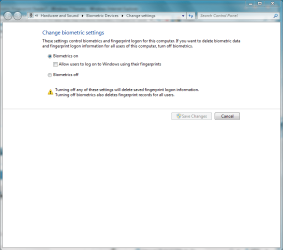
type biometric into the search bar and the settings will allow you to register use the device to log into windows.
 

Attachments

  • Capture.PNG
    Capture.PNG
    26.6 KB · Views: 356

My Computer My Computer

Computer Manufacturer/Model Number
HP dv6519tx
OS
Windows 7 Ultimate x64
CPU
1.80 GHz Intel Core 2 Duo processor T7100
Memory
3 gig ddr2
Graphics Card(s)
NVIDIA GeForce 8400M GS
Sound Card
Realtek High Definition Audio
Monitor(s) Displays
15.4” WXGA High Definition BrightView Widescreen
Screen Resolution
1280 x 800
Hard Drives
Hitachi 320 GB (5400 rpm)
PSU
90 W AC Power Adapter
Cooling
Kitchen plate under the lappy
Keyboard
101 key compatible
Mouse
Touch Pad with On/Off button and dedicated vertical Scroll
Internet Speed
Three Wireless internet prepaid using E160G USB dongle
Hi, 2 Bunny.

Since Jan has so nicely pulled references together in another thread, please consider what she wrote:

I realize this is not answering your question.... but I suggest you do some reading on the pros & cons of fingerprint readers.

If somebody steals your fingerprints, you're pretty much out of luck for the rest of your life. You wouldn't be able to use your prints as a form of identification until you were absolutely sure all copies had been destroyed. There's no way to get new prints.
I have 3 HP laptops here with fingerprint readers. I consider them part of HP's bloatware & as such are never used.

HowStuffWorks "How Fingerprint Scanners Work"

Case studies reveal the pros and cons of biometrics

FAQ on Fingerprint Scanner, different types of fingerprint sensors/readers, Capacitive Sensors, Optical Sensors, Thermal Sensors, Pressure Sensors, RF Sensors, Ultrasonic Sensors, Static Fingerprint Reader/Sensor, Swipe Fingerprint Reader/Sensor

http://www.sevenforums.com/hardware-devices/67167-fingerprint-reader-why-why-not.html
 

My Computer My Computer

OS
Windows 7 & Windows Vista Ultimate
BIOMETRIC Reply

Hi, 2 Bunny.

Since Jan has so nicely pulled references together in another thread, please consider what she wrote:

I realize this is not answering your question.... but I suggest you do some reading on the pros & cons of fingerprint readers.

If somebody steals your fingerprints, you're pretty much out of luck for the rest of your life. You wouldn't be able to use your prints as a form of identification until you were absolutely sure all copies had been destroyed. There's no way to get new prints.
I have 3 HP laptops here with fingerprint readers. I consider them part of HP's bloatware & as such are never used.

HowStuffWorks "How Fingerprint Scanners Work"

Case studies reveal the pros and cons of biometrics

FAQ on Fingerprint Scanner, different types of fingerprint sensors/readers, Capacitive Sensors, Optical Sensors, Thermal Sensors, Pressure Sensors, RF Sensors, Ultrasonic Sensors, Static Fingerprint Reader/Sensor, Swipe Fingerprint Reader/Sensor

http://www.sevenforums.com/hardware-devices/67167-fingerprint-reader-why-why-not.html

Didn't they also have a thing on mythbusters or something where they were able to fool a "StateOfTheArt" Biometric Door unlocker machine with just a standard copy machine and some paper?

For me, the machine mostly doesn't leave the house that much, so somebody would need to break in and physically steal the machine first. Good thought though. I just need something convenient, especially at this stage of setting things up, rebooting, tweaking, etc.

type biometric into the search bar and the settings will allow you to register use the device to log into windows.

Sorry, nothing there when I search for "Biometric".

While we're at it, anybody know of any Biometric login software for WinXP x64?

Thanks.

- 2 Bunny
 

My Computer My Computer

Computer type
Laptop
Computer Manufacturer/Model Number
Lenovo N200 0769-AUU
OS
Windows 7 64Bit
CPU
Intel Pentium T2390 1.87Ghz (Dual Core)
Motherboard
Lenovo IEL10
Memory
1.5GB DDR2 PC2-5300 (Soon to Upgrade)
Graphics Card(s)
Intel GMA X3100
Sound Card
Lenovo Motherboard Standard Built in (HD)
Monitor(s) Displays
Built in display (Usable Quality)
Screen Resolution
1280X800
Hard Drives
SEAGATE!
PSU
External Lenovo (20Volt, 65Watt)
Case
Lenovo stock case
Cooling
Generic Lenovo Cooler
Keyboard
Stock Standard Lenovo Keyboard (High quality)
Mouse
Built in high quality trackpad
Internet Speed
As fast as it goes
Antivirus
Avast! Free
Browser
Firefox (2006-2014), Pale Moon (2014-?)
SOLUTION SOON TO COME Reply

Any new solutions in the community on this one?

Thanks.

- 2 Bunny
 

My Computer My Computer

Computer type
Laptop
Computer Manufacturer/Model Number
Lenovo N200 0769-AUU
OS
Windows 7 64Bit
CPU
Intel Pentium T2390 1.87Ghz (Dual Core)
Motherboard
Lenovo IEL10
Memory
1.5GB DDR2 PC2-5300 (Soon to Upgrade)
Graphics Card(s)
Intel GMA X3100
Sound Card
Lenovo Motherboard Standard Built in (HD)
Monitor(s) Displays
Built in display (Usable Quality)
Screen Resolution
1280X800
Hard Drives
SEAGATE!
PSU
External Lenovo (20Volt, 65Watt)
Case
Lenovo stock case
Cooling
Generic Lenovo Cooler
Keyboard
Stock Standard Lenovo Keyboard (High quality)
Mouse
Built in high quality trackpad
Internet Speed
As fast as it goes
Antivirus
Avast! Free
Browser
Firefox (2006-2014), Pale Moon (2014-?)
My netbook has a biometric fingerprint reader, also an AuthenTec, and the results when I was using it to log in were hit and miss.

You should be able to go into control panel, and there should be a control panel item that allows you to register your fingerprints for login. I don't have my netbook right here with me, or I would be able to be more specific.

I do know that you need to register your fingerprints within Windows before it will allow you to use the biometric scanner to log in though.
 

My Computer My Computer

Computer type
PC/Desktop
Computer Manufacturer/Model Number
SuperBeast
OS
Windows 10 Tech Preview 9926 x64
CPU
AMD FX-8350
Motherboard
Gigabyte GA-990FXA-UD3
Memory
16GB DDR3 1333
Graphics Card(s)
Asus R9 290 DirectCU II OC, Gigabyte Windforce R9 290 OC
Sound Card
Integrated w/ Creative A250 2.1 speakers
Monitor(s) Displays
Main: Asus VN289H 28" Secondary: Acer G246HL 24"
Screen Resolution
1920x1080
Hard Drives
128 GB SanDisk Ultra Plus (Windows drive)

240 GB Crucial M500 SSD (Games drive)

1 TB WDC WD10EACS 7200RPM HDD (Data drive)

2 TB Seagate Expansion Desktop external HDD (Backup drive)
PSU
900w Antec HCG-900
Case
Raidmax Agusta Full ATX
Cooling
Corsair H80
Keyboard
Cooler Master Devastator MB24
Mouse
Cooler Master Devastator MS2K 1000/1600/2000 DPI
Internet Speed
100Mbps cable
Antivirus
Avast!
Browser
Chrome
Yes, there is, but you have to get the fingerprint reader software and driver and install it immediately after installing windows.
 

My Computer My Computer

Computer Manufacturer/Model Number
HP dv6519tx
OS
Windows 7 Ultimate x64
CPU
1.80 GHz Intel Core 2 Duo processor T7100
Memory
3 gig ddr2
Graphics Card(s)
NVIDIA GeForce 8400M GS
Sound Card
Realtek High Definition Audio
Monitor(s) Displays
15.4” WXGA High Definition BrightView Widescreen
Screen Resolution
1280 x 800
Hard Drives
Hitachi 320 GB (5400 rpm)
PSU
90 W AC Power Adapter
Cooling
Kitchen plate under the lappy
Keyboard
101 key compatible
Mouse
Touch Pad with On/Off button and dedicated vertical Scroll
Internet Speed
Three Wireless internet prepaid using E160G USB dongle
Back
Top