
Upgrade to win 7 wont boot from CD

oxicottin

New member
Member
Local time
5:28 PM
Messages
47
Hello, I am running Vista 32 and have purchased a Win 7 home premium upgrade from MS and I cant get it to boot from the cd. I went into bios and the boot order was correct starting with DVD/CD and it still wont do it? If I start vista and go into the DVD drive I can start it that way. I also wanted to use the 64 bit DVD that came with it because my PC is 64-bit compatible. How do I get this to boot on start OR can I just run from "My Computer" because the Win 7 screen does come up if I go that rout.

Thanks,
Chad
 

My Computer My Computer

Computer type
PC/Desktop
Computer Manufacturer/Model Number
Custom Build
OS
7/32 & 64 bit, 10/32 & 64 bit

My Computer My Computer

Computer Manufacturer/Model Number
Too many to describe...
OS
Windows 7 x64 pro/ Windows 7 x86 Pro/ XP SP3 x86

My Computer My Computer

Computer Manufacturer/Model Number
HP, Dell, Gateway, Toshiba - 4 laptops and 2 desktops
OS
Vista, Windows7, Mint Mate, Zorin, Windows 8
CPU
from 1.6GHz Duo to i7
Monitor(s) Displays
2x HP w2207
Hard Drives
5x HDD, 7x SSD, 12x Externals
Keyboard
with trackball - no mices
Mouse
Trackball mice
Internet Speed
DSL 6000
I purchased the CD's.... I have read the links provided prior to posting and everyone basically talks about whether or not a student copy can install as a full copy. What now?
 

My Computer My Computer

Computer type
PC/Desktop
Computer Manufacturer/Model Number
Custom Build
OS
7/32 & 64 bit, 10/32 & 64 bit
you must revise you boot menu carefully because if your drive recognizes the dvd then its down to your boot menu.
 

My Computer My Computer

Computer Manufacturer/Model Number
Acer Desktop
OS
Windows 7 Ultimate X64
CPU
AMD Athlon II X2 215 dual core processor
Motherboard
WMCP78M
Memory
4gb
Graphics Card(s)
nVidia
Sound Card
nVidia
Monitor(s) Displays
1
Screen Resolution
1680x1050 - pixels
Hard Drives
1TB
PSU
Cant be bothered looking behind machine, maybe later.
Case
Black steel thing
Cooling
A fan!!!!!!!!!!!!!?
Keyboard
A good one, wish buttons were bigger for my paws,
Mouse
A good one
Internet Speed
20mb
Other Info
Not a bad machine.

also have a Zoostorm Desktop pc, jsut a machine for testing stuff on before i throw it on to this one.
I purchased the CD's.... I have read the links provided prior to posting and everyone basically talks about whether or not a student copy can install as a full copy. What now?
Whether the student copy can do a full install was something that people talked about 1 year ago, the matter is completely settled now, see the link WHS provided.

If you dont have the downloaded student iso, just use the usb stick method.
 

My Computer My Computer

Computer Manufacturer/Model Number
Too many to describe...
OS
Windows 7 x64 pro/ Windows 7 x86 Pro/ XP SP3 x86
what machine do you have, make/model?
 

My Computer My Computer

Computer Manufacturer/Model Number
Acer Desktop
OS
Windows 7 Ultimate X64
CPU
AMD Athlon II X2 215 dual core processor
Motherboard
WMCP78M
Memory
4gb
Graphics Card(s)
nVidia
Sound Card
nVidia
Monitor(s) Displays
1
Screen Resolution
1680x1050 - pixels
Hard Drives
1TB
PSU
Cant be bothered looking behind machine, maybe later.
Case
Black steel thing
Cooling
A fan!!!!!!!!!!!!!?
Keyboard
A good one, wish buttons were bigger for my paws,
Mouse
A good one
Internet Speed
20mb
Other Info
Not a bad machine.

also have a Zoostorm Desktop pc, jsut a machine for testing stuff on before i throw it on to this one.
I built my machine years ago and it is compatible with Win7
 

My Computer My Computer

Computer type
PC/Desktop
Computer Manufacturer/Model Number
Custom Build
OS
7/32 & 64 bit, 10/32 & 64 bit

My Computer My Computer

Computer type
PC/Desktop
Computer Manufacturer/Model Number
Home Built
OS
Windows 10 Education 64 bit
CPU
AMD Phenom II X4 980 Black Edition Deneb 3.7GHz
Motherboard
Asus M4N68T-M V2 µATX Motherboard
Memory
8GB 4GBx2 Kingston PC10600 DDR3 1333 Memory
Graphics Card(s)
Zotac NVIDIA Geforce GT640 2 Gig DDR3 PCIe
Sound Card
VIA VT1708s High Definition Audio 8-channel Onboard
Monitor(s) Displays
22" LG E2242 1080p and 2 19" I-INC AG191D
Screen Resolution
1280x1024 - 1920x1080 - 1280x1024
Hard Drives
Crucial M100 256 GB SSD and 500 GB WD Blue SATA
PSU
Thermaltake TR 620
Case
Power Up Black ATX Mid-Tower Case
Cooling
Stock heatsink and fan
Keyboard
Logitech Wireless K350 Wave
Mouse
Logitech Wireless M570 Trackman Wheel
Internet Speed
80 Mbps Down 30 Mbps Up
Antivirus
Windows Defender
Browser
Internet Explorer 11
Other Info
HP DVD1040e Lightscribe - External USB2
I opened the DVD and there is a auto start file..
 

My Computer My Computer

Computer type
PC/Desktop
Computer Manufacturer/Model Number
Custom Build
OS
7/32 & 64 bit, 10/32 & 64 bit
how exactly are you trying to boot from dvd, when you restart your pc what next?
 

My Computer My Computer

Computer Manufacturer/Model Number
Acer Desktop
OS
Windows 7 Ultimate X64
CPU
AMD Athlon II X2 215 dual core processor
Motherboard
WMCP78M
Memory
4gb
Graphics Card(s)
nVidia
Sound Card
nVidia
Monitor(s) Displays
1
Screen Resolution
1680x1050 - pixels
Hard Drives
1TB
PSU
Cant be bothered looking behind machine, maybe later.
Case
Black steel thing
Cooling
A fan!!!!!!!!!!!!!?
Keyboard
A good one, wish buttons were bigger for my paws,
Mouse
A good one
Internet Speed
20mb
Other Info
Not a bad machine.

also have a Zoostorm Desktop pc, jsut a machine for testing stuff on before i throw it on to this one.

My Computer My Computer

Computer Manufacturer/Model Number
Too many to describe...
OS
Windows 7 x64 pro/ Windows 7 x86 Pro/ XP SP3 x86
When you boot from the CD, watch the top left of the screen. There may be a quick message appearing that says "Press any key". If that is the case, hit the space bar or any other key.
 

My Computer My Computer

Computer Manufacturer/Model Number
HP, Dell, Gateway, Toshiba - 4 laptops and 2 desktops
OS
Vista, Windows7, Mint Mate, Zorin, Windows 8
CPU
from 1.6GHz Duo to i7
Monitor(s) Displays
2x HP w2207
Hard Drives
5x HDD, 7x SSD, 12x Externals
Keyboard
with trackball - no mices
Mouse
Trackball mice
Internet Speed
DSL 6000
I opened the DVD and there is a auto start file..

Having an auto start or autorun file doesn't make the disk bootable. Autorun is just a windows function to make installing software easier. Being bootable is a completely different function controlled by other files. There are utilities that will tell you if the CD or DVD is bootable, I can't list one off of the top of my head but I believe there are some listed that were tried in the other thread I linked too. It appears though that based on what others have posted your disks should be bootable.
 

My Computer My Computer

Computer type
PC/Desktop
Computer Manufacturer/Model Number
Home Built
OS
Windows 10 Education 64 bit
CPU
AMD Phenom II X4 980 Black Edition Deneb 3.7GHz
Motherboard
Asus M4N68T-M V2 µATX Motherboard
Memory
8GB 4GBx2 Kingston PC10600 DDR3 1333 Memory
Graphics Card(s)
Zotac NVIDIA Geforce GT640 2 Gig DDR3 PCIe
Sound Card
VIA VT1708s High Definition Audio 8-channel Onboard
Monitor(s) Displays
22" LG E2242 1080p and 2 19" I-INC AG191D
Screen Resolution
1280x1024 - 1920x1080 - 1280x1024
Hard Drives
Crucial M100 256 GB SSD and 500 GB WD Blue SATA
PSU
Thermaltake TR 620
Case
Power Up Black ATX Mid-Tower Case
Cooling
Stock heatsink and fan
Keyboard
Logitech Wireless K350 Wave
Mouse
Logitech Wireless M570 Trackman Wheel
Internet Speed
80 Mbps Down 30 Mbps Up
Antivirus
Windows Defender
Browser
Internet Explorer 11
Other Info
HP DVD1040e Lightscribe - External USB2
When Booting from dvd to do a clean install requires you to keep hitting the esc key or f12 key to get into boot menu, on some machines, all depending... once in boot menu select usually boot from cdrom hit enter, a message will appear saying something like to boot from dvd press any key, you hit enter. then thats hit just follow on screen indtructions.
 

My Computer My Computer

Computer Manufacturer/Model Number
Acer Desktop
OS
Windows 7 Ultimate X64
CPU
AMD Athlon II X2 215 dual core processor
Motherboard
WMCP78M
Memory
4gb
Graphics Card(s)
nVidia
Sound Card
nVidia
Monitor(s) Displays
1
Screen Resolution
1680x1050 - pixels
Hard Drives
1TB
PSU
Cant be bothered looking behind machine, maybe later.
Case
Black steel thing
Cooling
A fan!!!!!!!!!!!!!?
Keyboard
A good one, wish buttons were bigger for my paws,
Mouse
A good one
Internet Speed
20mb
Other Info
Not a bad machine.

also have a Zoostorm Desktop pc, jsut a machine for testing stuff on before i throw it on to this one.
When Booting from dvd to do a clean install requires you to keep hitting the esc key or f12 key to get into boot menu, on some machines, all depending... once in boot menu select usually boot from cdrom hit enter, a message will appear saying something like to boot from dvd press any key, you hit enter. then thats hit just follow on screen indtructions.

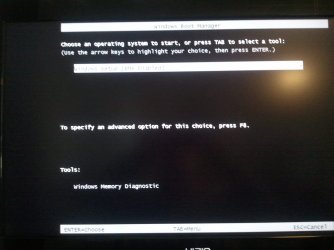
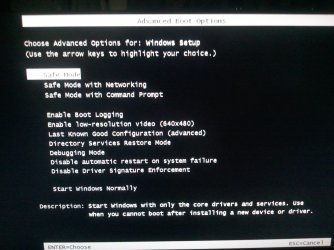
Ok sorry to get back late.... Worked a double :( Anyways, I taped the "Tab" key on start and got a new screen called Windows Boot Manager (image 1) then I pressed F8 with it on (Windows Setup [EMS Enabled]) and got (image 2) I didnt see anything about boot order? Im going to do a full install.
Thank,
Chad
 

Attachments

  • Image1.jpg
    Image1.jpg
    232.5 KB · Views: 13
  • Image2.jpg
    Image2.jpg
    300.7 KB · Views: 6

My Computer My Computer

Computer type
PC/Desktop
Computer Manufacturer/Model Number
Custom Build
OS
7/32 & 64 bit, 10/32 & 64 bit
Boot menu key is usually F12 or F9.
 

My Computer My Computer

Computer Manufacturer/Model Number
Too many to describe...
OS
Windows 7 x64 pro/ Windows 7 x86 Pro/ XP SP3 x86
Thats not your boot menu, thats you in safe mode after pressing f8.

Try pressing esc key constantly while restarting should bring you to boot menu.

if that fails try again pressing the f12 key as above
 

My Computer My Computer

Computer Manufacturer/Model Number
Acer Desktop
OS
Windows 7 Ultimate X64
CPU
AMD Athlon II X2 215 dual core processor
Motherboard
WMCP78M
Memory
4gb
Graphics Card(s)
nVidia
Sound Card
nVidia
Monitor(s) Displays
1
Screen Resolution
1680x1050 - pixels
Hard Drives
1TB
PSU
Cant be bothered looking behind machine, maybe later.
Case
Black steel thing
Cooling
A fan!!!!!!!!!!!!!?
Keyboard
A good one, wish buttons were bigger for my paws,
Mouse
A good one
Internet Speed
20mb
Other Info
Not a bad machine.

also have a Zoostorm Desktop pc, jsut a machine for testing stuff on before i throw it on to this one.
Ok, I tried as follows:

Esc: opens Windows Boot Manager
F12: Does nothing
F9: opens Windows Boot Manager

I have a startup screen that says ASUS and at the bottom of that there is two things it says: Let me look and I will post back.
 

My Computer My Computer

Computer type
PC/Desktop
Computer Manufacturer/Model Number
Custom Build
OS
7/32 & 64 bit, 10/32 & 64 bit

My Computer My Computer

Computer Manufacturer/Model Number
Acer Desktop
OS
Windows 7 Ultimate X64
CPU
AMD Athlon II X2 215 dual core processor
Motherboard
WMCP78M
Memory
4gb
Graphics Card(s)
nVidia
Sound Card
nVidia
Monitor(s) Displays
1
Screen Resolution
1680x1050 - pixels
Hard Drives
1TB
PSU
Cant be bothered looking behind machine, maybe later.
Case
Black steel thing
Cooling
A fan!!!!!!!!!!!!!?
Keyboard
A good one, wish buttons were bigger for my paws,
Mouse
A good one
Internet Speed
20mb
Other Info
Not a bad machine.

also have a Zoostorm Desktop pc, jsut a machine for testing stuff on before i throw it on to this one.
Back
Top