A Windows 7 search alternative ?

If you want to capture a snip of a menu, such as the Start menu, follow these steps:

  1. Open Snipping Tool by clicking the Start button
    4f6cbd09-148c-4dd8-b1f2-48f232a2fd33.png
    , clicking All Programs, clicking Accessories, and then clicking Snipping Tool.
  2. After you open Snipping Tool, press ESC, and then open the menu that you want to capture.
  3. Press CTRL+PRINT SCREEN.
  4. Click the arrow next to the New button, select a snip type from the menu, and then use your mouse or tablet pen to capture the menu.
Copied and pasted from a Win7 Tut.

Thanks for the tip, Mitchell. I think I could find that very useful. :)

James
 

My Computer My Computer

OS
Win7U 64 RTM
CPU
Q9550
Motherboard
GA-EP45-UD3R
Memory
8GB Gskill
Graphics Card(s)
ASUS|EAH4850/HTDI/1GD3/A
Sound Card
xfi Plat
Monitor(s) Displays
Dell 2405fpw
Screen Resolution
1920x1200
Hard Drives
Seagate & WD sata Drives
PSU
Antec
Case
Antec
Keyboard
MS Natural Ergonomic 4000
Mouse
Logitech MX610 USB Cordless
Posting back with an update (it’s been a long week!):

I did add all partitions and drives to Indexing and allowed 24 hrs. for the index to rebuild. The results were that the start menu did find the file NOHSC_menu.pdf it couldn’t find before, and found it quickly. However, a search from Computer still failed to find the file at all.


Given that Everything and other 3rd party search engines are able to find files on my 12 partition system in fractions of seconds, it doesn't seem unreasonable to expect that Win 7 search should be able to do the same thing. OK, Everything searches only filenames, but if content searches are too intense under some circumstances, it seems like a filename only (win 7) search could be implemented first, searching for content afterward, especially given the speed with which Everything finds a filename.


But I believe that the problem with Win search is more complicated than a simple search priority implementation. The searches I initiate from Computer inevitably find nothing and will continue ‘looking’ for hours if allowed, or simply return a result of 0 items found. The searches from Start Menu are finding files it didn’t before, but it still misses some.


Summary:

1) Start Menu searches are hit and miss. It will find some of the most obscure files containing the search criteria, yet miss what should be obvious (and multiple) hits. Indexing all partitions does seem to make a bit of difference, but not enough to really rely on.
2) Computer searches are pointless. Results in the GROD almost every time.
3) A partition search in WE will sometimes (about 1/2 to 3/4) turn up correct results, but only if I use a filter i.e., name: (full or partial filename).

As has been surmised, multiple partitions does seem to be the wrench in the works here, although 3rd party (filename search) tools seem to have no problem returning lightning quick, accurate results. Perhaps the fact that Win7 search also looks at content is a factor as well. It would be interesting to know if others having problems also have multiple partitions. No answers here, merely an update to the question.

James

Edit: Library searching is also problematic, in fact, even searching in the Pictures library returns absolutely no results, even when using the exact filename with or without the 'name:' filter. Nothing. I'm determined to wring the most I can out of search and will be researching as time peremits. One thing is certain...Win7 search has big problems for some people. Whether this issue is confined only to those with multiple partitions or also impacts systems for other reasons remains to be seen.

Sorry for the longwinded posts!

James
 
Last edited:

My Computer My Computer

OS
Win7U 64 RTM
CPU
Q9550
Motherboard
GA-EP45-UD3R
Memory
8GB Gskill
Graphics Card(s)
ASUS|EAH4850/HTDI/1GD3/A
Sound Card
xfi Plat
Monitor(s) Displays
Dell 2405fpw
Screen Resolution
1920x1200
Hard Drives
Seagate & WD sata Drives
PSU
Antec
Case
Antec
Keyboard
MS Natural Ergonomic 4000
Mouse
Logitech MX610 USB Cordless

My Computer My Computer

Computer Manufacturer/Model Number
Toshiba Satellite S875D-S7239 laptop
OS
MS Windows 7 Ultimate SP1 64-bit
CPU
AMD A10-4600M
Motherboard
AMD Pumori (Socket FT1)
Memory
6.00 GB Dual-Channel DDR3 @ 798MHz (11-11-12-28)
Graphics Card(s)
AMD Radeon HD 7660G
Sound Card
High Definition Audio Device
Monitor(s) Displays
Generic PnP Monitor (1600x900@60Hz)
Screen Resolution
1600x900@60Hz
Hard Drives
SSD 119GB Corsair CSSD-V128GB2 ATA Device
Keyboard
Standard PS/2 Keyboard
Mouse
HP Wireless Optical Mobile Mouse Model FHA-3410
Internet Speed
What the local pub, local coffee shop offers.
Other Info
Optical Drive:MATSHITA BD-CMB UJ160B ATA Device


Also have an Asus ha1002xp netbook with Win 7 Ultimate installed.
I have recommended "Agent Ransack" before on this forum. It is also mentioned in the Free Programs list.
I cannot recommend it highly enough. Search Everything is powerful (perhaps overly so) and fast but is not, in my opinion, a fully functional search engine.

"Agent Ransack" is non indexed, fast, highly capable, small footprint (free) search engine.
It can do complex Boolean content searches as well as date range, time, size etc.
As a simple example I searched approx 1GB of PDF files for the obscure content 12x13" it found the one file containing it in 3 places in approx 2 min.
Usual searches sub second/seconds range.

I tried it as a substitute because of the problems I had with Windows indexed search. "Agent Ransack" is now my search engine of choice.
 

My Computer My Computer

Computer type
PC/Desktop
Computer Manufacturer/Model Number
Own build
OS
Windows 7x64 Home Premium SP1
CPU
Intel i7 2600k
Motherboard
ASUS P8Z68 Deluxe
Memory
G.Skill Ripjaws (DDR3-1600) 2x4GB
Graphics Card(s)
Nvidia GeForce GTS 450; Intel HD Graphics 3000(GT2+)
Monitor(s) Displays
Dell Ultrasharp IPS panel U2311H, Samsung SyncMaster P2350
Screen Resolution
1920x1080
Hard Drives
Samsung 850 Pro SSD 256GB, Samsung SSD 840 120GB, Seagates 1TB Barracuda ST31000528AS x2
PSU
Seasonic M12II 520W
Case
Lian Li Lancool PC-K60
Cooling
Case: 1x120mm, 3x140mm CPU: Hyper 212+
Keyboard
Logitech MK520 (wireless)
Mouse
Logitech MK520
Internet Speed
6-7 Mbps
Antivirus
Norton Security Premium, Malwarebytes on 2 (MSE on 3rd PC)
Browser
FireFox
Other Info
Audio: Logitech Z523 2.1
I need to search on non-indexed server drives, often for file content. It crashes 80% of the time, and the other 20% is incomplete (does not find the file). To get around this I have to go into XP-Mode and I use search companion -- works like a charm.
In searching my C-drive, or even specific folders, Win 7 Search does not find the simplest things. I have been using Win 7 now for 5 months -- this search is the worst ever! I'd rather have the old search I think I had in Norton Utlities in the late 80's or early 90's!
MS needs to come clean on this -- as the Editor said a few posts above, a lot of people are having real problems with this. For goodness sake, FIX IT!!!!!
 

My Computer My Computer

OS
Win 7 -64 premium
I need to search on non-indexed server drives, often for file content. It crashes 80% of the time, and the other 20% is incomplete (does not find the file). To get around this I have to go into XP-Mode and I use search companion -- works like a charm.
In searching my C-drive, or even specific folders, Win 7 Search does not find the simplest things. I have been using Win 7 now for 5 months -- this search is the worst ever! I'd rather have the old search I think I had in Norton Utlities in the late 80's or early 90's!
MS needs to come clean on this -- as the Editor said a few posts above, a lot of people are having real problems with this. For goodness sake, FIX IT!!!!!


agree!

check my post above
 

My Computer My Computer

Computer Manufacturer/Model Number
Gateway/NV7923u & NV79C52u Laptops
OS
windows 7 professional & ultimate 64bit laptops
CPU
2.27 boost to 2.53 & 2.53 boost to 2.80
Motherboard
Mobile Intel® HM55 Express Chipset ???
Memory
4GB
Graphics Card(s)
Intel® Graphics Media Accelerator HD
Sound Card
realtek High-definition audio support
Monitor(s) Displays
17.3 " HD 1600 x 900
Hard Drives
hatachi Travelstar 5400 500GB & west digital 500GB
Internet Speed
35MB fios

My Computer My Computer

Computer Manufacturer/Model Number
Hopalong/ Godzilla
OS
Windows7 Pro 64bit SP-1; Windows XP Pro 32bit
CPU
Intel Core i7-870 Lynnfield 2.93GHz LGA 1156 95W Quad-Core
Motherboard
ASUS P7P55D-E PRO
Memory
8GB@1400MHz Crucial Ballistix DDR3-1600 4x2GB
Graphics Card(s)
ASUS ENGTX460 DirectCU/2DI/1GD5 1GB 256-bit GDDR5
Sound Card
VIA Onboard
Monitor(s) Displays
Asus VS248H-P 24"; Samsung SyncMaster 941BW 19"ws
Screen Resolution
1920x1080; 1440x900
Hard Drives
Samsung 830 120GB SSD
Intel 320 120GB SSD
Western Digital Caviar Black WD7501AALS 750GB 7200 RPM SATA 3.0Gb/s
Western Digital Caviar Black WD6401AALS 640GB 7200 RPM SATA 3.0Gb/s
PSU
COOLER MASTER Silent Pro RS850-AMBAJ3-US 850W Modular
Case
COOLER MASTER HAF 932 RC-932-KKN5-GP Black
Cooling
Scythe "Mugen-2 Rev.B" (2 ScytheKaze-Jyuni PWM fans)
Keyboard
Logitech K-320
Mouse
Kensington
Antivirus
Avast Inernet Suite
Browser
IE 9 ; Chrome
It should not have to be that complicated. Just give me back the search from XP.
 

My Computer My Computer

OS
Win 7 -64 premium
MS needs to come clean on this -- as the Editor said a few posts above, a lot of people are having real problems with this. For goodness sake, FIX IT!!!!!
I can't believe I still have to ask this, but why does Microsoft have to come clean one something that works for 99.9% of the people who try it? Instead of randomly pointing fingers, why not try to find out what makes your system different than most others?

I have 6 drives mapped to different server on my current work computer, and 4 mapped at home to my WHS box. I can use the built-in search on any of those locations, and aside from the expected delay, every search works fine and returns what I am looking for.

I'll say it one more time, for logic's sake......find out what the problem is, rather than just instantly assume the problem is with Microsoft. If everyone had this problem, it would be called a bug, and Microsoft would be on the hook to fix it. Common sense, people. Common sense.
 

My Computer My Computer

OS
Windows 7 Ultimate x64 SP1
CPU
Intel Core i7-2600
Motherboard
Gigabyte GA-P67A-UD3P-B3
Memory
12 GB Patriot Extreme DDR3-1333
Graphics Card(s)
Nvidia GTX 470
Monitor(s) Displays
Dell UltraSharp 2209WA
Hard Drives
OCZ Agility3 240 GB, WD5001AALS, WD7501AALS
PSU
OCZ ModStream 700W
Case
CoolerMaster HAF 912 Advanced
Cooling
CoolerMaster Hyper 212 Plus
I did add all partitions and drives to Indexing and allowed 24 hrs. for the index to rebuild. The results were that the start menu did find the file NOHSC_menu.pdf it couldn’t find before, and found it quickly. However, a search from Computer still failed to find the file at all.

A whole lot of lateness, but...

When you do the search from "Computer" it doesn't use the index. Instead it goes down the file system tree doing a filename match only. So if you have a lot of drives/data then it will take a while.

Using it from the start menu or Win+F Search then it will use the index.
 

My Computer My Computer

Computer type
PC/Desktop
Computer Manufacturer/Model Number
Alienware Aurora ALX R4
OS
Windows 10 Pro (x64)
CPU
Intel Core i7-3930K (3.2GHz - 4.5GHz)
Motherboard
Alienware Aurora-R4 x79
Memory
4x Samsung 4GB PC3-12800 DDR3 (16GB 1600MHz)
Graphics Card(s)
Nvidia Geforce GTX 690
Sound Card
SteelSeries Siberia Elite
Monitor(s) Displays
Dell UltraSharp U3011
Screen Resolution
2560x1600
Hard Drives
Samsung 850 Pro 256 GB, Seagate 1TB Desktop Hybrid HDD, 2x Western Digital 4TB Green HDD
PSU
875W Some Dell PSU <.<
Case
Alienware Aurora ALX
Cooling
Custom Liquid Cooling (EK CPU & GPU blocks) dual EK 480RAD
Keyboard
Logitech G710+ Mechanical
Mouse
Logitech G700s
Internet Speed
Verizon Fios (50 mbps average)
Other Info
Server: Intel NUC D54250WYK: i5-4250U, 16GB, 256 GB mSATA, Windows Server 2012 R2
Hello, I am looking for a 3rd party search tool wich is about similar to Windows XP search tool.

It should be able to open with the Ctrl+F key in the Explorer.

Thanks for the help and sorry for the mistakes (I'm not English)


There is something called check everything download it here. Everything Search Engine

Good luck

Ken

Searched for "Glary" in Everything Search and Windows Explorer search C Drive.

Only difference is GlaryInitialize is showing up in Everything Search but not showing up in the Windows search

Name: GlaryInitialize
Path: C:Windows\System32\Tasks
Size: blank
Date Modified: blank

I then opened C:\Windows\System32 and searched for "Glary". Nothing showed up.

Everything is faster even with Windows being indexed and also appears to be more comprehensive in its searches as its name "Everything" would lead one to believe.

Evidently Everything searches for more than just files.:D
 

My Computer My Computer

Computer Manufacturer/Model Number
Dell 570MT
OS
Windows 7 Home Premium 64bit
CPU
Athlon XII
Motherboard
?
Memory
4GB
Graphics Card(s)
ATI Radeon 4200
Sound Card
?
Monitor(s) Displays
Asus and Dell
Hard Drives
Unknown
PSU
unknown
Case
unknown
Cooling
unknown
I also find Everything Search Engine very useful.

It's very fast and efficient - without requiring masses of indexing - it's only for filenames. tho.

Others like Agent Ransack - Free File Searching Utility - to search for file contents
The horse I keep flogging is going to die one day.
These two complement each other and form the basis of my search toolkit.
"Everything" mainly for administration/computer manage activities.
"Agent Ransack/File Locator Lite" Day to day file/contents searches.
 

My Computer My Computer

Computer type
PC/Desktop
Computer Manufacturer/Model Number
Own build
OS
Windows 7x64 Home Premium SP1
CPU
Intel i7 2600k
Motherboard
ASUS P8Z68 Deluxe
Memory
G.Skill Ripjaws (DDR3-1600) 2x4GB
Graphics Card(s)
Nvidia GeForce GTS 450; Intel HD Graphics 3000(GT2+)
Monitor(s) Displays
Dell Ultrasharp IPS panel U2311H, Samsung SyncMaster P2350
Screen Resolution
1920x1080
Hard Drives
Samsung 850 Pro SSD 256GB, Samsung SSD 840 120GB, Seagates 1TB Barracuda ST31000528AS x2
PSU
Seasonic M12II 520W
Case
Lian Li Lancool PC-K60
Cooling
Case: 1x120mm, 3x140mm CPU: Hyper 212+
Keyboard
Logitech MK520 (wireless)
Mouse
Logitech MK520
Internet Speed
6-7 Mbps
Antivirus
Norton Security Premium, Malwarebytes on 2 (MSE on 3rd PC)
Browser
FireFox
Other Info
Audio: Logitech Z523 2.1
I also find Everything Search Engine very useful.

It's very fast and efficient - without requiring masses of indexing - it's only for filenames. tho.

Others like Agent Ransack - Free File Searching Utility - to search for file contents
The horse I keep flogging is going to die one day.
These two complement each other and form the basis of my search toolkit.
"Everything" mainly for administration/computer manage activities.
"Agent Ransack/File Locator Lite" Day to day file/contents searches.


mjf, try to supply links for the others
 

My Computer My Computer

Computer Manufacturer/Model Number
Gateway/NV7923u & NV79C52u Laptops
OS
windows 7 professional & ultimate 64bit laptops
CPU
2.27 boost to 2.53 & 2.53 boost to 2.80
Motherboard
Mobile Intel® HM55 Express Chipset ???
Memory
4GB
Graphics Card(s)
Intel® Graphics Media Accelerator HD
Sound Card
realtek High-definition audio support
Monitor(s) Displays
17.3 " HD 1600 x 900
Hard Drives
hatachi Travelstar 5400 500GB & west digital 500GB
Internet Speed
35MB fios
[QUOTE
I'll say it one more time, for logic's sake......find out what the problem is, rather than just instantly assume the problem is with Microsoft. If everyone had this problem, it would be called a bug, and Microsoft would be on the hook to fix it. Common sense, people. Common sense.[/QUOTE]

Instantly? Use your own common sense. I'm not some bloody hoser with 1800 posts on this board, I came here as a last resort to find a solution. I've spent days (over the past 5 months) looking for a solution, and bottom line, it just does not work. Content based searches across my network crash or give wrong results! In XP Mode they do not. P-O-S!
 

My Computer My Computer

OS
Win 7 -64 premium
I did add all partitions and drives to Indexing and allowed 24 hrs. for the index to rebuild. The results were that the start menu did find the file NOHSC_menu.pdf it couldn’t find before, and found it quickly. However, a search from Computer still failed to find the file at all.

A whole lot of lateness, but...

When you do the search from "Computer" it doesn't use the index. Instead it goes down the file system tree doing a filename match only. So if you have a lot of drives/data then it will take a while.

Using it from the start menu or Win+F Search then it will use the index.

WinKey+F is perfectly useless here. GROD for as long as I care to watch. However, tweaks in the setup here and there and further education on the AQS syntax has provided much better results. A search from Computer actually works pretty well now. Not perfect, but improved and quick enough for me to be content. WinKey+F is benched. No point in wasting time.

James
 

My Computer My Computer

OS
Win7U 64 RTM
CPU
Q9550
Motherboard
GA-EP45-UD3R
Memory
8GB Gskill
Graphics Card(s)
ASUS|EAH4850/HTDI/1GD3/A
Sound Card
xfi Plat
Monitor(s) Displays
Dell 2405fpw
Screen Resolution
1920x1200
Hard Drives
Seagate & WD sata Drives
PSU
Antec
Case
Antec
Keyboard
MS Natural Ergonomic 4000
Mouse
Logitech MX610 USB Cordless
Hello, I am looking for a 3rd party search tool wich is about similar to Windows XP search tool.

It should be able to open with the Ctrl+F key in the Explorer.

Thanks for the help and sorry for the mistakes (I'm not English)

I also find Everything Search Engine very useful.

It's very fast and efficient - without requiring masses of indexing - it's only for filenames. tho.

Others like Agent Ransack - Free File Searching Utility - to search for file contents
The horse I keep flogging is going to die one day.
These two complement each other and form the basis of my search toolkit.
"Everything" mainly for administration/computer manage activities.
"Agent Ransack/File Locator Lite" Day to day file/contents searches.


mjf, try to supply links for the others
pacinitaly i'm not sure what your last question means. I can recommend the two applications linked above.
As to the OP's specific question Agent Ransack now marketed as FileLocator Lite meets his requirements (and then some I would say). Other third party suggestions are included in the thread.
The question has been answered and it's now up to the OP to try them and see what best suits his/her needs.
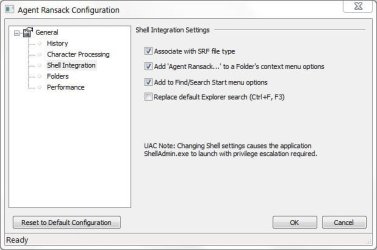
To get the (much superior) ctrl F or F3 simply select the configuration setting shown below
 

Attachments

  • ARctrlF.JPG
    ARctrlF.JPG
    33.2 KB · Views: 46
  • ARctrlF2.JPG
    ARctrlF2.JPG
    114.2 KB · Views: 66
Last edited:

My Computer My Computer

Computer type
PC/Desktop
Computer Manufacturer/Model Number
Own build
OS
Windows 7x64 Home Premium SP1
CPU
Intel i7 2600k
Motherboard
ASUS P8Z68 Deluxe
Memory
G.Skill Ripjaws (DDR3-1600) 2x4GB
Graphics Card(s)
Nvidia GeForce GTS 450; Intel HD Graphics 3000(GT2+)
Monitor(s) Displays
Dell Ultrasharp IPS panel U2311H, Samsung SyncMaster P2350
Screen Resolution
1920x1080
Hard Drives
Samsung 850 Pro SSD 256GB, Samsung SSD 840 120GB, Seagates 1TB Barracuda ST31000528AS x2
PSU
Seasonic M12II 520W
Case
Lian Li Lancool PC-K60
Cooling
Case: 1x120mm, 3x140mm CPU: Hyper 212+
Keyboard
Logitech MK520 (wireless)
Mouse
Logitech MK520
Internet Speed
6-7 Mbps
Antivirus
Norton Security Premium, Malwarebytes on 2 (MSE on 3rd PC)
Browser
FireFox
Other Info
Audio: Logitech Z523 2.1
Needless to say (but I'm still gonna say it ;)), a GUI search would be best in Win 7 ala Win XP. One of the most frequently asked questions on this board deals with the search function in Win 7.

Sure, one could learn the syntax; I'm a geek, I've learned it and I use it. One can also tweak the indexing options; I'm a geek, I've tweaked it for my needs.

The point is, this board has many people looking for help with Win 7. They are not all geeks like me and many of the other regular posters here.

The XP search was easy. It offered drop downs for file types, extensions, contents, size, date modified, location (one did not have to select the folder through explorer, one could select it from a drop down) et al, without remembering some arcane syntax methods. Welcome to the world of DOS. A Win 7 search GUI could expound, hierarchically, on the old XP search GUI with extra drop downs for the myriad of newly indexed values. It's too bad MS doesn't do this.

I'm mystified. This is not a small issue for the average user. All they want to do is find their files and get their work done. MS made that more difficult and less intuitive in Win 7.

It is too easy to dismiss others by simply saying "learn the new method" when others have been using the XP search method for almost 10 years now. I cannot imagine a GUI would be that difficult to put together. Again, it's too bad MS hasn't done it in Win 7.

I miss the cat ...

search-cat.jpg
 
Last edited:

My Computer My Computer

Computer Manufacturer/Model Number
Toshiba L355D
OS
Windows 7 Ultimate x64 SP1
CPU
Core2 Duo
Motherboard
Intel
Memory
4 GB
Graphics Card(s)
GM965 on-board
Sound Card
RealTek on-board
Monitor(s) Displays
19"+17"(laptop)
Screen Resolution
1440x900 (x 2)
Hard Drives
500GB Ext. 200GB Internal
PSU
N/A
Case
N/A
Cooling
N/A

I looked at the link. It has over 5,500 words.

No doubt that Windows7 search is designed for computers with many many files on them, my guess is upwards of 1 million.

I checked my computer.

It has a paltry 113,500 files on them, 71,500 or 63% are in the c:windows\ directory chain.

The point is for users like myself who have under 50,000 or even double that amount of files on their computer Windows 7 Search Configuration and Use is more trouble than it is worth. Especially when there are third party search programs out there for free that do what I want, don't really need to be configured and on computers with the limited number of files that I have are lightning fast.:D
 

My Computer My Computer

Computer Manufacturer/Model Number
Dell 570MT
OS
Windows 7 Home Premium 64bit
CPU
Athlon XII
Motherboard
?
Memory
4GB
Graphics Card(s)
ATI Radeon 4200
Sound Card
?
Monitor(s) Displays
Asus and Dell
Hard Drives
Unknown
PSU
unknown
Case
unknown
Cooling
unknown
MS needs to come clean on this -- as the Editor said a few posts above, a lot of people are having real problems with this. For goodness sake, FIX IT!!!!!
I can't believe I still have to ask this, but why does Microsoft have to come clean one something that works for 99.9% of the people who try it? Instead of randomly pointing fingers, why not try to find out what makes your system different than most others?

I have 6 drives mapped to different server on my current work computer, and 4 mapped at home to my WHS box. I can use the built-in search on any of those locations, and aside from the expected delay, every search works fine and returns what I am looking for.

I'll say it one more time, for logic's sake......find out what the problem is, rather than just instantly assume the problem is with Microsoft. If everyone had this problem, it would be called a bug, and Microsoft would be on the hook to fix it. Common sense, people. Common sense.

It is not always a case of there being a problem.

Many times it is a case of the proper match.

For example I use my computer for streaming videos off the Net, surfing the Net, playing some DVDs and Avi files, and doing a limited amount of Word Processing and Spreadsheet stuff.

I don't need a powerhouse computer and I don't need a powerhouse search engine that is overkill for my needs.

I am sure if I had 1 million files or whatever on my computer I would take the time learn the Windows Search capabilities and configure it to achieve my desired goals.

But my search needs are simple so I only need a simple search program that works quickly and effectively and does not take any time to learn and to configure.:D

You don't see any of the Indy car drivers on the regular streets driving their ethanol race cars, it would be great overkill for sitting in gridlock.:D
 

My Computer My Computer

Computer Manufacturer/Model Number
Dell 570MT
OS
Windows 7 Home Premium 64bit
CPU
Athlon XII
Motherboard
?
Memory
4GB
Graphics Card(s)
ATI Radeon 4200
Sound Card
?
Monitor(s) Displays
Asus and Dell
Hard Drives
Unknown
PSU
unknown
Case
unknown
Cooling
unknown
Instantly? Use your own common sense. I'm not some bloody hoser with 1800 posts on this board, I came here as a last resort to find a solution. I've spent days (over the past 5 months) looking for a solution, and bottom line, it just does not work. Content based searches across my network crash or give wrong results! In XP Mode they do not. P-O-S!
If it is a bug, aka Microsoft's fault, why would it work for just about everyone else? How about my users...all 30 of them who've been switched to Windows 7 Professional? We store everything on our servers, and I have taught all of them how to use the search so they can find files somewhere across the 150 GB of data we currently store. Not one person has complained of an issue...and these people complain about everything computer-related.

Common sense isn't always common, as demonstrated here. The longer you sit and blame Microsoft, the longer it will be until you decide to find the real culprit. I do sincerely hope you aren't ever a legal prosecutor or a detective.
But my search needs are simple so I only need a simple search program that works quickly and effectively and does not take any time to learn and to configure.:D
You've got it right in front of you. What does the power of the computer have to do with it? There isn't even a learning curve, because the syntax is either readily available, or part of common knowledge, as demonstrated in the previous thread in which a user bashed Microsoft (sound familair?) for not returning all of their .sol files....several pages worth of rants, until it was discovered the OP didn't know the simple and decades old syntax of *.sol to find them. Simply put...the search feature does exactly what it is instructed to do, and it is available on screen nearly everywhere.

If my users can learn how to use it effectively, than there's no excuse for anyone else not to. These are people who often call me at home at night asking how to undock their laptops from their docking stations, what cables they need for wireless internet, and what it means when they put their computers to sleep. Yes, those are true stories.
 

My Computer My Computer

OS
Windows 7 Ultimate x64 SP1
CPU
Intel Core i7-2600
Motherboard
Gigabyte GA-P67A-UD3P-B3
Memory
12 GB Patriot Extreme DDR3-1333
Graphics Card(s)
Nvidia GTX 470
Monitor(s) Displays
Dell UltraSharp 2209WA
Hard Drives
OCZ Agility3 240 GB, WD5001AALS, WD7501AALS
PSU
OCZ ModStream 700W
Case
CoolerMaster HAF 912 Advanced
Cooling
CoolerMaster Hyper 212 Plus
Back
Top