Copy win7 system files to new formatted harddisk

d4d4ng

New member
Local time
1:46 PM
Messages
2
Hi All,

I used 32 bit win7 on a laptop with 200GB harddisk. As the time went by, it has becoming full. I want to reformat the harddisk but I don't want the hassle to reactivate the windows. I would like to know how to backup the windows system files only but not files that have been installed by other software. It should include the driver files needed by windows to operate.

I am not sure if I can use the recovery disk created by windows it self to copy windows system files to a new formatted harddisk.

Any enlightenment will be highly appreciated.

Thanks in advanced.

Best regards.
 

My Computer My Computer

At a glance

Windows 7 Premium 32 bit
OS
Windows 7 Premium 32 bit
I recommend that you perform a image backup of your 200gig C drive and then store the image on an external drive. After creating the bootable restore cdrom, you can then replace the 200 gig with a larger one and booting the cdrom, you can restore to a larger drive. Then if you don't want the programs you had installed, you can uninstall them.

Other than that, I do not think that your method on your new hard disk will work, too many interconnected files and entries in your registry which will really barf..

Rich
 

My Computer My Computer

At a glance

Windows 7 Pro x64 SP1Intel Core I716 GigsNVIDIA GeForce GTX 670M
Computer type
Laptop
Computer Manufacturer/Model Number
Toshiba Laptop Qosimo X870
OS
Windows 7 Pro x64 SP1
CPU
Intel Core I7
Motherboard
Toshiba Qosmio
Memory
16 Gigs
Graphics Card(s)
NVIDIA GeForce GTX 670M
Monitor(s) Displays
17.7" laptop
Screen Resolution
1600 x 900
Hard Drives
256 Gig SanDisk SSD for C
256 Gig Intel SSD for D
Internet Speed
50/25 FIOS
Antivirus
Vipre (all you can eat for 10 machines)
Browser
IE and FF
Other Info
I have dos 6.22, wfwg 3.11, win98, 2000 and xp VHD's available for testing. MS's Virtual PC works great.
Hi Rich,

Thank you very much for your prompt reply. Appreciate it.
I think you are right. I forgot all the entries in registry put by installed software.
But if I create a recovery disk by windows 7, can I restore it to a new formatted harddisk so I don't have to uninstall programs that I don't need anymore. Just reinstall program that I need now.

Best regards.
 

My Computer My Computer

At a glance

Windows 7 Premium 32 bit
OS
Windows 7 Premium 32 bit
Hi Rich,

Thank you very much for your prompt reply. Appreciate it.
I think you are right. I forgot all the entries in registry put by installed software.
But if I create a recovery disk by windows 7, can I restore it to a new formatted harddisk so I don't have to uninstall programs that I don't need anymore. Just reinstall program that I need now.

Best regards.

One thing about the recovery disk. It will put your complete system on a new
hard disk. Just like the other one but larger.

I have recommended Acronis backup as it seems to be pretty reliable and fast.
I do this each saturday morning to a small Esata 2.5" drive(s) I have 4 of them that I rotate.
there isn't any way to selectivly backup just the system files and not programs, Again the registry gets into the game.

Best to image the system and uninstall what you don't want, they create another image that you can restore to your new hard disk.

There ain't no easy way :(

Rich
 

My Computer My Computer

At a glance

Windows 7 Pro x64 SP1Intel Core I716 GigsNVIDIA GeForce GTX 670M
Computer type
Laptop
Computer Manufacturer/Model Number
Toshiba Laptop Qosimo X870
OS
Windows 7 Pro x64 SP1
CPU
Intel Core I7
Motherboard
Toshiba Qosmio
Memory
16 Gigs
Graphics Card(s)
NVIDIA GeForce GTX 670M
Monitor(s) Displays
17.7" laptop
Screen Resolution
1600 x 900
Hard Drives
256 Gig SanDisk SSD for C
256 Gig Intel SSD for D
Internet Speed
50/25 FIOS
Antivirus
Vipre (all you can eat for 10 machines)
Browser
IE and FF
Other Info
I have dos 6.22, wfwg 3.11, win98, 2000 and xp VHD's available for testing. MS's Virtual PC works great.

My Computer My Computer

At a glance

Win7 Enterprise, Win7 x86 (Ult 7600), Win7 x6...AMD fx8350 4ghz, AMD-32 2400mhz, AMD-64 3200m...2gb, 4gb on the Ult 7600, 4gb on Technet RTM,...Draw my own Graphics, several nVidia cards
Computer type
PC/Desktop
Computer Manufacturer/Model Number
Built them myself, Science Experiments !
OS
Win7 Enterprise, Win7 x86 (Ult 7600), Win7 x64 Ult 7600, TechNet RTM on AMD x64 (2.8Ghz)
CPU
AMD fx8350 4ghz, AMD-32 2400mhz, AMD-64 3200mhz, AMDx64 2.8G
Motherboard
SIS 755, ECS-K8M890M-M (Ult 7600), GigaByte & others
Memory
2gb, 4gb on the Ult 7600, 4gb on Technet RTM, 32gb on FX8350
Graphics Card(s)
Draw my own Graphics, several nVidia cards
Sound Card
on motherboard
Monitor(s) Displays
19" flat scr, 28" I-Inc widescr,22" Emprex Widescr, 23" Acer
Screen Resolution
1280 x 1024, 1440 x 900, 1920 x 1080
Hard Drives
6 pata Ide HD's & 2 Sata HD's
added 80gb external on Ult 7600 computer,
numerous extra 1tb, 2TB, 3Tb SATA HD's
A collection of ext HD Docks w/ HDs
PSU
430w, 550w, 600w, 700, 800, etc
Case
All Generic Full Towers
Cooling
Open Air & a few fans, some w/ colored LEDs
Keyboard
Compaq & Dell recycled from GoodWill
Mouse
Made in China Optical Wired Mouse
Internet Speed
Fast Cable InterNet
Antivirus
AVG Free on 24 different Desktops, NO Problems!
Browser
IE 8 is preferred, but use FireFox sometimes
Other Info
Linksys Routers, switches, & Hubs
Too Many USB Flash Drives to count, Biggest is 64GB !
Eight computers in my home network.
Sixteen computers at my business network.
Linked via TeamViewer !
Lots of old used spare computer parts everywhere!
Hi Rich,

Thank you very much for your prompt reply. Appreciate it.
I think you are right. I forgot all the entries in registry put by installed software.
But if I create a recovery disk by windows 7, can I restore it to a new formatted harddisk so I don't have to uninstall programs that I don't need anymore. Just reinstall program that I need now.

Best regards.


Hello d4d4ng, welcome to Seven Forums!


If the disk out-lined in this tutorial at the link below is the one you are referring to, it is not an installer, it will only do startup error repairs, it can't be used to install Windows.

How to Create a Windows 7 System Repair Disc
 

My Computer My Computer

At a glance

W 7 64-bit UltimateIntel Q9550 Yorkfield8GB Dominator 8500C5DATI : XFX 5870
Computer Manufacturer/Model Number
* BFK Customs *
OS
W 7 64-bit Ultimate
CPU
Intel Q9550 Yorkfield
Motherboard
ASUS P5Q Pro
Memory
8GB Dominator 8500C5D
Graphics Card(s)
ATI : XFX 5870
Sound Card
Realtek HD Audio 7-1
Monitor(s) Displays
1x 47" LCD HDMI & 3x 26" LCD HDMI
Screen Resolution
1920x1080P & 1920x1200
Hard Drives
1x 80GB Intel X25-M G2 SSD : 1x 500GB & 1x 640GB WD Caviar Black(s)
PSU
Corsair 620HX
Case
Cooler Master RC-690
Cooling
Tuniq Tower 120, 2x 140mm and 3x 120mm case fans
Keyboard
Microsoft 500
Mouse
Razer Diamondback 3G
Internet Speed
14 Mb/s
Other Info
1x Koutech 3Gb/s SATA HDD Hot Swap Rack
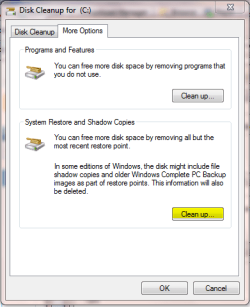
There are other factors in what is taking up the space on your HDD. Restore points and temporary internet files are 2 of those and they can take up a hell of a lot of space.

Step 1

Try cleaning out all but the most recent and see how much space it can free up. Locate 'Disk Cleanup' and right-click then 'Run as Administrator' then in the 'More Options' tab, look at the second option.

Cleanup.PNG

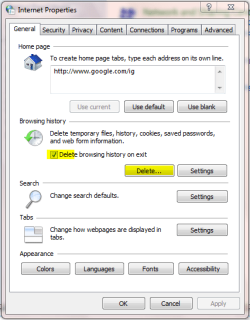
Step 2

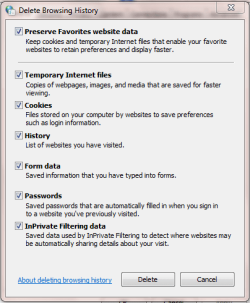
Open Control Panel and click 'Network and Internet' then 'Internet Options' and set the following options.

IE O Delete files 1.PNGIE O Delete files 2.PNG

Now every time IE closes down it'll delete most o your temporary internet file.


OS
 

My Computer My Computer

At a glance

Windows 7 Ultimate x64AMD Sempron Dual Core3GBNVIDIA GeForce 6150SE nForce 430
Computer Manufacturer/Model Number
Compaq Desktop
OS
Windows 7 Ultimate x64
CPU
AMD Sempron Dual Core
Memory
3GB
Graphics Card(s)
NVIDIA GeForce 6150SE nForce 430
Screen Resolution
1024x768
Hard Drives
150GB Sata
Recommended prior to image creation and restoration of to new drive;

Check present to see if "dirty" by running "chkdsk /r/f" check disk utility with repair swirches added,

run the "sfc /scannow" command at the Start>Run command line for verification of system file integrity using the system file checker,

backup anything you want and deletion of unneeded files and empty temp folders on source drive to reduce size of the actual image,

and lastly hope the restored image works properly before disconnecting the original 200gb source drive.

The alternative option would be simply having the new drive added in as a main storage device for backup purposes where if large enough store a full system image made of the present main drive. http://www.sevenforums.com/tutorials/663-backup-complete-computer-create-image-backup.html
 

My Computers My Computers

  • At a glance

    W7 Ultimate x64/W10 Pro x64/W11 Pro Triple Bo...AMD Phenom II X4 975 Deneb 3.6ghz - 965 2nd r...Kingston Hyper X DDR3 1600 1.5v 16gb - Hyper ...MSI HD Radeon 5750 1gb - MSI HD Radeon 6450 o...
    Computer type
    PC/Desktop
    Computer Manufacturer/Model Number
    Custom builds = 2
    OS
    W7 Ultimate x64/W10 Pro x64/W11 Pro Triple Boot - Main PC W7 Remote PC Micro ATX W7 Pro x64/W11 Pro
    CPU
    AMD Phenom II X4 975 Deneb 3.6ghz - 965 2nd remote pc
    Motherboard
    Gigabyte GA-790XTA-UD4-Gigabyte GA-880GM-D2H remote pc
    Memory
    Kingston Hyper X DDR3 1600 1.5v 16gb - Hyper X Fury 8gb 2nd
    Graphics Card(s)
    MSI HD Radeon 5750 1gb - MSI HD Radeon 6450 on mini tower
    Sound Card
    Creative Labs X-Fi Xtreme Audio P - Realtek onooard 2nd case
    Monitor(s) Displays
    ASUS VW199T-P 19" HP 2082a Main-HP 2082a 20" remote pc
    Screen Resolution
    Asus 1440x900 - HP 1600x900
    Hard Drives
    WD Black 1TB HD per OS W7, W10, and pending W11 presently on 500gb OS Drive - Pending Triple 1TB HDs for Spanned Storage/backup volume
    Single 2TB external USB enclosure, single 1TB System 7 Host/Boot drive, Pending 8TB external HD for system image b
    PSU
    Corsair 750TX - primary / Corsair CX600 - second
    Case
    Antec 900-2 - SSD compatible / NZXT Vulcan mini tower
    Cooling
    Zalman CNPS9900A
    Keyboard
    AZIO L70 Backlit Letters Gaming - ONN Cordless/USB
    Mouse
    MSI DS200 Programmable, Logitech Cordless
    Internet Speed
    30mbps upgrade - primary hard wired - mini tower usb WiFi
    Antivirus
    GFI VIPRE Internet Security 2014 on W7 2016 beta on W10,
    Browser
    Cyberfox, WaterFox 64bit FF variants, FireFox x64, Pale Moon
    Other Info
    Accomdata fan cooled usb 2.0 PIDE/Sata II, III external enclosure.
    Sambient usb/eSata PATA/Sata II, III external enclosure.
  • At a glance

    W7 Pro x64/W11 ProAMD Deneb 3.6ghz - 965Kingston Hyper X Fury 8gbMSI HD Radeon 6450 DVI Output
    Computer type
    PC/Desktop
    System Manufacturer/Model Number
    CUSTOM ASSEMBLY
    OS
    W7 Pro x64/W11 Pro
    CPU
    AMD Deneb 3.6ghz - 965
    Motherboard
    Gigabyte GA-880GM-D2H remote pc
    Memory
    Kingston Hyper X Fury 8gb
    Graphics Card(s)
    MSI HD Radeon 6450 DVI Output
    Sound Card
    Realtek onooard Creative or Other separate PENDING
    Monitor(s) Displays
    VIZIO 32" LCD TV Separate LCD Pending
    Screen Resolution
    1600x1080
    Hard Drives
    WD 500GB OS Host/Boot WD Green 1TB Storage/Backup
    PSU
    Corsair 600W - THERMALTAKE 600W spare case
    Case
    NZXT Vulcan mini tower
    Cooling
    Twin 120mm Top Fans - 240mm Side Cover
    Keyboard
    ONN Cordless/USB Logitech Cordless
    Mouse
    ONN USB/Cordless - Logitech Cordless
    Internet Speed
    DSL 5G
    Browser
    MS Edge, FireFox, WaterFox x64, FireFox Nightly
    Other Info
    OS Testing-Remote Access to Main TeamViewer
If your 200GB disc is nearly full, there must be a lot of user data. Maybe you can offload that to an external disc and then install a http://www.sevenforums.com/tutorials/72427-data-partition.html. Once you have all your user data folders established, you can copy the data back to where it belongs. Maybe you even want to keep some of the infrequently used files on the external disc. Movies and Music (both are big) play just as well from an external disc.

Now you can deal with the remaining OS partition. Delete everything you do not need. Uninstall programs with Revo Uninstaller (use the "Advanced option"), cleanup your temporary files with CCleaner and delete your hibernation file (if you do not use hibernation) with the cmd command powercfg.exe -h off. Now you should have more breathing room.
 

My Computer My Computer

At a glance

Vista, Windows7, Mint Mate, Zorin, Windows 8from 1.6GHz Duo to i7
Computer Manufacturer/Model Number
HP, Dell, Gateway, Toshiba - 4 laptops and 2 desktops
OS
Vista, Windows7, Mint Mate, Zorin, Windows 8
CPU
from 1.6GHz Duo to i7
Monitor(s) Displays
2x HP w2207
Hard Drives
5x HDD, 7x SSD, 12x Externals
Keyboard
with trackball - no mices
Mouse
Trackball mice
Internet Speed
DSL 6000
There are three decent free imaging programs that can save a backup image of your Win7 partition after you clean it up using the excellent suggestions outlined above. You can then use the boot disk which comes with each to reimage the new HD.

The built-in Win7 backup imaging program is worth a try: http://www.sevenforums.com/tutorials/663-backup-complete-computer-create-image-backup.html

If it won't reimage correctly to a new larger HD, try the second best free choice Macrium Reflect linked earlier.

The third most popular free imaging choice is Paragon 10 Backup/Imaging. Paragon Backup & Recovery Free Advanced Edition - Free Download

One of the three of these will reimage Win7 to your new HD successfully so you can Extend it's partition into the extra space of the larger HD: http://www.sevenforums.com/tutorials/2670-partition-volume-extend.html
 
Actually I wouldn't recommend resizing if you see an image successfully restored onto the new drive but use the remaining space for a second data partition. That will retain the integrity of the partition table rather then seeing it turn into a bunch of unallocated "raw" drive space due to some corruption of the MFT.

Some time when removing the 7 RC off of a second primary and nuking that to re-expand the XP primary the entire drive suddenly became "raw"! If this wasn't a preinstalled 7 I would simply adivse a clean install and restoration of a backup using the Windows Easy Transfer once you had everything back on fresh. Your user files and settings would then be restored.

The option for using the new drive in a self contained external enclosure would be another idea for long term storage of your major files freeing up space on the present drive plus safe guarding against any sudden losses, Without the means of performing a clean install you will still want to keep the original intact even if replaced by the new drive entirely in the event of any mishap.
 

My Computers My Computers

  • At a glance

    W7 Ultimate x64/W10 Pro x64/W11 Pro Triple Bo...AMD Phenom II X4 975 Deneb 3.6ghz - 965 2nd r...Kingston Hyper X DDR3 1600 1.5v 16gb - Hyper ...MSI HD Radeon 5750 1gb - MSI HD Radeon 6450 o...
    Computer type
    PC/Desktop
    Computer Manufacturer/Model Number
    Custom builds = 2
    OS
    W7 Ultimate x64/W10 Pro x64/W11 Pro Triple Boot - Main PC W7 Remote PC Micro ATX W7 Pro x64/W11 Pro
    CPU
    AMD Phenom II X4 975 Deneb 3.6ghz - 965 2nd remote pc
    Motherboard
    Gigabyte GA-790XTA-UD4-Gigabyte GA-880GM-D2H remote pc
    Memory
    Kingston Hyper X DDR3 1600 1.5v 16gb - Hyper X Fury 8gb 2nd
    Graphics Card(s)
    MSI HD Radeon 5750 1gb - MSI HD Radeon 6450 on mini tower
    Sound Card
    Creative Labs X-Fi Xtreme Audio P - Realtek onooard 2nd case
    Monitor(s) Displays
    ASUS VW199T-P 19" HP 2082a Main-HP 2082a 20" remote pc
    Screen Resolution
    Asus 1440x900 - HP 1600x900
    Hard Drives
    WD Black 1TB HD per OS W7, W10, and pending W11 presently on 500gb OS Drive - Pending Triple 1TB HDs for Spanned Storage/backup volume
    Single 2TB external USB enclosure, single 1TB System 7 Host/Boot drive, Pending 8TB external HD for system image b
    PSU
    Corsair 750TX - primary / Corsair CX600 - second
    Case
    Antec 900-2 - SSD compatible / NZXT Vulcan mini tower
    Cooling
    Zalman CNPS9900A
    Keyboard
    AZIO L70 Backlit Letters Gaming - ONN Cordless/USB
    Mouse
    MSI DS200 Programmable, Logitech Cordless
    Internet Speed
    30mbps upgrade - primary hard wired - mini tower usb WiFi
    Antivirus
    GFI VIPRE Internet Security 2014 on W7 2016 beta on W10,
    Browser
    Cyberfox, WaterFox 64bit FF variants, FireFox x64, Pale Moon
    Other Info
    Accomdata fan cooled usb 2.0 PIDE/Sata II, III external enclosure.
    Sambient usb/eSata PATA/Sata II, III external enclosure.
  • At a glance

    W7 Pro x64/W11 ProAMD Deneb 3.6ghz - 965Kingston Hyper X Fury 8gbMSI HD Radeon 6450 DVI Output
    Computer type
    PC/Desktop
    System Manufacturer/Model Number
    CUSTOM ASSEMBLY
    OS
    W7 Pro x64/W11 Pro
    CPU
    AMD Deneb 3.6ghz - 965
    Motherboard
    Gigabyte GA-880GM-D2H remote pc
    Memory
    Kingston Hyper X Fury 8gb
    Graphics Card(s)
    MSI HD Radeon 6450 DVI Output
    Sound Card
    Realtek onooard Creative or Other separate PENDING
    Monitor(s) Displays
    VIZIO 32" LCD TV Separate LCD Pending
    Screen Resolution
    1600x1080
    Hard Drives
    WD 500GB OS Host/Boot WD Green 1TB Storage/Backup
    PSU
    Corsair 600W - THERMALTAKE 600W spare case
    Case
    NZXT Vulcan mini tower
    Cooling
    Twin 120mm Top Fans - 240mm Side Cover
    Keyboard
    ONN Cordless/USB Logitech Cordless
    Mouse
    ONN USB/Cordless - Logitech Cordless
    Internet Speed
    DSL 5G
    Browser
    MS Edge, FireFox, WaterFox x64, FireFox Nightly
    Other Info
    OS Testing-Remote Access to Main TeamViewer
Back
Top