

t4akawolf
Banned
[THIS PROBLEM HAS BEEN SOLVED. PLEASE REFER TO POST #3]
Greetings Fellow Earthlings,
I just want to know how to totally HIDE a specific program's icon from the system tray. Not hiding it IN the tray but FROM it. So that when I run the program, the icon does not show up in the tray AT ALL, neither in the regular or hidden icons list.
I've done some searching online, but the answers I found online aren't actually a solution to my question, they are workarounds.
By the way, in case you misunderstood my problem, I don't want to just transfer the icon from beside the clock to the Hidden Icons list. I want it to totally disappear. So the 'Hide icon and all notifications' in the 'Customize' option doesn't work. Also, this is only for one specific icon, so hiding the tray altogether is not feasible either...
Greetings Fellow Earthlings,
I just want to know how to totally HIDE a specific program's icon from the system tray. Not hiding it IN the tray but FROM it. So that when I run the program, the icon does not show up in the tray AT ALL, neither in the regular or hidden icons list.
I've done some searching online, but the answers I found online aren't actually a solution to my question, they are workarounds.
By the way, in case you misunderstood my problem, I don't want to just transfer the icon from beside the clock to the Hidden Icons list. I want it to totally disappear. So the 'Hide icon and all notifications' in the 'Customize' option doesn't work. Also, this is only for one specific icon, so hiding the tray altogether is not feasible either...
Last edited:
My Computer
At a glance
Windows 7 Ultimate x32 (UPDATE: Now x64!)Intel(R) Core(TM)2 Duo CPU - E4600 @ 2.40GHz ...4096 RAMATI Radeon HD 4350 1GB DDR2
- Computer Manufacturer/Model Number
- Intel DG31PR
- OS
- Windows 7 Ultimate x32 (UPDATE: Now x64!)
- CPU
- Intel(R) Core(TM)2 Duo CPU - E4600 @ 2.40GHz (2CPUs)
- Motherboard
- Intel DG31PR
- Memory
- 4096 RAM
- Graphics Card(s)
- ATI Radeon HD 4350 1GB DDR2
- Sound Card
- In-built
- Monitor(s) Displays
- Generic Pnp Monitor 1024x768 (32 bit) (85Hz)
- Screen Resolution
- 1024x768
- Hard Drives
- [s]250GB HDD[/s] 1TB HDD + 150GB Ext + 4GB PD
- PSU
- 450W
- Case
- Uhm, a normal one I guess
- Cooling
- No cooling thingamabobs installed
- Keyboard
- MS Standard PS/2 Keyboard
- Mouse
- MS HID Compliant Mouse
- Internet Speed
- 256Kbps-768Kbps
- Other Info
- Creative 2.1 Speakers

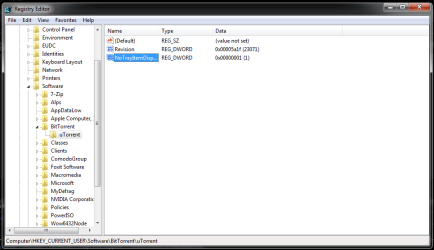


 Thanks a lot!!

