
You are using an out of date browser. It may not display this or other websites correctly.
You should upgrade or use an alternative browser.
You should upgrade or use an alternative browser.
Resize partition with unallocated space in the front
- Thread starter cheerful
- Start date

Hello cheerful Most partitioning programs(3rd party) will see the option for moving partitions. Once you have a particular partition reduced in size you simply move it toward the rear of the drive leaving an empty space in front of it.
Several screenshots of how to resize partitions with the free Linx drive tool GParted can be looked over at GPARTED DOCUMENTATION - GENERALITIES
Other programs will have their own guides for use as well. One thing to note about moving partitions however is the amount of time it may take depending on size and how much is on a partition. If you have a good number of files and data the length of time involved in moving it can take some time.
Several screenshots of how to resize partitions with the free Linx drive tool GParted can be looked over at GPARTED DOCUMENTATION - GENERALITIES
Other programs will have their own guides for use as well. One thing to note about moving partitions however is the amount of time it may take depending on size and how much is on a partition. If you have a good number of files and data the length of time involved in moving it can take some time.
My Computers
-
At a glance
W7 Ultimate x64/W10 Pro x64/W11 Pro Triple Bo...AMD Phenom II X4 975 Deneb 3.6ghz - 965 2nd r...Kingston Hyper X DDR3 1600 1.5v 16gb - Hyper ...MSI HD Radeon 5750 1gb - MSI HD Radeon 6450 o...- Computer type
- PC/Desktop
- Computer Manufacturer/Model Number
- Custom builds = 2
- OS
- W7 Ultimate x64/W10 Pro x64/W11 Pro Triple Boot - Main PC W7 Remote PC Micro ATX W7 Pro x64/W11 Pro
- CPU
- AMD Phenom II X4 975 Deneb 3.6ghz - 965 2nd remote pc
- Motherboard
- Gigabyte GA-790XTA-UD4-Gigabyte GA-880GM-D2H remote pc
- Memory
- Kingston Hyper X DDR3 1600 1.5v 16gb - Hyper X Fury 8gb 2nd
- Graphics Card(s)
- MSI HD Radeon 5750 1gb - MSI HD Radeon 6450 on mini tower
- Sound Card
- Creative Labs X-Fi Xtreme Audio P - Realtek onooard 2nd case
- Monitor(s) Displays
- ASUS VW199T-P 19" HP 2082a Main-HP 2082a 20" remote pc
- Screen Resolution
- Asus 1440x900 - HP 1600x900
- Hard Drives
- WD Black 1TB HD per OS W7, W10, and pending W11 presently on 500gb OS Drive - Pending Triple 1TB HDs for Spanned Storage/backup volume
Single 2TB external USB enclosure, single 1TB System 7 Host/Boot drive, Pending 8TB external HD for system image b
- PSU
- Corsair 750TX - primary / Corsair CX600 - second
- Case
- Antec 900-2 - SSD compatible / NZXT Vulcan mini tower
- Cooling
- Zalman CNPS9900A
- Keyboard
- AZIO L70 Backlit Letters Gaming - ONN Cordless/USB
- Mouse
- MSI DS200 Programmable, Logitech Cordless
- Internet Speed
- 30mbps upgrade - primary hard wired - mini tower usb WiFi
- Antivirus
- GFI VIPRE Internet Security 2014 on W7 2016 beta on W10,
- Browser
- Cyberfox, WaterFox 64bit FF variants, FireFox x64, Pale Moon
- Other Info
- Accomdata fan cooled usb 2.0 PIDE/Sata II, III external enclosure.
Sambient usb/eSata PATA/Sata II, III external enclosure.
-
At a glance
W7 Pro x64/W11 ProAMD Deneb 3.6ghz - 965Kingston Hyper X Fury 8gbMSI HD Radeon 6450 DVI Output- Computer type
- PC/Desktop
- System Manufacturer/Model Number
- CUSTOM ASSEMBLY
- OS
- W7 Pro x64/W11 Pro
- CPU
- AMD Deneb 3.6ghz - 965
- Motherboard
- Gigabyte GA-880GM-D2H remote pc
- Memory
- Kingston Hyper X Fury 8gb
- Graphics Card(s)
- MSI HD Radeon 6450 DVI Output
- Sound Card
- Realtek onooard Creative or Other separate PENDING
- Monitor(s) Displays
- VIZIO 32" LCD TV Separate LCD Pending
- Screen Resolution
- 1600x1080
- Hard Drives
- WD 500GB OS Host/Boot WD Green 1TB Storage/Backup
- PSU
- Corsair 600W - THERMALTAKE 600W spare case
- Case
- NZXT Vulcan mini tower
- Cooling
- Twin 120mm Top Fans - 240mm Side Cover
- Keyboard
- ONN Cordless/USB Logitech Cordless
- Mouse
- ONN USB/Cordless - Logitech Cordless
- Internet Speed
- DSL 5G
- Browser
- MS Edge, FireFox, WaterFox x64, FireFox Nightly
- Other Info
- OS Testing-Remote Access to Main TeamViewer

Yes, definitely!
I actually need something for Win7 64bit for this purpose too, and I found one, this one:
They have a 32-bit Home version that is free to use, the pro is needed for 64-bit, but it's $20 at 50% off when I found it.
Sending you to this favorably reviewed and reasonably priced product:
EASEUS Partition Master Professional Review - EASEUS Partition Master Professional Download - Softpedia
The demo looks like doing partitions in batches and resize/move is disabled, but it and review should do well to inform, any partition manager worth using should look at least this good on paper.
I will reiterate and then some what Night Hawk said: BIG moves/resizes can take a long time and my bonus:
DON'T DO IT AT ALL if strong weather might knock out your power at that time without a Uninterruptible Power Supply to give you the chance to abort it. (and you need to be there )
)
I actually need something for Win7 64bit for this purpose too, and I found one, this one:
They have a 32-bit Home version that is free to use, the pro is needed for 64-bit, but it's $20 at 50% off when I found it.
Sending you to this favorably reviewed and reasonably priced product:
EASEUS Partition Master Professional Review - EASEUS Partition Master Professional Download - Softpedia
The demo looks like doing partitions in batches and resize/move is disabled, but it and review should do well to inform, any partition manager worth using should look at least this good on paper.
I will reiterate and then some what Night Hawk said: BIG moves/resizes can take a long time and my bonus:
DON'T DO IT AT ALL if strong weather might knock out your power at that time without a Uninterruptible Power Supply to give you the chance to abort it. (and you need to be there
)My Computer
At a glance
Windows 7 Ultimate Retail Box (64-bit install...AMD FX-8350 CPU v1.15 (or 1.0F) BIOS was requ...8G CAS-7 G-Skill DDR3 @1333 (2 fours) [mobo n...Radeon HD 7950 [3 gigs of GDDR5] MSI Twin Fro...
- Computer type
- PC/Desktop
- Computer Manufacturer/Model Number
- Self Built Custom
- OS
- Windows 7 Ultimate Retail Box (64-bit installed) + Service Pack 1
- CPU
- AMD FX-8350 CPU v1.15 (or 1.0F) BIOS was required!
- Motherboard
- MSI 890FXA-GD70
- Memory
- 8G CAS-7 G-Skill DDR3 @1333 (2 fours) [mobo nonOC max rec'd]
- Graphics Card(s)
- Radeon HD 7950 [3 gigs of GDDR5] MSI Twin Frozr model
- Sound Card
- Realtek High Definition Audio (onboard mobo, ALC-889 chip)
- Monitor(s) Displays
- 2 WS LED Monitors: One LG One Viewsonic
- Screen Resolution
- 1920 by 1080
- Hard Drives
- SSD for OS: Samsung 840 Pro
SSD for VM and utilities: Adata SX900
7200 RPM SATA HDs for the rest: Hitachi and Seagate
- PSU
- Corsair TX850 - 850W max, in service since August 2010.
- Case
- Thermaltake Armor A90
- Cooling
- Thermaltake Spin Q CPU Cooler, in service since August 2010
- Keyboard
- Logitech G11
- Mouse
- Logitech M310 Wireless
- Internet Speed
- 100 Megabit broadband supposedly upgraded from 50 (Cable)
- Antivirus
- Bitdefender Internet Security 2014 suite
- Browser
- Pale Moon 64-bit main, also IceDragon, Opera, and Maxthon.
- Other Info
- CompTIA A+ certified (220-800 series) in July 2013.
- Local time
- 5:40 AM
- Messages
- 1,741
gparted is free and will do whatever you need to do. You can burn it to cd or create a bootable flash drive using uNetBootin (faster). Just a word of advice.. defrag your hdd 1st to compact everything as much as possible and if you are planning to move partitions, shrink them as much as possible 1st, then move the partition before expanding it. Smaller partitions can be moved more quickly. Make a backup image of your system partition in case something does go wrong.. (like a power loss in the middle of resizing a partition) ..to an external hdd if possible. Don't add or remove any partitions in front of the system partition either or you will have to repair windows or even reinstall it because the drive letters will change.

- Local time
- 3:40 AM
- Messages
- 50,634
Easeus is not recommended for Win7. For partition management use free Partition Wizard bootable CD, which has never failed in hundreds of resizing/moving/copying operations we have helped with here.
Rightlick on the partition, choose Resize, then slide left grey border over to take up the unallocated (deleted) space. OK, Apply step.
Always backup your files before any disk operations.
Rightlick on the partition, choose Resize, then slide left grey border over to take up the unallocated (deleted) space. OK, Apply step.
Always backup your files before any disk operations.

Easeus is not recommended for Win7. For partition management use free Partition Wizard bootable CD, which has never failed in hundreds of resizing/moving/copying operations we have helped with here.
Rightlick on the partition, choose Resize, then slide left grey border over to take up the unallocated (deleted) space. OK, Apply step.
Always backup your files before any disk operations.
I agree Partition Wizard is great. Here is a example of how to Move/Resize your partition.
Resize Partition for Windows Server 2000/2003/2008 – Move/Resize Partition safely
Jim

My Computer
At a glance
Windows 8.1 Pro w/Media Center 64bit, Windows...Phenom II X6 1100TCrucial Balistic 8gb DDR3-1866 CL9MSI R6850 Cyclone IGD5 PE
- Computer type
- PC/Desktop
- Computer Manufacturer/Model Number
- Home Built
- OS
- Windows 8.1 Pro w/Media Center 64bit, Windows 7 HP 64bit
- CPU
- Phenom II X6 1100T
- Motherboard
- ASUS M5A99X EVO
- Memory
- Crucial Balistic 8gb DDR3-1866 CL9
- Graphics Card(s)
- MSI R6850 Cyclone IGD5 PE
- Sound Card
- On Board
- Monitor(s) Displays
- ASUS VE258Q 25" LED with DVI-HDMI-DisplayPort
- Screen Resolution
- 1920 x 1080
- Hard Drives
- Two WD Cavier Black 2TB Sata III, WD My Book Essential 2TB USB 3.0
- PSU
- Seasonic X650 80 Plus GOLD Modular
- Case
- Corsair 400R
- Cooling
- Antec Kuhler H2O 620, Two 120mm and four 140mm
- Keyboard
- Logitech K120
- Mouse
- Logitech Marble Mouse USB, Logitech Precision Game Pad
- Internet Speed
- 15MB
- Antivirus
- Norton IS 2013, Malwarebytes Pro Beta 2
- Browser
- IE-11, FF-27
- Other Info
- APC UPS ES 750, Netgear WNR3500L Gigabit & Wireless N Router with SamKnows Test Program, Motorola SB6120 Gigabit Cable Modem. Brother HL-2170W Laser Printer, Epson V300 Scanner
Paragon is another one seeing a free version for 32bit Windows at Paragon Partition Manager Free Edition - Download
They get you on the 64bit however while this one gets a good rep. GParted is used most often here on both live cds and usb flash drives.
The advice by gregrocker on backing up your important even unreplacable data and files before proceeding is certainly one thing to adhere to. At any time with any partitioning program during any type of change of drive layout such as resizing or moving partitions "something can go wrong" is the additive phrase!
People often ask why I would want multiple large capacity drives until they see how one drive is used to backup another and another!
They get you on the 64bit however while this one gets a good rep. GParted is used most often here on both live cds and usb flash drives.
The advice by gregrocker on backing up your important even unreplacable data and files before proceeding is certainly one thing to adhere to. At any time with any partitioning program during any type of change of drive layout such as resizing or moving partitions "something can go wrong" is the additive phrase!
People often ask why I would want multiple large capacity drives until they see how one drive is used to backup another and another!
Attachments
My Computers
-
At a glance
W7 Ultimate x64/W10 Pro x64/W11 Pro Triple Bo...AMD Phenom II X4 975 Deneb 3.6ghz - 965 2nd r...Kingston Hyper X DDR3 1600 1.5v 16gb - Hyper ...MSI HD Radeon 5750 1gb - MSI HD Radeon 6450 o...- Computer type
- PC/Desktop
- Computer Manufacturer/Model Number
- Custom builds = 2
- OS
- W7 Ultimate x64/W10 Pro x64/W11 Pro Triple Boot - Main PC W7 Remote PC Micro ATX W7 Pro x64/W11 Pro
- CPU
- AMD Phenom II X4 975 Deneb 3.6ghz - 965 2nd remote pc
- Motherboard
- Gigabyte GA-790XTA-UD4-Gigabyte GA-880GM-D2H remote pc
- Memory
- Kingston Hyper X DDR3 1600 1.5v 16gb - Hyper X Fury 8gb 2nd
- Graphics Card(s)
- MSI HD Radeon 5750 1gb - MSI HD Radeon 6450 on mini tower
- Sound Card
- Creative Labs X-Fi Xtreme Audio P - Realtek onooard 2nd case
- Monitor(s) Displays
- ASUS VW199T-P 19" HP 2082a Main-HP 2082a 20" remote pc
- Screen Resolution
- Asus 1440x900 - HP 1600x900
- Hard Drives
- WD Black 1TB HD per OS W7, W10, and pending W11 presently on 500gb OS Drive - Pending Triple 1TB HDs for Spanned Storage/backup volume
Single 2TB external USB enclosure, single 1TB System 7 Host/Boot drive, Pending 8TB external HD for system image b
- PSU
- Corsair 750TX - primary / Corsair CX600 - second
- Case
- Antec 900-2 - SSD compatible / NZXT Vulcan mini tower
- Cooling
- Zalman CNPS9900A
- Keyboard
- AZIO L70 Backlit Letters Gaming - ONN Cordless/USB
- Mouse
- MSI DS200 Programmable, Logitech Cordless
- Internet Speed
- 30mbps upgrade - primary hard wired - mini tower usb WiFi
- Antivirus
- GFI VIPRE Internet Security 2014 on W7 2016 beta on W10,
- Browser
- Cyberfox, WaterFox 64bit FF variants, FireFox x64, Pale Moon
- Other Info
- Accomdata fan cooled usb 2.0 PIDE/Sata II, III external enclosure.
Sambient usb/eSata PATA/Sata II, III external enclosure.
-
At a glance
W7 Pro x64/W11 ProAMD Deneb 3.6ghz - 965Kingston Hyper X Fury 8gbMSI HD Radeon 6450 DVI Output- Computer type
- PC/Desktop
- System Manufacturer/Model Number
- CUSTOM ASSEMBLY
- OS
- W7 Pro x64/W11 Pro
- CPU
- AMD Deneb 3.6ghz - 965
- Motherboard
- Gigabyte GA-880GM-D2H remote pc
- Memory
- Kingston Hyper X Fury 8gb
- Graphics Card(s)
- MSI HD Radeon 6450 DVI Output
- Sound Card
- Realtek onooard Creative or Other separate PENDING
- Monitor(s) Displays
- VIZIO 32" LCD TV Separate LCD Pending
- Screen Resolution
- 1600x1080
- Hard Drives
- WD 500GB OS Host/Boot WD Green 1TB Storage/Backup
- PSU
- Corsair 600W - THERMALTAKE 600W spare case
- Case
- NZXT Vulcan mini tower
- Cooling
- Twin 120mm Top Fans - 240mm Side Cover
- Keyboard
- ONN Cordless/USB Logitech Cordless
- Mouse
- ONN USB/Cordless - Logitech Cordless
- Internet Speed
- DSL 5G
- Browser
- MS Edge, FireFox, WaterFox x64, FireFox Nightly
- Other Info
- OS Testing-Remote Access to Main TeamViewer

- Local time
- 11:40 AM
- Messages
- 16,788
Easeus works fine on Win 7.
Paragon is the best - sadly the free versions are a bit limited, and the new freebie only works on 32 bit.
Am I imagining it, or did the Paragon PM2010 free have a 64 bit version?
Of the free ones - Partition Wizard does the most.
Paragon is the best - sadly the free versions are a bit limited, and the new freebie only works on 32 bit.
Am I imagining it, or did the Paragon PM2010 free have a 64 bit version?
Of the free ones - Partition Wizard does the most.
My Computers
-
At a glance
7 X64i5 84002x8gb 3200mhz- Computer type
- PC/Desktop
- OS
- 7 X64
- CPU
- i5 8400
- Motherboard
- gigabyte b365m ds3h
- Memory
- 2x8gb 3200mhz
- Hard Drives
- various
- PSU
- pure power 11 400w cm
- Case
- Coolermaster
- Cooling
- cryorig m9i
-
At a glance
7x64g54008gb ddr4 2400- Computer type
- PC/Desktop
- OS
- 7x64
- CPU
- g5400
- Motherboard
- ga b365m ds3h
- Memory
- 8gb ddr4 2400
- PSU
- xfx pro 450w
Paragon has a 64bit personal edition you pay $24.95 for however seen at Paragon Partition Manager Personal - Overview
That comes in both flavors with it's limitations on the trial versions. The shareware version of UltraISO is another good one for writing iso images like GParted onto flash drives for the free cross platform drive tool there. ISO CD DVD image creator, editor and ISZ DMG DAA UIF to ISO converter - UltraISO can extract/create/edit/convert CD and DVD image files directly, make bootable CDs and convert ISZ DMG DAA UIF to ISO.
That comes in both flavors with it's limitations on the trial versions. The shareware version of UltraISO is another good one for writing iso images like GParted onto flash drives for the free cross platform drive tool there. ISO CD DVD image creator, editor and ISZ DMG DAA UIF to ISO converter - UltraISO can extract/create/edit/convert CD and DVD image files directly, make bootable CDs and convert ISZ DMG DAA UIF to ISO.
My Computers
-
At a glance
W7 Ultimate x64/W10 Pro x64/W11 Pro Triple Bo...AMD Phenom II X4 975 Deneb 3.6ghz - 965 2nd r...Kingston Hyper X DDR3 1600 1.5v 16gb - Hyper ...MSI HD Radeon 5750 1gb - MSI HD Radeon 6450 o...- Computer type
- PC/Desktop
- Computer Manufacturer/Model Number
- Custom builds = 2
- OS
- W7 Ultimate x64/W10 Pro x64/W11 Pro Triple Boot - Main PC W7 Remote PC Micro ATX W7 Pro x64/W11 Pro
- CPU
- AMD Phenom II X4 975 Deneb 3.6ghz - 965 2nd remote pc
- Motherboard
- Gigabyte GA-790XTA-UD4-Gigabyte GA-880GM-D2H remote pc
- Memory
- Kingston Hyper X DDR3 1600 1.5v 16gb - Hyper X Fury 8gb 2nd
- Graphics Card(s)
- MSI HD Radeon 5750 1gb - MSI HD Radeon 6450 on mini tower
- Sound Card
- Creative Labs X-Fi Xtreme Audio P - Realtek onooard 2nd case
- Monitor(s) Displays
- ASUS VW199T-P 19" HP 2082a Main-HP 2082a 20" remote pc
- Screen Resolution
- Asus 1440x900 - HP 1600x900
- Hard Drives
- WD Black 1TB HD per OS W7, W10, and pending W11 presently on 500gb OS Drive - Pending Triple 1TB HDs for Spanned Storage/backup volume
Single 2TB external USB enclosure, single 1TB System 7 Host/Boot drive, Pending 8TB external HD for system image b
- PSU
- Corsair 750TX - primary / Corsair CX600 - second
- Case
- Antec 900-2 - SSD compatible / NZXT Vulcan mini tower
- Cooling
- Zalman CNPS9900A
- Keyboard
- AZIO L70 Backlit Letters Gaming - ONN Cordless/USB
- Mouse
- MSI DS200 Programmable, Logitech Cordless
- Internet Speed
- 30mbps upgrade - primary hard wired - mini tower usb WiFi
- Antivirus
- GFI VIPRE Internet Security 2014 on W7 2016 beta on W10,
- Browser
- Cyberfox, WaterFox 64bit FF variants, FireFox x64, Pale Moon
- Other Info
- Accomdata fan cooled usb 2.0 PIDE/Sata II, III external enclosure.
Sambient usb/eSata PATA/Sata II, III external enclosure.
-
At a glance
W7 Pro x64/W11 ProAMD Deneb 3.6ghz - 965Kingston Hyper X Fury 8gbMSI HD Radeon 6450 DVI Output- Computer type
- PC/Desktop
- System Manufacturer/Model Number
- CUSTOM ASSEMBLY
- OS
- W7 Pro x64/W11 Pro
- CPU
- AMD Deneb 3.6ghz - 965
- Motherboard
- Gigabyte GA-880GM-D2H remote pc
- Memory
- Kingston Hyper X Fury 8gb
- Graphics Card(s)
- MSI HD Radeon 6450 DVI Output
- Sound Card
- Realtek onooard Creative or Other separate PENDING
- Monitor(s) Displays
- VIZIO 32" LCD TV Separate LCD Pending
- Screen Resolution
- 1600x1080
- Hard Drives
- WD 500GB OS Host/Boot WD Green 1TB Storage/Backup
- PSU
- Corsair 600W - THERMALTAKE 600W spare case
- Case
- NZXT Vulcan mini tower
- Cooling
- Twin 120mm Top Fans - 240mm Side Cover
- Keyboard
- ONN Cordless/USB Logitech Cordless
- Mouse
- ONN USB/Cordless - Logitech Cordless
- Internet Speed
- DSL 5G
- Browser
- MS Edge, FireFox, WaterFox x64, FireFox Nightly
- Other Info
- OS Testing-Remote Access to Main TeamViewer
- Local time
- 11:40 AM
- Messages
- 16,788
It's great Easeus now do 64 bit compatible free version.
No boot disc , tho.
No boot disc , tho.
My Computers
-
At a glance
7 X64i5 84002x8gb 3200mhz- Computer type
- PC/Desktop
- OS
- 7 X64
- CPU
- i5 8400
- Motherboard
- gigabyte b365m ds3h
- Memory
- 2x8gb 3200mhz
- Hard Drives
- various
- PSU
- pure power 11 400w cm
- Case
- Coolermaster
- Cooling
- cryorig m9i
-
At a glance
7x64g54008gb ddr4 2400- Computer type
- PC/Desktop
- OS
- 7x64
- CPU
- g5400
- Motherboard
- ga b365m ds3h
- Memory
- 8gb ddr4 2400
- PSU
- xfx pro 450w
- Local time
- 11:40 AM
- Messages
- 16,788
http://www.partitionwizard.com/free-partition-manager.html
d/l the bootable iso separately from:
Partition Wizard Bootable CD allows user to boot computer directly ...
Both are free.
d/l the bootable iso separately from:
Partition Wizard Bootable CD allows user to boot computer directly ...
Both are free.
My Computers
-
At a glance
7 X64i5 84002x8gb 3200mhz- Computer type
- PC/Desktop
- OS
- 7 X64
- CPU
- i5 8400
- Motherboard
- gigabyte b365m ds3h
- Memory
- 2x8gb 3200mhz
- Hard Drives
- various
- PSU
- pure power 11 400w cm
- Case
- Coolermaster
- Cooling
- cryorig m9i
-
At a glance
7x64g54008gb ddr4 2400- Computer type
- PC/Desktop
- OS
- 7x64
- CPU
- g5400
- Motherboard
- ga b365m ds3h
- Memory
- 8gb ddr4 2400
- PSU
- xfx pro 450w
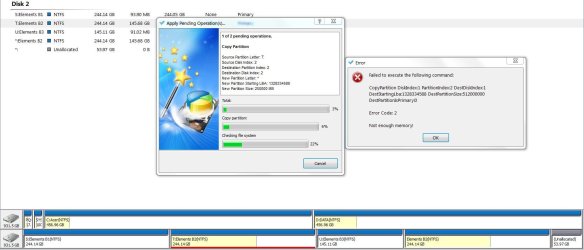
I have used both CD boot and resident partition wizard mini tool (look the same). In attempting a large copy/move operation the resident version (with no other app running) failed. The boot CD version performing exactly the same task worked without a hitch.
This is the error using the resident version. Note that the Elements B2 component on the bottom right was part of unallocated. So the total unallocated was large enough for the task. I also have 4GB ram.
Conclusion: Maybe the OS loaded can affect some of the larger operations. The boot CD may be preferable.
This is the error using the resident version. Note that the Elements B2 component on the bottom right was part of unallocated. So the total unallocated was large enough for the task. I also have 4GB ram.
Conclusion: Maybe the OS loaded can affect some of the larger operations. The boot CD may be preferable.
Attachments
Last edited:
My Computer
At a glance
Windows 7x64 Home Premium SP1Intel i7 2600kG.Skill Ripjaws (DDR3-1600) 2x4GBNvidia GeForce GTS 450; Intel HD Graphics 300...
- Computer type
- PC/Desktop
- Computer Manufacturer/Model Number
- Own build
- OS
- Windows 7x64 Home Premium SP1
- CPU
- Intel i7 2600k
- Motherboard
- ASUS P8Z68 Deluxe
- Memory
- G.Skill Ripjaws (DDR3-1600) 2x4GB
- Graphics Card(s)
- Nvidia GeForce GTS 450; Intel HD Graphics 3000(GT2+)
- Monitor(s) Displays
- Dell Ultrasharp IPS panel U2311H, Samsung SyncMaster P2350
- Screen Resolution
- 1920x1080
- Hard Drives
- Samsung 850 Pro SSD 256GB, Samsung SSD 840 120GB, Seagates 1TB Barracuda ST31000528AS x2
- PSU
- Seasonic M12II 520W
- Case
- Lian Li Lancool PC-K60
- Cooling
- Case: 1x120mm, 3x140mm CPU: Hyper 212+
- Keyboard
- Logitech MK520 (wireless)
- Mouse
- Logitech MK520
- Internet Speed
- 6-7 Mbps
- Antivirus
- Norton Security Premium, Malwarebytes on 2 (MSE on 3rd PC)
- Browser
- FireFox
- Other Info
- Audio: Logitech Z523 2.1
- Local time
- 3:40 AM
- Messages
- 50,634
This is because it has to remember the full size of the partition to do the copy/move. Not a prob using boot CD.
This is why we always recommend free Partition Wizard CD.
This is why we always recommend free Partition Wizard CD.
Not sure I know what you mean, can you elaborate?This is because it has to remember the full size of the partition to do the copy/move. Not a prob using boot CD.
This is why we always recommend free Partition Wizard CD.
My Computer
At a glance
Windows 7x64 Home Premium SP1Intel i7 2600kG.Skill Ripjaws (DDR3-1600) 2x4GBNvidia GeForce GTS 450; Intel HD Graphics 300...
- Computer type
- PC/Desktop
- Computer Manufacturer/Model Number
- Own build
- OS
- Windows 7x64 Home Premium SP1
- CPU
- Intel i7 2600k
- Motherboard
- ASUS P8Z68 Deluxe
- Memory
- G.Skill Ripjaws (DDR3-1600) 2x4GB
- Graphics Card(s)
- Nvidia GeForce GTS 450; Intel HD Graphics 3000(GT2+)
- Monitor(s) Displays
- Dell Ultrasharp IPS panel U2311H, Samsung SyncMaster P2350
- Screen Resolution
- 1920x1080
- Hard Drives
- Samsung 850 Pro SSD 256GB, Samsung SSD 840 120GB, Seagates 1TB Barracuda ST31000528AS x2
- PSU
- Seasonic M12II 520W
- Case
- Lian Li Lancool PC-K60
- Cooling
- Case: 1x120mm, 3x140mm CPU: Hyper 212+
- Keyboard
- Logitech MK520 (wireless)
- Mouse
- Logitech MK520
- Internet Speed
- 6-7 Mbps
- Antivirus
- Norton Security Premium, Malwarebytes on 2 (MSE on 3rd PC)
- Browser
- FireFox
- Other Info
- Audio: Logitech Z523 2.1
- Local time
- 3:40 AM
- Messages
- 50,634
If you choose Move using PW in Windows it has to commit the entire partition to memory to move it, frequently resulting in that error since there is not enough memory to spare.
At least this is what I remember from when I googled the error the first time I got it, which was about the last time I used PW from Windows.
There are multiple other reasons to use PW CD instead of the installed version.
At least this is what I remember from when I googled the error the first time I got it, which was about the last time I used PW from Windows.
There are multiple other reasons to use PW CD instead of the installed version.
If this was the case it could only move small partitions. I expect it to use RAM as buffering and fill the unallocated which is what it did using the boot CD version.If you choose Move using PW in Windows it has to commit the entire partition to memory to move it, frequently resulting in that error since there is not enough memory to spare.
At least this is what I remember from when I googled the error the first time I got it, which was about the last time I used PW from Windows.
There are multiple other reasons to use PW CD instead of the installed version.
In principle, working on an external HDD, the move/copy should work using both the resident and boot CD.
For some jobs the resident version would be more convenient. This is the second problem I've had with the resident version so:
Use the Partition Wizard Bootable CD.
My Computer
At a glance
Windows 7x64 Home Premium SP1Intel i7 2600kG.Skill Ripjaws (DDR3-1600) 2x4GBNvidia GeForce GTS 450; Intel HD Graphics 300...
- Computer type
- PC/Desktop
- Computer Manufacturer/Model Number
- Own build
- OS
- Windows 7x64 Home Premium SP1
- CPU
- Intel i7 2600k
- Motherboard
- ASUS P8Z68 Deluxe
- Memory
- G.Skill Ripjaws (DDR3-1600) 2x4GB
- Graphics Card(s)
- Nvidia GeForce GTS 450; Intel HD Graphics 3000(GT2+)
- Monitor(s) Displays
- Dell Ultrasharp IPS panel U2311H, Samsung SyncMaster P2350
- Screen Resolution
- 1920x1080
- Hard Drives
- Samsung 850 Pro SSD 256GB, Samsung SSD 840 120GB, Seagates 1TB Barracuda ST31000528AS x2
- PSU
- Seasonic M12II 520W
- Case
- Lian Li Lancool PC-K60
- Cooling
- Case: 1x120mm, 3x140mm CPU: Hyper 212+
- Keyboard
- Logitech MK520 (wireless)
- Mouse
- Logitech MK520
- Internet Speed
- 6-7 Mbps
- Antivirus
- Norton Security Premium, Malwarebytes on 2 (MSE on 3rd PC)
- Browser
- FireFox
- Other Info
- Audio: Logitech Z523 2.1
Similar threads

- Replies
- 3
- Views
- 1K

- Replies
- 5
- Views
- 745
- Replies
- 6
- Views
- 4K

- Replies
- 8
- Views
- 7K

