SSD / HDD : Optimize for Windows Reinstallation

How to Optimize an SSD / HDD When You're Ready to Reinstall the Operating System

This will show how to remove / over-write all existing data from a Solid State Drive (SSD) or a Hard Disk Drive (HDD), it'll work for both, then how to create a partition and then format that partition before install begins so you have a clean drive to start the installation with.

   Note

Before you start this, in the Windows start menu search box type diskmgmt.msc right click the entry and click "Run as Administrator" if you get a User Account Control (UAC) prompt enter your user credentials and click Yes; make very sure you know the correct drive number of the drive you want to do this to if you have more than one SSD / HDD in the machine, you don't want to do the wrong one.
   Warning

Do not do this to any SSD or HDD that has data on it you don't want to lose, the first thing this does is to mark the drive as "Unallocated Space" and then writes zeroes ( 0's ) to the entire drive, it's known as a "Secure Erase" and it will make data un-recoverable, it cannot be done to just a single partition on a drive, it will do the whole drive.
You have been warned!
   Information

It may be a help to over-write the HDD Master Boot Record (MBR) before you start any other procedure using the diskpart clean command, rather than the clean all; it takes just seconds to complete so you will have "unallocated" space to use either the Windows installer to create and format the partition(s) or use diskpart for that, however you choose.

Let's get started!


Step One

Boot To DISKPART


If need be, view this tutorial at the link below for an out-line of the process.
How to Boot to DISKPART at PC Startup

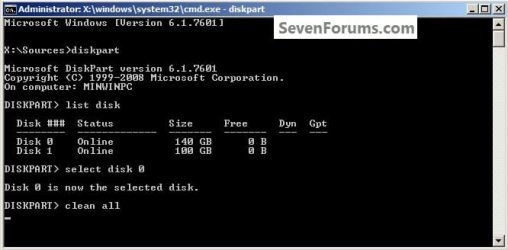
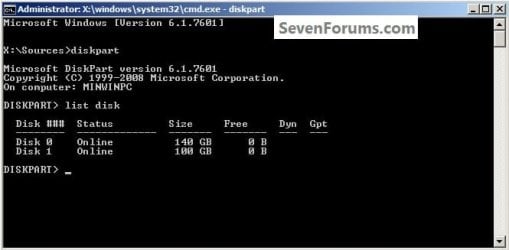
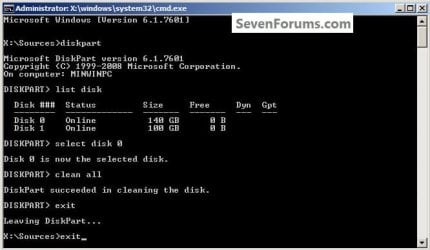
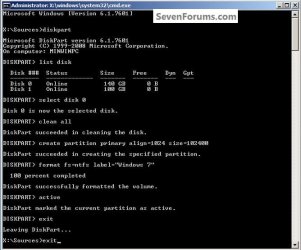
1) In the command window that opens type diskpart then hit the <enter> key then type list disk <enter> if you have more than one SSD / HDD in the machine it'll list them all.

Have a look here to view additional important information on this entire process.
click any image to enlarge
One_1.jpg
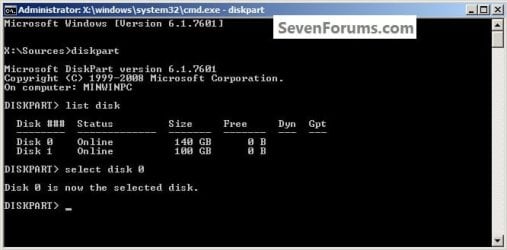
2) Now in the command window type select disk # (# = target disk number) then <enter>, you will get "Disk # is now the selected disk".
One_2.jpg
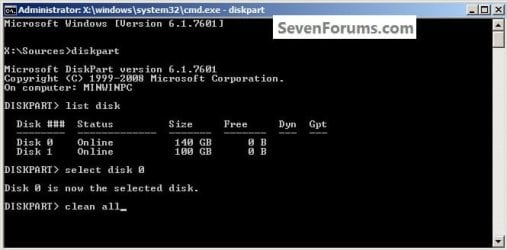
3) Now type clean <enter> you will get a blinking cursor telling you that clean all is working like in the second snip down, just relax and let it work.
One_3.1.jpg
One_3.2.jpg
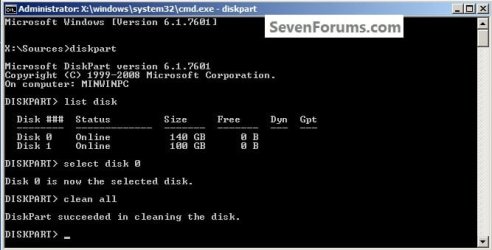
4) When it finishes you'll get "DiskPart succeeded in cleaning the disk" in the command window.
One_4.1.jpg
To leave diskpart at any time and return to the Windows 7 installer type exit two (2) separate times and hit <enter> after each and you will be returned to the installer to continue the installation process.
One_4.2.jpg


Step Two

Create a Partition


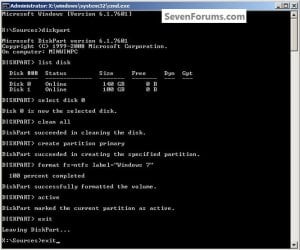
1) Create a single partition of the entire HDD / SSD

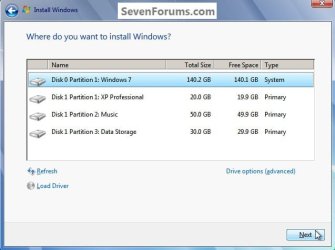
Still in the same command window, to create a partition of the entire HDD / SSD, it is suggested if you are using one of the larger, 1 - 2TB HDDs that you use the outline in #2 below to create a single 100GB partition to do the installation to or #3 below if you would like to include the new Windows 7 System Reserved partition, as we're now seeing serious issues with some trying to install to such large partitions.

Do not format the created partition(s) with the installer if you create them using this process as the installer will delete all this info, the second snip shows how to select "where to install" during the installation process, click to highlight/select the "Windows 7" partition and click next.

Now skip down to #5 below to start the installation.
click any image to enlarge
Two_1.1.jpg
Two_1.2.jpg
2) Create a specific size partition

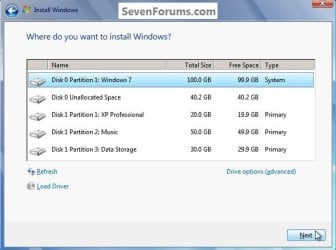
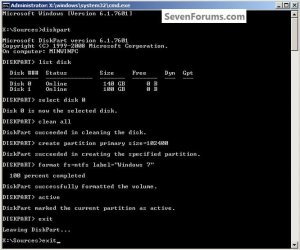
If you wanted to create a specific size partition, say 100GB you would add the size you want to create in MBs like in the command below.
create partition primary size=102400 <enter>
1024MB = 1GB - 1024x100 = 102400, you can use/create any size you like.

You can always extend the Windows partition to include the remaining unallocated space on the HDD / SSD or create additional Primary partitions or an Extended partition after the installation completes if you choose.

Do not format the created partition(s) with the installer if you create them using this process as the installer will delete all this info, the second snip shows how to select "where to install" during the installation process, click to highlight/select the "Windows 7" partition and click next.

Now skip down to #5 below to start the installation.
Two_2.1.jpg
Two_2.2.jpg
3) Create the System Reserved partition

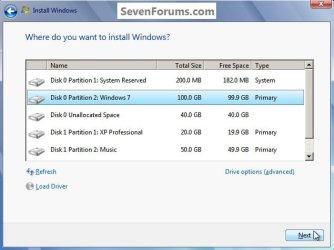
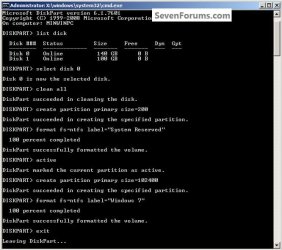
If you should want to add the "System Reserved" partition back after the clean all, see this snip; of course you would have to select to install Windows 7 to the partition labeled as "Windows 7" during the install and do not format either partition with the installer.

The reason for suggesting to create the System Reserved at 200MB instead of the new default of 100MB is an attempt to curb some of the issues we're now seeing with the partition being too small when dual/multi booting and it also being needed for use with the Windows 7 Backup and Restore and BitLocker programs.

You can always extend the Windows partition to include the remaining unallocated space on the HDD / SSD or create additional Primary partitions or an Extended partition after the installation completes if you choose.

The second snip shows how to select "where to install" during the installation process, click to highlight/select the "Windows 7" partition and click next.
Two_3.1.jpg
Two_3.2.jpg
4) See this tutorial for the "align" argument

Align a Solid State Drive for Windows Installation
Two_4.1.jpg
5) That's it, you're now done with the command window, type exit <enter> to leave diskpart and exit <enter> again to close the command window; if you're using a Windows 7 full installer it will go to the "Select Language" screen to continue the installation process as usual.

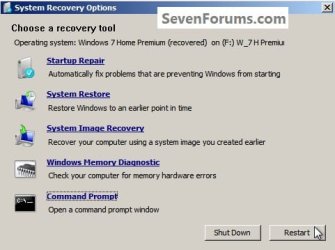
For those using a created repair CD or a Vista installer type exit <enter> to leave diskpart and exit <enter> again to close the command window; at the System Recovery Options dialog box that's still open click Restart to finish the process.
Restart.jpg
Enjoy! :)


Last edited by a moderator:
Bare Foot Kid,

Thank you for your response. I actually do want to erase everything off the HD just to be sure that my clean Win 7 install is going to be.... well, simply clean! I have two disks and the one I want to clean is the one that I used for OS, programs, and games. I'm going to move whatever data I want to keep onto my second HD. In this case, how am I going to get the MBR back in place onto the one that I'm going to clean? is it generated while creating partition, or do I have to do something else? Any help on this would be much appreciated.

Thank you,

Luc.
 

My Computer My Computer

At a glance

Windows 7 Prof x64Phenom II x4 955 BE8GB Corsair Dominator 1333MSI N460 GTX Cyclone 768D5 OC
Computer Manufacturer/Model Number
Home Built
OS
Windows 7 Prof x64
CPU
Phenom II x4 955 BE
Motherboard
GA-790FXTA-UD5
Memory
8GB Corsair Dominator 1333
Graphics Card(s)
MSI N460 GTX Cyclone 768D5 OC
Sound Card
Realtek integrated
Monitor(s) Displays
Iiyama ProLite E2407HDS
Screen Resolution
1920 X 1080
Hard Drives
Samsung Spinpoint F3 HD502HJ
PSU
Cooler Master 700W
Case
Thermaltake Element S VK600 series
Cooling
CPU Noctua NH-U9B SE2
Keyboard
Logitech
Mouse
Razer Krait
Internet Speed
Mobile Broadband
Hello again.


The MBR is written to the new partition automatically when Windows 7 is installed.

Leave only the Hard Disk Drive you want to do the install to connected to the motherboard, just to be on the safe-side so you don't have to be concerned about your data and you can reconnect it after the install is complete and Windows is booting good.

Create a single 100GB partition to do the install to and other partitions can be created after the install using Windows 7 disk management.
 

My Computer My Computer

At a glance

W 7 64-bit UltimateIntel Q9550 Yorkfield8GB Dominator 8500C5DATI : XFX 5870
Computer Manufacturer/Model Number
* BFK Customs *
OS
W 7 64-bit Ultimate
CPU
Intel Q9550 Yorkfield
Motherboard
ASUS P5Q Pro
Memory
8GB Dominator 8500C5D
Graphics Card(s)
ATI : XFX 5870
Sound Card
Realtek HD Audio 7-1
Monitor(s) Displays
1x 47" LCD HDMI & 3x 26" LCD HDMI
Screen Resolution
1920x1080P & 1920x1200
Hard Drives
1x 80GB Intel X25-M G2 SSD : 1x 500GB & 1x 640GB WD Caviar Black(s)
PSU
Corsair 620HX
Case
Cooler Master RC-690
Cooling
Tuniq Tower 120, 2x 140mm and 3x 120mm case fans
Keyboard
Microsoft 500
Mouse
Razer Diamondback 3G
Internet Speed
14 Mb/s
Other Info
1x Koutech 3Gb/s SATA HDD Hot Swap Rack
Bare Foot Kid,

+1 for the info :D

Cheers,
 

My Computer My Computer

At a glance

Windows 7 Prof x64Phenom II x4 955 BE8GB Corsair Dominator 1333MSI N460 GTX Cyclone 768D5 OC
Computer Manufacturer/Model Number
Home Built
OS
Windows 7 Prof x64
CPU
Phenom II x4 955 BE
Motherboard
GA-790FXTA-UD5
Memory
8GB Corsair Dominator 1333
Graphics Card(s)
MSI N460 GTX Cyclone 768D5 OC
Sound Card
Realtek integrated
Monitor(s) Displays
Iiyama ProLite E2407HDS
Screen Resolution
1920 X 1080
Hard Drives
Samsung Spinpoint F3 HD502HJ
PSU
Cooler Master 700W
Case
Thermaltake Element S VK600 series
Cooling
CPU Noctua NH-U9B SE2
Keyboard
Logitech
Mouse
Razer Krait
Internet Speed
Mobile Broadband

My Computer My Computer

At a glance

W 7 64-bit UltimateIntel Q9550 Yorkfield8GB Dominator 8500C5DATI : XFX 5870
Computer Manufacturer/Model Number
* BFK Customs *
OS
W 7 64-bit Ultimate
CPU
Intel Q9550 Yorkfield
Motherboard
ASUS P5Q Pro
Memory
8GB Dominator 8500C5D
Graphics Card(s)
ATI : XFX 5870
Sound Card
Realtek HD Audio 7-1
Monitor(s) Displays
1x 47" LCD HDMI & 3x 26" LCD HDMI
Screen Resolution
1920x1080P & 1920x1200
Hard Drives
1x 80GB Intel X25-M G2 SSD : 1x 500GB & 1x 640GB WD Caviar Black(s)
PSU
Corsair 620HX
Case
Cooler Master RC-690
Cooling
Tuniq Tower 120, 2x 140mm and 3x 120mm case fans
Keyboard
Microsoft 500
Mouse
Razer Diamondback 3G
Internet Speed
14 Mb/s
Other Info
1x Koutech 3Gb/s SATA HDD Hot Swap Rack
Bare Foot Kid,
It's me again with yet another question if you don't mind.

I intend to install Win 7 on a new SSD. My questions are:

1. If I follow your tutorial and create the partitions through diskpart, and create that 200MB reserved for system space, what letter is it going to have assigned by the Win installer?

2. Do I have to create that 200MB space? I'm sure I won't use dual/multi boot, however I read that it's good to have it anyway. Is that correct?

Sorry if the questions seem lame... It's just before I install the new OS on this SSD, I want to be sure that I'm doing things right...

Thank you.

Luc.
 

My Computer My Computer

At a glance

Windows 7 Prof x64Phenom II x4 955 BE8GB Corsair Dominator 1333MSI N460 GTX Cyclone 768D5 OC
Computer Manufacturer/Model Number
Home Built
OS
Windows 7 Prof x64
CPU
Phenom II x4 955 BE
Motherboard
GA-790FXTA-UD5
Memory
8GB Corsair Dominator 1333
Graphics Card(s)
MSI N460 GTX Cyclone 768D5 OC
Sound Card
Realtek integrated
Monitor(s) Displays
Iiyama ProLite E2407HDS
Screen Resolution
1920 X 1080
Hard Drives
Samsung Spinpoint F3 HD502HJ
PSU
Cooler Master 700W
Case
Thermaltake Element S VK600 series
Cooling
CPU Noctua NH-U9B SE2
Keyboard
Logitech
Mouse
Razer Krait
Internet Speed
Mobile Broadband
The 200mb partition isnt assigned a letter and you will never need to refer to it.

If you just let windows 7 installer do its work, itl automatically create this partition.
 

My Computer My Computer

At a glance

Windows 7 Professional 64-bitIntel E8400 3GHzKingston PC3-10700H 4GbXFX Radeon HD 5850 BlackEd.
Computer Manufacturer/Model Number
self built
OS
Windows 7 Professional 64-bit
CPU
Intel E8400 3GHz
Motherboard
Intel DX48BT2
Memory
Kingston PC3-10700H 4Gb
Graphics Card(s)
XFX Radeon HD 5850 BlackEd.
Sound Card
Asus Xonar DG
Monitor(s) Displays
2x Samsung SM-T220HD 22"
Screen Resolution
1680x1050 on two monitors
Hard Drives
OCZ Vertex 2 120gb 3.5" (OS)
Seagate Momentus XT 500gb
Samsung F3 1Tb (games)
2x Samsung F1 1Tb
PSU
Thermaltake ToughPower 850w
Case
Thermaltake Armor
Cooling
Scythe Mugen II
Keyboard
Microsoft Comfort Curve USB
Mouse
Razer Diamondback 3G
Internet Speed
8128/443
Thanks Swarfega,
If i'm to create that partition I would like it to be slightly bigger - hence use of diskpart and extending it to 200MB.

And what about it's usefulness? Please note I'm not going to use double/multi boot.

Cheers,

Luc.
 

My Computer My Computer

At a glance

Windows 7 Prof x64Phenom II x4 955 BE8GB Corsair Dominator 1333MSI N460 GTX Cyclone 768D5 OC
Computer Manufacturer/Model Number
Home Built
OS
Windows 7 Prof x64
CPU
Phenom II x4 955 BE
Motherboard
GA-790FXTA-UD5
Memory
8GB Corsair Dominator 1333
Graphics Card(s)
MSI N460 GTX Cyclone 768D5 OC
Sound Card
Realtek integrated
Monitor(s) Displays
Iiyama ProLite E2407HDS
Screen Resolution
1920 X 1080
Hard Drives
Samsung Spinpoint F3 HD502HJ
PSU
Cooler Master 700W
Case
Thermaltake Element S VK600 series
Cooling
CPU Noctua NH-U9B SE2
Keyboard
Logitech
Mouse
Razer Krait
Internet Speed
Mobile Broadband
I am trying to limit the number of things on my SSD drive, the OS and one other main program I use. Currently I have Mozilla and Chrome installed on my HDD. I have noticed that only IE will pull up a program called Gotomeeting correctly, Mozilla and Chrome will just hang the program and I have to close out of it. It has only been doing this since I installed the SSD drive...should I have Mozilla and Chrome installed on the SSD drive to get Gotomeeting to work correctly or does that even have anything to do with why Gotomeeting will not work correctly on these two browsers? I have a 64 bit OS.

Casey
 

My Computer My Computer

At a glance

Windows 7 Home PremiumAMD Phenom II 955 Black Edition Quad CoreCorsair XMS3 8GBATI Eyefinity HD 5770 5 mini display ports
Computer type
PC/Desktop
Computer Manufacturer/Model Number
Custom Build
OS
Windows 7 Home Premium
CPU
AMD Phenom II 955 Black Edition Quad Core
Motherboard
MSI 870-G45
Memory
Corsair XMS3 8GB
Graphics Card(s)
ATI Eyefinity HD 5770 5 mini display ports
Sound Card
Realtek High Definition 6.1
Monitor(s) Displays
2 DELL E207WFP 21.5" - 1 Acer 21.5"
Screen Resolution
2 Dells 1680x1050 - Acer 1920x1080
Hard Drives
Intel 40GB SSD
WD 500GB internal
WD 500Gb external
PSU
Cooler Master 500w
Case
Cooler Master 430 Black Elite
Keyboard
HP
Mouse
MIBRU
Internet Speed
10 mbs
Antivirus
Trend Micro
Browser
Chrome
If i'm to create that partition I would like it to be slightly bigger - hence use of diskpart and extending it to 200MB.

And what about it's usefulness? Please note I'm not going to use double/multi boot.

Cheers,

Luc.

Hello Luc, here are some of the other uses of the System Reserved partition, hence the suggestion to create it at 200MB instead of the default of 100MB; we are now seeing issues with the default being too small.


I wrote this for another tutorial I haven't used yet.

   Note

  • It adds a link to the WinRe (Windows Recovery Environment) that is seen when the advanced boot options are accessed through the use of the F8 hot-key during system startup that can be used to recover from startup errors if a Windows installation / recovery disk is not available for use.
  • The partition is suggested for use with Windows Backup and Restore to function correctly, we're now seeing issues if not enough space is available for WB & R to use and creating a larger (than the default 100MB) SysResv partition may solve these issues.
  • It is used by Windows 7 BitLocker to store encryption information and will be created by the BitLocker program if it does not exist.
  • It creates a single location for the Windows BCD store that the system boot files are kept in, in a dual / multi boot situation and makes removing one of the installed Windows Operating Systems (OS) in a dual/multi boot very easy to accomplish if the need arises.

Hello Casey, I'm afraid I don't have an answer for you on that one.
 

My Computer My Computer

At a glance

W 7 64-bit UltimateIntel Q9550 Yorkfield8GB Dominator 8500C5DATI : XFX 5870
Computer Manufacturer/Model Number
* BFK Customs *
OS
W 7 64-bit Ultimate
CPU
Intel Q9550 Yorkfield
Motherboard
ASUS P5Q Pro
Memory
8GB Dominator 8500C5D
Graphics Card(s)
ATI : XFX 5870
Sound Card
Realtek HD Audio 7-1
Monitor(s) Displays
1x 47" LCD HDMI & 3x 26" LCD HDMI
Screen Resolution
1920x1080P & 1920x1200
Hard Drives
1x 80GB Intel X25-M G2 SSD : 1x 500GB & 1x 640GB WD Caviar Black(s)
PSU
Corsair 620HX
Case
Cooler Master RC-690
Cooling
Tuniq Tower 120, 2x 140mm and 3x 120mm case fans
Keyboard
Microsoft 500
Mouse
Razer Diamondback 3G
Internet Speed
14 Mb/s
Other Info
1x Koutech 3Gb/s SATA HDD Hot Swap Rack
Bare Foot Kid,
Thank you for your reply. However I still didn't get an answer in regard to the following; can you have a look at this?

I intend to install Win 7 on a new SSD. My questions are:

1. If I follow your tutorial and create the partitions through diskpart, and create that 200MB reserved for system space, what letter is it going to have assigned by the Win installer?

Thank You BFK.
 

My Computer My Computer

At a glance

Windows 7 Prof x64Phenom II x4 955 BE8GB Corsair Dominator 1333MSI N460 GTX Cyclone 768D5 OC
Computer Manufacturer/Model Number
Home Built
OS
Windows 7 Prof x64
CPU
Phenom II x4 955 BE
Motherboard
GA-790FXTA-UD5
Memory
8GB Corsair Dominator 1333
Graphics Card(s)
MSI N460 GTX Cyclone 768D5 OC
Sound Card
Realtek integrated
Monitor(s) Displays
Iiyama ProLite E2407HDS
Screen Resolution
1920 X 1080
Hard Drives
Samsung Spinpoint F3 HD502HJ
PSU
Cooler Master 700W
Case
Thermaltake Element S VK600 series
Cooling
CPU Noctua NH-U9B SE2
Keyboard
Logitech
Mouse
Razer Krait
Internet Speed
Mobile Broadband
Bare Foot Kid,
Thank you for your reply. However I still didn't get an answer in regard to the following; can you have a look at this?

I intend to install Win 7 on a new SSD. My questions are:

1. If I follow your tutorial and create the partitions through diskpart, and create that 200MB reserved for system space, what letter is it going to have assigned by the Win installer?

Thank You BFK.


You don't assign a letter and Windows 7 will not assign a letter during the install, it will automatically leave the letter blank, that's the reason for naming it "System Reserved" in-case that's a prerequisite. That way it'll be "hidden" to the OS so things won't mistakenly get saved there.

My apologies, I meant to answer this and got sidetracked.
 

My Computer My Computer

At a glance

W 7 64-bit UltimateIntel Q9550 Yorkfield8GB Dominator 8500C5DATI : XFX 5870
Computer Manufacturer/Model Number
* BFK Customs *
OS
W 7 64-bit Ultimate
CPU
Intel Q9550 Yorkfield
Motherboard
ASUS P5Q Pro
Memory
8GB Dominator 8500C5D
Graphics Card(s)
ATI : XFX 5870
Sound Card
Realtek HD Audio 7-1
Monitor(s) Displays
1x 47" LCD HDMI & 3x 26" LCD HDMI
Screen Resolution
1920x1080P & 1920x1200
Hard Drives
1x 80GB Intel X25-M G2 SSD : 1x 500GB & 1x 640GB WD Caviar Black(s)
PSU
Corsair 620HX
Case
Cooler Master RC-690
Cooling
Tuniq Tower 120, 2x 140mm and 3x 120mm case fans
Keyboard
Microsoft 500
Mouse
Razer Diamondback 3G
Internet Speed
14 Mb/s
Other Info
1x Koutech 3Gb/s SATA HDD Hot Swap Rack
BFK,

Once again thank you for your help with it. Much appreciated.

Cheers,
 

My Computer My Computer

At a glance

Windows 7 Prof x64Phenom II x4 955 BE8GB Corsair Dominator 1333MSI N460 GTX Cyclone 768D5 OC
Computer Manufacturer/Model Number
Home Built
OS
Windows 7 Prof x64
CPU
Phenom II x4 955 BE
Motherboard
GA-790FXTA-UD5
Memory
8GB Corsair Dominator 1333
Graphics Card(s)
MSI N460 GTX Cyclone 768D5 OC
Sound Card
Realtek integrated
Monitor(s) Displays
Iiyama ProLite E2407HDS
Screen Resolution
1920 X 1080
Hard Drives
Samsung Spinpoint F3 HD502HJ
PSU
Cooler Master 700W
Case
Thermaltake Element S VK600 series
Cooling
CPU Noctua NH-U9B SE2
Keyboard
Logitech
Mouse
Razer Krait
Internet Speed
Mobile Broadband

My Computer My Computer

At a glance

W 7 64-bit UltimateIntel Q9550 Yorkfield8GB Dominator 8500C5DATI : XFX 5870
Computer Manufacturer/Model Number
* BFK Customs *
OS
W 7 64-bit Ultimate
CPU
Intel Q9550 Yorkfield
Motherboard
ASUS P5Q Pro
Memory
8GB Dominator 8500C5D
Graphics Card(s)
ATI : XFX 5870
Sound Card
Realtek HD Audio 7-1
Monitor(s) Displays
1x 47" LCD HDMI & 3x 26" LCD HDMI
Screen Resolution
1920x1080P & 1920x1200
Hard Drives
1x 80GB Intel X25-M G2 SSD : 1x 500GB & 1x 640GB WD Caviar Black(s)
PSU
Corsair 620HX
Case
Cooler Master RC-690
Cooling
Tuniq Tower 120, 2x 140mm and 3x 120mm case fans
Keyboard
Microsoft 500
Mouse
Razer Diamondback 3G
Internet Speed
14 Mb/s
Other Info
1x Koutech 3Gb/s SATA HDD Hot Swap Rack
I am trying to limit the number of things on my SSD drive, the OS and one other main program I use. Currently I have Mozilla and Chrome installed on my HDD. I have noticed that only IE will pull up a program called Gotomeeting correctly, Mozilla and Chrome will just hang the program and I have to close out of it. It has only been doing this since I installed the SSD drive...should I have Mozilla and Chrome installed on the SSD drive to get Gotomeeting to work correctly or does that even have anything to do with why Gotomeeting will not work correctly on these two browsers? I have a 64 bit OS.

Casey


Don't know about Gotomeeting but, I would recommend to put Mozilla and Chrome on your SSD.

Most apps will run better on the SSD, just keep all personnal data and files saved on your HDD.
 

My Computer My Computer

At a glance

Windows 7 Ult x64 - SP1/ Windows 8 Pro x64Intel Core i5-3570K 4.6GHz8GB (2X4GB) DDR3 1600 Corsair Vengeance CL8 1.5vSapphire HD 7770 Vapor-X OC 1GB DDR5
Computer type
PC/Desktop
Computer Manufacturer/Model Number
76~2.0
OS
Windows 7 Ult x64 - SP1/ Windows 8 Pro x64
CPU
Intel Core i5-3570K 4.6GHz
Motherboard
Gigabyte GA-Z77X UD3H, f18
Memory
8GB (2X4GB) DDR3 1600 Corsair Vengeance CL8 1.5v
Graphics Card(s)
Sapphire HD 7770 Vapor-X OC 1GB DDR5
Sound Card
Onboard VIA VT2021
Monitor(s) Displays
22" LCD Dell
Screen Resolution
1680x1050
Hard Drives
Samsung 840Pro 128GB SSD,
Seagate Barracuda 500GB SATA2 7200rpm 32MB cache, Seagate Barracuda 1TB SATA2 7200rpm 32MB cache,
PSU
Corsair HX650W
Case
Cooler Master Storm Scout
Cooling
Corsair H80 2x12cm Noctua NF P12 , 2x14cm case fans
Keyboard
Logitech Wave
Mouse
CM Sentinel
Internet Speed
Dismal
Antivirus
Avast
Browser
Opera Next
Other Info
Haswell laptop: HP Envy 17t-j, i7-4700MQ, GeForce 740M 2GB DDR3, 17.3" Full HD 1920x1080, 16GB RAM, Samsung 840 Pro 128GB, 1TB Hitachi 7200 HDD,
Desktop: eSATA ports,
External eSATA Seagate 500GB SATA2 7200rpm,
External WD USB 500GB
Hi Ted, should I have my browsers on the SSD or reg HD or doe sit matter?

Thanks,

Casey
 

My Computer My Computer

At a glance

Windows 7 Home PremiumAMD Phenom II 955 Black Edition Quad CoreCorsair XMS3 8GBATI Eyefinity HD 5770 5 mini display ports
Computer type
PC/Desktop
Computer Manufacturer/Model Number
Custom Build
OS
Windows 7 Home Premium
CPU
AMD Phenom II 955 Black Edition Quad Core
Motherboard
MSI 870-G45
Memory
Corsair XMS3 8GB
Graphics Card(s)
ATI Eyefinity HD 5770 5 mini display ports
Sound Card
Realtek High Definition 6.1
Monitor(s) Displays
2 DELL E207WFP 21.5" - 1 Acer 21.5"
Screen Resolution
2 Dells 1680x1050 - Acer 1920x1080
Hard Drives
Intel 40GB SSD
WD 500GB internal
WD 500Gb external
PSU
Cooler Master 500w
Case
Cooler Master 430 Black Elite
Keyboard
HP
Mouse
MIBRU
Internet Speed
10 mbs
Antivirus
Trend Micro
Browser
Chrome
Hi Ted, should I have my browsers on the SSD or reg HD or doe sit matter?

Thanks,

Casey
All program files should be on the SSD - for faster access. Else you defeat the purpose of the SSD which is fast access. The same goes for ALL other OS files. And do not disable Superfetch. It provides the fastest access of all.

PS: Ted, I hope you don't mind. Looked like you were "out of town".
 

My Computer My Computer

At a glance

Vista, Windows7, Mint Mate, Zorin, Windows 8from 1.6GHz Duo to i7
Computer Manufacturer/Model Number
HP, Dell, Gateway, Toshiba - 4 laptops and 2 desktops
OS
Vista, Windows7, Mint Mate, Zorin, Windows 8
CPU
from 1.6GHz Duo to i7
Monitor(s) Displays
2x HP w2207
Hard Drives
5x HDD, 7x SSD, 12x Externals
Keyboard
with trackball - no mices
Mouse
Trackball mice
Internet Speed
DSL 6000
Hi Ted, should I have my browsers on the SSD or reg HD or doe sit matter?

Thanks,

Casey
All program files should be on the SSD - for faster access. Else you defeat the purpose of the SSD which is fast access. The same goes for ALL other OS files. And do not disable Superfetch. It provides the fastest access of all.

PS: Ted, I hope you don't mind. Looked like you were "out of town".

Hi WHS,

I guess I need to figure out which are program files and which are not. Is there an easy way to tell? How do I know if Superfetch is disabled or not?

Thanks,

Casey
 

My Computer My Computer

At a glance

Windows 7 Home PremiumAMD Phenom II 955 Black Edition Quad CoreCorsair XMS3 8GBATI Eyefinity HD 5770 5 mini display ports
Computer type
PC/Desktop
Computer Manufacturer/Model Number
Custom Build
OS
Windows 7 Home Premium
CPU
AMD Phenom II 955 Black Edition Quad Core
Motherboard
MSI 870-G45
Memory
Corsair XMS3 8GB
Graphics Card(s)
ATI Eyefinity HD 5770 5 mini display ports
Sound Card
Realtek High Definition 6.1
Monitor(s) Displays
2 DELL E207WFP 21.5" - 1 Acer 21.5"
Screen Resolution
2 Dells 1680x1050 - Acer 1920x1080
Hard Drives
Intel 40GB SSD
WD 500GB internal
WD 500Gb external
PSU
Cooler Master 500w
Case
Cooler Master 430 Black Elite
Keyboard
HP
Mouse
MIBRU
Internet Speed
10 mbs
Antivirus
Trend Micro
Browser
Chrome
Hello Casey.


If you haven't disabled Superfetch then it's on; 2 things though, disable hibernate if you don't use it and set the maximum disk usage for system restore to about 2GB; that's a good start. How big is the SSD?


Hello Wolfgang, thanks I appreciate the help.
 

My Computer My Computer

At a glance

W 7 64-bit UltimateIntel Q9550 Yorkfield8GB Dominator 8500C5DATI : XFX 5870
Computer Manufacturer/Model Number
* BFK Customs *
OS
W 7 64-bit Ultimate
CPU
Intel Q9550 Yorkfield
Motherboard
ASUS P5Q Pro
Memory
8GB Dominator 8500C5D
Graphics Card(s)
ATI : XFX 5870
Sound Card
Realtek HD Audio 7-1
Monitor(s) Displays
1x 47" LCD HDMI & 3x 26" LCD HDMI
Screen Resolution
1920x1080P & 1920x1200
Hard Drives
1x 80GB Intel X25-M G2 SSD : 1x 500GB & 1x 640GB WD Caviar Black(s)
PSU
Corsair 620HX
Case
Cooler Master RC-690
Cooling
Tuniq Tower 120, 2x 140mm and 3x 120mm case fans
Keyboard
Microsoft 500
Mouse
Razer Diamondback 3G
Internet Speed
14 Mb/s
Other Info
1x Koutech 3Gb/s SATA HDD Hot Swap Rack
Thanks Ted!
I have done those two steps...the disk is an Intel 60 GB.
 

My Computer My Computer

At a glance

Windows 7 Home PremiumAMD Phenom II 955 Black Edition Quad CoreCorsair XMS3 8GBATI Eyefinity HD 5770 5 mini display ports
Computer type
PC/Desktop
Computer Manufacturer/Model Number
Custom Build
OS
Windows 7 Home Premium
CPU
AMD Phenom II 955 Black Edition Quad Core
Motherboard
MSI 870-G45
Memory
Corsair XMS3 8GB
Graphics Card(s)
ATI Eyefinity HD 5770 5 mini display ports
Sound Card
Realtek High Definition 6.1
Monitor(s) Displays
2 DELL E207WFP 21.5" - 1 Acer 21.5"
Screen Resolution
2 Dells 1680x1050 - Acer 1920x1080
Hard Drives
Intel 40GB SSD
WD 500GB internal
WD 500Gb external
PSU
Cooler Master 500w
Case
Cooler Master 430 Black Elite
Keyboard
HP
Mouse
MIBRU
Internet Speed
10 mbs
Antivirus
Trend Micro
Browser
Chrome
Your specs say Intel 40GB, they don't make a 60GB...yet ;)
 

My Computer My Computer

At a glance

Windows 7 Ult x64 - SP1/ Windows 8 Pro x64Intel Core i5-3570K 4.6GHz8GB (2X4GB) DDR3 1600 Corsair Vengeance CL8 1.5vSapphire HD 7770 Vapor-X OC 1GB DDR5
Computer type
PC/Desktop
Computer Manufacturer/Model Number
76~2.0
OS
Windows 7 Ult x64 - SP1/ Windows 8 Pro x64
CPU
Intel Core i5-3570K 4.6GHz
Motherboard
Gigabyte GA-Z77X UD3H, f18
Memory
8GB (2X4GB) DDR3 1600 Corsair Vengeance CL8 1.5v
Graphics Card(s)
Sapphire HD 7770 Vapor-X OC 1GB DDR5
Sound Card
Onboard VIA VT2021
Monitor(s) Displays
22" LCD Dell
Screen Resolution
1680x1050
Hard Drives
Samsung 840Pro 128GB SSD,
Seagate Barracuda 500GB SATA2 7200rpm 32MB cache, Seagate Barracuda 1TB SATA2 7200rpm 32MB cache,
PSU
Corsair HX650W
Case
Cooler Master Storm Scout
Cooling
Corsair H80 2x12cm Noctua NF P12 , 2x14cm case fans
Keyboard
Logitech Wave
Mouse
CM Sentinel
Internet Speed
Dismal
Antivirus
Avast
Browser
Opera Next
Other Info
Haswell laptop: HP Envy 17t-j, i7-4700MQ, GeForce 740M 2GB DDR3, 17.3" Full HD 1920x1080, 16GB RAM, Samsung 840 Pro 128GB, 1TB Hitachi 7200 HDD,
Desktop: eSATA ports,
External eSATA Seagate 500GB SATA2 7200rpm,
External WD USB 500GB
Back
Top