My Hardrive is filling up with WHAT?

Well let us not forget that CCleaner even has a tool for removing particular restore points so you might as well remove restore points created on occasions with less system priorities such as antivirus updates.

Right click Computer on Desktop then Properties>>>System Protection>>>choose your drive>>>Configure and from there you can allocate how much disk space you will allow Windows to use for restore points so I think you can just set it to 5-10%.

Windows 7's own defragging module is rather slow and like what was stated on one of the previous posts, you should do defragging AFTER you've done disk cleanup or have removed the junk files because after the junk is eliminated, there would be less files to defrag and the defragging operation will be slightly faster.

CCleaner is a great tool, I have a mate who uses computers on shops outside and CCleaner was able to remove like 2GBs junk files in some of those computers.
 

My Computer My Computer

At a glance

Windows 7 Ultimate 32 Bit, Windows Developer ...Intel Pentium Dual CPU E2180@2GHzNVIDIA GeForce 7200 GS
Computer Manufacturer/Model Number
Custom Built
OS
Windows 7 Ultimate 32 Bit, Windows Developer Preview, Linux Mint 9 Gnome 32 Bit
CPU
Intel Pentium Dual CPU E2180@2GHz
Motherboard
Elitegroup 671T-M3
Graphics Card(s)
NVIDIA GeForce 7200 GS
Monitor(s) Displays
AOC TFT1560 15" LCD Monitor
Screen Resolution
1024x768
Keyboard
Logitech USB Keyboard
If you have hibernation enabled, the hiberfil.sys file can be quite big.

http://www.sevenforums.com/tutorials/819-hibernate-enable-disable.html

A Guy
Isn't it usually the size of your RAM.

Actually, I believe by default is is 75% of Ram? Glenn has 4GB = 3.072GB file size. Correct me if wrong, I know you can change the size with a command prompt.

A Guy

I will test hibernation as I don't normally use it.
I have 4G of Ram,
My hiberfil.sys is approx. 2.5G right now, so that is the default size of mine.
I think it depends on how much hibernation is used and what was open at the time.

Update:
Ok tested a couple times and my hiberfil.sys size did not change.
 
Last edited:

My Computer My Computer

At a glance

Win 7 Ultimate 32bitC2D E6600 2.4Ghz4G Kingston KHX5400D2EVGA GTX 570 HD SC (012-P3-1573-KR)
Computer Manufacturer/Model Number
Self Built
OS
Win 7 Ultimate 32bit
CPU
C2D E6600 2.4Ghz
Motherboard
Intel D965WH
Memory
4G Kingston KHX5400D2
Graphics Card(s)
EVGA GTX 570 HD SC (012-P3-1573-KR)
Sound Card
On-Board
Monitor(s) Displays
Samsung 226BW
Screen Resolution
1680 x 1050
Hard Drives
2 x 250 Seagate Barracuda
2 x 500 Seagate Barracuda (Raid1)
PSU
Corsair TX750W
Case
In-Win C589
Cooling
Stock Intel Cooling
You can also delete all but your most recent system restore point. Old system restore points will sometime eat up a good chunk of hard drive space.

Hello kellymac35,
That is something that I'm sure I need to check on. Thanks for the idea!
glennc
 

My Computer My Computer

At a glance

Windows 7 UltimateAMD Phenom-II X4 9658192 MB DDR2-SDRAMATI Radeon HD 4200
Computer type
PC/Desktop
Computer Manufacturer/Model Number
Self-Built
OS
Windows 7 Ultimate
CPU
AMD Phenom-II X4 965
Motherboard
Gigabyte GA-MA785GM-US2H
Memory
8192 MB DDR2-SDRAM
Graphics Card(s)
ATI Radeon HD 4200
Sound Card
ATI Radeon HD 4200 High Definition Audo
Monitor(s) Displays
LG Electronics W1943
Screen Resolution
1360 X 768
Hard Drives
C: 500 GB Caviar Black SATA
E: 500 GB Caviar Black SATA
PSU
Ultra LSP 750
Case
Ultra XBlaster
Cooling
2 Fans, CPU Fan, PS Fan
Keyboard
Acer
Mouse
Logitech
Internet Speed
6 MB
I would not delete System Restore points. We help people rescue their System all the time here using System Restore, sometimes requiring a months-old Restore point.

If anything I would add more HD space apportioned to System Restore at Computer>Properties>Advanced Options>System Protection>Configure. I use 20%.

I just cleaned up a friend's computer with CCleaner which found 3.5gb of junk. Avoid some of this by ticking the box in Internet Options>Advanced to "Empty temporary files when Browser is closed."

System Reserved is 100mb, not 100gb.

In your case, Glenn, since you never took our advice after your system bricked to run a free lightweight AV like MSE with the Win7 firewall and are still running 3rd party tweaking utilities, all bets are off on what is going on with your system.
 
Last edited:
1. Run this program WinDirStat - Windows Directory Statistics. That will tell you how much is on your system.
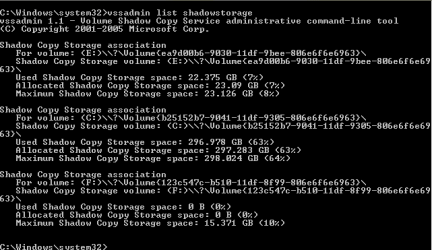
2. Open an elevated command prompt (run as admin) and type (or paste) vssadmin list shadowstorage , then hit Enter - that will give you amount allocated for the shadowstorage (the area where the OS stores the restore points).
3. Once you have those numbers, it should add up to the used space. Post the numbers and we'll have a look at them.

Hey whs,
How ya doin? Thanks for the assist. OK WinDirStat says 465.7 total and 116 free. I have around 20 Gig in Videos, Pictures, Documents and Music.
Below is results of the next command:

Capture.PNG

Hope you can decipher it!!
Thanks
glennc
 

My Computer My Computer

At a glance

Windows 7 UltimateAMD Phenom-II X4 9658192 MB DDR2-SDRAMATI Radeon HD 4200
Computer type
PC/Desktop
Computer Manufacturer/Model Number
Self-Built
OS
Windows 7 Ultimate
CPU
AMD Phenom-II X4 965
Motherboard
Gigabyte GA-MA785GM-US2H
Memory
8192 MB DDR2-SDRAM
Graphics Card(s)
ATI Radeon HD 4200
Sound Card
ATI Radeon HD 4200 High Definition Audo
Monitor(s) Displays
LG Electronics W1943
Screen Resolution
1360 X 768
Hard Drives
C: 500 GB Caviar Black SATA
E: 500 GB Caviar Black SATA
PSU
Ultra LSP 750
Case
Ultra XBlaster
Cooling
2 Fans, CPU Fan, PS Fan
Keyboard
Acer
Mouse
Logitech
Internet Speed
6 MB
It may be temp folders . If you dont run disk cleanup, sometimes temp tends to increase in size .

Look at temp folder : Press windows button and R simultaneously on your keyboard to open the run window; type %temp% and hit enter . You may need to delete it .

Most secured way to delete all the unnecessary things .... download CCleaner, check everything in the cleaner tab, and run cleaner . It will free up a lot of spaces .

But it will not remove the older unnecessary backups (those are automatically done ) . Tuneup utilities does it nicely , though it is not free .

So either use disk cleanup utility or ccleaner . You will get a lot of free space back .

Windows Disk Cleanup right click and run as Administrator to get the temp Windows files etc.
I found that out the hard way. One of those Doh! moments.


Mike

Thanks Hopalong X,
Been using it as quasi-administrator. Will begin using it that way thanks.
glennc
 

My Computer My Computer

At a glance

Windows 7 UltimateAMD Phenom-II X4 9658192 MB DDR2-SDRAMATI Radeon HD 4200
Computer type
PC/Desktop
Computer Manufacturer/Model Number
Self-Built
OS
Windows 7 Ultimate
CPU
AMD Phenom-II X4 965
Motherboard
Gigabyte GA-MA785GM-US2H
Memory
8192 MB DDR2-SDRAM
Graphics Card(s)
ATI Radeon HD 4200
Sound Card
ATI Radeon HD 4200 High Definition Audo
Monitor(s) Displays
LG Electronics W1943
Screen Resolution
1360 X 768
Hard Drives
C: 500 GB Caviar Black SATA
E: 500 GB Caviar Black SATA
PSU
Ultra LSP 750
Case
Ultra XBlaster
Cooling
2 Fans, CPU Fan, PS Fan
Keyboard
Acer
Mouse
Logitech
Internet Speed
6 MB
Hi all:

Want a one-click disk clean up that will clean ALL the drives on your system?

Do this:

  1. Open a comand box and type: cleanmgr /sageset:0 <--that's a zero
  2. <Enter>
A window will open up allowing you to mark all the types of files you want cleaned.
After making your choices, close that window and the Command Box, too.

Now, open Notepad and type: cleanmgr /sagerun:0
Save this file with a .bat extension.

From now on when you want a quick and dirty way to run the Disk Cleaner on all your drives, just click on this .bat and watch the magic!
FYI:
You can use any number at the end of the command line from 0-65535.
You can set up that many unique .bat files.

Hello rap33042,
I am sure that is a good knowledgeable response. Unfortunately my comfort skill level bar is set lower than that. Thanks though anyway!
glennc
 

My Computer My Computer

At a glance

Windows 7 UltimateAMD Phenom-II X4 9658192 MB DDR2-SDRAMATI Radeon HD 4200
Computer type
PC/Desktop
Computer Manufacturer/Model Number
Self-Built
OS
Windows 7 Ultimate
CPU
AMD Phenom-II X4 965
Motherboard
Gigabyte GA-MA785GM-US2H
Memory
8192 MB DDR2-SDRAM
Graphics Card(s)
ATI Radeon HD 4200
Sound Card
ATI Radeon HD 4200 High Definition Audo
Monitor(s) Displays
LG Electronics W1943
Screen Resolution
1360 X 768
Hard Drives
C: 500 GB Caviar Black SATA
E: 500 GB Caviar Black SATA
PSU
Ultra LSP 750
Case
Ultra XBlaster
Cooling
2 Fans, CPU Fan, PS Fan
Keyboard
Acer
Mouse
Logitech
Internet Speed
6 MB
1. Run this program WinDirStat - Windows Directory Statistics. That will tell you how much is on your system.
I'm surprised it took 5 replies before someone suggested this. Use this tool to figure out WHAT is taking up the space, and then you'll know how to resolve it.

Howdy DeaconFrost,
Howya bin? Thanks for entering the discussion. I just downloaded it to leave some stats for whs. It will take me time to actually learn the program, but it looks comprehensive. Take care.
glennc
 

My Computer My Computer

At a glance

Windows 7 UltimateAMD Phenom-II X4 9658192 MB DDR2-SDRAMATI Radeon HD 4200
Computer type
PC/Desktop
Computer Manufacturer/Model Number
Self-Built
OS
Windows 7 Ultimate
CPU
AMD Phenom-II X4 965
Motherboard
Gigabyte GA-MA785GM-US2H
Memory
8192 MB DDR2-SDRAM
Graphics Card(s)
ATI Radeon HD 4200
Sound Card
ATI Radeon HD 4200 High Definition Audo
Monitor(s) Displays
LG Electronics W1943
Screen Resolution
1360 X 768
Hard Drives
C: 500 GB Caviar Black SATA
E: 500 GB Caviar Black SATA
PSU
Ultra LSP 750
Case
Ultra XBlaster
Cooling
2 Fans, CPU Fan, PS Fan
Keyboard
Acer
Mouse
Logitech
Internet Speed
6 MB
Glenn, there is nothing wrong with a lot of restore points as long as you can afford the space. If not, we can reduce the maximum space requirements.

Hey whs,
I just downloaded the program and ran vssadmin and left the results for ya to take a look at and divine my problem. With 75% of my drive used up, I am uncomfortable and never really had any luck with System Restore Points, the last two time I ran a restore they did not achieve the desired objective.
Thanks a bunch!
glennc
 

My Computer My Computer

At a glance

Windows 7 UltimateAMD Phenom-II X4 9658192 MB DDR2-SDRAMATI Radeon HD 4200
Computer type
PC/Desktop
Computer Manufacturer/Model Number
Self-Built
OS
Windows 7 Ultimate
CPU
AMD Phenom-II X4 965
Motherboard
Gigabyte GA-MA785GM-US2H
Memory
8192 MB DDR2-SDRAM
Graphics Card(s)
ATI Radeon HD 4200
Sound Card
ATI Radeon HD 4200 High Definition Audo
Monitor(s) Displays
LG Electronics W1943
Screen Resolution
1360 X 768
Hard Drives
C: 500 GB Caviar Black SATA
E: 500 GB Caviar Black SATA
PSU
Ultra LSP 750
Case
Ultra XBlaster
Cooling
2 Fans, CPU Fan, PS Fan
Keyboard
Acer
Mouse
Logitech
Internet Speed
6 MB
Glenn, you have nearly 300GBs of restore points on C. That is 64% of your partition. I suggest we reduce that shadowstorage. The easiest way is in command prompt with this command: (paste it into cmd)

vssadmin resize shadowstorage /for=C: /on=C: /maxsize=20GB

That would give you 20GBs of shadowstorage good for at least 20 restore points. If you want more, change the "20".

Note: with the resize you lose all current restore points. I suggest you create a new one right away.
 

My Computer My Computer

At a glance

Vista, Windows7, Mint Mate, Zorin, Windows 8from 1.6GHz Duo to i7
Computer Manufacturer/Model Number
HP, Dell, Gateway, Toshiba - 4 laptops and 2 desktops
OS
Vista, Windows7, Mint Mate, Zorin, Windows 8
CPU
from 1.6GHz Duo to i7
Monitor(s) Displays
2x HP w2207
Hard Drives
5x HDD, 7x SSD, 12x Externals
Keyboard
with trackball - no mices
Mouse
Trackball mice
Internet Speed
DSL 6000
WinUtilites, its like Advanced System Care

As already stated,,, WinDirStat will help you find what you are looking for.
If you want Information Overload on everything files related try Xinorbis also free.

As for the above mentioned software. I am not trying to start a flame war or anything.
I wouldn't touch either of those apps if you paid me to.
There is nothing that either one of those apps do that you can't find 3 to 6 well established and very trusted, totally free apps, won't do better.

a. find duplicate files - BAD BAD BAD Idea to run on the entire system. There just is no point to this, and has the potential if used incorrectly to do absolute devistation than anything good.

b. clean registry and Defrag Registry - Not needed. And also a bad idea to ever run on any system. I don't even recommend to anyone other than a real tech run CCleaners Registery Cleaner.

c. temporary files,
application and internet browser history, cache and cookies - CCLeaner + ATF-Cleaner + MRU Blaster all will do just fine in Win 7 and all free

d. defragment - 7 does not need a third party Defrag, Let Windows handle the defrag. It works perfectly fine without interference.

e. built-in StartUp Cleaner - CCleaner and even MSCONFIG will do this for FREE

f. fix broken shortcuts - Generally not ever needed and coming here will get you a quick easy fix, again, for free

g. uninstall unneeded software - Again, free and built into Windows, but if needed, Revo Uninstaller or even CCLeaner will work. Generally, Built-In Windows Uninstaller will work just fine every time.

h. other features include secure file deletion - If really worried about this, Eraser is Free

i. recycle bin shredding - Again, Eraser is free

j. system maintenance tasks scheduling - ummm,, ok,, really not needed. You should be doing this on a regular basis manually anyway to make sure it is actually getting done.

k. undelete deleted files - Piriform - Recuva is all you really need for this, and free and made by the same guys that make CCleaner. But I would also recommend Softperfect File Recovery (scroll to bottom) and TestDisk Partition Recovery

Side Note: I do not recommend
"EASEUS Data Recovery Wizard Free Edition" because TestDisk Partition Recovery will do the same thing but will recover all of your data, not just up to 1 Gig and it's free and in many cases will find and recover more.

L. The Memory Optimizer - Ho boy, really really really really really, deep breath, really really really really really Not Needed
Let Windows Manage The Memory.

Again, this is not to start a Flame war or anything, but to inform those that do not know, or those who might see you using them and they might try them, those apps you mentinoed are best left alone and not used at all. Even if you can get them both for free. The sites you will see them advertised on most with awards and whatnot are the ones who get Paid for those awards and ads and recommendations. To the best of my knowledge if you see them advertised here it is by rotating ad link trading, just a guess. Even still they are best left avoided.

If I didn't think so, or did not think it was important information, I would not have posted all this.


Hello Tepid,
I really appreciate the time and trouble you took to give such a lengthy and insightful breakdown of some of the programs that I use and can use. So I don't consider it derogatory to speak your opinion on them and I do thanks you for it.
I have been known though not to take others advice as well as I should, you get so many knowledgeable opposing viewpoints on so many things that it becomes a guessing game on my part.
WinDirStat, when I take time to learn it, looks info overload enough, thanks.
As for WinUtilities it was recommended by a Tech friend, when he was using Advanced Sytem Care, I used it. I must say these programs make me a bit nervous as they go deeper than CCleaner which I have been using for years. Feel confident on how to keep out of trouble with it and use it regularly.
Now in reference to defragging the registry I will accept your point of view. I have though noticed improved performance after running ASC and WinUtilities that have the registry defrag in them. It is just I don't have any feedback or control on what it does, that concerns me.
ATF-Cleaner and MRU Blaster I have not heard of. Maybe will look into them. I just use noscript and better privacy with save no settings and CCleaner.
Use CCleaner and the built in Cleaner but am unfamiliar with the use of MSCONFIG so I stay away from it. Any explanations you care to share on its use would of course be appreciated.
Use Revo Pro.
Set CCleaner to 7 overwrites so it does my shredding.
System Maintenance is something that I wish you would elaborate on. Just to make sure I know what you are talking about and what I may be missing.
As for EASUS, I had to buy it after a catastrophic event. Saved me a whole lot of irreplaceable files and photos. I now have a separate drive for backup using Macrium Reflect.
I do use W7 for defragmenting. As to Memory Optimizer if it was in those previously mentioned programs I wasn't really aware.
Thanks again for the wealth of information and advice. I would appreciate if you could elaborate on the issues I've mentioned. Take care.
glennc
 

My Computer My Computer

At a glance

Windows 7 UltimateAMD Phenom-II X4 9658192 MB DDR2-SDRAMATI Radeon HD 4200
Computer type
PC/Desktop
Computer Manufacturer/Model Number
Self-Built
OS
Windows 7 Ultimate
CPU
AMD Phenom-II X4 965
Motherboard
Gigabyte GA-MA785GM-US2H
Memory
8192 MB DDR2-SDRAM
Graphics Card(s)
ATI Radeon HD 4200
Sound Card
ATI Radeon HD 4200 High Definition Audo
Monitor(s) Displays
LG Electronics W1943
Screen Resolution
1360 X 768
Hard Drives
C: 500 GB Caviar Black SATA
E: 500 GB Caviar Black SATA
PSU
Ultra LSP 750
Case
Ultra XBlaster
Cooling
2 Fans, CPU Fan, PS Fan
Keyboard
Acer
Mouse
Logitech
Internet Speed
6 MB
same happened to me once with windows 7

would you happen to have installed 3dsmax by any chance?

it creates xml files that keep growing bigger and bigger.
deleting the xml files helped me.

Howdy reloadxero,
No I haven't used that program but thanks much for the thought.
glennc
 

My Computer My Computer

At a glance

Windows 7 UltimateAMD Phenom-II X4 9658192 MB DDR2-SDRAMATI Radeon HD 4200
Computer type
PC/Desktop
Computer Manufacturer/Model Number
Self-Built
OS
Windows 7 Ultimate
CPU
AMD Phenom-II X4 965
Motherboard
Gigabyte GA-MA785GM-US2H
Memory
8192 MB DDR2-SDRAM
Graphics Card(s)
ATI Radeon HD 4200
Sound Card
ATI Radeon HD 4200 High Definition Audo
Monitor(s) Displays
LG Electronics W1943
Screen Resolution
1360 X 768
Hard Drives
C: 500 GB Caviar Black SATA
E: 500 GB Caviar Black SATA
PSU
Ultra LSP 750
Case
Ultra XBlaster
Cooling
2 Fans, CPU Fan, PS Fan
Keyboard
Acer
Mouse
Logitech
Internet Speed
6 MB
If you have hibernation enabled, the hiberfil.sys file can be quite big.

http://www.sevenforums.com/tutorials/819-hibernate-enable-disable.html

A Guy
Isn't it usually the size of your RAM.

Actually, I believe by default is is 75% of Ram? Glenn has 4GB = 3.072GB file size. Correct me if wrong, I know you can change the size with a command prompt.

A Guy

Howdy big guy, A Guy,
I do not use hibernate, but will check to make sure it is off, thanks for the help!
glennc
 

My Computer My Computer

At a glance

Windows 7 UltimateAMD Phenom-II X4 9658192 MB DDR2-SDRAMATI Radeon HD 4200
Computer type
PC/Desktop
Computer Manufacturer/Model Number
Self-Built
OS
Windows 7 Ultimate
CPU
AMD Phenom-II X4 965
Motherboard
Gigabyte GA-MA785GM-US2H
Memory
8192 MB DDR2-SDRAM
Graphics Card(s)
ATI Radeon HD 4200
Sound Card
ATI Radeon HD 4200 High Definition Audo
Monitor(s) Displays
LG Electronics W1943
Screen Resolution
1360 X 768
Hard Drives
C: 500 GB Caviar Black SATA
E: 500 GB Caviar Black SATA
PSU
Ultra LSP 750
Case
Ultra XBlaster
Cooling
2 Fans, CPU Fan, PS Fan
Keyboard
Acer
Mouse
Logitech
Internet Speed
6 MB
Well let us not forget that CCleaner even has a tool for removing particular restore points so you might as well remove restore points created on occasions with less system priorities such as antivirus updates.

Right click Computer on Desktop then Properties>>>System Protection>>>choose your drive>>>Configure and from there you can allocate how much disk space you will allow Windows to use for restore points so I think you can just set it to 5-10%.

Windows 7's own defragging module is rather slow and like what was stated on one of the previous posts, you should do defragging AFTER you've done disk cleanup or have removed the junk files because after the junk is eliminated, there would be less files to defrag and the defragging operation will be slightly faster.

CCleaner is a great tool, I have a mate who uses computers on shops outside and CCleaner was able to remove like 2GBs junk files in some of those computers.

Hello Vertex,
Love CCleaner, didn't realize it had a restore point deleter, that will probably help quite a bit. Although I would also like to learn using W7's utilities if they have any for that same use. Thank you.
glennc
 

My Computer My Computer

At a glance

Windows 7 UltimateAMD Phenom-II X4 9658192 MB DDR2-SDRAMATI Radeon HD 4200
Computer type
PC/Desktop
Computer Manufacturer/Model Number
Self-Built
OS
Windows 7 Ultimate
CPU
AMD Phenom-II X4 965
Motherboard
Gigabyte GA-MA785GM-US2H
Memory
8192 MB DDR2-SDRAM
Graphics Card(s)
ATI Radeon HD 4200
Sound Card
ATI Radeon HD 4200 High Definition Audo
Monitor(s) Displays
LG Electronics W1943
Screen Resolution
1360 X 768
Hard Drives
C: 500 GB Caviar Black SATA
E: 500 GB Caviar Black SATA
PSU
Ultra LSP 750
Case
Ultra XBlaster
Cooling
2 Fans, CPU Fan, PS Fan
Keyboard
Acer
Mouse
Logitech
Internet Speed
6 MB
Isn't it usually the size of your RAM.

Actually, I believe by default is is 75% of Ram? Glenn has 4GB = 3.072GB file size. Correct me if wrong, I know you can change the size with a command prompt.

A Guy

I will test hibernation as I don't normally use it.
I have 4G of Ram,
My hiberfil.sys is approx. 2.5G right now, so that is the default size of mine.
I think it depends on how much hibernation is used and what was open at the time.

Update:
Ok tested a couple times and my hiberfil.sys size did not change.

Hey Tepid and the others,
In reference to the Hibernate being enabled. In a quick check of the Hibernate Tutorial it says that if it doesn't show up on your start menu, it is not on. Is that an adequate test. On the shutdown options there is only sleep listed. Thanks for any answers.
glennc
 

My Computer My Computer

At a glance

Windows 7 UltimateAMD Phenom-II X4 9658192 MB DDR2-SDRAMATI Radeon HD 4200
Computer type
PC/Desktop
Computer Manufacturer/Model Number
Self-Built
OS
Windows 7 Ultimate
CPU
AMD Phenom-II X4 965
Motherboard
Gigabyte GA-MA785GM-US2H
Memory
8192 MB DDR2-SDRAM
Graphics Card(s)
ATI Radeon HD 4200
Sound Card
ATI Radeon HD 4200 High Definition Audo
Monitor(s) Displays
LG Electronics W1943
Screen Resolution
1360 X 768
Hard Drives
C: 500 GB Caviar Black SATA
E: 500 GB Caviar Black SATA
PSU
Ultra LSP 750
Case
Ultra XBlaster
Cooling
2 Fans, CPU Fan, PS Fan
Keyboard
Acer
Mouse
Logitech
Internet Speed
6 MB

My Computer My Computer

At a glance

Windows 7 Ultimate 32bit SP1Intel(R) Core(TM)2 Quad CPU @ 2.40GHz, 2400 MHz4 GBATI Radeon HD 2600 Pro
Computer type
PC/Desktop
Computer Manufacturer/Model Number
Bruce ... somewhere in his 40's
OS
Windows 7 Ultimate 32bit SP1
CPU
Intel(R) Core(TM)2 Quad CPU @ 2.40GHz, 2400 MHz
Motherboard
INTEL/D975XBX2
Memory
4 GB
Graphics Card(s)
ATI Radeon HD 2600 Pro
Monitor(s) Displays
Samsung SyncMaster 914v
Screen Resolution
1280 x 1024
Hard Drives
2/500GB each ... ST3500630AS ATA Device.
One is not connected
PSU
Rocketfish 700 W
Case
G.Skill Gigabyte Chassis
Keyboard
Standard PS/2 Keyboard
Mouse
Microsoft PS/2 Mouse
Internet Speed
DSL
Antivirus
Avira Internet Security
Browser
IE 11
Other Info
ATI HDMI Audio
I would not delete System Restore points. We help people rescue their System all the time here using System Restore, sometimes requiring a months-old Restore point.

If anything I would add more HD space apportioned to System Restore at Computer>Properties>Advanced Options>System Protection>Configure. I use 20%.

I just cleaned up a friend's computer with CCleaner which found 3.5gb or junk. Avoid some of this by ticking the box in Internet Options>Advanced to "Empty temporary files when Browser is closed."

System Reserved is 100mb, not 100gb.

In your case, Glenn, since you never took our advice after your system bricked to run a free lightweight AV like MSE with the Win7 firewall and are still running 3rd party tweaking utilities, all bets are off on what is going on with your system.

There ya are gregrocker,
Thanks for the assist. Interesting point on System Restore points, I appreciate the suggested amount of space to reserve, will check that out.
Already done on CCleaner and Internet deletion of temp files. Good thoughts.
I sit corrected, mb not gb. Thanks it does make a pretty big difference.
As too the 3rd party tweaking utilities, I believe I may swear off of them against the protest of my friend. I was always on the edge with that one. As to the others, guilty as charged, for now.
Appreciate the thoughtful suggestions and advice.
glennc
 

My Computer My Computer

At a glance

Windows 7 UltimateAMD Phenom-II X4 9658192 MB DDR2-SDRAMATI Radeon HD 4200
Computer type
PC/Desktop
Computer Manufacturer/Model Number
Self-Built
OS
Windows 7 Ultimate
CPU
AMD Phenom-II X4 965
Motherboard
Gigabyte GA-MA785GM-US2H
Memory
8192 MB DDR2-SDRAM
Graphics Card(s)
ATI Radeon HD 4200
Sound Card
ATI Radeon HD 4200 High Definition Audo
Monitor(s) Displays
LG Electronics W1943
Screen Resolution
1360 X 768
Hard Drives
C: 500 GB Caviar Black SATA
E: 500 GB Caviar Black SATA
PSU
Ultra LSP 750
Case
Ultra XBlaster
Cooling
2 Fans, CPU Fan, PS Fan
Keyboard
Acer
Mouse
Logitech
Internet Speed
6 MB
I just downloaded it to leave some stats for whs. It will take me time to actually learn the program, but it looks comprehensive.
It is comprehensive, but it does take a minute to figure out what you are looking at. It's great for pin-pointing what is using your space.
 

My Computer My Computer

At a glance

Windows 7 Ultimate x64 SP1Intel Core i7-260012 GB Patriot Extreme DDR3-1333Nvidia GTX 470
OS
Windows 7 Ultimate x64 SP1
CPU
Intel Core i7-2600
Motherboard
Gigabyte GA-P67A-UD3P-B3
Memory
12 GB Patriot Extreme DDR3-1333
Graphics Card(s)
Nvidia GTX 470
Monitor(s) Displays
Dell UltraSharp 2209WA
Hard Drives
OCZ Agility3 240 GB, WD5001AALS, WD7501AALS
PSU
OCZ ModStream 700W
Case
CoolerMaster HAF 912 Advanced
Cooling
CoolerMaster Hyper 212 Plus
Glenn, you have nearly 300GBs of restore points on C. That is 64% of your partition. I suggest we reduce that shadowstorage. The easiest way is in command prompt with this command: (paste it into cmd)

vssadmin resize shadowstorage /for=C: /on=C: /maxsize=20GB

That would give you 20GBs of shadowstorage good for at least 20 restore points. If you want more, change the "20".

Note: with the resize you lose all current restore points. I suggest you create a new one right away.

Hello whs,
I don't know how I missed this post as I was waiting on it? Checking the configure for system restore point space, I had and it still says 22.37 GB. Using the command you suggested and upping it to 25 GB, I have the immediate system restore point done after that command and it retained 3 previous points. Cool. Best of all is I now have 389 GB free instead of 116 GB. Amazing and many thanks.
The obvious question is that if I set it for 22.37 GB why did it take up over 270 GBs on it apparently own volition. Just trying to get the opaque a little translucent.
Please type sloooowly :)
glennc
 

My Computer My Computer

At a glance

Windows 7 UltimateAMD Phenom-II X4 9658192 MB DDR2-SDRAMATI Radeon HD 4200
Computer type
PC/Desktop
Computer Manufacturer/Model Number
Self-Built
OS
Windows 7 Ultimate
CPU
AMD Phenom-II X4 965
Motherboard
Gigabyte GA-MA785GM-US2H
Memory
8192 MB DDR2-SDRAM
Graphics Card(s)
ATI Radeon HD 4200
Sound Card
ATI Radeon HD 4200 High Definition Audo
Monitor(s) Displays
LG Electronics W1943
Screen Resolution
1360 X 768
Hard Drives
C: 500 GB Caviar Black SATA
E: 500 GB Caviar Black SATA
PSU
Ultra LSP 750
Case
Ultra XBlaster
Cooling
2 Fans, CPU Fan, PS Fan
Keyboard
Acer
Mouse
Logitech
Internet Speed
6 MB
Read this about system restore points ... How much disk space does System Restore require?

And this about deleting restore points ...
Delete a restore point

Howdy Jacee,
Thanks for those links. It gave me an idea of what I should have set up. If you look at the last reply to whs, you'll see we managed to pare down the reserved area and free up some 270 GB. I would like to pose the same question to you, if I set it and it is still set for 22.37 GB, why did it take the rest of the space by itself?
Much appreciated.
glennc
 

My Computer My Computer

At a glance

Windows 7 UltimateAMD Phenom-II X4 9658192 MB DDR2-SDRAMATI Radeon HD 4200
Computer type
PC/Desktop
Computer Manufacturer/Model Number
Self-Built
OS
Windows 7 Ultimate
CPU
AMD Phenom-II X4 965
Motherboard
Gigabyte GA-MA785GM-US2H
Memory
8192 MB DDR2-SDRAM
Graphics Card(s)
ATI Radeon HD 4200
Sound Card
ATI Radeon HD 4200 High Definition Audo
Monitor(s) Displays
LG Electronics W1943
Screen Resolution
1360 X 768
Hard Drives
C: 500 GB Caviar Black SATA
E: 500 GB Caviar Black SATA
PSU
Ultra LSP 750
Case
Ultra XBlaster
Cooling
2 Fans, CPU Fan, PS Fan
Keyboard
Acer
Mouse
Logitech
Internet Speed
6 MB
Back
Top