Win 7 install on a 40gig drive is filling up, why?

bounce

New member
Local time
10:23 PM
Messages
59
I've got 40 gigs with only Win 7 and some apps installed and it's filling up. Is this normal?
I ran tree size to see what the files taking up space are and it's stuff like this: {19FEB028-F207-11DE-94FB-001A6B62D540}

What exactly is this kind of file, and is it ok to delete? thanks
 

My Computer My Computer

At a glance

windows 7 32bit
OS
windows 7 32bit
{19FEB028-F207-11DE-94FB-001A6B62D540}

That's a temp file. If you run a disc "clean up" it will most properly delete the file or any others that are no longer needed. (what is the size of it ?)
Mind you saying this you are running Win 7 on pretty small drive.

Microsoft Makes Windows 7 Minimum Requirements Official

I would suggest looking at investing in a bigger drive. They are fairly cheap nowadays, and it's a worthy investment.
Your page/swap file is going to max out in next to no time.
 

My Computer My Computer

At a glance

Windows 7 Ultimate 64bitAMD Phenom Quad core 9950 black edition16Gb2x XFX Radeon 5850
Computer type
PC/Desktop
Computer Manufacturer/Model Number
Self Built
OS
Windows 7 Ultimate 64bit
CPU
AMD Phenom Quad core 9950 black edition
Motherboard
Gigabyte
Memory
16Gb
Graphics Card(s)
2x XFX Radeon 5850
Sound Card
PCI Express X-Fi Titanium / Logitech G35
Monitor(s) Displays
2x HP 2410i
Screen Resolution
1920x1080
Hard Drives
2x 500Gb Seagate
1x 300Gb Seagate
1x 1Tb Seagate
2x 1Tb Hitatchi
PSU
Jean Tech Storm 700W
Case
Cooler Master COSMOS S
Cooling
Akasa Evo Blue Pro
Keyboard
Logitech G15
Mouse
Mad Catz M.M.O. 7
Internet Speed
12mb
hi bounce, i would agree with poormanuk and invest in a larger hdd, you could clone the small drive onto a larger drive using a third party software such as Acronis hope this helps
 

My Computer My Computer

At a glance

win 7 ultimate32bit, Win8.1pro wmc 32bitamd phenom x4 9600corsair twinxs 2x2gb2x nvidia 1gb 8500gt
Computer type
PC/Desktop
Computer Manufacturer/Model Number
self build
OS
win 7 ultimate32bit, Win8.1pro wmc 32bit
CPU
amd phenom x4 9600
Motherboard
asus m2n32-sli deluxe
Memory
corsair twinxs 2x2gb
Graphics Card(s)
2x nvidia 1gb 8500gt
Sound Card
onboard
Monitor(s) Displays
23" PB Viseo 233d
Screen Resolution
1920x1080
Hard Drives
maxtor sata 500gb
maxtor sata 320gb
fujitsu sata200gb
PSU
oryxx tornado 750w
Case
thermaltake xaser lll
Cooling
artic freezer64 pro + 7 case fans
In addition, if you have features like system protection enabled that is going to eat into some of your space. You have the ability to turn this off if you wish. Just right click on My Computer, go to Properties, and click on System Protection on the left.

And things like hibernation and page files also consume the drive. If you don't use hibernation, you might want to turn it off to get that space back.
 

My Computer My Computer

At a glance

Windows 7 Ultimate x64Intel Q9550 2.83Ghz OC'd to 3.40Ghz8GB G.Skill PI DDR2-800, 4-4-4-12 timingsEVGA 1280MB Nvidia GeForce GTX570
Computer Manufacturer/Model Number
Self-Built in July 2009
OS
Windows 7 Ultimate x64
CPU
Intel Q9550 2.83Ghz OC'd to 3.40Ghz
Motherboard
Gigabyte GA-EP45-UD3R rev. 1.1, F12 BIOS
Memory
8GB G.Skill PI DDR2-800, 4-4-4-12 timings
Graphics Card(s)
EVGA 1280MB Nvidia GeForce GTX570
Sound Card
Realtek ALC899A 8 channel onboard audio
Monitor(s) Displays
23" Acer x233H
Screen Resolution
1920x1080
Hard Drives
Intel X25-M 80GB Gen 2 SSD
Western Digital 1TB Caviar Black, 32MB cache. WD1001FALS
PSU
Corsair 620HX modular
Case
Antec P182
Cooling
stock
Keyboard
ABS M1 Mechanical
Mouse
Logitech G9 Laser Mouse
Internet Speed
15/2 cable modem
Other Info
Windows and Linux enthusiast. Logitech G35 Headset.
There's a few of those temp files @ 6gigs each. I run ccleaner all the time but it doesn't get those. I have Acronis, so I guess I'll just get a bigger drive. Files seem awfully huge for temps though... :confused:
 

My Computer My Computer

At a glance

windows 7 32bit
OS
windows 7 32bit
In addition, if you have features like system protection enabled that is going to eat into some of your space. You have the ability to turn this off if you wish. Just right click on My Computer, go to Properties, and click on System Protection on the left.

And things like hibernation and page files also consume the drive. If you don't use hibernation, you might want to turn it off to get that space back.

No sys protection settings are on.. "hibernation" in Win 7 is the same as "change when the computer goes to sleep" right? I have that set to never on monitor and drives (while laptop is plugged in)
so I should be good there? Thanks for those tips though
 

My Computer My Computer

At a glance

windows 7 32bit
OS
windows 7 32bit
The hibernation file you really only need for hibernation - not for sleep mode. It is the size of your RAM. Go into an elevated command prompt and paste this commannd in:

powercfg.exe -h off

Then hit Enter. That will get rid of it. If you use Acronis for imaging on a regular basis, you can also stop the system restore points (shadowstorge). That will save you another few Gigabytes.
I run Win7 in a 42GB partition (on an SSD). I have 1700 progam folders (11.450 files) and my system uses 15.2GB. I think you should be OK with a 40GB partition. If it is a spinning disk, defrag it. That may gain some too.
 

My Computer My Computer

At a glance

Vista, Windows7, Mint Mate, Zorin, Windows 8from 1.6GHz Duo to i7
Computer Manufacturer/Model Number
HP, Dell, Gateway, Toshiba - 4 laptops and 2 desktops
OS
Vista, Windows7, Mint Mate, Zorin, Windows 8
CPU
from 1.6GHz Duo to i7
Monitor(s) Displays
2x HP w2207
Hard Drives
5x HDD, 7x SSD, 12x Externals
Keyboard
with trackball - no mices
Mouse
Trackball mice
Internet Speed
DSL 6000
I am using only 21 gigs on a 60 gig partition after 3 months. That is for Windows 7 Home Premium and all apps. You almost certainly have some settings you can change as mentioned in posts above to keep the occupied space beaten down.

My occupied space has remained constant at near 21 gigs for 2 months and may not move up from there unless I install additional programs. So it is controllable.
 

My Computer My Computer

At a glance

Windows 7 Home Premium SP1, 64-bitIntel Skylake i5-6600K, not overclocked8 GB HyperX DDR4-2666 (2 x 4 GB)none; graphics are integrated on CPU
Computer type
PC/Desktop
Computer Manufacturer/Model Number
Ignatz Special; 4 speed manual gearbox; factory air conditioning; one of one
OS
Windows 7 Home Premium SP1, 64-bit
CPU
Intel Skylake i5-6600K, not overclocked
Motherboard
AsRock Z170M Extreme 4, micro ATX
Memory
8 GB HyperX DDR4-2666 (2 x 4 GB)
Graphics Card(s)
none; graphics are integrated on CPU
Sound Card
onboard: Realtek ALC1150; external: USB Behringer UF0-202
Monitor(s) Displays
Dell S2340M 23 inch IPS
Screen Resolution
1600 x 900
Hard Drives
System: Crucial MX100 series SSD, 128 GB;
Data: Samsung Spinpoint 103SJ, 1 TB;
Backup: WD Caviar Green WD30EZRX-00D8PB0, 3 TB
PSU
Rosewill SilentNight 500 watt fanless, semi-modular
Case
Antec Solo II
Cooling
Noctua NH-U12S; Noctua F12 intake, Noctua S12A exhaust
Keyboard
Microsoft 200 6JH-00001 USB
Mouse
Dell or Microsoft optical wired; USB
Antivirus
Microsoft Security Essentials and Malwarebytes Premium
Browser
Pale Moon
Other Info
All fans PWM; speeds at idle: CPU circa 500 rpm; intake circa 600 rpm; exhaust circa 600 rpm; CPU temps 27 idle and 47 C load in a warm room (27 C/81 F) when running Intel Extreme Tuning Utility stress test.
Well,, for the record,, My opinion is,, get a bigger HDD. Just saying.
 

My Computer My Computer

At a glance

Win 7 Ultimate 32bitC2D E6600 2.4Ghz4G Kingston KHX5400D2EVGA GTX 570 HD SC (012-P3-1573-KR)
Computer Manufacturer/Model Number
Self Built
OS
Win 7 Ultimate 32bit
CPU
C2D E6600 2.4Ghz
Motherboard
Intel D965WH
Memory
4G Kingston KHX5400D2
Graphics Card(s)
EVGA GTX 570 HD SC (012-P3-1573-KR)
Sound Card
On-Board
Monitor(s) Displays
Samsung 226BW
Screen Resolution
1680 x 1050
Hard Drives
2 x 250 Seagate Barracuda
2 x 500 Seagate Barracuda (Raid1)
PSU
Corsair TX750W
Case
In-Win C589
Cooling
Stock Intel Cooling
I'll bet system restore is turned on, which is creating restore points. That will eat space in 6gig chunks.

Smitty
 

My Computer My Computer

At a glance

Windows 7 Home Premium 64 bitIntel Core 2 quad Extreme Q9770 @ 3.2 GHz4x2 GB Muskin 1600 MHz ramNVidia GTX 250
Computer Manufacturer/Model Number
Dell XPS 730
OS
Windows 7 Home Premium 64 bit
CPU
Intel Core 2 quad Extreme Q9770 @ 3.2 GHz
Memory
4x2 GB Muskin 1600 MHz ram
Graphics Card(s)
NVidia GTX 250
Sound Card
Soundblaster X-Fi Fatality Champion
Monitor(s) Displays
2 Dell 2007WFP Ultrascans
Screen Resolution
3360 x 1050
Hard Drives
WD Black 1TB sata, 2-WD Black 500 sata, 2-Seagate 500 Go external
PSU
1000 Watt
Cooling
air
Keyboard
MS Natrual Keyboard Pro
Mouse
Logitech Wireless Trackball
Internet Speed
DSL Elite
I'll bet system restore is turned on, which is creating restore points. That will eat space in 6gig chunks.

Smitty

In Win7, the shadowstorage is allocated as a function of the partition size. Not like Vista where it is always 15%. Given that the OP has only a 40GB partition, it is probably not more than 3GBs. But even that he can save if he has a good imaging plan with his Acronis.
 

My Computer My Computer

At a glance

Vista, Windows7, Mint Mate, Zorin, Windows 8from 1.6GHz Duo to i7
Computer Manufacturer/Model Number
HP, Dell, Gateway, Toshiba - 4 laptops and 2 desktops
OS
Vista, Windows7, Mint Mate, Zorin, Windows 8
CPU
from 1.6GHz Duo to i7
Monitor(s) Displays
2x HP w2207
Hard Drives
5x HDD, 7x SSD, 12x Externals
Keyboard
with trackball - no mices
Mouse
Trackball mice
Internet Speed
DSL 6000
Sorry bout that WHS, i was thinking how sys restore use to work, i personally make backup's so i haven't messed with sys restor in Win 7. Thank for the info though.

Smitty
 

My Computer My Computer

At a glance

Windows 7 Home Premium 64 bitIntel Core 2 quad Extreme Q9770 @ 3.2 GHz4x2 GB Muskin 1600 MHz ramNVidia GTX 250
Computer Manufacturer/Model Number
Dell XPS 730
OS
Windows 7 Home Premium 64 bit
CPU
Intel Core 2 quad Extreme Q9770 @ 3.2 GHz
Memory
4x2 GB Muskin 1600 MHz ram
Graphics Card(s)
NVidia GTX 250
Sound Card
Soundblaster X-Fi Fatality Champion
Monitor(s) Displays
2 Dell 2007WFP Ultrascans
Screen Resolution
3360 x 1050
Hard Drives
WD Black 1TB sata, 2-WD Black 500 sata, 2-Seagate 500 Go external
PSU
1000 Watt
Cooling
air
Keyboard
MS Natrual Keyboard Pro
Mouse
Logitech Wireless Trackball
Internet Speed
DSL Elite
No need to apologize Smitty. If it was Vista, your number would be right - 15% of 40GB = 6GB (which would be the shadowstorage maximum).
Win7 is quite iffy when it comes to shadowstorage. All kinds of things happen. The other day someone had a setting of more than 100% of his partition as shadowstorage. The system ate all the storage the man had on his disk - in about 3 months time. Even Brink was puzzled.
The fact that you can easily set the amount of shadowstorage with the slider seems to bear some dangers. I preferred the vssadmin route - at least not every noobie knew how to play around with it.

2010-01-22_192229.png
 

My Computer My Computer

At a glance

Vista, Windows7, Mint Mate, Zorin, Windows 8from 1.6GHz Duo to i7
Computer Manufacturer/Model Number
HP, Dell, Gateway, Toshiba - 4 laptops and 2 desktops
OS
Vista, Windows7, Mint Mate, Zorin, Windows 8
CPU
from 1.6GHz Duo to i7
Monitor(s) Displays
2x HP w2207
Hard Drives
5x HDD, 7x SSD, 12x Externals
Keyboard
with trackball - no mices
Mouse
Trackball mice
Internet Speed
DSL 6000
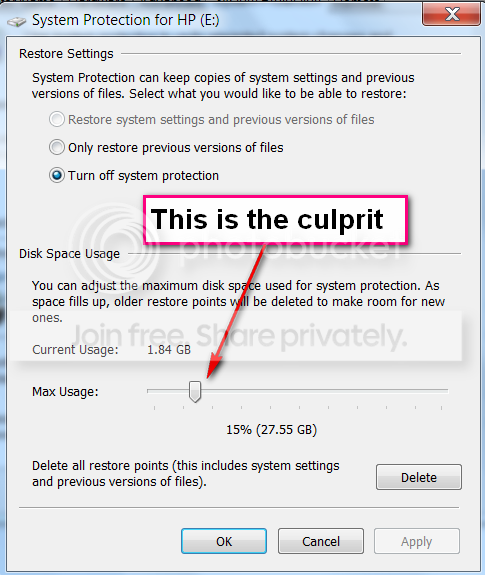
hmm wasn't getting my subscribed updates to this for a few days. Here is the pic of how I had my system restore (shadow?) settings on the C: drive.
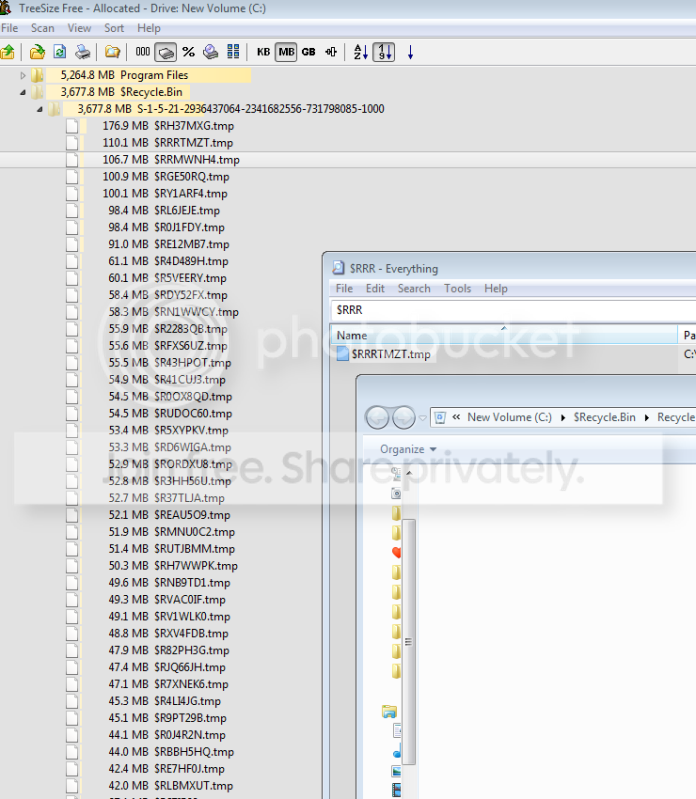
I've also included a pic of a "tree size folder" tree to show where some of the space is. The strange thing is as you can see in that pic it says I have files in my recycle bin, but the recycle bin window I've opened in front of it has 0 files.

This temp file filling is driving me crazy, I'll delete 20 gigs and by the end of the next day my drive is full again. That can't be normal?

systemrestoresettings.png


Last edited:

My Computer My Computer

At a glance

windows 7 32bit
OS
windows 7 32bit
From the looks of the images you have in your last post you didn't click Apply and OK to make the settings permenent. Also where are all those temp files comeing from? That's where i'd start looking.
 

My Computer My Computer

At a glance

Windows 7 Home Premium 64 bitIntel Core 2 quad Extreme Q9770 @ 3.2 GHz4x2 GB Muskin 1600 MHz ramNVidia GTX 250
Computer Manufacturer/Model Number
Dell XPS 730
OS
Windows 7 Home Premium 64 bit
CPU
Intel Core 2 quad Extreme Q9770 @ 3.2 GHz
Memory
4x2 GB Muskin 1600 MHz ram
Graphics Card(s)
NVidia GTX 250
Sound Card
Soundblaster X-Fi Fatality Champion
Monitor(s) Displays
2 Dell 2007WFP Ultrascans
Screen Resolution
3360 x 1050
Hard Drives
WD Black 1TB sata, 2-WD Black 500 sata, 2-Seagate 500 Go external
PSU
1000 Watt
Cooling
air
Keyboard
MS Natrual Keyboard Pro
Mouse
Logitech Wireless Trackball
Internet Speed
DSL Elite
Plus you did not click on "Turn off system protection".
 

My Computer My Computer

At a glance

Vista, Windows7, Mint Mate, Zorin, Windows 8from 1.6GHz Duo to i7
Computer Manufacturer/Model Number
HP, Dell, Gateway, Toshiba - 4 laptops and 2 desktops
OS
Vista, Windows7, Mint Mate, Zorin, Windows 8
CPU
from 1.6GHz Duo to i7
Monitor(s) Displays
2x HP w2207
Hard Drives
5x HDD, 7x SSD, 12x Externals
Keyboard
with trackball - no mices
Mouse
Trackball mice
Internet Speed
DSL 6000
actually I had gone back and was playing around with the settings and forgot to set them to how they were when the problem started, like this:
latestCapture.png
 

My Computer My Computer

At a glance

windows 7 32bit
OS
windows 7 32bit
Here is a nice tool to see what are the biggest files and where storage is going

WinDirStat Portable
 

My Computer My Computer

At a glance

Win 7 Ultimate 32bitC2D E6600 2.4Ghz4G Kingston KHX5400D2EVGA GTX 570 HD SC (012-P3-1573-KR)
Computer Manufacturer/Model Number
Self Built
OS
Win 7 Ultimate 32bit
CPU
C2D E6600 2.4Ghz
Motherboard
Intel D965WH
Memory
4G Kingston KHX5400D2
Graphics Card(s)
EVGA GTX 570 HD SC (012-P3-1573-KR)
Sound Card
On-Board
Monitor(s) Displays
Samsung 226BW
Screen Resolution
1680 x 1050
Hard Drives
2 x 250 Seagate Barracuda
2 x 500 Seagate Barracuda (Raid1)
PSU
Corsair TX750W
Case
In-Win C589
Cooling
Stock Intel Cooling
I've been using tree size free which essentially does the same thing, some of the biggest files are in my recycle bin. So what I'm doing is clicking on the file and in tree size and opening the "path" to the recycle bin, but it is empty when I open it.
Pic includes tree size/everything (search) / and recycle bin. Any clues on why there are no files in recycle bin, but they're showing up in search and in tree size?
Recyclebinmore.png
 
Last edited:

My Computer My Computer

At a glance

windows 7 32bit
OS
windows 7 32bit
I've been using tree size free which essentially does the same thing, some of the biggest files are in my recycle bin. So what I'm doing is clicking on the file and in tree size and opening the "path" to the recyle bin, but it is empty when I open it.
Pic includes tree size/everything (search) / and recycle bin. Any clues on why there are no files in recycle bin, but they're showing up in search and in tree size?
Recyclebinmore.png

Those are all tmep files. you could right click tree size and delete them. But I am sure someone has already suggested that.
 

My Computer My Computer

At a glance

Win 8 Release candidate 8400[email protected]4 gigsNvidia 9600M
Computer Manufacturer/Model Number
HP Pavillion dv-7 1005 Tx
OS
Win 8 Release candidate 8400
CPU
[email protected]
Memory
4 gigs
Graphics Card(s)
Nvidia 9600M
Sound Card
HD built-in
Monitor(s) Displays
17" Wxga
Screen Resolution
1440x900
Cooling
none
Internet Speed
45Mb down 5Mb up
Back
Top