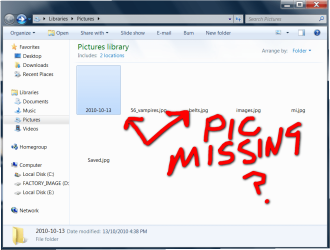
Pictures missing suddenly and backgroung picture missing

ohsocute69

New member
Member
Local time
11:19 AM
Messages
69
i got on the pc this morning and noticed that where i have the picture saved on the desktop it was just black so i went into where my pictures are saved and there missing ??

but when i double click on one it will show any ideas please im lost on this ??
 

Attachments

  • 2010-11-29_101452.png
    2010-11-29_101452.png
    59.4 KB · Views: 16

My Computer My Computer

At a glance

32
OS
32
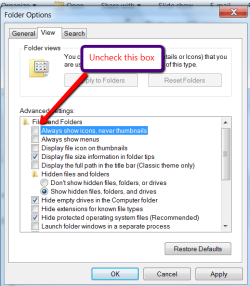
Go to Organize > Folder and search options > View tab and uncheck the box as shown.
 

Attachments

  • 2010-11-28_1940.png
    2010-11-28_1940.png
    23.3 KB · Views: 22

My Computer My Computer

At a glance

Vista, Windows7, Mint Mate, Zorin, Windows 8from 1.6GHz Duo to i7
Computer Manufacturer/Model Number
HP, Dell, Gateway, Toshiba - 4 laptops and 2 desktops
OS
Vista, Windows7, Mint Mate, Zorin, Windows 8
CPU
from 1.6GHz Duo to i7
Monitor(s) Displays
2x HP w2207
Hard Drives
5x HDD, 7x SSD, 12x Externals
Keyboard
with trackball - no mices
Mouse
Trackball mice
Internet Speed
DSL 6000

My Computer My Computer

At a glance

Vista, Windows7, Mint Mate, Zorin, Windows 8from 1.6GHz Duo to i7
Computer Manufacturer/Model Number
HP, Dell, Gateway, Toshiba - 4 laptops and 2 desktops
OS
Vista, Windows7, Mint Mate, Zorin, Windows 8
CPU
from 1.6GHz Duo to i7
Monitor(s) Displays
2x HP w2207
Hard Drives
5x HDD, 7x SSD, 12x Externals
Keyboard
with trackball - no mices
Mouse
Trackball mice
Internet Speed
DSL 6000
Sometimes things just get corrupted within a system -- and we're not aware of the reason. And just as often, sometimes you can repair the problem by going through the motions of doing some basic steps, like, for example, (building on what whs suggested above), starting with the "Always show icons, never thumbnails" box why don't you do this: Since it's currently UNchecked, why don't you go ahead and check it, then hit Apply, and close Explorer. Turn off your system and reboot. Then, reopen Windows Explorer and UNcheck the box. Hit Apply.

If that doesn't work why don't you try making a copy of your Desktop photo, saving it to a different folder, and then deleting that image from the folder where you have your Desktop photos saved. Again, shut down and re-boot. Try transferring the copied image to the Desktop folder, and hopefully this time it will show up.

 

My Computer My Computer

At a glance

Vista 64 bit and 32 bit (SP2)Intel(R) Core(TM)2 Duo Processor T9400 (2.53 GHz4GB DDR2 System Memory (2 Dimm)512 MB NVIDIA GeForce 9600M GT
Computer Manufacturer/Model Number
HP Pavillion dv5t (generation 1)
OS
Vista 64 bit and 32 bit (SP2)
CPU
Intel(R) Core(TM)2 Duo Processor T9400 (2.53 GHz
Memory
4GB DDR2 System Memory (2 Dimm)
Graphics Card(s)
512 MB NVIDIA GeForce 9600M GT
Monitor(s) Displays
15.4" diagonal WSXGA+ High-Definition HP BrightView Widescre
Screen Resolution
1680 x 1050
Hard Drives
320GB 5400RPM SATA Hard Drive with HP ProtectSmart Hard Drive Protection
Keyboard
Built-in HP
Mouse
Built in - Synaptics TouchPad V6.5 on PS/2 Port
Internet Speed
Max
Other Info
~ Intel Next-Gen Wireless-N Mini-card w/Bluetooth ~ Blu-Ray ROM DVD+/-R/RW ~ Integ. HDTV Hybrid Tuner ~ 12 Cell Battery ~ MS Office (Home Premium) 2007 ~
Back
Top