Program for alphabetizing my quick launch icons?

krokusnat

Banned
Local time
10:08 PM
Messages
93
Location
Utah
Does anybody have any ideas of a program out there for alphabetizing my quick launch icons?
 

My Computer

Computer Manufacturer/Model Number
Custom built be me
OS
Windows 7 Ultimate x64
CPU
Amd dual-core 4400 Socket 979
Motherboard
Asus A8N-SLI
Memory
Kingston 3gb ddr 3200
Graphics Card(s)
Radeon Sapphire HD5670 1gb GDDR5 Artic cooling
Sound Card
Standard Motherboards Realtec
Monitor(s) Displays
IC Power
Screen Resolution
1280 x 1024
Hard Drives
Seagate Barracuda 500gb Sata 16mb Cache 7200 rpm Primary Drive
300gb Maxtor IDE
Seagate 500gb usb freeagent backup drive
PSU
600 watt power star
Case
Lian-Li Aluminum
Cooling
MassCool Socket 979
Keyboard
Microsoft Comfort Curve
Mouse
Microsoft Basic Optical Mouse 2.0
Internet Speed
5mb
Other Info
The system as of now is about a year old and the OS was installed on 11/30/2010..
you have a quicklaunch toolbar on your taskbar?

i don't know of any software that will sort it.

you have to unlock the taskbar, and sort them manually i'm afraid.
 

My Computer

Computer Manufacturer/Model Number
mickey megabyte 1234
OS
ultimate 64 sp1
CPU
i5 2500K [email protected]
Motherboard
MSI P67A-GD53
Memory
8 gigs GSkill Ripjaws 1600
Graphics Card(s)
amd hd6950
Sound Card
creative x-fi gamer
Monitor(s) Displays
samsung 24"
Screen Resolution
1920x1080
Hard Drives
ocz vertex 2e 60 gig, samsung f3 1tb, buffalo 2tb ext
PSU
antec 550
Case
antec three hundred
Cooling
i'm a cooling fan
Keyboard
saitek eclipse ii
Mouse
logitech g3
Internet Speed
about 4 Mbps
Other Info
i love win7
I believe it is not possible. The only way I have found to sort Quick Launch icons is to unlock the taskbar, then increase the size of it, and drag icons one by to the end of Quick Launch in the order you want to have them (at least my Quick Launch only let's me to move an icon to last position, not in between other icons).

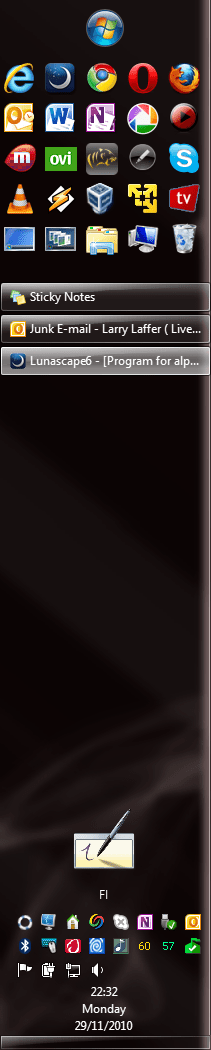
An example. Here's my taskbar with Quick Launch:

Taskbar_1.PNG

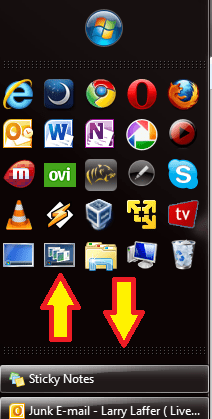
To reorganize, I unlock the taskbar and make Quick Launch area bigger so I have some extra space at the end of it. I have vertical taskbar but the same works with horizontal.

Taskbar_2.png

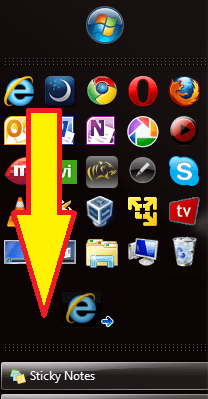
Let's say I want to move the IE icon to be the last one. I drag it to the end, to that empty space and drop it there.

Taskbar_3.png

That's it.

Taskbar_4.png

This, moving a QL icon to the end is the only way I've found. I seem to be unable to drop a QL icon between other icons, it always goes to the last position. I wanted mine to show browsers on top row, and Libraries, Computer and Trashcan as last icons, so I just dropped icons to the last position in that order I wanted, one by one from first to last.

I notice I'm telling this in a very confusing way :) Hopefully you get my point here.

Kari
 

My Computer

Computer type
Laptop
Computer Manufacturer/Model Number
HP ENVY 17-1150eg
OS
Windows 10 Pro x64 EN-GB
CPU
1.6 GHz Intel Core i7-720QM Processor
Memory
6 GB
Graphics Card(s)
ATI Mobility Radeon HD 5850 Graphics
Sound Card
Beats sound system with integrated subwoofer
Monitor(s) Displays
17" laptop display, 22" LED and 32" Full HD TV through HDMI
Screen Resolution
1600*900 (1), 1920*1080 (2&3)
Hard Drives
Internal: 2 x 500 GB SATA Hard Disk Drive 7200 rpm
External: 2TB for backups, 3TB USB3 network drive for media
Cooling
As Envy runs a bit warm, I have it on a Cooler Master pad
Keyboard
Logitech diNovo Media Desktop Laser (bluetooth)
Mouse
Logitech Performance Mouse MX
Internet Speed
50/10 Mbps VDSL
Antivirus
Windows Defender 4.3.9431.0
Browser
Maxthon 3.5.2., IE11
you have a quicklaunch toolbar on your taskbar?

i don't know of any software that will sort it.

you have to unlock the taskbar, and sort them manually i'm afraid.

I was afraid of that too. :D Bummer...Cyberscrub Privacy Suite used to do it for XP but it won't Windows 7. :( And thank you mickey and Kari for your replies I really appreciate that..
 

My Computer

Computer Manufacturer/Model Number
Custom built be me
OS
Windows 7 Ultimate x64
CPU
Amd dual-core 4400 Socket 979
Motherboard
Asus A8N-SLI
Memory
Kingston 3gb ddr 3200
Graphics Card(s)
Radeon Sapphire HD5670 1gb GDDR5 Artic cooling
Sound Card
Standard Motherboards Realtec
Monitor(s) Displays
IC Power
Screen Resolution
1280 x 1024
Hard Drives
Seagate Barracuda 500gb Sata 16mb Cache 7200 rpm Primary Drive
300gb Maxtor IDE
Seagate 500gb usb freeagent backup drive
PSU
600 watt power star
Case
Lian-Li Aluminum
Cooling
MassCool Socket 979
Keyboard
Microsoft Comfort Curve
Mouse
Microsoft Basic Optical Mouse 2.0
Internet Speed
5mb
Other Info
The system as of now is about a year old and the OS was installed on 11/30/2010..
Back
Top