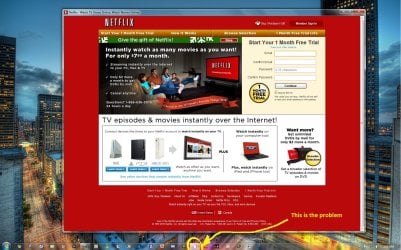
Hello, My name is Kati and Im new the the forums. Just got Windows 7 not to long ago . Anyways, I was wondering if someone can help with me a problem I have everytime I delete my browsing history to my pin websites on my taskbar. I recently had IE9 Beta and I didn't like it. I couldn't remove my browsing history from the address bar so I uninstalled IE9 and installed Google Chrome latest release (Not Beta). Everything works fine up untill I went to remove my browsing history today and clicked on one of my pin website on my taskbar and seen the little "Icon" was blank. It does this to all my website pinned icons aside from my Google Chrome icon. The only way to fix it is to open the pin website let it load for a second and close it. Then when I open the website again the Icon is back to normal. If I delete my history and DONT click on any of the pin website everything looks to be okay. Its only when I open it for the FIRST time after deleting my History. I was wondering if there is anything I can do to fix this. Its kinda annoying
Oh yeah, Here is a Screen Shot.
Attachments
problemtaskbar.jpg
259.4 KB
· Views: 82
My Computer
At a glance
Windiws 7 Home Premium 64 Bit. Switching to P...Quad Core 2.66GB512 EVGA
Computer Manufacturer/Model Number
Custom
OS
Windiws 7 Home Premium 64 Bit. Switching to Pro in a few days.
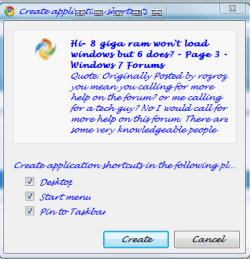
have you tried making a application shortcut in the chrome browser when you are viewing the website you want to keep?
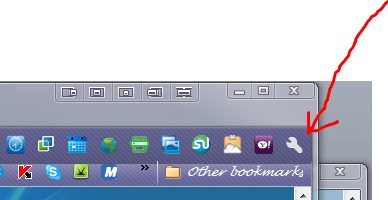
click on the wrench icon on the top right of browser(in pic)
scroll down to tools in the context menu
move cursor left in the context menu to create application shortcut and click on this and a window pops up as in the screenshot i have posted you can choose what shortcuts you want
Attachments
app.PNG
14 KB
· Views: 8
a2.PNG
10.1 KB
· Views: 7
My Computer
At a glance
Operating System : Windows 7 Home Premium Edi...Processor : Intel Core 2 Quad Q8300 @ 2500 MHzPhysical Memory :8GB Corsair4x 2GB 800MHz C5 ...Video Card : XFX 6700 AMD
Computer Manufacturer/Model Number
packard bell IXTREME M5722
OS
Operating System : Windows 7 Home Premium Edition 6.01.7600 SP1 (x64)
CPU
Processor : Intel Core 2 Quad Q8300 @ 2500 MHz
Motherboard
Mainboard : Packard Bell (Acer EG43M )
Memory
Physical Memory :8GB Corsair4x 2GB 800MHz C5 DDR2
Graphics Card(s)
Video Card : XFX 6700 AMD
Monitor(s) Displays
Maestro 234DL - BenQ V2220 - BenQ VW2420H
Screen Resolution
Current Display :1920x1080p pixels at 60 Hz in HD LED
Hard Drives
Hard Disks : WDC (1000 GB)
Drive C: (Hard Disk) : 428 GB available on 491 GB
Drive D: (Hard Disk) : 426 GB available on 492 GB
SAMSUNG spinpoint HD103SJ 1000.2 GB
(X 2) KINGSTON SSD NOW V 30GB
PSU
XFX ProSeries 550W PSU
Case
PACKARD BELL IXTREME
Cooling
System Blower Current: 150mA Air Flow16CFM ;Akasa 90mm rear
EXTRA COOLING>(FAN CONTROLLER) PC Bay Cooler 3 x 40mm fans; Akasa AK-HD-BL Blue hard drive cooler 2 x 40 mm fan 4500 rpm 29.7 dBA
Bios> American Megatrends Inc.
Version : P01-A1
Date : 08/31/2009
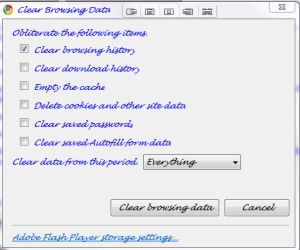
TIP also when you clear your browsing history (in the chrome options in under the hood) (and download history if you wish) make sure that you only click that option like in the pick dont tick empty the cache box
Attachments
delete history.PNG
12.1 KB
· Views: 8
My Computer
At a glance
Operating System : Windows 7 Home Premium Edi...Processor : Intel Core 2 Quad Q8300 @ 2500 MHzPhysical Memory :8GB Corsair4x 2GB 800MHz C5 ...Video Card : XFX 6700 AMD
Computer Manufacturer/Model Number
packard bell IXTREME M5722
OS
Operating System : Windows 7 Home Premium Edition 6.01.7600 SP1 (x64)
CPU
Processor : Intel Core 2 Quad Q8300 @ 2500 MHz
Motherboard
Mainboard : Packard Bell (Acer EG43M )
Memory
Physical Memory :8GB Corsair4x 2GB 800MHz C5 DDR2
Graphics Card(s)
Video Card : XFX 6700 AMD
Monitor(s) Displays
Maestro 234DL - BenQ V2220 - BenQ VW2420H
Screen Resolution
Current Display :1920x1080p pixels at 60 Hz in HD LED
Hard Drives
Hard Disks : WDC (1000 GB)
Drive C: (Hard Disk) : 428 GB available on 491 GB
Drive D: (Hard Disk) : 426 GB available on 492 GB
SAMSUNG spinpoint HD103SJ 1000.2 GB
(X 2) KINGSTON SSD NOW V 30GB
PSU
XFX ProSeries 550W PSU
Case
PACKARD BELL IXTREME
Cooling
System Blower Current: 150mA Air Flow16CFM ;Akasa 90mm rear
EXTRA COOLING>(FAN CONTROLLER) PC Bay Cooler 3 x 40mm fans; Akasa AK-HD-BL Blue hard drive cooler 2 x 40 mm fan 4500 rpm 29.7 dBA
Bios> American Megatrends Inc.
Version : P01-A1
Date : 08/31/2009
Hello brianzion. I did the whole create application shortcut already. I did both pin to desktop and dragged it down and it did the samething...Then I went ahead and unpin all the websites and restarted my computer and did the "Pin to Taskbar" option in create application shortcut. It also didn't work. I unchecked "Empty The Cache" and did a Clear Browsing History and it still didn't work.
My Computer
At a glance
Windiws 7 Home Premium 64 Bit. Switching to P...Quad Core 2.66GB512 EVGA
Computer Manufacturer/Model Number
Custom
OS
Windiws 7 Home Premium 64 Bit. Switching to Pro in a few days.
EXTRA COOLING>(FAN CONTROLLER) PC Bay Cooler 3 x 40mm fans; Akasa AK-HD-BL Blue hard drive cooler 2 x 40 mm fan 4500 rpm 29.7 dBA
Bios> American Megatrends Inc.
Version : P01-A1
Date : 08/31/2009
EXTRA COOLING>(FAN CONTROLLER) PC Bay Cooler 3 x 40mm fans; Akasa AK-HD-BL Blue hard drive cooler 2 x 40 mm fan 4500 rpm 29.7 dBA
Bios> American Megatrends Inc.
Version : P01-A1
Date : 08/31/2009
tryed both and it still isn't working. Its weird b/c I dont have this problem on my other computer which is pretty much the same hardware as this computer aside from my 2 Hard Drives on this computer. Im not going to stop untill I fix this! hehe
My Computer
At a glance
Windiws 7 Home Premium 64 Bit. Switching to P...Quad Core 2.66GB512 EVGA
Computer Manufacturer/Model Number
Custom
OS
Windiws 7 Home Premium 64 Bit. Switching to Pro in a few days.
EXTRA COOLING>(FAN CONTROLLER) PC Bay Cooler 3 x 40mm fans; Akasa AK-HD-BL Blue hard drive cooler 2 x 40 mm fan 4500 rpm 29.7 dBA
Bios> American Megatrends Inc.
Version : P01-A1
Date : 08/31/2009
EXTRA COOLING>(FAN CONTROLLER) PC Bay Cooler 3 x 40mm fans; Akasa AK-HD-BL Blue hard drive cooler 2 x 40 mm fan 4500 rpm 29.7 dBA
Bios> American Megatrends Inc.
Version : P01-A1
Date : 08/31/2009
EXTRA COOLING>(FAN CONTROLLER) PC Bay Cooler 3 x 40mm fans; Akasa AK-HD-BL Blue hard drive cooler 2 x 40 mm fan 4500 rpm 29.7 dBA
Bios> American Megatrends Inc.
Version : P01-A1
Date : 08/31/2009
EXTRA COOLING>(FAN CONTROLLER) PC Bay Cooler 3 x 40mm fans; Akasa AK-HD-BL Blue hard drive cooler 2 x 40 mm fan 4500 rpm 29.7 dBA
Bios> American Megatrends Inc.
Version : P01-A1
Date : 08/31/2009
EXTRA COOLING>(FAN CONTROLLER) PC Bay Cooler 3 x 40mm fans; Akasa AK-HD-BL Blue hard drive cooler 2 x 40 mm fan 4500 rpm 29.7 dBA
Bios> American Megatrends Inc.
Version : P01-A1
Date : 08/31/2009
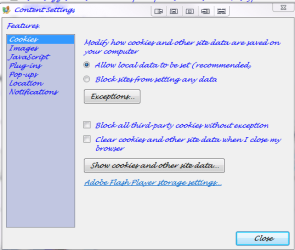
hi again well sorry nothing has worked yet all your other icons are ok ? its only the chrome you have issues with if you sync your details with chrome have you tried un-installing and re-installing? look at the settings in the screenshot
Attachments
chrome1.PNG
16 KB
· Views: 2
Last edited:
My Computer
At a glance
Operating System : Windows 7 Home Premium Edi...Processor : Intel Core 2 Quad Q8300 @ 2500 MHzPhysical Memory :8GB Corsair4x 2GB 800MHz C5 ...Video Card : XFX 6700 AMD
Computer Manufacturer/Model Number
packard bell IXTREME M5722
OS
Operating System : Windows 7 Home Premium Edition 6.01.7600 SP1 (x64)
CPU
Processor : Intel Core 2 Quad Q8300 @ 2500 MHz
Motherboard
Mainboard : Packard Bell (Acer EG43M )
Memory
Physical Memory :8GB Corsair4x 2GB 800MHz C5 DDR2
Graphics Card(s)
Video Card : XFX 6700 AMD
Monitor(s) Displays
Maestro 234DL - BenQ V2220 - BenQ VW2420H
Screen Resolution
Current Display :1920x1080p pixels at 60 Hz in HD LED
Hard Drives
Hard Disks : WDC (1000 GB)
Drive C: (Hard Disk) : 428 GB available on 491 GB
Drive D: (Hard Disk) : 426 GB available on 492 GB
SAMSUNG spinpoint HD103SJ 1000.2 GB
(X 2) KINGSTON SSD NOW V 30GB
PSU
XFX ProSeries 550W PSU
Case
PACKARD BELL IXTREME
Cooling
System Blower Current: 150mA Air Flow16CFM ;Akasa 90mm rear
EXTRA COOLING>(FAN CONTROLLER) PC Bay Cooler 3 x 40mm fans; Akasa AK-HD-BL Blue hard drive cooler 2 x 40 mm fan 4500 rpm 29.7 dBA
Bios> American Megatrends Inc.
Version : P01-A1
Date : 08/31/2009
If a Windows Resource Protection (WRP) file is missing or is corrupted, Windows may not behave as expected. For example, some Windows functions may not work, or Windows may crash. The System File Checker tool (SFC.exe) scans for missing or corrupted system files and repairs them.
1. Click Start, click All Programs, click Accessories, right-click Command Prompt, and then click Run as administrator. If you are prompted for an administrator password or for a confirmation, type the password, or click Allow
2. Type (or copy and paste) the following command, and then press ENTER:
sfc /scannow
A message will appear stating that 'The system scan will begin'. Be patient because the scan may take some time
3. If any files require a replace SFC will replace them. You may be asked to insert your Windows 7 DVD for this process to continue
4. If everything is okay you should, after the scan, see the following message "Windows resource protection did not find any integrity violations"
5. After the scan has completed, close the command prompt window, restart the computer and check.
EXTRA COOLING>(FAN CONTROLLER) PC Bay Cooler 3 x 40mm fans; Akasa AK-HD-BL Blue hard drive cooler 2 x 40 mm fan 4500 rpm 29.7 dBA
Bios> American Megatrends Inc.
Version : P01-A1
Date : 08/31/2009
Im going to try those two methods you just posted. Yes, Its only with Google Chrome Pin Icons. All other Icon are fine. I also wanted to thank you for sticking this out with me...I wish I was more "tech-ie" lol.
My Computer
At a glance
Windiws 7 Home Premium 64 Bit. Switching to P...Quad Core 2.66GB512 EVGA
Computer Manufacturer/Model Number
Custom
OS
Windiws 7 Home Premium 64 Bit. Switching to Pro in a few days.
"Windows resource protection did not find any integrity violations" Nope. Not the problem...lol
I also have AVG PC Tuneup 2011 and uninstalled Google Chrome unpin all my website clean the Registry with AVG and CCleaner. Reinstalled Google Chrome and still the same problem. Im lost now.
My Computer
At a glance
Windiws 7 Home Premium 64 Bit. Switching to P...Quad Core 2.66GB512 EVGA
Computer Manufacturer/Model Number
Custom
OS
Windiws 7 Home Premium 64 Bit. Switching to Pro in a few days.

 . Anyways, I was wondering if someone can help with me a problem I have everytime I delete my browsing history to my pin websites on my taskbar. I recently had IE9 Beta and I didn't like it. I couldn't remove my browsing history from the address bar so I uninstalled IE9 and installed Google Chrome latest release (Not Beta). Everything works fine up untill I went to remove my browsing history today and clicked on one of my pin website on my taskbar and seen the little "Icon" was blank. It does this to all my website pinned icons aside from my Google Chrome icon. The only way to fix it is to open the pin website let it load for a second and close it. Then when I open the website again the Icon is back to normal. If I delete my history and DONT click on any of the pin website everything looks to be okay. Its only when I open it for the FIRST time after deleting my History. I was wondering if there is anything I can do to fix this. Its kinda annoying