Show us your hard drive performance

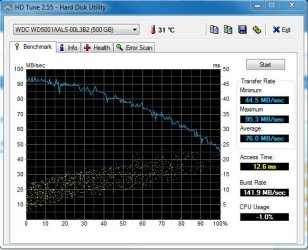
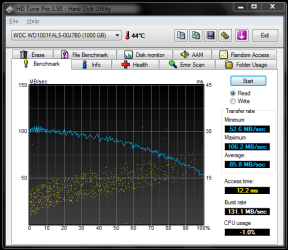
Just installed my new WD Black Caviar 1TB. This is the result,
WD read.PNG
 

My Computer My Computer

Computer type
PC/Desktop
Computer Manufacturer/Model Number
Self built.
OS
Windows 7 RTM 64bit, Windows 8 Pro 64bit
CPU
Intel i5-2500K @ 3.3Ghz
Motherboard
Asus Maximus IV GENE-Z/GEN3
Memory
16GB G.Skill RaptorX 1600MHz DDR3
Graphics Card(s)
N570GTX Twin Frozr III Power Edition
Sound Card
SupremeFX X-Fi 2
Monitor(s) Displays
BenQ XL2420T 120Hz 24 inch gaming monitor, Acer V233H 23 inc
Screen Resolution
1920x1080
Hard Drives
320GB Seagate Barracuda
WD 1TB Black Caviar
2TB WD Green Caviar
Samsung SSD 840 PRO Series
PSU
CoolerMaster Silent Pro Gold 1200WATT 80 Plus Gold
Case
CoolerMaster HAF X RC-942
Cooling
CoolerMaster V6GT Multi-Platform CPU Cooler
Keyboard
Logitech G510 Gaming Keyboard
Mouse
Logitech G700 Gaming Mouse
Antivirus
Norton Internet Security
Browser
Firefox 21
Other Info
Logitech Extreme 3D Pro Gaming Joystick, Logitech G930 Wireless Gaming Headset
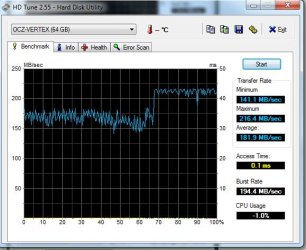
Here's mine the OCZ Vertex SSD seems a little disappointing, anyone have any advice apart from getting another and using RAID

hows that disappointing? its got a good max transfer, good average and a high burst rate, the access time doesn't get any better than that. the only way you will get better results is a simple ram drive.

personally i wouldn't be complaining.

how much was it for that ssd?
 

My Computer My Computer

Computer Manufacturer/Model Number
Mad Customs #4
OS
Windows 7 7600 x64 (16385) Ultimate,Windows Vista x64 Ultimate
CPU
Intel Quad core Q9550 [email protected](AS5 lapped)(1845FSB)
Motherboard
EVGA 790i FTW DIGITAL PWM (AS5 re-pasted)
Memory
2gbx4 GSkill1600MHz9/9/9/24/2T-1.8v@1677MHz9/9/9/18/1T-1.8v
Graphics Card(s)
x2 Leadtek 9800GX2 Quad SLI(re-pasted/no cases)755/1120/1820
Sound Card
Crapative XF-i Plat
Monitor(s) Displays
Chimei22"ws(DVI)/LG32"LCD(HDMI)/Samsung 40"LCD(HDMI)
Screen Resolution
1680x1050/1360x768/1920x1080 (1080P)
Hard Drives
Seagate 1TB "40NS" 32mb sata2, Hitachi 500gb 16mb sata2 (backup storage), Sandisk 16gb micro SD (mobile storage)
PSU
Zalman 850-HP 850watt x6 12v@18A
Case
Tiled floor (nice and cold-usually 18c idle)
Cooling
fan forced 120 Xtreme (lapped)with push/pull setup
Keyboard
Logitech Di Novo Edge
Mouse
MX 1100
Internet Speed
Bigpond 17mbit/s cable=Max witnessed 2.5Mbyte/s down 30kb up
Other Info
Enzotech SLF-1+Enzotech CNB-EVGAi chipset coolers/Sunbeamtech Rheobus Extreme 30 Watt x 6 channel fan controller/Zalman ZM-MFC2 fan controller-Watt meter/Logitech G25 Racing Wheel/Logitech cordless number pad/OCZ NIA//HTPC:7600 x64/[email protected]/2x2Gb ST Proj.X DDR3 1800 9-9-9-24/Nvidia 8400GS 512Mb/Asus HDAV1.3 Delux(changed OPAmps to OPA627)/250Gb 16Mb 7200/480W PSU/Custom made cardboard box!!
Here's mine the OCZ Vertex SSD seems a little disappointing, anyone have any advice apart from getting another and using RAID


To have your full speed, you need to trim it. Update to firmware 1.10 (1370) and trim the drive.
 

My Computer My Computer

OS
Win7 64 bits FR
CPU
2500K @ 4.5 GHz
Motherboard
Asrock Z68 Gen3 Extreme3
Memory
4x4GB 1600MHz GSkill CL9.
Graphics Card(s)
HD6850 Powercolor stock
Sound Card
Integrated
Monitor(s) Displays
Samsung 2343 + Dell 20in 4/3
Screen Resolution
2048x1152, 1600x1200
Hard Drives
OCZ Vertex LE SSD, 50GB
OCZ Solid 3 120GB
OCZ Vertex 2 240GB
Western Digital Scorpio 320GB 5400 rpm
PSU
KingWin Lazer Platinum (90+) 550Watts
Case
HAF912
Cooling
CPU: OCZ Vendetta 2
Keyboard
MX5500 revolution bluetooth
Mouse
MX5500 revolution bluetooth
Internet Speed
Cable 7 Mbps
hows that disappointing? its got a good max transfer, good average and a high burst rate, the access time doesn't get any better than that. the only way you will get better results is a simple ram drive.

personally i wouldn't be complaining.

how much was it for that ssd?

@Bloke

Just didn't seem consistent, paid about £150 ouch that seems cheap now even though it was an OEM from Novatech!

To be honest wasn't sure what to expect but saw the Core SSD results at the beginning of thre thread and they seemed more consistent. You have have given me more confidence in the result I get
Kensiko

Thanks for the advice but I'm not sure what you mean by trimming, will look it up and see what I can do. From memory the firmware update means I will lose all data on the drive?
 

My Computer My Computer

Computer Manufacturer/Model Number
DIY
OS
Windows 7
CPU
i7 920 CO stepping @ 3.0GHz
Motherboard
Gigabyte EX58 UD5
Memory
6GB CM3X2G1600CS
Graphics Card(s)
ATI HD4870 1GB
Sound Card
On-Board
Monitor(s) Displays
LGE L226W & Sasmung LE40M86BD
Screen Resolution
1680x1050 & 1980x1020
Hard Drives
OCZ-VERTEX 1.3 [Hard drive] (64.02 GB)
Western Digital 640GB Black Editions x 2
Western Digital 1TB Black Editions x 1
SAMSUNG HD501LJ [Hard drive] (500.11 GB)
Seagate esata 500gb
SanDisk Cruzer USB Device (16.0
PSU
Thermaltake Toughpower 750W Modular
Case
Antec 900-2
Cooling
Cases + Zalman CNPS9900 LED
Keyboard
Logitech DiNovo
Mouse
MX Laser
Internet Speed
Upto 8
Thanks for the advice but I'm not sure what you mean by trimming, will look it up and see what I can do. From memory the firmware update means I will lose all data on the drive?

No, not with the bootable CD, fortunately for you. I don't have the time right now to explain what is trim, but you should definitely take a look at the OCZ forum.
 

My Computer My Computer

OS
Win7 64 bits FR
CPU
2500K @ 4.5 GHz
Motherboard
Asrock Z68 Gen3 Extreme3
Memory
4x4GB 1600MHz GSkill CL9.
Graphics Card(s)
HD6850 Powercolor stock
Sound Card
Integrated
Monitor(s) Displays
Samsung 2343 + Dell 20in 4/3
Screen Resolution
2048x1152, 1600x1200
Hard Drives
OCZ Vertex LE SSD, 50GB
OCZ Solid 3 120GB
OCZ Vertex 2 240GB
Western Digital Scorpio 320GB 5400 rpm
PSU
KingWin Lazer Platinum (90+) 550Watts
Case
HAF912
Cooling
CPU: OCZ Vendetta 2
Keyboard
MX5500 revolution bluetooth
Mouse
MX5500 revolution bluetooth
Internet Speed
Cable 7 Mbps
Hi

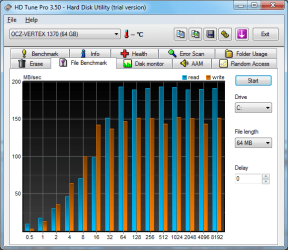
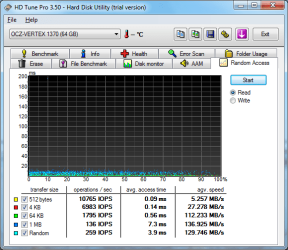
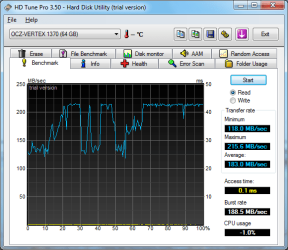
Just been over the OCZ Forum you gave me the boot up the rear I needed and have now upgraded the firmware. Also used the beta wiper tool and have posted the revised benchmarks here.

:D

Thanks again
 

Attachments

  • HDTune_File_Benchmark_OCZ-VERTEX_1370 Post Wiper.png
    HDTune_File_Benchmark_OCZ-VERTEX_1370 Post Wiper.png
    27.5 KB · Views: 19
  • HDTune_Random_Access_OCZ-VERTEX_1370 Post Wiper.png
    HDTune_Random_Access_OCZ-VERTEX_1370 Post Wiper.png
    21.9 KB · Views: 28
  • HDTune_Benchmark_OCZ-VERTEX_1370 Post Wiper.png
    HDTune_Benchmark_OCZ-VERTEX_1370 Post Wiper.png
    22.7 KB · Views: 47
Last edited:

My Computer My Computer

Computer Manufacturer/Model Number
DIY
OS
Windows 7
CPU
i7 920 CO stepping @ 3.0GHz
Motherboard
Gigabyte EX58 UD5
Memory
6GB CM3X2G1600CS
Graphics Card(s)
ATI HD4870 1GB
Sound Card
On-Board
Monitor(s) Displays
LGE L226W & Sasmung LE40M86BD
Screen Resolution
1680x1050 & 1980x1020
Hard Drives
OCZ-VERTEX 1.3 [Hard drive] (64.02 GB)
Western Digital 640GB Black Editions x 2
Western Digital 1TB Black Editions x 1
SAMSUNG HD501LJ [Hard drive] (500.11 GB)
Seagate esata 500gb
SanDisk Cruzer USB Device (16.0
PSU
Thermaltake Toughpower 750W Modular
Case
Antec 900-2
Cooling
Cases + Zalman CNPS9900 LED
Keyboard
Logitech DiNovo
Mouse
MX Laser
Internet Speed
Upto 8
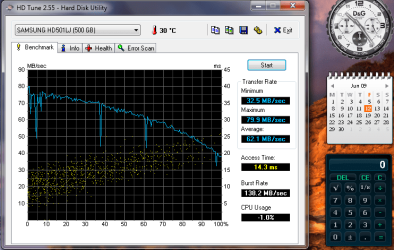
Here is my shot.
I am a little disappointed, I expected a little better?
Still only get 5.8 on the Win7 performance meter.
 

Attachments

  • HDD.png
    HDD.png
    44.9 KB · Views: 55

My Computer My Computer

Computer type
PC/Desktop
Computer Manufacturer/Model Number
Hybrid
OS
Win7 SP1 + Ultimate 64 bit
CPU
Intel G3258
Motherboard
GA Z97X Gaming 3
Memory
32gb Gskill
Graphics Card(s)
GTX 660Ti EVGA x 2
Monitor(s) Displays
Asus 23" LCD Widescreen
Screen Resolution
1920/1080
Hard Drives
1 x Samsung EVO840 250gb SSD
1 X 1 TB Velociraptor
1 x 1 Seagate 7200rpm
PSU
750W Thermaltake
Case
Thermaltake A60
Cooling
Xigmatek Dark Knight CPU and stock case fans
Keyboard
Alienware
Mouse
Microsoft USB
Internet Speed
Optusnet Cable
Antivirus
MS, Malwarebytes
Browser
Palemoon 64Bit
Its not bad but im still pretty happy with a 150mb/s Average

RAID0.JPG
 

My Computer My Computer

Computer Manufacturer/Model Number
Apple
OS
OSX 10.7. Windows 7 Ultimate x64
CPU
Intel Core i7 2.0Ghz
Motherboard
ASUS P5Q-PRO
Memory
8GB DDR3 1333Mhz
Graphics Card(s)
AMD Radeon HD 6490M 256MB
Sound Card
5.1 Built In
Monitor(s) Displays
15" LED
Screen Resolution
1400x900
Hard Drives
1x 500GB 5400RPM
PSU
NA
Case
Unibody
Cooling
2x Case Fans
Keyboard
Built In
Mouse
Built In
Internet Speed
2x 10Mb ADSL
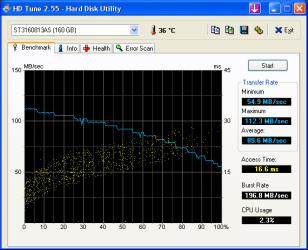
My Access time is high :( how could I speed this up?

HD Tune: ST3160813AS Benchmark

Transfer Rate Minimum : 52.5 MB/sec
Transfer Rate Maximum : 112.0 MB/sec
Transfer Rate Average : 88.1 MB/sec
Access Time : 16.6 ms :cry:
Burst Rate : 171.7 MB/sec
CPU Usage : -1.0%

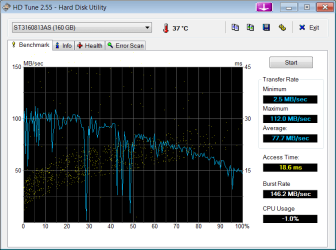
Second benchmark with S.M.A.R.T disk enabled,didn't help Access Time

HD Tune: ST3160813AS Benchmark

Transfer Rate Minimum : 2.5 MB/sec :cry:
Transfer Rate Maximum : 112.0 MB/sec
Transfer Rate Average : 77.7 MB/sec
Access Time : 18.6 ms :cry:
Burst Rate : 146.2 MB/sec
CPU Usage : -1.0%


Brains.
 

Attachments

  • HDTune_Benchmark_ST3160813AS.png
    HDTune_Benchmark_ST3160813AS.png
    15.1 KB · Views: 244
  • HDTune_Benchmark_ST3160813AS_2.png
    HDTune_Benchmark_ST3160813AS_2.png
    15.7 KB · Views: 43
Last edited:

My Computer My Computer

OS
Windows 7 (6.1) Ultimate Edition x64 (Build 7100) "6.1.7100.0"
CPU
Intel(R) Core(TM)2 Duo CPU E8400
Motherboard
Gigabyte EP35-DS3L Intel P35/G33/G31 rev. A2
Memory
4G Dual (2G DDR2(Kingston) PC2-5300 (333 MHz) + 2G PC2-6400
Graphics Card(s)
GeForce 9600 GT 512 MB PCI Express x16
Sound Card
onboard
Monitor(s) Displays
22" Chimei
Screen Resolution
1680 * 1050 75mhz
Hard Drives
WDC 300G,
ST3160913AS 149G ATA
My Access time is high :( how could I speed this up?

HD Tune: ST3160813AS Benchmark

Transfer Rate Minimum : 52.5 MB/sec
Transfer Rate Maximum : 112.0 MB/sec
Transfer Rate Average : 88.1 MB/sec
Access Time : 16.6 ms
Burst Rate : 171.7 MB/sec
CPU Usage : -1.0%


Brains.

you cant, a better performing hdd. the access time is the hardware inside the drive. some motherboards might get a different access time with the same drive but at the end its the physical internals like the spindle motor and head magnets ect.
 

My Computer My Computer

Computer Manufacturer/Model Number
Mad Customs #4
OS
Windows 7 7600 x64 (16385) Ultimate,Windows Vista x64 Ultimate
CPU
Intel Quad core Q9550 [email protected](AS5 lapped)(1845FSB)
Motherboard
EVGA 790i FTW DIGITAL PWM (AS5 re-pasted)
Memory
2gbx4 GSkill1600MHz9/9/9/24/2T-1.8v@1677MHz9/9/9/18/1T-1.8v
Graphics Card(s)
x2 Leadtek 9800GX2 Quad SLI(re-pasted/no cases)755/1120/1820
Sound Card
Crapative XF-i Plat
Monitor(s) Displays
Chimei22"ws(DVI)/LG32"LCD(HDMI)/Samsung 40"LCD(HDMI)
Screen Resolution
1680x1050/1360x768/1920x1080 (1080P)
Hard Drives
Seagate 1TB "40NS" 32mb sata2, Hitachi 500gb 16mb sata2 (backup storage), Sandisk 16gb micro SD (mobile storage)
PSU
Zalman 850-HP 850watt x6 12v@18A
Case
Tiled floor (nice and cold-usually 18c idle)
Cooling
fan forced 120 Xtreme (lapped)with push/pull setup
Keyboard
Logitech Di Novo Edge
Mouse
MX 1100
Internet Speed
Bigpond 17mbit/s cable=Max witnessed 2.5Mbyte/s down 30kb up
Other Info
Enzotech SLF-1+Enzotech CNB-EVGAi chipset coolers/Sunbeamtech Rheobus Extreme 30 Watt x 6 channel fan controller/Zalman ZM-MFC2 fan controller-Watt meter/Logitech G25 Racing Wheel/Logitech cordless number pad/OCZ NIA//HTPC:7600 x64/[email protected]/2x2Gb ST Proj.X DDR3 1800 9-9-9-24/Nvidia 8400GS 512Mb/Asus HDAV1.3 Delux(changed OPAmps to OPA627)/250Gb 16Mb 7200/480W PSU/Custom made cardboard box!!
you cant, a better performing hdd. the access time is the hardware inside the drive. some motherboards might get a different access time with the same drive but at the end its the physical internals like the spindle motor and head magnets ect.

G'day bloke,thanks for your reply :D
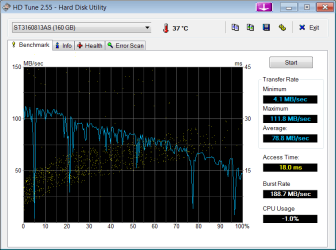
In reference to my last post http://www.sevenforums.com/129798-post150.html I've disabled S.M.A.R.T in CMOS and now it's worse. New question is how reliable is HD Tune?

HD Tune: ST3160813AS Benchmark

Transfer Rate Minimum : 4.1 MB/sec :cry:
Transfer Rate Maximum : 111.8 MB/sec
Transfer Rate Average : 78.8 MB/sec
Access Time : 18.0 ms
Burst Rate : 188.7 MB/sec
CPU Usage : -1.0%

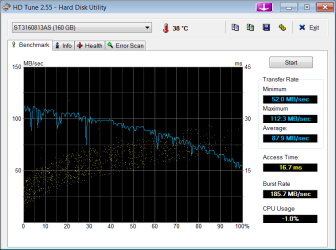
Second benchmark back to normal

HD Tune: ST3160813AS Benchmark

Transfer Rate Minimum : 52.0 MB/sec
Transfer Rate Maximum : 112.3 MB/sec
Transfer Rate Average : 87.9 MB/sec
Access Time : 16.7 ms
Burst Rate : 185.7 MB/sec
CPU Usage : -1.0%

Brains.

EDIT:Note to self, if I'm getting a Maximum : 112.3 MB/sec means my HD is running @133 so I would expect at least 125.MB/sec -/+.
if I find my answer I will post it.:geek:
 

Attachments

  • HDTune_Benchmark_ST3160813AS_3.png
    HDTune_Benchmark_ST3160813AS_3.png
    15.8 KB · Views: 29
  • HDTune_Benchmark_ST3160813AS_4.png
    HDTune_Benchmark_ST3160813AS_4.png
    15.2 KB · Views: 25
Last edited:

My Computer My Computer

OS
Windows 7 (6.1) Ultimate Edition x64 (Build 7100) "6.1.7100.0"
CPU
Intel(R) Core(TM)2 Duo CPU E8400
Motherboard
Gigabyte EP35-DS3L Intel P35/G33/G31 rev. A2
Memory
4G Dual (2G DDR2(Kingston) PC2-5300 (333 MHz) + 2G PC2-6400
Graphics Card(s)
GeForce 9600 GT 512 MB PCI Express x16
Sound Card
onboard
Monitor(s) Displays
22" Chimei
Screen Resolution
1680 * 1050 75mhz
Hard Drives
WDC 300G,
ST3160913AS 149G ATA
G'day bloke,thanks for your reply :D
In reference to my last post http://www.sevenforums.com/129798-post150.html I've disabled S.M.A.R.T in CMOS and now it's worse. New question is how reliable is HD Tune?

HD Tune: ST3160813AS Benchmark

Transfer Rate Minimum : 4.1 MB/sec :cry:
Transfer Rate Maximum : 111.8 MB/sec
Transfer Rate Average : 78.8 MB/sec
Access Time : 18.0 ms
Burst Rate : 188.7 MB/sec
CPU Usage : -1.0%

Second benchmark back to normal

HD Tune: ST3160813AS Benchmark

Transfer Rate Minimum : 52.0 MB/sec
Transfer Rate Maximum : 112.3 MB/sec
Transfer Rate Average : 87.9 MB/sec
Access Time : 16.7 ms
Burst Rate : 185.7 MB/sec
CPU Usage : -1.0%

Brains.

EDIT:Note to self, if I'm getting a Maximum : 112.3 MB/sec means my HD is running @133 so I would expect at least 125.MB/sec -/+.
if I find my answer I will post it.:geek:

the other thing is the o/s will be using the hd even though it says cpu usage -1.0% thats why the scores always fluctuate and have spikes in the graph.
 

My Computer My Computer

Computer Manufacturer/Model Number
Mad Customs #4
OS
Windows 7 7600 x64 (16385) Ultimate,Windows Vista x64 Ultimate
CPU
Intel Quad core Q9550 [email protected](AS5 lapped)(1845FSB)
Motherboard
EVGA 790i FTW DIGITAL PWM (AS5 re-pasted)
Memory
2gbx4 GSkill1600MHz9/9/9/24/2T-1.8v@1677MHz9/9/9/18/1T-1.8v
Graphics Card(s)
x2 Leadtek 9800GX2 Quad SLI(re-pasted/no cases)755/1120/1820
Sound Card
Crapative XF-i Plat
Monitor(s) Displays
Chimei22"ws(DVI)/LG32"LCD(HDMI)/Samsung 40"LCD(HDMI)
Screen Resolution
1680x1050/1360x768/1920x1080 (1080P)
Hard Drives
Seagate 1TB "40NS" 32mb sata2, Hitachi 500gb 16mb sata2 (backup storage), Sandisk 16gb micro SD (mobile storage)
PSU
Zalman 850-HP 850watt x6 12v@18A
Case
Tiled floor (nice and cold-usually 18c idle)
Cooling
fan forced 120 Xtreme (lapped)with push/pull setup
Keyboard
Logitech Di Novo Edge
Mouse
MX 1100
Internet Speed
Bigpond 17mbit/s cable=Max witnessed 2.5Mbyte/s down 30kb up
Other Info
Enzotech SLF-1+Enzotech CNB-EVGAi chipset coolers/Sunbeamtech Rheobus Extreme 30 Watt x 6 channel fan controller/Zalman ZM-MFC2 fan controller-Watt meter/Logitech G25 Racing Wheel/Logitech cordless number pad/OCZ NIA//HTPC:7600 x64/[email protected]/2x2Gb ST Proj.X DDR3 1800 9-9-9-24/Nvidia 8400GS 512Mb/Asus HDAV1.3 Delux(changed OPAmps to OPA627)/250Gb 16Mb 7200/480W PSU/Custom made cardboard box!!
the other thing is the o/s will be using the hd even though it says cpu usage -1.0% thats why the scores always fluctuate and have spikes in the graph.

Yes bloke I think your right on that,
-1.0% I think means =OFF

I'm missing my game night(I'm a Arma gamer) no time now I'll log back in tomorrow be good ;)

Regards
Brains.
 

My Computer My Computer

OS
Windows 7 (6.1) Ultimate Edition x64 (Build 7100) "6.1.7100.0"
CPU
Intel(R) Core(TM)2 Duo CPU E8400
Motherboard
Gigabyte EP35-DS3L Intel P35/G33/G31 rev. A2
Memory
4G Dual (2G DDR2(Kingston) PC2-5300 (333 MHz) + 2G PC2-6400
Graphics Card(s)
GeForce 9600 GT 512 MB PCI Express x16
Sound Card
onboard
Monitor(s) Displays
22" Chimei
Screen Resolution
1680 * 1050 75mhz
Hard Drives
WDC 300G,
ST3160913AS 149G ATA
i think -1.0% is a glitch with hdtune and windows 7 i have even ran something in the background and still get -1.0% so the easiest way to tell is if you have the spikes (drive access) showing in your graph then its in use at some point. if the hdd is being accessed then the cpu will be to as the cpu controlls the hdd like our brains control our heart.
 

My Computer My Computer

Computer Manufacturer/Model Number
Mad Customs #4
OS
Windows 7 7600 x64 (16385) Ultimate,Windows Vista x64 Ultimate
CPU
Intel Quad core Q9550 [email protected](AS5 lapped)(1845FSB)
Motherboard
EVGA 790i FTW DIGITAL PWM (AS5 re-pasted)
Memory
2gbx4 GSkill1600MHz9/9/9/24/2T-1.8v@1677MHz9/9/9/18/1T-1.8v
Graphics Card(s)
x2 Leadtek 9800GX2 Quad SLI(re-pasted/no cases)755/1120/1820
Sound Card
Crapative XF-i Plat
Monitor(s) Displays
Chimei22"ws(DVI)/LG32"LCD(HDMI)/Samsung 40"LCD(HDMI)
Screen Resolution
1680x1050/1360x768/1920x1080 (1080P)
Hard Drives
Seagate 1TB "40NS" 32mb sata2, Hitachi 500gb 16mb sata2 (backup storage), Sandisk 16gb micro SD (mobile storage)
PSU
Zalman 850-HP 850watt x6 12v@18A
Case
Tiled floor (nice and cold-usually 18c idle)
Cooling
fan forced 120 Xtreme (lapped)with push/pull setup
Keyboard
Logitech Di Novo Edge
Mouse
MX 1100
Internet Speed
Bigpond 17mbit/s cable=Max witnessed 2.5Mbyte/s down 30kb up
Other Info
Enzotech SLF-1+Enzotech CNB-EVGAi chipset coolers/Sunbeamtech Rheobus Extreme 30 Watt x 6 channel fan controller/Zalman ZM-MFC2 fan controller-Watt meter/Logitech G25 Racing Wheel/Logitech cordless number pad/OCZ NIA//HTPC:7600 x64/[email protected]/2x2Gb ST Proj.X DDR3 1800 9-9-9-24/Nvidia 8400GS 512Mb/Asus HDAV1.3 Delux(changed OPAmps to OPA627)/250Gb 16Mb 7200/480W PSU/Custom made cardboard box!!
Mine has gone down since using build 7229
 

Attachments

  • Untitled-1.jpg
    Untitled-1.jpg
    41.4 KB · Views: 26
  • Untitled-2.jpg
    Untitled-2.jpg
    48.6 KB · Views: 26

My Computer My Computer

Computer type
PC/Desktop
Computer Manufacturer/Model Number
Custom build using Mainly ASUS equipment
OS
Windows 10 Pro x64
CPU
Intel i7 5930k 3.5 O/C @ 4.2ghz
Motherboard
Asus Rampage V Extreme: BIOS 1902
Memory
32Gb Dominator Platinum (4x 8GB) 2666MHz
Graphics Card(s)
Asus GeForce GTX980Ti Matrix Platinum 6Gb
Sound Card
Onboard Realtek HD (SPDIF)
Monitor(s) Displays
Primary: Asus PB287Q 28" 4K, Secondary: Samsung 55" 4k
Screen Resolution
3840 x 2160
Hard Drives
1 x SM-951 .M2 SSD 512Gb (System)
1 x Samsung 850 Pro 256Gb SSD (Games)
1 x OCZ Vector 150 240Gb SSD (Games)
3 x Western Digital Caviar Black 1TB S300 16mb 7200rpm :
1 x 10Gb RamDisk
PSU
Corsair CMPSU-850AX
Case
Coolermaster Stormtrooper
Cooling
Noctua NH-D14 SE2011
Keyboard
Apple Keyboard USB
Mouse
Logitech MX Master
Internet Speed
76mb down /16mb up
Antivirus
ESET NOD V8
Browser
Firefox, Chrome, Opera, IE
Other Info
CPU Idle Temp = 36°
CPU Load Temp = 48° @100% for 40mins

Asus - RT-AC68U Router
Mine has gone down since using build 7229

i doubt that a different version of windows will affect how your hardware will perform, win7 cannot alter hdtune nor can it alter any bios in any hardware.

if you dont already know, the most affective way of testing a drive is when its not in use (dual boot setup and test the one thats not in use, and NOT partitioned drives, you need another physical drive for the other boot so its not at all in use).
 

My Computer My Computer

Computer Manufacturer/Model Number
Mad Customs #4
OS
Windows 7 7600 x64 (16385) Ultimate,Windows Vista x64 Ultimate
CPU
Intel Quad core Q9550 [email protected](AS5 lapped)(1845FSB)
Motherboard
EVGA 790i FTW DIGITAL PWM (AS5 re-pasted)
Memory
2gbx4 GSkill1600MHz9/9/9/24/2T-1.8v@1677MHz9/9/9/18/1T-1.8v
Graphics Card(s)
x2 Leadtek 9800GX2 Quad SLI(re-pasted/no cases)755/1120/1820
Sound Card
Crapative XF-i Plat
Monitor(s) Displays
Chimei22"ws(DVI)/LG32"LCD(HDMI)/Samsung 40"LCD(HDMI)
Screen Resolution
1680x1050/1360x768/1920x1080 (1080P)
Hard Drives
Seagate 1TB "40NS" 32mb sata2, Hitachi 500gb 16mb sata2 (backup storage), Sandisk 16gb micro SD (mobile storage)
PSU
Zalman 850-HP 850watt x6 12v@18A
Case
Tiled floor (nice and cold-usually 18c idle)
Cooling
fan forced 120 Xtreme (lapped)with push/pull setup
Keyboard
Logitech Di Novo Edge
Mouse
MX 1100
Internet Speed
Bigpond 17mbit/s cable=Max witnessed 2.5Mbyte/s down 30kb up
Other Info
Enzotech SLF-1+Enzotech CNB-EVGAi chipset coolers/Sunbeamtech Rheobus Extreme 30 Watt x 6 channel fan controller/Zalman ZM-MFC2 fan controller-Watt meter/Logitech G25 Racing Wheel/Logitech cordless number pad/OCZ NIA//HTPC:7600 x64/[email protected]/2x2Gb ST Proj.X DDR3 1800 9-9-9-24/Nvidia 8400GS 512Mb/Asus HDAV1.3 Delux(changed OPAmps to OPA627)/250Gb 16Mb 7200/480W PSU/Custom made cardboard box!!
7229 was the first build that wouldnt let me use my AHCI, I had to go back to IDE
 

My Computer My Computer

Computer type
PC/Desktop
Computer Manufacturer/Model Number
Custom build using Mainly ASUS equipment
OS
Windows 10 Pro x64
CPU
Intel i7 5930k 3.5 O/C @ 4.2ghz
Motherboard
Asus Rampage V Extreme: BIOS 1902
Memory
32Gb Dominator Platinum (4x 8GB) 2666MHz
Graphics Card(s)
Asus GeForce GTX980Ti Matrix Platinum 6Gb
Sound Card
Onboard Realtek HD (SPDIF)
Monitor(s) Displays
Primary: Asus PB287Q 28" 4K, Secondary: Samsung 55" 4k
Screen Resolution
3840 x 2160
Hard Drives
1 x SM-951 .M2 SSD 512Gb (System)
1 x Samsung 850 Pro 256Gb SSD (Games)
1 x OCZ Vector 150 240Gb SSD (Games)
3 x Western Digital Caviar Black 1TB S300 16mb 7200rpm :
1 x 10Gb RamDisk
PSU
Corsair CMPSU-850AX
Case
Coolermaster Stormtrooper
Cooling
Noctua NH-D14 SE2011
Keyboard
Apple Keyboard USB
Mouse
Logitech MX Master
Internet Speed
76mb down /16mb up
Antivirus
ESET NOD V8
Browser
Firefox, Chrome, Opera, IE
Other Info
CPU Idle Temp = 36°
CPU Load Temp = 48° @100% for 40mins

Asus - RT-AC68U Router
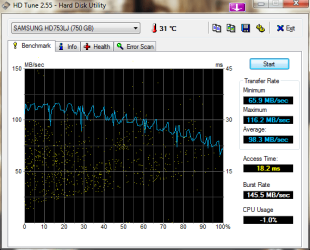
HDTune_Benchmark_SAMSUNG_HD753LJ.png
 

My Computer My Computer

OS
Windows 7 RC
CPU
Intel Q6600 @3.52ghz (440x8)
Motherboard
Gigabyte EP45-DS3R
Memory
4 GB G-Skill
Graphics Card(s)
Saphire Radeon HD4870 1GB
Sound Card
Onboard
Monitor(s) Displays
Acer 22" LCD
Screen Resolution
1680x1050
Hard Drives
Samsung Spinpoint F1 750GB
PSU
OCZ 750 watt
Cooling
Arctic Cooling Freezer 7 Pro
i think -1.0% is a glitch with hdtune and windows 7

I can confirm that bloke as I ran a new HDTune test from my XP(32bit) separate Drive although the scores are close I did get a 2.3% CPU Usage score.
I noticed that my Sata drive is using ATA (in Device Manager) and after setting AHCI in CMOS I get 1sec blue screen before reboot.I than set to Auto.
I am new to Sata drives as well so I'm in my learning curve.

Brains.
 

Attachments

  • HDTune_Benchmark_ST3160813AS_Jacks_Win7.png
    HDTune_Benchmark_ST3160813AS_Jacks_Win7.png
    15.4 KB · Views: 33

My Computer My Computer

OS
Windows 7 (6.1) Ultimate Edition x64 (Build 7100) "6.1.7100.0"
CPU
Intel(R) Core(TM)2 Duo CPU E8400
Motherboard
Gigabyte EP35-DS3L Intel P35/G33/G31 rev. A2
Memory
4G Dual (2G DDR2(Kingston) PC2-5300 (333 MHz) + 2G PC2-6400
Graphics Card(s)
GeForce 9600 GT 512 MB PCI Express x16
Sound Card
onboard
Monitor(s) Displays
22" Chimei
Screen Resolution
1680 * 1050 75mhz
Hard Drives
WDC 300G,
ST3160913AS 149G ATA
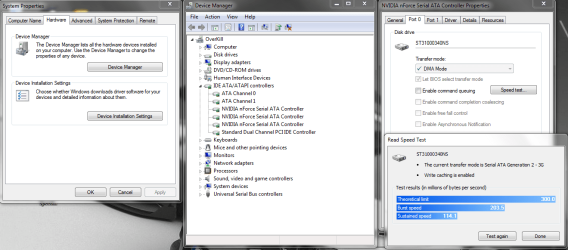
i get around 13ms access, this is a shot using my nvidia sata speed test.

the drive is my primary drive with the o/s on it, drive is a Seagate 32mb cache 1TB 40NS series.

Capture.PNG
 

My Computer My Computer

Computer Manufacturer/Model Number
Mad Customs #4
OS
Windows 7 7600 x64 (16385) Ultimate,Windows Vista x64 Ultimate
CPU
Intel Quad core Q9550 [email protected](AS5 lapped)(1845FSB)
Motherboard
EVGA 790i FTW DIGITAL PWM (AS5 re-pasted)
Memory
2gbx4 GSkill1600MHz9/9/9/24/2T-1.8v@1677MHz9/9/9/18/1T-1.8v
Graphics Card(s)
x2 Leadtek 9800GX2 Quad SLI(re-pasted/no cases)755/1120/1820
Sound Card
Crapative XF-i Plat
Monitor(s) Displays
Chimei22"ws(DVI)/LG32"LCD(HDMI)/Samsung 40"LCD(HDMI)
Screen Resolution
1680x1050/1360x768/1920x1080 (1080P)
Hard Drives
Seagate 1TB "40NS" 32mb sata2, Hitachi 500gb 16mb sata2 (backup storage), Sandisk 16gb micro SD (mobile storage)
PSU
Zalman 850-HP 850watt x6 12v@18A
Case
Tiled floor (nice and cold-usually 18c idle)
Cooling
fan forced 120 Xtreme (lapped)with push/pull setup
Keyboard
Logitech Di Novo Edge
Mouse
MX 1100
Internet Speed
Bigpond 17mbit/s cable=Max witnessed 2.5Mbyte/s down 30kb up
Other Info
Enzotech SLF-1+Enzotech CNB-EVGAi chipset coolers/Sunbeamtech Rheobus Extreme 30 Watt x 6 channel fan controller/Zalman ZM-MFC2 fan controller-Watt meter/Logitech G25 Racing Wheel/Logitech cordless number pad/OCZ NIA//HTPC:7600 x64/[email protected]/2x2Gb ST Proj.X DDR3 1800 9-9-9-24/Nvidia 8400GS 512Mb/Asus HDAV1.3 Delux(changed OPAmps to OPA627)/250Gb 16Mb 7200/480W PSU/Custom made cardboard box!!
Back
Top