Solved Optiplex 760 dual monitors to work in 7

AaronZ

New member
Local time
8:41 AM
Messages
15
My work PC was just reimaged (10 days later) with Windows 7. Now my onboard video card is not working but the PCI Geforce 4 MX is working as a Standard VGA Adapter. I am only seeing 1 monitor and updating the Intel Q43 display driver does not fix the issue. I went into BIOS and the Primary adapter is set for AUTO. I am going to change this to Onboard tomorrow to see if that makes a difference. Other than that I am extremely happy with Windows 7 being on my computer. It is so much faster.

Please Help!!!

I am afraid that my work is going to need to buy another video card but I am sure there is a way to get this working.
 

My Computer My Computer

At a glance

Windows 7 Ultimate 32bitIntel P4 2.82gb DDR-400Nividia Geforce 6800
Computer Manufacturer/Model Number
Mine
OS
Windows 7 Ultimate 32bit
CPU
Intel P4 2.8
Motherboard
Intel Perl D
Memory
2gb DDR-400
Graphics Card(s)
Nividia Geforce 6800
Sound Card
Soundblaster
Monitor(s) Displays
21" Viewsonic
Hard Drives
250GB Seagate
PSU
430 Thermaltake
Case
Antec
Cooling
Fan
Welcome to the forums AaronZ,
Have you check to see if it gives you the option to extend your current desktop?
 

My Computer My Computer

At a glance

Windows 7 x86/x64, Server 2008r2, Web Server ...i7 v2 3930K Steping stone 2G.SKILL Ripjaws Z Series 32GBAMD HD 5770
Computer Manufacturer/Model Number
SMN-Productions
OS
Windows 7 x86/x64, Server 2008r2, Web Server 2008
CPU
i7 v2 3930K Steping stone 2
Motherboard
ASUS Rampage IV Extreme
Memory
G.SKILL Ripjaws Z Series 32GB
Graphics Card(s)
AMD HD 5770
Monitor(s) Displays
Acer 21" and Samsung 20"
Hard Drives
Patriot Pyro 80GB
PSU
1000 Watt
Case
HAF-X
Cooling
4 Fans
Keyboard
Black Widow Ultimate
My work PC was just reimaged (10 days later) with Windows 7. Now my onboard video card is not working but the PCI Geforce 4 MX is working as a Standard VGA Adapter. I am only seeing 1 monitor and updating the Intel Q43 display driver does not fix the issue. I went into BIOS and the Primary adapter is set for AUTO. I am going to change this to Onboard tomorrow to see if that makes a difference. Other than that I am extremely happy with Windows 7 being on my computer. It is so much faster.

Please Help!!!

I am afraid that my work is going to need to buy another video card but I am sure there is a way to get this working.

The issue here is, you cannot use the Standard VGA Adapter for dual monitors. You need to download the drivers for your video card. You can get them from Dell at:

Welcome to Dell Support
 

My Computer My Computer

At a glance

Windows 7 Enterprise (x64); Windows Server 20...16GB
Computer type
PC/Desktop
Computer Manufacturer/Model Number
Dell OP7010
OS
Windows 7 Enterprise (x64); Windows Server 2008 R2 (x64)
Memory
16GB
Monitor(s) Displays
4 Dell 24" LCD
Screen Resolution
1280x1024
Keyboard
Dell
Mouse
Dell Optical
Internet Speed
40meg
Welcome to the forums AaronZ,
Have you check to see if it gives you the option to extend your current desktop?

Not an option, only 1 monitor is detected. If that was an option, 7 would automatically clone my desktop onto the 2nd monitor.

My work PC was just reimaged (10 days later) with Windows 7. Now my onboard video card is not working but the PCI Geforce 4 MX is working as a Standard VGA Adapter. I am only seeing 1 monitor and updating the Intel Q43 display driver does not fix the issue. I went into BIOS and the Primary adapter is set for AUTO. I am going to change this to Onboard tomorrow to see if that makes a difference. Other than that I am extremely happy with Windows 7 being on my computer. It is so much faster.

Please Help!!!

I am afraid that my work is going to need to buy another video card but I am sure there is a way to get this working.

The issue here is, you cannot use the Standard VGA Adapter for dual monitors. You need to download the drivers for your video card. You can get them from Dell at:

Welcome to Dell Support

Not an option because the add-on call was not installed at time of manufacturing. There are NO working drivers for my video card that work in 7. I guess I need to have them get me another video card or a monitor that supports HDMI input.

Edit: It comes down to this. Either A) They replace the video card or B) they get a Displayport to VGA adapter cord or C) They buy me 1 huge monitor.
 
Last edited:

My Computer My Computer

At a glance

Windows 7 Ultimate 32bitIntel P4 2.82gb DDR-400Nividia Geforce 6800
Computer Manufacturer/Model Number
Mine
OS
Windows 7 Ultimate 32bit
CPU
Intel P4 2.8
Motherboard
Intel Perl D
Memory
2gb DDR-400
Graphics Card(s)
Nividia Geforce 6800
Sound Card
Soundblaster
Monitor(s) Displays
21" Viewsonic
Hard Drives
250GB Seagate
PSU
430 Thermaltake
Case
Antec
Cooling
Fan
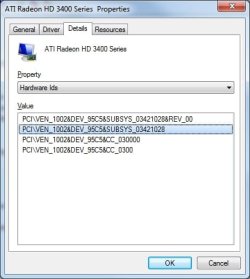
If you get the PCI\VEN number for the video card you can search google for the card type\name. Then go to the manufactures web site and download the drivers for the video card.

Device Manager | Display Adapters | {Your Video Card}, Right Click, Properties -> Details Tab -> Property (Pull Down). Highlight the Value, typically the second from the top and then CTRL-C. Paste that into google and find the card type\name.
 

Attachments

  • VideoCardPCI-VEN.jpg
    VideoCardPCI-VEN.jpg
    24.6 KB · Views: 13

My Computer My Computer

At a glance

Windows 7 Enterprise (x64); Windows Server 20...16GB
Computer type
PC/Desktop
Computer Manufacturer/Model Number
Dell OP7010
OS
Windows 7 Enterprise (x64); Windows Server 2008 R2 (x64)
Memory
16GB
Monitor(s) Displays
4 Dell 24" LCD
Screen Resolution
1280x1024
Keyboard
Dell
Mouse
Dell Optical
Internet Speed
40meg
Update: So I explained the issue with the Desktop group and they gave me a PCI Express card. I thought ROCK! I am set. However if a PCI Express card is installed in this POS, it will override the onboard video card. This is why I have NEVER and NEVER plan to buy a pre-built computer for my personal use.

I appreciate the help but I am going to request a larger monitor. 17" is just tooooo small.
 

My Computer My Computer

At a glance

Windows 7 Ultimate 32bitIntel P4 2.82gb DDR-400Nividia Geforce 6800
Computer Manufacturer/Model Number
Mine
OS
Windows 7 Ultimate 32bit
CPU
Intel P4 2.8
Motherboard
Intel Perl D
Memory
2gb DDR-400
Graphics Card(s)
Nividia Geforce 6800
Sound Card
Soundblaster
Monitor(s) Displays
21" Viewsonic
Hard Drives
250GB Seagate
PSU
430 Thermaltake
Case
Antec
Cooling
Fan
Update: So I explained the issue with the Desktop group and they gave me a PCI Express card. I thought ROCK! I am set. However if a PCI Express card is installed in this POS, it will override the onboard video card. This is why I have NEVER and NEVER plan to buy a pre-built computer for my personal use.

I appreciate the help but I am going to request a larger monitor. 17" is just tooooo small.


Check the BIOS setting on your Dell, in some cases you can change the setting to use "Both" video cards. Dell typically will set video to "Auto" so the average user will not have to change anything when they install an add-on video card. -WS
 

My Computer My Computer

At a glance

Windows 7 Enterprise (x64); Windows Server 20...16GB
Computer type
PC/Desktop
Computer Manufacturer/Model Number
Dell OP7010
OS
Windows 7 Enterprise (x64); Windows Server 2008 R2 (x64)
Memory
16GB
Monitor(s) Displays
4 Dell 24" LCD
Screen Resolution
1280x1024
Keyboard
Dell
Mouse
Dell Optical
Internet Speed
40meg
Thanks WS. I was instructed to update to a BIOS that was released 8 days ago. I will give that a try and cross my fingers.
 

My Computer My Computer

At a glance

Windows 7 Ultimate 32bitIntel P4 2.82gb DDR-400Nividia Geforce 6800
Computer Manufacturer/Model Number
Mine
OS
Windows 7 Ultimate 32bit
CPU
Intel P4 2.8
Motherboard
Intel Perl D
Memory
2gb DDR-400
Graphics Card(s)
Nividia Geforce 6800
Sound Card
Soundblaster
Monitor(s) Displays
21" Viewsonic
Hard Drives
250GB Seagate
PSU
430 Thermaltake
Case
Antec
Cooling
Fan
mini dell optiplex 760 with Radeon hd5450

Hi, I'm have a dell optiplex760 (mini) and i need a second monitor as extended, so I bought a Radeon HD5450 (PCI express 2.1 bus of 512mb) with a Y cable of an end, VGA the other end of DVI. any time i fix the two cables. it shut down the other one(VGA)PLease what can i do...... urgent
 

My Computer My Computer

At a glance

windows 7 enterprise 64bitrqdeon HD5450 xfx
Computer Manufacturer/Model Number
dell optiplex 760
OS
windows 7 enterprise 64bit
Graphics Card(s)
rqdeon HD5450 xfx
@timmaleyer

Welcome to Seven Forums.

This is an extremely old thread, you would be much better off starting a new thread so everyone will read it and have a chance to help you. Since this is a closed complete thread no one will read it. I only saw it because I was part of it when it was active and it showed up in my list of threads with new messages.

Thanks -WS
 

My Computer My Computer

At a glance

Windows 7 Enterprise (x64); Windows Server 20...16GB
Computer type
PC/Desktop
Computer Manufacturer/Model Number
Dell OP7010
OS
Windows 7 Enterprise (x64); Windows Server 2008 R2 (x64)
Memory
16GB
Monitor(s) Displays
4 Dell 24" LCD
Screen Resolution
1280x1024
Keyboard
Dell
Mouse
Dell Optical
Internet Speed
40meg
Back
Top