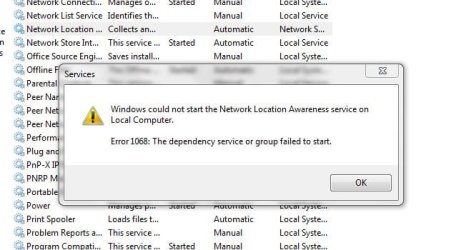
the dependency service or group failed to start

xs2bilal

New member
Local time
12:58 AM
Messages
5
Hi,
i am facing this problem for a couple of weeks :confused:. when i try to connect to the internet using wi-fi, it says limited access. on opening network and sharing center, under the "View your basic network information and set up connections" heading, it says "unknown", where it used to show the network map before this problem happened, and underneath that it says "The dependency service or group failed to start".

any idea on whats going on

Thanx in advance.
 

My Computer My Computer

Computer Manufacturer/Model Number
HP Pavilion dv6000 notebook
OS
Windows 7 Ultimate 32bit
CPU
Genuine Intel CPU 1.60 GHz (2 CPUs)
Memory
1024MB
Graphics Card(s)
256MB
From what I read about this problem it seems that a corrupted TCP/ip stack may be involved.

Try running this batch file which will reset winsock, reset the TCP/IP stack and release renew your IP.

Download Renew IP + Reset Winsock Batch File

If that doesn't fix the problem please post a screen shot of your ipconfig /all .


My Computer My Computer

Computer type
PC/Desktop
Computer Manufacturer/Model Number
Home built
OS
Windows 7 Ult, Windows 8.1 Pro,
CPU
Q9650-4.275GHz, E8600 4.5GHz, E6750-3.8GHz
Motherboard
Evga 780i FTW
Memory
G.Skill PC2 9600 1200Mhz 5 5 5 15 2T
Graphics Card(s)
GTX480
Sound Card
Asus Xonar D2
Monitor(s) Displays
HannsG
Screen Resolution
1680X1050
Hard Drives
GSkill Phoenix Pro 120GB SSD
PSU
ThermalTake Toughpower 1000Watt modular
Case
ThermalTake XaserV
Cooling
Xigmatek S1283
Keyboard
Logitech G15
Mouse
Logitech G9
Internet Speed
T1
Download Renew IP + Reset Winsock Batch File

the above link refers to a site with error message "download temporarily unavailable"

any idea
 

My Computer My Computer

Computer Manufacturer/Model Number
HP Pavilion dv6000 notebook
OS
Windows 7 Ultimate 32bit
CPU
Genuine Intel CPU 1.60 GHz (2 CPUs)
Memory
1024MB
Graphics Card(s)
256MB
Download Renew IP + Reset Winsock Batch File

the above link refers to a site with error message "download temporarily unavailable"

any idea

It's working for me but you can use your command prompt for this.

Type the following commands one at a time into your command prompt, hit "enter" after each one, run as admin then restart the machine.

netsh winsock reset catalog (reset winsock entries)
netsh int ip reset reset.log hit (reset TCP/IP stack)

Read more: http://windows7themes.net/repair-reset-winsock-windows-7.html#ixzz17joSyDoU
 

My Computer My Computer

Computer type
PC/Desktop
Computer Manufacturer/Model Number
Home built
OS
Windows 7 Ult, Windows 8.1 Pro,
CPU
Q9650-4.275GHz, E8600 4.5GHz, E6750-3.8GHz
Motherboard
Evga 780i FTW
Memory
G.Skill PC2 9600 1200Mhz 5 5 5 15 2T
Graphics Card(s)
GTX480
Sound Card
Asus Xonar D2
Monitor(s) Displays
HannsG
Screen Resolution
1680X1050
Hard Drives
GSkill Phoenix Pro 120GB SSD
PSU
ThermalTake Toughpower 1000Watt modular
Case
ThermalTake XaserV
Cooling
Xigmatek S1283
Keyboard
Logitech G15
Mouse
Logitech G9
Internet Speed
T1
Download Renew IP + Reset Winsock Batch File

the above link refers to a site with error message "download temporarily unavailable"

any idea

It's working for me but you can use your command prompt for this.

Type the following commands one at a time into your command prompt, hit "enter" after each one, run as admin then restart the machine.

netsh winsock reset catalog (reset winsock entries)
netsh int ip reset reset.log hit (reset TCP/IP stack)
Read more: http://windows7themes.net/repair-reset-winsock-windows-7.html#ixzz17joSyDoU


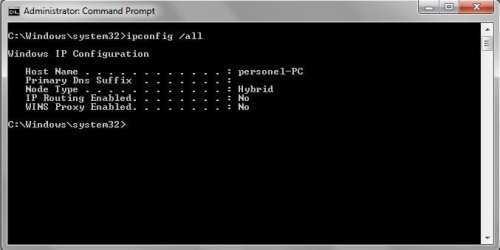
i have run both theses commands, and restarted my notebook, but it still is not working. here is the trace of ipconfig /all.
 

Attachments

  • Capture.JPG
    Capture.JPG
    24.9 KB · Views: 1,483

My Computer My Computer

Computer Manufacturer/Model Number
HP Pavilion dv6000 notebook
OS
Windows 7 Ultimate 32bit
CPU
Genuine Intel CPU 1.60 GHz (2 CPUs)
Memory
1024MB
Graphics Card(s)
256MB
Download Renew IP + Reset Winsock Batch File

the above link refers to a site with error message "download temporarily unavailable"

any idea

It's working for me but you can use your command prompt for this.

Type the following commands one at a time into your command prompt, hit "enter" after each one, run as admin then restart the machine.


netsh winsock reset catalog (reset winsock entries)
netsh int ip reset reset.log hit (reset TCP/IP stack)

Read more: http://windows7themes.net/repair-reset-winsock-windows-7.html#ixzz17joSyDoU


i have run both theses commands, and restarted my notebook, but it still is not working. here is the trace of ipconfig /all.

No wonder it's not working, it looks like you don't have any type of network to connect too.

I've never seen an ipconfig so empty which makes it hard to figure out whats going on.

Have you tried running sfc /scannow to see if any files are missing or corrupted?

Have you attempted to reset your router?
 

My Computer My Computer

Computer type
PC/Desktop
Computer Manufacturer/Model Number
Home built
OS
Windows 7 Ult, Windows 8.1 Pro,
CPU
Q9650-4.275GHz, E8600 4.5GHz, E6750-3.8GHz
Motherboard
Evga 780i FTW
Memory
G.Skill PC2 9600 1200Mhz 5 5 5 15 2T
Graphics Card(s)
GTX480
Sound Card
Asus Xonar D2
Monitor(s) Displays
HannsG
Screen Resolution
1680X1050
Hard Drives
GSkill Phoenix Pro 120GB SSD
PSU
ThermalTake Toughpower 1000Watt modular
Case
ThermalTake XaserV
Cooling
Xigmatek S1283
Keyboard
Logitech G15
Mouse
Logitech G9
Internet Speed
T1
It's working for me but you can use your command prompt for this.

Type the following commands one at a time into your command prompt, hit "enter" after each one, run as admin then restart the machine.

netsh winsock reset catalog (reset winsock entries)
netsh int ip reset reset.log hit (reset TCP/IP stack)

Read more: http://windows7themes.net/repair-reset-winsock-windows-7.html#ixzz17joSyDoU


i have run both theses commands, and restarted my notebook, but it still is not working. here is the trace of ipconfig /all.

No wonder it's not working, it looks like you don't have any type of network to connect too.

I've never seen an ipconfig so empty which makes it hard to figure out whats going on.

Have you tried running sfc /scannow to see if any files are missing or corrupted?

Have you attempted to reset your router?


i really appreciate your prompt response,

running sfc /scannow breaks at 68% prompting "Windows Resource Protection found corrupt files but was unable to fix some of them.

Details are included in the CBS.Log C:\windows\logs\cbs\cbs.log"

but i cant open this file, access is denied.


and how do i reset the router???
 

My Computer My Computer

Computer Manufacturer/Model Number
HP Pavilion dv6000 notebook
OS
Windows 7 Ultimate 32bit
CPU
Genuine Intel CPU 1.60 GHz (2 CPUs)
Memory
1024MB
Graphics Card(s)
256MB
Hi xs2bilal,

Click Start, on search box, and then type devmgmt.msc press enter. From Device Manager, locate the Network Adapters, expand it. Do you see any ! X or ? symbols. You may a sprint screen if you want and post it here.

From the troublesome computer verify that all your network services are Started from Control Panel=> Admin Tools=> Services:
• COM+ Event System (for WZC issues)
• Computer Browser
• DHCP Client
• DNS Client
• Network Connections
• Network Location Awareness
• Remote Procedure Call (RPC)
• Server
• TCP/IP Netbios helper
• Wireless Zero Configuration ( XP wireless configurations only)
• WLAN AutoConfig ( Vista wireless configurations only)
• Workstation

Please let us know.
 

My Computer My Computer

Computer Manufacturer/Model Number
Lenovo Desktop/Samsung Laptop
OS
Win7 & Win8 64bit
CPU
Intel i5
Internet Speed
Charter-20 Mbps
Antivirus
Avast
Browser
FF, IE9 and Chrome
i have run both theses commands, and restarted my notebook, but it still is not working. here is the trace of ipconfig /all.

No wonder it's not working, it looks like you don't have any type of network to connect too.

I've never seen an ipconfig so empty which makes it hard to figure out whats going on.

Have you tried running sfc /scannow to see if any files are missing or corrupted?

Have you attempted to reset your router?


i really appreciate your prompt response,

running sfc /scannow breaks at 68% prompting "Windows Resource Protection found corrupt files but was unable to fix some of them.
Details are included in the CBS.Log C:\windows\logs\cbs\cbs.log"

but i cant open this file, access is denied.

and how do i reset the router???

The fact that sfc /scannow didn't finish is a problem, sometimes if you restart and run the sfc command a couple more times it can help your system to get through the sfc scan.

You could also try to restore your system to a point before the problem began by using system restore, or you can also try doing a repair install from the Windows CD.
http://www.sevenforums.com/tutorials/3413-repair-install.html

Resetting the router is done by pushing a button which resides in a small hole on the side of your router for approx 30 second to a minute, the lights will flash at a certain point which means the router has been reset.

You can look up the procedure for your particular router but it's about the same for most routers. After the reset you would need to go into your routers control panel and set up the wireless security settings, password and SSID. If possible Use WPA2 security and AES encryption.
 

My Computer My Computer

Computer type
PC/Desktop
Computer Manufacturer/Model Number
Home built
OS
Windows 7 Ult, Windows 8.1 Pro,
CPU
Q9650-4.275GHz, E8600 4.5GHz, E6750-3.8GHz
Motherboard
Evga 780i FTW
Memory
G.Skill PC2 9600 1200Mhz 5 5 5 15 2T
Graphics Card(s)
GTX480
Sound Card
Asus Xonar D2
Monitor(s) Displays
HannsG
Screen Resolution
1680X1050
Hard Drives
GSkill Phoenix Pro 120GB SSD
PSU
ThermalTake Toughpower 1000Watt modular
Case
ThermalTake XaserV
Cooling
Xigmatek S1283
Keyboard
Logitech G15
Mouse
Logitech G9
Internet Speed
T1
Hi xs2bilal,

Click Start, on search box, and then type devmgmt.msc press enter. From Device Manager, locate the Network Adapters, expand it. Do you see any ! X or ? symbols. You may a sprint screen if you want and post it here.

From the troublesome computer verify that all your network services are Started from Control Panel=> Admin Tools=> Services:
• COM+ Event System (for WZC issues)
• Computer Browser
• DHCP Client
• DNS Client
• Network Connections
• Network Location Awareness
• Remote Procedure Call (RPC)
• Server
• TCP/IP Netbios helper
• Wireless Zero Configuration ( XP wireless configurations only)
• WLAN AutoConfig ( Vista wireless configurations only)
• Workstation

Please let us know.


Hi 2xg,

regarding the network adapter, there is no issue, it displays correct items with no X or ?.

well regarding services, there are some problems found,

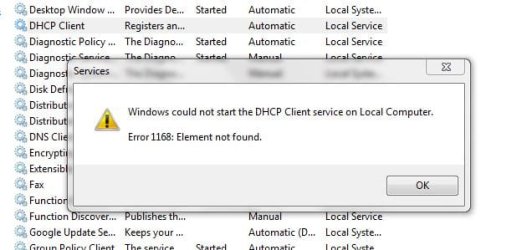
DHCP client service is not running and i am unable to start it.
Network Location Awareness service is not running and i am unable to start it.
Server service is not running and i am unable to start it.
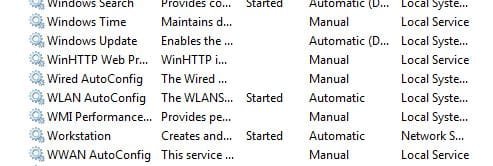
Wireless Zero Configuration service is not listed in it.

screen shots are provided for each service.
 

Attachments

  • DHCP Client.JPG
    DHCP Client.JPG
    35.9 KB · Views: 476
  • Network Location Awareness.JPG
    Network Location Awareness.JPG
    42.7 KB · Views: 350
  • Server.JPG
    Server.JPG
    35.2 KB · Views: 284
  • Wireless Zero Configuration.JPG
    Wireless Zero Configuration.JPG
    26.6 KB · Views: 199

My Computer My Computer

Computer Manufacturer/Model Number
HP Pavilion dv6000 notebook
OS
Windows 7 Ultimate 32bit
CPU
Genuine Intel CPU 1.60 GHz (2 CPUs)
Memory
1024MB
Graphics Card(s)
256MB
Very helpful, I think these are the issues. On each one of them, start with DHCP client, double click on it, locate Dependencies Tab, in here make sure that the dependencies are all Started, then do the same thing to the Network Location Awareness and Server Services.
DHCP client service is not running and i am unable to start it.
Network Location Awareness service is not running and i am unable to start it.
Server service is not running and i am unable to start it.
 

My Computer My Computer

Computer Manufacturer/Model Number
Lenovo Desktop/Samsung Laptop
OS
Win7 & Win8 64bit
CPU
Intel i5
Internet Speed
Charter-20 Mbps
Antivirus
Avast
Browser
FF, IE9 and Chrome
I think we already determined that there are no network services running at all going by the complete absence of anything in the ipconfig, and I'm pretty sure with sfc /scannow not being able to finish it's scan let alone correct the problem that this system's file's are somehow messed up.

I'd go with a system restore to a previous point in time or try the repair installation.
 

My Computer My Computer

Computer type
PC/Desktop
Computer Manufacturer/Model Number
Home built
OS
Windows 7 Ult, Windows 8.1 Pro,
CPU
Q9650-4.275GHz, E8600 4.5GHz, E6750-3.8GHz
Motherboard
Evga 780i FTW
Memory
G.Skill PC2 9600 1200Mhz 5 5 5 15 2T
Graphics Card(s)
GTX480
Sound Card
Asus Xonar D2
Monitor(s) Displays
HannsG
Screen Resolution
1680X1050
Hard Drives
GSkill Phoenix Pro 120GB SSD
PSU
ThermalTake Toughpower 1000Watt modular
Case
ThermalTake XaserV
Cooling
Xigmatek S1283
Keyboard
Logitech G15
Mouse
Logitech G9
Internet Speed
T1
:) I'd go with the Repair installation, perhaps will be better.
 

My Computer My Computer

Computer Manufacturer/Model Number
Lenovo Desktop/Samsung Laptop
OS
Win7 & Win8 64bit
CPU
Intel i5
Internet Speed
Charter-20 Mbps
Antivirus
Avast
Browser
FF, IE9 and Chrome
:) I'd go with the Repair installation, perhaps will be better.


Yeah me too, the Op's system seem to be pretty messed up somehow. :confused:
 

My Computer My Computer

Computer type
PC/Desktop
Computer Manufacturer/Model Number
Home built
OS
Windows 7 Ult, Windows 8.1 Pro,
CPU
Q9650-4.275GHz, E8600 4.5GHz, E6750-3.8GHz
Motherboard
Evga 780i FTW
Memory
G.Skill PC2 9600 1200Mhz 5 5 5 15 2T
Graphics Card(s)
GTX480
Sound Card
Asus Xonar D2
Monitor(s) Displays
HannsG
Screen Resolution
1680X1050
Hard Drives
GSkill Phoenix Pro 120GB SSD
PSU
ThermalTake Toughpower 1000Watt modular
Case
ThermalTake XaserV
Cooling
Xigmatek S1283
Keyboard
Logitech G15
Mouse
Logitech G9
Internet Speed
T1
Thanks

Download Renew IP + Reset Winsock Batch File

the above link refers to a site with error message "download temporarily unavailable"

any idea

It's working for me but you can use your command prompt for this.

Type the following commands one at a time into your command prompt, hit "enter" after each one, run as admin then restart the machine.

netsh winsock reset catalog (reset winsock entries)
netsh int ip reset reset.log hit (reset TCP/IP stack)

Read more: http://windows7themes.net/repair-reset-winsock-windows-7.html#ixzz17joSyDoU

Thanks chev65 you saved my ass!
 

My Computer My Computer

OS
Dorset
Download Renew IP + Reset Winsock Batch File

the above link refers to a site with error message "download temporarily unavailable"

any idea

It's working for me but you can use your command prompt for this.

Type the following commands one at a time into your command prompt, hit "enter" after each one, run as admin then restart the machine.


netsh winsock reset catalog (reset winsock entries)
netsh int ip reset reset.log hit (reset TCP/IP stack)

Thanks chev65 you saved my ass!

No problem jaco, it's nice to know these old threads are easy to locate and are still helping people. :)
 

My Computer My Computer

Computer type
PC/Desktop
Computer Manufacturer/Model Number
Home built
OS
Windows 7 Ult, Windows 8.1 Pro,
CPU
Q9650-4.275GHz, E8600 4.5GHz, E6750-3.8GHz
Motherboard
Evga 780i FTW
Memory
G.Skill PC2 9600 1200Mhz 5 5 5 15 2T
Graphics Card(s)
GTX480
Sound Card
Asus Xonar D2
Monitor(s) Displays
HannsG
Screen Resolution
1680X1050
Hard Drives
GSkill Phoenix Pro 120GB SSD
PSU
ThermalTake Toughpower 1000Watt modular
Case
ThermalTake XaserV
Cooling
Xigmatek S1283
Keyboard
Logitech G15
Mouse
Logitech G9
Internet Speed
T1
It's working for me but you can use your command prompt for this.

Type the following commands one at a time into your command prompt, hit "enter" after each one, run as admin then restart the machine.


netsh winsock reset catalog (reset winsock entries)
netsh int ip reset reset.log hit (reset TCP/IP stack)

Read more: http://windows7themes.net/repair-reset-winsock-windows-7.html#ixzz17joSyDoU


i have run both theses commands, and restarted my notebook, but it still is not working. here is the trace of ipconfig /all.

No wonder it's not working, it looks like you don't have any type of network to connect too.

I've never seen an ipconfig so empty which makes it hard to figure out whats going on.

Have you tried running sfc /scannow to see if any files are missing or corrupted?

Have you attempted to reset your router?

Oh my god. I had the same problem as op (did a system recovery, which left me with that lovely message).

sfc /scannow fixed mine, unfortunately I had spent a lot of time trying other stuff.

Thank you all for your help with solving this :-)
 

My Computer My Computer

OS
Windows Home Premium 64bit
I go with all the method above. No one worked on my laptop. Even to restore the computer, it says the computer seems not function correctly before. What should I do!
 

My Computer My Computer

OS
Windows7
Fun I recommend starting a new Thread with your problem and the good folks here will help you quicker.
 

My Computer My Computer

Computer type
PC/Desktop
Computer Manufacturer/Model Number
Home made Desktop
OS
Windows 10 Pro. 64/ version 1709 Windows 7 Pro/64
CPU
Intel i7-6800K @ 4.3
Motherboard
ASUS X-99 Deluxe II
Memory
Corsair Platinum 16 gig @2400
Graphics Card(s)
EVGA GTX 1070 OC
Monitor(s) Displays
Asus 27" LED LCD/VE278Q
Screen Resolution
1920-1080 or 1280-720 HDMI
Hard Drives
INTEL SSD 730-240 Gb Sata 3.0/
PSU
EVGA Platium 1200W
Case
Phanteks Luxe Tempered Glass 8 fans/ one radiator
Cooling
XSPC/ Water Cooled CPU
Keyboard
Das 4 Professional
Mouse
Logitech M705/MX Anywhere 2-S
Internet Speed
100 mbits
Antivirus
Microsoft Security Essentials/ Malwarebytes Premium 3.0/ SAS
Browser
I.E. 11 default/Firefox/ ISP Time Warner Cable/Spectrum
Other Info
LG BluRay Burner/
Sound system-KLipsch-THX/
Icy Dock ssd Hot Swap bays.
Download Renew IP + Reset Winsock Batch File

the above link refers to a site with error message "download temporarily unavailable"

any idea

It's working for me but you can use your command prompt for this.

Type the following commands one at a time into your command prompt, hit "enter" after each one, run as admin then restart the machine.


netsh winsock reset catalog (reset winsock entries)
netsh int ip reset reset.log hit (reset TCP/IP stack)

This was extremely helpful at work today, thanks again!
 

My Computer My Computer

Computer type
PC/Desktop
Computer Manufacturer/Model Number
Custom Build
OS
Windows 7 HP 64-Bit
CPU
Intel i7 3770k OC 4.5Ghz
Motherboard
ASRock z77 e4
Memory
8GB Kingston
Graphics Card(s)
Nvdia GTX 670
Hard Drives
128 GB Samsung SSD
1 TB Western Digital HDD
Antivirus
MSE
Browser
Chrome
Back
Top