Solved Signal strength good but no connection

pwimpenny

New member
Local time
10:18 PM
Messages
15
Im still having problems connecting my samsung r530 laptop when I am some distance from the router. What puzzles me is that my atheros AR9285 wireless card sees my network with a good signal strength but it will not connect. The small connection circle contunuiously rotates but it never connects. It connects fine when I move close to the router but no chance when away.
I could understand it if my network was not in range or the signal was poor but what reason will it not connect when its the closest network? Do I need to invest in a new router with the N range, do I need a better wireless card in my laptop, or do I have an adaptor or network setting that is incorrect. SHould I use static ip address or stick with my auto configuration? My networking tech knowledge is rather poor so I need all the help I can get please.:confused:
 

My Computer My Computer

At a glance

windows 7 ProfessionalIntel® Core™2 Quad Q9550 (2.83GHz)4GB CORSAIR XMS2 DUAL-DDR2 800MHzPNY QUADRO FX580 512MB GDDR3
Computer Manufacturer/Model Number
Pcspecialist
OS
windows 7 Professional
CPU
Intel® Core™2 Quad Q9550 (2.83GHz)
Motherboard
ASUS® P5Q WS
Memory
4GB CORSAIR XMS2 DUAL-DDR2 800MHz
Graphics Card(s)
PNY QUADRO FX580 512MB GDDR3
Sound Card
ONBOARD 8 CHANNEL (7.1) HIGH DEF AUDIO
Monitor(s) Displays
Samsung 23" W P2370
Screen Resolution
1950x1050
Hard Drives
250GB SERIAL ATA 3-Gb/s HARD DRIVE WITH 8MB CACHE (7,200rpm)
PSU
350W Dual Rail PSU + 120mm Case Fan
Case
SILVER/BLACK TRIDENT CASE + 2 FRONT USB
Cooling
SUPER QUIET 22dBA TRIPLE COPPER HEATPIPE CPU COOLER
Keyboard
Logitech LX700
Mouse
Logitech LX700
Internet Speed
8mb
Hello,

Let's see what we can do.

Have you updated your wireless network adapter to the current one yet?

Maybe some tweaking from your router is need, first off please provide the following.
From your wireless computer pls. install and run Xirrus Wi-Fi Inspector[/URL].
Click on the 'Show Networks' to display all wireless networks on the xirrus icon on your desktop of if you have one running in a corner. Tap the Printscreen key on your keyboard, open up Paint then choose Edit from the Menu and select Paste, then SAVE it. Upload and attached it here.

Please post an update.
 

My Computer My Computer

At a glance

Win7 & Win8 64bitIntel i5
Computer Manufacturer/Model Number
Lenovo Desktop/Samsung Laptop
OS
Win7 & Win8 64bit
CPU
Intel i5
Internet Speed
Charter-20 Mbps
Antivirus
Avast
Browser
FF, IE9 and Chrome
Hello,

Let's see what we can do.

Have you updated your wireless network adapter to the current one yet?
Yes my laptop adaptor has the latest drivers already and I believe my router is running the most recent firmware available.
Its an old Sky Netgear router DG834GT so has limited security options available.


Maybe some tweaking from your router is need, first off please provide the following.
From your wireless computer pls. install and run Xirrus Wi-Fi Inspector[/URL].
I have the inSIDDer software already on my laptop to inspect other networks. Will this do instead?

Click on the 'Show Networks' to display all wireless networks on the xirrus icon on your desktop of if you have one running in a corner. Tap the Printscreen key on your keyboard, open up Paint then choose Edit from the Menu and select Paste, then SAVE it. Upload and attached it here.
I will try and print the screen from inSIDDER. It shows the other networks running.

Please post an update.
Many thanks in advance.
 
Last edited:

My Computer My Computer

At a glance

windows 7 ProfessionalIntel® Core™2 Quad Q9550 (2.83GHz)4GB CORSAIR XMS2 DUAL-DDR2 800MHzPNY QUADRO FX580 512MB GDDR3
Computer Manufacturer/Model Number
Pcspecialist
OS
windows 7 Professional
CPU
Intel® Core™2 Quad Q9550 (2.83GHz)
Motherboard
ASUS® P5Q WS
Memory
4GB CORSAIR XMS2 DUAL-DDR2 800MHz
Graphics Card(s)
PNY QUADRO FX580 512MB GDDR3
Sound Card
ONBOARD 8 CHANNEL (7.1) HIGH DEF AUDIO
Monitor(s) Displays
Samsung 23" W P2370
Screen Resolution
1950x1050
Hard Drives
250GB SERIAL ATA 3-Gb/s HARD DRIVE WITH 8MB CACHE (7,200rpm)
PSU
350W Dual Rail PSU + 120mm Case Fan
Case
SILVER/BLACK TRIDENT CASE + 2 FRONT USB
Cooling
SUPER QUIET 22dBA TRIPLE COPPER HEATPIPE CPU COOLER
Keyboard
Logitech LX700
Mouse
Logitech LX700
Internet Speed
8mb
Im still having problems connecting my samsung r530 laptop when I am some distance from the router. What puzzles me is that my atheros AR9285 wireless card sees my network with a good signal strength but it will not connect. The small connection circle contunuiously rotates but it never connects. It connects fine when I move close to the router but no chance when away.
I could understand it if my network was not in range or the signal was poor but what reason will it not connect when its the closest network? Do I need to invest in a new router with the N range, do I need a better wireless card in my laptop, or do I have an adaptor or network setting that is incorrect. SHould I use static ip address or stick with my auto configuration? My networking tech knowledge is rather poor so I need all the help I can get please.:confused:

The reality is that wireless N does not have better range then wireless G, it only has better network speed and bandwidth with the same range.

I wouldn't use the auto configuration, it's best to set everything up manually using WPA2 security with AES encryption. Set up the router and the Win7 connection manually using those settings.

If you are going through more than two walls your wireless connecton strength won't be very good and your connection quality might not be consistant.

Using a static IP won't help one bit. Using a different router with wireless N would work better for you although it may not increase the signal strength which I believe is the problem here. Obviously using a clear "unused" channel for your wireless is required.

Adding a wireless AP "access point" or wireless bridge would be the best solution if signal strength is the issue.
 

My Computer My Computer

At a glance

Windows 7 Ult, Windows 8.1 Pro,Q9650-4.275GHz, E8600 4.5GHz, E6750-3.8GHzG.Skill PC2 9600 1200Mhz 5 5 5 15 2TGTX480
Computer type
PC/Desktop
Computer Manufacturer/Model Number
Home built
OS
Windows 7 Ult, Windows 8.1 Pro,
CPU
Q9650-4.275GHz, E8600 4.5GHz, E6750-3.8GHz
Motherboard
Evga 780i FTW
Memory
G.Skill PC2 9600 1200Mhz 5 5 5 15 2T
Graphics Card(s)
GTX480
Sound Card
Asus Xonar D2
Monitor(s) Displays
HannsG
Screen Resolution
1680X1050
Hard Drives
GSkill Phoenix Pro 120GB SSD
PSU
ThermalTake Toughpower 1000Watt modular
Case
ThermalTake XaserV
Cooling
Xigmatek S1283
Keyboard
Logitech G15
Mouse
Logitech G9
Internet Speed
T1
The Xirrus Wi-Fi Inspector Tool will show us the Channels that your neighbors are using (if they of course are using wireless connections too), and your network's Signal Strength. That will give us an idea if there's something that we tweak in your router. We'll move further if your Signal strength hasn't changed.

It will be nice if you can follow the instruction (Post# 2) on how to post the Xirrus snap shot on your next Post.

In my home wireless network, we use the 'G' technology Linksys Router with a High-Gain Antenna and we all get excellent Signal. Some ISP's will provide you with a Free upgrade on Hi-Gain Antenna, you might want to check that out from your Provider. One of our wireless computers as well with a wireless network adapter has high-gain antenna too and it's getting 5full bars. :)
Do I need to invest in a new router with the N range, do I need a better wireless card in my laptop, or do I have an adaptor or network setting that is incorrect
You're Welcome.
Many thanks in advance.

We'll appreciate an update.
 

My Computer My Computer

At a glance

Win7 & Win8 64bitIntel i5
Computer Manufacturer/Model Number
Lenovo Desktop/Samsung Laptop
OS
Win7 & Win8 64bit
CPU
Intel i5
Internet Speed
Charter-20 Mbps
Antivirus
Avast
Browser
FF, IE9 and Chrome
Im still having problems connecting my samsung r530 laptop when I am some distance from the router. What puzzles me is that my atheros AR9285 wireless card sees my network with a good signal strength but it will not connect. The small connection circle contunuiously rotates but it never connects. It connects fine when I move close to the router but no chance when away.
I could understand it if my network was not in range or the signal was poor but what reason will it not connect when its the closest network? Do I need to invest in a new router with the N range, do I need a better wireless card in my laptop, or do I have an adaptor or network setting that is incorrect. SHould I use static ip address or stick with my auto configuration? My networking tech knowledge is rather poor so I need all the help I can get please.:confused:

The reality is that wireless N does not have better range then wireless G, it only has better network speed and bandwidth with the same range.

I wouldn't use the auto configuration, it's best to set everything up manually using WPA2 security with AES encryption. Set up the router and the Win7 connection manually using those settings.
Unfortunately my router does not seem to support WPA2....only WPA. Its a Version 1 Sky netgear router DG834GT.

If you are going through more than two walls your wireless connecton strength won't be very good and your connection quality might not be consistant.
I am going through more than 2 walls but it still spots my network with a signal strength of "good" My old laptop with XP had no trouble picking up my network from the same location but my new W7 samsung will not have it.

Using a static IP won't help one bit. Using a different router with wireless N would work better for you although it may not increase the signal strength which I believe is the problem here. Obviously using a clear "unused" channel for your wireless is required.
I am using a clear unused channel but no difference.

Adding a wireless AP "access point" or wireless bridge would be the best solution if signal strength is the issue.
How can I do this please?
 

My Computer My Computer

At a glance

windows 7 ProfessionalIntel® Core™2 Quad Q9550 (2.83GHz)4GB CORSAIR XMS2 DUAL-DDR2 800MHzPNY QUADRO FX580 512MB GDDR3
Computer Manufacturer/Model Number
Pcspecialist
OS
windows 7 Professional
CPU
Intel® Core™2 Quad Q9550 (2.83GHz)
Motherboard
ASUS® P5Q WS
Memory
4GB CORSAIR XMS2 DUAL-DDR2 800MHz
Graphics Card(s)
PNY QUADRO FX580 512MB GDDR3
Sound Card
ONBOARD 8 CHANNEL (7.1) HIGH DEF AUDIO
Monitor(s) Displays
Samsung 23" W P2370
Screen Resolution
1950x1050
Hard Drives
250GB SERIAL ATA 3-Gb/s HARD DRIVE WITH 8MB CACHE (7,200rpm)
PSU
350W Dual Rail PSU + 120mm Case Fan
Case
SILVER/BLACK TRIDENT CASE + 2 FRONT USB
Cooling
SUPER QUIET 22dBA TRIPLE COPPER HEATPIPE CPU COOLER
Keyboard
Logitech LX700
Mouse
Logitech LX700
Internet Speed
8mb
Before buying anything. Try changng your Wireless Channel first, I wish that I can see some snap shots, so that I may be able to see what Channels are your neighbors using. This will require for your to logon to your router's Control Panel Page. also have the UserName and Password ready. Anyway, Channel 1, 6 and 11 have very good signals.

To change your Network Security, it's on the Control Page as well, usually on the Security page or tab. The wireless Channel page is on the Wireless page or tab.

Updating your router's firmware to the latest might also help. You may manually download the firmware from the manufacturer's site then manually install it by using a wired connection.

Please let us know.
 

My Computer My Computer

At a glance

Win7 & Win8 64bitIntel i5
Computer Manufacturer/Model Number
Lenovo Desktop/Samsung Laptop
OS
Win7 & Win8 64bit
CPU
Intel i5
Internet Speed
Charter-20 Mbps
Antivirus
Avast
Browser
FF, IE9 and Chrome
Im still having problems connecting my samsung r530 laptop when I am some distance from the router. What puzzles me is that my atheros AR9285 wireless card sees my network with a good signal strength but it will not connect. The small connection circle contunuiously rotates but it never connects. It connects fine when I move close to the router but no chance when away.
I could understand it if my network was not in range or the signal was poor but what reason will it not connect when its the closest network? Do I need to invest in a new router with the N range, do I need a better wireless card in my laptop, or do I have an adaptor or network setting that is incorrect. SHould I use static ip address or stick with my auto configuration? My networking tech knowledge is rather poor so I need all the help I can get please.:confused:

The reality is that wireless N does not have better range then wireless G, it only has better network speed and bandwidth with the same range.

I wouldn't use the auto configuration, it's best to set everything up manually using WPA2 security with AES encryption. Set up the router and the Win7 connection manually using those settings.
Unfortunately my router does not seem to support WPA2....only WPA. Its a Version 1 Sky netgear router DG834GT.

If you are going through more than two walls your wireless connecton strength won't be very good and your connection quality might not be consistant.
I am going through more than 2 walls but it still spots my network with a signal strength of "good" My old laptop with XP had no trouble picking up my network from the same location but my new W7 samsung will not have it.

Using a static IP won't help one bit. Using a different router with wireless N would work better for you although it may not increase the signal strength which I believe is the problem here. Obviously using a clear "unused" channel for your wireless is required.
I am using a clear unused channel but no difference.

Adding a wireless AP "access point" or wireless bridge would be the best solution if signal strength is the issue.
How can I do this please?

If the signal shows up as "good" then signal strength isn't the issue so adding an access point or bridge won't really help much. Good is much better than fair or poor. You said you checked the channels to make sure your using a clear one.

It sounds like you may have a 2.4GHz phone in the area near where your trying to connect from, I can't imagine why the signal would show up as "good" but you can't connect, unless something is blocking or interfering with the connection.

If you don't have the most recent 1.03.23 firmware installed on your router you should try updating the firmware.
Answer

You should also try the latest Atheros drivers for your 9285 driver.
http://h10025.www1.hp.com/ewfrf/wc/...&dlc=en&cc=us&lang=en&os=4062&product=3985010
 

My Computer My Computer

At a glance

Windows 7 Ult, Windows 8.1 Pro,Q9650-4.275GHz, E8600 4.5GHz, E6750-3.8GHzG.Skill PC2 9600 1200Mhz 5 5 5 15 2TGTX480
Computer type
PC/Desktop
Computer Manufacturer/Model Number
Home built
OS
Windows 7 Ult, Windows 8.1 Pro,
CPU
Q9650-4.275GHz, E8600 4.5GHz, E6750-3.8GHz
Motherboard
Evga 780i FTW
Memory
G.Skill PC2 9600 1200Mhz 5 5 5 15 2T
Graphics Card(s)
GTX480
Sound Card
Asus Xonar D2
Monitor(s) Displays
HannsG
Screen Resolution
1680X1050
Hard Drives
GSkill Phoenix Pro 120GB SSD
PSU
ThermalTake Toughpower 1000Watt modular
Case
ThermalTake XaserV
Cooling
Xigmatek S1283
Keyboard
Logitech G15
Mouse
Logitech G9
Internet Speed
T1
Hello,

Let's see what we can do.

Have you updated your wireless network adapter to the current one yet?

Maybe some tweaking from your router is need, first off please provide the following.
From your wireless computer pls. install and run Xirrus Wi-Fi Inspector[/URL].
Click on the 'Show Networks' to display all wireless networks on the xirrus icon on your desktop of if you have one running in a corner. Tap the Printscreen key on your keyboard, open up Paint then choose Edit from the Menu and select Paste, then SAVE it. Upload and attached it here.

Please post an update.

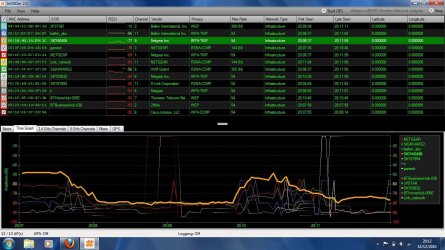
Ive attached a snapshot as requested but with inSIDDer. Im sure it shows the same details but in different places.:huh: The thick yellow time line show my network firstly from the same room as the router (around 50db) them moving to the garage where I get a good 3 bar signel (80db) but my network begins to disconnect itself. I notice lots more neighbours networks are in range when I move to the garage so this can't help. Wish I new how to make my connection stick.
If you can help me better using Xirrus I will download it.

many thanks
phil
 

Attachments

  • Snapshot.jpg
    Snapshot.jpg
    157.9 KB · Views: 174

My Computer My Computer

At a glance

windows 7 ProfessionalIntel® Core™2 Quad Q9550 (2.83GHz)4GB CORSAIR XMS2 DUAL-DDR2 800MHzPNY QUADRO FX580 512MB GDDR3
Computer Manufacturer/Model Number
Pcspecialist
OS
windows 7 Professional
CPU
Intel® Core™2 Quad Q9550 (2.83GHz)
Motherboard
ASUS® P5Q WS
Memory
4GB CORSAIR XMS2 DUAL-DDR2 800MHz
Graphics Card(s)
PNY QUADRO FX580 512MB GDDR3
Sound Card
ONBOARD 8 CHANNEL (7.1) HIGH DEF AUDIO
Monitor(s) Displays
Samsung 23" W P2370
Screen Resolution
1950x1050
Hard Drives
250GB SERIAL ATA 3-Gb/s HARD DRIVE WITH 8MB CACHE (7,200rpm)
PSU
350W Dual Rail PSU + 120mm Case Fan
Case
SILVER/BLACK TRIDENT CASE + 2 FRONT USB
Cooling
SUPER QUIET 22dBA TRIPLE COPPER HEATPIPE CPU COOLER
Keyboard
Logitech LX700
Mouse
Logitech LX700
Internet Speed
8mb
Before buying anything. Try changng your Wireless Channel first, I wish that I can see some snap shots, so that I may be able to see what Channels are your neighbors using. This will require for your to logon to your router's Control Panel Page. also have the UserName and Password ready. Anyway, Channel 1, 6 and 11 have very good signals.

To change your Network Security, it's on the Control Page as well, usually on the Security page or tab. The wireless Channel page is on the Wireless page or tab.

Updating your router's firmware to the latest might also help. You may manually download the firmware from the manufacturer's site then manually install it by using a wired connection.

Please let us know.

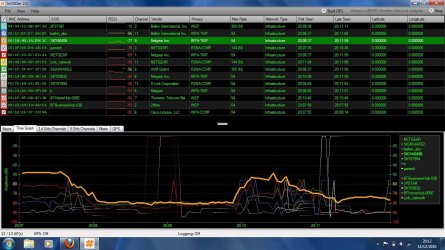
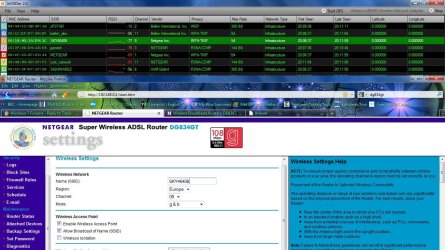
I have changed the channel already to 9 which is different to all the neighbours. Ive attached a snapshot for you. Network security on my router is limited to WPA which is a shame. Ive included a snapshot of my router settings.
 

Attachments

  • Snapshot.jpg
    Snapshot.jpg
    157.9 KB · Views: 45
  • Snapshot2.jpg
    Snapshot2.jpg
    172.8 KB · Views: 67

My Computer My Computer

At a glance

windows 7 ProfessionalIntel® Core™2 Quad Q9550 (2.83GHz)4GB CORSAIR XMS2 DUAL-DDR2 800MHzPNY QUADRO FX580 512MB GDDR3
Computer Manufacturer/Model Number
Pcspecialist
OS
windows 7 Professional
CPU
Intel® Core™2 Quad Q9550 (2.83GHz)
Motherboard
ASUS® P5Q WS
Memory
4GB CORSAIR XMS2 DUAL-DDR2 800MHz
Graphics Card(s)
PNY QUADRO FX580 512MB GDDR3
Sound Card
ONBOARD 8 CHANNEL (7.1) HIGH DEF AUDIO
Monitor(s) Displays
Samsung 23" W P2370
Screen Resolution
1950x1050
Hard Drives
250GB SERIAL ATA 3-Gb/s HARD DRIVE WITH 8MB CACHE (7,200rpm)
PSU
350W Dual Rail PSU + 120mm Case Fan
Case
SILVER/BLACK TRIDENT CASE + 2 FRONT USB
Cooling
SUPER QUIET 22dBA TRIPLE COPPER HEATPIPE CPU COOLER
Keyboard
Logitech LX700
Mouse
Logitech LX700
Internet Speed
8mb
Thanks, very helpful. Is your SSID, the ones highlighted (SKY...)? If that's the one please change the Channel to 6 or 1 and see it it helps. Do you have the UserName and Password for your router.

Also, we have suggested for you that it's extremely impt. to download the latest firmware of your router. chev65 has provided you with the link. Please update your Atheros driver too.

If none of the above works, I hope it does :), then we'll move on.

An fyi...this device works for me with high-gain removable antenna=> http://www.amazon.com/BlueProton-10...GTCO/ref=sr_1_2?ie=UTF8&qid=1292359181&sr=8-2
 

My Computer My Computer

At a glance

Win7 & Win8 64bitIntel i5
Computer Manufacturer/Model Number
Lenovo Desktop/Samsung Laptop
OS
Win7 & Win8 64bit
CPU
Intel i5
Internet Speed
Charter-20 Mbps
Antivirus
Avast
Browser
FF, IE9 and Chrome
If your connection is the one showing as Sky46406? rather than useing WPA TKIP you will definately want to use WPA security and AES encryption, if your router has it. TKIP was never the accepted standard, it can cause connection problems and simply does not work as well as AES. You will want to change the setting on your router to use WPA and AES only, not mixed. and then go through your wireless connection manager in Windows 7 and change it to the same.

I don't think I'd go with channel 6 or 1 as it's already being used in your area, it looks like you have 4 or 5 channel 6's there. It's true that channel 1 ,6 and 11 don't overlap but in general I try to use a channel furthest from the other ones in the area. I'm using channel 9 myself because everyone seems to use 6, 1, or 11.
 

My Computer My Computer

At a glance

Windows 7 Ult, Windows 8.1 Pro,Q9650-4.275GHz, E8600 4.5GHz, E6750-3.8GHzG.Skill PC2 9600 1200Mhz 5 5 5 15 2TGTX480
Computer type
PC/Desktop
Computer Manufacturer/Model Number
Home built
OS
Windows 7 Ult, Windows 8.1 Pro,
CPU
Q9650-4.275GHz, E8600 4.5GHz, E6750-3.8GHz
Motherboard
Evga 780i FTW
Memory
G.Skill PC2 9600 1200Mhz 5 5 5 15 2T
Graphics Card(s)
GTX480
Sound Card
Asus Xonar D2
Monitor(s) Displays
HannsG
Screen Resolution
1680X1050
Hard Drives
GSkill Phoenix Pro 120GB SSD
PSU
ThermalTake Toughpower 1000Watt modular
Case
ThermalTake XaserV
Cooling
Xigmatek S1283
Keyboard
Logitech G15
Mouse
Logitech G9
Internet Speed
T1
Back
Top