
Router won't assign network adapter a valid IP address

foogama

New member
Local time
1:33 PM
Messages
21
Location
Washington, DC
For some reason my Router stopped assigning my LAN Adapter a valid IP address. No windows updates were made, the router did not reset, I didn't change the driver, it was entirely spontaneous.

Things I've tried with no success:
  • Power cycled the PC and the Modem/Router
  • /release & /renew the IP address trough the cmd prompt
  • "netsh winsock reset" from the cmd prompt (and restarted machine)
  • Switched ethernet ports on both the router AND my PC (I have two ethernet network adapters)
  • putting my entire router in the microwave for 15 minutes with a can of gasoline
  • repeated all the above steps per the direction of a "technical expert" at Verizon FiOS who clearly drinks paint for breakfast
  • Replaced the ethernet cable
  • Updated the driver of the network adapter
  • Manually entered a valid IPv4 address through the TCP/IPv4 Properties window
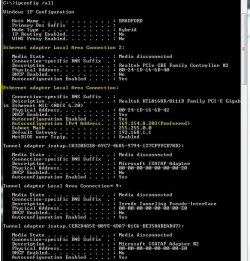
Attached are screen shots of the diagnostic results from Windows 7 that fail, as well as the ipconfig /all results with the invalid IP address the router keeps assigning.

I'm running Windows 7 x64 with a Realtek RTL8168D/8111D Ethernet Adapter. Other devices on the network connect without incident, including the laptop I'm submitting this from and my Xbox 360.
 

Attachments
My Computer My Computer

At a glance

Windows 7 Profesisonal x64Intel i7 920 Nehalem 2.66GHz LGA 1366 130W mo...OCZ Gold 12GB (6 x 2GB) 240-Pin DDR3 SDRAM DD...EVGA 896-P3-1262-AR GeForce GTX 260 896MB 448...
OS
Windows 7 Profesisonal x64
CPU
Intel i7 920 Nehalem 2.66GHz LGA 1366 130W model BX80601920
Motherboard
GIGABYTE GA-EX58-UD5 LGA 1366 Intel X58
Memory
OCZ Gold 12GB (6 x 2GB) 240-Pin DDR3 SDRAM DDR3 1600
Graphics Card(s)
EVGA 896-P3-1262-AR GeForce GTX 260 896MB 448-bit GDDR3
Sound Card
Realtek HD Auido - built in to MoBo
Hard Drives
OCZ Vertex Series OCZSSD2-1VTX120G 2.5" 120GB SATA II MLC Internal SSD
PSU
ZALMAN ZM850-HP 850W Modular
Case
Antec 902
Cooling
Vigor Monsoon III LT Dual 120mm Fan
Internet Speed
25Mbps down 15Mbps up (Verizon FiOS)
Have you checked to make sure DHCP is enabled on the router still?
 

My Computer My Computer

At a glance

Windows 7 x86/x64, Server 2008r2, Web Server ...i7 v2 3930K Steping stone 2G.SKILL Ripjaws Z Series 32GBAMD HD 5770
Computer Manufacturer/Model Number
SMN-Productions
OS
Windows 7 x86/x64, Server 2008r2, Web Server 2008
CPU
i7 v2 3930K Steping stone 2
Motherboard
ASUS Rampage IV Extreme
Memory
G.SKILL Ripjaws Z Series 32GB
Graphics Card(s)
AMD HD 5770
Monitor(s) Displays
Acer 21" and Samsung 20"
Hard Drives
Patriot Pyro 80GB
PSU
1000 Watt
Case
HAF-X
Cooling
4 Fans
Keyboard
Black Widow Ultimate
Have you checked to make sure DHCP is enabled on the router still?

Yes, it is still enabled and other devices are getting assigned valid IP addresses just fine.
 

My Computer My Computer

At a glance

Windows 7 Profesisonal x64Intel i7 920 Nehalem 2.66GHz LGA 1366 130W mo...OCZ Gold 12GB (6 x 2GB) 240-Pin DDR3 SDRAM DD...EVGA 896-P3-1262-AR GeForce GTX 260 896MB 448...
OS
Windows 7 Profesisonal x64
CPU
Intel i7 920 Nehalem 2.66GHz LGA 1366 130W model BX80601920
Motherboard
GIGABYTE GA-EX58-UD5 LGA 1366 Intel X58
Memory
OCZ Gold 12GB (6 x 2GB) 240-Pin DDR3 SDRAM DDR3 1600
Graphics Card(s)
EVGA 896-P3-1262-AR GeForce GTX 260 896MB 448-bit GDDR3
Sound Card
Realtek HD Auido - built in to MoBo
Hard Drives
OCZ Vertex Series OCZSSD2-1VTX120G 2.5" 120GB SATA II MLC Internal SSD
PSU
ZALMAN ZM850-HP 850W Modular
Case
Antec 902
Cooling
Vigor Monsoon III LT Dual 120mm Fan
Internet Speed
25Mbps down 15Mbps up (Verizon FiOS)
Whats the router brand and model?
 

My Computer My Computer

At a glance

Windows 7 7600 1 X64AMD PHENOM II X 550 PROCESSOR 3.1 ghzCorsair 4 gig ddr 3ati radeon 3300
Computer Manufacturer/Model Number
Custom Build
OS
Windows 7 7600 1 X64
CPU
AMD PHENOM II X 550 PROCESSOR 3.1 ghz
Motherboard
ASUS M4A78-TE
Memory
Corsair 4 gig ddr 3
Graphics Card(s)
ati radeon 3300
Sound Card
ati hd
Monitor(s) Displays
syncmaster 2033sw
Screen Resolution
1600X900 60 hz refresh
Hard Drives
twin_seagates SATA's 1 TB & 500 Gig, hitachi_slimline 160 gig
PSU
antec_550 watt
Case
cooler master GLite
Cooling
stock_heat sink
Internet Speed
20mbs up/ 1.5mbs down
Other Info
favorite child "stewie"
favorite dog "brian"
Whats the router brand and model?

It is an Actiontec MI424-WR Rev.E modem router combo supplied by Verizon.

I'm almost convinced it is a network adapter or windows issue though, because other devices (wired and wireless) connect to it just fine.
 

My Computer My Computer

At a glance

Windows 7 Profesisonal x64Intel i7 920 Nehalem 2.66GHz LGA 1366 130W mo...OCZ Gold 12GB (6 x 2GB) 240-Pin DDR3 SDRAM DD...EVGA 896-P3-1262-AR GeForce GTX 260 896MB 448...
OS
Windows 7 Profesisonal x64
CPU
Intel i7 920 Nehalem 2.66GHz LGA 1366 130W model BX80601920
Motherboard
GIGABYTE GA-EX58-UD5 LGA 1366 Intel X58
Memory
OCZ Gold 12GB (6 x 2GB) 240-Pin DDR3 SDRAM DDR3 1600
Graphics Card(s)
EVGA 896-P3-1262-AR GeForce GTX 260 896MB 448-bit GDDR3
Sound Card
Realtek HD Auido - built in to MoBo
Hard Drives
OCZ Vertex Series OCZSSD2-1VTX120G 2.5" 120GB SATA II MLC Internal SSD
PSU
ZALMAN ZM850-HP 850W Modular
Case
Antec 902
Cooling
Vigor Monsoon III LT Dual 120mm Fan
Internet Speed
25Mbps down 15Mbps up (Verizon FiOS)
Delete the driver and use the windows default driver... That works from time to time... I noticed its pulling the default gateway though...
 

My Computer My Computer

At a glance

Windows 7 x86/x64, Server 2008r2, Web Server ...i7 v2 3930K Steping stone 2G.SKILL Ripjaws Z Series 32GBAMD HD 5770
Computer Manufacturer/Model Number
SMN-Productions
OS
Windows 7 x86/x64, Server 2008r2, Web Server 2008
CPU
i7 v2 3930K Steping stone 2
Motherboard
ASUS Rampage IV Extreme
Memory
G.SKILL Ripjaws Z Series 32GB
Graphics Card(s)
AMD HD 5770
Monitor(s) Displays
Acer 21" and Samsung 20"
Hard Drives
Patriot Pyro 80GB
PSU
1000 Watt
Case
HAF-X
Cooling
4 Fans
Keyboard
Black Widow Ultimate
For some reason my Router stopped assigning my LAN Adapter a valid IP address. No windows updates were made, the router did not reset, I didn't change the driver, it was entirely spontaneous.


Things I've tried with no success:
  • Power cycled the PC and the Modem/Router
  • /release & /renew the IP address trough the cmd prompt
  • "netsh winsock reset" from the cmd prompt (and restarted machine)
  • Switched ethernet ports on both the router AND my PC (I have two ethernet network adapters)
  • putting my entire router in the microwave for 15 minutes with a can of gasoline
  • repeated all the above steps per the direction of a "technical expert" at Verizon FiOS who clearly drinks paint for breakfast
  • Replaced the ethernet cable
  • Updated the driver of the network adapter
  • Manually entered a valid IPv4 address through the TCP/IPv4 Properties window
Attached are screen shots of the diagnostic results from Windows 7 that fail, as well as the ipconfig /all results with the invalid IP address the router keeps assigning.

I'm running Windows 7 x64 with a Realtek RTL8168D/8111D Ethernet Adapter. Other devices on the network connect without incident, including the laptop I'm submitting this from and my Xbox 360.

When you scroll down your ipconfig, how many of those tunnel adaptors do you see there?
 

My Computer My Computer

At a glance

Windows 7 Ult, Windows 8.1 Pro,Q9650-4.275GHz, E8600 4.5GHz, E6750-3.8GHzG.Skill PC2 9600 1200Mhz 5 5 5 15 2TGTX480
Computer type
PC/Desktop
Computer Manufacturer/Model Number
Home built
OS
Windows 7 Ult, Windows 8.1 Pro,
CPU
Q9650-4.275GHz, E8600 4.5GHz, E6750-3.8GHz
Motherboard
Evga 780i FTW
Memory
G.Skill PC2 9600 1200Mhz 5 5 5 15 2T
Graphics Card(s)
GTX480
Sound Card
Asus Xonar D2
Monitor(s) Displays
HannsG
Screen Resolution
1680X1050
Hard Drives
GSkill Phoenix Pro 120GB SSD
PSU
ThermalTake Toughpower 1000Watt modular
Case
ThermalTake XaserV
Cooling
Xigmatek S1283
Keyboard
Logitech G15
Mouse
Logitech G9
Internet Speed
T1
Reset

Reset the router to default.
Look on the backside of the router for the red reset button and press it for 2-3 seconds.
 

My Computer My Computer

At a glance

Windows 7 7600 1 X64AMD PHENOM II X 550 PROCESSOR 3.1 ghzCorsair 4 gig ddr 3ati radeon 3300
Computer Manufacturer/Model Number
Custom Build
OS
Windows 7 7600 1 X64
CPU
AMD PHENOM II X 550 PROCESSOR 3.1 ghz
Motherboard
ASUS M4A78-TE
Memory
Corsair 4 gig ddr 3
Graphics Card(s)
ati radeon 3300
Sound Card
ati hd
Monitor(s) Displays
syncmaster 2033sw
Screen Resolution
1600X900 60 hz refresh
Hard Drives
twin_seagates SATA's 1 TB & 500 Gig, hitachi_slimline 160 gig
PSU
antec_550 watt
Case
cooler master GLite
Cooling
stock_heat sink
Internet Speed
20mbs up/ 1.5mbs down
Other Info
favorite child "stewie"
favorite dog "brian"

My Computer My Computer

At a glance

Windows 7 7600 1 X64AMD PHENOM II X 550 PROCESSOR 3.1 ghzCorsair 4 gig ddr 3ati radeon 3300
Computer Manufacturer/Model Number
Custom Build
OS
Windows 7 7600 1 X64
CPU
AMD PHENOM II X 550 PROCESSOR 3.1 ghz
Motherboard
ASUS M4A78-TE
Memory
Corsair 4 gig ddr 3
Graphics Card(s)
ati radeon 3300
Sound Card
ati hd
Monitor(s) Displays
syncmaster 2033sw
Screen Resolution
1600X900 60 hz refresh
Hard Drives
twin_seagates SATA's 1 TB & 500 Gig, hitachi_slimline 160 gig
PSU
antec_550 watt
Case
cooler master GLite
Cooling
stock_heat sink
Internet Speed
20mbs up/ 1.5mbs down
Other Info
favorite child "stewie"
favorite dog "brian"
No exclamations marks or outstanding issues in the device manager.

I have two different LAN ports on my PC to experiment with, so i updated one to the most current driver off the Realtek's website, and the 2nd one I deleted to let windows assign it its own driver. Both still have the same problem.

I gave the router a hard reset as well--no dice.

I see two tunnel adapters: "Tunnel Adapter isatap" and "tunnel adapter Local Area Connection* 9". I have no idea what either of those are or what they do. They are both disconnected though.
 

My Computer My Computer

At a glance

Windows 7 Profesisonal x64Intel i7 920 Nehalem 2.66GHz LGA 1366 130W mo...OCZ Gold 12GB (6 x 2GB) 240-Pin DDR3 SDRAM DD...EVGA 896-P3-1262-AR GeForce GTX 260 896MB 448...
OS
Windows 7 Profesisonal x64
CPU
Intel i7 920 Nehalem 2.66GHz LGA 1366 130W model BX80601920
Motherboard
GIGABYTE GA-EX58-UD5 LGA 1366 Intel X58
Memory
OCZ Gold 12GB (6 x 2GB) 240-Pin DDR3 SDRAM DDR3 1600
Graphics Card(s)
EVGA 896-P3-1262-AR GeForce GTX 260 896MB 448-bit GDDR3
Sound Card
Realtek HD Auido - built in to MoBo
Hard Drives
OCZ Vertex Series OCZSSD2-1VTX120G 2.5" 120GB SATA II MLC Internal SSD
PSU
ZALMAN ZM850-HP 850W Modular
Case
Antec 902
Cooling
Vigor Monsoon III LT Dual 120mm Fan
Internet Speed
25Mbps down 15Mbps up (Verizon FiOS)
No exclamations marks or outstanding issues in the device manager.

I have two different LAN ports on my PC to experiment with, so i updated one to the most current driver off the Realtek's website, and the 2nd one I deleted to let windows assign it its own driver. Both still have the same problem.

I gave the router a hard reset as well--no dice.

I see two tunnel adapters: "Tunnel Adapter isatap" and "tunnel adapter Local Area Connection* 9". I have no idea what either of those are or what they do. They are both disconnected though.
Are you able to access the router via your web browser?
 

My Computer My Computer

At a glance

Windows 7 7600 1 X64AMD PHENOM II X 550 PROCESSOR 3.1 ghzCorsair 4 gig ddr 3ati radeon 3300
Computer Manufacturer/Model Number
Custom Build
OS
Windows 7 7600 1 X64
CPU
AMD PHENOM II X 550 PROCESSOR 3.1 ghz
Motherboard
ASUS M4A78-TE
Memory
Corsair 4 gig ddr 3
Graphics Card(s)
ati radeon 3300
Sound Card
ati hd
Monitor(s) Displays
syncmaster 2033sw
Screen Resolution
1600X900 60 hz refresh
Hard Drives
twin_seagates SATA's 1 TB & 500 Gig, hitachi_slimline 160 gig
PSU
antec_550 watt
Case
cooler master GLite
Cooling
stock_heat sink
Internet Speed
20mbs up/ 1.5mbs down
Other Info
favorite child "stewie"
favorite dog "brian"
No exclamations marks or outstanding issues in the device manager.

I have two different LAN ports on my PC to experiment with, so i updated one to the most current driver off the Realtek's website, and the 2nd one I deleted to let windows assign it its own driver. Both still have the same problem.

I gave the router a hard reset as well--no dice.

I see two tunnel adapters: "Tunnel Adapter isatap" and "tunnel adapter Local Area Connection* 9". I have no idea what either of those are or what they do. They are both disconnected though.


Whats interesting is that it shows the default gateway like it see's the router but it's not getting anything else from the router.
 

My Computer My Computer

At a glance

Windows 7 Ult, Windows 8.1 Pro,Q9650-4.275GHz, E8600 4.5GHz, E6750-3.8GHzG.Skill PC2 9600 1200Mhz 5 5 5 15 2TGTX480
Computer type
PC/Desktop
Computer Manufacturer/Model Number
Home built
OS
Windows 7 Ult, Windows 8.1 Pro,
CPU
Q9650-4.275GHz, E8600 4.5GHz, E6750-3.8GHz
Motherboard
Evga 780i FTW
Memory
G.Skill PC2 9600 1200Mhz 5 5 5 15 2T
Graphics Card(s)
GTX480
Sound Card
Asus Xonar D2
Monitor(s) Displays
HannsG
Screen Resolution
1680X1050
Hard Drives
GSkill Phoenix Pro 120GB SSD
PSU
ThermalTake Toughpower 1000Watt modular
Case
ThermalTake XaserV
Cooling
Xigmatek S1283
Keyboard
Logitech G15
Mouse
Logitech G9
Internet Speed
T1
Whats interesting is that it shows the default gateway like it see's the router but it's not getting anything else from the router.

I know, right!!? That's what's blowing my mind too!!

And no, I CANNOT access the router utility (192.168.1.1) from the web browser.
 

My Computer My Computer

At a glance

Windows 7 Profesisonal x64Intel i7 920 Nehalem 2.66GHz LGA 1366 130W mo...OCZ Gold 12GB (6 x 2GB) 240-Pin DDR3 SDRAM DD...EVGA 896-P3-1262-AR GeForce GTX 260 896MB 448...
OS
Windows 7 Profesisonal x64
CPU
Intel i7 920 Nehalem 2.66GHz LGA 1366 130W model BX80601920
Motherboard
GIGABYTE GA-EX58-UD5 LGA 1366 Intel X58
Memory
OCZ Gold 12GB (6 x 2GB) 240-Pin DDR3 SDRAM DDR3 1600
Graphics Card(s)
EVGA 896-P3-1262-AR GeForce GTX 260 896MB 448-bit GDDR3
Sound Card
Realtek HD Auido - built in to MoBo
Hard Drives
OCZ Vertex Series OCZSSD2-1VTX120G 2.5" 120GB SATA II MLC Internal SSD
PSU
ZALMAN ZM850-HP 850W Modular
Case
Antec 902
Cooling
Vigor Monsoon III LT Dual 120mm Fan
Internet Speed
25Mbps down 15Mbps up (Verizon FiOS)
If you can't even access the router then something is blocking it or the machine is having a problem.

I know you tried resetting winsock but maybe a complete reset of the TCP/ip stack would help.

Try running this batch file which will reset winsock, reset the TCP/IP stack and release renew your IP.


My Computer My Computer

At a glance

Windows 7 Ult, Windows 8.1 Pro,Q9650-4.275GHz, E8600 4.5GHz, E6750-3.8GHzG.Skill PC2 9600 1200Mhz 5 5 5 15 2TGTX480
Computer type
PC/Desktop
Computer Manufacturer/Model Number
Home built
OS
Windows 7 Ult, Windows 8.1 Pro,
CPU
Q9650-4.275GHz, E8600 4.5GHz, E6750-3.8GHz
Motherboard
Evga 780i FTW
Memory
G.Skill PC2 9600 1200Mhz 5 5 5 15 2T
Graphics Card(s)
GTX480
Sound Card
Asus Xonar D2
Monitor(s) Displays
HannsG
Screen Resolution
1680X1050
Hard Drives
GSkill Phoenix Pro 120GB SSD
PSU
ThermalTake Toughpower 1000Watt modular
Case
ThermalTake XaserV
Cooling
Xigmatek S1283
Keyboard
Logitech G15
Mouse
Logitech G9
Internet Speed
T1
If you can't even access the router then something is blocking it or the machine is having a problem.

I know you tried resetting winsock but maybe a complete reset of the TCP/ip stack would help.

Try running this batch file which will reset winsock, reset the TCP/IP stack and release renew your IP.


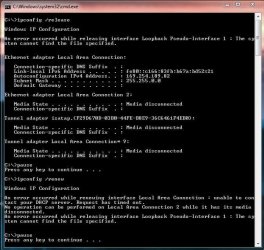
I ran the batch file, but it hangs on the /renew command and the returns the attached error message. The computer was connected to the modem/router via "Local Area Connection" during this, (not Local Area Connection 2).
 

Attachments

  • batch error.JPG
    batch error.JPG
    72.2 KB · Views: 57

My Computer My Computer

At a glance

Windows 7 Profesisonal x64Intel i7 920 Nehalem 2.66GHz LGA 1366 130W mo...OCZ Gold 12GB (6 x 2GB) 240-Pin DDR3 SDRAM DD...EVGA 896-P3-1262-AR GeForce GTX 260 896MB 448...
OS
Windows 7 Profesisonal x64
CPU
Intel i7 920 Nehalem 2.66GHz LGA 1366 130W model BX80601920
Motherboard
GIGABYTE GA-EX58-UD5 LGA 1366 Intel X58
Memory
OCZ Gold 12GB (6 x 2GB) 240-Pin DDR3 SDRAM DDR3 1600
Graphics Card(s)
EVGA 896-P3-1262-AR GeForce GTX 260 896MB 448-bit GDDR3
Sound Card
Realtek HD Auido - built in to MoBo
Hard Drives
OCZ Vertex Series OCZSSD2-1VTX120G 2.5" 120GB SATA II MLC Internal SSD
PSU
ZALMAN ZM850-HP 850W Modular
Case
Antec 902
Cooling
Vigor Monsoon III LT Dual 120mm Fan
Internet Speed
25Mbps down 15Mbps up (Verizon FiOS)
If you can't even access the router then something is blocking it or the machine is having a problem.

I know you tried resetting winsock but maybe a complete reset of the TCP/ip stack would help.

Try running this batch file which will reset winsock, reset the TCP/IP stack and release renew your IP.


I ran the batch file, but it hangs on the /renew command and the returns the attached error message. The computer was connected to the modem/router via "Local Area Connection" during this, (not Local Area Connection 2).

It looks like something is blocking the connection or some system files are missing. Have you tried running the sfc /scannow command? Be sure and set your Ipv4 properties back to using DHCP.

Have you tried uninstalling your A/V software?
 

My Computer My Computer

At a glance

Windows 7 Ult, Windows 8.1 Pro,Q9650-4.275GHz, E8600 4.5GHz, E6750-3.8GHzG.Skill PC2 9600 1200Mhz 5 5 5 15 2TGTX480
Computer type
PC/Desktop
Computer Manufacturer/Model Number
Home built
OS
Windows 7 Ult, Windows 8.1 Pro,
CPU
Q9650-4.275GHz, E8600 4.5GHz, E6750-3.8GHz
Motherboard
Evga 780i FTW
Memory
G.Skill PC2 9600 1200Mhz 5 5 5 15 2T
Graphics Card(s)
GTX480
Sound Card
Asus Xonar D2
Monitor(s) Displays
HannsG
Screen Resolution
1680X1050
Hard Drives
GSkill Phoenix Pro 120GB SSD
PSU
ThermalTake Toughpower 1000Watt modular
Case
ThermalTake XaserV
Cooling
Xigmatek S1283
Keyboard
Logitech G15
Mouse
Logitech G9
Internet Speed
T1
Tried disabling my AV software (Microsoft Security Essentials), no dice.

Ran sfc /scannow, nothing abnormal detected.

All IPv4 settings are set to auto and default.

Thanks very much for the help so far--it's already accomplished 5x more steps than FiOS could ever drum up.
 

My Computer My Computer

At a glance

Windows 7 Profesisonal x64Intel i7 920 Nehalem 2.66GHz LGA 1366 130W mo...OCZ Gold 12GB (6 x 2GB) 240-Pin DDR3 SDRAM DD...EVGA 896-P3-1262-AR GeForce GTX 260 896MB 448...
OS
Windows 7 Profesisonal x64
CPU
Intel i7 920 Nehalem 2.66GHz LGA 1366 130W model BX80601920
Motherboard
GIGABYTE GA-EX58-UD5 LGA 1366 Intel X58
Memory
OCZ Gold 12GB (6 x 2GB) 240-Pin DDR3 SDRAM DDR3 1600
Graphics Card(s)
EVGA 896-P3-1262-AR GeForce GTX 260 896MB 448-bit GDDR3
Sound Card
Realtek HD Auido - built in to MoBo
Hard Drives
OCZ Vertex Series OCZSSD2-1VTX120G 2.5" 120GB SATA II MLC Internal SSD
PSU
ZALMAN ZM850-HP 850W Modular
Case
Antec 902
Cooling
Vigor Monsoon III LT Dual 120mm Fan
Internet Speed
25Mbps down 15Mbps up (Verizon FiOS)
You might want to check in services.msc to make sure all the networking services are running.

Also check the Advanced sharing settings because they have been known to change for no reason.

I havn't seen a problem quite like this one, normally when this happens the default gateway IP isn't showing up.

Have you tried typing in the routers default gateway into your IPv4 properties? That will sometimes get you around a router problem. It's acting like the cable is bad or something but you said you tried using another cable....
 

My Computer My Computer

At a glance

Windows 7 Ult, Windows 8.1 Pro,Q9650-4.275GHz, E8600 4.5GHz, E6750-3.8GHzG.Skill PC2 9600 1200Mhz 5 5 5 15 2TGTX480
Computer type
PC/Desktop
Computer Manufacturer/Model Number
Home built
OS
Windows 7 Ult, Windows 8.1 Pro,
CPU
Q9650-4.275GHz, E8600 4.5GHz, E6750-3.8GHz
Motherboard
Evga 780i FTW
Memory
G.Skill PC2 9600 1200Mhz 5 5 5 15 2T
Graphics Card(s)
GTX480
Sound Card
Asus Xonar D2
Monitor(s) Displays
HannsG
Screen Resolution
1680X1050
Hard Drives
GSkill Phoenix Pro 120GB SSD
PSU
ThermalTake Toughpower 1000Watt modular
Case
ThermalTake XaserV
Cooling
Xigmatek S1283
Keyboard
Logitech G15
Mouse
Logitech G9
Internet Speed
T1
Now the Connection status keeps wavering between no network access to no internet access. Like every 3 seconds it will switch. 286k bytes received and 0 sent. hmmm...
 

My Computer My Computer

At a glance

Windows 7 Profesisonal x64Intel i7 920 Nehalem 2.66GHz LGA 1366 130W mo...OCZ Gold 12GB (6 x 2GB) 240-Pin DDR3 SDRAM DD...EVGA 896-P3-1262-AR GeForce GTX 260 896MB 448...
OS
Windows 7 Profesisonal x64
CPU
Intel i7 920 Nehalem 2.66GHz LGA 1366 130W model BX80601920
Motherboard
GIGABYTE GA-EX58-UD5 LGA 1366 Intel X58
Memory
OCZ Gold 12GB (6 x 2GB) 240-Pin DDR3 SDRAM DDR3 1600
Graphics Card(s)
EVGA 896-P3-1262-AR GeForce GTX 260 896MB 448-bit GDDR3
Sound Card
Realtek HD Auido - built in to MoBo
Hard Drives
OCZ Vertex Series OCZSSD2-1VTX120G 2.5" 120GB SATA II MLC Internal SSD
PSU
ZALMAN ZM850-HP 850W Modular
Case
Antec 902
Cooling
Vigor Monsoon III LT Dual 120mm Fan
Internet Speed
25Mbps down 15Mbps up (Verizon FiOS)
Now it works. I insulted it enough times I guess that it caved.

Unbelievable.

Thanks for all the help everyone, I don't think anything actually did anything, it just had a will of its own, but now i know what to try next time.
 

My Computer My Computer

At a glance

Windows 7 Profesisonal x64Intel i7 920 Nehalem 2.66GHz LGA 1366 130W mo...OCZ Gold 12GB (6 x 2GB) 240-Pin DDR3 SDRAM DD...EVGA 896-P3-1262-AR GeForce GTX 260 896MB 448...
OS
Windows 7 Profesisonal x64
CPU
Intel i7 920 Nehalem 2.66GHz LGA 1366 130W model BX80601920
Motherboard
GIGABYTE GA-EX58-UD5 LGA 1366 Intel X58
Memory
OCZ Gold 12GB (6 x 2GB) 240-Pin DDR3 SDRAM DDR3 1600
Graphics Card(s)
EVGA 896-P3-1262-AR GeForce GTX 260 896MB 448-bit GDDR3
Sound Card
Realtek HD Auido - built in to MoBo
Hard Drives
OCZ Vertex Series OCZSSD2-1VTX120G 2.5" 120GB SATA II MLC Internal SSD
PSU
ZALMAN ZM850-HP 850W Modular
Case
Antec 902
Cooling
Vigor Monsoon III LT Dual 120mm Fan
Internet Speed
25Mbps down 15Mbps up (Verizon FiOS)
Back
Top