Solved Computer doesn't have a valid IP address

Nightscape

New member
Local time
12:22 PM
Messages
9
Hey all

So here is my issue, I have a laptop that I have recently bought. I can connect to my works wifi without any issues but as soon as I get home the freaking pc cannot identify the wifi network. I know it is not the router as I have desktop,a tablet and 2 other laptops at home that connects easily.

its only my latest lg laptop that is doing this.

I am running windows 7 ultimate 32 bit.
Thanx in advance
 

My Computer

Computer type
PC/Desktop
Computer Manufacturer/Model Number
Custom
OS
Windows 7 ultimate 32 bit
CPU
intel i3
Memory
4 gb ddr3
Graphics Card(s)
ATI 7770 Msi
Hard Drives
1 tb Seagate
Antivirus
none
Browser
chrome
Does it see your wireless router and neighbour's wireless router?
What error message when connecting?
 

My Computer

Computer type
Laptop
Computer Manufacturer/Model Number
ACER ASPIRE 5742G
OS
Microsoft Windows 7 Home Premium 64-bits 7601 Multiprocessor Free Service Pack 1
CPU
Intel(R) Core(TM) i3 CPU M 370 @ 2.40GHz
Motherboard
Acer Aspire 5742G
Memory
4,00 GB
Graphics Card(s)
ATI Mobility Radeon HD 5400 Series
Sound Card
(1) AMD High Definition Audio Device (2) Realtek High Defi
Screen Resolution
1366 x 768 x 32 bits (4294967296 colors) @ 60 Hz
Hard Drives
WDC WD5000BEVT-22ZAT0
Hey .

Yeah it does see all the wireless net works and it does connect . But then i have no internet access. It can't id the network . And when I try to auto resolve the issue it says the pc doesn't have a valid ip adress...
 

My Computer

Computer type
PC/Desktop
Computer Manufacturer/Model Number
Custom
OS
Windows 7 ultimate 32 bit
CPU
intel i3
Memory
4 gb ddr3
Graphics Card(s)
ATI 7770 Msi
Hard Drives
1 tb Seagate
Antivirus
none
Browser
chrome
Hey .

Yeah it does see all the wireless net works and it does connect . But then i have no internet access. It can't id the network . And when I try to auto resolve the issue it says the pc doesn't have a valid ip adress...
In command prompt:
Code:
ipconfig/all >ipconf.txt

Post file ipconf.txt located in folder %userprofile%
You may delete the file afterwards
 

My Computer

Computer type
Laptop
Computer Manufacturer/Model Number
ACER ASPIRE 5742G
OS
Microsoft Windows 7 Home Premium 64-bits 7601 Multiprocessor Free Service Pack 1
CPU
Intel(R) Core(TM) i3 CPU M 370 @ 2.40GHz
Motherboard
Acer Aspire 5742G
Memory
4,00 GB
Graphics Card(s)
ATI Mobility Radeon HD 5400 Series
Sound Card
(1) AMD High Definition Audio Device (2) Realtek High Defi
Screen Resolution
1366 x 768 x 32 bits (4294967296 colors) @ 60 Hz
Hard Drives
WDC WD5000BEVT-22ZAT0
I am not at my pc right now ... Replying from my phone .... I will post it as soon as i can
 

My Computer

Computer type
PC/Desktop
Computer Manufacturer/Model Number
Custom
OS
Windows 7 ultimate 32 bit
CPU
intel i3
Memory
4 gb ddr3
Graphics Card(s)
ATI 7770 Msi
Hard Drives
1 tb Seagate
Antivirus
none
Browser
chrome
Hi there
might be trying to get an IP address that already exists or isn't available.

Unplug ALL your other devices, reset the router and then try and connect this ONE device ONLY to the internet.

Report back on what happens.

Cheers
jimbo
 

My Computer

Computer type
PC/Desktop
Computer Manufacturer/Model Number
Custom built, several laptops HP/ASUS
OS
Linux CENTOS 7 / various Windows OS'es and servers
CPU
Intel i7 Intel i5
Memory
8GB, 16GB
Graphics Card(s)
On Motherboard
Sound Card
Realtek HD audio
Monitor(s) Displays
Apple Cinema display, Samsung LCD
Screen Resolution
1920 X 1080
Hard Drives
4 X 1TB SATA
Mouse
Toshiba wireless laser
Internet Speed
> 20MB up
Hey jimbo ....

I have done that and it works ... But i have to do this everynight i get home .... And that anoys the crap out of me ...
 

My Computer

Computer type
PC/Desktop
Computer Manufacturer/Model Number
Custom
OS
Windows 7 ultimate 32 bit
CPU
intel i3
Memory
4 gb ddr3
Graphics Card(s)
ATI 7770 Msi
Hard Drives
1 tb Seagate
Antivirus
none
Browser
chrome
Hey jimbo ....

I have done that and it works ... But i have to do this everynight i get home .... And that anoys the crap out of me ...
What solves it... resetting router, or only one connected to router?

Or does "unplugging ALL your other devices" solve it?
 

My Computer

Computer type
Laptop
Computer Manufacturer/Model Number
ACER ASPIRE 5742G
OS
Microsoft Windows 7 Home Premium 64-bits 7601 Multiprocessor Free Service Pack 1
CPU
Intel(R) Core(TM) i3 CPU M 370 @ 2.40GHz
Motherboard
Acer Aspire 5742G
Memory
4,00 GB
Graphics Card(s)
ATI Mobility Radeon HD 5400 Series
Sound Card
(1) AMD High Definition Audio Device (2) Realtek High Defi
Screen Resolution
1366 x 768 x 32 bits (4294967296 colors) @ 60 Hz
Hard Drives
WDC WD5000BEVT-22ZAT0
Resetting the router....
 

My Computer

Computer type
PC/Desktop
Computer Manufacturer/Model Number
Custom
OS
Windows 7 ultimate 32 bit
CPU
intel i3
Memory
4 gb ddr3
Graphics Card(s)
ATI 7770 Msi
Hard Drives
1 tb Seagate
Antivirus
none
Browser
chrome
Do #4 so I can investigate
 

My Computer

Computer type
Laptop
Computer Manufacturer/Model Number
ACER ASPIRE 5742G
OS
Microsoft Windows 7 Home Premium 64-bits 7601 Multiprocessor Free Service Pack 1
CPU
Intel(R) Core(TM) i3 CPU M 370 @ 2.40GHz
Motherboard
Acer Aspire 5742G
Memory
4,00 GB
Graphics Card(s)
ATI Mobility Radeon HD 5400 Series
Sound Card
(1) AMD High Definition Audio Device (2) Realtek High Defi
Screen Resolution
1366 x 768 x 32 bits (4294967296 colors) @ 60 Hz
Hard Drives
WDC WD5000BEVT-22ZAT0
Windows IP Configuration

Host Name . . . . . . . . . . . . : Jaco-PC
Primary Dns Suffix . . . . . . . :
Node Type . . . . . . . . . . . . : Hybrid
IP Routing Enabled. . . . . . . . : No
WINS Proxy Enabled. . . . . . . . : No

Wireless LAN adapter Wireless Network Connection:

Connection-specific DNS Suffix . :
Description . . . . . . . . . . . : 802.11g Mini Card Wireless Adapter
Physical Address. . . . . . . . . : 00-19-DB-98-8F-B4
DHCP Enabled. . . . . . . . . . . : Yes
Autoconfiguration Enabled . . . . : Yes
Link-local IPv6 Address . . . . . : fe80::8a7:680c:6098:23ff%13(Preferred)
IPv4 Address. . . . . . . . . . . : 10.0.0.11(Preferred)
Subnet Mask . . . . . . . . . . . : 255.255.255.0
Lease Obtained. . . . . . . . . . : Monday, June 17, 2013 1:30:06 PM
Lease Expires . . . . . . . . . . : Tuesday, June 18, 2013 1:30:06 PM
Default Gateway . . . . . . . . . : 10.0.0.2
DHCP Server . . . . . . . . . . . : 10.0.0.2
DHCPv6 IAID . . . . . . . . . . . : 234887643
DHCPv6 Client DUID. . . . . . . . : 00-01-00-01-12-B0-F9-61-00-0C-29-D7-A8-0D
DNS Servers . . . . . . . . . . . : 10.0.0.2
NetBIOS over Tcpip. . . . . . . . : Enabled

Ethernet adapter Local Area Connection:

Connection-specific DNS Suffix . :
Description . . . . . . . . . . . : Realtek RTL8168B/8111B Family PCI-E Gigabit Ethernet NIC (NDIS 6.20)
Physical Address. . . . . . . . . : 00-19-DB-3D-60-D5
DHCP Enabled. . . . . . . . . . . : Yes
Autoconfiguration Enabled . . . . : Yes
Link-local IPv6 Address . . . . . : fe80::10e0:46f8:5cd5:64fa%12(Preferred)
Autoconfiguration IPv4 Address. . : 169.254.100.250(Preferred)
Subnet Mask . . . . . . . . . . . : 255.255.0.0
Default Gateway . . . . . . . . . :
DHCPv6 IAID . . . . . . . . . . . : 251664859
DHCPv6 Client DUID. . . . . . . . : 00-01-00-01-12-B0-F9-61-00-0C-29-D7-A8-0D
DNS Servers . . . . . . . . . . . : fec0:0:0:ffff::1%1
fec0:0:0:ffff::2%1
fec0:0:0:ffff::3%1
NetBIOS over Tcpip. . . . . . . . : Enabled

Tunnel adapter isatap.{8B487BDD-B740-4150-B088-093A5FF9CE75}:

Media State . . . . . . . . . . . : Media disconnected
Connection-specific DNS Suffix . :
Description . . . . . . . . . . . : Microsoft ISATAP Adapter
Physical Address. . . . . . . . . : 00-00-00-00-00-00-00-E0
DHCP Enabled. . . . . . . . . . . : No
Autoconfiguration Enabled . . . . : Yes

Tunnel adapter Local Area Connection* 11:

Media State . . . . . . . . . . . : Media disconnected
Connection-specific DNS Suffix . :
Description . . . . . . . . . . . : Microsoft Teredo Tunneling Adapter
Physical Address. . . . . . . . . : 00-00-00-00-00-00-00-E0
DHCP Enabled. . . . . . . . . . . : No
Autoconfiguration Enabled . . . . : Yes

Tunnel adapter isatap.{6497058C-25C5-4CE2-8F43-DFAA3EEC4BCC}:

Media State . . . . . . . . . . . : Media disconnected
Connection-specific DNS Suffix . :
Description . . . . . . . . . . . : Microsoft ISATAP Adapter #2
Physical Address. . . . . . . . . : 00-00-00-00-00-00-00-E0
DHCP Enabled. . . . . . . . . . . : No
Autoconfiguration Enabled . . . . : Yes

There is all as you requested

 

My Computer

Computer type
PC/Desktop
Computer Manufacturer/Model Number
Custom
OS
Windows 7 ultimate 32 bit
CPU
intel i3
Memory
4 gb ddr3
Graphics Card(s)
ATI 7770 Msi
Hard Drives
1 tb Seagate
Antivirus
none
Browser
chrome
   Note
I am currently using Windows Server 2012 however please be assured that the steps are the same.


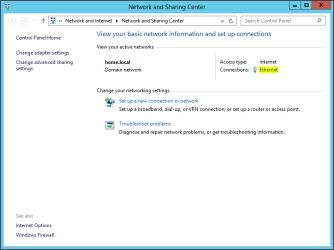
Can you click start and search for 'Network and Sharing Center' then press enter

Open up the control panel console and you should see the something similar to the following:

networkandsharing.PNG

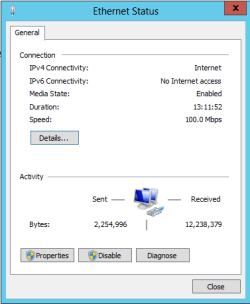
Please then click on the connections hyperlink whether it be wireless or wired and you should then be presented with the following:

status.PNG

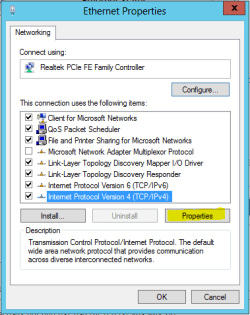
From here click on properties to then be shown the following screen:

Ethernet Properties.PNG

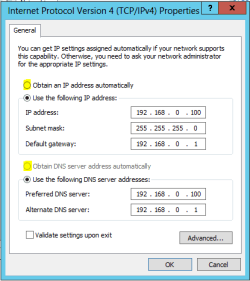
From here can you please highlight the 'Internet Protocol Version 4 (TCP/IPv4)' item and then click on properties:

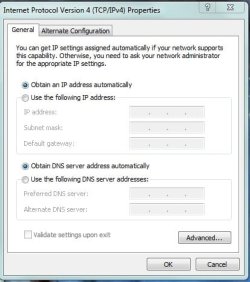
Obtain IP address auto.PNG

From here can you click on 'Obtain an IP address automatically' and 'Obtain DNS server address automatically

After that click OK and then close all prompts and windows and then verify if your issue is solved or not?

Hope This Helps,
Josh! :)
 

My Computer

Computer type
PC/Desktop
Computer Manufacturer/Model Number
Custom Built
OS
Windows 7 Professional x64 SP1 ; Windows Server 2012 R2 Standard
CPU
Intel Core i5 2400 @ 3.10GHz
Motherboard
Foxconn H67MP-S/-V/H67MP
Memory
8.0GB DDR3 @ 665MHz (2GBx4)
Graphics Card(s)
AMD Radeon HD 6870
Sound Card
Realtek High Definition Audio
Monitor(s) Displays
AOC 2243W & SMB1930NW
Screen Resolution
1440x900 & 1920x1080
Hard Drives
977GB Seagate ST31000524AS ATA Drive (SATA)
250GB WD iSCSI attached Drive
PSU
750W Gaming PSU
Case
Novatech Night
Cooling
Fan
Keyboard
Dell Standard PS/2 Keyboard
Mouse
R.A.T 07 Gaming Mouse
Internet Speed
Download: 10 Mbps Ping: 30ms Upload: 0.81 Mbps
Browser
Google Chrome
Other Info
Optiarc DVD RW AD-5260S ATA Device
Windows IP Configuration

Host Name . . . . . . . . . . . . : Jaco-PC
Primary Dns Suffix . . . . . . . :
Node Type . . . . . . . . . . . . : Hybrid
IP Routing Enabled. . . . . . . . : No
WINS Proxy Enabled. . . . . . . . : No

Wireless LAN adapter Wireless Network Connection:

Connection-specific DNS Suffix . :
Description . . . . . . . . . . . : 802.11g Mini Card Wireless Adapter
Physical Address. . . . . . . . . : 00-19-DB-98-8F-B4
DHCP Enabled. . . . . . . . . . . : Yes
Autoconfiguration Enabled . . . . : Yes
Link-local IPv6 Address . . . . . : fe80::8a7:680c:6098:23ff%13(Preferred)
IPv4 Address. . . . . . . . . . . : 10.0.0.11(Preferred)
Subnet Mask . . . . . . . . . . . : 255.255.255.0
Lease Obtained. . . . . . . . . . : Monday, June 17, 2013 1:30:06 PM
Lease Expires . . . . . . . . . . : Tuesday, June 18, 2013 1:30:06 PM
Default Gateway . . . . . . . . . : 10.0.0.2
DHCP Server . . . . . . . . . . . : 10.0.0.2
DHCPv6 IAID . . . . . . . . . . . : 234887643
DHCPv6 Client DUID. . . . . . . . : 00-01-00-01-12-B0-F9-61-00-0C-29-D7-A8-0D
DNS Servers . . . . . . . . . . . : 10.0.0.2
NetBIOS over Tcpip. . . . . . . . : Enabled

Ethernet adapter Local Area Connection:

Connection-specific DNS Suffix . :
Description . . . . . . . . . . . : Realtek RTL8168B/8111B Family PCI-E Gigabit Ethernet NIC (NDIS 6.20)
Physical Address. . . . . . . . . : 00-19-DB-3D-60-D5
DHCP Enabled. . . . . . . . . . . : Yes
Autoconfiguration Enabled . . . . : Yes
Link-local IPv6 Address . . . . . : fe80::10e0:46f8:5cd5:64fa%12(Preferred)
Autoconfiguration IPv4 Address. . : 169.254.100.250(Preferred)
Subnet Mask . . . . . . . . . . . : 255.255.0.0
Default Gateway . . . . . . . . . :
DHCPv6 IAID . . . . . . . . . . . : 251664859
DHCPv6 Client DUID. . . . . . . . : 00-01-00-01-12-B0-F9-61-00-0C-29-D7-A8-0D
DNS Servers . . . . . . . . . . . : fec0:0:0:ffff::1%1
fec0:0:0:ffff::2%1
fec0:0:0:ffff::3%1
NetBIOS over Tcpip. . . . . . . . : Enabled

Tunnel adapter isatap.{8B487BDD-B740-4150-B088-093A5FF9CE75}:

Media State . . . . . . . . . . . : Media disconnected
Connection-specific DNS Suffix . :
Description . . . . . . . . . . . : Microsoft ISATAP Adapter
Physical Address. . . . . . . . . : 00-00-00-00-00-00-00-E0
DHCP Enabled. . . . . . . . . . . : No
Autoconfiguration Enabled . . . . : Yes

Tunnel adapter Local Area Connection* 11:

Media State . . . . . . . . . . . : Media disconnected
Connection-specific DNS Suffix . :
Description . . . . . . . . . . . : Microsoft Teredo Tunneling Adapter
Physical Address. . . . . . . . . : 00-00-00-00-00-00-00-E0
DHCP Enabled. . . . . . . . . . . : No
Autoconfiguration Enabled . . . . : Yes

Tunnel adapter isatap.{6497058C-25C5-4CE2-8F43-DFAA3EEC4BCC}:

Media State . . . . . . . . . . . : Media disconnected
Connection-specific DNS Suffix . :
Description . . . . . . . . . . . : Microsoft ISATAP Adapter #2
Physical Address. . . . . . . . . : 00-00-00-00-00-00-00-E0
DHCP Enabled. . . . . . . . . . . : No
Autoconfiguration Enabled . . . . : Yes

There is all as you requested
http://10.0.0.2 works?
ping 10.0.0.2 works?
 

My Computer

Computer type
Laptop
Computer Manufacturer/Model Number
ACER ASPIRE 5742G
OS
Microsoft Windows 7 Home Premium 64-bits 7601 Multiprocessor Free Service Pack 1
CPU
Intel(R) Core(TM) i3 CPU M 370 @ 2.40GHz
Motherboard
Acer Aspire 5742G
Memory
4,00 GB
Graphics Card(s)
ATI Mobility Radeon HD 5400 Series
Sound Card
(1) AMD High Definition Audio Device (2) Realtek High Defi
Screen Resolution
1366 x 768 x 32 bits (4294967296 colors) @ 60 Hz
Hard Drives
WDC WD5000BEVT-22ZAT0
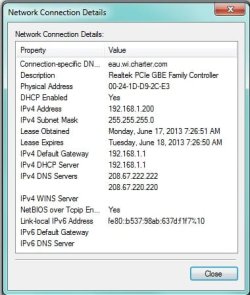
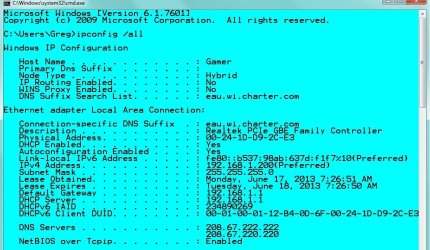
See, I'm okay with 10.0.0.2 being your default gateway, but I don't see it working as your default DNS server. I use the servers at OpenDNS, namely 208.67.222.222 and 208.67.220.220. Your system is trying to use your router for DNS. That shouldn't be happening in a home setting. That's the reason that the DNS settings should be set to Auto, as shown back in post number 12.
 

My Computer

Computer type
PC/Desktop
Computer Manufacturer/Model Number
iBuyPower NZXT
OS
Microsoft Windows 10 Home Build 15036
CPU
Intel(R) Core(TM) i7-860 @ 2.80GHz
Motherboard
Gigabyte Technology Co., Ltd. P55-UD3L
Memory
4.00 GB
Graphics Card(s)
NVIDIA GeForce GTX 750
Sound Card
(1) Line 6 UX2 (2) Realtek High Definition Audio
Monitor(s) Displays
23" acer
Screen Resolution
1920 x 1080 x 32 bits (4294967296 colors) @ 60 Hz
Hard Drives
(1) WDC WD5000AAKS-00D2B0 ATA Device (2) Seagate FreeAgent Go 250G USB Device
Cooling
Corsair H75 liquid cooler (Very easy to install, actually)
Internet Speed
60M cable modem-->Linksys E1200-->1Gbps net card
Browser
Chrome
Other Info
This is probably the longest I've ever had a Windows machine run without having to restore it to scratch. I'm used to restoring to "factory" about every 2 yrs. I've run with Win7 since new in 2009 and only recently (Nov, '14) restored to clean up the machine from all my 'xperimenting. LOL!! I may never need another machine.

Upgraded to 10 when it was still free, then installed 2017 update.
See, I'm okay with 10.0.0.2 being your default gateway, but I don't see it working as your default DNS server. I use the servers at OpenDNS, namely 208.67.222.222 and 208.67.220.220. Your system is trying to use your router for DNS. That shouldn't be happening in a home setting. That's the reason that the DNS settings should be set to Auto, as shown back in post number 12.

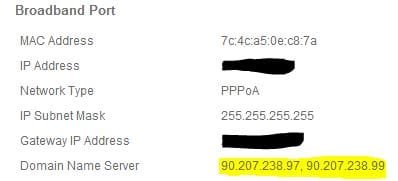
Home routers will have a set of public DNS servers themselves. You would apply the DNS server the same as the default gateway since the routers DNS records will include the IP addresses of other devices within the LAN.

For example if I wanted to ping \\Josh-PC then the computer will find the IP address on the routers DNS records rather than the public set ones. That being said to find websites such as Google then the router will try and search for it with its own public DNS settings

broadband port.JPG

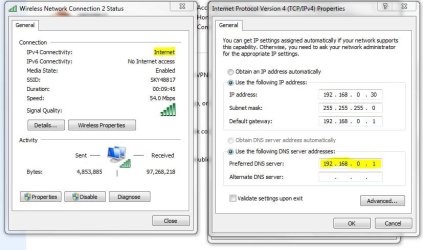
DNS setting.JPG

DHCP should automatically correct any DNS or IP conflict therefore setting to obtain automatically should resolve any IP address conflict or DNS not responding (Subject to internet connectivity) by using the router as the DNS server. This can be verified with the ipconfig /all.

Hope This Helps,
Josh! :)
 

My Computer

Computer type
PC/Desktop
Computer Manufacturer/Model Number
Custom Built
OS
Windows 7 Professional x64 SP1 ; Windows Server 2012 R2 Standard
CPU
Intel Core i5 2400 @ 3.10GHz
Motherboard
Foxconn H67MP-S/-V/H67MP
Memory
8.0GB DDR3 @ 665MHz (2GBx4)
Graphics Card(s)
AMD Radeon HD 6870
Sound Card
Realtek High Definition Audio
Monitor(s) Displays
AOC 2243W & SMB1930NW
Screen Resolution
1440x900 & 1920x1080
Hard Drives
977GB Seagate ST31000524AS ATA Drive (SATA)
250GB WD iSCSI attached Drive
PSU
750W Gaming PSU
Case
Novatech Night
Cooling
Fan
Keyboard
Dell Standard PS/2 Keyboard
Mouse
R.A.T 07 Gaming Mouse
Internet Speed
Download: 10 Mbps Ping: 30ms Upload: 0.81 Mbps
Browser
Google Chrome
Other Info
Optiarc DVD RW AD-5260S ATA Device
Okay....

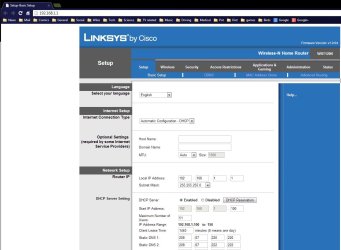
This is the way mine is set up. As you can see in the IP properties, I have DNS set up automatically. My system picks up the DNS from my router (as well as IP thru DHCP). My router does not act as the DNS. My system does not ask my router for DNS information. My system DOES ask my router where to go to get DNS information, however. If you want to ping a local machine, ping it's IP address. Seems to me, it's just as easy.
 

Attachments

  • ipprop.jpg
    ipprop.jpg
    28.7 KB · Views: 5
  • routerconfig.jpg
    routerconfig.jpg
    90 KB · Views: 9
  • NetProp.jpg
    NetProp.jpg
    30.9 KB · Views: 6
  • ipconfig.jpg
    ipconfig.jpg
    113.1 KB · Views: 8

My Computer

Computer type
PC/Desktop
Computer Manufacturer/Model Number
iBuyPower NZXT
OS
Microsoft Windows 10 Home Build 15036
CPU
Intel(R) Core(TM) i7-860 @ 2.80GHz
Motherboard
Gigabyte Technology Co., Ltd. P55-UD3L
Memory
4.00 GB
Graphics Card(s)
NVIDIA GeForce GTX 750
Sound Card
(1) Line 6 UX2 (2) Realtek High Definition Audio
Monitor(s) Displays
23" acer
Screen Resolution
1920 x 1080 x 32 bits (4294967296 colors) @ 60 Hz
Hard Drives
(1) WDC WD5000AAKS-00D2B0 ATA Device (2) Seagate FreeAgent Go 250G USB Device
Cooling
Corsair H75 liquid cooler (Very easy to install, actually)
Internet Speed
60M cable modem-->Linksys E1200-->1Gbps net card
Browser
Chrome
Other Info
This is probably the longest I've ever had a Windows machine run without having to restore it to scratch. I'm used to restoring to "factory" about every 2 yrs. I've run with Win7 since new in 2009 and only recently (Nov, '14) restored to clean up the machine from all my 'xperimenting. LOL!! I may never need another machine.

Upgraded to 10 when it was still free, then installed 2017 update.
I see where you are coming from however in order to connect to machines on your local network by machine names then DNS records will need to be made. These records aren't stored on public DNS servers since your devices have private IP addresses. For example to ping a device by its name the machine must first find its IP address, this is obtained from the DNS records that your router stores and not the public DNS servers. For example below shows that the name 'mybooklive' has been resolved to 192.168.0.121.

ping.JPG

You are correct that your router is not acting as a public DNS server. What happens when finding a website IP address is that your router will first check its own records to see if it knows the IP address. This is normally going to fail therefore it forwards the request to its primary and secondary DNS servers which in your case is set as (208.67.222.222 & 208.67.220.220) until it finds the websites IP address to which it will then forward that information to your machine to then browse to the server.

Introduction to DNS (Domain Name Services) - YouTube - Detailed information starts at 12:10

This explains alot of DNS if you didn't quite get what I meant :) I do apologise if the video is patronsing at times

Hope This Helps,
Josh! :)
 

My Computer

Computer type
PC/Desktop
Computer Manufacturer/Model Number
Custom Built
OS
Windows 7 Professional x64 SP1 ; Windows Server 2012 R2 Standard
CPU
Intel Core i5 2400 @ 3.10GHz
Motherboard
Foxconn H67MP-S/-V/H67MP
Memory
8.0GB DDR3 @ 665MHz (2GBx4)
Graphics Card(s)
AMD Radeon HD 6870
Sound Card
Realtek High Definition Audio
Monitor(s) Displays
AOC 2243W & SMB1930NW
Screen Resolution
1440x900 & 1920x1080
Hard Drives
977GB Seagate ST31000524AS ATA Drive (SATA)
250GB WD iSCSI attached Drive
PSU
750W Gaming PSU
Case
Novatech Night
Cooling
Fan
Keyboard
Dell Standard PS/2 Keyboard
Mouse
R.A.T 07 Gaming Mouse
Internet Speed
Download: 10 Mbps Ping: 30ms Upload: 0.81 Mbps
Browser
Google Chrome
Other Info
Optiarc DVD RW AD-5260S ATA Device
hey guys thanx for all the replies ... i fiddeld with the dns and everything seems to work fine nou ...

thanx a lot
 

My Computer

Computer type
PC/Desktop
Computer Manufacturer/Model Number
Custom
OS
Windows 7 ultimate 32 bit
CPU
intel i3
Memory
4 gb ddr3
Graphics Card(s)
ATI 7770 Msi
Hard Drives
1 tb Seagate
Antivirus
none
Browser
chrome
hey guys thanx for all the replies ... i fiddeld with the dns and everything seems to work fine nou ...

thanx a lot

I'd be interested in finding out what solution you settled on.
 

My Computer

Computer type
PC/Desktop
Computer Manufacturer/Model Number
iBuyPower NZXT
OS
Microsoft Windows 10 Home Build 15036
CPU
Intel(R) Core(TM) i7-860 @ 2.80GHz
Motherboard
Gigabyte Technology Co., Ltd. P55-UD3L
Memory
4.00 GB
Graphics Card(s)
NVIDIA GeForce GTX 750
Sound Card
(1) Line 6 UX2 (2) Realtek High Definition Audio
Monitor(s) Displays
23" acer
Screen Resolution
1920 x 1080 x 32 bits (4294967296 colors) @ 60 Hz
Hard Drives
(1) WDC WD5000AAKS-00D2B0 ATA Device (2) Seagate FreeAgent Go 250G USB Device
Cooling
Corsair H75 liquid cooler (Very easy to install, actually)
Internet Speed
60M cable modem-->Linksys E1200-->1Gbps net card
Browser
Chrome
Other Info
This is probably the longest I've ever had a Windows machine run without having to restore it to scratch. I'm used to restoring to "factory" about every 2 yrs. I've run with Win7 since new in 2009 and only recently (Nov, '14) restored to clean up the machine from all my 'xperimenting. LOL!! I may never need another machine.

Upgraded to 10 when it was still free, then installed 2017 update.
hi i tried to set my ip adresses and dns manually and then that didn't work ... so i put all the pc's in the house on auto obtain ... turned the router off and the on again ... i then reconnected each pc ... problem seems to be solved now been running for 3 days without issues.

thanx all
 

My Computer

Computer type
PC/Desktop
Computer Manufacturer/Model Number
Custom
OS
Windows 7 ultimate 32 bit
CPU
intel i3
Memory
4 gb ddr3
Graphics Card(s)
ATI 7770 Msi
Hard Drives
1 tb Seagate
Antivirus
none
Browser
chrome
Back
Top