Show us your SSD performance

Status
Not open for further replies.
Benefits of consolidate free space?

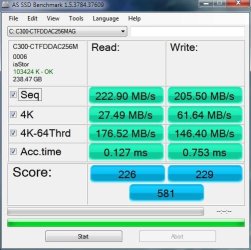
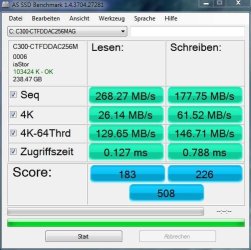
This might be controversial, but the results surprised me. I was skeptical about the need to Consolidate Free Space in the latest SSD drives. However, I have taken this plunge with both my C300 crucial SSD and my Intel G2 SSD and to my surprise, in both cases there was a substantial improvement in my SSD performances. These results seem in conflict with "conventional wisdom". I am listing the bench results on the crucial drive below. The tests were performed one day apart, before and after running PerfectDisk 11 Consolidate Free Space on the drive. I also have similar results for the Intel G2 drive if anyone is interested. I do recognize that different runs of SSD bench can get different results and I have done two runs pre-and post-free space consolidation to confirm the improvements. I am reluctant to subject my SSD to more bench testing for obvious reasons.
 

Attachments
  • SSDBenchC300_12_17_2010.JPG
    SSDBenchC300_12_17_2010.JPG
    50.4 KB · Views: 3
  • SSDBenchC300_12_18_2010.JPG
    SSDBenchC300_12_18_2010.JPG
    49.8 KB · Views: 2
Last edited:

My Computer My Computer

Computer Manufacturer/Model Number
Homemade
OS
Win 7 64 bit professional
CPU
CPU: 3930K @ 4.8 MHz Stable as a rock
Motherboard
ASUS Rampage IV Extreme LGA 2011
Memory
CORSAIR DOMINATOR GT 16GB (4 x 4GB) 240-Pin DDR3
Graphics Card(s)
EVGA SuperClocked+ GeForce GTX 680
Monitor(s) Displays
Dell 3007WFP
Screen Resolution
2560 x 1600
Hard Drives
Vector(256gb) x 2
RevoDrive 3 X2 space (240 GB)
Crucial C300 256 GB SSD
PSU
CORSAIR AX1200i 1200W Digital ATX12V v2.31 and EPS 2.92 SLI
Cooling
Water cooling EK Supremacy ELITE
Mouse
ratZ-7
Other Info
WEI-7.8
I wonder whether it really matters since the access times did not change. Do you see a difference in real life too?
 

My Computer My Computer

Computer Manufacturer/Model Number
HP, Dell, Gateway, Toshiba - 4 laptops and 2 desktops
OS
Vista, Windows7, Mint Mate, Zorin, Windows 8
CPU
from 1.6GHz Duo to i7
Monitor(s) Displays
2x HP w2207
Hard Drives
5x HDD, 7x SSD, 12x Externals
Keyboard
with trackball - no mices
Mouse
Trackball mice
Internet Speed
DSL 6000
I wonder whether it really matters since the access times did not change. Do you see a difference in real life too?

Exactly. 4K and access times are what really matter and these didn't change so in reality, it did nothing to improve performance
 

My Computer My Computer

Computer Manufacturer/Model Number
tw33k
OS
Windows 7 Ultimate (x64) SP1
CPU
Intel 3770k 4.6GHz
Motherboard
ASUS Maximus V Formula
Memory
8GB (2x 4GB) Crucial Ballistix
Graphics Card(s)
Sapphire 7950 (1060/1600)
Sound Card
On Board Realtek HD Audio
Monitor(s) Displays
27" Acer B273HU (via HDMI)
Screen Resolution
2048 x 1152
Hard Drives
Crucial M4 128GB
2TB WD Black
1TB Samsung F3 SATA
1TB WD Elite External
2TB WD USB 3.0
PSU
Corsair AX750 Gold
Case
Corsair Obsidian 800DW
Cooling
Corsair H100 (2x AP-121/2x UK-3000 push/pull)
Keyboard
Microsoft Wireless 5000
Mouse
Microsoft Wireless 5000
Internet Speed
5mb/s
Other Info
Logitech z-2300 2.1 speakers
Lamptron FC-5 v2
I wonder whether it really matters since the access times did not change. Do you see a difference in real life too?

You are absolutely right, in daily use, no discernible change. However, in certain large data and output programs that I run, a more than an appreciable change. In fact, I noticed the same issue when I moved from an Intel G2 160 GB drive to the Crucial C300 256 GB. If you use your computer for surfing, mail etc. the difference between the new generation drives is difficult to notice and it is easy and reasonable to jump on the 4K bandwagon. However there are a fair share of uses where larger reads and writes make an appreciable difference, especially when these programs tie up the computer for extended time periods. Different strokes for different folks. I am still not sure why the consolidated free space helps the performance.

I have three home built PC's that all use SSD's and in my limited personal experience, it is difficult to compare the day today, ongoing performance of a small Intel G2 against the larger Intel G2's even though their bench performance is considerably different – as long as the computer is being used for traditional personal purposes.

Cheers.
 

My Computer My Computer

Computer Manufacturer/Model Number
Homemade
OS
Win 7 64 bit professional
CPU
CPU: 3930K @ 4.8 MHz Stable as a rock
Motherboard
ASUS Rampage IV Extreme LGA 2011
Memory
CORSAIR DOMINATOR GT 16GB (4 x 4GB) 240-Pin DDR3
Graphics Card(s)
EVGA SuperClocked+ GeForce GTX 680
Monitor(s) Displays
Dell 3007WFP
Screen Resolution
2560 x 1600
Hard Drives
Vector(256gb) x 2
RevoDrive 3 X2 space (240 GB)
Crucial C300 256 GB SSD
PSU
CORSAIR AX1200i 1200W Digital ATX12V v2.31 and EPS 2.92 SLI
Cooling
Water cooling EK Supremacy ELITE
Mouse
ratZ-7
Other Info
WEI-7.8
I could imagine that for e.g. video editing of a large video file it may make a difference - provided your CPU and GPU can keep up with it.
 

My Computer My Computer

Computer Manufacturer/Model Number
HP, Dell, Gateway, Toshiba - 4 laptops and 2 desktops
OS
Vista, Windows7, Mint Mate, Zorin, Windows 8
CPU
from 1.6GHz Duo to i7
Monitor(s) Displays
2x HP w2207
Hard Drives
5x HDD, 7x SSD, 12x Externals
Keyboard
with trackball - no mices
Mouse
Trackball mice
Internet Speed
DSL 6000
This might be controversial, but the results surprised me. I was skeptical about the need to Consolidate Free Space in the latest SSD drives. However, I have taken this plunge with both my C300 crucial SSD and my Intel G2 SSD and to my surprise, in both cases there was a substantial improvement in my SSD performances. These results seem in conflict with "conventional wisdom". I am listing the bench results on the crucial drive below. The tests were performed one day apart, before and after running PerfectDisk 11 Consolidate Free Space on the drive. I also have similar results for the Intel G2 drive if anyone is interested. I do recognize that different runs of SSD bench can get different results and I have done two runs pre-and post-free space consolidation to confirm the improvements. I am reluctant to subject my SSD to more bench testing for obvious reasons.

Excellent!

I've said before and still think a Consolodate Defrag on a SSD is a good thing, if done in moderation.

Although I would not recommend Defragmenting a SSD with the Win7 built in defragger.

I too use the Consolodate method (Perfect Disc 11) for my SSDs and it does indeed help. And SmartDefrag for the Spinners.


I have found letting it Consolodate my SSDs (I have a Intel and OCZ) every 3 weeks or so keeps everything running like new. :)

Too much benchmarking will slow them down though.
 

My Computer My Computer

Computer Manufacturer/Model Number
Custom (Self Build)
OS
Windows 7 Home Premium 64bit
CPU
Intel Core i7 2700k
Motherboard
eVGA P67 SLI
Memory
8GB Mushkin Redline Ridgebacks @1866
Graphics Card(s)
EVGA GTX570 SC
Sound Card
XiFi Titanium HD
Monitor(s) Displays
LG W2453V
Screen Resolution
1920x1080
Hard Drives
Intel 320 80GB -- Intel X25-V 40GB --WD Black 1TB x2 -- WD Blue 640GB
PSU
Seasonic x750
Case
Corsair 600T SE White
Cooling
eVGA Superclocked CPU Cooler
Keyboard
Saitek Cyborg
Antivirus
Kaspersky
Browser
IE
Other Info
LG BD/DVD
This might be controversial, but the results surprised me. I was skeptical about the need to Consolidate Free Space in the latest SSD drives.------------I am reluctant to subject my SSD to more bench testing for obvious reasons.

Excellent!

I've said before and still think a Consolodate Defrag on a SSD is a good thing, if done in moderation.

Although I would not recommend Defragmenting a SSD with the Win7 built in defragger.

I too use the Consolodate method (Perfect Disc 11) for my SSDs and it does indeed help. And SmartDefrag for the Spinners.


I have found letting it Consolodate my SSDs (I have a Intel and OCZ) every 3 weeks or so keeps everything running like new. :)

Too much benchmarking will slow them down though.

Great to see your comments. I will follow your pattern of consolidating free space. I also use PerfectDisk 11.
Thanks and cheers.
 

My Computer My Computer

Computer Manufacturer/Model Number
Homemade
OS
Win 7 64 bit professional
CPU
CPU: 3930K @ 4.8 MHz Stable as a rock
Motherboard
ASUS Rampage IV Extreme LGA 2011
Memory
CORSAIR DOMINATOR GT 16GB (4 x 4GB) 240-Pin DDR3
Graphics Card(s)
EVGA SuperClocked+ GeForce GTX 680
Monitor(s) Displays
Dell 3007WFP
Screen Resolution
2560 x 1600
Hard Drives
Vector(256gb) x 2
RevoDrive 3 X2 space (240 GB)
Crucial C300 256 GB SSD
PSU
CORSAIR AX1200i 1200W Digital ATX12V v2.31 and EPS 2.92 SLI
Cooling
Water cooling EK Supremacy ELITE
Mouse
ratZ-7
Other Info
WEI-7.8
Does anybody have a logic why this space consolidation would speed things up. Since access to any place on the SSD is the same, I would think that it does not matter whether the data that is e.g. being read out is in 1,2,3 versus 1, 25, 144. But maybe there is some chaining effect like on a spinning disk when the data is adjacent.
 

My Computer My Computer

Computer Manufacturer/Model Number
HP, Dell, Gateway, Toshiba - 4 laptops and 2 desktops
OS
Vista, Windows7, Mint Mate, Zorin, Windows 8
CPU
from 1.6GHz Duo to i7
Monitor(s) Displays
2x HP w2207
Hard Drives
5x HDD, 7x SSD, 12x Externals
Keyboard
with trackball - no mices
Mouse
Trackball mice
Internet Speed
DSL 6000
Quote from Tony (Tiger) on the OCZ forum

"The idea is to consolidate partially written to blocks as the controllers on the drives will use up free blocks in preference to partially written too blocks first. So...eventually you run out of free blocks and the drive will slow. If you manually consolidate free space on say a raid array (that does not have TRIM) you then free up more free blocks which you then clean with AS-SSD using FF.

So its like TRIM in a way with free space consolidation being GC "

Based on this Wishmaster's extended scheduling pattern makes even more sense to me. Wrong or right It always has improved my benches (run couple of months apart) on a variety of drives. You are clearly very experienced with SSD's and your duplicating this process as a test could be very interesting. I doubt if a few runs would have any significant negative impact on your SSD's life.
 

My Computer My Computer

Computer Manufacturer/Model Number
Homemade
OS
Win 7 64 bit professional
CPU
CPU: 3930K @ 4.8 MHz Stable as a rock
Motherboard
ASUS Rampage IV Extreme LGA 2011
Memory
CORSAIR DOMINATOR GT 16GB (4 x 4GB) 240-Pin DDR3
Graphics Card(s)
EVGA SuperClocked+ GeForce GTX 680
Monitor(s) Displays
Dell 3007WFP
Screen Resolution
2560 x 1600
Hard Drives
Vector(256gb) x 2
RevoDrive 3 X2 space (240 GB)
Crucial C300 256 GB SSD
PSU
CORSAIR AX1200i 1200W Digital ATX12V v2.31 and EPS 2.92 SLI
Cooling
Water cooling EK Supremacy ELITE
Mouse
ratZ-7
Other Info
WEI-7.8
Hmm, interesting. That makes sense. How much does the program you guys are using cost?
 

My Computer My Computer

Computer Manufacturer/Model Number
HP, Dell, Gateway, Toshiba - 4 laptops and 2 desktops
OS
Vista, Windows7, Mint Mate, Zorin, Windows 8
CPU
from 1.6GHz Duo to i7
Monitor(s) Displays
2x HP w2207
Hard Drives
5x HDD, 7x SSD, 12x Externals
Keyboard
with trackball - no mices
Mouse
Trackball mice
Internet Speed
DSL 6000

My Computer My Computer

Computer Manufacturer/Model Number
Homemade
OS
Win 7 64 bit professional
CPU
CPU: 3930K @ 4.8 MHz Stable as a rock
Motherboard
ASUS Rampage IV Extreme LGA 2011
Memory
CORSAIR DOMINATOR GT 16GB (4 x 4GB) 240-Pin DDR3
Graphics Card(s)
EVGA SuperClocked+ GeForce GTX 680
Monitor(s) Displays
Dell 3007WFP
Screen Resolution
2560 x 1600
Hard Drives
Vector(256gb) x 2
RevoDrive 3 X2 space (240 GB)
Crucial C300 256 GB SSD
PSU
CORSAIR AX1200i 1200W Digital ATX12V v2.31 and EPS 2.92 SLI
Cooling
Water cooling EK Supremacy ELITE
Mouse
ratZ-7
Other Info
WEI-7.8

My Computer My Computer

Computer Manufacturer/Model Number
HP, Dell, Gateway, Toshiba - 4 laptops and 2 desktops
OS
Vista, Windows7, Mint Mate, Zorin, Windows 8
CPU
from 1.6GHz Duo to i7
Monitor(s) Displays
2x HP w2207
Hard Drives
5x HDD, 7x SSD, 12x Externals
Keyboard
with trackball - no mices
Mouse
Trackball mice
Internet Speed
DSL 6000

My Computer My Computer

Computer Manufacturer/Model Number
Self
OS
Main - Windows 7 Pro SP1 64-Bit; 2nd - Windows Server 2008 R2
CPU
Main - Core i7 2600K; 2nd - Core i7 920
Motherboard
Main - Asus P8Z68-V Pro/Gen3; 2nd - Gigabyte GA-EX58-UDR3
Memory
Main - 16GB Corsair Vengeance; 2nd - 12GB Corsair Vengeance
Graphics Card(s)
Main - XFX Radeon 6870 1GB; 2nd - XFX Radeon 4870 1GB
Sound Card
Both: Onboard Realtek Azalia
Monitor(s) Displays
Main - Hann 25" + I-INC 25" + Acer 23"; 2nd - Upgrading Soon
Screen Resolution
Main - 1920x1080 (All Three Monitors); 2nd - Upgrading Soon
Hard Drives
Main - (1) Crucial M4 128GB (Boot)
Main - (1) Seagate 2TB 64MB Cache (Data)
Main - (1) Seagate 2TB 64MB Cache (Data Backup)
2nd - (1) Intel X25-M SSD 80GB (Boot)
2nd - (3) Seagate 1TB 32MB Cache (Data Backup)
2nd - (1) Seagate 320GB (Because)
PSU
Main - OCZ 600W Modular; 2nd - OCZ 600W
Case
Main - Thermaltake Element G; 2nd - NZXT something or other
Cooling
Main - Corsair H80; 2nd - Prolimatech Megahalems
Keyboard
Main - Razer Reclusa; 2nd - Old MS Keyboard
Mouse
Main - Logitech MX Revolution; 2nd - Old MS Mouse
Internet Speed
20Mbps Time-Warner Cable
I thought they sent a email for 30% off untill the 31st or something along that line .. was trying to find it but must have deleted it. :(

It was a promo code you had to put in @ purchase.

Perhaps you'll get one if you opt for the trial first?

**EDIT Found it!
PROMO Code: FLOSS30

If you decide you like it and want buy it, Enter the code at checkout before Dec. 31st and its 30% off.
 

My Computer My Computer

Computer Manufacturer/Model Number
Custom (Self Build)
OS
Windows 7 Home Premium 64bit
CPU
Intel Core i7 2700k
Motherboard
eVGA P67 SLI
Memory
8GB Mushkin Redline Ridgebacks @1866
Graphics Card(s)
EVGA GTX570 SC
Sound Card
XiFi Titanium HD
Monitor(s) Displays
LG W2453V
Screen Resolution
1920x1080
Hard Drives
Intel 320 80GB -- Intel X25-V 40GB --WD Black 1TB x2 -- WD Blue 640GB
PSU
Seasonic x750
Case
Corsair 600T SE White
Cooling
eVGA Superclocked CPU Cooler
Keyboard
Saitek Cyborg
Antivirus
Kaspersky
Browser
IE
Other Info
LG BD/DVD
I thought they sent a email for 30% off untill the 31st or something along that line .. was trying to find it but must have deleted it. :(

It was a promo code you had to put in @ purchase.

Perhaps you'll get one if you opt for the trial first?

**EDIT Found it!
PROMO Code: FLOSS30

If you decide you like it and want buy it, Enter the code at checkout before Dec. 31st and its 30% off.
Yeah, I saw that too. The program is not too expensive anyhow and with the 30% coupon it is a bit over $20.
 

My Computer My Computer

Computer Manufacturer/Model Number
HP, Dell, Gateway, Toshiba - 4 laptops and 2 desktops
OS
Vista, Windows7, Mint Mate, Zorin, Windows 8
CPU
from 1.6GHz Duo to i7
Monitor(s) Displays
2x HP w2207
Hard Drives
5x HDD, 7x SSD, 12x Externals
Keyboard
with trackball - no mices
Mouse
Trackball mice
Internet Speed
DSL 6000
OCZ Vertex 2 60GB
 

Attachments

  • Capture.PNG
    Capture.PNG
    12.2 KB · Views: 22

My Computer My Computer

Computer type
PC/Desktop
Computer Manufacturer/Model Number
Golden Mk. I.4
OS
Windows 10 Pro x64 ; Xubuntu x64
CPU
Intel i7 860 @ 2.80 GHz O/C'ed to 4.0GHz
Motherboard
Gigabyte P55A-UD3R Rev.1. Award BIOS F13
Memory
16GB Corsair Vengance DDR3 @ 661 MHz Dual Channel (9-9-9-24)
Graphics Card(s)
EVGA NVidia GTX 560 1024MB
Sound Card
Realtek Integrated
Monitor(s) Displays
Dual Samsung SyncMaster 2494HS
Screen Resolution
1920*1080 and 1920*1080
Hard Drives
1*Samsung 840 EVO 120GB SSD;
1*OCZ Vertex 2 60GB SSD;
2*Samsung F3 SpinPoint 1TB in RAID0;
1*Samsung F1 SpinPoint 1TB;
2*Western Digital 1TB External USB 3.0
1*Western Digital 500GB External USB 3.0
1*Seagate 500GB External USB 2.0
PSU
Thermaltake ToughPower QFan 750W
Case
Thermaltake Element S VK60001W2Z
Cooling
Corsair H60 Water Cooling, 2*230mm and 2*80mm case fans
Keyboard
Logitech G110
Mouse
Logitech MX518
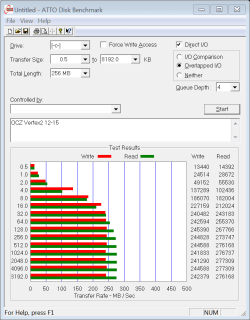
I hope this is the right place to ask this, but dose there seem to a difference between the controller on different SSds and the chipset of your computer? ie, would an intel perform better with an intel chipset than an AMD chipset?

I have a Vertex2 with and AMD chipset. I do not seem to get quite the performance on benchmarks I was expecting, but am quite satisfied with 'real world' performance. I did get a 7.7 WEI but the benchmarks don't seem to be what others have gotten.
ATTO 12-15.PNG
 

My Computers My Computers

System One System Two

  • Computer type
    PC/Desktop
    Computer Manufacturer/Model Number
    ALWAYS UNDER CONSTRUCTION
    OS
    Windows 11 Pro
    CPU
    Ryzen 9 5900X
    Motherboard
    Asus X570 Crosshair Viii Hero
    Memory
    32GB G Skill DDR4-3600
    Graphics Card(s)
    EVGA RTX 3080 FTW 3 Ultra
    Sound Card
    On Board/Sennheiser PC37X Headset
    Monitor(s) Displays
    3 X Asus 27"
    Screen Resolution
    2560x1440
    Hard Drives
    2 X 1 TB NVME drives
    PSU
    EVGA 850
    Case
    Phanteks Eclipse P400A
    Cooling
    EVGA 280 AIO
    Keyboard
    Logitech G510s/ Logitech G13
    Mouse
    Logitech G502
    Internet Speed
    24/1
    Antivirus
    ESET/MBAM Pro/SAS Pro
    Browser
    Chrome/ Firefox/ Edge
  • Computer type
    Laptop
    System Manufacturer/Model Number
    Dell 16 Plus
    OS
    Windows 11 Pro
    CPU
    Intel Ultra 9 288V
    Memory
    32 GB LPDDR5X 8533
    Monitor(s) Displays
    16" Mini-LED HDR600 Touch 90 Hz
    Screen Resolution
    2560X1600
    Hard Drives
    1 TB NVME

My Computer My Computer

Computer Manufacturer/Model Number
HP, Dell, Gateway, Toshiba - 4 laptops and 2 desktops
OS
Vista, Windows7, Mint Mate, Zorin, Windows 8
CPU
from 1.6GHz Duo to i7
Monitor(s) Displays
2x HP w2207
Hard Drives
5x HDD, 7x SSD, 12x Externals
Keyboard
with trackball - no mices
Mouse
Trackball mice
Internet Speed
DSL 6000
I think it is the drivers that give a little bit more for Intel, so I guess that means my guess is generally 'maybe a little bit'.

This is just from several benchmark sites and comparisons I have seen, no offense intended to my AMD friends ;)

For example: AS SSD Benchmark thread
Check the 'Controller Chip' column

This is by no means conclusive.
 

My Computer My Computer

Computer type
PC/Desktop
Computer Manufacturer/Model Number
76~2.0
OS
Windows 7 Ult x64 - SP1/ Windows 8 Pro x64
CPU
Intel Core i5-3570K 4.6GHz
Motherboard
Gigabyte GA-Z77X UD3H, f18
Memory
8GB (2X4GB) DDR3 1600 Corsair Vengeance CL8 1.5v
Graphics Card(s)
Sapphire HD 7770 Vapor-X OC 1GB DDR5
Sound Card
Onboard VIA VT2021
Monitor(s) Displays
22" LCD Dell
Screen Resolution
1680x1050
Hard Drives
Samsung 840Pro 128GB SSD,
Seagate Barracuda 500GB SATA2 7200rpm 32MB cache, Seagate Barracuda 1TB SATA2 7200rpm 32MB cache,
PSU
Corsair HX650W
Case
Cooler Master Storm Scout
Cooling
Corsair H80 2x12cm Noctua NF P12 , 2x14cm case fans
Keyboard
Logitech Wave
Mouse
CM Sentinel
Internet Speed
Dismal
Antivirus
Avast
Browser
Opera Next
Other Info
Haswell laptop: HP Envy 17t-j, i7-4700MQ, GeForce 740M 2GB DDR3, 17.3" Full HD 1920x1080, 16GB RAM, Samsung 840 Pro 128GB, 1TB Hitachi 7200 HDD,
Desktop: eSATA ports,
External eSATA Seagate 500GB SATA2 7200rpm,
External WD USB 500GB
OCZ Vertex 2 120GB SSD
 

Attachments

  • Capture.PNG
    Capture.PNG
    2.9 KB · Views: 13

My Computer My Computer

Computer Manufacturer/Model Number
HP Pavilion dv6-1030us
OS
Windows 7 Home Premium x64
CPU
Intel Core 2 Duo T6400 (2.0GHz)
Memory
4GB DDR2
Graphics Card(s)
Intel Graphics Media Accelerator 4500MHD w/ 1GB
Sound Card
IDT High Definition CODEC w/ Bose Companion 3 Speaker System
Monitor(s) Displays
Generic PnP Monitor (1366 x 768)
Hard Drives
OCZ Vertex 2 2.5" 120GB SATA II (SSD)
Read: 285MB/s
Write: 275MB/s
Status
Not open for further replies.
Back
Top