W7 Nivida gts250 - not able to adjust screen resolution

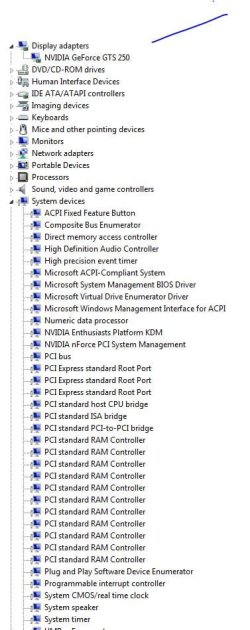
The only thing in Device Manager under display adapters is the GTS250. When I disable it everything runs fine except my games. It says there is no 3D driver. How do I get a picture of the device manager?
 

My Computer My Computer

At a glance

W7 home premuum home 64bitEmachine ET 1831 -053gb ramNvida GTS250 1gb
OS
W7 home premuum home 64bit
CPU
Emachine ET 1831 -05
Memory
3gb ram
Graphics Card(s)
Nvida GTS250 1gb
Monitor(s) Displays
Westinghouse 22 in widescrren
Hard Drives
500gb
OK. When you disable the GTS250, the on-board card takes over : it is not as good hence the games no longer work as expected. You want to try and find the on-board card, and turn that off....now to find out how.

Use the Snipping Tool (Start > type snipping in the find box) and post the image here.

PAR : one last thing to check. When you plug your monitor in, are you plugging it in to the GTS graphics card adapter, and not the original adpater that came with your PC? I'm sure you are, but just to check.
 

My Computer My Computer

At a glance

Windows 10 Pro x64 ; Xubuntu x64Intel i7 860 @ 2.80 GHz O/C'ed to 4.0GHz16GB Corsair Vengance DDR3 @ 661 MHz Dual Cha...EVGA NVidia GTX 560 1024MB
Computer type
PC/Desktop
Computer Manufacturer/Model Number
Golden Mk. I.4
OS
Windows 10 Pro x64 ; Xubuntu x64
CPU
Intel i7 860 @ 2.80 GHz O/C'ed to 4.0GHz
Motherboard
Gigabyte P55A-UD3R Rev.1. Award BIOS F13
Memory
16GB Corsair Vengance DDR3 @ 661 MHz Dual Channel (9-9-9-24)
Graphics Card(s)
EVGA NVidia GTX 560 1024MB
Sound Card
Realtek Integrated
Monitor(s) Displays
Dual Samsung SyncMaster 2494HS
Screen Resolution
1920*1080 and 1920*1080
Hard Drives
1*Samsung 840 EVO 120GB SSD;
1*OCZ Vertex 2 60GB SSD;
2*Samsung F3 SpinPoint 1TB in RAID0;
1*Samsung F1 SpinPoint 1TB;
2*Western Digital 1TB External USB 3.0
1*Western Digital 500GB External USB 3.0
1*Seagate 500GB External USB 2.0
PSU
Thermaltake ToughPower QFan 750W
Case
Thermaltake Element S VK60001W2Z
Cooling
Corsair H60 Water Cooling, 2*230mm and 2*80mm case fans
Keyboard
Logitech G110
Mouse
Logitech MX518
Capture.JPG
here is an attachemtn of the pic of my DM
 

Attachments

  • Capture.JPG
    Capture.JPG
    71.5 KB · Views: 13

My Computer My Computer

At a glance

W7 home premuum home 64bitEmachine ET 1831 -053gb ramNvida GTS250 1gb
OS
W7 home premuum home 64bit
CPU
Emachine ET 1831 -05
Memory
3gb ram
Graphics Card(s)
Nvida GTS250 1gb
Monitor(s) Displays
Westinghouse 22 in widescrren
Hard Drives
500gb
Yes, I am plugging it in the right one.
 

My Computer My Computer

At a glance

W7 home premuum home 64bitEmachine ET 1831 -053gb ramNvida GTS250 1gb
OS
W7 home premuum home 64bit
CPU
Emachine ET 1831 -05
Memory
3gb ram
Graphics Card(s)
Nvida GTS250 1gb
Monitor(s) Displays
Westinghouse 22 in widescrren
Hard Drives
500gb
I'm confused.

You can disable the GTS250, and you still get video, with the monitor connected to the 250? (You do have the monitor connected to the 250 rather than the onboard graphics port, right?)
 

My Computer My Computer

At a glance

Windows 7 Pro X64 SP1Intel Core I7-3930k16 GB Gskill DDR3-2133eVGA GTX680
Computer Manufacturer/Model Number
homegrown
OS
Windows 7 Pro X64 SP1
CPU
Intel Core I7-3930k
Motherboard
Asus P9X79 Pro
Memory
16 GB Gskill DDR3-2133
Graphics Card(s)
eVGA GTX680
Sound Card
Creative X-Fi Titanium
Monitor(s) Displays
As PA246Q
Screen Resolution
1920 X 1200
Hard Drives
Corsair Force GT, 120 GB
WDC 1.5TB Caviar Black
PSU
PCP&C Silencer 750 Crossfire
Case
Silverstone FT02
Cooling
Noctua NH-D14
Keyboard
cheap Logitech USB
Mouse
Microsoft Intellimouse Explorer (old optical) USB
Internet Speed
6Mb cable
Other Info
Pioneer BDR-205
Samsung SH-203B
Monsoon 5.1 speakers
Yes, I am plugging it in the right one.

OK, thats odd because when you disable your GTS card you shouldn't see anything at all - can you triple check that.

I wonder if you need to disable the PCB switch on the motherboard. Does your PC manual make reference to a PCB switch by any chance?
 

My Computer My Computer

At a glance

Windows 10 Pro x64 ; Xubuntu x64Intel i7 860 @ 2.80 GHz O/C'ed to 4.0GHz16GB Corsair Vengance DDR3 @ 661 MHz Dual Cha...EVGA NVidia GTX 560 1024MB
Computer type
PC/Desktop
Computer Manufacturer/Model Number
Golden Mk. I.4
OS
Windows 10 Pro x64 ; Xubuntu x64
CPU
Intel i7 860 @ 2.80 GHz O/C'ed to 4.0GHz
Motherboard
Gigabyte P55A-UD3R Rev.1. Award BIOS F13
Memory
16GB Corsair Vengance DDR3 @ 661 MHz Dual Channel (9-9-9-24)
Graphics Card(s)
EVGA NVidia GTX 560 1024MB
Sound Card
Realtek Integrated
Monitor(s) Displays
Dual Samsung SyncMaster 2494HS
Screen Resolution
1920*1080 and 1920*1080
Hard Drives
1*Samsung 840 EVO 120GB SSD;
1*OCZ Vertex 2 60GB SSD;
2*Samsung F3 SpinPoint 1TB in RAID0;
1*Samsung F1 SpinPoint 1TB;
2*Western Digital 1TB External USB 3.0
1*Western Digital 500GB External USB 3.0
1*Seagate 500GB External USB 2.0
PSU
Thermaltake ToughPower QFan 750W
Case
Thermaltake Element S VK60001W2Z
Cooling
Corsair H60 Water Cooling, 2*230mm and 2*80mm case fans
Keyboard
Logitech G110
Mouse
Logitech MX518

My Computer My Computer

At a glance

Windows 10 Home x64INTEL Core i5-750 Quad-Core 3.37GHzHyperX Fury Black Series 8GB (2 x 4GB) 1866MhzEVGA GeForce GTX 750 Superclocked 1GB 128-Bit...
Computer type
PC/Desktop
OS
Windows 10 Home x64
CPU
INTEL Core i5-750 Quad-Core 3.37GHz
Motherboard
ASUS P7P55D
Memory
HyperX Fury Black Series 8GB (2 x 4GB) 1866Mhz
Graphics Card(s)
EVGA GeForce GTX 750 Superclocked 1GB 128-Bit GDDR5
Monitor(s) Displays
LG 32MA68HY 32" IPS
Screen Resolution
1920 x 1080
Hard Drives
Samsung 840 Evo 120GB, SEAGATE 500GB Barracuda® 7200.12, SATA 3 Gb/s, 7200 RPM, 16MB cache
PSU
ANTEC TruePower New TP-550, 80 PLUS, 550W
Case
ANTEC Three Hundred Illusion
Cooling
COOLER MASTER Hyper 212 Plus, 4 x 120mm 1 x 140mm Noctua's
Internet Speed
85 + Mbps
Antivirus
Avast
Browser
Vivaldi
bobkn, I do have it plugged int he right one

golden, it is not listed in the manual. Regedit puts default resolution at 1600x1200 meaning when I disable the video card it automatically goes back to the right resolution.
 

My Computer My Computer

At a glance

W7 home premuum home 64bitEmachine ET 1831 -053gb ramNvida GTS250 1gb
OS
W7 home premuum home 64bit
CPU
Emachine ET 1831 -05
Memory
3gb ram
Graphics Card(s)
Nvida GTS250 1gb
Monitor(s) Displays
Westinghouse 22 in widescrren
Hard Drives
500gb
Thank, A Guy, but we already been down that road.
 

My Computer My Computer

At a glance

W7 home premuum home 64bitEmachine ET 1831 -053gb ramNvida GTS250 1gb
OS
W7 home premuum home 64bit
CPU
Emachine ET 1831 -05
Memory
3gb ram
Graphics Card(s)
Nvida GTS250 1gb
Monitor(s) Displays
Westinghouse 22 in widescrren
Hard Drives
500gb

My Computer My Computer

At a glance

W7 home premuum home 64bitEmachine ET 1831 -053gb ramNvida GTS250 1gb
OS
W7 home premuum home 64bit
CPU
Emachine ET 1831 -05
Memory
3gb ram
Graphics Card(s)
Nvida GTS250 1gb
Monitor(s) Displays
Westinghouse 22 in widescrren
Hard Drives
500gb
Hi Par,

The thing is that if you plug your monitor into the GTS adapter, and then disable the adapter, your screen should go blank. It doesn't sound like that is happening. hence the confusion about the adapter.....

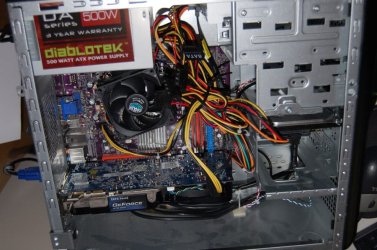
Are you able to take a photograph of the side of your PC, with the side panel removed so we can see exactly the layout of the two adapters,?

Sorry, I know its frustrating for you, but we will get there in the end.
 

My Computer My Computer

At a glance

Windows 10 Pro x64 ; Xubuntu x64Intel i7 860 @ 2.80 GHz O/C'ed to 4.0GHz16GB Corsair Vengance DDR3 @ 661 MHz Dual Cha...EVGA NVidia GTX 560 1024MB
Computer type
PC/Desktop
Computer Manufacturer/Model Number
Golden Mk. I.4
OS
Windows 10 Pro x64 ; Xubuntu x64
CPU
Intel i7 860 @ 2.80 GHz O/C'ed to 4.0GHz
Motherboard
Gigabyte P55A-UD3R Rev.1. Award BIOS F13
Memory
16GB Corsair Vengance DDR3 @ 661 MHz Dual Channel (9-9-9-24)
Graphics Card(s)
EVGA NVidia GTX 560 1024MB
Sound Card
Realtek Integrated
Monitor(s) Displays
Dual Samsung SyncMaster 2494HS
Screen Resolution
1920*1080 and 1920*1080
Hard Drives
1*Samsung 840 EVO 120GB SSD;
1*OCZ Vertex 2 60GB SSD;
2*Samsung F3 SpinPoint 1TB in RAID0;
1*Samsung F1 SpinPoint 1TB;
2*Western Digital 1TB External USB 3.0
1*Western Digital 500GB External USB 3.0
1*Seagate 500GB External USB 2.0
PSU
Thermaltake ToughPower QFan 750W
Case
Thermaltake Element S VK60001W2Z
Cooling
Corsair H60 Water Cooling, 2*230mm and 2*80mm case fans
Keyboard
Logitech G110
Mouse
Logitech MX518
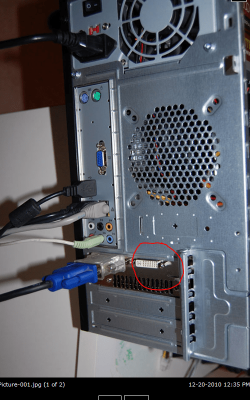
this is so odd --- it is like the computer has a fall back driver that is always on??? anyway here are the pics
 

Attachments

  • Picture-001.jpg
    Picture-001.jpg
    71.6 KB · Views: 8
  • Picture-002.jpg
    Picture-002.jpg
    90.4 KB · Views: 7

My Computer My Computer

At a glance

W7 home premuum home 64bitEmachine ET 1831 -053gb ramNvida GTS250 1gb
OS
W7 home premuum home 64bit
CPU
Emachine ET 1831 -05
Memory
3gb ram
Graphics Card(s)
Nvida GTS250 1gb
Monitor(s) Displays
Westinghouse 22 in widescrren
Hard Drives
500gb
Where does this adapter lead to?
 

Attachments

  • Capture1.PNG
    Capture1.PNG
    197.2 KB · Views: 8

My Computer My Computer

At a glance

Windows 10 Pro x64 ; Xubuntu x64Intel i7 860 @ 2.80 GHz O/C'ed to 4.0GHz16GB Corsair Vengance DDR3 @ 661 MHz Dual Cha...EVGA NVidia GTX 560 1024MB
Computer type
PC/Desktop
Computer Manufacturer/Model Number
Golden Mk. I.4
OS
Windows 10 Pro x64 ; Xubuntu x64
CPU
Intel i7 860 @ 2.80 GHz O/C'ed to 4.0GHz
Motherboard
Gigabyte P55A-UD3R Rev.1. Award BIOS F13
Memory
16GB Corsair Vengance DDR3 @ 661 MHz Dual Channel (9-9-9-24)
Graphics Card(s)
EVGA NVidia GTX 560 1024MB
Sound Card
Realtek Integrated
Monitor(s) Displays
Dual Samsung SyncMaster 2494HS
Screen Resolution
1920*1080 and 1920*1080
Hard Drives
1*Samsung 840 EVO 120GB SSD;
1*OCZ Vertex 2 60GB SSD;
2*Samsung F3 SpinPoint 1TB in RAID0;
1*Samsung F1 SpinPoint 1TB;
2*Western Digital 1TB External USB 3.0
1*Western Digital 500GB External USB 3.0
1*Seagate 500GB External USB 2.0
PSU
Thermaltake ToughPower QFan 750W
Case
Thermaltake Element S VK60001W2Z
Cooling
Corsair H60 Water Cooling, 2*230mm and 2*80mm case fans
Keyboard
Logitech G110
Mouse
Logitech MX518
It's on the GTS250 but when I plug it into that one the screen goes yellow so I am assuming it is only for a second monitor.
 

My Computer My Computer

At a glance

W7 home premuum home 64bitEmachine ET 1831 -053gb ramNvida GTS250 1gb
OS
W7 home premuum home 64bit
CPU
Emachine ET 1831 -05
Memory
3gb ram
Graphics Card(s)
Nvida GTS250 1gb
Monitor(s) Displays
Westinghouse 22 in widescrren
Hard Drives
500gb
Thats the HDMI adaptor for the GTS - it works with a single monitor too. Thats what I have my monitor plugged into.

What is the silver connector between the blue one on your monitor cable, and the adapter its currently plugged into?
 

My Computer My Computer

At a glance

Windows 10 Pro x64 ; Xubuntu x64Intel i7 860 @ 2.80 GHz O/C'ed to 4.0GHz16GB Corsair Vengance DDR3 @ 661 MHz Dual Cha...EVGA NVidia GTX 560 1024MB
Computer type
PC/Desktop
Computer Manufacturer/Model Number
Golden Mk. I.4
OS
Windows 10 Pro x64 ; Xubuntu x64
CPU
Intel i7 860 @ 2.80 GHz O/C'ed to 4.0GHz
Motherboard
Gigabyte P55A-UD3R Rev.1. Award BIOS F13
Memory
16GB Corsair Vengance DDR3 @ 661 MHz Dual Channel (9-9-9-24)
Graphics Card(s)
EVGA NVidia GTX 560 1024MB
Sound Card
Realtek Integrated
Monitor(s) Displays
Dual Samsung SyncMaster 2494HS
Screen Resolution
1920*1080 and 1920*1080
Hard Drives
1*Samsung 840 EVO 120GB SSD;
1*OCZ Vertex 2 60GB SSD;
2*Samsung F3 SpinPoint 1TB in RAID0;
1*Samsung F1 SpinPoint 1TB;
2*Western Digital 1TB External USB 3.0
1*Western Digital 500GB External USB 3.0
1*Seagate 500GB External USB 2.0
PSU
Thermaltake ToughPower QFan 750W
Case
Thermaltake Element S VK60001W2Z
Cooling
Corsair H60 Water Cooling, 2*230mm and 2*80mm case fans
Keyboard
Logitech G110
Mouse
Logitech MX518
It's another HDMI connecter. The adapter converts the HDMI to fit my VGA cable I have connected to my monitor. Do you think an HDMI cable would make a difference? My monitor will take one.
 

My Computer My Computer

At a glance

W7 home premuum home 64bitEmachine ET 1831 -053gb ramNvida GTS250 1gb
OS
W7 home premuum home 64bit
CPU
Emachine ET 1831 -05
Memory
3gb ram
Graphics Card(s)
Nvida GTS250 1gb
Monitor(s) Displays
Westinghouse 22 in widescrren
Hard Drives
500gb
It's another HDMI connecter. The adapter converts the HDMI to fit my VGA cable I have connected to my monitor. Do you think an HDMI cable would make a difference? My monitor will take one.

Yes! You definately want HDMI if you can. Plug it in, then reboot.
 

My Computer My Computer

At a glance

Windows 10 Pro x64 ; Xubuntu x64Intel i7 860 @ 2.80 GHz O/C'ed to 4.0GHz16GB Corsair Vengance DDR3 @ 661 MHz Dual Cha...EVGA NVidia GTX 560 1024MB
Computer type
PC/Desktop
Computer Manufacturer/Model Number
Golden Mk. I.4
OS
Windows 10 Pro x64 ; Xubuntu x64
CPU
Intel i7 860 @ 2.80 GHz O/C'ed to 4.0GHz
Motherboard
Gigabyte P55A-UD3R Rev.1. Award BIOS F13
Memory
16GB Corsair Vengance DDR3 @ 661 MHz Dual Channel (9-9-9-24)
Graphics Card(s)
EVGA NVidia GTX 560 1024MB
Sound Card
Realtek Integrated
Monitor(s) Displays
Dual Samsung SyncMaster 2494HS
Screen Resolution
1920*1080 and 1920*1080
Hard Drives
1*Samsung 840 EVO 120GB SSD;
1*OCZ Vertex 2 60GB SSD;
2*Samsung F3 SpinPoint 1TB in RAID0;
1*Samsung F1 SpinPoint 1TB;
2*Western Digital 1TB External USB 3.0
1*Western Digital 500GB External USB 3.0
1*Seagate 500GB External USB 2.0
PSU
Thermaltake ToughPower QFan 750W
Case
Thermaltake Element S VK60001W2Z
Cooling
Corsair H60 Water Cooling, 2*230mm and 2*80mm case fans
Keyboard
Logitech G110
Mouse
Logitech MX518
Well I've got to get one. I'll post as soon as I do. Is this what will fix it then?
 

My Computer My Computer

At a glance

W7 home premuum home 64bitEmachine ET 1831 -053gb ramNvida GTS250 1gb
OS
W7 home premuum home 64bit
CPU
Emachine ET 1831 -05
Memory
3gb ram
Graphics Card(s)
Nvida GTS250 1gb
Monitor(s) Displays
Westinghouse 22 in widescrren
Hard Drives
500gb
Neither of the those ports are HDMI. They are DVI. HDMI looks more like a USB size.
 

My Computer My Computer

At a glance

Windows7 Pro 64bit SP-1; Windows XP Pro 32bitIntel Core i7-870 Lynnfield 2.93GHz LGA 1156 ...8GB@1400MHz Crucial Ballistix DDR3-1600 4x2GBASUS ENGTX460 DirectCU/2DI/1GD5 1GB 256-bit G...
Computer Manufacturer/Model Number
Hopalong/ Godzilla
OS
Windows7 Pro 64bit SP-1; Windows XP Pro 32bit
CPU
Intel Core i7-870 Lynnfield 2.93GHz LGA 1156 95W Quad-Core
Motherboard
ASUS P7P55D-E PRO
Memory
8GB@1400MHz Crucial Ballistix DDR3-1600 4x2GB
Graphics Card(s)
ASUS ENGTX460 DirectCU/2DI/1GD5 1GB 256-bit GDDR5
Sound Card
VIA Onboard
Monitor(s) Displays
Asus VS248H-P 24"; Samsung SyncMaster 941BW 19"ws
Screen Resolution
1920x1080; 1440x900
Hard Drives
Samsung 830 120GB SSD
Intel 320 120GB SSD
Western Digital Caviar Black WD7501AALS 750GB 7200 RPM SATA 3.0Gb/s
Western Digital Caviar Black WD6401AALS 640GB 7200 RPM SATA 3.0Gb/s
PSU
COOLER MASTER Silent Pro RS850-AMBAJ3-US 850W Modular
Case
COOLER MASTER HAF 932 RC-932-KKN5-GP Black
Cooling
Scythe "Mugen-2 Rev.B" (2 ScytheKaze-Jyuni PWM fans)
Keyboard
Logitech K-320
Mouse
Kensington
Antivirus
Avast Inernet Suite
Browser
IE 9 ; Chrome
Well I've got to get one. I'll post as soon as I do. Is this what will fix it then?

I think so. Its posisble the card only delivers higher output through the HDMI connection, but I can't be 100% sure. You definately want to use HDMI if you can.

Correction : Hopalong is 100% correct. Its DVI. My mistake, I always get confused between them. You still want to use DVI if you can.
 

My Computer My Computer

At a glance

Windows 10 Pro x64 ; Xubuntu x64Intel i7 860 @ 2.80 GHz O/C'ed to 4.0GHz16GB Corsair Vengance DDR3 @ 661 MHz Dual Cha...EVGA NVidia GTX 560 1024MB
Computer type
PC/Desktop
Computer Manufacturer/Model Number
Golden Mk. I.4
OS
Windows 10 Pro x64 ; Xubuntu x64
CPU
Intel i7 860 @ 2.80 GHz O/C'ed to 4.0GHz
Motherboard
Gigabyte P55A-UD3R Rev.1. Award BIOS F13
Memory
16GB Corsair Vengance DDR3 @ 661 MHz Dual Channel (9-9-9-24)
Graphics Card(s)
EVGA NVidia GTX 560 1024MB
Sound Card
Realtek Integrated
Monitor(s) Displays
Dual Samsung SyncMaster 2494HS
Screen Resolution
1920*1080 and 1920*1080
Hard Drives
1*Samsung 840 EVO 120GB SSD;
1*OCZ Vertex 2 60GB SSD;
2*Samsung F3 SpinPoint 1TB in RAID0;
1*Samsung F1 SpinPoint 1TB;
2*Western Digital 1TB External USB 3.0
1*Western Digital 500GB External USB 3.0
1*Seagate 500GB External USB 2.0
PSU
Thermaltake ToughPower QFan 750W
Case
Thermaltake Element S VK60001W2Z
Cooling
Corsair H60 Water Cooling, 2*230mm and 2*80mm case fans
Keyboard
Logitech G110
Mouse
Logitech MX518
Back
Top