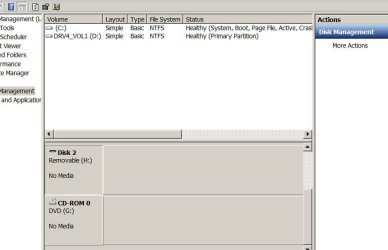
One hard drive, and my DVD drive not shown?

nhdiesel

New member
Local time
3:04 AM
Messages
8
I have a similar problem as a previous thread, with a little bit of a difference. My PC has 3 hard drives and one DVD drive. I can see 2 of the hard drives in Libraries, but not the 3rd hard drive, or the DVD drive. If I go into Computer Management, they are shown, but say "No Media", and the internal hard drive is shown as "removable".

It won't let me right click anything except to access Properties or Change Drive Letters/Paths. These drives were working until fairly recently, but the hard drive was the first to give me problems. Sometimes it wouldn't show up, and rebooting the PC would let it show up. Now, however, that no longer works. I have data on that drive I really want to keep, so formatting it is not an option. And of course, I can't format a DVD drive.

Any suggestions would be appreciated.

Jim
 

My Computer My Computer

At a glance

Windows 7
OS
Windows 7

My Computer My Computer

At a glance

Vista, Windows7, Mint Mate, Zorin, Windows 8from 1.6GHz Duo to i7
Computer Manufacturer/Model Number
HP, Dell, Gateway, Toshiba - 4 laptops and 2 desktops
OS
Vista, Windows7, Mint Mate, Zorin, Windows 8
CPU
from 1.6GHz Duo to i7
Monitor(s) Displays
2x HP w2207
Hard Drives
5x HDD, 7x SSD, 12x Externals
Keyboard
with trackball - no mices
Mouse
Trackball mice
Internet Speed
DSL 6000
With regards the DVD, in (Windows) Explorer, on the Menu bar click Tools > Folder Options... > View. Is 'Hide empty drives in the computer folder' ticked?
 

My Computer My Computer

At a glance

windows 7 ultimate
OS
windows 7 ultimate
Thanks for the reply. Here is a snip of the disk manager:
driveissue.JPG

Jim
 

My Computer My Computer

At a glance

Windows 7
OS
Windows 7
That is indeed a very strange Disk Management view. But at least you still seem to have a drive letter (H) for that disk. You could try to run chkdsk H: /f /r in elevated cmd. Maybe it finds the straggler and can fix it. And try also what I suggested above.
 

My Computer My Computer

At a glance

Vista, Windows7, Mint Mate, Zorin, Windows 8from 1.6GHz Duo to i7
Computer Manufacturer/Model Number
HP, Dell, Gateway, Toshiba - 4 laptops and 2 desktops
OS
Vista, Windows7, Mint Mate, Zorin, Windows 8
CPU
from 1.6GHz Duo to i7
Monitor(s) Displays
2x HP w2207
Hard Drives
5x HDD, 7x SSD, 12x Externals
Keyboard
with trackball - no mices
Mouse
Trackball mice
Internet Speed
DSL 6000
When I did the first suggestion, it said it did not find any integrity violations. When I did what you suggested in your second reply, I got the message "cannot open volume for direct access".

And before anyone asks...since this problem started, I have run several scans with AVG and Ad-Aware. I also use Zonealarm.

Jim
 

My Computer My Computer

At a glance

Windows 7
OS
Windows 7
Jim, that's too bad. I am sorry that we cannot make any headway, but I am running out of ideas. Maybe another member has some new ideas. I will post it on the "help" thread - so don't give up.
 

My Computer My Computer

At a glance

Vista, Windows7, Mint Mate, Zorin, Windows 8from 1.6GHz Duo to i7
Computer Manufacturer/Model Number
HP, Dell, Gateway, Toshiba - 4 laptops and 2 desktops
OS
Vista, Windows7, Mint Mate, Zorin, Windows 8
CPU
from 1.6GHz Duo to i7
Monitor(s) Displays
2x HP w2207
Hard Drives
5x HDD, 7x SSD, 12x Externals
Keyboard
with trackball - no mices
Mouse
Trackball mice
Internet Speed
DSL 6000
Hi, launch Explorer, click Organise> Folder and search Options > View > and clear "Hide empty drives in the computer folder" to get your empty drives back., I hope this helps you.
 

My Computer My Computer

At a glance

Vista Ult64, Win7600Intel Core 2 Quad Q6600 @ 2400 MHz 64bit OS4096 MB DDR3-SDRAMATI Radeon HD 3870 Series x2 Crossfired
Computer Manufacturer/Model Number
Self Build 64bit
OS
Vista Ult64, Win7600
CPU
Intel Core 2 Quad Q6600 @ 2400 MHz 64bit OS
Motherboard
Asus P5E3 Deluxe WiFi @p 64 bit OS
Memory
4096 MB DDR3-SDRAM
Graphics Card(s)
ATI Radeon HD 3870 Series x2 Crossfired
Sound Card
Realtek on board
Monitor(s) Displays
Samsung SyncMaster - 23 inches
Screen Resolution
1680x1050 pixels at 60 Hz in True Colors
Hard Drives
Hitachi (250 GB)/Samsung 750 GB. /Barracuda 160 GB.
My Book 1 TB external..
PSU
Cooler Master 1000w
Case
Cooler Master Cosmos 1000.
Cooling
Fans and fresh air,
Keyboard
Wireless
Mouse
Wireless
Internet Speed
Never fast enough
Other Info
I use a Magnum.
One suggestion that was made by Carl is that you get rid of your security setup. Zonealarm apparently has caused problems in the past. Also AVG and Adaware together may not play well. I suggest you replace all that by MSE and Superantispyware for scanning.
 

My Computer My Computer

At a glance

Vista, Windows7, Mint Mate, Zorin, Windows 8from 1.6GHz Duo to i7
Computer Manufacturer/Model Number
HP, Dell, Gateway, Toshiba - 4 laptops and 2 desktops
OS
Vista, Windows7, Mint Mate, Zorin, Windows 8
CPU
from 1.6GHz Duo to i7
Monitor(s) Displays
2x HP w2207
Hard Drives
5x HDD, 7x SSD, 12x Externals
Keyboard
with trackball - no mices
Mouse
Trackball mice
Internet Speed
DSL 6000
Thank you both, we are making some progress. Fimble & jfar's suggestion got my DVD back, and my hard drive is now showing up in Explorer. Unfortunately, its still showing up as a removable drive, and shows that there is no disk in it. Its a 500gb drive, and it has about 450gb of files on it.

Edit: I just saw your last post. I've used these products for years and never had a problem. Our other PC (actually a laptop) has no problems running win. 7 and these products. They were suggested to me by pros in the industry and I trust them.

I may just have a problem with the hard drive. I think I'll pull it and use a USB cable I have and see if it shows up then, or try hooking it to the laptop with the USB cable. (its a USB to SATA cable).

I appreciate the help. :-)

(edited to give thanks where due ;-)
 

My Computer My Computer

At a glance

Windows 7
OS
Windows 7
They were suggested to me by pros in the industry and I trust them.
I would not trust AVG for one bit. In my computer club we got 6 systems (all triple booted) heavily infected depite AVG being installed. Took 3 guys 1 week to fix that mess. And you may want to check on all the threads that state the problems with AVG. But it is your system and you can, of course, use what you think is best.

I have no personal experience with ZoneAlarm, but apparently there were problems too.

Regarding " pros in the industry " - I have been around computers for 52 years, and I know what some of those look like.
 

My Computer My Computer

At a glance

Vista, Windows7, Mint Mate, Zorin, Windows 8from 1.6GHz Duo to i7
Computer Manufacturer/Model Number
HP, Dell, Gateway, Toshiba - 4 laptops and 2 desktops
OS
Vista, Windows7, Mint Mate, Zorin, Windows 8
CPU
from 1.6GHz Duo to i7
Monitor(s) Displays
2x HP w2207
Hard Drives
5x HDD, 7x SSD, 12x Externals
Keyboard
with trackball - no mices
Mouse
Trackball mice
Internet Speed
DSL 6000
OMG! Missed that one....sorry....corrected now :-)

Jim
I was jesting...

But seriously. AVG has had many issues with Windows 7. This was made worse by a recent update that made some Windows 7 systems inoperable.

Get rid until it's sorted its game out..
 

My Computer My Computer

At a glance

windows 7 ultimate
OS
windows 7 ultimate
More than 1 anti-virus app. on any system is a fundamental NO-NO!

I just delivered a new 2-hard drive system to a customer.
System had been working perfectly, both drives were available.
Shortly afterward, win 7 lost one of the drives.
I find on the internet that this has been regularly occurring with Win 7 for 3 years.
A suggestion for your antivirus app is Vexira from Centralcommand.com.
 

My Computer My Computer

At a glance

xp professional 32 bit
Computer Manufacturer/Model Number
ibm/thinkpad/T42
OS
xp professional 32 bit
Hard Drives
160gb seagate
Back
Top