how to get image onto win7 without installing the win7 os ?

tuxulin

New member
Local time
2:37 AM
Messages
3
im new here, so first hello all.

i use windows xp for my DAW and Linux for everything else.
i have now win7 but before i format the pc i need help with one problem.

currently
when xp OS software becomes unstable all i need to do is
1, get my ghost ver8 which is on a boot cd
2, boot to prompt and run ghost to find the image on another partition
3, restoring the image takes 10 minutes
4, restart
after the steps above win xp and my DAW is back to the perfect working order.

win 7 does not support ghost 8 (dos version) and neither can i boot to prompt.
so that is my big headache.

is there a way that i can image my hdd partition but most importantly to restore the image on the hdd without installing win7 ?

thank you
Tux Ulin
 

My Computer My Computer

At a glance

win 7 64bit
OS
win 7 64bit
im new here, so first hello all.

i use windows xp for my DAW and Linux for everything else.
i have now win7 but before i format the pc i need help with one problem.

currently
when xp OS software becomes unstable all i need to do is
1, get my ghost ver8 which is on a boot cd
2, boot to prompt and run ghost to find the image on another partition
3, restoring the image takes 10 minutes
4, restart
after the steps above win xp and my DAW is back to the perfect working order.

win 7 does not support ghost 8 (dos version) and neither can i boot to prompt.
so that is my big headache.

is there a way that i can image my hdd partition but most importantly to restore the image on the hdd without installing win7 ?

thank you
Tux Ulin


Acronis true home does that and a whole lot more. Doesnt have the Bloat of symantec, and can convert win 7 back ups to acronis and acronis to win y7.

Ken J
 

My Computer My Computer

At a glance

Win 8 Release candidate 8400[email protected]4 gigsNvidia 9600M
Computer Manufacturer/Model Number
HP Pavillion dv-7 1005 Tx
OS
Win 8 Release candidate 8400
CPU
[email protected]
Memory
4 gigs
Graphics Card(s)
Nvidia 9600M
Sound Card
HD built-in
Monitor(s) Displays
17" Wxga
Screen Resolution
1440x900
Cooling
none
Internet Speed
45Mb down 5Mb up
Win7 has built-in drive imaging: http://www.sevenforums.com/tutorials/663-backup-complete-computer-create-image-backup.html

Since Win7 imaging wants to wipe the entire HD before reimaging, if you want more flexibility in a free app try Macrium Reflect or Paragon 10. With any WD or Seagate HD there is also excellent Acronis free ap on their Support Downloads webpage for your model HD.

Your best arrangement for a multi-boot setup is to use separate HD's, unplug the others during install, then when you plug them back in boot via BIOS boot order or boot menu. This keeps the HD's independent to come and go as you please.

Tips on getting a purrfect install based on hundreds done here: http://www.sevenforums.com/installation-setup/125874-re-install-windows-7-a.html#post1086729
 

My Computer My Computer

At a glance

Vista, Windows7, Mint Mate, Zorin, Windows 8from 1.6GHz Duo to i7
Computer Manufacturer/Model Number
HP, Dell, Gateway, Toshiba - 4 laptops and 2 desktops
OS
Vista, Windows7, Mint Mate, Zorin, Windows 8
CPU
from 1.6GHz Duo to i7
Monitor(s) Displays
2x HP w2207
Hard Drives
5x HDD, 7x SSD, 12x Externals
Keyboard
with trackball - no mices
Mouse
Trackball mice
Internet Speed
DSL 6000
thanks alot for all the replies, ill try out your tips.

it seems things were so simple under win xp..... all i needed to do was to boot in prompt run ghost 8 and image then to restore was the same.... thats it done.

im not technical at all. i just need is a simple solution.

anyway ill stop the bla bla bla and get working on suggestions provided here.

thanks again
Tux
 

My Computer My Computer

At a glance

win 7 64bit
OS
win 7 64bit
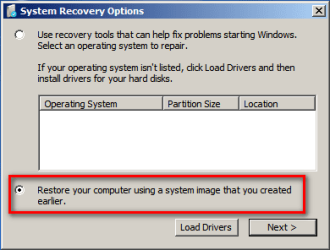
Also using Windows 7 built-in tools, it couldn't be simpler. Whenever I need to restore an image, I just boot with Windows 7 DVD, choose Repair your computer, and then choose an image I've stored on external drive.

2010-12-26_204240.png

Kari
 

My Computer My Computer

At a glance

Windows 10 Pro x64 EN-GB1.6 GHz Intel Core i7-720QM Processor6 GBATI Mobility Radeon HD 5850 Graphics
Computer type
Laptop
Computer Manufacturer/Model Number
HP ENVY 17-1150eg
OS
Windows 10 Pro x64 EN-GB
CPU
1.6 GHz Intel Core i7-720QM Processor
Memory
6 GB
Graphics Card(s)
ATI Mobility Radeon HD 5850 Graphics
Sound Card
Beats sound system with integrated subwoofer
Monitor(s) Displays
17" laptop display, 22" LED and 32" Full HD TV through HDMI
Screen Resolution
1600*900 (1), 1920*1080 (2&3)
Hard Drives
Internal: 2 x 500 GB SATA Hard Disk Drive 7200 rpm
External: 2TB for backups, 3TB USB3 network drive for media
Cooling
As Envy runs a bit warm, I have it on a Cooler Master pad
Keyboard
Logitech diNovo Media Desktop Laser (bluetooth)
Mouse
Logitech Performance Mouse MX
Internet Speed
50/10 Mbps VDSL
Antivirus
Windows Defender 4.3.9431.0
Browser
Maxthon 3.5.2., IE11
Or buy Acronis True Image as was suggested and install the Startup Recovery Manager. This give the option to press F11 at boot which launches ATI and alllows you to restore your backup image. I like it as it does not require me to boot a CD first.
 

My Computer My Computer

At a glance

Windows 10 Pro X64Intel Quad Core i7-4770 @ 3.4Ghz16.0GB PC3-12800 DDR3 SDRAM 1600 MHzIntel Integrated HD Graphics
Computer type
PC/Desktop
Computer Manufacturer/Model Number
Lenovo IdeaCenter 450
OS
Windows 10 Pro X64
CPU
Intel Quad Core i7-4770 @ 3.4Ghz
Memory
16.0GB PC3-12800 DDR3 SDRAM 1600 MHz
Graphics Card(s)
Intel Integrated HD Graphics
Sound Card
Realtek HD Audio
Monitor(s) Displays
HP 22" LCD
Screen Resolution
1680 x 1050
Hard Drives
250GB Samsung EVO SATA-3 SSD
2TB Seagate ST2000DM001 SATA-2
1.5TB Seagate ST3150041AS SATA
Keyboard
Dell USB
Mouse
Lenovo USB
Internet Speed
Cable via Road Runner 3MB Upload, 30MB Download
Antivirus
Windows Defender, MBAM Pro, MBAE
Browser
Seamonkey
Other Info
UEFI/GPT
PLDS DVD-RW DH16AERSH
Here is what I am using with 100% success. I have restored more than 20 times without any problems: http://www.sevenforums.com/tutorials/73828-imaging-free-macrium.html?ltr=I

For Ghost, you need V15 in Win7 - I used Ghost14 for Vista, but that is a lot more complicated than Macrium.

I'm going to have to try Macrium, Wolfgang, as I've had Acronis, Paragon and Win7 backup imaging fail at one time or another and would like to find one which always works. Thanks for the recommendatino.
 
Here is what I am using with 100% success. I have restored more than 20 times without any problems: http://www.sevenforums.com/tutorials/73828-imaging-free-macrium.html?ltr=I

For Ghost, you need V15 in Win7 - I used Ghost14 for Vista, but that is a lot more complicated than Macrium.

I'm going to have to try Macrium, Wolfgang, as I've had Acronis, Paragon and Win7 backup imaging fail at one time or another and would like to find one which always works. Thanks for the recommendatino.
Greg, for you that will be a piece of cake. Today I made my first backup to a USB3 attached external (on my Sony Vaio Christmas present). I'll have to test how the Linux recovery program can deal with that.
 

My Computer My Computer

At a glance

Vista, Windows7, Mint Mate, Zorin, Windows 8from 1.6GHz Duo to i7
Computer Manufacturer/Model Number
HP, Dell, Gateway, Toshiba - 4 laptops and 2 desktops
OS
Vista, Windows7, Mint Mate, Zorin, Windows 8
CPU
from 1.6GHz Duo to i7
Monitor(s) Displays
2x HP w2207
Hard Drives
5x HDD, 7x SSD, 12x Externals
Keyboard
with trackball - no mices
Mouse
Trackball mice
Internet Speed
DSL 6000
well thanks for all the help again
i read up and and tried a few of the provided solutions that is here.
at the end of the day i think i will stay with macrium reflect.

the reason is, its its real simple for a window7 idiot like me, i dont
need all the extra functions becuase i dont think ill ever use them
and lastly its free.

i made an image then destroyed my mbr and reloaded the image
again using their recovery disk.... LOL while making the recovery disk
i chosed linux machine.... seems like windows 7 dislikes people booting
directly to prompt. hhhmmmm

any way thank you all
Tux
 

My Computer My Computer

At a glance

win 7 64bit
OS
win 7 64bit
Back
Top