Windows 7 x64 installation problem related to drivers?

ozgurasl

New member
Local time
10:38 PM
Messages
5
Hi,

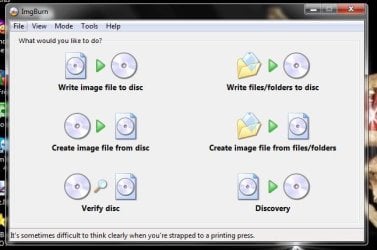
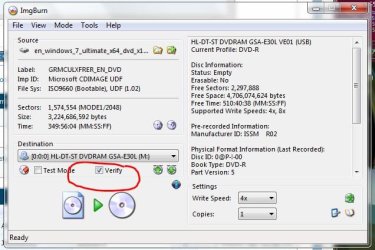
i downloaded the .iso file from Microsoft Academic Alliance. first i could not use windows 7 USB DVD download tool it gave the message "the iso file is not valid. i managed to burn the iso file to a dvd. but the set-up file is not executable. when i clicked to set-up, 32bit 64bit problem comes as an error window....

until i reached this step i downloaded and burned lots of copy

when i boot my laptop with dvd, set-up comes till to drivers selection step and i can not continue because i cant browse any drivers.

i know it is a common problem but any of the solutions have worked for me. i also contacted with MS software support representative but he did not offer me anything more than another iso burner software...

i use windows vista 32 bit dell with studio 1555 and the version i want to set-up windows 7 professional x64.

i will be so glad if somebody can help me
 

My Computer My Computer

At a glance

windows vista 32 bit
OS
windows vista 32 bit

Attachments

  • ImgBurn.JPG
    ImgBurn.JPG
    40.3 KB · Views: 3
  • ImgBurn_Verify.JPG
    ImgBurn_Verify.JPG
    54.5 KB · Views: 2

My Computer My Computer

At a glance

Win7 Enterprise, Win7 x86 (Ult 7600), Win7 x6...AMD fx8350 4ghz, AMD-32 2400mhz, AMD-64 3200m...2gb, 4gb on the Ult 7600, 4gb on Technet RTM,...Draw my own Graphics, several nVidia cards
Computer type
PC/Desktop
Computer Manufacturer/Model Number
Built them myself, Science Experiments !
OS
Win7 Enterprise, Win7 x86 (Ult 7600), Win7 x64 Ult 7600, TechNet RTM on AMD x64 (2.8Ghz)
CPU
AMD fx8350 4ghz, AMD-32 2400mhz, AMD-64 3200mhz, AMDx64 2.8G
Motherboard
SIS 755, ECS-K8M890M-M (Ult 7600), GigaByte & others
Memory
2gb, 4gb on the Ult 7600, 4gb on Technet RTM, 32gb on FX8350
Graphics Card(s)
Draw my own Graphics, several nVidia cards
Sound Card
on motherboard
Monitor(s) Displays
19" flat scr, 28" I-Inc widescr,22" Emprex Widescr, 23" Acer
Screen Resolution
1280 x 1024, 1440 x 900, 1920 x 1080
Hard Drives
6 pata Ide HD's & 2 Sata HD's
added 80gb external on Ult 7600 computer,
numerous extra 1tb, 2TB, 3Tb SATA HD's
A collection of ext HD Docks w/ HDs
PSU
430w, 550w, 600w, 700, 800, etc
Case
All Generic Full Towers
Cooling
Open Air & a few fans, some w/ colored LEDs
Keyboard
Compaq & Dell recycled from GoodWill
Mouse
Made in China Optical Wired Mouse
Internet Speed
Fast Cable InterNet
Antivirus
AVG Free on 24 different Desktops, NO Problems!
Browser
IE 8 is preferred, but use FireFox sometimes
Other Info
Linksys Routers, switches, & Hubs
Too Many USB Flash Drives to count, Biggest is 64GB !
Eight computers in my home network.
Sixteen computers at my business network.
Linked via TeamViewer !
Lots of old used spare computer parts everywhere!
Why do you need to load hardware drivers in set up?
 

My Computer My Computer

At a glance

ME/XP/Vista/Win7
OS
ME/XP/Vista/Win7
Why do you need to load hardware drivers in set up?

because setup cant find any drivers in the dvd as its own procedure. and i thought that i can add drivers manually from somewhere somehow.

now i burnd the dvd again as DocBrown said. i hope it works..
 

My Computer My Computer

At a glance

windows vista 32 bit
OS
windows vista 32 bit
What hardware drivers is set up looking for?

Have you deleted all the Vista 32bit install?
 

My Computer My Computer

At a glance

ME/XP/Vista/Win7
OS
ME/XP/Vista/Win7
If you are connected to the internet during the install, win7 will find 99% of the drivers needed ;)
 

My Computer My Computer

At a glance

Win7 Enterprise, Win7 x86 (Ult 7600), Win7 x6...AMD fx8350 4ghz, AMD-32 2400mhz, AMD-64 3200m...2gb, 4gb on the Ult 7600, 4gb on Technet RTM,...Draw my own Graphics, several nVidia cards
Computer type
PC/Desktop
Computer Manufacturer/Model Number
Built them myself, Science Experiments !
OS
Win7 Enterprise, Win7 x86 (Ult 7600), Win7 x64 Ult 7600, TechNet RTM on AMD x64 (2.8Ghz)
CPU
AMD fx8350 4ghz, AMD-32 2400mhz, AMD-64 3200mhz, AMDx64 2.8G
Motherboard
SIS 755, ECS-K8M890M-M (Ult 7600), GigaByte & others
Memory
2gb, 4gb on the Ult 7600, 4gb on Technet RTM, 32gb on FX8350
Graphics Card(s)
Draw my own Graphics, several nVidia cards
Sound Card
on motherboard
Monitor(s) Displays
19" flat scr, 28" I-Inc widescr,22" Emprex Widescr, 23" Acer
Screen Resolution
1280 x 1024, 1440 x 900, 1920 x 1080
Hard Drives
6 pata Ide HD's & 2 Sata HD's
added 80gb external on Ult 7600 computer,
numerous extra 1tb, 2TB, 3Tb SATA HD's
A collection of ext HD Docks w/ HDs
PSU
430w, 550w, 600w, 700, 800, etc
Case
All Generic Full Towers
Cooling
Open Air & a few fans, some w/ colored LEDs
Keyboard
Compaq & Dell recycled from GoodWill
Mouse
Made in China Optical Wired Mouse
Internet Speed
Fast Cable InterNet
Antivirus
AVG Free on 24 different Desktops, NO Problems!
Browser
IE 8 is preferred, but use FireFox sometimes
Other Info
Linksys Routers, switches, & Hubs
Too Many USB Flash Drives to count, Biggest is 64GB !
Eight computers in my home network.
Sixteen computers at my business network.
Linked via TeamViewer !
Lots of old used spare computer parts everywhere!
If you are connected to the internet during the install, win7 will find 99% of the drivers needed ;)

i burned the cd again but it did not work properly...i think i will ask for another try to download the iso file...

unfortunately there is no chance to connect to internet because i cant run the setup under vista, i have to boot the computer with dvd... i also downloaded x64 German version and it worked properly during burning i could burn the dvd with windows 7 dvd usb tool. then i tried to run the setup but i had the error message says i have to boot to set up. i booted but set up could not find the drivers again...

now i use German windows 7 x64 even though i am not so comfortable as English.

these are the results my last tries...

thanks everybody who replied...

i can try other solutions when they r offered
 

My Computer My Computer

At a glance

windows vista 32 bit
OS
windows vista 32 bit
What hardware drivers is set up looking for?

Have you deleted all the Vista 32bit install?

Have you deleted all the Vista 32bit install?
 

My Computer My Computer

At a glance

ME/XP/Vista/Win7
OS
ME/XP/Vista/Win7
Download the ISO again from your source. You paid them for it so you should have unlimited access to the ISO for download. If not, here is where MS made good on Student version when ISO wasn't provided at first: Microsoft Fixes Windows 7 Student Edition Upgrade Problems

Then burn the ISO to DVD exactly as suggested.

Back up your files externally, make your Recovery DIsks or save a backup image of the entire HD first so you have a path back to factory condition. Then wipe the HD of all code: SSD / HDD : Optimize for Windows Reinstallation

If you install to wiped HD, the installer will issue a 100mb System Reserved boot partition which conveniently places the Repair Console (normally only on the DVD or Repair CD) on the F8 Advanced Boot Tools menu. So I would choose Custom Install and then Drive Options to partition as you wish and format: Clean Install Windows 7

If you have Upgrade version and wipe the HD, skip inserting the key during install and do one of the workarounds given here for installing to a wiped HD: Clean Install with a Upgrade Windows 7 Version

The installer is mostly driver-complete, with newer arriving quickly via optional Windows Updates. Just in case, have your Ethernet/Wireless driver on flash stick or CD so you can get online to Update quickly. Then enable hardware driver auto-updating: http://windows.microsoft.com/en-US/w...-your-hardware

Any drivers then missing in Device Manager can be found on the Support Downloads webpage for your model computer or device. Driver Install - Device Manager

Install updates and then programs slowly over time to gauge performance after each. Don't let any programs write themselves into msconfig>Startup as they slow startup, become freeloaders on your RAM/CPU and can spy on you. I only allow AV and gadgets. Startup Programs - Change

Use a lightweight free AV like MS Security Essentials which works perfectly with Windows 7 Firewall. http://www.microsoft.com/security_essentials/

When it is finished, clean and order the HD perfectly using state-of-the-art free CCleaner then Auslogics Disk and Registry defraggers monthly.
CCleaner - Free software downloads and software reviews - CNET Download.com
Auslogics Disk Defrag - Reviews and free Auslogics Disk Defrag downloads at Download.com
Auslogics Registry Defrag - Free software downloads and software reviews - CNET Download.com

Then save a Windows 7 Backup image externally so you never have to reinstall again, just reimage the HD or replacement using DVD or Repair CD. Backup Complete Computer - Create an Image Backup
 
Back
Top