Which is the best uninstaller?

I'm using Revo,and It's good to me. In general, all programs for this purpose do the same things as Revo...
 

My Computer

Computer type
PC/Desktop
Computer Manufacturer/Model Number
Custom Build
OS
Windows 10 Pro x64
CPU
Intel Core i5 4440 @Stock
Motherboard
Gigabyte Z97 D3H
Memory
4 x 4GB HyperX Fury DDR3
Graphics Card(s)
Gigabyte GTX 1050Ti O4G
Sound Card
Integrated
Monitor(s) Displays
Dell P2417H
Screen Resolution
1920 x 1080
Hard Drives
Samsung EVO 850 120GB / Toshiba DT01ACA050 1TB 7200prm 32MB
PSU
Riotoro Onyx 750W
Case
NZXT H500 Black-Red
Cooling
Stock CPU + NZXT 120mm + 2x120mm red fans
Keyboard
Modecom Volcano Lanparty
Mouse
Asus ROG Gladius / DeepCool E-Pad Plus
Internet Speed
DOCSIS 50/3 Mbit
Browser
Google Chrome
Other Info
Asus K55VJ(i5 3210M, GT635M / 2GB, 8GB DDR3, 500GB HDD)

My Computer

Computer type
Laptop
Computer Manufacturer/Model Number
Sony Vaio VPCEB47GM Laptop
OS
Win 7 Pro 64-bit
CPU
Intel i5 2.4 Ghz
Memory
8GB DDR3
Graphics Card(s)
Intel HD 3000
Sound Card
IDT High Definition
Monitor(s) Displays
15.6 WGXA Anti-Glare LED
Screen Resolution
1280x800
Hard Drives
640Gb 7200rpm
Antivirus
MSE
Browser
Opera (primary) with IE9 backup
Good post and he keeps his list fairly well updated.
 

My Computer

Computer Manufacturer/Model Number
Home built
OS
Windows 7 Ultimate 32 bit
CPU
Intel(R) Pentium(R) 4 CPU 3.00GHz
Motherboard
ASUS P4P800-VM Motherboard Chipset: Intel 865G + ICH5
Memory
2.50 GB RAM
Graphics Card(s)
NVIDIA GeForce 7600 GS
Sound Card
SoundMax Integrated Digital Audio (Chip)
Monitor(s) Displays
ViewSonic VX 1962 wm
Screen Resolution
1680 X 1050
Hard Drives
Seagate Barracuda 7200.10 80 GB
ST380215A ATA Device 18.6 GB
Western Digital "My Book" external hard drive 750 GB
Cooling
Fan based
Keyboard
Microsoft Comfort Curve Keyboard 2000 v10 USB
Mouse
Logitec optic USB
Internet Speed
3.01 Mb/s download 0.64 Mb/s upload
I've never seen a single recommendation not to uninstall bloatware from a computer's hard drive, and it makes me wonder why anyone would allow 100,000's or even 1,000,000's of completely useless keys and values from those same uninstalled programs plus all other uninstalled sofware over time to continue to remain in and bloat the Registry?

~Maxx~

RevoUninstallerLogo.png
 

My Computer

Computer Manufacturer/Model Number
HP HPE 270f
OS
Windows 7 x64 Home Premium
CPU
Intel Core i7 930 @ 2.8 Ghz Socket 1366 LGA
Motherboard
Pegatron Truckee v1.04E41
Memory
8 GB 1366 Mhz DDR3 (PC3-10700) RAM
Graphics Card(s)
ATI Radeon 5770 1 GB DDR5 RAM
Sound Card
Realtech High Definition
Monitor(s) Displays
32" Sony Bravia
Screen Resolution
1366 X 768
Hard Drives
Intel 25nm 120 GB Series 320 SSD HD Tune- 265 MBps Read/ 130 MBps Write

LaCie 1TB + 1TB RAID 0 eSATA Drive HD Tune- 160 MBps Read/ 90 MBps Write
Keyboard
Logitech Illuminated
Mouse
Logitech MX Revolution
Internet Speed
36.4 Mbps Maximum on a 37 Mbps Motorola SB501 Modem
Most of us reinstall frequently enough to keep registry bloat down. Show me a bona fide study that demonstrates increased performance from deleting unused and useless keys. Don't get me wrong; I use Revo and Ccleaner to removes keys form software and hardware I have uninstalled.
 

My Computer

Computer Manufacturer/Model Number
Home built
OS
Windows 7 Ultimate 32 bit
CPU
Intel(R) Pentium(R) 4 CPU 3.00GHz
Motherboard
ASUS P4P800-VM Motherboard Chipset: Intel 865G + ICH5
Memory
2.50 GB RAM
Graphics Card(s)
NVIDIA GeForce 7600 GS
Sound Card
SoundMax Integrated Digital Audio (Chip)
Monitor(s) Displays
ViewSonic VX 1962 wm
Screen Resolution
1680 X 1050
Hard Drives
Seagate Barracuda 7200.10 80 GB
ST380215A ATA Device 18.6 GB
Western Digital "My Book" external hard drive 750 GB
Cooling
Fan based
Keyboard
Microsoft Comfort Curve Keyboard 2000 v10 USB
Mouse
Logitec optic USB
Internet Speed
3.01 Mb/s download 0.64 Mb/s upload
Show me a bona fide study that demonstrates increased performance from deleting unused and useless keys..

I never said that this was a performance issue only a housekeeping issue in that I eschew bloat of any kind even in the Registry!

PS- Many of us did not receive installation disks when we purchased our computers.

~Maxx~

RevoUninstallerLogo.png
 

My Computer

Computer Manufacturer/Model Number
HP HPE 270f
OS
Windows 7 x64 Home Premium
CPU
Intel Core i7 930 @ 2.8 Ghz Socket 1366 LGA
Motherboard
Pegatron Truckee v1.04E41
Memory
8 GB 1366 Mhz DDR3 (PC3-10700) RAM
Graphics Card(s)
ATI Radeon 5770 1 GB DDR5 RAM
Sound Card
Realtech High Definition
Monitor(s) Displays
32" Sony Bravia
Screen Resolution
1366 X 768
Hard Drives
Intel 25nm 120 GB Series 320 SSD HD Tune- 265 MBps Read/ 130 MBps Write

LaCie 1TB + 1TB RAID 0 eSATA Drive HD Tune- 160 MBps Read/ 90 MBps Write
Keyboard
Logitech Illuminated
Mouse
Logitech MX Revolution
Internet Speed
36.4 Mbps Maximum on a 37 Mbps Motorola SB501 Modem
Revo is quite good, and clean, depends how you select uninstallation method.
 

My Computer

OS
Windows 7 Home Premium x64
CPU
Intel Core 2 Quad Q8200 @ 2.33GHz
Motherboard
Asus
Memory
4GB of RAM
Graphics Card(s)
nVidia GeForce 9500GT
Monitor(s) Displays
Samsung SyncMaster B1930
Screen Resolution
1366x768
Hard Drives
SATA 320GB
SATA 500GB
Keyboard
Logitech
Mouse
Microsoft Hardware
Internet Speed
< 100KB/s
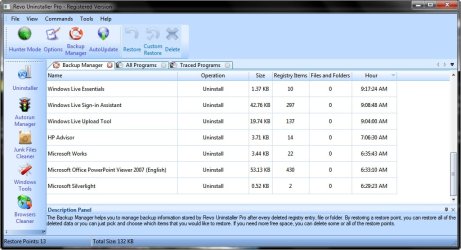
Revo Uninstaller also keeps a detailed record of all Registry keys and values that have been removed for each and every program that it has uninstalled and in addition Revo does a full Registry Backup each day.

~Maxx~

RevoUninstallerLogo.png
 

Attachments

  • Revo Reg Backup.jpg
    Revo Reg Backup.jpg
    77.7 KB · Views: 48

My Computer

Computer Manufacturer/Model Number
HP HPE 270f
OS
Windows 7 x64 Home Premium
CPU
Intel Core i7 930 @ 2.8 Ghz Socket 1366 LGA
Motherboard
Pegatron Truckee v1.04E41
Memory
8 GB 1366 Mhz DDR3 (PC3-10700) RAM
Graphics Card(s)
ATI Radeon 5770 1 GB DDR5 RAM
Sound Card
Realtech High Definition
Monitor(s) Displays
32" Sony Bravia
Screen Resolution
1366 X 768
Hard Drives
Intel 25nm 120 GB Series 320 SSD HD Tune- 265 MBps Read/ 130 MBps Write

LaCie 1TB + 1TB RAID 0 eSATA Drive HD Tune- 160 MBps Read/ 90 MBps Write
Keyboard
Logitech Illuminated
Mouse
Logitech MX Revolution
Internet Speed
36.4 Mbps Maximum on a 37 Mbps Motorola SB501 Modem

My Computer

Computer type
Laptop
Computer Manufacturer/Model Number
Sony Vaio VPCEB47GM Laptop
OS
Win 7 Pro 64-bit
CPU
Intel i5 2.4 Ghz
Memory
8GB DDR3
Graphics Card(s)
Intel HD 3000
Sound Card
IDT High Definition
Monitor(s) Displays
15.6 WGXA Anti-Glare LED
Screen Resolution
1280x800
Hard Drives
640Gb 7200rpm
Antivirus
MSE
Browser
Opera (primary) with IE9 backup
i use your uninstaller and find it great. the only thing i will say about it is that when it goes through the first step which is the programes uninstall proccess it asks you to restart now. if ya do this it skips the last two steps which are to clean up reg entries and remove junk files. if ya just click restart later it will carry on to the next two steps and fully remove everything related to the programe off the computer.

i also use tune up untilities to clean the reg and disks. using the one click maintenance is a handy oul yoke cause ya can set it to run once a week or when ever suites ya. keeps on top of the reg, and anything unused on the computer that might be slowing it down or causing problems!
 

My Computer

Computer Manufacturer/Model Number
Acer Aspire x33000
OS
Windows 7 Home Premium 64bit
CPU
AMD Athlon x2
Motherboard
Acer wmcp78m
Memory
3g Ram and 10g Virtual
Graphics Card(s)
Nivida Gforce 9
Screen Resolution
1920 x 1080
Be VERY careful with registry cleaning. Win 7 is not XP.
 

My Computer

Computer Manufacturer/Model Number
Home built
OS
Windows 7 Ultimate 32 bit
CPU
Intel(R) Pentium(R) 4 CPU 3.00GHz
Motherboard
ASUS P4P800-VM Motherboard Chipset: Intel 865G + ICH5
Memory
2.50 GB RAM
Graphics Card(s)
NVIDIA GeForce 7600 GS
Sound Card
SoundMax Integrated Digital Audio (Chip)
Monitor(s) Displays
ViewSonic VX 1962 wm
Screen Resolution
1680 X 1050
Hard Drives
Seagate Barracuda 7200.10 80 GB
ST380215A ATA Device 18.6 GB
Western Digital "My Book" external hard drive 750 GB
Cooling
Fan based
Keyboard
Microsoft Comfort Curve Keyboard 2000 v10 USB
Mouse
Logitec optic USB
Internet Speed
3.01 Mb/s download 0.64 Mb/s upload
I use Revo Portable, works great and no need to install :)
 

My Computer

OS
windows 7 ultimate X64 bit
I use Revo Portable, works great and no need to install :)

Is this portable .exe based on the standard version of the Revo Uninstaller or the Pro version that features native support for 64 bit Operating Systems?

~Maxx~

RevoUninstallerLogo.png
 

My Computer

Computer Manufacturer/Model Number
HP HPE 270f
OS
Windows 7 x64 Home Premium
CPU
Intel Core i7 930 @ 2.8 Ghz Socket 1366 LGA
Motherboard
Pegatron Truckee v1.04E41
Memory
8 GB 1366 Mhz DDR3 (PC3-10700) RAM
Graphics Card(s)
ATI Radeon 5770 1 GB DDR5 RAM
Sound Card
Realtech High Definition
Monitor(s) Displays
32" Sony Bravia
Screen Resolution
1366 X 768
Hard Drives
Intel 25nm 120 GB Series 320 SSD HD Tune- 265 MBps Read/ 130 MBps Write

LaCie 1TB + 1TB RAID 0 eSATA Drive HD Tune- 160 MBps Read/ 90 MBps Write
Keyboard
Logitech Illuminated
Mouse
Logitech MX Revolution
Internet Speed
36.4 Mbps Maximum on a 37 Mbps Motorola SB501 Modem

My Computer

OS
windows 7 ultimate X64 bit
According to the Revo website the freeware v1.91 does not have full native 64 bit support as the v2.5.1 Pro version has. Even before I bought my Win 7computer I researched this subject because I knew that I would have to remove several GB of bloatware from my net HP computer.

The first thing I did when I got the Win 7 x64 computer last July was to install Revo Uninstaller Pro x64 which I already had a licence for and then I started the massive amount of software removals with the king of all trialware Norton Internet Security which Revo handled with ease as it removed 1,000's of NIS Registry keys and almost 10,000 folders which I now do not have to keep on my HDD in perpetuity! I have Revo Pro x64 for ridding me of all that worthless junk on my x64 computer!

~Maxx~

RevoUninstallerLogo.png
 

Attachments

  • Revo Free vs Pro.jpg
    Revo Free vs Pro.jpg
    6 KB · Views: 7

My Computer

Computer Manufacturer/Model Number
HP HPE 270f
OS
Windows 7 x64 Home Premium
CPU
Intel Core i7 930 @ 2.8 Ghz Socket 1366 LGA
Motherboard
Pegatron Truckee v1.04E41
Memory
8 GB 1366 Mhz DDR3 (PC3-10700) RAM
Graphics Card(s)
ATI Radeon 5770 1 GB DDR5 RAM
Sound Card
Realtech High Definition
Monitor(s) Displays
32" Sony Bravia
Screen Resolution
1366 X 768
Hard Drives
Intel 25nm 120 GB Series 320 SSD HD Tune- 265 MBps Read/ 130 MBps Write

LaCie 1TB + 1TB RAID 0 eSATA Drive HD Tune- 160 MBps Read/ 90 MBps Write
Keyboard
Logitech Illuminated
Mouse
Logitech MX Revolution
Internet Speed
36.4 Mbps Maximum on a 37 Mbps Motorola SB501 Modem
If I'm not mistaken, Revo doesn't support x64 systems, isn't that correct?

Edit: Yes, I just checked, according to their site x64 systems and W7 are not supported, although it appears people are using it successfully on W7 systems.

Personally, I use Your Uninstaller Pro, but would have like to try Revo if it worked on x64 Os's.

In any event, there is no doubt that the regular Windows uninstaller from Control Panel leaves a lot of stuff behind in almost every single uninstall that it performs, so I feel there is real value in using an uninstaller that digs into the registry and removes most, if not all, of those entries that the regular uninstaller leaves behind.

Of course, one can also get rid of these left over registry entries by using a registry cleaner. I realize Registry cleaners have a bad name around here, but I haven't had a problem using them and initially thousands of entries are usually flagged for removal the first time a cleaner is run on a system that has been in use for a while.

I usually use the registry cleaner in TuneUp Utilities which either automatically backs up the registry or records exactly what it is cleaning before it performs any cleaning, so any actions it performs can very easily be undone if there should be a problem, however, I have never experienced a problem using that particular registry cleaner. It is not the most aggressive cleaner out there, but it seems to be very safe, ime.

Where are you guys getting your information that Revo does not support 64 bit systems? The free version is 32 bit only, not the Pro.
 

My Computer

Computer Manufacturer/Model Number
the pig mobile
OS
Win 7 64, Vista64
CPU
X4 955
Motherboard
MSI 790FX GD70
Memory
4 gigs
Graphics Card(s)
GTX 480
Sound Card
Asus STX
Monitor(s) Displays
Alienware 23in
Hard Drives
4 or 5 I don't remember?
PSU
Cooler master 1000watt
Case
UFO, about the size of a real UFO
Cooling
Water
Where are you guys getting your information that Revo does not support 64 bit systems? The free version is 32 bit only, not the Pro.

Exactly! One of the primary functions that differentiates Revo Uninstaller Pro from the traditional 32 bit freeware version is that it is compatible with 64 bit Operating Systems including Windows 7.

RevoPro___2.png


~Maxx~

RevoPro.png
 
Last edited:

My Computer

Computer Manufacturer/Model Number
HP HPE 270f
OS
Windows 7 x64 Home Premium
CPU
Intel Core i7 930 @ 2.8 Ghz Socket 1366 LGA
Motherboard
Pegatron Truckee v1.04E41
Memory
8 GB 1366 Mhz DDR3 (PC3-10700) RAM
Graphics Card(s)
ATI Radeon 5770 1 GB DDR5 RAM
Sound Card
Realtech High Definition
Monitor(s) Displays
32" Sony Bravia
Screen Resolution
1366 X 768
Hard Drives
Intel 25nm 120 GB Series 320 SSD HD Tune- 265 MBps Read/ 130 MBps Write

LaCie 1TB + 1TB RAID 0 eSATA Drive HD Tune- 160 MBps Read/ 90 MBps Write
Keyboard
Logitech Illuminated
Mouse
Logitech MX Revolution
Internet Speed
36.4 Mbps Maximum on a 37 Mbps Motorola SB501 Modem
Hi guys, I would appreciate it if you could comment on this issue => Is it beter to remove the preinstalled trials of antivirus, antispyware etc. programs using Revo or their own uninstallers?
 

My Computer

OS
windows 7 ultimate X64 bit
Using Revo. Because with Revo you can delete the rest of files from the program,also the entries in registry...
 

My Computer

Computer type
PC/Desktop
Computer Manufacturer/Model Number
Custom Build
OS
Windows 10 Pro x64
CPU
Intel Core i5 4440 @Stock
Motherboard
Gigabyte Z97 D3H
Memory
4 x 4GB HyperX Fury DDR3
Graphics Card(s)
Gigabyte GTX 1050Ti O4G
Sound Card
Integrated
Monitor(s) Displays
Dell P2417H
Screen Resolution
1920 x 1080
Hard Drives
Samsung EVO 850 120GB / Toshiba DT01ACA050 1TB 7200prm 32MB
PSU
Riotoro Onyx 750W
Case
NZXT H500 Black-Red
Cooling
Stock CPU + NZXT 120mm + 2x120mm red fans
Keyboard
Modecom Volcano Lanparty
Mouse
Asus ROG Gladius / DeepCool E-Pad Plus
Internet Speed
DOCSIS 50/3 Mbit
Browser
Google Chrome
Other Info
Asus K55VJ(i5 3210M, GT635M / 2GB, 8GB DDR3, 500GB HDD)
Back
Top