Uninstall .NET 2.0,2.0SP1,2.0SP2,3.0,3.0SP1,3.5 when installing 3.5SP1

pstein

New member
Member
VIP
Local time
1:22 AM
Messages
244
Meanwhile on my computer I have a lot of previous .NET packages
2.0
2.0SP1
2.0SP2
3.0
3.0SP1
3.5

I thought they are cumulative. So why are older version not automatically uninstalled when a newer is installed?

When I install v3.5SP1 another version would be added.
Can I uninstall all the previous versions W(ithout loss of functionality)?

Does this work in Win7 and WinXP?

Peter
 

My Computer My Computer

At a glance

win7pro 64bit
Computer type
PC/Desktop
OS
win7pro 64bit
The previous versions provide 'backward compatibility' for older programs...
 

My Computer My Computer

At a glance

Win7 Home Premium x64 W10Pro&HomeA12 9720p 4+8 TurionII M5206GB 8GBR7
Computer type
Laptop
Computer Manufacturer/Model Number
HP 17-ak0xx, dv7 3173nr
OS
Win7 Home Premium x64 W10Pro&Home
CPU
A12 9720p 4+8 TurionII M520
Motherboard
HP 3839
Memory
6GB 8GB
Graphics Card(s)
R7
Monitor(s) Displays
24" sa550
Screen Resolution
1600x900 1920x1080
Mouse
Logitechx2
Internet Speed
120Mb/s down 12up
Microsoft .NET Framework 3.5
Brief Description
Microsoft .NET Framework 3.5 contains many new features building incrementally upon .NET Framework 2.0 and 3.0, and includes .NET Framework 2.0 service pack 1 and .NET Framework 3.0 service pack 1.

I don't know about the version included in windows 7 but if you download and install Dot Net Framework 3.5 for XP it installs Dot Net 2.0, 3.0 and 3.5. Dot net framework 1.0 is a separate download. I wouldn't uninstall any of it. I have a couple of programs that specifically look for Dot Net 2, one of them I think is the Nvidia control panel.
 

My Computer My Computer

At a glance

Windows 10 Education 64 bitAMD Phenom II X4 980 Black Edition Deneb 3.7GHz8GB 4GBx2 Kingston PC10600 DDR3 1333 MemoryZotac NVIDIA Geforce GT640 2 Gig DDR3 PCIe
Computer type
PC/Desktop
Computer Manufacturer/Model Number
Home Built
OS
Windows 10 Education 64 bit
CPU
AMD Phenom II X4 980 Black Edition Deneb 3.7GHz
Motherboard
Asus M4N68T-M V2 µATX Motherboard
Memory
8GB 4GBx2 Kingston PC10600 DDR3 1333 Memory
Graphics Card(s)
Zotac NVIDIA Geforce GT640 2 Gig DDR3 PCIe
Sound Card
VIA VT1708s High Definition Audio 8-channel Onboard
Monitor(s) Displays
22" LG E2242 1080p and 2 19" I-INC AG191D
Screen Resolution
1280x1024 - 1920x1080 - 1280x1024
Hard Drives
Crucial M100 256 GB SSD and 500 GB WD Blue SATA
PSU
Thermaltake TR 620
Case
Power Up Black ATX Mid-Tower Case
Cooling
Stock heatsink and fan
Keyboard
Logitech Wireless K350 Wave
Mouse
Logitech Wireless M570 Trackman Wheel
Internet Speed
80 Mbps Down 30 Mbps Up
Antivirus
Windows Defender
Browser
Internet Explorer 11
Other Info
HP DVD1040e Lightscribe - External USB2
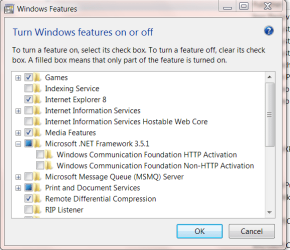
Windows 7 includes .NET as a feature. They do not appear in the Program listing. .Net 4 is the only one that is not included since it came out later.
Go to Control Panel/Program and Features and on the left click on "Turn Windows Features on of off"

Features.PNG

Everything from 2.0 through 3.5.1 is included.

Windows XP is different as they are installed like any other program. I do not know if you can get by with only 3.5.1. That would be for an XP person to clarify.

Jim :geek:
 

My Computer My Computer

At a glance

Windows 8.1 Pro w/Media Center 64bit, Windows...Phenom II X6 1100TCrucial Balistic 8gb DDR3-1866 CL9MSI R6850 Cyclone IGD5 PE
Computer type
PC/Desktop
Computer Manufacturer/Model Number
Home Built
OS
Windows 8.1 Pro w/Media Center 64bit, Windows 7 HP 64bit
CPU
Phenom II X6 1100T
Motherboard
ASUS M5A99X EVO
Memory
Crucial Balistic 8gb DDR3-1866 CL9
Graphics Card(s)
MSI R6850 Cyclone IGD5 PE
Sound Card
On Board
Monitor(s) Displays
ASUS VE258Q 25" LED with DVI-HDMI-DisplayPort
Screen Resolution
1920 x 1080
Hard Drives
Two WD Cavier Black 2TB Sata III, WD My Book Essential 2TB USB 3.0
PSU
Seasonic X650 80 Plus GOLD Modular
Case
Corsair 400R
Cooling
Antec Kuhler H2O 620, Two 120mm and four 140mm
Keyboard
Logitech K120
Mouse
Logitech Marble Mouse USB, Logitech Precision Game Pad
Internet Speed
15MB
Antivirus
Norton IS 2013, Malwarebytes Pro Beta 2
Browser
IE-11, FF-27
Other Info
APC UPS ES 750, Netgear WNR3500L Gigabit & Wireless N Router with SamKnows Test Program, Motorola SB6120 Gigabit Cable Modem. Brother HL-2170W Laser Printer, Epson V300 Scanner
Hello!

This question again! Don't worry about it, this confuses a lot of people. The issue is that cumulative can have two very subtly different meanings, and most people don't realise that it can, and so become confused. Allow me to explain.

Firstly, the answer. No, you cannot uninstall them without loss of functionality. If you want to stop reading here, then fine.

A developer writes a program which uses C# and .net Framework, as an example. He compiles it so that it uses .net Framework 3.5 Client Profile. Sadly, he wasn't a very good developer, and didn't include proper error handling. I know this sounds a bit technical. This bit can be ignored if you don't understand it. The program runs, and looks for .net 3.5. If it doesn't find it, then it crashes. Program dead. Very dead.

Another programmer writes a program for .net 2.0. Again, if .net 2.0 doesn't exist on the system, then it crashes.

The .net 3.5 program cannot run on .net 2.0, and the .net Framework 2.0 program cannot run on .net 3.5. Both need to be installed on your system side by side for good functionality of both programs.

So far, it appears that Cumulative is a word unknown to Microsoft. After all, if it is cumulative, why can't the .net 2.0 program run on .net 3.5?

For this, please navigate to C:\Windows\Microsoft.net\Framework\. Look in the folders of each version currently on your system. 2.0 has a lot of files in it. A massive number. Almost every file from 1.0 or 1.1 has been updated in version 2.0. If you target 2.0 in a program, you get mostly 2.0 assemblies. Now look in 3.0. How few files there are! Most of the time while targeting 3.0, you get 2.0 assemblies, except for very occasionally. Cumulative. Now look at 3.5. A lot are updated again. Much less likely to get 2.0 stuff now. 4.0 - a lot of new stuff. Most stuff has now been replaced since 2.0. This is what it means by cumulative.

I am willing to be corrected on any of this, and this final statement, but I am pretty sure I am right. A Service Pack will overwrite an original version quite happily. Therefore, to run every program, I think that you only need:

  • 1.0.3705
  • 1.1.4322
  • 2.0.50727
  • 3.0
  • 3.5
  • 4.0.30319
1 and 1.1 have passed. You can basically live without them now. Don't try to remove 3.5 pre-SP1. I think it has just been updated to SP1, and trying to remove it wouldn't be clever. More and more programs are using 4.0. It is a very nice library for a developer. I would recommend leaving everything alone, except for installing 4.0.

Good luck!

Richard

 

My Computer My Computer

At a glance

Vista Home Premium x86 SP2Intel Core 2 Quad Q9300 2.50GHz4 gb (DDR2 800) 400MHzATI Radeon HD 3870 (512 MBytes)
Computer Manufacturer/Model Number
Dell XPS 420
OS
Vista Home Premium x86 SP2
CPU
Intel Core 2 Quad Q9300 2.50GHz
Motherboard
Stock Dell 0TP406
Memory
4 gb (DDR2 800) 400MHz
Graphics Card(s)
ATI Radeon HD 3870 (512 MBytes)
Monitor(s) Displays
1 x Dell 2007FP and 1 x (old) Sonic flat screen
Screen Resolution
1600 x 1200 and 1280 x 1204
Hard Drives
1 x 640Gb (SATA 300) Western Digital: WDC WD6400AAKS-75A7B0 1 x 1Tb (SATA 600) Western Digital: Caviar Black, SATA 6GB/S, 64Mb cache, 8ms Western Digital: WDC WD1002FAEX-00Z3A0 ATA Device
Case
Dell XPS 420
Cooling
Stock Fan
Keyboard
Dell Bluetooth
Mouse
Advent Optical ADE-WG01 (colour change light up)
Internet Speed
Varies from 10kb/s to 170kb/s. So unreliable it is not funny
Other Info
ASUS USB 3.0 5Gbps/SATA 6Gbps - PCI-Express Combo Controller Card (U3S6)
It's important to note that 3.0 and 3.5 are NOT technically full versions of a framework - for these to work correctly, you MUST have 2.0 installed. 3.0 and 3.5x provide additional functionality, but they do NOT work without the base 2.0 package (which is why you see the 3.5 redistributable on the web installing 2.0, 3.0, and 3.5 components!!!). The simple answer is, please don't do that. You'll break the entire framework. If you really need 3.5 installed on machines, get the 3.5 SP1 full network installation package, and use that installer to install 3.5 SP1 - it will update the 2.0, 3.0, and 3.5 .NET runtime components on the machine, although there are still security updates for those versions that you will need to also install manually or via windows update after installing 3.5 SP1 on XP. If you need 3.5 for Windows 7 or Server 2008 R2, simply enable the .NET feature in the "Turn Windows features on or off" control panel applet within the Programs section (or if you're a CLI guy, use dism.exe to add or remove the feature from a cmd prompt).
 

My Computer My Computer

At a glance

Windows 10 Pro x64Intel Core i7 4790K @ 4.5GHz32GB DDR3Nvidia GeForce GTX970
Computer type
PC/Desktop
Computer Manufacturer/Model Number
Custom
OS
Windows 10 Pro x64
CPU
Intel Core i7 4790K @ 4.5GHz
Motherboard
Asus Maximus Hero VII
Memory
32GB DDR3
Graphics Card(s)
Nvidia GeForce GTX970
Sound Card
Realtek HD Audio
Screen Resolution
1920x1200
Hard Drives
1x Samsung 250GB SSD
4x WD RE 2TB (RAIDZ)
PSU
Corsair AX760i
Case
Fractal Design Define R4
Cooling
Noctua NH-D15
how can I remove all .net framework and reinstall them
 

My Computer My Computer

At a glance

Windows 7 Ultimate x64core i78g1g
Computer Manufacturer/Model Number
dell n5010
OS
Windows 7 Ultimate x64
CPU
core i7
Motherboard
isuz
Memory
8g
Graphics Card(s)
1g
Back
Top