Problem with shortcuts and shutting down

arosegirl7

New member
I am new to Windows 7. My main complaint is with the icons on the desktop. When I click on one it takes about 30 seconds to open, XP opened immediately.

My second problem is when I am working in Paint Shop Pro it will tell me
Windows is having a problem and is shutting down. I can't save my work and
lose everything.

Any help out there for my problems.
Many thanks!
 

My Computer

OS
64 bit
Neither of those things are normal for Win 7. The icons should open programs more or less immediately, and if windows shuts down like that there is a problem with the software.

A lot more information is needed to diagnose such problems.

You can use this;

Speccy - System Information - Free Download

<http://www.piriform.com/speccy>

to find out more about your system.

Download and install it. Fill out the "My System Specs" ( Lower left of your post viewing window ), using the information you get from "speccy". Then we have some basis for diagnostics.

Regards....Mike Connor
 

My Computer

OS
Several, including Windows 7 x64 Ultimate
It would help if we knew your hardware specs.
 

My Computer

Computer Manufacturer/Model Number
HP, Dell, Gateway, Toshiba - 4 laptops and 2 desktops
OS
Vista, Windows7, Mint Mate, Zorin, Windows 8
CPU
from 1.6GHz Duo to i7
Monitor(s) Displays
2x HP w2207
Hard Drives
5x HDD, 7x SSD, 12x Externals
Keyboard
with trackball - no mices
Mouse
Trackball mice
Internet Speed
DSL 6000
I checked and it is $24.95 to download it.
I have a Dell Studio XPS 8100 a 64 bit OS, Intel core(T)i5 CPU
[email protected] 320 GHz, 6.00 GB RAM

Do you need any more info to help me?
Thank you!
 

My Computer

OS
64 bit
I checked and it is $24.95 to download it.
I have a Dell Studio XPS 8100 a 64 bit OS, Intel core(T)i5 CPU
[email protected] 320 GHz, 6.00 GB RAM

Do you need any more info to help me?
Thank you!

Speccy is free.

From the same people who make CCleaner, Piriform.

Piriform - Products

<http://www.piriform.com/products>

Quite a lot of info is required in order to carry out sensible diagnostics. Without the info it's quite impossible to offer any useful advice on various problems.

Regards....Mike Connor
 

My Computer

OS
Several, including Windows 7 x64 Ultimate
Do you have this problem with all shortcuts on the desktop?

As regards Paint Shop Pro, this could well be an issue with the program that requires an update from the vendor.
 

My Computer

Computer type
PC/Desktop
Computer Manufacturer/Model Number
Dwarf Dwf/11/2012 r09/2013
OS
Windows 8.1 Pro RTM x64
CPU
Intel Core-i5-3570K 4-core @ 3.4GHz (Ivy Bridge) (OC 4.4GHz)
Motherboard
ASRock Z77 Extreme4-M
Memory
4 x 4GB DDR3-1600 Corsair Vengeance CMZ8GX3M2A1600C9B (16GB)
Graphics Card(s)
MSI GeForce GTX770 Gaming OC 2GB
Sound Card
Realtek High Definition on board solution (ALC 898)
Monitor(s) Displays
ViewSonic VA1912w Widescreen (VGA)
Screen Resolution
1440x900
Hard Drives
OCZ Agility 3 SSD 120GB SATA III x2 (RAID 0)
Samsung HD501LJ 500GB SATA II x2
Hitachi HDS721010CLA332 1TB SATA II
Iomega 1.5TB Ext USB 2.0
WD 2.0TB Ext USB 3.0
PSU
XFX Pro Series 850W Semi-Modular
Case
Gigabyte IF233
Cooling
1 x 120mm Front Inlet 1 x 120mm Rear Exhaust
Keyboard
Microsoft Comfort Curve Keyboard 3000 (USB)
Mouse
Microsoft Comfort Mouse 3000 for Business (USB)
Internet Speed
NetGear DG834Gv3 ADSL Modem/Router (Ethernet) ~4.0 Mb/s (O2)
Antivirus
Avast! 8.0.1497
Browser
IE 11
Other Info
Optical Drive: HL-DT-ST BD-RE BH10LS30 SATA Bluray
Lexmark S305 Printer/Scanner/Copier (USB)
WEI Score: 8.1/8.1/8.5/8.5/8.25
Asus Eee PC 1011PX Netbook (Windows 7 x86 Starter)
This is what Speccy says:
OS Windows 7 Home Premium 64 bit
CPU Intel core i5 650 @3.20GHz 21 C
Ram 6.0GB Dual-channel DDR3 @ 665MHZ (9-9-9-24)
Motherboard Dell Inc. OG3HR7 (CPU 1)
Graphics DellST2310 @ 1920x1080 ATI Radeon HD 5450
Hard Drives 977GB Seagate ST31000528AS (RAID) 31 C
Optical Drives PLDS DVD+RW DH-16ABS
Audio Realtek High Definition Audio

Thanks again!
 

My Computer

OS
64 bit
Well, it may or may not help but won't hurt to try. Do a full scan with Malwarebytes
Also, what antivirus program your using and what're your startup items? (Win key+R, msconfig>startup tab)
 

My Computer

Computer Manufacturer/Model Number
HCL
OS
Winbdows 7 ultimate x64 | Ubuntu 12.04 x64 LTS
CPU
Core 2 Duo e7400 @ 2.90GHz
Motherboard
Gigabyte G31M-ES2L
Memory
3GB DDR2
Graphics Card(s)
Asus Nvidia GTX 560Ti 1GB
Sound Card
On-board
Monitor(s) Displays
HCL eZeeBee 18.5" LCD
Screen Resolution
1366x768 @ 60Hz
Hard Drives
Western Digital 320GB
PSU
Corsair CX500 V2 500W
Cooling
Stock
Keyboard
Stock
Mouse
Stock
Internet Speed
15-25kBps D/L | 10kBps U/L | Hey Don't laugh
I use Norton. I have Malwarebytes, and Superantispyware I will do a scan. Don't know about the startup items.
 

My Computer

OS
64 bit
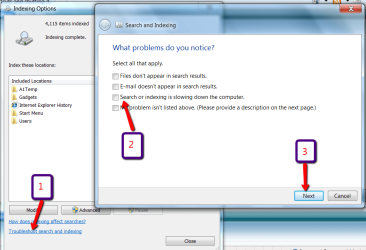
It may be an indexing problem. Type index into start search and go to indexing options. The follow the steps on the picture.
 

Attachments

  • 2011-01-07_0950.png
    2011-01-07_0950.png
    145 KB · Views: 6

My Computer

Computer Manufacturer/Model Number
HP, Dell, Gateway, Toshiba - 4 laptops and 2 desktops
OS
Vista, Windows7, Mint Mate, Zorin, Windows 8
CPU
from 1.6GHz Duo to i7
Monitor(s) Displays
2x HP w2207
Hard Drives
5x HDD, 7x SSD, 12x Externals
Keyboard
with trackball - no mices
Mouse
Trackball mice
Internet Speed
DSL 6000
Did you clean install Win 7 or upgrade because your comp has plenty of power to run Win 7 smoothly, sounds like you have a background conflict that is causing the slow down, could be between Norton and PS, just some things to check
 

My Computer

Computer Manufacturer/Model Number
Dell XPS 730
OS
Windows 7 Home Premium 64 bit
CPU
Intel Core 2 quad Extreme Q9770 @ 3.2 GHz
Memory
4x2 GB Muskin 1600 MHz ram
Graphics Card(s)
NVidia GTX 250
Sound Card
Soundblaster X-Fi Fatality Champion
Monitor(s) Displays
2 Dell 2007WFP Ultrascans
Screen Resolution
3360 x 1050
Hard Drives
WD Black 1TB sata, 2-WD Black 500 sata, 2-Seagate 500 Go external
PSU
1000 Watt
Cooling
air
Keyboard
MS Natrual Keyboard Pro
Mouse
Logitech Wireless Trackball
Internet Speed
DSL Elite
About startup items, type 'msconfig' in start menu search and select the first option and go to the startup tab and post the items.
Personally, I'd not install Norton. I've seen many cases of slow downs caused by it. However, the choice is yours.
As a side note, temporarily exit Norton, by right clicking the norton icon and selecting exit or similar option (I may be wrong as I've never used it) and then try opening any item.
 

My Computer

Computer Manufacturer/Model Number
HCL
OS
Winbdows 7 ultimate x64 | Ubuntu 12.04 x64 LTS
CPU
Core 2 Duo e7400 @ 2.90GHz
Motherboard
Gigabyte G31M-ES2L
Memory
3GB DDR2
Graphics Card(s)
Asus Nvidia GTX 560Ti 1GB
Sound Card
On-board
Monitor(s) Displays
HCL eZeeBee 18.5" LCD
Screen Resolution
1366x768 @ 60Hz
Hard Drives
Western Digital 320GB
PSU
Corsair CX500 V2 500W
Cooling
Stock
Keyboard
Stock
Mouse
Stock
Internet Speed
15-25kBps D/L | 10kBps U/L | Hey Don't laugh
I have seen similar behavior on any computer with a shortcut pointing to something that isn't there - or is there but pointing to a slower ROM disc. This happens to me every time I access my "Games" shortcut folder. One of the game shortcuts ties to see where it is pointed.
Unfortunately, Microsoft programmed Windows for all shortcuts to be active. And there's nothing more active than your Desktop.
Here's a really quick and simple thing to try, before wasting hours of time (and maybe money) on other things... Move all your desktop items off the desktop into a folder instead. You can even leave the folder on the Desktop. See if the 30-sec wait follows the folder. If it does, it's one of those icons. Then to find out which one(s), start moving them back to the Desktop one at a time.
 

My Computer

OS
XP x86, Vista x86, Vista x64, Win7 x86, Win7 x64
I completed the scan and nothing was found.
How do I check the startup items?
Just disable them temporarily in msconfig > Startup button and reboot.
 

My Computer

Computer Manufacturer/Model Number
HP, Dell, Gateway, Toshiba - 4 laptops and 2 desktops
OS
Vista, Windows7, Mint Mate, Zorin, Windows 8
CPU
from 1.6GHz Duo to i7
Monitor(s) Displays
2x HP w2207
Hard Drives
5x HDD, 7x SSD, 12x Externals
Keyboard
with trackball - no mices
Mouse
Trackball mice
Internet Speed
DSL 6000
I posted the method above. Isn't it clear to you? And have you tried temporarily disabling Norton?
 

My Computer

Computer Manufacturer/Model Number
HCL
OS
Winbdows 7 ultimate x64 | Ubuntu 12.04 x64 LTS
CPU
Core 2 Duo e7400 @ 2.90GHz
Motherboard
Gigabyte G31M-ES2L
Memory
3GB DDR2
Graphics Card(s)
Asus Nvidia GTX 560Ti 1GB
Sound Card
On-board
Monitor(s) Displays
HCL eZeeBee 18.5" LCD
Screen Resolution
1366x768 @ 60Hz
Hard Drives
Western Digital 320GB
PSU
Corsair CX500 V2 500W
Cooling
Stock
Keyboard
Stock
Mouse
Stock
Internet Speed
15-25kBps D/L | 10kBps U/L | Hey Don't laugh
You might also like to use this;

Belarc Advisor - Free Personal PC Audit

<http://www.belarc.com/free_download.html>

it will scan your machine and tell you what is installed where etc. Also if you have all relevant security updates, and a lot of other info.


It is completely free.

Regards....Mike Connor
 

My Computer

OS
Several, including Windows 7 x64 Ultimate
I don't understand why having Norton would take my icons take so long to work.
And no, it wasn't clear to me.
 

My Computer

OS
64 bit
Back
Top