Problem with shortcuts and shutting down

I don't understand why having Norton would take my icons take so long to work.
And no, it wasn't clear to me.

Some software does not work very well together with other software. Various Norton products are well known for causing quite a few problems. Especially in conjunction with other security products.

Regards....Mike Connor
 

My Computer

OS
Several, including Windows 7 x64 Ultimate
I don't understand why having Norton would take my icons take so long to work.
And no, it wasn't clear to me.

Hi arosegirl7. Welcome to the forums. :geek:

Norton has been known to have compatibility problems.

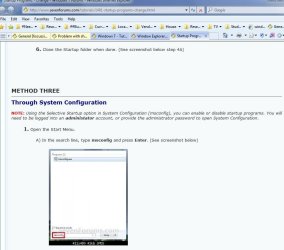
The best advice given in this thread is to disable startup items in MSConfig. You cannot do any damage doing this, as it just disables program startup files and can be re-enabled simply by goiing back into MSConfig and rechecking the checkbox next to the item.

Here is a tutorial on the matter:

http://www.sevenforums.com/tutorials/1401-startup-programs-change.html

You will be using method 3 (as per screenshot). You will have to scroll a bit down the page to get to method 3.

1) Try disabling Norton startup items first

2) Exit MSConfig and restart your system (it will likely ask you if you want to restart the system when you exit MSConfig. Choose yes).

3) Restart, see if your problem is still present.

If it is, you can disable other items, one at a time, following the procedure outlined above and in the tutorial linked to.

Post back and let us know how it went. Also, here is how you should fill out your system specs:

http://www.sevenforums.com/general-discussion/8-forum-rules-info-please-read.html#post256049

If Norton turns out to be the problem, let us know and we will post links to free and effective Anti-Virus software.

James
 

Attachments

  • MSCONFIG_Method 3.JPG
    MSCONFIG_Method 3.JPG
    94.3 KB · Views: 6

My Computer

OS
Win7U 64 RTM
CPU
Q9550
Motherboard
GA-EP45-UD3R
Memory
8GB Gskill
Graphics Card(s)
ASUS|EAH4850/HTDI/1GD3/A
Sound Card
xfi Plat
Monitor(s) Displays
Dell 2405fpw
Screen Resolution
1920x1200
Hard Drives
Seagate & WD sata Drives
PSU
Antec
Case
Antec
Keyboard
MS Natural Ergonomic 4000
Mouse
Logitech MX610 USB Cordless
I completed the scan and nothing was found.
How do I check the startup items?

If you press the "windows" key on your keyboard and the "R" Key, a run box will open


Type msconfig into that box, and another box opens;


If you go to the "startup" tab in that box, you can check or uncheck all the items that start up on your computer when you boot it. An empty box disables the file ( but does not delete it), a checked box enables it.

Regards....Mike Connor
 

My Computer

OS
Several, including Windows 7 x64 Ultimate
I finally contacted Dell Support, I was kept on the line 35 minutes, they took over my computer. Guess what?
They couldn't find or fix the problem. They could see what was happening but didn't know how to fix it. How about that?
I am going to call them Monday see if I can talk to someone that might have a solution. Thanks for all of
you trying to help me.
 

My Computer

OS
64 bit
As you wish. Nevermind, but did you try all the possible solutions posted here?
 

My Computer

Computer Manufacturer/Model Number
HCL
OS
Winbdows 7 ultimate x64 | Ubuntu 12.04 x64 LTS
CPU
Core 2 Duo e7400 @ 2.90GHz
Motherboard
Gigabyte G31M-ES2L
Memory
3GB DDR2
Graphics Card(s)
Asus Nvidia GTX 560Ti 1GB
Sound Card
On-board
Monitor(s) Displays
HCL eZeeBee 18.5" LCD
Screen Resolution
1366x768 @ 60Hz
Hard Drives
Western Digital 320GB
PSU
Corsair CX500 V2 500W
Cooling
Stock
Keyboard
Stock
Mouse
Stock
Internet Speed
15-25kBps D/L | 10kBps U/L | Hey Don't laugh
I tried everything I was told except when I typed in index I was given a totally different screen and didn't know
what to do with it.
 

My Computer

OS
64 bit
I finally contacted Dell Support, I was kept on the line 35 minutes, they took over my computer. Guess what?
They couldn't find or fix the problem. They could see what was happening but didn't know how to fix it. How about that?
I am going to call them Monday see if I can talk to someone that might have a solution. Thanks for all of
you trying to help me.
Call the Dell Headquarter and ask for a case manager. Then you get to talk to intelligent people.
 

My Computer

Computer Manufacturer/Model Number
HP, Dell, Gateway, Toshiba - 4 laptops and 2 desktops
OS
Vista, Windows7, Mint Mate, Zorin, Windows 8
CPU
from 1.6GHz Duo to i7
Monitor(s) Displays
2x HP w2207
Hard Drives
5x HDD, 7x SSD, 12x Externals
Keyboard
with trackball - no mices
Mouse
Trackball mice
Internet Speed
DSL 6000
I called Dell again, they don't have case managers, or at least that is what I was told. I got another
guy from the Philippines that I think knew what he was doing. He ran a lot of test others had not. To make a long story short he came to the conclusion my internet provider was my problem, very slow connection.
Hughes guy is to come next week..for $125 he will check it out. I will let ya'll know if he fixes it.
Again thanks for all your help.
 

My Computer

OS
64 bit
That is a very strange diagnosis. Before you spend $125, disconnect the internet cable and see whether it is happening too. If yes, open Resource Monitor.

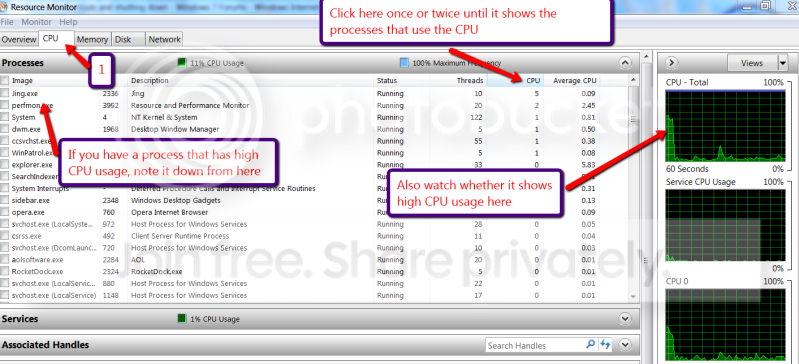
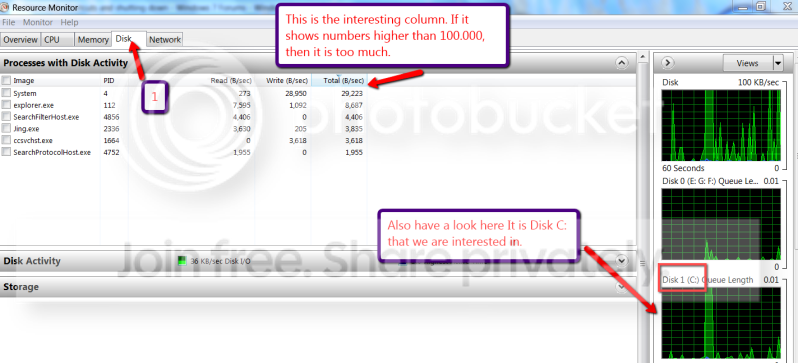
Have first look at the CPU tab and see what is eating the CPU (make sure the CPU column is set such that the big consumers appear on top). Then open the Disk tab. Maybe some process is keeping the disk busy. If the processes are not very telling, you can right click on them and check on "Analyse wait chain".

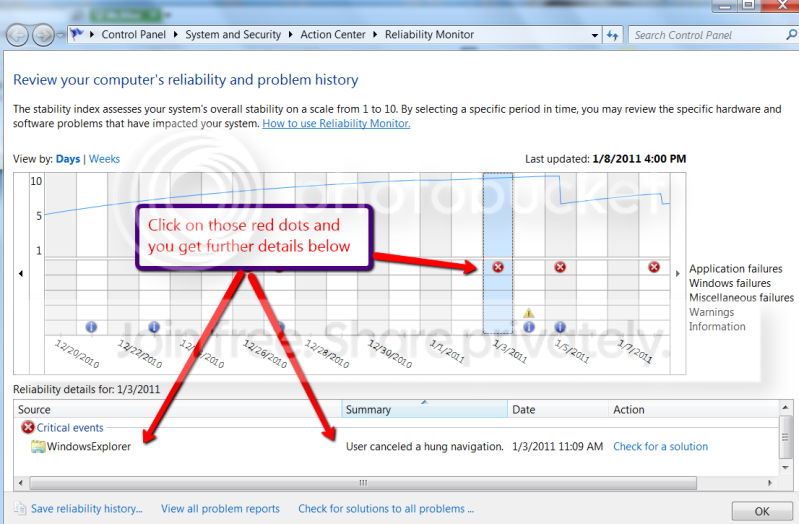
Another thing I would do is look into the Reliability History and see whether there are any red dots. Click on those and see what it says.
 

My Computer

Computer Manufacturer/Model Number
HP, Dell, Gateway, Toshiba - 4 laptops and 2 desktops
OS
Vista, Windows7, Mint Mate, Zorin, Windows 8
CPU
from 1.6GHz Duo to i7
Monitor(s) Displays
2x HP w2207
Hard Drives
5x HDD, 7x SSD, 12x Externals
Keyboard
with trackball - no mices
Mouse
Trackball mice
Internet Speed
DSL 6000
I hate to sound like such a dummy but I don't know which is my internet cable. You wouldn't believe all the wires I have under my desk. I also don't know how to check the CPU usage.
I sure hope ya'll can save me mega bucks.
 

My Computer

OS
64 bit
The internet cable comes from your Router that the ISP gave you. It is often yellow; but I also have blue and black. The plug looks similar to a USB plug (e.g. on the cable from your printer) - just a tad bigger. And do not worry. Any question is a valid question.


PS: I will make you a seperate posting on the Resource Monitor. But I first have to make a few pictures to post for you.
 

My Computer

Computer Manufacturer/Model Number
HP, Dell, Gateway, Toshiba - 4 laptops and 2 desktops
OS
Vista, Windows7, Mint Mate, Zorin, Windows 8
CPU
from 1.6GHz Duo to i7
Monitor(s) Displays
2x HP w2207
Hard Drives
5x HDD, 7x SSD, 12x Externals
Keyboard
with trackball - no mices
Mouse
Trackball mice
Internet Speed
DSL 6000
OK, Here is the little tutorial:

1. Pres the WIN Start button on the keyboard and type Resource Monitor - then hit enter. You should see a window like the first and the second picture. Click on the CPU tab (1) and follow the guidance on the picture.


2011-01-08_1647.png


2. Now click on the Disk tab (1) and follow the picture.


2011-01-08_1654.png


3. Press Start again and type Reliability History - then hit Enter. The text on the picture should explain what you are looking for:


2011-01-08_1700.png
 

My Computer

Computer Manufacturer/Model Number
HP, Dell, Gateway, Toshiba - 4 laptops and 2 desktops
OS
Vista, Windows7, Mint Mate, Zorin, Windows 8
CPU
from 1.6GHz Duo to i7
Monitor(s) Displays
2x HP w2207
Hard Drives
5x HDD, 7x SSD, 12x Externals
Keyboard
with trackball - no mices
Mouse
Trackball mice
Internet Speed
DSL 6000
Me again. I started clicking on all my icons, very strange!!! Some open immediately and others are very slow!
I haven't been using the ones that open fast. Doesn't this confuse the issue??? I made notations of which were slow and which were fast. The fast ones takes me to My computer, Olympus Master, Microsoft word, Windows Explorer. Aren't all these on my computer and don't require internet connection? Just wondering?
 

My Computer

OS
64 bit
Which are the slow ones? And did you make the test with the Internet cable disconected? And yes, the ones you listed do not need the internet, but so may be most others. Just list a few of the slowpokes.
 

My Computer

Computer Manufacturer/Model Number
HP, Dell, Gateway, Toshiba - 4 laptops and 2 desktops
OS
Vista, Windows7, Mint Mate, Zorin, Windows 8
CPU
from 1.6GHz Duo to i7
Monitor(s) Displays
2x HP w2207
Hard Drives
5x HDD, 7x SSD, 12x Externals
Keyboard
with trackball - no mices
Mouse
Trackball mice
Internet Speed
DSL 6000
The slow ones are Facebook, PSP Free tubes, Bonnie Dundee, Vics Signatures, Burnbac, Bestlawn's, Home Cooking, Yahoo.com. All of these require internet connection.
 

My Computer

OS
64 bit
OK, they are internet connections indeed. Here is what I would do: I would ask the Internet Provider to send you a new modem. When this guy comes to your house, he is going to charge you $125 regardless whether it was their fault or yours - you will not be able to tell the differnce. But a faulty modem they have to replace fro free. Maybe they do some remote tests first, but that is OK.
 

My Computer

Computer Manufacturer/Model Number
HP, Dell, Gateway, Toshiba - 4 laptops and 2 desktops
OS
Vista, Windows7, Mint Mate, Zorin, Windows 8
CPU
from 1.6GHz Duo to i7
Monitor(s) Displays
2x HP w2207
Hard Drives
5x HDD, 7x SSD, 12x Externals
Keyboard
with trackball - no mices
Mouse
Trackball mice
Internet Speed
DSL 6000
Thank you so much! It is good to have such brilliant people to help people like me that doesn't know much about the inner workings of a computer.
 

My Computer

OS
64 bit
I looked at the internet connection. The cable is yellow and there is a little light there that is blinking.
Does that tell you anything or is is supposed to?
 

My Computer

OS
64 bit
I looked at the internet connection. The cable is yellow and there is a little light there that is blinking.
Does that tell you anything or is is supposed to?
On the routers, there are usually 4 lights of which one or two are blinking. But that does not mean that the thing functions correctly.

Do something else: Open an elevated Command Prompt: go to Start > All Programs > Accessories > right click on Command Prompt > Run as administraotr. Then you get a small black window.

Here you type: tracert yahoo.com - then hit enter. Tell me what you got or make a snip with the snipping tool and attach it to your answer with the paperclip. The snipping tool is also in Accessories.

Next (still in Command Prompt) type: ping yahoo.com and hit Enter. Make a snip of that too and attach it to your next post.

But pull the little black window to a size where everything fits. You can also watch my tutorial which explains how to handle Command Prompt: http://www.sevenforums.com/tutorials/72301-command-prompt-settings.html
 

My Computer

Computer Manufacturer/Model Number
HP, Dell, Gateway, Toshiba - 4 laptops and 2 desktops
OS
Vista, Windows7, Mint Mate, Zorin, Windows 8
CPU
from 1.6GHz Duo to i7
Monitor(s) Displays
2x HP w2207
Hard Drives
5x HDD, 7x SSD, 12x Externals
Keyboard
with trackball - no mices
Mouse
Trackball mice
Internet Speed
DSL 6000
I snipped the first one and it doesn't want to attach with the paper clip. I get a window on how to manage
attachments.
 

My Computer

OS
64 bit
Back
Top