How to get rid of "Do you want to allow..."?

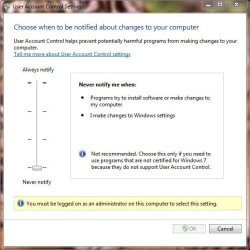
Set User Account Controls to lowest setting. It previously wouldn't allow Gadgets then, but think it will now.

Or after install, Enable Hidden Administrator then delete named User account created during install. This requires setting up a whole new desktop and file system, which is why I only do it when first installing. But you are never second-guessed again.

When I last posted this, someone replied that the same thing can be achieved by turning off User Account controls, so I mentioned it first.

Only do this if you know what you're doing. (You know who you are.)
 
It is what it is

The problem with UAC isn't just that viruses could add themselves to whitelists, it's that they could sniff the whitelists and run themselves as a program from that list - which is even harder to prevent.

Sure it would be simple for MS to implement the safe program list, which requires user input "Are you sure you want to add <program name> to the safe programs list?", but now viruses could scan that list and fork a process as a program from that list to trick the kernel, thereby nullifying that list.

I agree it is annoying, though. I keep trying to run things like CPU-Z and HWMonitor, only to find that popup on a trusted program that is run routinely. I never had Vista, but it was my understanding that UAC didn't really change from Vista to Win7 - the only thing that changed was the default security level.

I don't really mind it, but as others have said, it's not an end-all-be-all. You can do without it if you're a safe user and have other security protection (firewall, virus/worm/trojan/malware scanner).

vol7ron
 

My Computer My Computer

At a glance

Windows 7 Ultimate x64E6600 @ 3.3 (not max) @ Air Cooling6GBNvidia 9800GTX
Computer Manufacturer/Model Number
(Old system) - gearing up for an upgrade
OS
Windows 7 Ultimate x64
CPU
E6600 @ 3.3 (not max) @ Air Cooling
Motherboard
P5W DH Deluxe
Memory
6GB
Graphics Card(s)
Nvidia 9800GTX
Monitor(s) Displays
2x 22"LG Flatron L227WTG
Hard Drives
80GB Intel G2 SSD
3x 74GB WD Raptor @10000
1x1TB Seagate Barracuda @ 7200.12
PSU
Ultra 550W
Case
Ultra Light
The problem with UAC isn't just that viruses could add themselves to whitelists, it's that they could sniff the whitelists and run themselves as a program from that list - which is even harder to prevent.

Sure it would be simple for MS to implement the safe program list, which requires user input "Are you sure you want to add <program name> to the safe programs list?", but now viruses could scan that list and fork a process as a program from that list to trick the kernel, thereby nullifying that list.

I agree it is annoying, though. I keep trying to run things like CPU-Z and HWMonitor, only to find that popup on a trusted program that is run routinely. I never had Vista, but it was my understanding that UAC didn't really change from Vista to Win7 - the only thing that changed was the default security level.

I don't really mind it, but as others have said, it's not an end-all-be-all. You can do without it if you're a safe user and have other security protection (firewall, virus/worm/trojan/malware scanner).

vol7ron


Yup. Vista introduced this UAC and 7 is carrying on the legacy. I personally just leave it. I only have 1 or maybe 2 programs that require the UAC permission on a daily basis, and find I can live with the few extra seconds it adds to my day, but if you are constantly having to allow, day after day, time after time, it could get annoying.

I enabled the Hidden Super administrator in Vista, but chose to leave 7 as is.

link:

Enable the (Hidden) Administrator Account on Windows 7 or Vista - How-To Geek

Something to keep in mind if it suits your fancy.
 

My Computer My Computer

At a glance

Windows 7 ProfessionalIntel Core2 Duo CPU T6400 @ 2.00GHz3 GBlowly Intel Express Chipset WHOPPING 64 mb de...
Computer Manufacturer/Model Number
Laptop Acer Aspire 6930
OS
Windows 7 Professional
CPU
Intel Core2 Duo CPU T6400 @ 2.00GHz
Memory
3 GB
Graphics Card(s)
lowly Intel Express Chipset WHOPPING 64 mb dedicated.LOL
Monitor(s) Displays
26" RCA and 40" Haier, and laptop 17" screen
Screen Resolution
26":1366X768 40":1920X1080 Laptop Screen: 1366X768
Hard Drives
Onboard HDD 300 GB/
Seagate 1TB External HDD/
Verbatim 500 GB External HDD/
Firelite 160 GB USB HDD
Keyboard
Microsoft Intellitype Wireless Multimedia Keyboard 1.1
Mouse
Microsoft Wireless Optical Mouse 2000
Other Info
Currently using Telus DSL. I currently have a 3.0 connection, but on wait list for 15.0 connection.
Sorry for bumbing an old threat, but it comes up first on Google and I have indeed found a solution for this...

You have to open the program that you want to stop opening the confirmation window first -> leave the program open then go to it's install folder and right click on it's executable -> goto properties -> and toggle "run this program as in administror" (you should toggle it on ones and finally leave it off) -> close the program and restart it again.

Works for me, it no longer pops up the confirmation window for some reason. Don't know why this works but it does.
 

My Computer My Computer

At a glance

Windows 7
OS
Windows 7
That does not work for me. After I click to allow to run (like I have 50,000 times before) I look at the settings and the "run as administrator" box is already checked. Let's just all agree that MS has created in literature what is called a tragedy, which means the effect you wanted turns out to be the exact effect you didn't want. To wit, we're tired of constantly clicking that asinine box for programs we always run and so we set UAC off-now we have effectively no UAC checks, the same as not even having it installed. Congratulations Micro-brains, you just made Windows less secure by trying to make it more secure.

What is so hard about having the ability to white list certain programs? If it's a security concern, then give us the option to "allow for xx times then revert" "never check again" "only ask when program changes" (as in updates and patches). I know it's a hard concept to grasp, but I have confidence you can do it.

In the meantime, my friend is writing a .Net program to do just that. Really hard Micro-brains, really hard.

Sorry for bumbing an old threat, but it comes up first on Google and I have indeed found a solution for this...

You have to open the program that you want to stop opening the confirmation window first -> leave the program open then go to it's install folder and right click on it's executable -> goto properties -> and toggle "run this program as in administror" (you should toggle it on ones and finally leave it off) -> close the program and restart it again.

Works for me, it no longer pops up the confirmation window for some reason. Don't know why this works but it does.
 

My Computer My Computer

At a glance

Win 7 Ultimatei7 920 Bloomfield @ 3.8GhzOCZ Gold @ 12GBnVidia GTX295
Computer Manufacturer/Model Number
Custom
OS
Win 7 Ultimate
CPU
i7 920 Bloomfield @ 3.8Ghz
Motherboard
Gigagbyte x58 UD5 v2
Memory
OCZ Gold @ 12GB
Graphics Card(s)
nVidia GTX295
Sound Card
on board
Monitor(s) Displays
Phillips 23" graphics LCD, Asus 25.5: LCD, AOE 23" LCD
Hard Drives
OCZ Vertex 2 SSD
Intel V series SSD.
x2 Western Digital 640 Black Edition
PSU
Kinwin 1000
Case
Cooler Master Stacker
Cooling
x7 Scyth 120 Gentle Typhoon
Some rather odd logic there. If you turn off security settings because they somehow annoy you, and that makes your system less secure,that has nothing to do with Microsoft, it is your own fault.

Systems like Windows 7 are not built primarily for people who then attempt to disable or change various parts of them in order to make things more convenient for themselves. They are built primarily for people who want trouble free and secure operation, with the least personal effort.

If you are confident in disabling or changing things that you find annoying, then go ahead and do so, nobody is stopping you, but don't whine that it is somebody else's fault when something goes wrong.

Some things may well annoy you, but the same things might well save somebody else a lot of problems.

Regards....Mike Connor
 

My Computer My Computer

At a glance

Several, including Windows 7 x64 Ultimate
OS
Several, including Windows 7 x64 Ultimate
To wit, we're tired of constantly clicking that asinine box for programs we always run and so we set UAC off-now we have effectively no UAC checks, the same as not even having it installed. Congratulations Micro-brains, you just made Windows less secure by trying to make it more secure.

I have to question who has the more "micro" brain. You can't be bothered to click "yes" once in a while to protect your security, and you want to blame others and call them stupid for it.

What is so hard about having the ability to white list certain programs?

Nothing is hard about having a white list. What's hard is having a white list that isn't trivial to exploit. Just remember, anything you can do, an app can do. That's why the UAC screen goes dark, because it's putting UAC prompts in a different "window station" that apps running as the current user can't access. Thus, a rogue app can't push the "yes" button for you.

What's even harder is that users who can't be inconvenienced a little will tend to put anything that asks for elevation into the whitelist, thereby making it useless. They'll just automatically add whatever virus or spyware wants to be installed because it claims to be naked pictures of paris hilton.

If it's a security concern, then give us the option to "allow for xx times then revert" "never check again" "only ask when program changes" (as in updates and patches). I know it's a hard concept to grasp, but I have confidence you can do it.

Sadly, I have no confidence that you understand the security implications of what you're suggesting. It's not hard to add those functions. But doing so basically makes running in locked down mode pointless, and trivial to exploit.

In the meantime, my friend is writing a .Net program to do just that. Really hard Micro-brains, really hard.

Why don't you come back when he's actually done it. I know people writing all kinds of things, few of them actually succeed.
 

My Computer My Computer

At a glance

Windows 7 64 bit SP1Core i7 92012 GB (6x2GB Corsair)nVidia 250GTS
Computer Manufacturer/Model Number
Self-Built
OS
Windows 7 64 bit SP1
CPU
Core i7 920
Motherboard
Gigabyte GA-X58A-UD3R
Memory
12 GB (6x2GB Corsair)
Graphics Card(s)
nVidia 250GTS
Sound Card
Built-in
Monitor(s) Displays
2x Samsung SyncMaster 2343 (23" Widescreen)
Keyboard
Microsoft Natural Keyboard
Mouse
Logitech Laser
"I'm going to stop locking my front door and setting my alarm because I can't stand the annoyance of it."

IOW, people have no problem locking and securing their home for security reasons, yet b**ch about having to click a button on a computer screen! :rolleyes:
 
Last edited:

My Computer My Computer

At a glance

Windows 7 Pro/32 Academic. Build 7600Intel 2.3 Duo core4 GB DDRNvidia GeForce 9500 GT
Computer Manufacturer/Model Number
Custom Build
OS
Windows 7 Pro/32 Academic. Build 7600
CPU
Intel 2.3 Duo core
Motherboard
EliteGroup G31T-M
Memory
4 GB DDR
Graphics Card(s)
Nvidia GeForce 9500 GT
Sound Card
Built in
Monitor(s) Displays
Viewsonic 15" 4:3
Screen Resolution
1280 x 1024
Hard Drives
WD Caviar Black 750 GB
WD 250 GB External
PSU
Antec 450w
Keyboard
Standard windows
Mouse
Logitech USB
Internet Speed
Bellsouth DSL 6.0
Those of you who trust "a run of the mill" security software suite to protect your system if and when the UAC is disabled, consider this.

The very first step the malicious software performs is to disable third-party protection, such as Symantec, McAfee, etc., or at the very least, adds itself to the exception list. I used to think that using a lesser know product, such as Vipre, would make it harder to disable protection by the malicious software. Boy, was I wrong...:(

While UAC cannot protect against everything, especially against the end user:p, it does prevent software to run in escalated privileged level without notifying the end user. Unfortunately, the level of access provided by UAC is about the same a the *NIX platforms "su" instead of the "sudo". In another word with the UAC, there's no way limiting privileged access based on a list of UIDs.

The UAC in itself can be bypassed by malicious software, especially when the default UID created during installation with administrator level access used as a standard logon ID. The more secure way to use UAC to protect the machine is to use a standard user account and separate administrative account. This will force entering account/password as well, if and when the UAC pops up.;)

<RUNT>
While people who use some type of *NIX have no issues with using "su", "sudo", or within the GUI using "kdesudo" or "gksudo", they seem to have issues with UAC. Maybe be if they'd apply their security knowledge "between the ears" to Windows 7, they wouldn't have much of an issue with the UAC.
</RUNT>
 

My Computer My Computer

At a glance

Windows 7 64-bit, Windows 8.1 64-bit, OSX El ...Intel i5-3350P 3.1 GHz16 GBs GSkill SniperRadeon HD 7850
Computer type
PC/Desktop
Computer Manufacturer/Model Number
Custom built at Home
OS
Windows 7 64-bit, Windows 8.1 64-bit, OSX El Capitan, Windows 10 (VMware)
CPU
Intel i5-3350P 3.1 GHz
Motherboard
Gigabyte GA-Z77X-UP5 TH
Memory
16 GBs GSkill Sniper
Graphics Card(s)
Radeon HD 7850
Sound Card
VIA HD Audio
Monitor(s) Displays
Dell U2410 24"
Screen Resolution
1920x1200
Hard Drives
1 x Intel 520 240 GBs
1 x Seagate 1TBs SATA 2.0,
1 x Seagate 1TBs eSATA 2.0
PSU
Thermaltake 850W
Case
Antec P183
Cooling
Noctua NH-D14 Heatsink 2 x 120mm fans, 4 x 120mm case fans
Keyboard
Dell Multimedia keyboard
Mouse
Logitech Trackball
Internet Speed
28.5 Mb/s
The constant barrage of UAC requests, basically limits the benefit for those that actually need protecting, because they will quickly numb to the process and nearly autoclick for anything that asks.

It should be simple to create a high security whitelist. Clearly MS allows some files on the whitelist, it's own.

There should be levels of security like Yellow/Orange/Red. RED should be placing something on the whitelist. You only do this for completely trusted programs, and it requires advanced intervention, not an auto request and it would require a maximum security (RED) UAC to pass. Thus nothing could sneak onto the list and it would greatly cut down on pointless request for the same trusted programs day after day.

I would greatly desire such a feature to cut down pointless routine UACs and make legit concerns more obvious.

It isn't naive to expect both better and more user friendly security.

Endless UAC request are both annoying and a security problem in themselves.
 

My Computer My Computer

At a glance

Windows 7 x64 Home PremiumIntel Q9400 @ 3.2 GHz6GB PC 6400Nvidia 8800GT
OS
Windows 7 x64 Home Premium
CPU
Intel Q9400 @ 3.2 GHz
Motherboard
Gigabyte DS3L
Memory
6GB PC 6400
Graphics Card(s)
Nvidia 8800GT
Screen Resolution
1920x1200
Hard Drives
Dual WD Green 1TB
Internet Speed
10 Mb/s
I just want to point this out:
Unless you are installing a program (or maybe updating), you really shouldn't be getting a lot of UAC prompts.

I only get them when I update software now, and I haven't had one in the last week.
Personally, I think people are WAY overreacting about UAC prompts.

~Lordbob
 

My Computer My Computer

At a glance

Windows 7 Ultimate x64, Mint 9Intel i5-2500k2x 4Gb Corsair VENGEANCE DDR3-1600NVidia GeForce N260GTX Twin Frozr
Computer Manufacturer/Model Number
Hera
OS
Windows 7 Ultimate x64, Mint 9
CPU
Intel i5-2500k
Motherboard
ASUS P8P67 Pro
Memory
2x 4Gb Corsair VENGEANCE DDR3-1600
Graphics Card(s)
NVidia GeForce N260GTX Twin Frozr
Sound Card
Realtek HD OnBoard Audio
Monitor(s) Displays
ASUS 24" Monitor
Screen Resolution
1920x1080
Hard Drives
G.SKILL Phoenix Series 60GB SATA II MLC Internal Solid State Drive (SSD)
SAMSUNG Spinpoint F3R 1TB 7200 RPM 32MB Cache SATA II
PSU
Cooler Master Real Power Pro 750W
Case
Cooler Master Haf 932
Cooling
Fans
Keyboard
Razer Tarantula
Mouse
Razer Lachesis
Internet Speed
not fast enough
I just want to point this out:
Unless you are installing a program (or maybe updating), you really shouldn't be getting a lot of UAC prompts.

Some software UACs every time you run it. That is what I think most recent posters are complaining about. I use "process explorer" instead of windows task manager. It UACs every time you run it. I run it a lot and it is annoying to have to UAC each time.

MS could an should have a remedy for this.
 

My Computer My Computer

At a glance

Windows 7 x64 Home PremiumIntel Q9400 @ 3.2 GHz6GB PC 6400Nvidia 8800GT
OS
Windows 7 x64 Home Premium
CPU
Intel Q9400 @ 3.2 GHz
Motherboard
Gigabyte DS3L
Memory
6GB PC 6400
Graphics Card(s)
Nvidia 8800GT
Screen Resolution
1920x1200
Hard Drives
Dual WD Green 1TB
Internet Speed
10 Mb/s
Some software UACs every time you run it. That is what I think most recent posters are complaining about. I use "process explorer" instead of windows task manager. It UACs every time you run it. I run it a lot and it is annoying to have to UAC each time.

MS could an should have a remedy for this.
The time I notice the UAC is if and when the program request direct access to the hardware, installing programs, and when Windows settings are changed. And yes, the Windows task manager throws a UAC as well, if I want to look at all of the processes. Running programs that had been designed for Windows Vista/7, read as does not want to take over your system, do not prompt for UAC. Even Black Ops game starts up just fine with my standard UID.

I run Core Temp gadget in the sidebar and every time I login to the desktop, I need to type in the password for the Administrator to run Core Temp. Once it's typed in, it does not ask me again until I login at the next time.

You can easily disable the UAC, Just type in to the search bar "UAC" and a window like this comes up:

UAC.JPG

You can actually shut it off in the same place, if you are logged in as administrator. The image below shows the standard UID trying to do the same:

Admin UAC.JPG

There's your remedy from Microsoft, just don't blame Windows when you system gets to be taken over by malicious software.

It's unlikely that Microsoft will change the UAC and provide a white list to exempt programs, nor should they as number of people explained already. Feel free to explore/research the subject on the 'net; there are number of ways for making a program bypass the UAC and use it at your own risk.
 

My Computer My Computer

At a glance

Windows 7 64-bit, Windows 8.1 64-bit, OSX El ...Intel i5-3350P 3.1 GHz16 GBs GSkill SniperRadeon HD 7850
Computer type
PC/Desktop
Computer Manufacturer/Model Number
Custom built at Home
OS
Windows 7 64-bit, Windows 8.1 64-bit, OSX El Capitan, Windows 10 (VMware)
CPU
Intel i5-3350P 3.1 GHz
Motherboard
Gigabyte GA-Z77X-UP5 TH
Memory
16 GBs GSkill Sniper
Graphics Card(s)
Radeon HD 7850
Sound Card
VIA HD Audio
Monitor(s) Displays
Dell U2410 24"
Screen Resolution
1920x1200
Hard Drives
1 x Intel 520 240 GBs
1 x Seagate 1TBs SATA 2.0,
1 x Seagate 1TBs eSATA 2.0
PSU
Thermaltake 850W
Case
Antec P183
Cooling
Noctua NH-D14 Heatsink 2 x 120mm fans, 4 x 120mm case fans
Keyboard
Dell Multimedia keyboard
Mouse
Logitech Trackball
Internet Speed
28.5 Mb/s
Have you tried turning down your UAC setting a notch?

I have it on the 2nd lowest setting, right above never notify.

I tried never notify, but this lead to some issues with some things not getting the permissions they needed.
 

My Computer My Computer

At a glance

Windows 7 x64 Home PremiumIntel Q9400 @ 3.2 GHz6GB PC 6400Nvidia 8800GT
OS
Windows 7 x64 Home Premium
CPU
Intel Q9400 @ 3.2 GHz
Motherboard
Gigabyte DS3L
Memory
6GB PC 6400
Graphics Card(s)
Nvidia 8800GT
Screen Resolution
1920x1200
Hard Drives
Dual WD Green 1TB
Internet Speed
10 Mb/s
The constant barrage of UAC requests, basically limits the benefit for those that actually need protecting, because they will quickly numb to the process and nearly autoclick for anything that asks.

Hi,

I used to operate in a UAC = OFF mode for a long time, until I discovered (thanks to Brink) that IE8 Protected Mode is also tuned OFF. Since all my banking and share trading is done on-line, I considered this an unacceptable risk. I'm now a convert to keeping UAC turned ON.

Regarding the quoted statement, my experience is that I always take a few seconds, mostly less, to actually read the UAC pop-up before clicking "OK", or not if that is the case. This means I am far more aware of what is about to execute, and that means the fundamental component of any secuirty system, my own decision making process, is functioning at peak performance.

The UAC is actually a very smart pyschological tool : it interacts with the human brain at a very basic level. The human brain struggles to process multiple commands/inputs similtaneously : if it is overloaded with information, it becomes extremely poor at processing or reacting to input : in laymans speak, it makes bad decisions. It has been shown that the brain can only process the so-called "7 units of information" at a time, and its very little indeed (essentially one thing at a time).

To illustratre the point, think about it this way : you and your girlfriend are walking down the street after nice meal, the atmosphere is relaxed and you have had a good time. You are engrossed with each others company talking about the excellent time you have just had. Its a quiet and dimly lit street. Approaching you from the other direction is a large man, dressed in a black trench coat, head down and covered with a large hat. He is walking fast, directly at you. As he approaches you he whips back his trench coat....only to produce his mobile phone to call for a taxi since he is late for an appointement. How do you react in the instant that this man whips back his trench coat?

This is an example from a pyschology course I attended recently : all respondents to this question agree that your relaxed mood immediately evaporates and you go on edge expecting the worst. This is the classic "fight or flight scenario". Your brain has immediately re-focused itself on the apparent danger this stranger represents to you - all your nice relaxing thoughts and conversation with your girlfriend immediately cease to exist as your brain refocuses its limited processing capability to ensure your survival. The brain is excellent at self preservation. This is a basic human trait we inherited from the very first humans thousands of years ago - our brain learnt to adapt to ensure our survival when humans were at the bottom of the food chain. It's a genetically enherited trait, that even today when we are at the top of food chain, is still very much in action : sneak up behind your girlfriend when she isn't ware you are there and startle her. Her reaction is the brains response to ensuring its survival : it perceives the situation as being threatining, and acts appropriately.

UAC in many respects works the same way. It focuses your attention to one thing, and one thing only : the potential danger that exists by clicking that "OK" button. It diverts all your attention away the distractions, by dimming the screen and placing that pop-up right in front of you, and forcing your brain to focus its "7 units" on the "fight (clicking OK) or flight (clicking Cancel)" decision you need to make to proceed.

If you can understand how your brain processes information, and how its primary purpose is self preservation, and that it is very good at doing that, you will come to appreciate that UAC is actually a very good thing to have.

Its a long read, but I hope it helps.

Regards,
Golden

 

My Computer My Computer

At a glance

Windows 10 Pro x64 ; Xubuntu x64Intel i7 860 @ 2.80 GHz O/C'ed to 4.0GHz16GB Corsair Vengance DDR3 @ 661 MHz Dual Cha...EVGA NVidia GTX 560 1024MB
Computer type
PC/Desktop
Computer Manufacturer/Model Number
Golden Mk. I.4
OS
Windows 10 Pro x64 ; Xubuntu x64
CPU
Intel i7 860 @ 2.80 GHz O/C'ed to 4.0GHz
Motherboard
Gigabyte P55A-UD3R Rev.1. Award BIOS F13
Memory
16GB Corsair Vengance DDR3 @ 661 MHz Dual Channel (9-9-9-24)
Graphics Card(s)
EVGA NVidia GTX 560 1024MB
Sound Card
Realtek Integrated
Monitor(s) Displays
Dual Samsung SyncMaster 2494HS
Screen Resolution
1920*1080 and 1920*1080
Hard Drives
1*Samsung 840 EVO 120GB SSD;
1*OCZ Vertex 2 60GB SSD;
2*Samsung F3 SpinPoint 1TB in RAID0;
1*Samsung F1 SpinPoint 1TB;
2*Western Digital 1TB External USB 3.0
1*Western Digital 500GB External USB 3.0
1*Seagate 500GB External USB 2.0
PSU
Thermaltake ToughPower QFan 750W
Case
Thermaltake Element S VK60001W2Z
Cooling
Corsair H60 Water Cooling, 2*230mm and 2*80mm case fans
Keyboard
Logitech G110
Mouse
Logitech MX518
The UAC is actually a very smart pyschological tool :

No. A smart tool would reduce the amount of unnecessary false positives. Right now the false positive rate is hovering near 100%.

Right now it is like the security theater of airline security harassing passengers while there a tons of unlocked doors that non passenger can walk through.

Meanwhile the bad guys are slipping through without harassment/UAC:

New Windows zero-day flaw bypasses UAC | Naked Security
 

My Computer My Computer

At a glance

Windows 7 x64 Home PremiumIntel Q9400 @ 3.2 GHz6GB PC 6400Nvidia 8800GT
OS
Windows 7 x64 Home Premium
CPU
Intel Q9400 @ 3.2 GHz
Motherboard
Gigabyte DS3L
Memory
6GB PC 6400
Graphics Card(s)
Nvidia 8800GT
Screen Resolution
1920x1200
Hard Drives
Dual WD Green 1TB
Internet Speed
10 Mb/s
The UAC is actually a very smart pyschological tool :

No. A smart tool would reduce the amount of unnecessary false positives.

Hi,

I think you may the missed point since you have quoted out of context : the smart part about UAC is that it is a highly effective tool at focusing the brain at, and only at, the decision to proceed or not. Nothing more, and nothing less. Hence my reference to "pyschological".

My view is that if UAC was more selective (lets say for example through the use of a whitelist), notwithstanding the issues about the whitelist being compromised, the human brain would get "lazy" so to speak, and not be required to "think" about the decision it faces. Always remember that the brain tries to conserve as much energy as possible : if it doesn't have to think, then it won't. This is where it becomes dangerous for us.

UAC is not a security tool - it doesn't return "false positives". Merely a warning that something is about to make a change to the system. Since many, but not all, changes to system files are notoriosuly correlated with nefarious activity (e.g. malware), it makes sense to err on the side of caution.

Regards,
Golden
 

My Computer My Computer

At a glance

Windows 10 Pro x64 ; Xubuntu x64Intel i7 860 @ 2.80 GHz O/C'ed to 4.0GHz16GB Corsair Vengance DDR3 @ 661 MHz Dual Cha...EVGA NVidia GTX 560 1024MB
Computer type
PC/Desktop
Computer Manufacturer/Model Number
Golden Mk. I.4
OS
Windows 10 Pro x64 ; Xubuntu x64
CPU
Intel i7 860 @ 2.80 GHz O/C'ed to 4.0GHz
Motherboard
Gigabyte P55A-UD3R Rev.1. Award BIOS F13
Memory
16GB Corsair Vengance DDR3 @ 661 MHz Dual Channel (9-9-9-24)
Graphics Card(s)
EVGA NVidia GTX 560 1024MB
Sound Card
Realtek Integrated
Monitor(s) Displays
Dual Samsung SyncMaster 2494HS
Screen Resolution
1920*1080 and 1920*1080
Hard Drives
1*Samsung 840 EVO 120GB SSD;
1*OCZ Vertex 2 60GB SSD;
2*Samsung F3 SpinPoint 1TB in RAID0;
1*Samsung F1 SpinPoint 1TB;
2*Western Digital 1TB External USB 3.0
1*Western Digital 500GB External USB 3.0
1*Seagate 500GB External USB 2.0
PSU
Thermaltake ToughPower QFan 750W
Case
Thermaltake Element S VK60001W2Z
Cooling
Corsair H60 Water Cooling, 2*230mm and 2*80mm case fans
Keyboard
Logitech G110
Mouse
Logitech MX518
My view is that if UAC was more selective (lets say for example through the use of a whitelist), notwithstanding the issues about the whitelist being compromised, the human brain would get "lazy" so to speak, and not be required to "think" about the decision it faces.

That is opposite to the way the brain actually works. It focuses on novelty and filters the familiar.

If you don't have a white-list and you get 5 UACs every day, you just start answering on auto pilot.

If you have a white-list and get one per week, you are much more likely to pay attention to it.

Thus from a psychological point of view, it is best to minimize UACs to the bare minimum so they will be more likely to be viewed as novel events when a real issue occurs.
 

My Computer My Computer

At a glance

Windows 7 x64 Home PremiumIntel Q9400 @ 3.2 GHz6GB PC 6400Nvidia 8800GT
OS
Windows 7 x64 Home Premium
CPU
Intel Q9400 @ 3.2 GHz
Motherboard
Gigabyte DS3L
Memory
6GB PC 6400
Graphics Card(s)
Nvidia 8800GT
Screen Resolution
1920x1200
Hard Drives
Dual WD Green 1TB
Internet Speed
10 Mb/s
Hi,

Thats an interesting observation. I agree on the novelty concept to a degree, except that UAC targets the highest order response to the brain, the "danger or self preservation response", which over-rides the novelty concept, since novelty beaomes familiarity over time.

I see the UAC as aiming to trigger the "danger response" by dimming the screen and going "watch out! something is trying to make a change to the system!" It's also succesful since it focuses 100% of your attention to the issue at hand - although with many users that attention probably manifests itself as frustration.

Imagine if the UAC warning paid a user $5 for every time it opened and required you to select an option. The response would be quite different and no-one would have an issue with it. That would trigger the second highest priority, namely pleasure or self-reward.

Unfortunately, people have to understand that the significance of the "danger reaction" to the way the brain operates, and to appreciate that it over-rides other responses. Its more of an education process than anything else I would imagine.

Thanks for your educated responses - it makes the thread more interesting.

Regards,
Golden
 

My Computer My Computer

At a glance

Windows 10 Pro x64 ; Xubuntu x64Intel i7 860 @ 2.80 GHz O/C'ed to 4.0GHz16GB Corsair Vengance DDR3 @ 661 MHz Dual Cha...EVGA NVidia GTX 560 1024MB
Computer type
PC/Desktop
Computer Manufacturer/Model Number
Golden Mk. I.4
OS
Windows 10 Pro x64 ; Xubuntu x64
CPU
Intel i7 860 @ 2.80 GHz O/C'ed to 4.0GHz
Motherboard
Gigabyte P55A-UD3R Rev.1. Award BIOS F13
Memory
16GB Corsair Vengance DDR3 @ 661 MHz Dual Channel (9-9-9-24)
Graphics Card(s)
EVGA NVidia GTX 560 1024MB
Sound Card
Realtek Integrated
Monitor(s) Displays
Dual Samsung SyncMaster 2494HS
Screen Resolution
1920*1080 and 1920*1080
Hard Drives
1*Samsung 840 EVO 120GB SSD;
1*OCZ Vertex 2 60GB SSD;
2*Samsung F3 SpinPoint 1TB in RAID0;
1*Samsung F1 SpinPoint 1TB;
2*Western Digital 1TB External USB 3.0
1*Western Digital 500GB External USB 3.0
1*Seagate 500GB External USB 2.0
PSU
Thermaltake ToughPower QFan 750W
Case
Thermaltake Element S VK60001W2Z
Cooling
Corsair H60 Water Cooling, 2*230mm and 2*80mm case fans
Keyboard
Logitech G110
Mouse
Logitech MX518
Back
Top