Display boot up

ronhud

New member
Local time
11:47 PM
Messages
7
A couple of years ago I could arrange to boot my pc in such a way that each piece of software/driver was listed on the screen as it st6arted to load so it was possible to see what was taking a long time or failing. I can't see how to do that with my Windows 7 Home Premium os. Any suggestions?
 

My Computer My Computer

At a glance

Windows t Home
OS
Windows t Home

My Computer My Computer

At a glance

Windows 10, Home Clean InstallIntel Core2 processsor Q8200(2.33Ghz 1333FSB)...6 gbATI Radeon 256MB HD3650
Computer type
PC/Desktop
Computer Manufacturer/Model Number
Dell XPS 420
OS
Windows 10, Home Clean Install
CPU
Intel Core2 processsor Q8200(2.33Ghz 1333FSB) Quad Core Tech
Motherboard
Dell
Memory
6 gb
Graphics Card(s)
ATI Radeon 256MB HD3650
Sound Card
Intergrated 7.1 Channel Audio
Monitor(s) Displays
Dell SP2009W 20"
Hard Drives
640 GB Serial ATA Hard drive
Cooling
Fan
Keyboard
Dell USB Keyboard
Mouse
Dell Premium Optical USB
Internet Speed
DSL 2.85
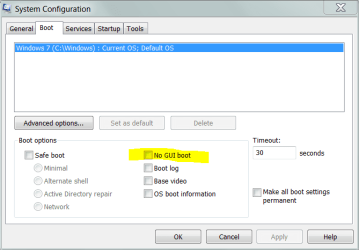
Start, Run - MSCONFIG

select NoGUIboot
 

Attachments

  • Capture.PNG
    Capture.PNG
    13.1 KB · Views: 42

My Computer My Computer

At a glance

Windows 7 Ultimate x64P4 3.2DDR 400ATI HD3850
OS
Windows 7 Ultimate x64
CPU
P4 3.2
Motherboard
Intel 815GM
Memory
DDR 400
Graphics Card(s)
ATI HD3850
Sound Card
C-Media 7.1
Monitor(s) Displays
SyncMaster 244T
Screen Resolution
1920*1200
Hard Drives
Several
PSU
500
Case
PowerSpec $24
Cooling
ThermalTake copper
Internet Speed
Blazing
Thanks for the replies. GUIon just stops the display of the 4 square animation however OS boot information does list the drivers as they load. They went quickly enough so I'm still in the dark as regards the delay. The event log facility shows my total boot time as 244192 which includes an element called BootPostBootTime of 146415. I assume these are milliseconds.

It seems a retrograde step to not to be able to enable a simple real time listing of each process as it starts.
 

My Computer My Computer

At a glance

Windows t Home
OS
Windows t Home
So wait...if the list went quickly by doesn't that mean they loaded quickly?

MainPathBootTime is a more relevant measure, calculating how long it takes for you to get to a usable desktop.

BootPostBootTime represents the remainder of the boot process, during which processes and services load in the background and you can do stuff with the desktop.

BootTime is the total time it takes for every system startup activity to complete. (MainPathBootTime + BootPostBootTime)
 

My Computer My Computer

At a glance

Windows 10 Pro (x64)Intel Core i7-3930K (3.2GHz - 4.5GHz)4x Samsung 4GB PC3-12800 DDR3 (16GB 1600MHz)Nvidia Geforce GTX 690
Computer type
PC/Desktop
Computer Manufacturer/Model Number
Alienware Aurora ALX R4
OS
Windows 10 Pro (x64)
CPU
Intel Core i7-3930K (3.2GHz - 4.5GHz)
Motherboard
Alienware Aurora-R4 x79
Memory
4x Samsung 4GB PC3-12800 DDR3 (16GB 1600MHz)
Graphics Card(s)
Nvidia Geforce GTX 690
Sound Card
SteelSeries Siberia Elite
Monitor(s) Displays
Dell UltraSharp U3011
Screen Resolution
2560x1600
Hard Drives
Samsung 850 Pro 256 GB, Seagate 1TB Desktop Hybrid HDD, 2x Western Digital 4TB Green HDD
PSU
875W Some Dell PSU <.<
Case
Alienware Aurora ALX
Cooling
Custom Liquid Cooling (EK CPU & GPU blocks) dual EK 480RAD
Keyboard
Logitech G710+ Mechanical
Mouse
Logitech G700s
Internet Speed
Verizon Fios (50 mbps average)
Other Info
Server: Intel NUC D54250WYK: i5-4250U, 16GB, 256 GB mSATA, Windows Server 2012 R2
Of course - so something other than the drivers is causing the delay. Deleting start up programs (which might mean disabling anti virus as that may be the cause) and restoring bit by bit is a pretty crude method when a simple real time listing of all start up processes pre and post boot would be more precise. Unfortunately the boot log doesnt include time details.
 

My Computer My Computer

At a glance

Windows t Home
OS
Windows t Home
Thanks for the replies. GUIon just stops the display of the 4 square animation however OS boot information does list the drivers as they load. They went quickly enough so I'm still in the dark as regards the delay. The event log facility shows my total boot time as 244192 which includes an element called BootPostBootTime of 146415. I assume these are milliseconds.

It seems a retrograde step to not to be able to enable a simple real time listing of each process as it starts.

I've never heard of such an ability in any previous version of Windows. I believe you may have been using some third-party utility.
 

My Computer My Computer

At a glance

Windows 7 Ultimate RTM (Technet)3.00 gigahertz Intel Core2 Duo E84004GBATI Radeon X1950 Pro
Computer Manufacturer/Model Number
Custom
OS
Windows 7 Ultimate RTM (Technet)
CPU
3.00 gigahertz Intel Core2 Duo E8400
Motherboard
ASUSTeK Computer INC. P5K/EPU Rev 1.xx
Memory
4GB
Graphics Card(s)
ATI Radeon X1950 Pro
Sound Card
Built in HD Audio
Monitor(s) Displays
22" Gateway LCD
Screen Resolution
1920 x 1200
Hard Drives
ST3160023A [Hard drive] (160.04 GB) -- drive 0, rev 8.01, ST3500630AS [Hard drive] (500.11 GB) -- drive 2, rev 3.AAK
ST3500630AS [Hard drive] (500.11 GB) -- drive 1, rev 3.AAK
Keyboard
Logitech G11
Mouse
Microsoft Wireless Laser Mouse 5000
Internet Speed
13.44 Mbps
I dont think it was a 3rd party utility. Maybe a longer time ago than I thought (I'm old and have a 'concertina' memory!) Might it have been something like 'boot in dos mode'? Anyway I wonder if there is a utility around now to do this, I'll have a google.
 

My Computer My Computer

At a glance

Windows t Home
OS
Windows t Home

My Computer My Computer

At a glance

Windows 10, Home Clean InstallIntel Core2 processsor Q8200(2.33Ghz 1333FSB)...6 gbATI Radeon 256MB HD3650
Computer type
PC/Desktop
Computer Manufacturer/Model Number
Dell XPS 420
OS
Windows 10, Home Clean Install
CPU
Intel Core2 processsor Q8200(2.33Ghz 1333FSB) Quad Core Tech
Motherboard
Dell
Memory
6 gb
Graphics Card(s)
ATI Radeon 256MB HD3650
Sound Card
Intergrated 7.1 Channel Audio
Monitor(s) Displays
Dell SP2009W 20"
Hard Drives
640 GB Serial ATA Hard drive
Cooling
Fan
Keyboard
Dell USB Keyboard
Mouse
Dell Premium Optical USB
Internet Speed
DSL 2.85
try this! i use it and it pretty good! it will tell ya everything thats starting and how long each thing is taking! it will give ya recommended stuff to take out of boot and tell what it cant take out.

just be wide cause on mine it tells ya it can take something to do with nivida out. didnt cause any problems, i just got an error sayin it coulodnt start or something. i just had to put it back in the boot and it was fine!

Soluto
 

My Computer My Computer

At a glance

Windows 7 Home Premium 64bitAMD Athlon x23g Ram and 10g VirtualNivida Gforce 9
Computer Manufacturer/Model Number
Acer Aspire x33000
OS
Windows 7 Home Premium 64bit
CPU
AMD Athlon x2
Motherboard
Acer wmcp78m
Memory
3g Ram and 10g Virtual
Graphics Card(s)
Nivida Gforce 9
Screen Resolution
1920 x 1080
I had already downloaded Soluto but after installation when I rebooted it just froze my pc with a blank screen so I had to start in safe mode and uninstall it. I have emailed Soluto for there comments.
 

My Computer My Computer

At a glance

Windows t Home
OS
Windows t Home
ah thats pants. it is only a beta tho.

i have no problems with it. find it very good!

see what they say and maybe give it another shot if ya think its worth it!
 

My Computer My Computer

At a glance

Windows 7 Home Premium 64bitAMD Athlon x23g Ram and 10g VirtualNivida Gforce 9
Computer Manufacturer/Model Number
Acer Aspire x33000
OS
Windows 7 Home Premium 64bit
CPU
AMD Athlon x2
Motherboard
Acer wmcp78m
Memory
3g Ram and 10g Virtual
Graphics Card(s)
Nivida Gforce 9
Screen Resolution
1920 x 1080
Maybe needless to say, but to see windows loading it's drivers:
Check the OS boot information checkbox in msconfig.

Gr.
 

My Computer My Computer

At a glance

Windows 7 enterprise x64
OS
Windows 7 enterprise x64
Back
Top