Microsoft confirms Windows 7 SP1 RTM, released to OEMs today

Status
Not open for further replies.
Prior to SP1 every time my PC came out of sleep mode my external USB 3.0 drive would disconnect and reconnect. It doesn't happen any more :)
 

My Computer My Computer

At a glance

Windows 7 Ultimate (x64) SP1Intel 3770k 4.6GHz8GB (2x 4GB) Crucial BallistixSapphire 7950 (1060/1600)
Computer Manufacturer/Model Number
tw33k
OS
Windows 7 Ultimate (x64) SP1
CPU
Intel 3770k 4.6GHz
Motherboard
ASUS Maximus V Formula
Memory
8GB (2x 4GB) Crucial Ballistix
Graphics Card(s)
Sapphire 7950 (1060/1600)
Sound Card
On Board Realtek HD Audio
Monitor(s) Displays
27" Acer B273HU (via HDMI)
Screen Resolution
2048 x 1152
Hard Drives
Crucial M4 128GB
2TB WD Black
1TB Samsung F3 SATA
1TB WD Elite External
2TB WD USB 3.0
PSU
Corsair AX750 Gold
Case
Corsair Obsidian 800DW
Cooling
Corsair H100 (2x AP-121/2x UK-3000 push/pull)
Keyboard
Microsoft Wireless 5000
Mouse
Microsoft Wireless 5000
Internet Speed
5mb/s
Other Info
Logitech z-2300 2.1 speakers
Lamptron FC-5 v2
:huh:
Bad Request Invalid Host Name...according to Firefox :confused:

That link is now working again.

That list is for SP1 RC not RTM and may not be 100% but still good information. It was posted in December.

Jim :geek:
 

My Computer My Computer

At a glance

Windows 8.1 Pro w/Media Center 64bit, Windows...Phenom II X6 1100TCrucial Balistic 8gb DDR3-1866 CL9MSI R6850 Cyclone IGD5 PE
Computer type
PC/Desktop
Computer Manufacturer/Model Number
Home Built
OS
Windows 8.1 Pro w/Media Center 64bit, Windows 7 HP 64bit
CPU
Phenom II X6 1100T
Motherboard
ASUS M5A99X EVO
Memory
Crucial Balistic 8gb DDR3-1866 CL9
Graphics Card(s)
MSI R6850 Cyclone IGD5 PE
Sound Card
On Board
Monitor(s) Displays
ASUS VE258Q 25" LED with DVI-HDMI-DisplayPort
Screen Resolution
1920 x 1080
Hard Drives
Two WD Cavier Black 2TB Sata III, WD My Book Essential 2TB USB 3.0
PSU
Seasonic X650 80 Plus GOLD Modular
Case
Corsair 400R
Cooling
Antec Kuhler H2O 620, Two 120mm and four 140mm
Keyboard
Logitech K120
Mouse
Logitech Marble Mouse USB, Logitech Precision Game Pad
Internet Speed
15MB
Antivirus
Norton IS 2013, Malwarebytes Pro Beta 2
Browser
IE-11, FF-27
Other Info
APC UPS ES 750, Netgear WNR3500L Gigabit & Wireless N Router with SamKnows Test Program, Motorola SB6120 Gigabit Cable Modem. Brother HL-2170W Laser Printer, Epson V300 Scanner

My Computer My Computer

At a glance

Windows 7 Professional 32-bitIntel(R) Pentium(R) D CPU 3.00 GHzKingston DDR2 3 gigs total Dual channels Symm...NVIDIA GeForce 8600 GT
Computer Manufacturer/Model Number
Custom
OS
Windows 7 Professional 32-bit
CPU
Intel(R) Pentium(R) D CPU 3.00 GHz
Motherboard
Asus P5B-VM
Memory
Kingston DDR2 3 gigs total Dual channels Symmetric
Graphics Card(s)
NVIDIA GeForce 8600 GT
Sound Card
Hi defonition Sound max
Monitor(s) Displays
CisNet
Screen Resolution
1280*1024
Hard Drives
WDC WD16000AA-00L7A0 SATA DRIVE
WDC IDE Drive 80 gigs.
PSU
Raidmax 380 watt
Case
Generic brand
Cooling
Standard fan
Keyboard
Logitech Cordless desktop EX100
Mouse
Logitech Cordless desktop EX100
Internet Speed
5.0 mbs
Other Info
MSE anti-virus
That list is for SP1 RC not RTM and may not be 100% but still good information. It was posted in December.

Jim :geek:
Thanks, I hadn't noticed that, but until someone can post a current list, this will serve me, because I don't intend to install SP1, and this will help suppliment my updates. The only problem is, that there are so many, that I will have to sort through them for the ones that are applicable for me.
 

My Computer My Computer

At a glance

W7x64 Pro, SuSe 12.1/** W7 x64 Pro, XP MCEPhenom II 1090T w/Noctua NH-D14 /**4400+ X2 w...2 x 2GB Patriot PGS34g1600LLKA/**4x1GB Corsai...EVGA GTX460 SC/**EVGA 8800GTS
Computer Manufacturer/Model Number
DIY
OS
W7x64 Pro, SuSe 12.1/** W7 x64 Pro, XP MCE
CPU
Phenom II 1090T w/Noctua NH-D14 /**4400+ X2 w/CM Hyper TX 3
Motherboard
ASRock 890FX Deluxe 4/**A8N-SLI
Memory
2 x 2GB Patriot PGS34g1600LLKA/**4x1GB Corsair VS
Graphics Card(s)
EVGA GTX460 SC/**EVGA 8800GTS
Sound Card
Asus Xonar D2X/**Xonar D1
Monitor(s) Displays
Acer X233H, Dell E152FPc /**LG M237-WD
Screen Resolution
1920x1080 & 1024x768/**1980x1080
Hard Drives
WDC 2TB, 1.5TB, 1TB, 500GB,Seagate 500GB , Maxtor 80GB /**500GB Seagate & WDC 1TB Black
PSU
CM RS600 w/ APC BX1000G/**Antec 500 TP w/ APC BX1000
Case
HAF922/**Antec 1040IIB
Cooling
3x200mm, 1x140 and 1x120mm/**5x80mm fans
Keyboard
Logitech Media USB/**Saitek Eclipse
Mouse
Cordless Trackman Wheel/**Ditto
Internet Speed
3.3Mbps
Other Info
SB 560 5.1 w/ Sennheiser RS140/**Creative T20 speakers, Dvico FusionHDTV7 Gold RT, Cisco E3000, HP 5510V AIO, Linksys E3000, Belkin F5U237 hub and **F5D8055 adapter
(** = 2nd rig)
Guys, I installed this on two laptops and two PC's without any issues.

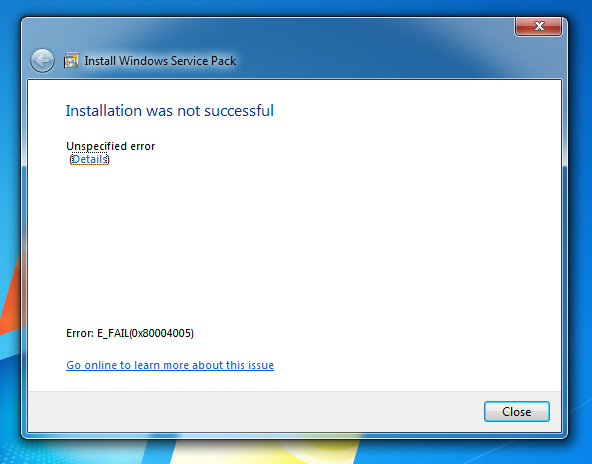
However, the third PC, which happens to be my main PC, is giving me an error. It tries to install and errors out with this screen.

mjj7I.png
 

My Computer My Computer

At a glance

Win7 64 bit
OS
Win7 64 bit

My Computer My Computer

At a glance

Windows 10 Pro x64, Arch LinuxIntel Core 2 Quad Q8200 OC'd 3.08GHz8GB DDR2 900MhzMSI GT730 2GB GDDR5 (Kepler)
Computer type
PC/Desktop
Computer Manufacturer/Model Number
Custom Build
OS
Windows 10 Pro x64, Arch Linux
CPU
Intel Core 2 Quad Q8200 OC'd 3.08GHz
Motherboard
Asus Rampage formula LGA775
Memory
8GB DDR2 900Mhz
Graphics Card(s)
MSI GT730 2GB GDDR5 (Kepler)
Sound Card
Supreme FX2
Monitor(s) Displays
Samsung LS22F350 LED
Screen Resolution
1080P
Hard Drives
Kingston SSDNow UV400 120GB, 500GB Hitachi, 2TB Samsung, 500GB Seagate FreeAgent, 640GB Samsung, 160GB Toshiba (Arch)
PSU
AeroCool 500W Bronze
Cooling
Cooler Master V6 + 3X fans
Keyboard
Prolink keyboard
Mouse
Logitech M705
Internet Speed
1MiB/s
Browser
Chrome Beta

My Computer My Computer

At a glance

Windows 7 Ultimate - 64-bit | Windows 8 Pro -...Intel® Core™ i7 Processor 3,610QM (2.30Hz, 6M...8 GBNVIDIA® GeForce® GT 650M 2GB Graphics, Optimu...
Computer Manufacturer/Model Number
Samsung NP550P5C-S02IN
OS
Windows 7 Ultimate - 64-bit | Windows 8 Pro - 64-bit
CPU
Intel® Core™ i7 Processor 3,610QM (2.30Hz, 6MB L3 Cach
Memory
8 GB
Graphics Card(s)
NVIDIA® GeForce® GT 650M 2GB Graphics, Optimus™ techno
Sound Card
SoundAlive™ JBL 3 Speakers (With sub-Woofer)
Monitor(s) Displays
39.62cm (15.6) SuperBright 300nit HD+ LED Display
Screen Resolution
1,600 x 900, Anti-Reflective
Hard Drives
1TB S-ATA II Hard Drive (5,400RPM)
I Installed the 64bit iso without any problem. my dell wireless got installed. everything else is smooths as silk.
 

My Computer My Computer

At a glance

windows Seven 7100
OS
windows Seven 7100

My Computer My Computer

At a glance

Windows 7 Ultimate x64 SP1 | OSX Lion 10.7 x64Intel Core i5 7504x Corsair Value DDR-3 1333MHz 2GbSapphire HD4850 512Mb HDMI+DVI+VGA
OS
Windows 7 Ultimate x64 SP1 | OSX Lion 10.7 x64
CPU
Intel Core i5 750
Motherboard
Asus P7P55D LE
Memory
4x Corsair Value DDR-3 1333MHz 2Gb
Graphics Card(s)
Sapphire HD4850 512Mb HDMI+DVI+VGA
Sound Card
Sound Blaster Audigy 2 ZS Platinum
Monitor(s) Displays
Samsung Syncmaster 245BW
Screen Resolution
1920x1200
Hard Drives
Samsung Spinpoint 160Gb
Seagate Barracuda 200Gb
PSU
Seventeam 650W ATX 2.3
Case
Coolermaster Centurion 532
Cooling
Stock cooling system
Keyboard
Logitech G15 Gaming Keyboard
Mouse
Razer Deathadder
Internet Speed
10Mbit Down / 1Mbit Up ADSL2+M
Other Info
Apple AirPort Extreme 802.11n (single band)
1Tb External USB HDD (AEBS volume)
Linksys WAG120N ADSL2+ Modem/Router
Tried both the readiness patch and sfc /scannow, and still SP1 wont install.
 

My Computer My Computer

At a glance

Win7 64 bit
OS
Win7 64 bit
RC

I have done three rigs. I must be using the RC version. I just got two updates via MS update for the RC.

The cleanup routine has given me back 1.9 Gig on all three rigs.

Just Noticed I have a watermark (lower left desktop). "Windows 7 Evaluation Copy Build 7601"
I have good BkUps. What should I do? Sit tight?
 
Last edited:

My Computer My Computer

At a glance

win 7 X64 Ultimate SP1I3770KG Skill F3-14900CL9-4GBXL x 4NVIDIA GeForce GTX670 + Intel 4000
Computer Manufacturer/Model Number
BGC (Bob's Garage Crew)
OS
win 7 X64 Ultimate SP1
CPU
I3770K
Motherboard
Asus P8Z77-V Deluxe
Memory
G Skill F3-14900CL9-4GBXL x 4
Graphics Card(s)
NVIDIA GeForce GTX670 + Intel 4000
Sound Card
Realtek HD 5.1 (MOB)
Monitor(s) Displays
Asus VW224T (1)
Screen Resolution
1920 x 1080
Hard Drives
SATA Corsair Force GT 2.5" 180GB (System) Sata 3
OCZ Vertex3 120GB
OCZ Vertex 2 120GB 2.5" SATA II
ST31000524AS 1000.2GB
WD15EARS (External)
PSU
CoolerMaster 1000 Watt
Case
CoolerMaster HAF X
Cooling
CPU -- CoolerMaster 520N
Keyboard
MS Wireless 3000 V2
Mouse
MS Wireless 3000 V2
Internet Speed
Cable
Antivirus
Norton Internet Security
Browser
IE9
Other Info
AMI Bios 1805
OC'd 3%
Prior to SP1 every time my PC came out of sleep mode my external USB 3.0 drive would disconnect and reconnect. It doesn't happen any more :)


Finally .....MS really fixed this ....?
Mine keeps rebooting if i have Ext.HDD plugged in .....though ...
hopefully this will be fixed too ....;)
 

My Computer My Computer

At a glance

WDS 7 Home Pre.x64Intel Core i5 2450M @ 2.50GHz8GB Kingston[2x4] Dual-Channel DDR3 @ 1333MHzAMD Radeon(TM) HD 6470M + Intel(R) HD Graph 3000
Computer type
Laptop
Computer Manufacturer/Model Number
Sony Vaio VPC-SE23FXS
OS
WDS 7 Home Pre.x64
CPU
Intel Core i5 2450M @ 2.50GHz
Memory
8GB Kingston[2x4] Dual-Channel DDR3 @ 1333MHz
Graphics Card(s)
AMD Radeon(TM) HD 6470M + Intel(R) HD Graph 3000
Hard Drives
TOSHIBA MK6459GSXP 600GB x 5400RPM (SATA)
I have done three rigs. I must be using the RC version. I just got two updates via MS update for the RC.

The cleanup routine has given me back 1.9 Gig on all three rigs.

Just Noticed I have a watermark (lower left desktop). "Windows 7 Evaluation Copy Build 7601"
I have good BkUps. What should I do? Sit tight?
Hi, Hammerhead!

Since you've ran the cleanup routine you will be unable to uninstall the SP1 RC. When the SP1 RTM is released you will have to do a clean install of Win 7 in order to install it.

You can also use a backup before you ran the cleanup tool and then install the SP1 RTM or use a backup before you installed the RC and then install the RTM.

In the meantime, if you really want the RTM, you'll have to restore from backup, find the leaked file and then install the leaked RTM. Otherwise, as you mentioned, sit tight until MS officially releases it and then perform your restore and installation of the RTM.
 

My Computer My Computer

At a glance

Windows 7 Ultimate x64 SP1Core2 Duo4 GBGM965 on-board
Computer Manufacturer/Model Number
Toshiba L355D
OS
Windows 7 Ultimate x64 SP1
CPU
Core2 Duo
Motherboard
Intel
Memory
4 GB
Graphics Card(s)
GM965 on-board
Sound Card
RealTek on-board
Monitor(s) Displays
19"+17"(laptop)
Screen Resolution
1440x900 (x 2)
Hard Drives
500GB Ext. 200GB Internal
PSU
N/A
Case
N/A
Cooling
N/A
Tried both the readiness patch and sfc /scannow, and still SP1 wont install.

You'll have to dig in your CBS.log in order to trace why it doesn't install...

C:\WINDOWS\Logs\CBS, then copy the cbs.log in your documents. Near the end of the Log you'll start to see errors...

Post here the line when it start to say error.
 

My Computer My Computer

At a glance

Windows 7 Professional SP1 - x64 [Non-UEFI Boot]Ivy Bridge Core i5 3570K (Delidded)G.Skill "Ares" DDR3 PC3-12800 - 1600MHz (16Gb)Asus Dual-RX480-O4G
Computer type
PC/Desktop
Computer Manufacturer/Model Number
Custom Build
OS
Windows 7 Professional SP1 - x64 [Non-UEFI Boot]
CPU
Ivy Bridge Core i5 3570K (Delidded)
Motherboard
Asus P8Z77-V LE PLUS
Memory
G.Skill "Ares" DDR3 PC3-12800 - 1600MHz (16Gb)
Graphics Card(s)
Asus Dual-RX480-O4G
Sound Card
Creative Sound Blaster Z w/5.1 sound system
Monitor(s) Displays
Asus IPS 23"
Screen Resolution
16/9
Hard Drives
Internal:
500Go Sata 6Gb/s (x2)
500Go Sata 3Gb/s (x2)
SSD 60Go Sata 6Gb/s
PSU
In Win C 900W Series 80+ Platinum
Case
Thermaltake Chaser A71
Cooling
Custom Water Cooling Loop
Keyboard
Cooler Master QuickFire XTi
Mouse
Razer Imperator 2012 (4G)
Antivirus
MSE
Browser
IE 11.0.xxx Rtm
Other Info
"Raid0" with Intel Smart Response Technology (HDD/SSD)
Well, this is where the fails start

Code:
2011-01-23 12:02:45, Error CBS Failed. Attempted to uninstall a version of a non-driver component that is not installed, version: 0X600011db04001, component: x86_microsoft-windows-mail-core-dll_31bf3856ad364e35_6.1.7600.16385_none_585517a9869db81d, owner: Microsoft-Windows-Client-Features-Package~31bf3856ad364e35~amd64~~6.1.7600.16385.Microsoft-Windows-Client-Features-Update [HRESULT = 0x80004005 - E_FAIL]
2011-01-23 12:02:45, Info CBS Failed to mergecomponent [HRESULT = 0x80004005 - E_FAIL]
2011-01-23 12:02:45, Info CBS ComponentAnalyzerUninstallDeployment: Failed on update: Microsoft-Windows-Client-Features-Update [HRESULT = 0x80004005 - E_FAIL]
2011-01-23 12:02:45, Info CBS Failed to execute item[0] in Package: Microsoft-Windows-Client-Features-Package~31bf3856ad364e35~amd64~~6.1.7600.16385, Update: Microsoft-Windows-Client-Features-Update [HRESULT = 0x80004005 - E_FAIL]
2011-01-23 12:02:45, Info CBS Failed to execute execution update. [HRESULT = 0x80004005 - E_FAIL]
2011-01-23 12:02:45, Info CBS Failed to execute execution package: Microsoft-Windows-Client-Features-Package~31bf3856ad364e35~amd64~~6.1.7600.16385 [HRESULT = 0x80004005 - E_FAIL]
2011-01-23 12:02:45, Info CBS Failed to prepare execution [HRESULT = 0x80004005 - E_FAIL]
2011-01-23 12:02:45, Info CSI 0000000e@2011/1/23:17:02:45.857 CSI Transaction @0x3478aa0 destroyed
2011-01-23 12:02:45, Info CBS Perf: InstallUninstallChain complete.
2011-01-23 12:02:45, Info CBS Failed to execute execution chain. [HRESULT = 0x80004005 - E_FAIL]
2011-01-23 12:02:45, Error CBS Failed to process single phase execution. [HRESULT = 0x80004005 - E_FAIL]
2011-01-23 12:02:45, Info CBS WER: Generating failure report for package: Package_for_KB976932~31bf3856ad364e35~amd64~~6.1.1.17514, status: 0x80004005, failure source: Execute, start state: Partially Installed, target state: Installed, client id: SP Coordinater Engine
2011-01-23 12:02:45, Info CBS Failed to query DisableWerReporting flag. Assuming not set... [HRESULT = 0x80070002 - ERROR_FILE_NOT_FOUND]
2011-01-23 12:02:45, Info CBS Failed to add %windir%\winsxs\pending.xml to WER report because it is missing. Continuing without it...
2011-01-23 12:02:45, Info CBS Failed to add %windir%\winsxs\pending.xml.bad to WER report because it is missing. Continuing without it...
2011-01-23 12:02:46, Info CBS Reboot mark refs: 0
2011-01-23 12:02:46, Info CBS SQM: Reporting package change for package: Package_for_KB976932~31bf3856ad364e35~amd64~~6.1.1.17514, current: Partially Installed, pending: Default, start: Partially Installed, applicable: Installed, target: Installed, limit: Installed, hotpatch status: DisabledBecauseNoHotpatchPackagesInitiated, status: 0x0, failure source: Execute, reboot required: False, client id: SP Coordinater Engine, initiated offline: False, execution sequence: 240, first merged sequence: 240
2011-01-23 12:02:46, Info CBS SQM: Upload requested for report: PackageChangeBegin_Package_for_KB976932~31bf3856ad364e35~amd64~~6.1.1.17514, session id: 101457923, sample type: Standard
2011-01-23 12:02:46, Info CBS SQM: Ignoring upload request because the sample type is not enabled: Standard
2011-01-23 12:02:46, Info CBS SQM: Reporting package change completion for package: Package_for_KB976932~31bf3856ad364e35~amd64~~6.1.1.17514, current: Partially Installed, original: Partially Installed, target: Installed, status: 0x80004005, failure source: Execute, failure details: "(null)", client id: SP Coordinater Engine, initiated offline: False, execution sequence: 240, first merged sequence: 240
2011-01-23 12:02:46, Info CBS SQM: execute time performance datapoint is invalid. [HRESULT = 0x80070490 - ERROR_NOT_FOUND]
2011-01-23 12:02:46, Info CBS SQM: Upload requested for report: PackageChangeEnd_Package_for_KB976932~31bf3856ad364e35~amd64~~6.1.1.17514, session id: 101457924, sample type: Standard
2011-01-23 12:02:46, Info CBS SQM: Ignoring upload request because the sample type is not enabled: Standard
2011-01-23 12:02:46, Info CBS Enabling LKG boot option
2011-01-23 12:02:46, Info CBS Restored system sleep block state: 0x80000000
2011-01-23 12:02:46, Info CBS SPI: Error callback - 0x80004005
2011-01-23 12:02:46, Info CBS Exec: Processing complete. Session: 30128926_2199388262, Package: Package_for_KB976932~31bf3856ad364e35~amd64~~6.1.1.17514 [HRESULT = 0x80004005 - E_FAIL]
2011-01-23 12:02:46, Error CBS Failed to perform operation. [HRESULT = 0x80004005 - E_FAIL]
2011-01-23 12:02:46, Info CBS Session: 30128926_2199388262 finalized. Reboot required: no [HRESULT = 0x80004005 - E_FAIL]
2011-01-23 12:02:46, Error CBS SPI: (CSPICbsClient::Finalize:737)Failed to finalize session hr=0x80004005
2011-01-23 12:02:46, Error CBS SPI: (CSPICbsClient::ChangeState:519)Failed to finalize CBS session to install package hr=0x80004005
2011-01-23 12:02:46, Error CBS SPI: (CSPCInstallTask::Execute:1010)Failed to install package with identity Package_for_KB976932~31bf3856ad364e35~amd64~~6.1.1.17514 hr=0x80004005
2011-01-23 12:02:46, Info CBS SPI: Reporting Failed package event
2011-01-23 12:02:46, Error CBS Cannot finalize a session that has been finalized. [HRESULT = 0x800f0842 - CBS_E_SESSION_FINALIZED]
2011-01-23 12:02:46, Info CBS Session: 30128926_2199388262 finalized. Reboot required: no [HRESULT = 0x800f0842 - CBS_E_SESSION_FINALIZED]
2011-01-23 12:02:46, Error CBS SPI: (CSPICbsClient::Finalize:737)Failed to finalize session hr=0x800f0842
2011-01-23 12:03:52, Info CBS SPI: Deleting directory: C:\4553d1fd499fd3b0f554f19c33c4\76f5db96e2ab51ac04d921a6809ecf\4fadc32e49206c7918335c0de4c02dc1. ret=0
2011-01-23 12:03:52, Error CBS SPI: (CSPInstall::Install:1583)Failed executing Install task hr=0x80004005
2011-01-23 12:03:52, Info CBS SPI: Ending SP Installation
2011-01-23 12:03:52, Error CBS SPI: (PerformSPInstallation:833)Failed to install SP using UI hr=0x80004005
2011-01-23 12:03:52, Error CBS SPI: (wmain:1105)Failed to perform SP installation hr=0x80004005
2011-01-23 12:03:52, Info CBS SPI: Reporting Failed event

 

My Computer My Computer

At a glance

Win7 64 bit
OS
Win7 64 bit
This is what has been made public so far:

In addition to the regular updates there are the following:

Additional support for communication with third-party federation services:
· Additional support has been added to allow Windows 7 clients to effectively communicate with third-party identity federation services (those supporting the WS-Federation passive profile protocol). This change enhances platform interoperability, and improves the ability to communicate identity and authentication information between organizations.

Improved HDMI audio device performance:
· A small percentage of users have reported issues in which the connection between computers running Windows 7 and HDMI audio devices can be lost after system reboots. Updates have been incorporated into SP1 to ensure that connections between Windows 7 computers and HDMI audio devices are consistently maintained.


Changes common to both client and server platforms:
· Change to behavior of “Restore previous folders at logon” functionality
· SP1 changes the behavior of the “Restore previous folders at logon” function available in the Folder Options Explorer dialog. Prior to SP1, previous folders would be restored in a cascaded position based on the location of the most recently active folder. That behavior changes in SP1 so that all folders are restored to their previous positions.


Enhanced support for additional identities in RRAS and IPsec:
· Support for additional identification types has been added to the Identification field in the IKEv2 authentication protocol. This allows for a variety of additional forms of identification (such as E-mail ID or Certificate Subject) to be used when performing authentication using the IKEv2 protocol.


Support for Advanced Vector Extensions (AVX):
· There has always been a growing need for ever more computing power and as usage models change, processors instruction set architectures evolve to support these growing demands. Advanced Vector Extensions (AVX) is a 256 bit instruction set extension for processors. AVX is designed to allow for improved performance for applications that are floating point intensive. Support for AVX is a part of SP1 to allow applications to fully utilize the new instruction set and register extensions.

· Changes specific to Windows Server 2008 R2
Dynamic Memory:
· Constraints on the allocation of physical memory represents one of the greatest challenges organizations face as they adopt new virtualization technology and consolidate their infrastructure. With Dynamic Memory, an enhancement to Hyper-V™ introduced in Windows Server 2008 R2 SP1, organizations can now make the most efficient use of available physical memory, allowing them to realize the greatest possible potential from their virtualization resources. Dynamic Memory allows for memory on a host machine to be pooled and dynamically distributed to virtual machines as necessary. Memory is dynamically added or removed based on current workloads, and is done so without service interruption.

Microsoft RemoteFX:
· Businesses are increasingly looking to leverage the efficiency and cost savings that can come from a virtualized desktop infrastructure. With the addition of Microsoft RemoteFX in Windows Server 2008 R2 SP1, a new set of remote user experience capabilities that enable a media-rich user environment for virtual desktops, session-based desktops and remote applications is introduced. Harnessing the power of virtualized graphics resources, RemoteFX can be deployed to a range of thick and thin client devices, enabling cost-effective, local-like access to graphics-intensive applications and a broad array of end user peripherals, improving productivity of remote users.

· RemoteFX can function independently from specific graphics stacks and supports any screen content, including today’s most advanced applications and rich content (including Silverlight and Adobe Flash), ensuring that end users maintain a rich, local-like desktop experience even in a virtualized thin-client environment.

· RemoteFX also adds mainstream USB device support to virtual desktop computing, including support for USB drives, cameras and PDAs connected to the client device. RemoteFX also provides a platform for hardware and software partners to enhance RemoteFX capabilities in a variety of possible host, client and network configurations.

· To use RemoteFX, the virtualization server must be running Windows Server 2008 R2 with SP1, the virtual machine must be running Windows 7 Enterprise with SP1 or Windows 7 Ultimate with SP1, and the remote client computer must be running either Windows Server 2008 R2 with SP1 or Windows 7 with SP1. To connect to the virtual machine, the remote client computer requires an updated version of Remote Desktop Services (included in the service pack for all editions of Windows 7).

Enhancements to scalability and high availability when using DirectAccess:
· DirectAccess is a new feature in the Windows 7 and Windows Server 2008 R2 operating systems that gives users the experience of being seamlessly connected to their corporate network any time they have Internet access. In Windows Server 2008 R2 SP1, improvements have been made to enhance scalability and high availability when using DirectAccess, through the addition of support for 6to4 and ISATAP addresses when using DirectAccess in conjunction with Network Load Balancing (NLB).

Support for Managed Service Accounts (MSAs) in secure branch office scenarios:
· SP1 enables enhanced support for managed service accounts (MSAs) to be used on domain-member services located in perimeter networks (also known as DMZs or extranets).

Support for increased volume of authentication traffic on domain controllers connected to high-latency networks:
· As a greater volume of IT infrastructure migrates to cloud-based services, there is a need for higher thresholds of authentication traffic to domain controllers located on high-latency networks (such as the public Internet). SP1 allows for more granular control of the maximum number of possible concurrent connections to a domain controller, enabling a greater degree of performance tuning for service providers.

Enhancements to Failover Clustering with Storage:
· SP1 enables enhanced support for how Failover Clustering works with storage that is not visible for all cluster nodes. In SP1, improvements have been made to the Cluster Validation and multiple Failover Cluster Manager wizards to allow workloads to use disks that are shared between a subset of cluster nodes.

Good to know about the audio. I tried getting my new PC to work with my new HDTV and I couldn't get audio to work. But I also saw on the nvidia boards that it may be down to a nvidia driver issue. :huh:
 

My Computer My Computer

At a glance

Windows 7 Professional x64Intel i5-2500k @ 3.3Ghz4GB DDR3Nvidia GTS250 1GB
Computer Manufacturer/Model Number
Desktop
OS
Windows 7 Professional x64
CPU
Intel i5-2500k @ 3.3Ghz
Motherboard
Gigabyte GA-Z77X-UD5H
Memory
4GB DDR3
Graphics Card(s)
Nvidia GTS250 1GB
Monitor(s) Displays
Sony SDM S95A
Screen Resolution
1280x1024
Hard Drives
1x 1TB, 2x 250GB HDDs
PSU
Corsair HX850W
Case
Cooler Master 690 II
Cooling
Thermalright True Spirit 140mm & 3x 120mm & 3x 140mm Fans
Keyboard
Logitech Media Keyboard
Mouse
Microsoft Intellimouse
Internet Speed
8MB
Well, this is where the fails start

Code:
2011-01-23 12:02:45, Error CBS Failed. Attempted to uninstall a version of a non-driver component that is not installed, version: 0X600011db04001, component: x86_microsoft-windows-mail-core-dll_31bf3856ad364e35_6.1.7600.16385_none_585517a9869db81d, owner: Microsoft-Windows-Client-Features-Package~31bf3856ad364e35~amd64~~6.1.7600.16385.Microsoft-Windows-Client-Features-Update [HRESULT = 0x80004005 - E_FAIL]
2011-01-23 12:02:45, Info CBS Failed to mergecomponent [HRESULT = 0x80004005 - E_FAIL]
2011-01-23 12:02:45, Info CBS ComponentAnalyzerUninstallDeployment: Failed on update: Microsoft-Windows-Client-Features-Update [HRESULT = 0x80004005 - E_FAIL]
2011-01-23 12:02:45, Info CBS Failed to execute item[0] in Package: Microsoft-Windows-Client-Features-Package~31bf3856ad364e35~amd64~~6.1.7600.16385, Update: Microsoft-Windows-Client-Features-Update [HRESULT = 0x80004005 - E_FAIL]
2011-01-23 12:02:45, Info CBS Failed to execute execution update. [HRESULT = 0x80004005 - E_FAIL]
2011-01-23 12:02:45, Info CBS Failed to execute execution package: Microsoft-Windows-Client-Features-Package~31bf3856ad364e35~amd64~~6.1.7600.16385 [HRESULT = 0x80004005 - E_FAIL]
2011-01-23 12:02:45, Info CBS Failed to prepare execution [HRESULT = 0x80004005 - E_FAIL]
2011-01-23 12:02:45, Info CSI 0000000e@2011/1/23:17:02:45.857 CSI Transaction @0x3478aa0 destroyed
2011-01-23 12:02:45, Info CBS Perf: InstallUninstallChain complete.
2011-01-23 12:02:45, Info CBS Failed to execute execution chain. [HRESULT = 0x80004005 - E_FAIL]
2011-01-23 12:02:45, Error CBS Failed to process single phase execution. [HRESULT = 0x80004005 - E_FAIL]
2011-01-23 12:02:45, Info CBS WER: Generating failure report for package: Package_for_KB976932~31bf3856ad364e35~amd64~~6.1.1.17514, status: 0x80004005, failure source: Execute, start state: Partially Installed, target state: Installed, client id: SP Coordinater Engine
2011-01-23 12:02:45, Info CBS Failed to query DisableWerReporting flag. Assuming not set... [HRESULT = 0x80070002 - ERROR_FILE_NOT_FOUND]
2011-01-23 12:02:45, Info CBS Failed to add %windir%\winsxs\pending.xml to WER report because it is missing. Continuing without it...
2011-01-23 12:02:45, Info CBS Failed to add %windir%\winsxs\pending.xml.bad to WER report because it is missing. Continuing without it...
2011-01-23 12:02:46, Info CBS Reboot mark refs: 0
2011-01-23 12:02:46, Info CBS SQM: Reporting package change for package: Package_for_KB976932~31bf3856ad364e35~amd64~~6.1.1.17514, current: Partially Installed, pending: Default, start: Partially Installed, applicable: Installed, target: Installed, limit: Installed, hotpatch status: DisabledBecauseNoHotpatchPackagesInitiated, status: 0x0, failure source: Execute, reboot required: False, client id: SP Coordinater Engine, initiated offline: False, execution sequence: 240, first merged sequence: 240
2011-01-23 12:02:46, Info CBS SQM: Upload requested for report: PackageChangeBegin_Package_for_KB976932~31bf3856ad364e35~amd64~~6.1.1.17514, session id: 101457923, sample type: Standard
2011-01-23 12:02:46, Info CBS SQM: Ignoring upload request because the sample type is not enabled: Standard
2011-01-23 12:02:46, Info CBS SQM: Reporting package change completion for package: Package_for_KB976932~31bf3856ad364e35~amd64~~6.1.1.17514, current: Partially Installed, original: Partially Installed, target: Installed, status: 0x80004005, failure source: Execute, failure details: "(null)", client id: SP Coordinater Engine, initiated offline: False, execution sequence: 240, first merged sequence: 240
2011-01-23 12:02:46, Info CBS SQM: execute time performance datapoint is invalid. [HRESULT = 0x80070490 - ERROR_NOT_FOUND]
2011-01-23 12:02:46, Info CBS SQM: Upload requested for report: PackageChangeEnd_Package_for_KB976932~31bf3856ad364e35~amd64~~6.1.1.17514, session id: 101457924, sample type: Standard
2011-01-23 12:02:46, Info CBS SQM: Ignoring upload request because the sample type is not enabled: Standard
2011-01-23 12:02:46, Info CBS Enabling LKG boot option
2011-01-23 12:02:46, Info CBS Restored system sleep block state: 0x80000000
2011-01-23 12:02:46, Info CBS SPI: Error callback - 0x80004005
2011-01-23 12:02:46, Info CBS Exec: Processing complete. Session: 30128926_2199388262, Package: Package_for_KB976932~31bf3856ad364e35~amd64~~6.1.1.17514 [HRESULT = 0x80004005 - E_FAIL]
2011-01-23 12:02:46, Error CBS Failed to perform operation. [HRESULT = 0x80004005 - E_FAIL]
2011-01-23 12:02:46, Info CBS Session: 30128926_2199388262 finalized. Reboot required: no [HRESULT = 0x80004005 - E_FAIL]
2011-01-23 12:02:46, Error CBS SPI: (CSPICbsClient::Finalize:737)Failed to finalize session hr=0x80004005
2011-01-23 12:02:46, Error CBS SPI: (CSPICbsClient::ChangeState:519)Failed to finalize CBS session to install package hr=0x80004005
2011-01-23 12:02:46, Error CBS SPI: (CSPCInstallTask::Execute:1010)Failed to install package with identity Package_for_KB976932~31bf3856ad364e35~amd64~~6.1.1.17514 hr=0x80004005
2011-01-23 12:02:46, Info CBS SPI: Reporting Failed package event
2011-01-23 12:02:46, Error CBS Cannot finalize a session that has been finalized. [HRESULT = 0x800f0842 - CBS_E_SESSION_FINALIZED]
2011-01-23 12:02:46, Info CBS Session: 30128926_2199388262 finalized. Reboot required: no [HRESULT = 0x800f0842 - CBS_E_SESSION_FINALIZED]
2011-01-23 12:02:46, Error CBS SPI: (CSPICbsClient::Finalize:737)Failed to finalize session hr=0x800f0842
2011-01-23 12:03:52, Info CBS SPI: Deleting directory: C:\4553d1fd499fd3b0f554f19c33c4\76f5db96e2ab51ac04d921a6809ecf\4fadc32e49206c7918335c0de4c02dc1. ret=0
2011-01-23 12:03:52, Error CBS SPI: (CSPInstall::Install:1583)Failed executing Install task hr=0x80004005
2011-01-23 12:03:52, Info CBS SPI: Ending SP Installation
2011-01-23 12:03:52, Error CBS SPI: (PerformSPInstallation:833)Failed to install SP using UI hr=0x80004005
2011-01-23 12:03:52, Error CBS SPI: (wmain:1105)Failed to perform SP installation hr=0x80004005
2011-01-23 12:03:52, Info CBS SPI: Reporting Failed event

You've got the same prob as me...:

"2011-01-23 12:02:45, Error CBS Failed. Attempted to uninstall a version of a non-driver component that is not installed, version: 0X600011db04001, component: x86_microsoft-windows-mail-core-dll_31bf3856ad364e35_6.1.7600.16385_none_585517a9869db81d, owner: Microsoft-Windows-Client-Features-Package~31bf3856ad364e35~amd64~~6.1.7600.16385.Microsoft-Windows-Client-Features-Update [HRESULT = 0x80004005 - E_FAIL]"

This is the C:\WINDOWS\winsxs...x86 package that is the original provided by Windows 7 install (see screenshot).
This msoe.dll had been updated since during 2010 and the version now installed is now patched & different.

I've have tried to replace this original file but the SP1 install failed again with the same code in return.

I believe it might be a bug on x64 based system to correct...hope MS Techs are around to help.
I did apply some registry setting aswell provided in another thread but still fail with same error...
 

Attachments

  • Capture.PNG
    Capture.PNG
    4.3 KB · Views: 19
Last edited:

My Computer My Computer

At a glance

Windows 7 Professional SP1 - x64 [Non-UEFI Boot]Ivy Bridge Core i5 3570K (Delidded)G.Skill "Ares" DDR3 PC3-12800 - 1600MHz (16Gb)Asus Dual-RX480-O4G
Computer type
PC/Desktop
Computer Manufacturer/Model Number
Custom Build
OS
Windows 7 Professional SP1 - x64 [Non-UEFI Boot]
CPU
Ivy Bridge Core i5 3570K (Delidded)
Motherboard
Asus P8Z77-V LE PLUS
Memory
G.Skill "Ares" DDR3 PC3-12800 - 1600MHz (16Gb)
Graphics Card(s)
Asus Dual-RX480-O4G
Sound Card
Creative Sound Blaster Z w/5.1 sound system
Monitor(s) Displays
Asus IPS 23"
Screen Resolution
16/9
Hard Drives
Internal:
500Go Sata 6Gb/s (x2)
500Go Sata 3Gb/s (x2)
SSD 60Go Sata 6Gb/s
PSU
In Win C 900W Series 80+ Platinum
Case
Thermaltake Chaser A71
Cooling
Custom Water Cooling Loop
Keyboard
Cooler Master QuickFire XTi
Mouse
Razer Imperator 2012 (4G)
Antivirus
MSE
Browser
IE 11.0.xxx Rtm
Other Info
"Raid0" with Intel Smart Response Technology (HDD/SSD)
Different File

MIKEDL
OK I think I got mine. Laid down a save image and secured a different file from the net. Installed with no watermark. System says SP1 and so far everything looks ok.
 

My Computer My Computer

At a glance

win 7 X64 Ultimate SP1I3770KG Skill F3-14900CL9-4GBXL x 4NVIDIA GeForce GTX670 + Intel 4000
Computer Manufacturer/Model Number
BGC (Bob's Garage Crew)
OS
win 7 X64 Ultimate SP1
CPU
I3770K
Motherboard
Asus P8Z77-V Deluxe
Memory
G Skill F3-14900CL9-4GBXL x 4
Graphics Card(s)
NVIDIA GeForce GTX670 + Intel 4000
Sound Card
Realtek HD 5.1 (MOB)
Monitor(s) Displays
Asus VW224T (1)
Screen Resolution
1920 x 1080
Hard Drives
SATA Corsair Force GT 2.5" 180GB (System) Sata 3
OCZ Vertex3 120GB
OCZ Vertex 2 120GB 2.5" SATA II
ST31000524AS 1000.2GB
WD15EARS (External)
PSU
CoolerMaster 1000 Watt
Case
CoolerMaster HAF X
Cooling
CPU -- CoolerMaster 520N
Keyboard
MS Wireless 3000 V2
Mouse
MS Wireless 3000 V2
Internet Speed
Cable
Antivirus
Norton Internet Security
Browser
IE9
Other Info
AMI Bios 1805
OC'd 3%
MIKEDL
OK I think I got mine. Laid down a save image and secured a different file from the net. Installed with no watermark. System says SP1 and so far everything looks ok.
Hi, again, Hammerhead! :)

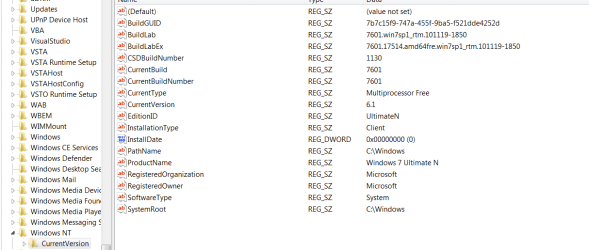
It appears you're a step ahead, then, Hammerhead. If you're really curious, check your registry for "HKEY_LOCAL_MACHINE\SOFTWARE\Wow6432Node\Microsoft\Windows NT\CurrentVersion" and look at the BuildLab value. It should read "7601.win7sp1_rtm.101119-1850". Also check the "BuildLabEx" entry and it should read "7601.17514.amd64fre.win7sp1_rtm.101119-1850". The numbers in bold indicate the RTM build.

Back to the game! Go Pack! :D
 

My Computer My Computer

At a glance

Windows 7 Ultimate x64 SP1Core2 Duo4 GBGM965 on-board
Computer Manufacturer/Model Number
Toshiba L355D
OS
Windows 7 Ultimate x64 SP1
CPU
Core2 Duo
Motherboard
Intel
Memory
4 GB
Graphics Card(s)
GM965 on-board
Sound Card
RealTek on-board
Monitor(s) Displays
19"+17"(laptop)
Screen Resolution
1440x900 (x 2)
Hard Drives
500GB Ext. 200GB Internal
PSU
N/A
Case
N/A
Cooling
N/A
A ok

mikedl


Reg Snip.PNG

Looks good. Everything is working so far.

Greenbay is have a good day!!!!
 
Last edited:

My Computer My Computer

At a glance

win 7 X64 Ultimate SP1I3770KG Skill F3-14900CL9-4GBXL x 4NVIDIA GeForce GTX670 + Intel 4000
Computer Manufacturer/Model Number
BGC (Bob's Garage Crew)
OS
win 7 X64 Ultimate SP1
CPU
I3770K
Motherboard
Asus P8Z77-V Deluxe
Memory
G Skill F3-14900CL9-4GBXL x 4
Graphics Card(s)
NVIDIA GeForce GTX670 + Intel 4000
Sound Card
Realtek HD 5.1 (MOB)
Monitor(s) Displays
Asus VW224T (1)
Screen Resolution
1920 x 1080
Hard Drives
SATA Corsair Force GT 2.5" 180GB (System) Sata 3
OCZ Vertex3 120GB
OCZ Vertex 2 120GB 2.5" SATA II
ST31000524AS 1000.2GB
WD15EARS (External)
PSU
CoolerMaster 1000 Watt
Case
CoolerMaster HAF X
Cooling
CPU -- CoolerMaster 520N
Keyboard
MS Wireless 3000 V2
Mouse
MS Wireless 3000 V2
Internet Speed
Cable
Antivirus
Norton Internet Security
Browser
IE9
Other Info
AMI Bios 1805
OC'd 3%
Status
Not open for further replies.
Back
Top