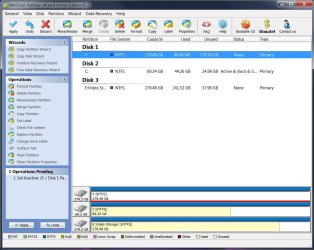
Have unallocated space on F: Need to convert to one NTFS drive help.

All Linux code must be deleted.

Type in command line
DISKPART
LIST DISK
SELECT DISK # (win HD)
CLEAN ALL
CREATE PARTITION PRIMARY
SELECT PARTITION 1
ACTIVE
FORMAT fs=NTFS
ASSIGN
EXIT
EXIT


How to Remove Linux and Install Windows XP

I mentioned in an earlier post that I'm not sharp with computers & would like to get clarification.

-Currently, drive F says 280Gb NTFS & shows no other partitions. All appears normal.

-Linux OS was installed on this drive but no other. While Linux OS was on F:, Win 7_64-bit was installed on C: as a clean install over Win XP home. Grub had no problems in finding Windows 7 for dual boot (just renamed it to Windows 7 in GRUB).

-Everything appears fine. No boot issues. No mention of GRUB while booting as it did before. I have moved some data to F: but not exceeding its former size.

So, do I still need to use DiskPart? I don't think DiskPart is hard to use but all seems OK.
 

My Computer My Computer

At a glance

Windows 7 64-bitIntel Core i5-2500K 3300 Mhz16Gb Patriot PC3-12800 1600 MhzEVGA GeForce GTX 560 Ti (Fermi)
Computer type
PC/Desktop
Computer Manufacturer/Model Number
Custom built 2011
OS
Windows 7 64-bit
CPU
Intel Core i5-2500K 3300 Mhz
Motherboard
Gigabyte P67A-UD3-B3
Memory
16Gb Patriot PC3-12800 1600 Mhz
Graphics Card(s)
EVGA GeForce GTX 560 Ti (Fermi)
Sound Card
On Motherboard
Monitor(s) Displays
Dell U2412M & NEC EA232WMi
Screen Resolution
DELL 1920x1200 - NEC 1920x1080
Hard Drives
Crucial 128 Gb SSD
Hitachi Deskstar 2Tb 7200 RPM 32MB Cache
Seagate Barracuda 500Gb 7200 RPM
Hitachi GST Deskstar 1.5TB 7200 RPM 64MB Cache
PSU
Seasonic M1211-620 Bronze
Case
Antec Solo
Cooling
Tuniq Tower 120 Extreme Rev 1
Keyboard
Apple
Mouse
Microsoft
Internet Speed
5mbs
Other Info
Sunbeam PL-RS-3 Rheosmart 3 Fan Controller 3.5" Bay 3 Channel 30W Fan Controller Panel
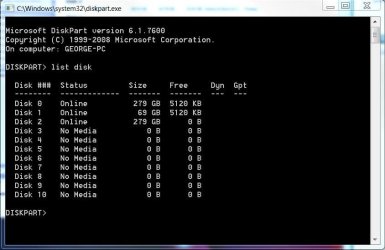
No, using diskpart to write zeroes to the whole disk is not a must.

As DeaconFrost said, the easiest way would have been to just delete the existing partitions in disk management and then create a new one.
 

My Computer My Computer

At a glance

Windows
OS
Windows
OK. I ran DiskPart as theog suggested below.

DISKPART
LIST DISK
SELECT DISK # (win HD)
CLEAN ALL
CREATE PARTITION PRIMARY
SELECT PARTITION 1
ACTIVE
FORMAT fs=NTFS
ASSIGN
EXIT
EXIT

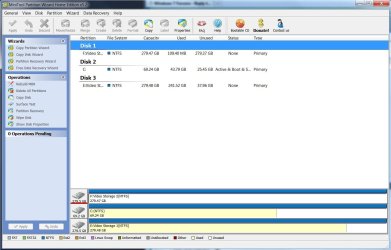
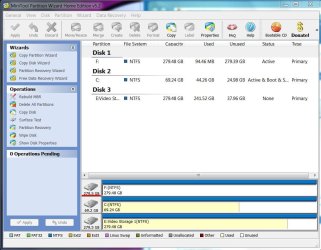
I've attached 3 screen grabs. The first 2 are before & then an after. All seems fine. Note the difference in Used; before @ 109.4Mb & after @ 94.46Mb.

Is there anything else that needs to be done? Can the 94.46Mb data be read to see if it's Linux-free?
 

Attachments

  • Capture 1.JPG
    Capture 1.JPG
    117.9 KB · Views: 13
  • Capture 2.JPG
    Capture 2.JPG
    51.6 KB · Views: 4
  • Capture 3.JPG
    Capture 3.JPG
    101 KB · Views: 10

My Computer My Computer

At a glance

Windows 7 64-bitIntel Core i5-2500K 3300 Mhz16Gb Patriot PC3-12800 1600 MhzEVGA GeForce GTX 560 Ti (Fermi)
Computer type
PC/Desktop
Computer Manufacturer/Model Number
Custom built 2011
OS
Windows 7 64-bit
CPU
Intel Core i5-2500K 3300 Mhz
Motherboard
Gigabyte P67A-UD3-B3
Memory
16Gb Patriot PC3-12800 1600 Mhz
Graphics Card(s)
EVGA GeForce GTX 560 Ti (Fermi)
Sound Card
On Motherboard
Monitor(s) Displays
Dell U2412M & NEC EA232WMi
Screen Resolution
DELL 1920x1200 - NEC 1920x1080
Hard Drives
Crucial 128 Gb SSD
Hitachi Deskstar 2Tb 7200 RPM 32MB Cache
Seagate Barracuda 500Gb 7200 RPM
Hitachi GST Deskstar 1.5TB 7200 RPM 64MB Cache
PSU
Seasonic M1211-620 Bronze
Case
Antec Solo
Cooling
Tuniq Tower 120 Extreme Rev 1
Keyboard
Apple
Mouse
Microsoft
Internet Speed
5mbs
Other Info
Sunbeam PL-RS-3 Rheosmart 3 Fan Controller 3.5" Bay 3 Channel 30W Fan Controller Panel
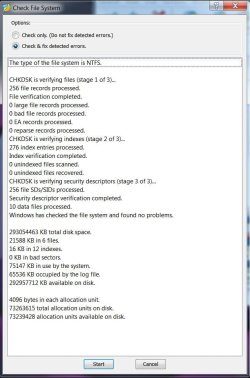
There was an unneeded command given for Diskpart to mark F Active. Rightclick on F in Partition Wizard to Modify>Set to Inactive, OK, Apply. You dont' want a partition marked Active unless there is an OS on it.

I'm not sure why the space used is different unless something wasn't copied back to the HD. Try rightclicking the HD with PW to Check File System and run Surface Scan with repair box ticked.

We see many cases here of GRUB corrupting Win7 even after it's been deleted. Deleting or formatting doesn't erase anything until it is overwritten with zeroes using the Clean All command or Partition Wizard to wipe the HD from the Disk tab or the partition using rightclick>wipe.
 
There was an unneeded command given for Diskpart to mark F Active. Rightclick on F in Partition Wizard to Modify>Set to Inactive, OK, Apply. You dont' want a partition marked Active unless there is an OS on it.

I'm not sure why the space used is different unless something wasn't copied back to the HD. Try rightclicking the HD with PW to Check File System and run Surface Scan with repair box ticked.

We see many cases here of GRUB corrupting Win7 even after it's been deleted. Deleting or formatting doesn't erase anything until it is overwritten with zeroes using the Clean All command or Partition Wizard to wipe the HD from the Disk tab or the partition using rightclick>wipe.

Thanks,
I'll check these later today & post.
 

My Computer My Computer

At a glance

Windows 7 64-bitIntel Core i5-2500K 3300 Mhz16Gb Patriot PC3-12800 1600 MhzEVGA GeForce GTX 560 Ti (Fermi)
Computer type
PC/Desktop
Computer Manufacturer/Model Number
Custom built 2011
OS
Windows 7 64-bit
CPU
Intel Core i5-2500K 3300 Mhz
Motherboard
Gigabyte P67A-UD3-B3
Memory
16Gb Patriot PC3-12800 1600 Mhz
Graphics Card(s)
EVGA GeForce GTX 560 Ti (Fermi)
Sound Card
On Motherboard
Monitor(s) Displays
Dell U2412M & NEC EA232WMi
Screen Resolution
DELL 1920x1200 - NEC 1920x1080
Hard Drives
Crucial 128 Gb SSD
Hitachi Deskstar 2Tb 7200 RPM 32MB Cache
Seagate Barracuda 500Gb 7200 RPM
Hitachi GST Deskstar 1.5TB 7200 RPM 64MB Cache
PSU
Seasonic M1211-620 Bronze
Case
Antec Solo
Cooling
Tuniq Tower 120 Extreme Rev 1
Keyboard
Apple
Mouse
Microsoft
Internet Speed
5mbs
Other Info
Sunbeam PL-RS-3 Rheosmart 3 Fan Controller 3.5" Bay 3 Channel 30W Fan Controller Panel
We see many cases here of GRUB corrupting Win7 even after it's been deleted.
I wonder what it takes to reproduce such a corruption

Could it be that corruption occurs when both OS are installed on the same HDD & not when they are installed on separate HDDs? Or perhaps wanting to install Win 7 on a HDD that only has had Linux installed & no other OS before it?

I've used various versions of Ubuntu over the last 2 years on a separate HDD & never had issues with XP & now Win 7. The need to clear Linux off this HDD was because of no longer using Linux at all, not for clashes with Win 7.

It's all very interesting.
 

My Computer My Computer

At a glance

Windows 7 64-bitIntel Core i5-2500K 3300 Mhz16Gb Patriot PC3-12800 1600 MhzEVGA GeForce GTX 560 Ti (Fermi)
Computer type
PC/Desktop
Computer Manufacturer/Model Number
Custom built 2011
OS
Windows 7 64-bit
CPU
Intel Core i5-2500K 3300 Mhz
Motherboard
Gigabyte P67A-UD3-B3
Memory
16Gb Patriot PC3-12800 1600 Mhz
Graphics Card(s)
EVGA GeForce GTX 560 Ti (Fermi)
Sound Card
On Motherboard
Monitor(s) Displays
Dell U2412M & NEC EA232WMi
Screen Resolution
DELL 1920x1200 - NEC 1920x1080
Hard Drives
Crucial 128 Gb SSD
Hitachi Deskstar 2Tb 7200 RPM 32MB Cache
Seagate Barracuda 500Gb 7200 RPM
Hitachi GST Deskstar 1.5TB 7200 RPM 64MB Cache
PSU
Seasonic M1211-620 Bronze
Case
Antec Solo
Cooling
Tuniq Tower 120 Extreme Rev 1
Keyboard
Apple
Mouse
Microsoft
Internet Speed
5mbs
Other Info
Sunbeam PL-RS-3 Rheosmart 3 Fan Controller 3.5" Bay 3 Channel 30W Fan Controller Panel
No, those are not issues at all. Because a sector on a harddrive is different than zero doesn't mean it will just begin to corrupt other sectors on the drive.
 

My Computer My Computer

At a glance

Windows
OS
Windows
You are correct in your assumption that installing Linux on a separate HD safeguards it from corrupting Win7 as it can when on the same HD.

Even better is to then boot either HD via the BIOS boot order or one-time BIOS Boot Menu so the HD's remain independent to come and go as you please.

This is the solution we propose in many cases of GRUB corruption making Win7 irreparable.

In fact, GRUB is most frequently on the HD when Win7 is absolutely irreparable, worse than compound tweaking which is the second-most-often cause of irreparability.

It becomes obvious when another OS causes these kind of problems in a forum where we repair more Win7 than any place else on the web.
 
But where is the problem? We have a harddrive with a Linux on it. We don't want Linux anymore, so we delete the partitions and create a new one that we want to use with Windows.

How will you explain that a corruption can occur, if the entire harddrive is not overwritten with zeroes first?

Of course something can happen, if you try to install Linux with an existing Windows-installation in place, if you don't know the hows and whys.
 

My Computer My Computer

At a glance

Windows
OS
Windows
Deleting or formatting erases nothing.

The only safe way to remove code from an infected or otherwise corrupted HD, or just to be safe, is to overwrite the data. The Quick Erase method is using zeroes.

The industry standards are:

  • Quick Erase: Fills hard drive with 0's
  • Gutmann: 27 random-order passes using specific data combined with eight passes using random data.Due to changes in the different data encoding schemes now used by modern hard drives, Gutmann no longer recommends 35 passes. A few random passes should suffice.
  • American DoD 5220-22.M: A seven-pass wipe using random characters, complements of characters, and random data streams.
  • Canadian RCMP TSSIT OPS-II: 8 drive-wiping passes with a random byte in the overwrite sequence changed each time.
  • PRNG Stream methods: Overwrites the drive with a stream from a Pseudo Random Number Generator (PRNG)
Quick Erase (with zeroes) and DOD Standard are automated on free Partition Wizard bootable CD's Disk tab, which also allows a rightclick-partiition-specific wipe.

Partition Wizard Use the Bootable CD
 
You don't understand what I say. But let us just put it to rest there.
 

My Computer My Computer

At a glance

Windows
OS
Windows
Late last evening is when I took the last set of screen grabs & I didn't try re-booting afterward.

When I got home I was greeted with an error that it couldn't find boot info & to Ctrl+Alt+Delete to retry. 2nd attempt failed as well. Then I remembered the Active issue on F: that gregrocker pointed out & also that F: was in Disk 0 position on the motherboard. I figured that in reversing the MB cables, the MB would boot to C: because it would be in 1st position. So, I unplugged the PC, removed the back cover & swapped connectors between C: & F:, then powered up. Everything booted fine & I have made the suggested changes & attached. All seems to of checked just fine. I think we're clean now. Please advise if further checks are needed.

I really appreciate everyone input. :thumbsup:
 

Attachments

  • Capture.JPG
    Capture.JPG
    76.9 KB · Views: 3
  • Capture 2.JPG
    Capture 2.JPG
    123 KB · Views: 7

My Computer My Computer

At a glance

Windows 7 64-bitIntel Core i5-2500K 3300 Mhz16Gb Patriot PC3-12800 1600 MhzEVGA GeForce GTX 560 Ti (Fermi)
Computer type
PC/Desktop
Computer Manufacturer/Model Number
Custom built 2011
OS
Windows 7 64-bit
CPU
Intel Core i5-2500K 3300 Mhz
Motherboard
Gigabyte P67A-UD3-B3
Memory
16Gb Patriot PC3-12800 1600 Mhz
Graphics Card(s)
EVGA GeForce GTX 560 Ti (Fermi)
Sound Card
On Motherboard
Monitor(s) Displays
Dell U2412M & NEC EA232WMi
Screen Resolution
DELL 1920x1200 - NEC 1920x1080
Hard Drives
Crucial 128 Gb SSD
Hitachi Deskstar 2Tb 7200 RPM 32MB Cache
Seagate Barracuda 500Gb 7200 RPM
Hitachi GST Deskstar 1.5TB 7200 RPM 64MB Cache
PSU
Seasonic M1211-620 Bronze
Case
Antec Solo
Cooling
Tuniq Tower 120 Extreme Rev 1
Keyboard
Apple
Mouse
Microsoft
Internet Speed
5mbs
Other Info
Sunbeam PL-RS-3 Rheosmart 3 Fan Controller 3.5" Bay 3 Channel 30W Fan Controller Panel
You are correct in your assumption that installing Linux on a separate HD safeguards it from corrupting Win7 as it can when on the same HD.

Even better is to then boot either HD via the BIOS boot order or one-time BIOS Boot Menu so the HD's remain independent to come and go as you please.

This is the solution we propose in many cases of GRUB corruption making Win7 irreparable.

In fact, GRUB is most frequently on the HD when Win7 is absolutely irreparable, worse than compound tweaking which is the second-most-often cause of irreparability.

It becomes obvious when another OS causes these kind of problems in a forum where we repair more Win7 than any place else on the web.

For the record, I feel using Clean All on my F: was a precautionary measure & Linux was not causing any known issues on my PC (Windows 7).

BTW, Are there any known issues using Mac OS X's BootCamp feature causing similar corruption?
 

My Computer My Computer

At a glance

Windows 7 64-bitIntel Core i5-2500K 3300 Mhz16Gb Patriot PC3-12800 1600 MhzEVGA GeForce GTX 560 Ti (Fermi)
Computer type
PC/Desktop
Computer Manufacturer/Model Number
Custom built 2011
OS
Windows 7 64-bit
CPU
Intel Core i5-2500K 3300 Mhz
Motherboard
Gigabyte P67A-UD3-B3
Memory
16Gb Patriot PC3-12800 1600 Mhz
Graphics Card(s)
EVGA GeForce GTX 560 Ti (Fermi)
Sound Card
On Motherboard
Monitor(s) Displays
Dell U2412M & NEC EA232WMi
Screen Resolution
DELL 1920x1200 - NEC 1920x1080
Hard Drives
Crucial 128 Gb SSD
Hitachi Deskstar 2Tb 7200 RPM 32MB Cache
Seagate Barracuda 500Gb 7200 RPM
Hitachi GST Deskstar 1.5TB 7200 RPM 64MB Cache
PSU
Seasonic M1211-620 Bronze
Case
Antec Solo
Cooling
Tuniq Tower 120 Extreme Rev 1
Keyboard
Apple
Mouse
Microsoft
Internet Speed
5mbs
Other Info
Sunbeam PL-RS-3 Rheosmart 3 Fan Controller 3.5" Bay 3 Channel 30W Fan Controller Panel
About the active partition flag. The MBR code will hand the boot process back over to the bios, if there is no active partition on the specific drive. So without the flag, it doesn't matter if that drive is prioritized in bios setup, bios will just try the next drive.

If the boot order in bios is correct then it doesn't matter that much, if there is an active partition on a data-only drive.
 

My Computer My Computer

At a glance

Windows
OS
Windows
If the boot order in bios is correct then it doesn't matter that much, if there is an active partition on a data-only drive.

Incorrect again.

It matters if a data drive is marked Active because if Win7 becomes irreparable and the user boots into DVD Repair console or Repair CD to run Startup Repair, it will write the System boot files to the first active partition thus derailing the System MBR from the Win7 or System Reserved boot partition.

Again this is something we deal with regularly here. Perhaps you should stick around and observe before offering advice.

BTW, Are there any known issues using Mac OS X's BootCamp feature causing similar corruption?

Not that I have ever seen.
 
Incorrect again.

It matters if a data drive is marked Active because if Win7 becomes irreparable and the user boots into DVD Repair console or Repair CD to run Startup Repair, it will write the System boot files to the first active partition thus derailing the System MBR from the Win7 or System Reserved boot partition.

Again this is something we deal with regularly here. Perhaps you should stick around and observe before offering advice.

I was not talking about what startup repair might and might not do. I told him how the active partition relates to the boot process. No matter what flags are set, you can always recover by doing it manually.
 

My Computer My Computer

At a glance

Windows
OS
Windows
Incorrect again.

It matters if a data drive is marked Active because if Win7 becomes irreparable and the user boots into DVD Repair console or Repair CD to run Startup Repair, it will write the System boot files to the first active partition thus derailing the System MBR from the Win7 or System Reserved boot partition.

Again this is something we deal with regularly here. Perhaps you should stick around and observe before offering advice.

I was not talking about what startup repair might and might not do. I told him how the active partition relates to the boot process. No matter what flags are set, you can always recover by doing it manually.

Hi pallesenw

Take Microsoft's advice on removing Linux.

How to Remove Linux and Install Windows on Your Computer
How to Remove Linux and Install Windows XP
 

My Computer My Computer

At a glance

ME/XP/Vista/Win7
OS
ME/XP/Vista/Win7
Back
Top