Hmm, intersting. But he focusses on R/W speeds which are pretty irrelevant for the OS. Funny that he does not mention anything about access time - must be a SSD newbie.
My Computer
Computer Manufacturer/Model Number
HP, Dell, Gateway, Toshiba - 4 laptops and 2 desktops
I flashed the firmware on my Asus U3S6 pci-e card and now I can't boot from it. Tried every version of firmware I could find. The thing is tho, I'm now running it off my onboard port with the AMD SATA driver and it's performing incredibly well. Can't tell the difference outside of benchmarks. I still want to try and get the card fixed but in the mean time I've really lost nothing. Interesting.
SATA 3GB/s
SATA 6GB/s
Last edited:
My Computer
Computer Manufacturer/Model Number
tw33k
OS
Windows 7 Ultimate (x64) SP1
CPU
Intel 3770k 4.6GHz
Motherboard
ASUS Maximus V Formula
Memory
8GB (2x 4GB) Crucial Ballistix
Graphics Card(s)
Sapphire 7950 (1060/1600)
Sound Card
On Board Realtek HD Audio
Monitor(s) Displays
27" Acer B273HU (via HDMI)
Screen Resolution
2048 x 1152
Hard Drives
Crucial M4 128GB
2TB WD Black
1TB Samsung F3 SATA
1TB WD Elite External
2TB WD USB 3.0
No. The firmware is installed on the drive itself and can only be replace by another update. You will not lose the firmware doing a reinstall of the OS, or wiping the drive.
My Computer
Computer type
PC/Desktop
Computer Manufacturer/Model Number
Custom built by me.
OS
Windows 10 Pro
CPU
Intel Core i7-4770K (3.5Ghz)
Motherboard
Gigabyte G1 Sniper 5 (F10 Bios)
Memory
32 gig Corsair Dominator Platinum (4x8Gig)
Graphics Card(s)
Sapphire Tri-X R9 Fury
Sound Card
Soundblaster ZXR
Monitor(s) Displays
NEC PA242W 24" LCD Monitor
Screen Resolution
1920 x 1200
Hard Drives
Primary - Samsung 850 Pro (512gig), Samsung 840 Pro (256gig), 2TB WD Caviar Black.
PSU
EVGA Supernova 1000 G2
Case
Cooler Master HAF X
Cooling
Corsair H100i with Corsair Air Series SP120 Quiet Fans
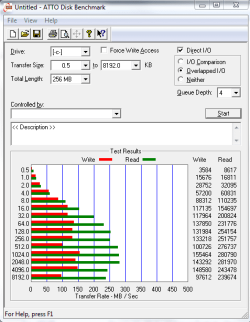
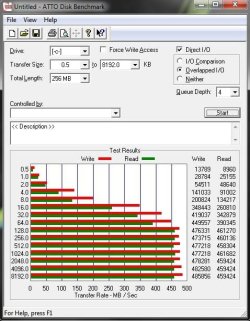
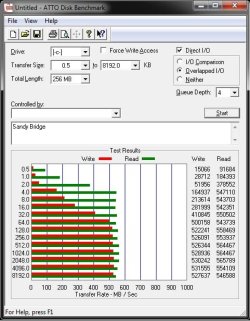
The one on the left (with no description) is an AMD Phenom II x4 955 on a Asus M4A87TD Evo board. The one on the right is a Intel i7 2600K on a Asus P8P67 Deluxe board
Attachments
AMD ATTO.jpg
55.6 KB
· Views: 79
Intel ATTO.jpg
54.8 KB
· Views: 69
My Computer
Computer type
PC/Desktop
Computer Manufacturer/Model Number
Misfits Machine!
OS
Windows 7 Professional
CPU
Intel i7 4790K
Motherboard
ASUS Maximus VII Hero
Memory
32 GB G.SKILL TridentX F3-2400C10D-GTX
Graphics Card(s)
EVGA GeForce GTX 980 Superclocked X2 SLI
Sound Card
Teac UD-501 External USB DAC/Bryston BHA-1 Headphone Amp
Monitor(s) Displays
BenQ BL3200PT
Screen Resolution
2560x1440
Hard Drives
Samsung 850 Pro Series 256GB SSD
Western Digital Red 3TB
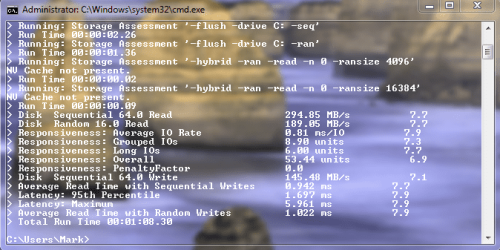
The AMD was an AMD SB850 controller using the AMD 3.0.765 chipset drivers on 2 SATAIII ports.
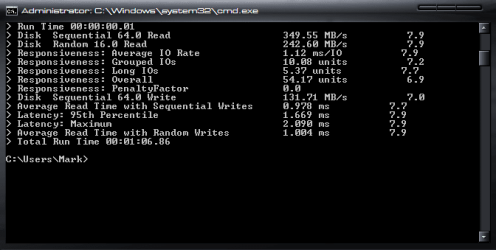
The Intel is the Intel P67 controller on 2 SATAIII ports. I downloaded driver version 9.2.0.1015 from the Asus site but the Intel Rapid Storage utility is claiming the driver is at 10.0.0.1046 so it must of updated itself along the way.
Apart from the obvious motherboard and CPU’s, both systems were identical. Stripe size on both is 128kb. The AMD was a bit of a task to get Windows to boot after the install. MBR got messed up but I think it was because I had my regular hard drive plugged in during the installation. The Intel was a breeze once I was able to get into the RAID bios…it was posting too quickly for me to enter the key strokes! And with the Intel I kept my regular hard drive unplugged until after everything was up and working.
My Computer
Computer type
PC/Desktop
Computer Manufacturer/Model Number
Misfits Machine!
OS
Windows 7 Professional
CPU
Intel i7 4790K
Motherboard
ASUS Maximus VII Hero
Memory
32 GB G.SKILL TridentX F3-2400C10D-GTX
Graphics Card(s)
EVGA GeForce GTX 980 Superclocked X2 SLI
Sound Card
Teac UD-501 External USB DAC/Bryston BHA-1 Headphone Amp
Monitor(s) Displays
BenQ BL3200PT
Screen Resolution
2560x1440
Hard Drives
Samsung 850 Pro Series 256GB SSD
Western Digital Red 3TB
Thanks! I had no intentions of setting up RAID but I got such a good deal on one drive I went back for a second. Two 120Gb drives came out cheaper than a 160Gb drive of the same make!!! Managing 1 larger volume instead of 2 smaller just made more sense to me (it’s easier for the GF as well!!!). And the performance increase was mind blowing!!
RAID may not be for everyone, but if you have 2 of the same SSD’s I say give it a try. Mathematically it may be more of a risk, but as long as you perform frequent backups you should be fine.
Last edited:
My Computer
Computer type
PC/Desktop
Computer Manufacturer/Model Number
Misfits Machine!
OS
Windows 7 Professional
CPU
Intel i7 4790K
Motherboard
ASUS Maximus VII Hero
Memory
32 GB G.SKILL TridentX F3-2400C10D-GTX
Graphics Card(s)
EVGA GeForce GTX 980 Superclocked X2 SLI
Sound Card
Teac UD-501 External USB DAC/Bryston BHA-1 Headphone Amp
Monitor(s) Displays
BenQ BL3200PT
Screen Resolution
2560x1440
Hard Drives
Samsung 850 Pro Series 256GB SSD
Western Digital Red 3TB
The one on the left (with no description) is an AMD Phenom II x4 955 on a Asus M4A87TD Evo board. The one on the right is a Intel i7 2600K on a Asus P8P67 Deluxe board
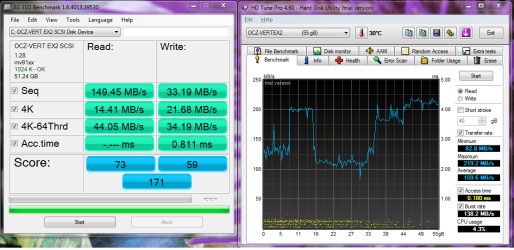
I don't think you are in AHCI mode. Read this tutorial to show you how to do it without reinstalling. I'm not sure what the MV91xx is. It is usually either msachi (microsofts ahci drivers) or Intel's version of AHCI (isastore I believe). Read the other tweeks on SSDs. You really don't have to do a lot, just a few of the important ones.
This info is in the top left corner. I don't understand why yours says SCSI. It should say ATA device or at least IDE. You do have it connected to a sata port don't you? I believe your board has sata2 and sata3 ports. Connect it to a sata3 port and follow the tutorial and make sure that port is in ahci mode.
I'm not familar wiyh the Marvel driver, but I still don't think it should say SCSI. I have used AMD drivers and Microsoft drivers and both cases AS SSD said ATA device. Even if he is not in AHCI it should say IDE I would think.